
NP-B6V2FIDE - Dishwasher PANASONIC - Free user manual and instructions
Find the device manual for free NP-B6V2FIDE PANASONIC in PDF.


| Product Type | Dishwasher for household use |
| Brand | Panasonic |
| Model | NP-B6V2FIDE |
| Place Settings | 13 |
| Height | 820 - 870 mm (adjustable feet) |
| Width | 598 mm |
| Depth | 550 mm |
| Net Weight | 37.6 kg |
| Power Supply | 220-240 V, 50 Hz, 10 A |
| Total Power | 1900 W |
| Heating Power | 1800 W |
| Pump Power | 100 W (wash) / 30 W (drain) |
| Water Supply Pressure | 0.03 - 1 MPa (0.3 - 10 bar) |
| Programs | Soak, Quick 30', ECO 50°C, Express 50', Hygiene 60°C, Intensive 65°C |
| Key Features | Active Drying Unit, adjustable upper basket height, folding racks (lower basket), spoon rack, half load, delayed start (1-19h), tablet detergent button, rinse aid indicator, buzzer volume control |
| Energy Saving | ECO program; EnergySave option opens door at end for drying; half load reduces consumption |
| Safety Features | Auto stop if door opened, child safety warnings, aquastop (on some models), must cut power before cleaning |
| Maintenance | Clean filters and spray arms monthly; descale with high-temperature program or cleaner; clean door seals with damp cloth |
| Spare Parts | Only original spare parts; repairs by authorized technician; water inlet hose must be new; mains lead replacement by authorized service |
| Disposal | Do not dispose with household waste; take to designated collection points for WEEE recycling |
Frequently Asked Questions - NP-B6V2FIDE PANASONIC
User questions about NP-B6V2FIDE PANASONIC
0 question about this device. Answer the ones you know or ask your own.
Ask a new question about this device
Download the instructions for your Dishwasher in PDF format for free! Find your manual NP-B6V2FIDE - PANASONIC and take your electronic device back in hand. On this page are published all the documents necessary for the use of your device. NP-B6V2FIDE by PANASONIC.
USER MANUAL NP-B6V2FIDE PANASONIC
Operating instructions & Installation instructions
DISHWASHER (For Household Use Only)
Model No.
NP-B6V2FTNZ
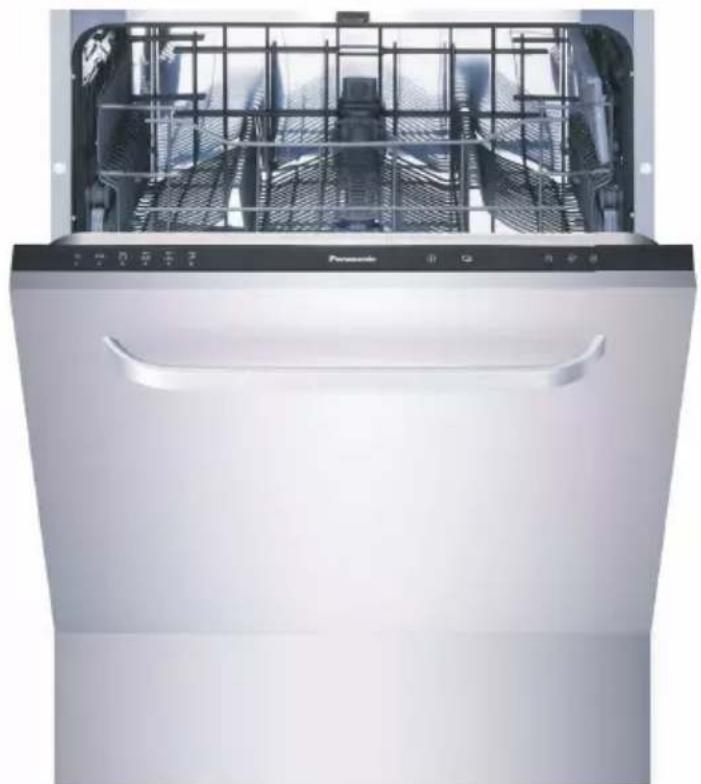
Thank you for purchasing this Panasonic product.
Please read these instructions carefully before operating this product and retain them for future reference.
For Domestic Use Only
Contents....2
Introducing the product 4
Specifications 5
Safety Information and Recommendations 6
- Safety information 6
- Recommendations 10
- Items not suitable for dishwashing 10
Installation Instructions 11
- Positioning the machine 11
- Water connections .... 12
- Water inlet hose 12
- Water outlet hose 13
- Electrical connection.... 14
- Prior to using the machine for the first time 14
Preparing the machine for use 15
- Detergent usage 15
- Filling the detergent compartment.... 15
- Combined detergent.... 16
- Rinse aid filling and adjustment 17
Loading your dishwasher 19
• Upper basket.... 20 • Alternative basket loads 23
Programme descriptions 25
- Programme items 25
Explanation of programmes 27
Getting familiar with your machine 28
Operating your machine 30
- Switching on the machine.... 30
- Programme follow-up .... 30
- Changing a programme 31
- Cancelling and resetting a programme .... 31
- Switching the machine off .... 31
- Programme & option comparison .... 32
Maintenance and Cleaning 34
- Filters 35
- Spray arms 36
- Hose filter 36
Troubleshooting 37
- Recycling 42
- Disposing of Waste Electrical & Electronic Equipment 43
Explanation of Product
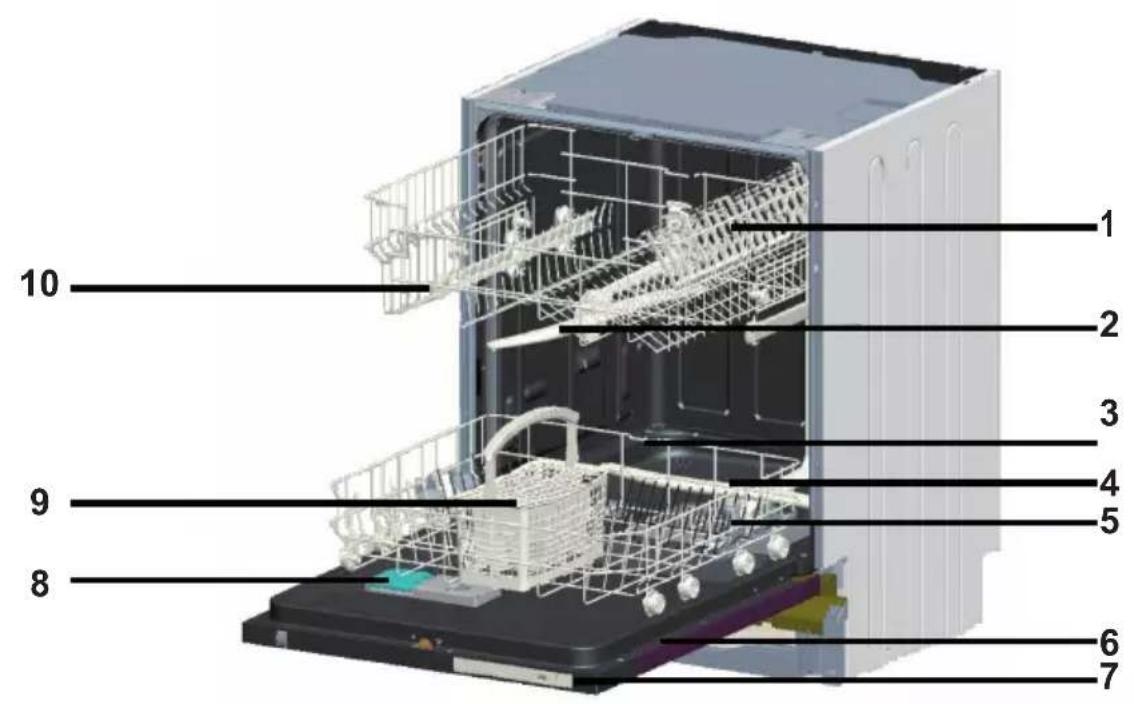
- Upper basket with racks
- Upper spray arm
- Lower basket
- Lower spray arm
- Filters
- Rating plate
- Control Panel
- Detergent and rinse-aid dispenser
- Cutlery basket
- Upper basket track latch
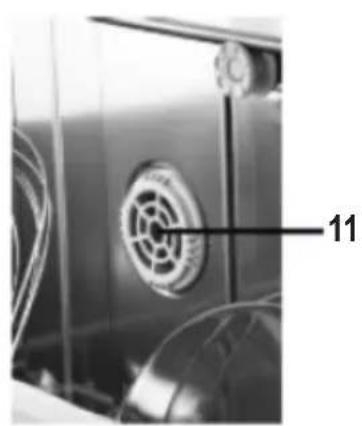
- Active Drying Unit: This system provides a better drying performance for the dishes.
| Capacity 13 place settings | |
| Height 820 mm - 870 mm | |
| Width 598 mm | |
| Depth 550 mm | |
| Net Weight 37,6 kg | |
| Electricity input 220-240 V, 50 Hz | |
| Total Power 1900 W | |
| Heating Power 1800 W | |
| Pump Power 100 W | |
| Drain Pump Power 30 W | |
| Water supply pressure 0.03 MPa (0,3 bar)-1 MPa (10 bar) | |
| Current 10 A |
Safety Information and Recommendations
Safety information
On taking delivery of the machine
- Carefully check the packaging and machine for any damage. If the machine is in any way damaged, do not use it and contact the Dealer.
- Remove all packaging materials as indicated and dispose of them in accordance with local regulations.
Machine installation advice
- Choose a suitable, safe and level place to install your machine.
- Carry out the installation and connection of your machine by following the instructions.
- This machine should be installed and repaired by an authorised technician only.
- Only original spare parts should be used with the machine.
- Before installing, ensure that the machine is unplugged.
- Ensure the electrical connection is compatible with the values on the rating plate.
- Pay special attention to ensure that the machine does not stand on the mains lead.
- Never use an extension lead or a multiple socket to power this appliance. The plug should be comfortably accessible after the machine has been installed. • After installing the machine, run it unloaded the first time.
- Incorrect installation is not covered by Warranty.
Safety Information and Recommendations
In daily use
- This machine is for household use only; do not use it for any other purpose. Commercial usage of the dishwasher will void the warranty.
- Do not use the open door of the dishwasher to get up, sit on, or place a load on, as the unit may fall over.
- Only use detergents and rinse aids that are produced specifically for dishwashers. Panasonic New Zealand Limited will not be held responsible for any damage that might occur in your machine otherwise.
- Do not drink water from the machine's washing section.
- Due to danger of explosion, do not put into the machine's washing section any chemicals or solvents other than detergents and rinse aids.
- Check whether plastic items are heat-resistant before washing them in the machine.
- This appliance can be used by children aged from 8 years and above and persons with reduced physical, sensory or mental capabilities or lack of experience and knowledge if they have been given supervision or instruction concerning use of the appliance in a safe way and understand the hazards involved.
- Children should be supervised to ensure that they do not play with the appliance.
- Do not put any items into your machine which are not suitable for dishwashing. Also, do not fill any of the baskets above their capacity. Panasonic will not be responsible for any scratch or rust to form on the inner frame of your machine due to basket movements or otherwise.
Safety Information and Recommendations
- Due to the possibility of hot water flowing out of the machine, the door should not be opened under any circumstances while the machine is operating. If the door is opened, a safety device will activate to ensure that the machine stops.
- Do not leave your dishwasher's door open. Failure to do so may lead to accidents as this could present a trip hazard.
- If the mains lead is damaged, it must be replaced by the Manufacturer, its Authorised Service Agent or suitably qualified persons in order to avoid a hazard.
- This appliance is not intended for use by persons (including children) with reduced physical, sensory or mental capabilities, or lack of experience and knowledge, unless they have been given supervision or instruction concerning use of the appliance by a person responsible for their safety.
- If the EnergySave option is selected, the door will be opened at the end of the programme. To prevent damage to the auto door mechanism, do not force the door closed for at least 1 minute. To get effective drying, the door should be open for at least 30 minutes (in models with auto door opening system).

Warning: Do not stand in front of the door after the beep sounds on models with auto-open function.
Knives and other utensils with sharp points must be loaded in the basket with their points down or placed in a horizontal position.
For your children's safety
- After removing the machine’s packaging, make sure that the packaging material is out of reach of children.
- Do not allow children to play with or start the machine.
- Keep your children away from detergents and rinse aids.
- Keep children away from the machine while it is open because there may still be residues of cleaning substances inside the machine.
- Ensure that your old machine is disposed of in a safe manner to prevent persons being trapped inside. Cleaning and user maintenance shall not be made by children without supervision.
In case of malfunction
- Refer repair of any malfunction to a Panasonic Authorised Service Centre. Any repair by any unauthorised personnel will void the manufacturer's warranty.
- Prior to any repair work on the machine, ensure that the machine is switched off and unplugged. Do not pull the cable when unplugging the appliance. Make sure to turn off the water tap.
Safety Information and Recommendations
Recommendations
- For energy and water saving, remove coarse residues from dishes before placing them into the machine. Fully load the machine before starting the programme.
- Use the pre-wash programme only whenever necessary.
- Place such hollow items as bowls, glasses and pots into the machine in such a way that they will face down.
- We recommend that dishes are not loaded into your machine other than indicated, and that the capacity is not exceeded.
Items not suitable for dishwashing:
- Cigarette ashes, candle leftovers, polish, paint, chemical substances, iron-alloy materials;
- Forks, spoons and knives with wooden or bone, or ivory or nacre-coated handles; glued items, items soiled with abrasive, acidic or base chemicals.
- Plastic items that are not heat-resistant, copper or tin-coated containers.
- Aluminium and silver objects (they may discolour, become dull).
- Certain delicate glass types, porcelains with ornamental printed patterns as they fade even after the first wash; certain crystal items as they lose their transparency over time, adhered cutlery that is not heat-resistant, lead crystal glasses, cutting boards, items manufactured with synthetic fibre;
- Absorbent items as sponges or kitchen rags are not suitable for dishwashing.

Warning: We highly recommend buying dishwasher safe products in your future purchases.
There is another instruction sheet for installation. Please read that installation sheet when you install your machine too.
Positioning the machine
When determining a location for the machine, make sure to choose a place where it is easy to load and unload dishes.
Do not put your machine in any location where there is the probability for the room temperature to fall below 0° C.
Before positioning, take the machine out of its packaging by following the warnings located on the package.
Position the machine close to a water tap and a drain. The machine needs to be sited in a location with the consideration that its connections will not be altered once they are made.
Do not grip the machine by its door or panel in order to move it.
Make sure to leave a certain clearance from all sides of the machine so that you can comfortably move it back and forth during cleaning.
Make sure that the water inlet and outlet hoses do not get squeezed or kinked while positioning the machine. Also, make sure that the machine does not stand on the mains lead.
Adjust the machine's adjustable feet so that it can stand level and balanced. Proper positioning of the machine ensures problem-free opening and closing of its door.
If the door of the machine does not close properly, check if the machine is level and stable; if not, adjust the feet accordingly.
Water connections
Ensure that the indoor plumbing is suitable for installing a dishwasher. Also, we recommend that you fit a water filter at the point the mains water enters your property so as to avoid any damage to your machine because of any contamination (sand, clay, rust etc.) that might be occasionally carried in through the mains water supply or the indoor plumbing, and to reduce the occurrence of things such as yellowing and formation of deposits after washing. The installation shall be in accordance with the requirements of AS/NZS 3500.1.
Water inlet hose
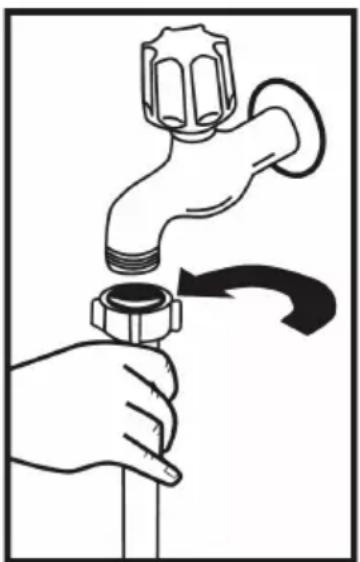
Use the new water inlet hose supplied with this machine. Do not use the water inlet hose, if any, from your old machine. If connecting a new water inlet hose, or one that has not been used for some time, run water through it for a while before making the connection. Connect the water inlet hose directly to the water inlet tap. The range of water pressure that the unit is designed to operate on is from a minimum
of 0.03 MPa to a maximum of 1 MPa. If the water pressure is above 1 MPa, a pressure-reducing valve should be fitted between the tap and the water inlet hose.
After the connections are made, the tap should be turned on fully and the connections checked for water tightness. For the safety of your machine, make sure to always turn off the water inlet tap after each wash programme is finished.
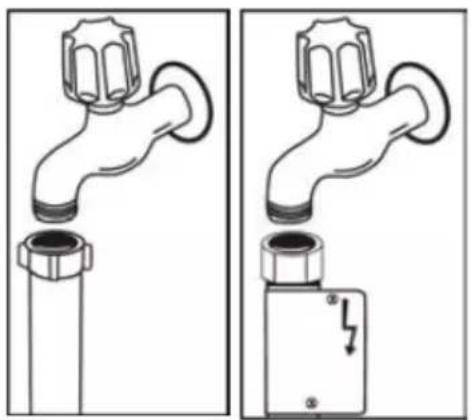
NOTE: Some models are fitted with an Aquastop valve. For safety reasons do NOT cut, twist, or fold a hose fitted with an Aquastop valve.
Water outlet hose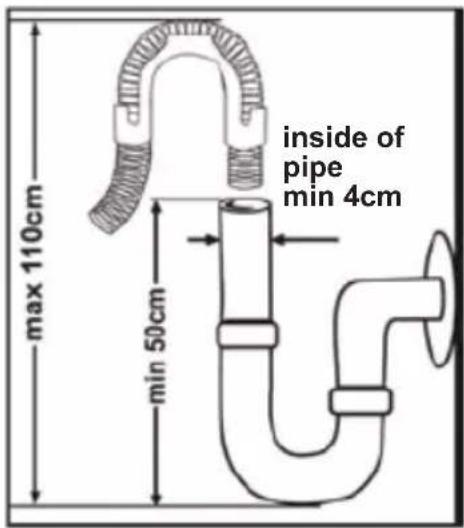
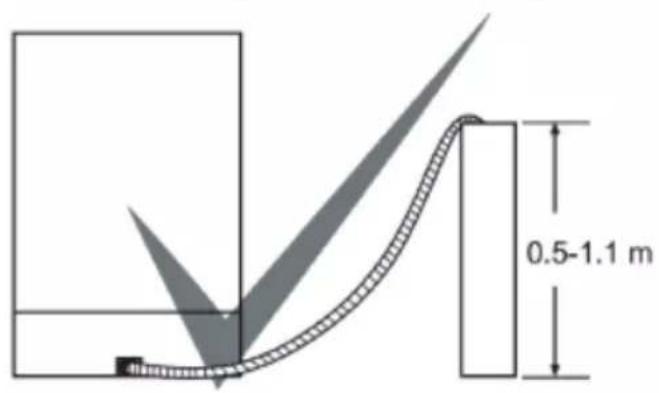
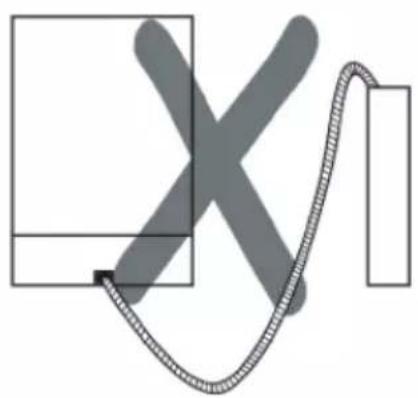
The water drain hose can be connected either directly to a waste water drain or to a sink drain spigot. Using a special bent pipe (if available), the water can be drained directly into the sink by hooking the bent pipe over the edge of the sink. This connection should be at a minimum of 50 cm and at a maximum of 110 cm above the base of the unit

Warning: If a drain hose longer than 4m is used, the dishes may remain dirty. In this case, Panasonic New Zealand Limited does not accept any responsibility.
Electrical connection
This machine should be connected to a suitable earthed mains socket. If there is no earthed mains socket available, have a competent electrician install an appropriate earthed mains socket for the appliance. Panasonic does not accept any responsibility for any loss or damage if the machine is used on a non-earthed system.
The power supply outlet should be rated at 10 A (minimum).
Your machine is set according to 220-240 V. The machine should not be plugged in during positioning.
Always use the coated plug supplied with your machine.
Running in low voltage will cause a decline in washing quality.
The machine's electrical cable should be replaced by a Panasonic Authorised Service Centre or an authorised electrician only. Failure to do so may lead to accidents.
In order not to cause an electric shock, do not unplug when your hands are wet.
When disconnecting your machine from the mains supply, always pull from the plug. Never pull the cord itself.
Prior to using the machine for the first time
- Check whether the electricity and supply water specifications match the values indicated by the installation instructions for the machine.
- Remove all packaging materials inside the machine.
- Set the water softener.
- Fill the rinse aid compartment.
Preparing the machine for use
Detergent usage
Use a detergent specifically designed for use in domestic dishwashers.
Powders, gels, and tablet detergents are available in the market that have been designed for use in household dishwashers.
Detergent should be put into the compartment prior to starting the machine. Keep detergents in cool, dry places out of reach of children.
Do not fill with more detergent than required; otherwise it may cause scratches on glass items as well as lead to poorly dissolved detergent.
For further information on the detergent that you use, contact the detergent manufacturer directly.
Filling the detergent compartment
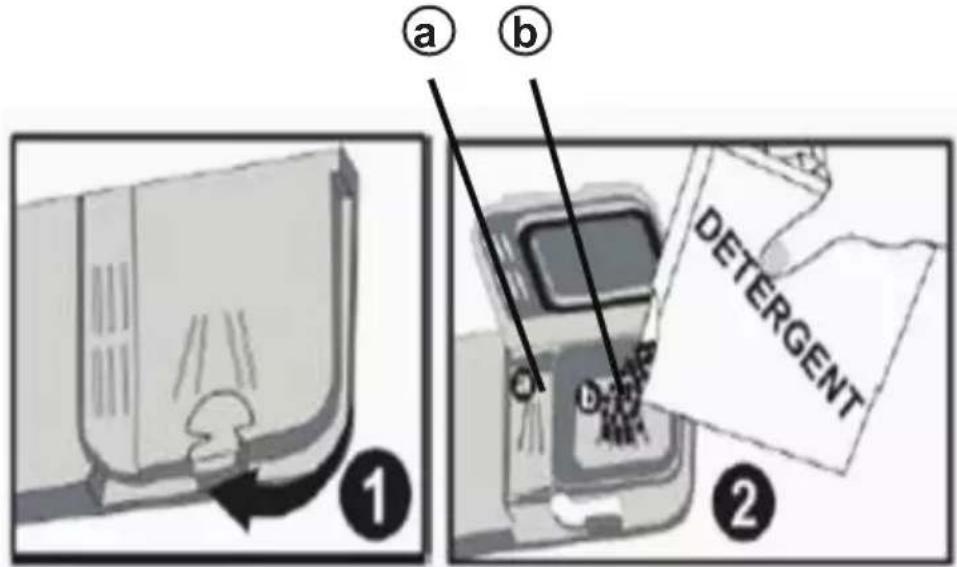
Push the latch to open the detergent container as shown in. 1 The detergent pod has level lines inside to measure the right detergent amount for the load. The detergent pod can take a total of 40 cm³ of detergent.
Pour powder and liquid detergent into the larger compartment (b) up to 25 cm³ if the dishes are heavily soiled or 15 cm³ if they are less soiled. (2) If the dishes have been kept dirty for a very long time, or if there is dried food waste on them, and/or you have overloaded the dishwasher, pour (a) 5 cm³ detergent into the pre-wash compartment and start the machine. You may have to add more detergent to the machine, depending on the degree of soil and on the water hardness level in your
area.
Preparing the machine for use
Combined detergent
Detergent manufacturers also produce combined detergents called “2 in 1”, “3 in 1” or “5 in 1” etc.
When using “2 in 1” detergents which contain detergent + salt or rinse aid, make sure to check the specifications of the tablet.
Other tablet detergents contain detergent + rinse aid + salt + various extra functions.
Generally, combined detergents produce satisfactory results only under certain usage conditions.
Points to consider when using these types of products:
- Always make sure to check the specifications of the detergent product to be used, whether or not it is a combined product.
- Check if the detergent used is appropriate for the hardness of the mains water that the machine is connected to.
- Observe the instructions on packaging when using such products.
- Always put the tablets into the detergent compartment in the detergent dispenser. Never put them into the interior section or the cutlery basket of the dishwasher.
- As this type of detergent may produce good results only for certain types of usage, contact the manufacturer to find out about the suitable usage conditions.
- When the conditions of use of such products and the machine settings are appropriate, they ensure savings in rinse aid consumption.
- Contact the detergent manufacturer if you are not obtaining good wash results (if your dishes remain chalky and wet) after having used 2-in-1 or 3-in-1 detergents. The scope of the warranty for your machine does not cover any complaints caused by the use of these types of detergents.
The scope of warranty for your machine does not cover any complaints caused by the use of these types of detergents.
Preparing the machine for use
Recommended usage: When using a combined detergent, add rinse agent to the machine, adjust the rinse agent settings to its lowest position, and activate the tablet detergent button in order to obtain better results. It is not recommended to use combined detergents in fast programmes.

Warning: Should any problem, which you have not encountered before, arise with the use of this type of detergent, contact the detergent manufacturer directly.
When stopping using combined detergents
• Fill the rinse aid compartment. • Make the suitable rinse aid setting.
Rinse aid filling and adjustment
Rinse aid is used to prevent white water drops, lime stains, and white film strip-shaped stains from remaining on the dishes, as well as to increase drying performance. Contrary to popular belief, it is used not only for obtaining shinier dishes but also for obtaining sufficiently dry dishes. For this reason, care should be taken that there is an adequate amount of rinse aid in the rinse aid compartment, and only rinse aid produced for use with dishwashers should be used.
Preparing the machine for use
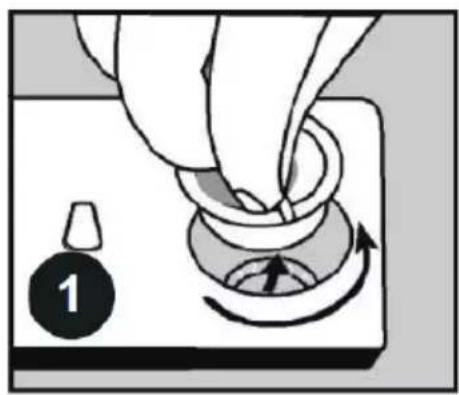
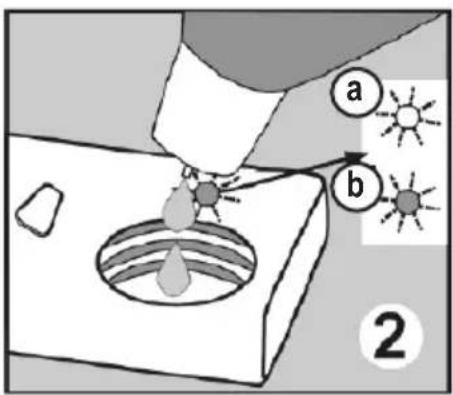
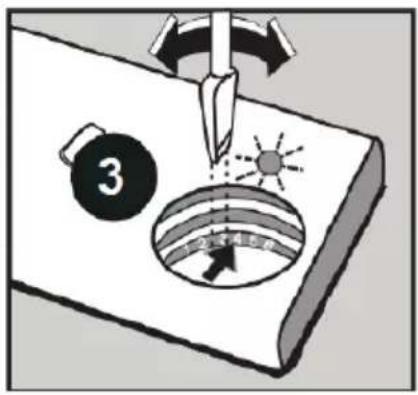
If the rinse aid lamp on the control panel lights, fill the rinse aid compartment with rinse aid. To add rinse aid, remove the rinse aid compartment cap by turning it ①. Fill the rinse aid compartment with rinse aid until the rinse aid level indicator becomes dark ②; refit the cap and close it by turning so that the arrows line up. By checking the rinse aid level indicator on the detergent dispenser, you can determine whether or not the machine needs rinse aid. A dark indicator b means that there is rinse aid in the compartment, while a light indicator a indicates that the rinse aid compartment requires filling with rinse aid. The rinse aid level adjuster can be set to a position between 1 and 6. Factory setting for rinse aid is position 3. If water stains form on your dishes after a wash, increase the value of the setting, whereas if a blue stain is left when wiped by hand, decrease the setting ③.

Warning: Use only those rinse aid materials which are allowed for use in the machine. As any rinse aid residues left as a result of overflow when filling the compartment will create extremely high amounts of foam and reduce the washing performance, wipe up any excess rinse aid with a cloth.
Proper loading and placement of dishes in the machine will help to improve energy consumption, washing and drying performance. There are two separate baskets to load dishes into the machine. The lower basket can be loaded with such round and deep items as pots with long handles, pot lids, plates, salad plates, and cutlery sets.
The upper basket has been designed for tea plates, dessert plates, salad bowls, cups and glasses. When placing long-stem glasses and goblets, lean them against the basket edge, rack or glass supporter wire and not against other items. Do not lean long glasses against one another as they cannot remain steady and may be damaged.
Locate the thin narrow items in the middle sections of baskets. You can place spoons among the other cutlery sets in order to prevent them from sticking to one another. We recommend use of the cutlery grid in order to obtain the best result. To avoid any possible injuries, always place long-handled or sharp-pointed items such as serving forks, bread knife etc. with their sharp points facing down or horizontally on the baskets.

Warning: Place dishes into your machine in such a way that they will not prevent the upper and lower spray arms from spinning.
Loading your dishwasher
Upper basket Height adjustable racks
These racks are designed to increase the capacity of the upper basket. You can place your glasses and cups on the racks. You can adjust the height of these racks.
Thanks to this feature, you can place different sizes of glasses under these racks.
Thanks to height adjustment plastics mounted on the basket, you can use your racks in 3 different heights. In addition, you can place long forks, knives and spoons on these racks laterally, so that they do not block the revolution of spray arms.
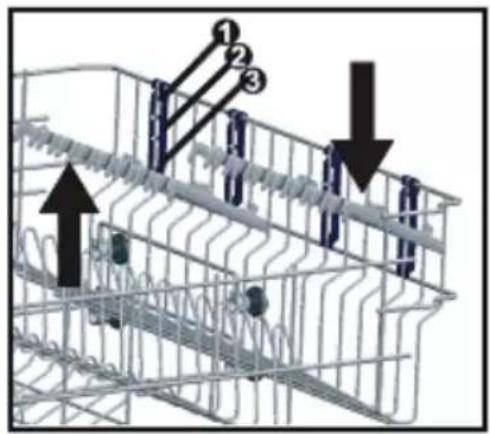
Top basket height adjustment
The top basket of your machine is in the upper position. When it is in this position, you can place big items such as pans, etc. on lower basket. When you take the top basket to the lower position, you can place and wash big sized plates on the top basket.
Use the wheels on the basket in order to change the basket height. Open the basket retaining parts at the end of top basket rails by turning them to the sides, and take the basket out. Change the position of the wheels; reinstall the basket to the rail, and close basket retainer parts. In this way, you take the top basket to the lower position.
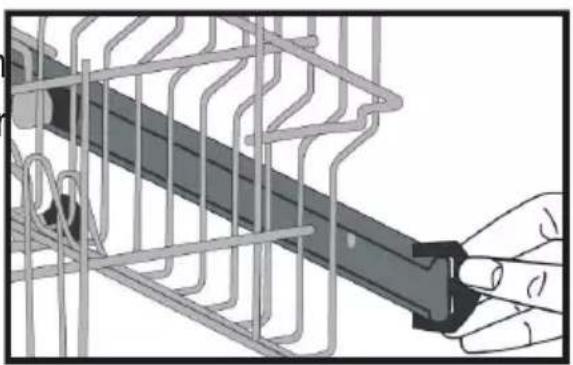
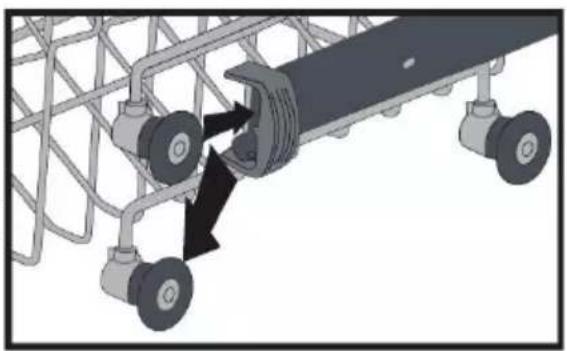
Loading your dishwasher
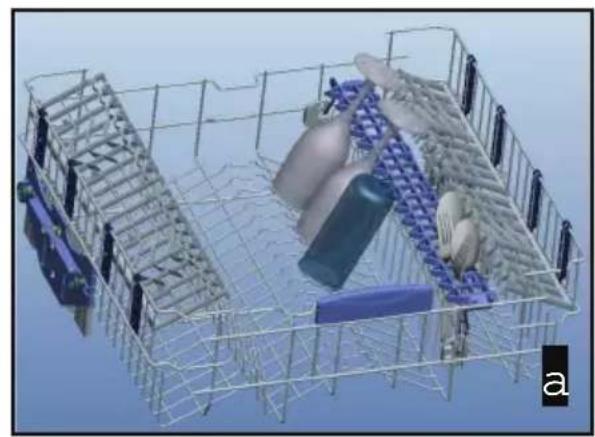
Spoon rack
This allows your long-stemmed goblets to be washed safely as well as allowing your spoons and forks to be easily loaded into the spoon rack. Do not lean your long-stemmed goblets and glasses against each other.
Using the spoon rack ensures your glasses and goblets stay in place during washing as well as preventing inadvertent contact.
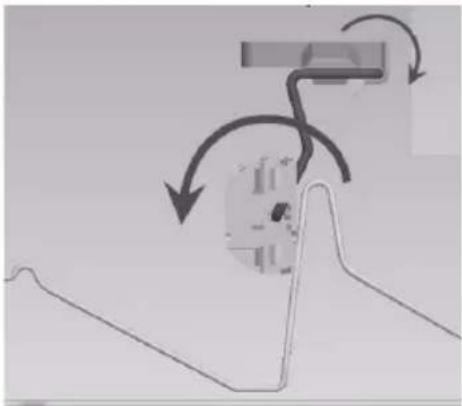
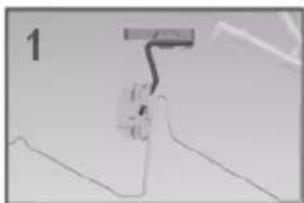
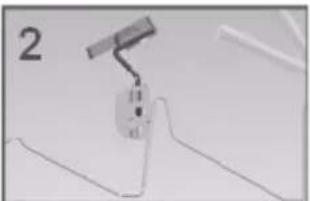
There are 4 different positions for your spoon rack. According to the size of your goblets and glasses, you can set your spoon rack to positions 1 or 2. Use it for your spoons and forks in position 1.
If you do not want to use spoon rack, you can place it in positions 3 or 4, allowing you to form larger volume areas in the upper basket.
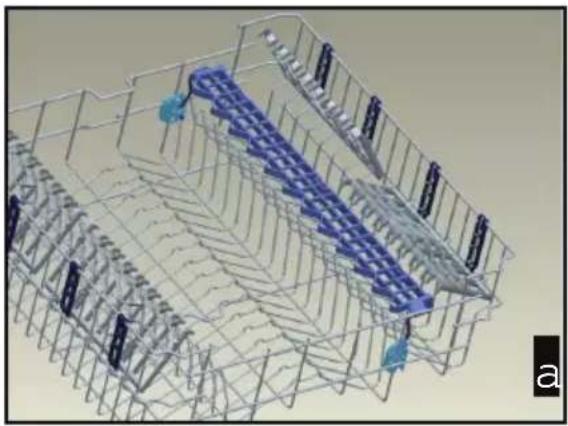
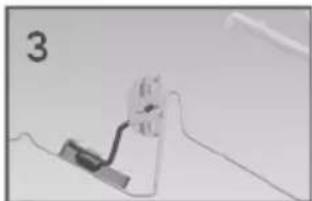
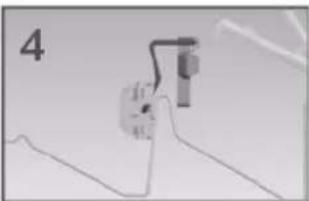
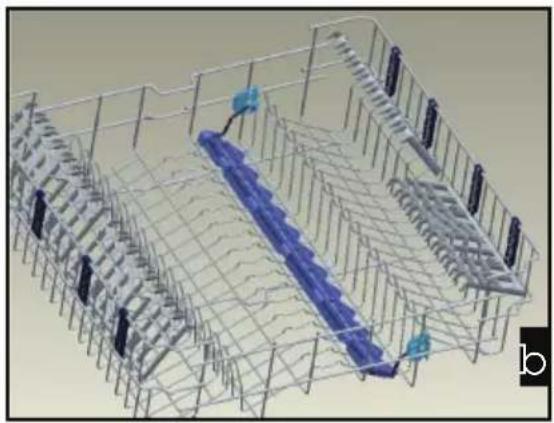
Loading your dishwasher
Lower basket Folding racks
In the lower basket of the machine, there are four folding racks that are designed to allow you to make it easier to place big items such as pots, pans, etc. If required, each part can be folded separately, or all of them can be folded and larger spaces can be obtained. To adjust them, raise them upwards, or fold down.
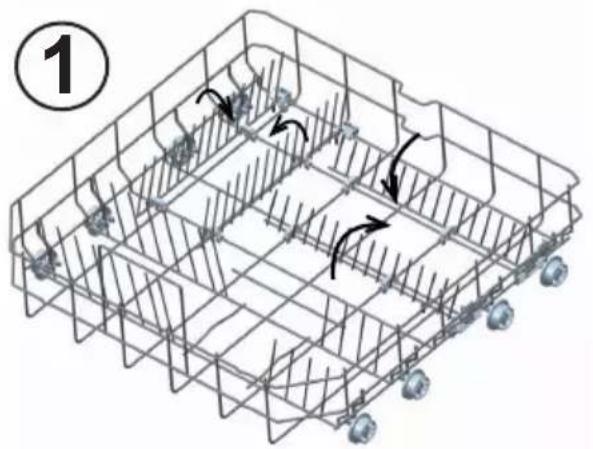
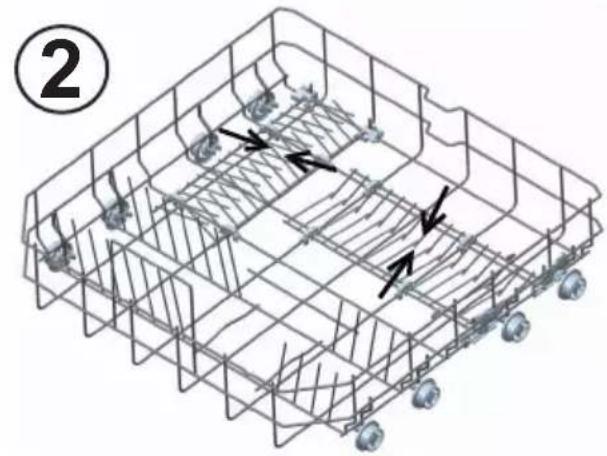
Alternative basket loads
Lower basket
- Pots and pans should be put on lower basket.
- Plates should be put on lower basket.
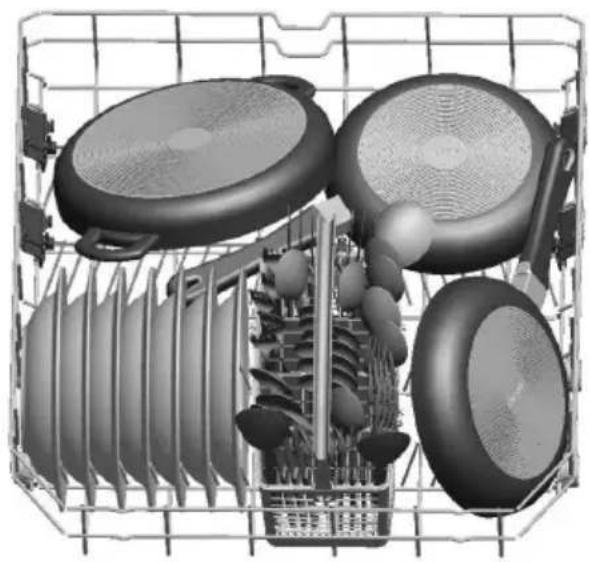
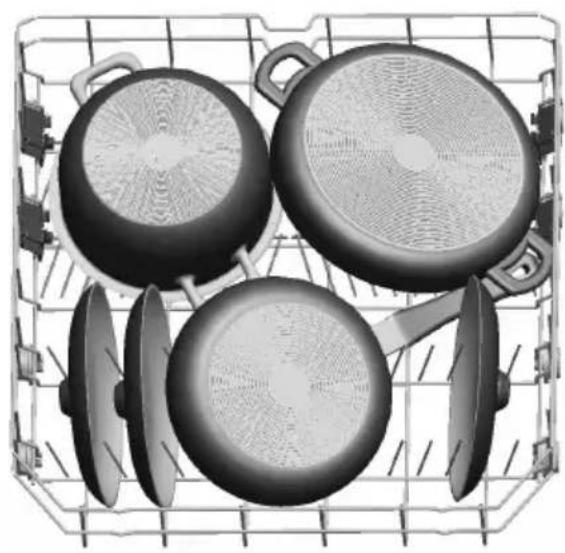
Upper basket
• Cups, glasses and bowls should be put on upper basket.
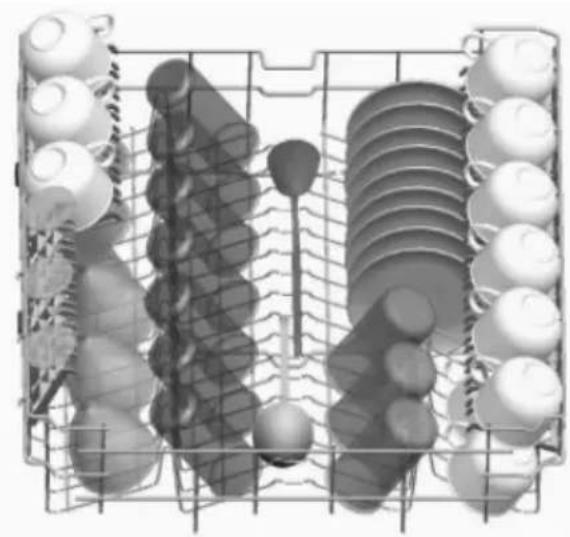
Loading your dishwasher
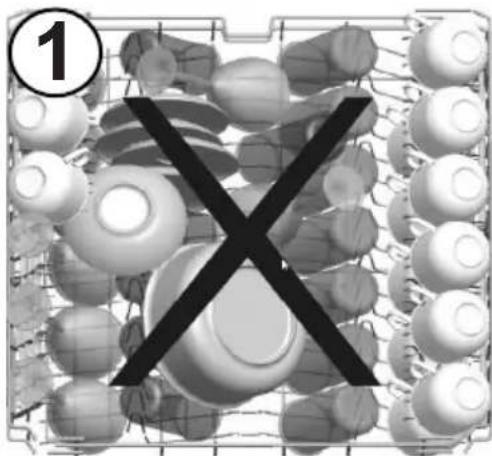
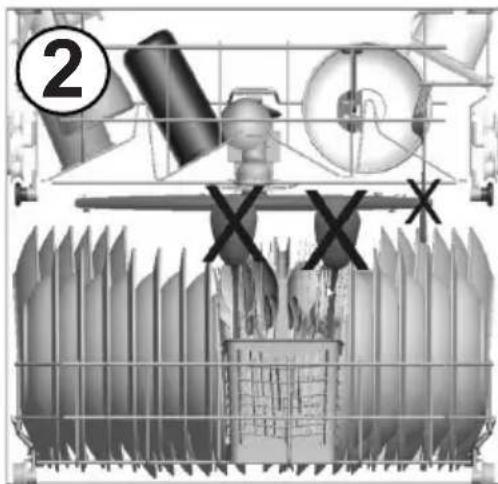
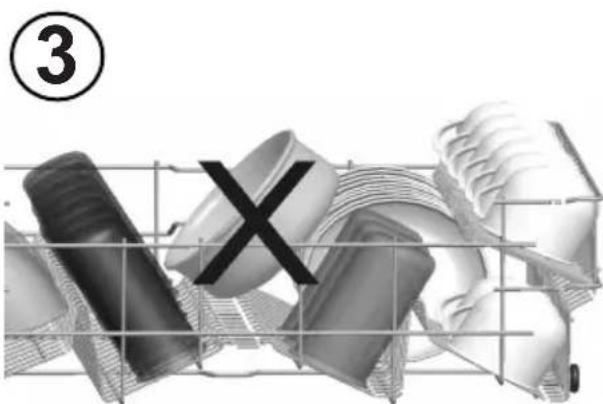
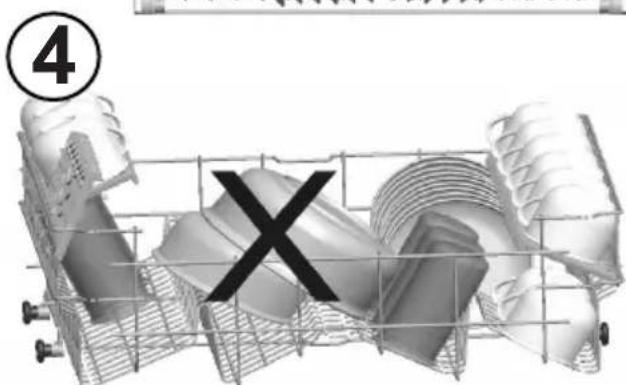
Poor loading
- Don't put the bowls over the glasses.
- They will not be washed properly.
- Don't put the long items like spoon on the cutlery basket. They may hit the spray arm.
- Don't put the bowls right side up.
- They will not be washed properly.
- Don't put the bowls over the other bowls. They will not be washed properly.
Programme items
| Programme No Soak | Quick 30  | 40°C [x8w8] | ECO (reference) |
| Programme names and temperatures | (P1) 40°C(P2) 50°C | (P3) | |
| Type of food waste Pre-wash to rinse and loosen residue awaiting full load then select a programme | Coffee, milk, tea, cold meats, vegetables, not kept for long | Coffee, milk, tea, cold meats, vegetables, not kept for long | |
| Level of soil | light medium | ||
| Detergent amount B: 25 cm3 / 15 cm3 A: 5 cm3 | A+B A+B | ||
| 35°C Wash 40°C | Wash Prewash | ||
| Hot rinse Cold Rinse 50°C Wash | |||
| End Hot rinse | Hot rinse | ||
| End | Dry | ||
| End | |||
| Programme duration (min.) | 18 | 30 | 143 |
| Electricity consumption (kW hours) | 0,57 | 0,88 | 0,80 |
| Water consumption (liters) | 7,7 | 12,4 | 12,8 |
Warning: In Soak, Quick 30' and Express 50' programmes, there is no drying step. Values above have been tested according to related standards in lab condition. These values may vary due to environment conditions (mains voltage, water pressure, water inlet temperature and ambient temperature).
Programme descriptions
Programme items
Programme No Express 50' Hygiene Intensive 65°C  | 60°C  | 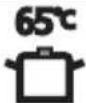 | ||
| Programme names and temperatures | 65°C (P4) 60°C (P5) | 65°C (P6) | ||
| Type of food waste Soups, sauces, pasta, eggs, pilaf, potato and oven dishes, fried foods | Dishes with dense dirt waiting for a long time or requiring hygienic washing | Soups, sauces, pasta, eggs, pilaf, potato and oven dishes, fried foods | ||
| Level of soil | medium | heavy | medium | |
| Detergent amount B: 25 cm3 / 15 cm3 A: 5 cm3 | A+B A+B A+B | |||
| 65°C Wash 60°C | Wash 45°C Wash | |||
| Warmish Rinse 65°C | C Wash 65°C Wash | |||
| Hot rinse Cold Rinse Cold rinse | ||||
| End 50°C Wash Hot rinse | ||||
| Hot rinse | Dry | |||
| Dry | End | |||
| End | ||||
| Programme duration (min.) | 50 | 154 | 117 | |
| Electricity consumption (kW hours) | 1,29 | 1,75 | 1,55 | |
| Water consumption (liters) | 12,7 | 18,5 | 17,2 | |
Explanation of programmes
Soak
With this pre-wash programme, you can rinse dishware that you plan to wash later. This programme is one of the fastest programmes in the world. It rinses your dishes with 4 place settings capacity in 18 minutes.
Quick 30'
Perfect for lightly soiled dishes and glasses, the Quick 30' programme washes a full load in 30 minutes at 40 °C, thus saving time and energy.
ECO 50°C
Ideal washing cycle for normally soiled dishes to save energy.
Express 50'
Express 50' 65°C programme, which is in accordance with EN 50242 performance standards, has "A" washing performance within a short period of time. Thanks to our Express 50' programme, at full capacity normally soiled dishes as well as dishes left for a considerable time dirty, are washed in only a very short period of time such as 50 minutes with a wash performance.
Hygiene 60°C
Special Hygiene programme which is developed for Panasonic Dishwashers ensures a maximum hygiene with high temperature washing. Panasonic Dishwasher's special hygiene programme that eliminates 99.9999% of all bacteria is tested and approved by International German Test Institute of VDE.
Intensive 65°C
Dishes with dense dried on soils or for Heavily soiled dishes requiring Hot pre-wash.
Getting familiar with your machine
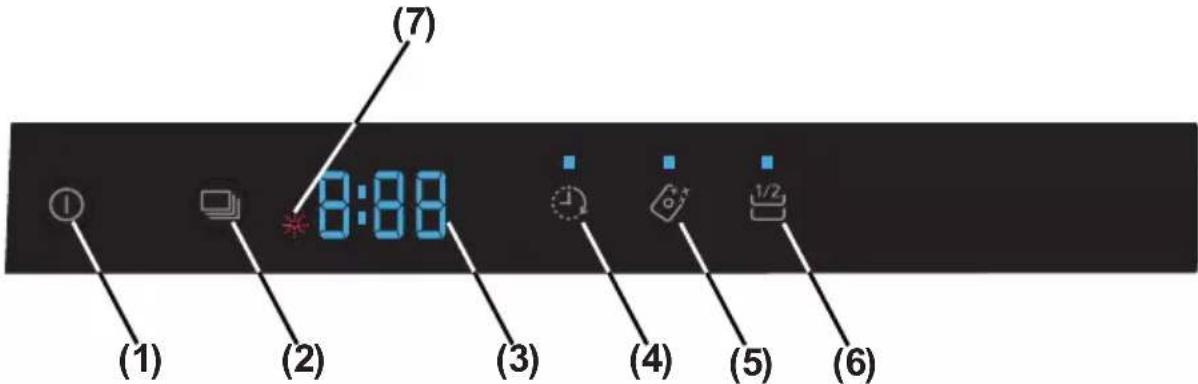
1.) Power On/Off Touch Button
After the Power On/Off touch is pressed, two dashes appear in the programme display, until touching any button. Touch the "On/Off touch button" with your fingertip for 1 second to turn the machine on or off.
2.) Programme Touch Button
Use the Programme touch button to select a suitable programme for your dishes.
3.) Programme Display
Programme display indicates the times of the programmes and the remaining time during the programme flow. You can also follow-up the selected programmes by this display.
4.) Delayed Start Touch Button
You can delay the start time of a selected programme from 1 to 19 hours by pressing the Delayed start touch button of the machine. When the Delayed start touch button is pressed, “1h” appears on the programme display. If you continue pressing the delay timer touch button, the time will increment from 1 to 19 shown on the display. The delayed start can be activated by selecting the delay time and the desired washing programme with the Programme touch button. It is also possible to select the programme first and the delayed start afterwards, depending on the last value entered.
To cancel Delayed start, either select the delay timer as "0h", or hold the program touch button for 3 seconds. The display will inform you how many seconds you need to hold the button by "3-2-1.." to cancel the delay.
Note: If the delay touch button is pressed and held, the delay timer starts changing faster (the rate of change is proportional to the hold pressing time). When the Delayed start touch button is pressed for a long period of time, the counter stops at "h:00".
5.) Tablet Detergent Touch Button (3 in 1 button)
Press the Tablet detergent touch button when you use combined detergents that include salt and rinse aid.
6.) Half Load Touch Button
By using the 'half load' feature of your dishwasher, you can reduce the duration of your selected programmes, and decrease your power and water consumption by using less electricity and water.
7.) Rinse Aid Warning Indicator
To determine if there is sufficient rinse aid in the machine, check the rinse aid warning light on the display. When the rinse aid warning light starts coming on, add rinse aid to the rinse aid compartment.
End of Programme
The machine makes a buzzer sound 5 times when the programme is completed.
When the door is opened after the selected washing program is completed, the buzzer activation will end and a '0' character is shown on the display.
Operating your machine
Switching on the machine
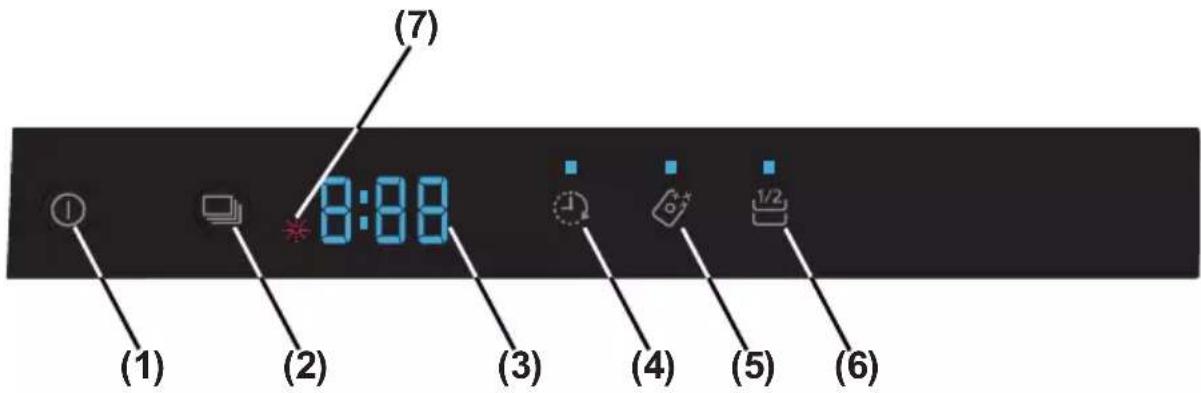
1- Touch the power On/Off key. When the machine is powered on, when the On/Off touch button (1) is pressed, two dashes appear in the programme display. 2- Select a programme suitable for the dishes via the Programme touch button (2). When selecting a programme with the programme touch button (2), the selected programme (P1, P2, etc.) appears on the programme display (3), from P1 to P6, and the duration of the programme is displayed alternately for 3 seconds for the programme and then 1 second for the duration time. 3- If desired, you can choose additional functions (4-5-6). 4- Close the door. The program starts automatically.
Note: If you decide not to start the machine after selecting the programme, press the on/off touch button (1). The machine will be ready for the new programme selection when you press the on/off touch button (1) again. Select the new programme by pressing the programme touch button (2).
Programme follow-up
- When the door is opened after the selected washing programme is completed, the buzzer activation will end and a '0' character is shown on the display (3).
- If the door is opened during the washing cycle, the remaining time of the selected program is shown on the display (3).
- The machine makes a buzzer sound 5 times when the program is completed.
Changing a program
To change the program while a wash program is in progress.
1- Open the door and select a new program by pressing the Program touch button (2). 2- After closing the door, the newly selected program continues from the point where the original program reached, but with the new parameters (temperature, cycles) of the new program.
Note: When opening the door of the machine to stop the washing program before it has completed, first carefully open the door slightly to avoid water spillage.
Cancelling and resetting a program
To cancel a program currently in progress or in standby mode.
1- Open the door of the machine. The last selected program will appear on the display (3). 2- Press and hold the program touch button (2) for 3 seconds. The display (3) will count from "3 to 1" and then show "0:01" to indicate that cancelling is ready. 3- After the door is closed, the discharge process starts. The machine will empty the water in it for about 30 seconds. When the program is cancelled, the machine will make a buzzer sound 5 times.
Note: When the door of the machine is opened to stop the washing program before it has completed, first carefully open the door slightly to avoid water spillage.
Switching the machine off
After the program is completed, you can switch your machine off by using the Power On/Off touch button (1).
Note: To improve drying performance, after the buzzer sound indicating the end of the wash program stops, leave the door of the machine ajar to hasten drying, or select an energy save option before starting a program to speed up drying performance.
Note: If the machine door is opened during washing or the power is cut off, the machine will restart the program when the door is closed or the power is restored.
Operating your machine
Programme & option compatibility
| Option Programmes | Delayed Start | Half Load | Tablet |
| Soak | X | X | X |
| Quick 30' | X | X | X |
| Eco | X | X | X |
| Express 50' | X | X | X |
| Hygiene | X | X | X |
| Intensive 65°C | X | X | X |
“-” Function cannot be selected; “x” function can be selected.
Compatibility between options
| Option | Delayed Start | Half Load | Tablet |
| Delayed Start | - | X | X |
| Half load | X | - | X |
| Tablet | X | X | - |
Buzzer sound setup
Setting up the buzzer.
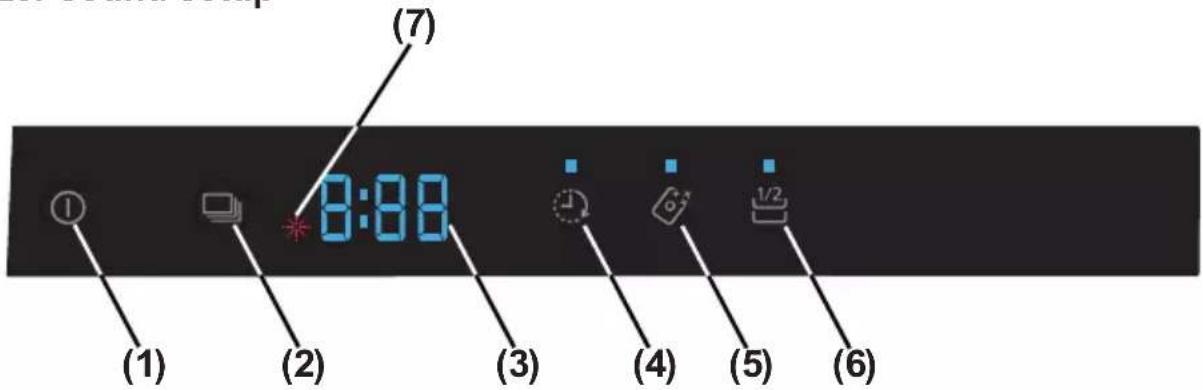
Press the "Power On/Off" touch button (1) (if it is in OFF position).
Press and hold "Tablet" (5) and "Half Load" (6) touch buttons for 3 seconds at the same time to set the volume level.
While pressing "Tablet" (5) and "Half Load" (6) touch buttons (during 3 seconds), the display shows a countdown from 3 seconds to 1 second.
- The first time the volume is adjusted, at the end of 3 seconds, “S03” is shown in the display.
- If the volume has been adjusted before, at the end of 5 seconds, the previously selected level is shown on the display (from "S00" to "S03").
The user can increase or decrease the volume level with repeated presses of either the "Tablet" (5) or "Half Load" (6) touch buttons, as follows:
- To increase the buzzer volume
1) Press the "Half Load" (6) touch button; 2) Display screen changes from "S00" to "S03".
- To decrease the buzzer volume
1) Press the "Tablet" (5) touch button; 2) Display screen changes from "S03" to "S00".
"S00" level means that all buzzer sounds are off.
To exit volume adjustment mode, switch off the machine.
The last volume level selected will be stored in memory.
Note: From level sound "3" to "1", loudness level is reduced in stages.
Maintenance and cleaning
Regular cleaning of the machine prolongs the machine's service life.
Oil and limescale may accumulate in the machine's washing section. In case of such accumulation;
- Fill the detergent compartment and, without loading any dishes into the machine, select a programme that runs at high temperature, and start the machine. In case this does not sufficiently clean the machine, use commercially available dishwasher cleaning products. (The cleaning products, made by the detergent manufacturers, should be suitable for use in dishwashers.)
Cleaning the seals in the machine door,
- To clean any accumulated residues in the door seals, wipe the seals regularly by using a dampened cloth.
Cleaning the machine,
- Clean the filters and spray arms at least once a month. Unplug or switch off your machine and turn off its tap before cleaning. Do not use abrasive materials when cleaning your machine. Wipe with a soft damp cloth.
Filters
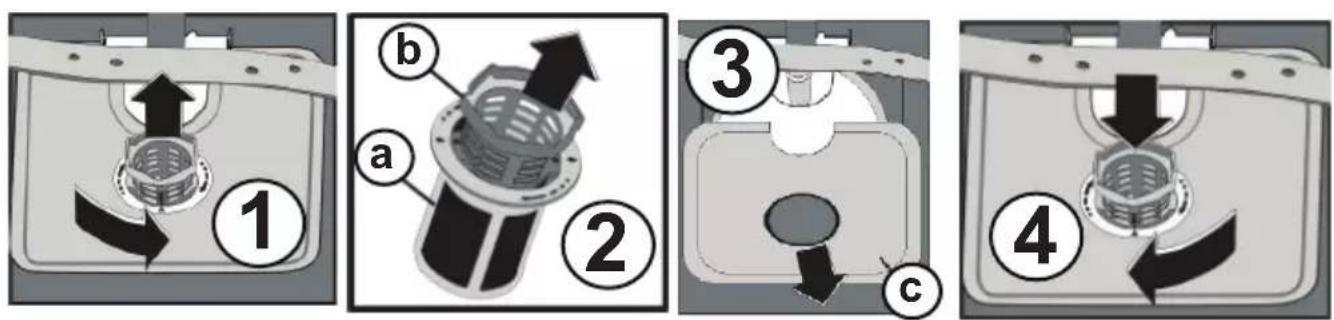
Check if any food wastes remain on the coarse and fine filters. If so, remove the filters and clean them thoroughly under a tap.
a. Micro Filter b. Coarse Filter c. Metal/Plastic Filter
To remove and clean the filter combination, turn it counterclockwise and take it out by lifting upwards.
Pull and remove the metal/plastic filter. Then pull the coarse filter out of the micro filter. Rinse thoroughly under a tap. Refit the metal/plastic filter. Insert the coarse filter into the micro filter so that the marks line up with each other. Insert the micro filter into the metal/plastic filter and turn in the direction of the arrow to lock it in place (until the arrow on the micro filter lines up).
- Never use your dishwasher without all filters.
- Incorrect fitting of the filter will reduce the washing effectiveness.
- Clean filters are very important in terms of the proper operation of the machine.
Maintenance and cleaning
Spray arms
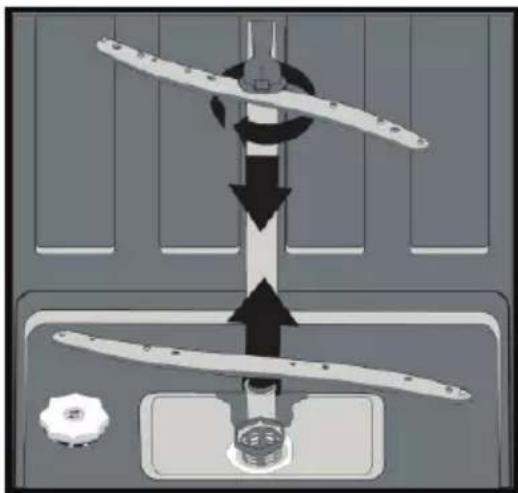
Check whether or not the holes for the upper and lower spray arms are clogged. If there is any clogging, remove the spray arms and clean them under water.
You can remove the lower spray arm by pulling it upwards, while the upper spray arm nut can be removed by turning the nut to the left.
Be sure that the nut is correctly tightened when refitting the upper spray arm.
Hose filter
The inlet hose filter helps to avoid any damage to your machine due to any contamination (sand, clay, rust etc.) that might be occasionally carried in through the mains water supply or the indoor plumbing, and to reduce such problems as yellowing and formation of deposits after washing. Check the filter and the hose from time to time and clean them if necessary. To clean the filter, first turn off the tap and then remove the hose. After removing the filter from the hose, clean it under the tap. Insert the cleaned filter back into its place inside the hose. Refit the hose.
Error codes & what to do
| ERROR CODE | ERROR DESCRIPTION CONTROL | |
| F1 | There is a water overflow | ·Power off your machine and close the tap.·Contact an Authorised Service Centre. |
| F2 | The waste water in the machine cannot be discharged. | ·Water discharge hose is clogged.·The filters of your machine might be clogged.·Power off-on your machine and activate the programme cancellation command.·If the error continues, contact an Authorised Service Centre. |
| F3 | Error of continuous water input | ·Close the tap.·Contact an Authorised Service Centre. |
| F5 | Inadequate water supply | ·Make sure the water input tap is totally open and that there is no water cut.·Close the water input tap, remove the water input hose from the tap and clean the filter at the connection end of the hose.·Restart the machine. If the problem persists, contact an Authorised Service Centre. |
| F6 Faulty | heater sensor · Contact an | Authorised Service Centre. |
| F7 | Overheating error (temperature in the machine is too high) | ·Contact an Authorised Service Centre. |
| F8 Heater | error · Contact an Authorised Service Centre. | |
| FE | Faulty electronic card | ·Contact an Authorised Service Centre. |
Troubleshooting
If the programme won't start
- Check if the plug is connected.
- Check your indoor fuses.
- Make sure that the water inlet tap is turned on.
- Make sure that you have closed the machine door.
- Make sure that you switched on the machine by pressing the Power On / Off button.
- Make sure that the water inlet filter and the machine filters are not clogged.
If detergent residues are left in the detergent compartment
Detergent has been added when the detergent compartment was wet.
If water is left inside the machine at the end of the programme
- The water drain hose is clogged or twisted.
- The filters are clogged. • The programme has not finished yet.
If the machine stops during a wash operation
- Power failure.
- Water inlet failure.
- Programme can be on standby mode.
If shaking and hitting noises are heard during a wash operation
- Dishes placed incorrectly.
- Spray arm hitting the dishes.
If there are partial food wastes left on the dishes
- Due to dishes placed incorrectly in the machine, the sprayed water did not reach the corresponding places.
- Basket overloaded.
- Dishes leaning against one another. • Very small amount of detergent added.
- An unsuitable, rather weak wash programme selected.
- Spray arm clogged with food wastes.
- Filters clogged.
- Filters incorrectly fitted. • Water drain pump clogged.
If there are whitish stains on the dishes
- A very small amount of detergent is being used.
- Rinse aid dosage setting at a very low level.
- A detergent without phosphate used; try one that contains phosphate.
If the dishes won't dry up
- A programme without a dry operation selected.
- Rinse aid dosage set too low.
- Dishes unloaded too fast.
Troubleshooting
If there are rust stains on the dishes
- Stainless-steel quality of the dishes washed is insufficient.
- Poor mains earthing.
Door is not opened / closed properly ;
- Too heavy a weight of wooden part mounted on the door. (Follow the weight guidance given in the Assembly manual)
- The door spring is not adjusted properly. Adjust it according to the Assembly manual.
Contact your Panasonic Service Centre if the problem still persists after the controls or in case of any malfunction not described above.
- Whenever you will not be operating your machine
- Unplug the machine and then turn the water off.
- Leave the door slightly ajar in order to prevent the formation of unpleasant smells.
- Keep the machine interior clean.
- Eliminating water droplets
- Wash the dishes with the intensive programme. • Take all of the metal containers in the machine out.
- Do not add detergent.
- If you properly place your dishes into the machine, you will be using it in the best way in terms of energy consumption, washing and drying performance.
- Clean all rough waste before you place dirty dishes in the machine.
- Operate the machine after it is completely full.
- Use pre-washing programme only when necessary.
- Observe programme information and average consumption values table when selecting a programme.
- Since the machine will reach high temperatures, we do not recommend installing it next to a refrigerator.
- If the appliance is located in a place where the risk of freezing exists, you must completely drain the water that has remained in the machine. Turn off the water tap, disconnect the water inlet hose from the tap and allow the interior water to drain.
Recycling
- Certain components and the packaging of your machine have been produced from recyclable materials.
- Plastic parts are marked with international abbreviations: (>PE<, >PS<, >POM<, >PP<, )
- Cardboard parts have been produced from recycled paper and they should be disposed of into waste paper collection containers for recycling.
- Such materials are not suitable for being disposed of into garbage bins. They should be delivered to recycling centres instead.
- Contact relevant centres in order to obtain information on methods and points of disposal.
Disposing of Waste Electrical & Electronic Equipment
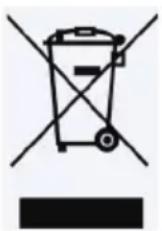
Information on disposal for users of waste electrical & electronic equipment (private households)
This symbol on the products and/or accompanying documents means that used electrical and electronic products should not be mixed with
general household waste.
For proper treatment, recovery and recycling, please take these products to designated collection points, where they will be accepted on a free of charge basis.
Alternatively, in some countries you may be able to return your products to your local retailer upon the purchase of an equivalent new product.
Disposing of this product correctly will help to save valuable resources and prevent any potential negative effects on human health and the environment which could otherwise arise from inappropriate waste handling. Please contact your local authority for further details of your nearest designated disposable point.
Penalties may be applicable for incorrect disposal of this waste, in accordance with national legislation.
If you wish to discard this product, please contact your local authorities or dealer and ask for the correct method of disposal.
Panasonic Corporation
Web Site: http://panasonic.com
© Panasonic Corporation 2016
5219XXXX R23


- OPERATING INSTRUCTIONS & INSTALLATION INSTRUCTIONS
- DISHWASHER (FOR HOUSEHOLD USE ONLY)
- NP-B6V2FTNZ
- PROGRAMME DESCRIPTIONS
- EXPLANATION OF PROGRAMMES
- GETTING FAMILIAR WITH YOUR MACHINE
- OPERATING YOUR MACHINE
- MAINTENANCE AND CLEANING
- TROUBLESHOOTING
- EXPLANATION OF PRODUCT
- SAFETY INFORMATION AND RECOMMENDATIONS
- SAFETY INFORMATION
- ON TAKING DELIVERY OF THE MACHINE
- MACHINE INSTALLATION ADVICE
- IN DAILY USE
- FOR YOUR CHILDREN'S SAFETY
- IN CASE OF MALFUNCTION
- RECOMMENDATIONS
- ITEMS NOT SUITABLE FOR DISHWASHING
- POSITIONING THE MACHINE
- WATER CONNECTIONS
- WATER INLET HOSE
- ELECTRICAL CONNECTION
- PRIOR TO USING THE MACHINE FOR THE FIRST TIME
- PREPARING THE MACHINE FOR USE
- DETERGENT USAGE
- FILLING THE DETERGENT COMPARTMENT
- COMBINED DETERGENT
- POINTS TO CONSIDER WHEN USING THESE TYPES OF PRODUCTS
- WHEN STOPPING USING COMBINED DETERGENTS
- RINSE AID FILLING AND ADJUSTMENT
- LOADING YOUR DISHWASHER
- UPPER BASKET HEIGHT ADJUSTABLE RACKS
- TOP BASKET HEIGHT ADJUSTMENT
- SPOON RACK
- LOWER BASKET FOLDING RACKS
- ALTERNATIVE BASKET LOADS
- LOWER BASKET
- UPPER BASKET
- POOR LOADING
- PROGRAMME ITEMS
- SOAK
- QUICK
- ECO 50°C
- EXPRESS
- HYGIENE 60°C
- INTENSIVE 65°C
- ) POWER ON/OFF TOUCH BUTTON
- ) PROGRAMME TOUCH BUTTON
- ) PROGRAMME DISPLAY
- ) DELAYED START TOUCH BUTTON
- ) TABLET DETERGENT TOUCH BUTTON (3 IN 1 BUTTON)
- ) HALF LOAD TOUCH BUTTON
- ) RINSE AID WARNING INDICATOR
- END OF PROGRAMME
- SWITCHING ON THE MACHINE
- PROGRAMME FOLLOW-UP
- CHANGING A PROGRAM
- CANCELLING AND RESETTING A PROGRAM
- SWITCHING THE MACHINE OFF
- BUZZER SOUND SETUP
- FILTERS
- SPRAY ARMS
- HOSE FILTER
- IF THE PROGRAMME WON'T START
- IF DETERGENT RESIDUES ARE LEFT IN THE DETERGENT COMPARTMENT
- IF WATER IS LEFT INSIDE THE MACHINE AT THE END OF THE PROGRAMME
- IF THE MACHINE STOPS DURING A WASH OPERATION
- IF SHAKING AND HITTING NOISES ARE HEARD DURING A WASH OPERATION
- IF THERE ARE PARTIAL FOOD WASTES LEFT ON THE DISHES
- IF THERE ARE WHITISH STAINS ON THE DISHES
- IF THE DISHES WON'T DRY UP
- IF THERE ARE RUST STAINS ON THE DISHES
- DOOR IS NOT OPENED / CLOSED PROPERLY
- RECYCLING
- DISPOSING OF WASTE ELECTRICAL & ELECTRONIC EQUIPMENT
- INFORMATION ON DISPOSAL FOR USERS OF WASTE ELECTRICAL & ELECTRONIC EQUIPMENT (PRIVATE HOUSEHOLDS)
Brand : PANASONIC
Model : NP-B6V2FIDE
Category : Dishwasher