
YES-001006 - Remote control HANNSPREE - Free user manual and instructions
Find the device manual for free YES-001006 HANNSPREE in PDF.


| Product Type | Remote Control |
| Brand | Hannspree |
| Model | YES-001006 |
| Dimensions (Approx.) | 20.0 x 5.0 x 2.0 cm |
| Weight (Approx.) | 100 g |
| Power Source | 2 x AAA batteries (not included) |
| Main Functions | Power, Volume +/-, Channel +/-, Input Source, Navigation (Up/Down/Left/Right), OK, Menu, Back, Mute, Number Keys (0-9), TV/AV |
| Compatible Devices | Hannspree TVs and select other brands (requires programming) |
| Range | Up to 8 meters (line of sight) |
| Material | ABS Plastic |
| Color | Black |
| Maintenance & Cleaning | Wipe with a soft, dry cloth. Do not use liquids or abrasive cleaners. |
| Safety Precautions | Keep away from water and heat sources. Replace batteries promptly when low. Dispose of batteries properly. |
| Spare Parts & Repairability | Batteries are user-replaceable. No other user-serviceable parts. Contact Hannspree support for repair or replacement. |
| General Information | Designed for easy control of Hannspree televisions. Features a slim, ergonomic design. |
Frequently Asked Questions - YES-001006 HANNSPREE
User questions about YES-001006 HANNSPREE
0 question about this device. Answer the ones you know or ask your own.
Ask a new question about this device
Download the instructions for your Remote control in PDF format for free! Find your manual YES-001006 - HANNSPREE and take your electronic device back in hand. On this page are published all the documents necessary for the use of your device. YES-001006 by HANNSPREE.
USER MANUAL YES-001006 HANNSPREE
2F, No.362, Rueiguang Rd., Neihu District.
Taipei City 114, Taiwan, R.O.C.
TEL: 886-2-87520000
FAX: 886-2-87527092
www.hannspree.com
瀚斯寶麗股份有限公司
台北市114內海
瑞光路362号2楼
电话:886-2-87520000
传真:886-2-87527092
www.hannsproe.com
YES-001003
YES-001005
YES-051018 VER-051024
YES-001001
YES-001006
Made in Taiwan
NTSCRCTWEN1203
MAH-000027
HANNSOTCE
Remote Control
遙控器
User's Manual
使用手册
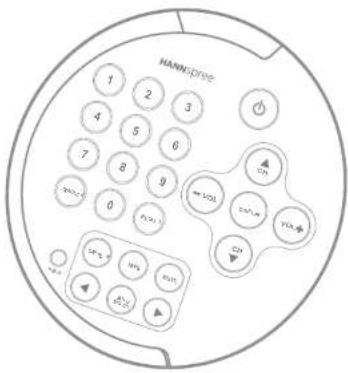
text_image
MANNIDRIVE 1 2 3 4 5 6 7 8 9 0 VOL VOL VOL VOL VOL VOL VOL VOL VOL VOL VOL VOL VOLTable of Contents
- Warranty and Service ...... 2
- Preface 3
- Introducing the Remote Control...... 4
- Checking Package Contents .... 5
- Getting to Know Your Remote Control .... 6 Inserting the Remote Control Battery .... 9
- Troubleshooting 10
1
Warranty and Service
Thank you for purchasing our product. With this product, you will be able to enjoy superior lifestyle with advanced technology.
Please refer to the Hannspree product warranty policy for detailed warranty and service information. You may also obtain the information from our customer service center. Our service representatives will be very happy to serve to your satisfaction.
Hannspree e-mail address:
service@hannspree.com
2
Preface
This manual is designed to assist users in using the Remote Control. Information in this document has been carefully checked for accuracy; however, no guarantee is given to the correctness of the contents. The information in this document is subject to change without notice.
Copyright
© Copyright 2003 Hannspree, Inc.
All rights reserved. This product and related documentation are protected by copyright and are distributed under licenses restricting their use, copying, and distribution. No part of this documentation may be reproduced in any form by any means without prior written authorization of Hannspree, Inc., and its licensors, if any.
3
Introducing the Remote Control
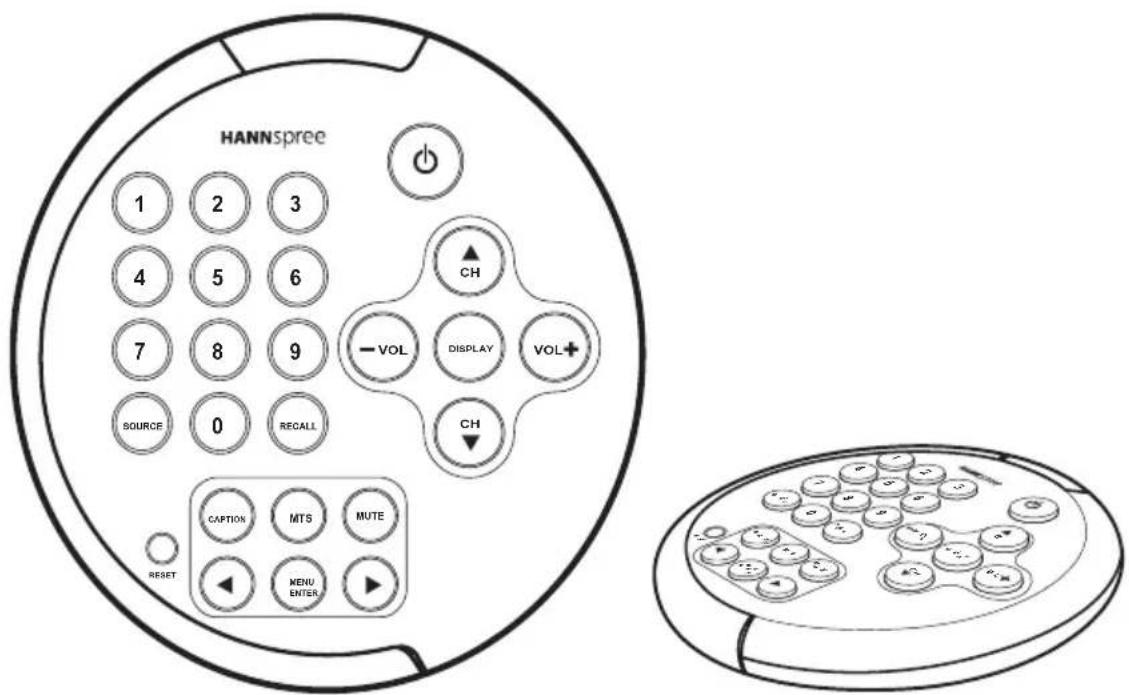
Thank you for purchasing this Remote Control. Your remote control is designed to be safe, versatile, and easy to use. The creative design makes it a fun addition to your TV.
text_image
HANNSpree 1 2 3 4 5 6 7 8 9 SOURCE 0 RECALL RESET CAPTION MTS MUTE MENU ENTER ► CH -VOL DISPLAY VOL+ CHThe control buttons located on the handy remote control let you change channels, adjust the volume, and change the display settings through an easy-to-use on-screen menu system.
4
Checking Package Contents
Make sure the following components are included in the box. Contact your vendor immediately if anything is missing or damaged.
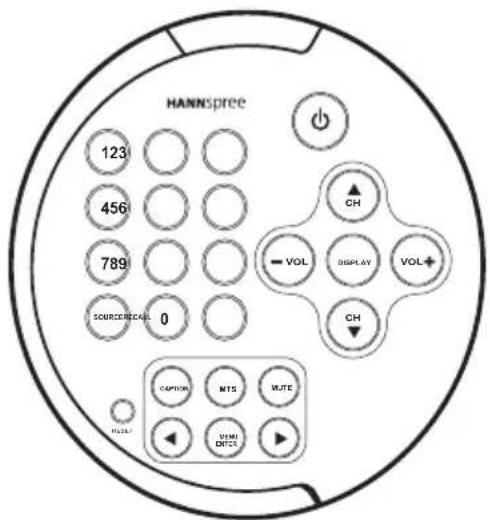
Remote Control
text_image
HANNSPREE 123 456 789 SOURCE:BEAL 0 CH VOL DISPLAY VOL + CH CAPTOR MTS WUTE UWI DOTSUser's Manual
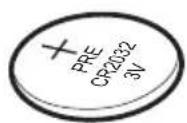
Lithium Ion Battery
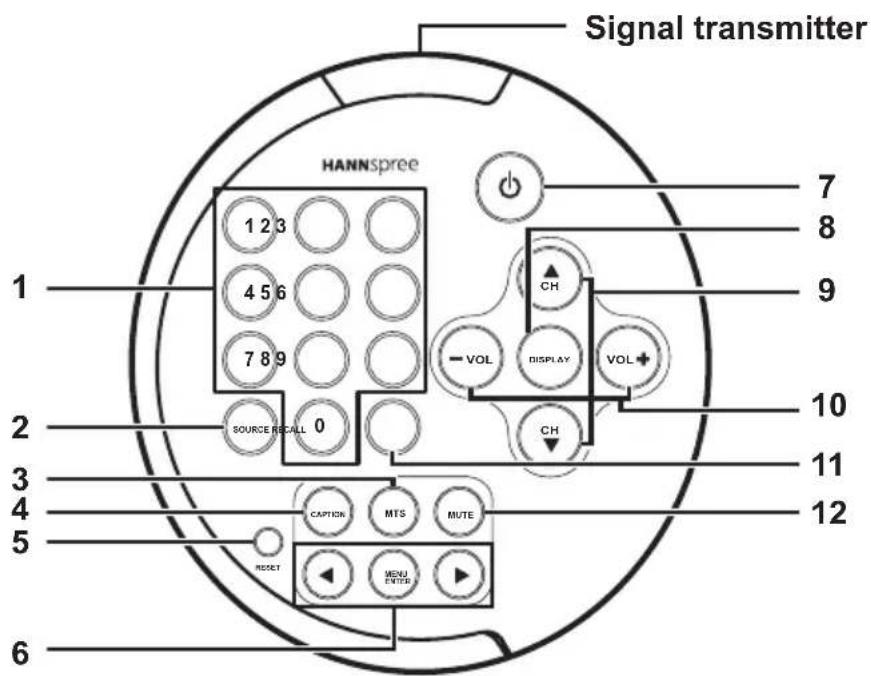
Getting to Know Your Remote Control
text_image
Signal transmitter HANNSpree 1 2 3 4 5 6 7 8 9 SOURCE RECALL 0 1 7 8 9 CH VOL DISPLAY VOL CH 10 11 12 CAPTOR MTS MUTE MENU ENTER RESET| Icon | DescriptionFunctions | ||
| 1 |  | Number buttons | Press these buttons to select a channel directly. Press 0-9 to enter the channel number. Press the 1 and 0 buttons for channel 10. |
| 2 |  | S | Press this button to cycle the video input sources. The source is displayed on the bottom right corner of the screen. |
| 3 |  | M | When you pressMTSbutton, a setting screen will appear on the bottom left. The green mark indicates The status that is supported by the current channel sound system, such as primary channel, secondary channel, and bi-channel. |
| 4 |  | C | Press this button to view program asubtitles (American standard, only available in 15"). |
| 5 |  | R | Press this button to return all settings to their factory-set default values. |
| 6 |   | Menu and Arrow buttons | Press MENUto activate the OSD menu system to adjust various settings and personal preferences. Press◄or►to scroll through the on-screen display menus. |
| 7 |  | P | o w e |
| 8 |  | D | Press this button to show messages on the screen, such as the mode and others.Press the button again to close the displayed message. |
| 9 |  | Channel select buttons | Press CH▲to increase the channel number. Press CH▼to decrease the channel number. |
| Icon | Description Functions | |
| 10 | Volume adjust buttons | Press VOL+ to increase the volume; press VOL- to decrease the volume. The range is from 1 to 20. |
| 11 | Button | Press this button to return to the last channel selected. |
| 12 | Mute button | Press this button to eliminate sound. The word MUTE appears on the top left corner of the screen. Press the MUTE button again or press the VOLUME button directly to restore sound. |
Notes:
- The operational distance the TV is directly exposed to strong light.
- Protect the remote cont damage.
- Do not place the remote
- Aim the transmitter on
the TV and ensure there are no obstacles between them.
Inserting the Remote Control Battery
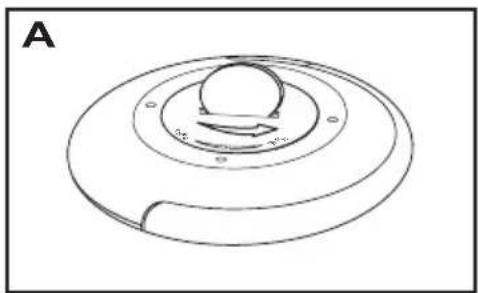
- Insert a coin into the battery cover slot at the back of the remote control (A), and turn counter clockwise to open.
- Remove the cover (B).
- Insert the battery paying attention to the polarity markings inside the battery compartment (C).
- Replace the battery cover (D).

Caution
- If the remot for a long period, remove the batteries and store them properly.
- Handle dama teries carefully, and wash hands with soap immediately if they come in contact with leaked chemical fluids.
• Refer to you waste disposal rules and contact a local waste disposal vendor to dispose of used batteries. - Danger of explosion if battery is incorrectly replaced. Replace only with the same or equivalent type recommended by the equipment manufacturer. Discard used batteries according to manufacturer's instructions.
- Check the remote control stains on the rear battery cover immediately and use new batteries if fluid is leaking from old batteries.
natural_image
Diagram of a circular mechanical component with a central hub and concentric rings, labeled 'A' in the top-left corner (no text or symbols on the diagram itself)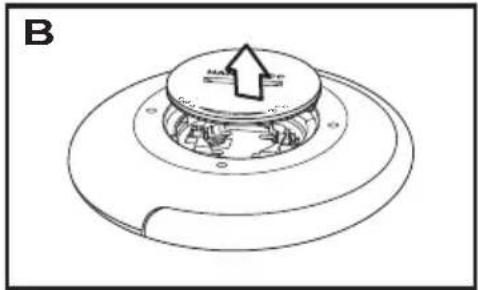
natural_image
Technical line drawing of a mechanical component with concentric rings and a central circular feature (no text or symbols)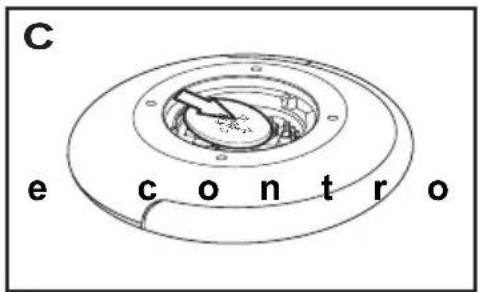
text_image
C e c o n t r o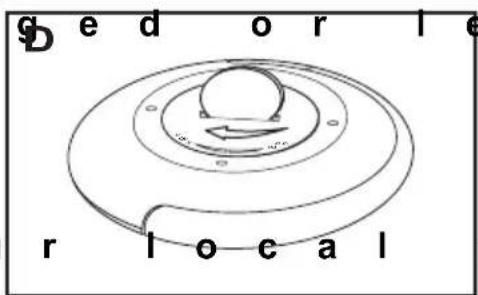
text_image
g e d o r l e r l o c a lSituationSolution
Remote control doesn't work.
- Make sure the b
- Replace the bat t
- Make sure the TV power cord is plugged in.
• Make sure the p
and the sensor is clear.
• Try operating th
tance to the TV. Don't exceed an angle of 30^ from the sensor.
MEMO
MEMO
目錄
© Copyright 2003 Hannspree, Inc.
natural_image
Diagram of a circular mechanical component with a central hub and concentric rings, labeled 'A' in the top-left corner (no text or symbols on the diagram itself)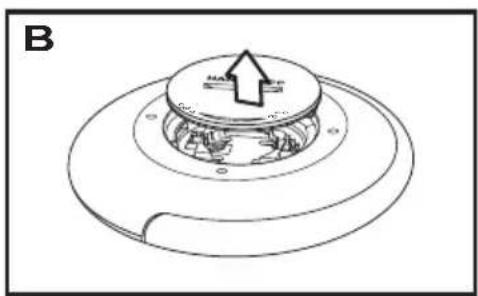
natural_image
Technical line drawing of a mechanical component with a central circular top and flange base, showing internal components and a directional arrow (no text or symbols)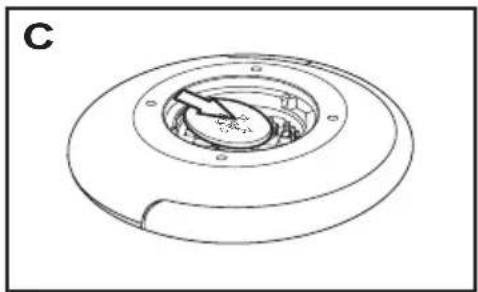
natural_image
Technical line drawing of a circular mechanical component with concentric rings and mounting holes (no text or symbols)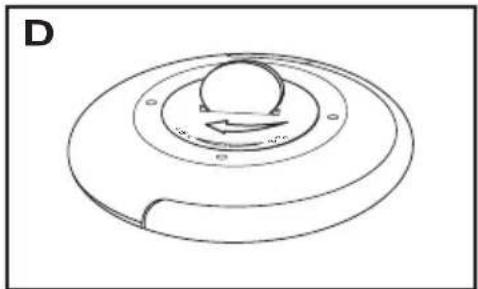
natural_image
Diagram of a circular mechanical component with a central knob and curved base, labeled 'D' in the top-left corner (no text or symbols on the diagram itself)6
故障排除
問題 解決方法
無法使用遙控器。