
DCC 2970 - Printer Triumph-Adler - Free user manual and instructions
Find the device manual for free DCC 2970 Triumph-Adler in PDF.


User questions about DCC 2970 Triumph-Adler
0 question about this device. Answer the ones you know or ask your own.
Ask a new question about this device
Download the instructions for your Printer in PDF format for free! Find your manual DCC 2970 - Triumph-Adler and take your electronic device back in hand. On this page are published all the documents necessary for the use of your device. DCC 2970 by Triumph-Adler.
USER MANUAL DCC 2970 Triumph-Adler
natural_image
Exterior view of a modern office building (no signage)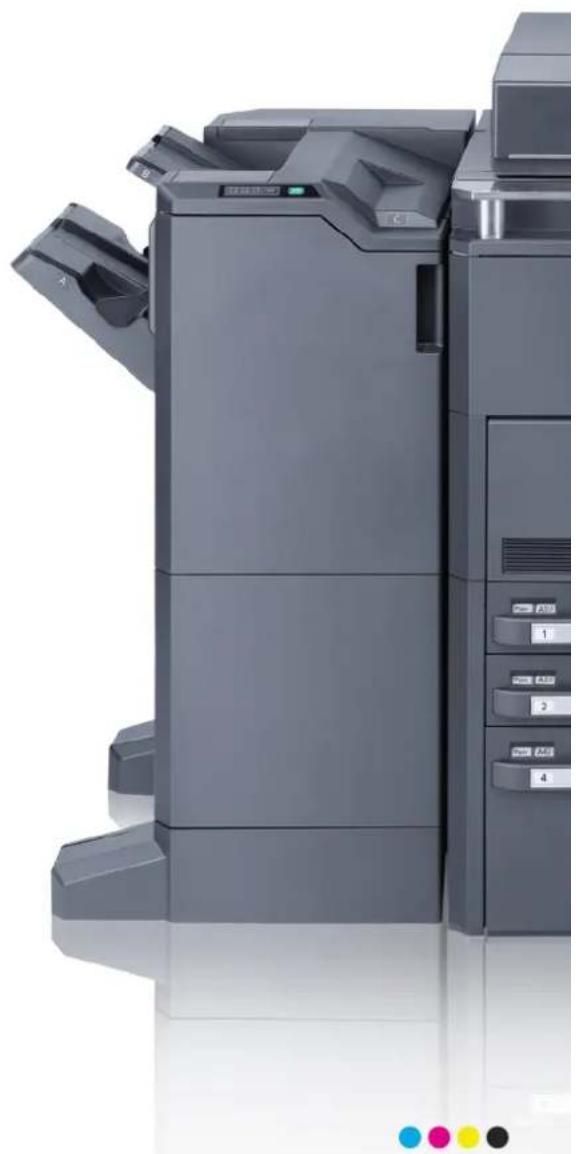
natural_image
Exterior view of a modern office typewriter with control panel and display (no visible text or symbols)DVD (Product Library)
- Bedienungsanleitung (Dieses Dokument) • Printing System Driver User Guide
- FAX Bedienungsanleitung • Network FAX Driver Operation Guide
- Card Authentication Kit (B) Operation Guide • Network Tool for Direct Printing Operation Guide
- Data Security Kit (E) Operation Guide • Network Print Monitor User Guide
- Embedded Web Server RX User Guide
- File Management Utility User Guide
8 Status/Druck abbrechen
text_image
Status/ Druckabbr.text_image
CLASS 1 LASER PRODUCT KLASSE 1 LASER PRODUKT• © 2011 ACCESS CO., LTD. All rights reserved.
Copyright (c) 1998-2006 The OpenSSL Project. All rights reserved.
Redistribution and use in source and binary forms, with or without modification, are permitted provided that the following conditions are met:
1 Redistributions of source code must retain the above copyright notice, this list of conditions and the following disclaimer.
2 Redistributions in binary form must reproduce the above copyright notice, this list of conditions and the following disclaimer in the documentation and/or other materials provided with the distribution.
3 All advertising materials mentioning features or use of this software must display the following acknowledgment:
"This product includes software developed by the OpenSSL Project for use in the OpenSSL Toolkit. (http://www.openssl.org/)
4 The names "OpenSSL Toolkit" and "OpenSSL Project" must not be used to endorse or promote products derived from this software without prior written permission.
For written permission, please contact openssl-core@openssl.org.
5 Products derived from this software may not be called "OpenSSL" nor may "OpenSSL" appear in their names without prior written permission of the OpenSSL Project.
6 Redistributions of any form whatsoever must retain the following acknowledgment: "This product includes software developed by the OpenSSL Project for use in the OpenSSL Toolkit (http://www.openssl.org/)
THIS SOFTWARE IS PROVIDED BY THE OpenSSL PROJECT "AS IS" AND ANY EXPRESSED OR IMPLIED WARRANTIES, INCLUDING, BUT NOT LIMITED TO, THE
IMPLIED WARRANTIES OF MERCHANTABILITY AND FITNESS FOR A PARTICULAR PURPOSE ARE DISCLAIMED. IN NO EVENT SHALL THE OpenSSL PROJECT OR ITS CONTRIBUTORS BE LIABLE FOR ANY DIRECT, INDIRECT, INCIDENTAL, SPECIAL, EXEMPLARY, OR CONSEQUENTIAL DAMAGES (INCLUDING, BUT NOT LIMITED TO, PROCUREMENT OF SUBSTITUTE GOODS OR SERVICES; LOSS OF USE, DATA, OR PROFITS; OR BUSINESS INTERRUPTION) HOWEVER CAUSED AND ON ANY THEORY OF LIABILITY, WHETHER IN CONTRACT, STRICT LIABILITY, OR TORT (INCLUDING NEGLIGENCE OR OTHERWISE) ARISING IN ANY WAY OUT OF THE USE OF THIS SOFTWARE, EVEN IF ADVISED OF THE POSSIBILITY OF SUCH DAMAGE.
Original SSLeay License
Copyright (C) 1995-1998 Eric Young (eay@cryptsoft.com) All rights reserved.
This package is an SSL implementation written by Eric Young (eay@cryptsoft.com). The implementation was written so as to conform with Netscapes SSL.
This library is free for commercial and non-commercial use as long as the following conditions are adhered to. The following conditions apply to all code found in this distribution, be it the RC4, RSA, Ihash, DES, etc., code; not just the SSL code. The SSL documentation included with this distribution is covered by the same copyright terms except that the holder is Tim Hudson (tjh@cryptsoft.com).
Copyright remains Eric Young's, and as such any Copyright notices in the code are not to be removed.
If this package is used in a product, Eric Young should be given attribution as the author of the parts of the library used.
This can be in the form of a textual message at program startup or in documentation (online or textual) provided with the package.
Redistribution and use in source and binary forms, with or without modification, are permitted provided that the following conditions are met:
1 Redistributions of source code must retain the copyright notice, this list of conditions and the following disclaimer.
2 Redistributions in binary form must reproduce the above copyright notice, this list of conditions and the following disclaimer in the documentation and/or other materials provided with the distribution.
3 All advertising materials mentioning features or use of this software must display the following acknowledgment:
"This product includes cryptographic software written by Eric Young (eay@cryptsoft.com)"
The word ‘cryptographic’ can be left out if the rouines from the library being used are not cryptographic related :-).
4 If you include any Windows specific code (or a derivative thereof) from the apps directory (application code) you must include an acknowledgement:
"This product includes software written by Tim Hudson (tjh@cryptsoft.com)"
THIS SOFTWARE IS PROVIDED BY ERIC YOUNG "AS IS" AND ANY EXPRESS OR IMPLIED WARRANTIES, INCLUDING, BUT NOT LIMITED TO, THE IMPLIED WARRANTIES OF MERCHANTABILITY AND FITNESS FOR A PARTICULAR PURPOSE ARE DISCLAIMED. IN NO EVENT SHALL THE AUTHOR OR CONTRIBUTORS BE LIABLE FOR ANY DIRECT, INDIRECT, INCIDENTAL, SPECIAL, EXEMPLARY, OR CONSEQUENTIAL DAMAGES (INCLUDING, BUT NOT LIMITED TO, PROCUREMENT OF SUBSTITUTE GOODS OR SERVICES; LOSS OF USE, DATA, OR PROFITS; OR BUSINESS INTERRUPTION) HOWEVER CAUSED AND ON ANY THEORY OF LIABILITY, WHETHER IN CONTRACT, STRICT LIABILITY, OR TORT (INCLUDING NEGLIGENCE OR OTHERWISE) ARISING IN ANY WAY OUT OF THE USE OF THIS SOFTWARE, EVEN IF ADVISED OF THE POSSIBILITY OF SUCH DAMAGE.
The licence and distribution terms for any publicly available version or derivative of this code cannot be changed. i.e. this code cannot simply be copied and put under another distribution licence [including the GNU Public Licence.]
Monotype Imaging License Agreement
1 Software shall mean the digitally encoded, machine readable, scalable outline data as encoded in a special format as well as the UFST Software.
2 You agree to accept a non-exclusive license to use the Software to reproduce and display weights, styles and versions of letters, numerals, characters and symbols (Typefaces) solely for your own customary business or personal purposes at the address stated on the registration card you return to Monotype Imaging. Under the terms of this License Agreement, you have the right to use the Fonts on up to three printers. If you need to have access to the fonts on more than three printers, you need to acquire a multi-user license agreement which can be obtained from Monotype Imaging. Monotype Imaging retains all rights, title and interest to the Software and Typefaces and no rights are granted to you other than a License to use the Software on the terms expressly set forth in this Agreement.
3 To protect proprietary rights of Monotype Imaging, you agree to maintain the Software and other proprietary information concerning the Typefaces in strict confidence and to establish reasonable procedures regulating access to and use of the Software and Typefaces.
4 You agree not to duplicate or copy the Software or Typefaces, except that you may make one backup copy. You agree that any such copy shall contain the same proprietary notices as those appearing on the original.
5 This License shall continue until the last use of the Software and Typefaces, unless sooner terminated. This License may be terminated by Monotype Imaging if you fail to comply with the terms of this License and such failure is not remedied within thirty (30) days after notice from Monotype Imaging. When this License expires or is terminated, you shall either return to Monotype Imaging or destroy all copies of the Software and Typefaces and documentation as requested.
6 You agree that you will not modify, alter, disassemble, decrypt, reverse engineer or decompile the Software.
7 Monotype Imaging warrants that for ninety (90) days after delivery, the Software will perform in accordance with Monotype Imaging-published specifications, and the diskette will be free from defects in material and workmanship. Monotype Imaging does not warrant that the Software is free from all bugs, errors and omissions.
The parties agree that all other warranties, expressed or implied, including warranties of fitness for a particular purpose and merchantability, are excluded.
8 Your exclusive remedy and the sole liability of Monotype Imaging in connection with the Software and Typefaces is repair or replacement of defective parts, upon their return to Monotype Imaging.
In no event will Monotype Imaging be liable for lost profits, lost data, or any other incidental or consequential damages, or any damages caused by abuse or misapplication of the Software and Typefaces.
9 Massachusetts U.S.A. law governs this Agreement.
10 You shall not sublicense, sell, lease, or otherwise transfer the Software and/or Typefaces without the prior written consent of Monotype Imaging.
11 Use, duplication or disclosure by the Government is subject to restrictions as set forth in the Rights in Technical Data and Computer Software clause at FAR 252-227-7013, subdivision (b)(3)(ii) or subparagraph (c)(1)(ii), as appropriate. Further use, duplication or disclosure is subject to restrictions applicable to restricted rights software as set forth in FAR 52.227-19 (c)(2).
12 You acknowledge that you have read this Agreement, understand it, and agree to be bound by its terms and conditions. Neither party shall be bound by any statement or representation not contained in this Agreement. No change in this Agreement is effective unless written and signed by properly authorized representatives of each party. By opening this diskette package, you agree to accept the terms and conditions of this Agreement.
Knopflerfish License
This product includes software developed by the Knopflerfish Project.
http://www.knopflerfish.org
Copyright 2003-2010 The Knopflerfish Project. All rights reserved.
Redistribution and use in source and binary forms, with or without modification, are permitted provided that the following conditions are met:
- Redistributions of source code must retain the above copyright notice, this list of conditions and the following disclaimer.
- Redistributions in binary form must reproduce the above copyright notice, this list of conditions and the following disclaimer in the documentation and/or other materials provided with the distribution.
- Neither the name of the KNOPFLERFISH project nor the names of its contributors may be used to endorse or promote products derived from this software without specific prior written permission.
THIS SOFTWARE IS PROVIDED BY THE COPYRIGHT HOLDERS AND CONTRIBUTORS "AS IS" AND ANY EXPRESS OR IMPLIED WARRANTIES, INCLUDING, BUT NOT LIMITED TO, THE IMPLIED WARRANTIES OF MERCHANTABILITY AND FITNESS FOR A PARTICULAR PURPOSE ARE DISCLAIMED. IN NO EVENT SHALL THE COPYRIGHT OWNER OR CONTRIBUTORS BE LIABLE FOR ANY DIRECT, INDIRECT, INCIDENTAL, SPECIAL, EXEMPLARY, OR CONSEQUENTIAL DAMAGES (INCLUDING, BUT NOT LIMITED TO, PROCUREMENT OF SUBSTITUTE GOODS OR SERVICES; LOSS OF USE, DATA, OR PROFITS; OR BUSINESS INTERRUPTION) HOWEVER CAUSED AND ON ANY THEORY OF LIABILITY, WHETHER IN CONTRACT, STRICT LIABILITY, OR TORT (INCLUDING NEGLIGENCE OR OTHERWISE) ARISING IN ANY WAY OUT OF THE USE OF THIS SOFTWARE, EVEN IF ADVISED OF THE POSSIBILITY OF SUCH DAMAGE.
Apache License (Version 2.0)
Apache License
Version 2.0, January 2004
http://www.apache.org/licenses/
TERMS AND CONDITIONS FOR USE, REPRODUCTION, AND DISTRIBUTION
1 Definitions.
“License” shall mean the terms and conditions for use, reproduction, and distribution as defined by Sections 1 through 9 of this document.
“Licensor” shall mean the copyright owner or entity authorized by the copyright owner that is granting the License.
"Legal Entity" shall mean the union of the acting entity and all other entities that control, are controlled by, or are under common control with that entity. For the purposes of this definition, "control" means (i) the power, direct or indirect, to cause the direction or management of such entity, whether by contract or otherwise, or (ii) ownership of fifty percent (50%) or more of the outstanding shares, or (iii) beneficial ownership of such entity.
"You" (or "Your") shall mean an individual or Legal Entity exercising permissions granted by this License.
“Source” form shall mean the preferred form for making modifications, including but not limited to software source code, documentation source, and configuration files.
"Object" form shall mean any form resulting from mechanical transformation or translation of a Source form, including but not limited to compiled object code, generated documentation, and conversions to other media types.
"Work" shall mean the work of authorship, whether in Source or Object form, made available under the License, as indicated by a copyright notice that is included in or attached to the work (an example is provided in the Appendix below).
"Derivative Works" shall mean any work, whether in Source or Object form, that is based on (or derived from) the Work and for which the editorial revisions, annotations, elaborations, or other modifications represent, as a whole, an original work of authorship. For the purposes of this License, Derivative Works shall not include works that remain separable from, or merely link (or bind by name) to the interfaces of, the Work and Derivative Works thereof.
“Contribution” shall mean any work of authorship, including the original version of the Work and any modifications or additions to that Work or Derivative Works thereof, that is intentionally submitted to Licensor for inclusion in the Work by the copyright owner or by an individual or Legal Entity authorized to submit on behalf of the copyright owner. For the purposes of this definition, “submitted” means any form of electronic, verbal, or written communication sent to the Licensor or its representatives, including but not limited to communication on electronic mailing lists, source code control systems, and issue tracking systems that are managed by, or on behalf of, the Licensor for the purpose of discussing and improving the Work, but excluding communication that is conspicuously marked or otherwise designated in writing by the copyright owner as “Not a Contribution.”
“Contributor” shall mean Licensor and any individual or Legal Entity on behalf of whom a Contribution has been received by Licensor and subsequently incorporated within the Work.
2 Grant of Copyright License. Subject to the terms and conditions of this License, each Contributor hereby grants to You a perpetual, worldwide, non-exclusive, no-charge, royalty-free, irrevocable copyright license to reproduce, prepare Derivative Works of, publicly display, publicly perform, sublicense, and distribute the Work and such Derivative Works in Source or Object form.
3 Grant of Patent License. Subject to the terms and conditions of this License, each Contributor hereby grants to You a perpetual, worldwide, non-exclusive, no-charge, royalty-free, irrevocable (except as stated in this section) patent license to make, have made, use, offer to sell, sell, import, and otherwise transfer the Work, where such license applies only to those patent claims licensable by such Contributor that are necessarily infringed by their Contribution(s) alone or by combination of their Contribution(s) with the Work to which such Contribution(s) was submitted. If You institute patent litigation against any entity (including a cross-claim or counterclaim in a lawsuit) alleging that the Work or a Contribution incorporated within the Work constitutes direct or contributory patent infringement, then any patent licenses granted to You under this License for that Work shall terminate as of the date such litigation is filed.
4 Redistribution. You may reproduce and distribute copies of the Work or Derivative Works thereof in any medium, with or without modifications, and in Source or Object form, provided that You meet the following conditions:
(a) You must give any other recipients of the Work or Derivative Works a copy of this License; and
(b) You must cause any modified files to carry prominent notices stating that You changed the files; and
(c) You must retain, in the Source form of any Derivative Works that You distribute, all copyright, patent, trademark, and attribution notices from the Source form of the Work, excluding those notices that do not pertain to any part of the Derivative Works; and
(d) If the Work includes a "NOTICE" text file as part of its distribution, then any Derivative Works that You distribute must include a readable copy of the attribution notices contained within such NOTICE file, excluding those notices that do not pertain to any part of the Derivative Works, in at least one of the following places: within a NOTICE text file distributed as part of the Derivative Works; within the Source form or documentation, if provided along with the Derivative Works; or, within a display generated by the Derivative Works, if and wherever such third-party notices normally appear. The contents of the NOTICE file are for informational purposes only and do not modify the License. You may add Your own attribution notices within Derivative Works that You distribute, alongside or as an addendum to the NOTICE text from the Work, provided that such additional attribution notices cannot be construed as modifying the License.
You may add Your own copyright statement to Your modifications and may provide additional or different license terms and conditions for use, reproduction, or distribution of Your modifications, or for any such Derivative Works as a whole, provided Your use, reproduction, and distribution of the Work otherwise complies with the conditions stated in this License.
5 Submission of Contributions. Unless You explicitly state otherwise, any Contribution intentionally submitted for inclusion in the Work by You to the Licensor shall be under the terms and conditions of this License, without any additional terms or conditions. Notwithstanding the above, nothing herein shall supersede or modify the terms of any separate license agreement you may have executed with Licensor regarding such Contributions.
6 Trademarks. This License does not grant permission to use the trade names, trademarks, service marks, or product names of the Licensor, except as required for reasonable and customary use in describing the origin of the Work and reproducing the content of the NOTICE file.
7 Disclaimer of Warranty. Unless required by applicable law or agreed to in writing, Licensor provides the Work (and each Contributor provides its Contributions) on an "AS IS" BASIS, WITHOUT WARRANTIES OR CONDITIONS OF ANY KIND, either express or implied, including, without limitation, any warranties or conditions of TITLE, NON-INFRINGEMENT, MERCHANTABILITY, or FITNESS FOR A PARTICULAR PURPOSE. You are solely responsible for determining the appropriateness of using or redistributing the Work and assume any risks associated with Your exercise of permissions under this License.
8 Limitation of Liability. In no event and under no legal theory, whether in tort (including negligence), contract, or otherwise, unless required by applicable law (such as deliberate and grossly negligent acts) or agreed to in writing, shall any Contributor be liable to You for damages, including any direct, indirect, special, incidental, or consequential damages of any character arising as a result of this License or out of the use or inability to use the Work (including but not limited to damages for loss of goodwill, work stoppage, computer failure or malfunction, or any and all other commercial damages or losses), even if such Contributor has been advised of the possibility of such damages.
9 Accepting Warranty or Additional Liability. While redistributing the Work or Derivative Works thereof, You may choose to offer, and charge a fee for, acceptance of support, warranty, indemnity, or other liability obligations and/or rights consistent with this License. However, in accepting such obligations, You may act only on Your own behalf and on Your sole responsibility, not on behalf of any other Contributor, and only if You agree to indemnify, defend, and hold each Contributor harmless for any liability incurred by, or claims asserted against, such Contributor by reason of your accepting any such warranty or additional liability.
END OF TERMS AND CONDITIONS
APPENDIX: How to apply the Apache License to your work.
To apply the Apache License to your work, attach the following boilerplate notice, with the fields enclosed by brackets “[]” replaced with your own identifying information. (Don't include the brackets!) The text should be enclosed in the appropriate comment syntax for the file format. We also recommend that a file or class name and description of purpose be included on the same “printed page” as the copyright notice for easier identification within third-party archives.
Copyright [yyyy] [name of copyright owner]
Licensed under the Apache License, Version 2.0 (the "License"); you may not use this file except in compliance with the License. You may obtain a copy of the License at
http://www.apache.org/licenses/LICENSE-2.0
Unless required by applicable law or agreed to in writing, software distributed under the License is distributed on an “AS IS” BASIS, WITHOUT WARRANTIES OR CONDITIONS OF ANY KIND, either express or implied. See the License for the specific language governing permissions and limitations under the License.
Energiesparfunktion
Energy Star (ENERGY STAR®) Program

text_image
Technical diagram of a device with numbered parts, showing internal components and exploded views.text_image
Technical diagram of an open printer with numbered parts and exploded view, showing internal structure and assembly details.Card Authentication Kit (B) Operation Guide
Data Security Kit (E) Operation Guide
Embedded Web Server RX User Guide
Printing System Driver User Guide
Network FAX Driver Operation Guide
Network Tool for Direct Printing Operation Guide
Network Print Monitor User Guide
File Management Utility User Guide
natural_image
Diagram of a server rack with multiple door compartments and ventilation slots, showing directional arrows indicating movement (no text or symbols present)natural_image
Line drawing of a hand inserting a component into a device panel (no text or symbols)natural_image
Architectural line drawing of a building facade with window and doorways (no text or symbols)natural_image
Technical diagram of a mechanical assembly with directional arrows indicating movement or force (no text or symbols present)natural_image
Diagram of a server rack with multiple door holders and mounting hardware (no text or symbols)natural_image
Line drawing of a hand inserting a screw into a device panel (no text or symbols)natural_image
Architectural line drawing of a building facade with window and doorways (no text or symbols)natural_image
Technical diagram of a server rack with directional arrows indicating movement or flow (no text or symbols present)natural_image
Line drawing of a server rack with an open door and a hand inserting a button (no text or symbols)natural_image
Diagram of a mechanical device with rotating arrows indicating motion (no text or symbols)natural_image
Illustration of a hand holding a CD with an open screen (no text or symbols visible)1 DVD einlegen.
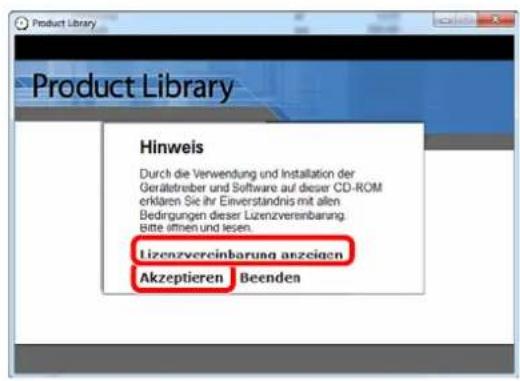
natural_image
Illustration of a hand holding a CD with an open screen showing a window (no text or symbols)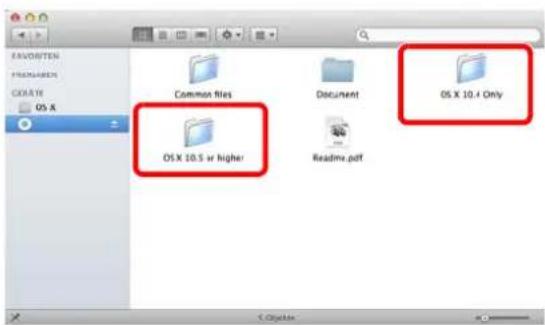
text_image
FANDEXTEN POSTGREEN CREATE OS X Common files Document OS X 10.4 Only OS X 10.5 or higher Readmv.pdf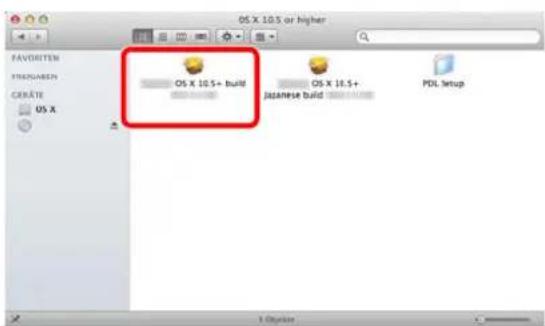
text_image
OS X 10.5 or higher FAVORITEN FRENSABEN CREATE OS X OS X 10.5+ build OS X 10.5+ Japanese build PDL setup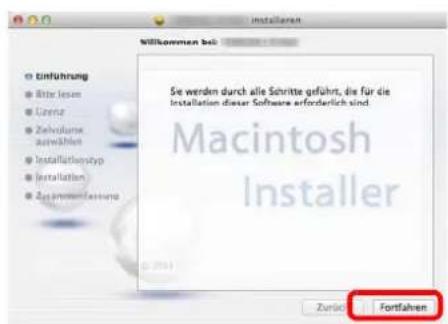
text_image
Illustration showing four sequential steps of a fabric or mechanical process, labeled 1 to 4 with arrows indicating direction and rotation.natural_image
Diagram of a hand inserting a device into a rack with an arrow indicating the component (no text or symbols present)natural_image
Diagram showing a hand holding a mechanical component with arrows indicating motion, next to an open mechanical assembly (no text or symbols present)natural_image
Illustration of a hand inserting a document into a file into a machine (no text or symbols visible)text_image
Technical diagram showing a printer or printer with an upward arrow and text label 'Up' indicating a process or status.WICHTIG:
natural_image
Pure architectural floor plan lines without any text, numbers, or symbolstext_image
Diagram illustrating lock mechanism with magnified view of lock and lock switch on a devicetext_image
Control Unit Plain AMD A B C D E F G H I J K L M N O P Q R S T U V W X Y Znatural_image
Diagram of a hand inserting a component into a device (no text or symbols visible)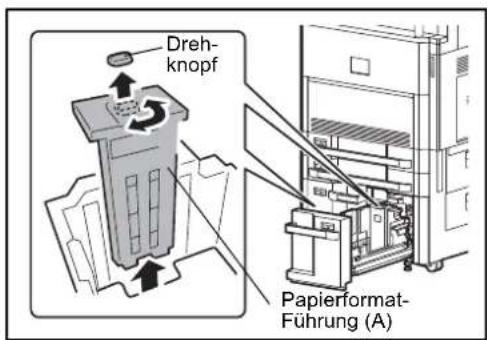
natural_image
Diagram showing a mechanical component being inserted into a machine, with no visible text or symbols.Letter
natural_image
Illustration of hands operating a mechanical device with a black arrow indicating a downward motion (no text or symbols present)text_image
Technical diagram showing a mechanical assembly with an upward arrow and directional label, likely indicating a process or operation.WICHTIG:
text_image
Technical diagram showing a device with labeled components and directional arrows indicating assembly or movement.natural_image
Diagram of a hand operating a device with an arrow indicating direction, showing internal components and a control panel (no text or symbols present)natural_image
Line drawing of a hand inserting a document into a file folder, with a black arrow indicating the direction (no text or symbols present)natural_image
Illustration of a hand inserting a device into a file folder, with a speaker icon and directional arrow (no text or symbols)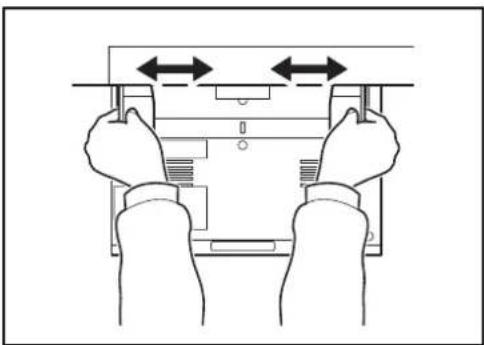
natural_image
Line drawing of two hands holding a device with bidirectional arrows indicating movement (no text or symbols)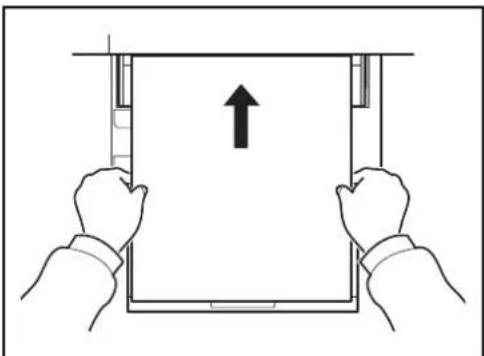
natural_image
Illustration of two hands holding a tablet with an upward arrow, no text or symbols presenttext_image
Technical diagram showing a device with an upward arrow and 'AB5c' label, likely indicating a directional or process flow.natural_image
Line drawing of a hand inserting a device into a folder, with an arrow indicating the process (no text or symbols present)natural_image
Line drawing of two hands holding a device with bidirectional arrows indicating movement (no text or symbols)natural_image
Technical line drawing of a mechanical assembly with a hand operating a workpiece (no text or symbols present)natural_image
Line drawing of hands operating a printer with a paper airplane (no text or symbols)natural_image
Technical line drawing of a printer internal structure with arrows indicating motion (no text or symbols)natural_image
Line drawing of a hand inserting a card into a printer (no text or symbols)natural_image
Technical line drawing of a printer or printer assembly with an inset showing a close-up of the component (no text or symbols present)natural_image
Line drawing of a hand holding a tool over a flat surface, with an arrow indicating motion (no text or symbols)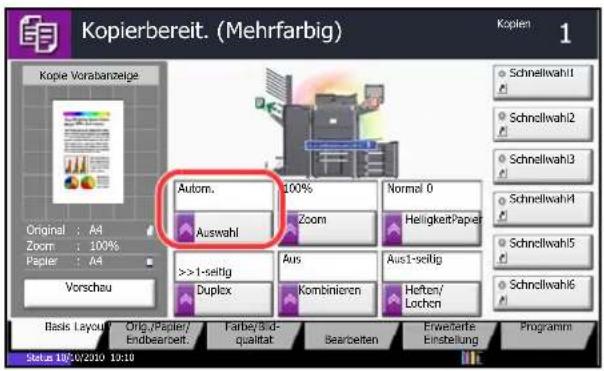
text_image
1 2 3 4 5 6 7 8 9 */. 0 #
text_image
Starttext_image
25% A A 400%flowchart
graph LR
    A["Original Kopie"] --> B["1"]
    A --> C["2"]
text_image
Diagram showing transformation from an open book to two blank document pages, likely illustrating a word-to-text conversion or data processing.Original Kopie
text_image
Ledger (A3) Letter (A4) Letter (A4) Ledger (A3)text_image
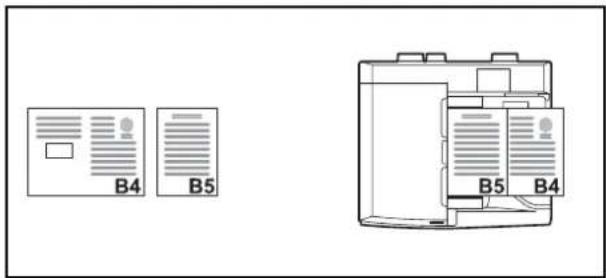
Legal (Folio) Letter-R (A4-R) Letter-R (A4-R)B4 und B5
text_image
B4 B5 B5 B4text_image
A4-R B5 B4natural_image
Simple line drawing of a rectangular frame with a shaded rectangle and an arrow indicating direction (no text or symbols)Original [Oberka. oben] [Oberka. links]
natural_image
Architectural floor plan showing room layout with a labeled section (A), no text or symbols presentOriginal [Oberka. oben] [Oberka. links]
text_image
Original [ - 1 -] [S.1] [1/n]natural_image
Diagram showing a flower image transforming into four separate grayscale square images, with no text or symbols present.Original Kopie
natural_image
Diagram showing a square frame with a white flower icon and a grid of six identical squares, connected by an arrow (no text or symbols)Original Kopie
natural_image
Two square frames showing a single white flower icon, one rotated to the other with two smaller squares (no text or symbols)Original Kopie
natural_image
Illustration of hands holding a tablet device with an upward arrow indicating motion (no text or symbols present)natural_image
Diagram showing two hands holding a vertical panel with an upward arrow, no text or symbols presentnatural_image
Illustration of a hand using a tool to press or spread material over a machine (no text or symbols visible)natural_image
Line drawing of a hand pressing down on a device component with an arrow indicating motion (no text or symbols present)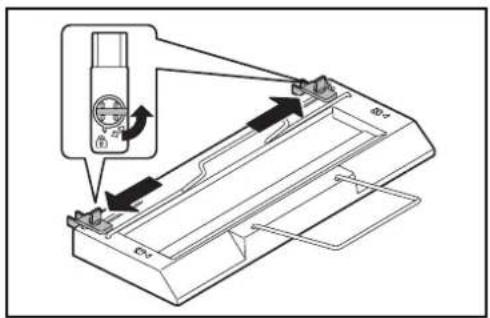
text_image
Diagram showing a device with a connector and directional arrows indicating assembly or operation, including a small inset image of a device with a switch.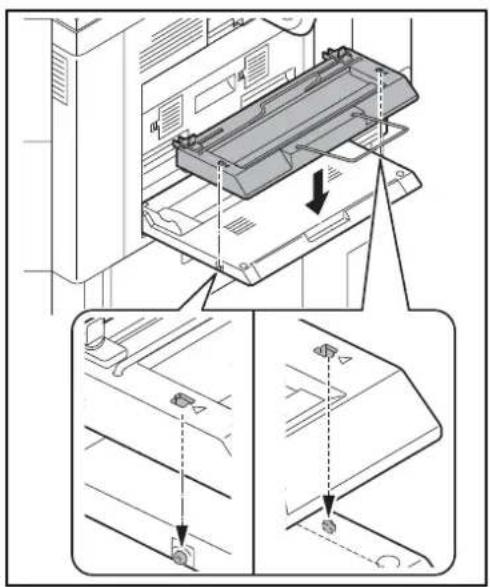
text_image
Technical diagram showing assembly steps of a printer with labeled components and directional arrows indicating movement.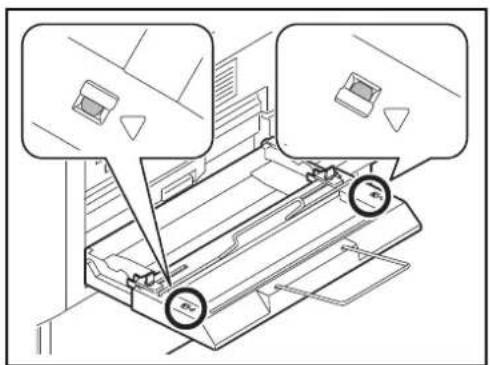
text_image
Technical diagram showing a printer or printer with two labeled components and circular annotations indicating measurement points.natural_image
Technical line drawing of a mechanical device with two arrows indicating directional movement (no text or symbols)natural_image
Technical diagram of a mechanical assembly with an inset showing internal components (no text or labels)text_image
Technical diagram showing mechanical assembly with rotational arrows and component labelsnatural_image
Diagram of hands operating a cylindrical device with arrows indicating movement or force (no text or symbols present)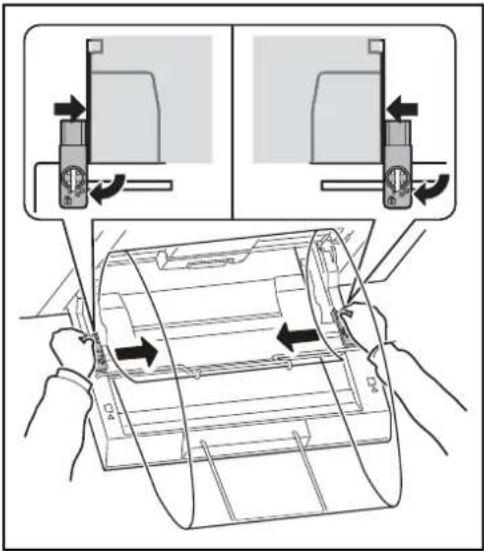
text_image
Diagram illustrating the process of inserting a printer into a device, with labeled arrows indicating movement and assembly steps.text_image
Ledger (A3) Letter (A4) Letter (A4) Ledger (A3)text_image
Legal (Folio) Letter-R (A4-R) Letter-R (A4-R)• B4 und B5
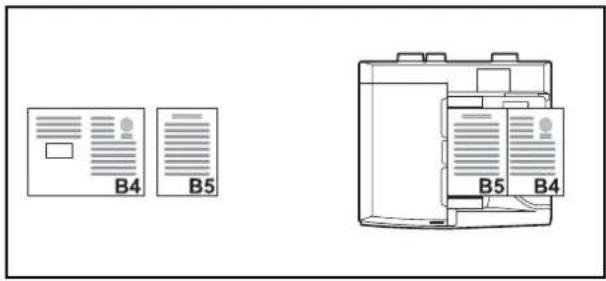
text_image
B4 B5 B5 B4natural_image
Simple line drawing of a rectangular frame with a shaded rectangle and label 'A' (no text or symbols beyond the label)Original [Oberkante oben] [Oberk. links]
natural_image
Simple line drawing of a room layout with a labeled area marked 'A' (no text or symbols beyond the label)Original [Oberkante oben] [Oberk. links]
flowchart
graph LR
    A["Original Kopie"] --> B["Output"]
natural_image
Diagram showing a hand inserting a device into a device panel, with no visible text or symbols.natural_image
Diagram showing a hand inserting a device into a device panel, with no visible text or symbols.8 Status/Druck abbrechen
text_image
Internal Scalable and Bitmapped Fonts List PRESCRIBE Font Name Scalable/Bitmap Password Selection [FSET] Font ID Internal Scalable and Bitmapped Fonts List PRESCRIBE Font Name Scalable/Bitmap Password Selection [FSET] Font IDNetzwerkstatus
natural_image
Technical diagram of a printer or printer with an inset showing a magnified view of its internal structure (no text or symbols present)Manuelle Korrektur
natural_image
Diagram of a printer with an open lid and a magnified inset showing a pixelated image (no text or symbols present)natural_image
Illustration of hands installing or adjusting a file folder into a rack (no text or symbols visible)natural_image
Diagram of a computer interface showing a hand inserting a USB into a drive module (no text or symbols present)natural_image
Illustration of hands operating a mechanical device with an inset showing the close-up of the component (no text or symbols visible)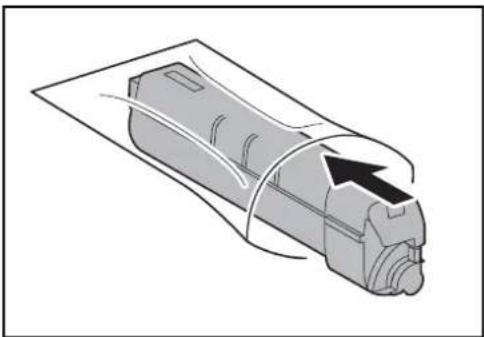
natural_image
Diagram of a mechanical component with a curved cover and arrow indicating direction (no text or symbols)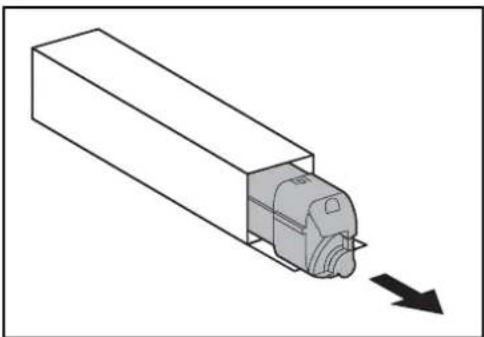
natural_image
Diagram of a mechanical component with a downward arrow indicating motion (no text or symbols)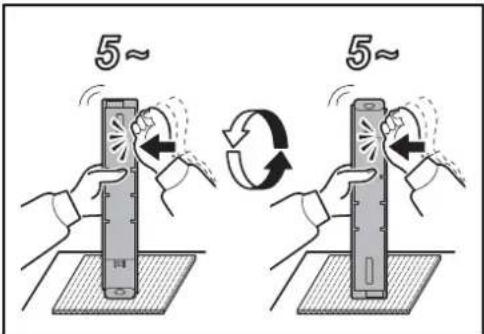
text_image
5~ 5~natural_image
Illustration of hands operating a mechanical device with an inset showing the close-up of the component (no text or symbols visible)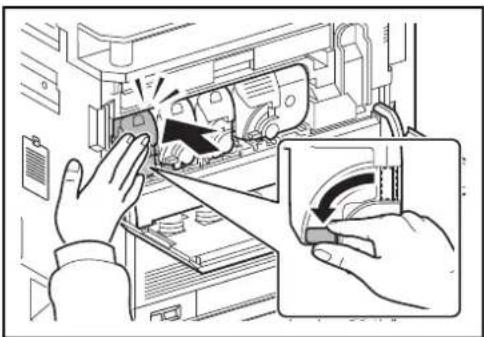
natural_image
Illustration of hands operating a computer in a rack, with an inset showing a close-up of the handle (no text or symbols present)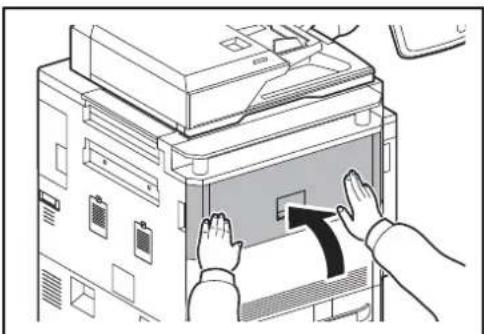
natural_image
Illustration of hands inserting a device into a printer (no text or symbols visible)natural_image
Illustration of a hand inserting a device into a rack, showing internal components and a blue arrow indicating the process (no text or symbols present)text_image
Diagram showing a hand inserting a device into a rack, with an inset highlighting the upward movement of the device.text_image
Diagram showing a device with labeled components and directional arrows indicating assembly or connection stepsnatural_image
Diagram of a mechanical component with a downward arrow indicating force or direction (no text or symbols present)natural_image
Diagram of an open box with a computer case and an upward arrow, no text or symbols presentnatural_image
Diagram of a computer tower with an open drive and a hand inserting a drive into the tower (no text or symbols visible)natural_image
Illustration of a hand inserting a card into a printer into a rack (no text or symbols visible)natural_image
Line drawing of a hand inserting a device into a rack, showing internal components and no text or symbolsnatural_image
Illustration of a hand inserting a card into a printer (no text or symbols visible)natural_image
Technical line drawing of a vehicle interior showing structural components and a directional arrow (no text or labels)natural_image
Diagram showing vehicle chassis components before and after assembly, with arrows indicating motion direction (no text or symbols)natural_image
Diagram showing two car body assemblies with arrows indicating assembly or transformation (no text or symbols present)natural_image
Line drawing of a hand opening a refrigerator with visible door, fan, and door handle (no text or symbols)text_image
Diagram illustrating a mechanical assembly or cleaning process with labeled directional arrows indicating movement or movement.natural_image
Technical diagram showing a mechanical assembly with a directional arrow indicating motion or force (no text or symbols present)natural_image
Mechanical assembly diagram showing two stages of a device with directional arrows indicating motion (no text or symbols present)natural_image
Mechanical assembly diagram showing a component being processed into a housing (no text or symbols present)natural_image
Technical line drawing of a mechanical assembly with internal components and an arrow indicating direction (no text or symbols)natural_image
Illustration of a hand inserting a component into a machine, with an arrow indicating the direction (no text or symbols present)natural_image
Technical line drawing of a mechanical assembly with internal components and a downward arrow indicating motion (no text or symbols)natural_image
Line drawing of a person receiving a medical procedure from a bottle (no text or symbols present)natural_image
Technical line drawing of a mechanical assembly with internal components and an upward arrow indicating motion (no text or symbols)natural_image
Line drawing of a hand using a tool to adjust or install a mechanical component (no text or symbols visible)Vorlagenglas
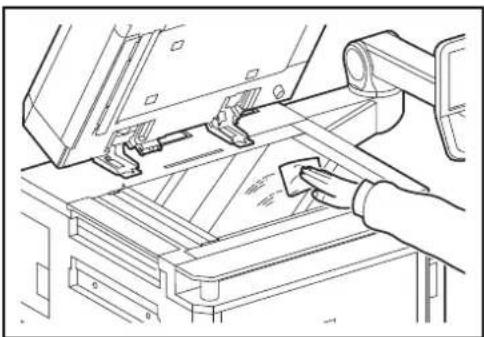
natural_image
Technical line drawing of a mechanical assembly with a hand operating a workpiece (no text or symbols present)natural_image
Line drawing of a hand inserting a component into a device (no text or symbols)text_image
Technical diagram showing a hand using a tool to cut or mark a component labeled 'a' on a workbench.natural_image
Technical line drawing of a hand using a tool to adjust or install a mechanical component (no text or symbols visible)natural_image
Diagram showing a hand inserting a component into an open device, with an arrow indicating the process (no text or symbols present)natural_image
Line drawing of a hand inserting or adjusting an electronic device into a case (no text or symbols visible)natural_image
Illustration of hands installing or adjusting a device panel with an arrow indicating rotation (no text or symbols present)natural_image
Diagram of a printer's internal structure showing internal components and a magnified view of the internal structure (no text or symbols present)natural_image
Illustration of a hand inserting a computer into a rack, showing the next panel with a scroll arrow (no text or symbols present)natural_image
Technical line drawing of a mechanical assembly with a magnified inset showing a tool interacting with a component (no text or symbols present)natural_image
Line drawing of a hand pressing down on a computer monitor (no text or symbols)Übertragungswalze
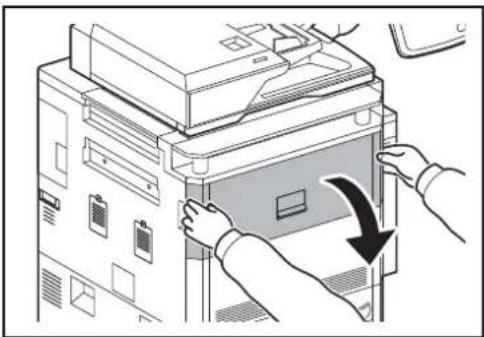
natural_image
Illustration of hands installing or adjusting a file folder into a server rack (no text or symbols visible)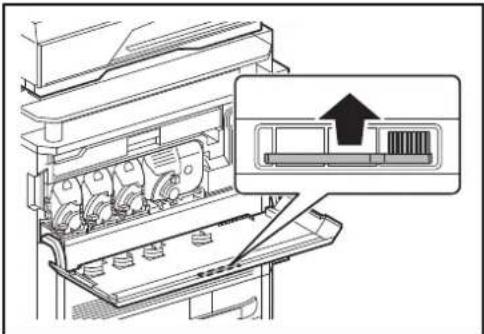
natural_image
Diagram of a printer's internal structure showing internal components and an open panel with a barcode symbol (no text or labels present)
natural_image
Illustration of a hand inserting a computer into a rack, showing internal components and a scroll (no text or symbols)natural_image
Illustration of hands operating a large industrial machine with rollers and a handle (no text or symbols visible)natural_image
Line drawing of a hand pressing down on a computer monitor (no text or symbols)text_image
Papierstau. K K K K J K K K K K K K K K K K K K K K K K K K K K K K K K K K K K K K K K K K K K K K K K K K K K K K K K K K K K K K K K K K K K K K K K K K K K K K K K K K K K K K K K K K M K K M M K K M M K K M M K K M M K K M M K K M M K K M M K K M M K K M M K K M M K K M M K K M M K K M M K K M M K K M M K K M M K K M M K K M M K K M M K K M M K K L M K C E M A B C D L L C E M M D L M E I G H I F F Jnatural_image
Illustration of a hand inserting a computer into a rack, showing the next panel with a scroll (no text or symbols present)natural_image
Illustration of a hand inserting a device into an internal machine (no text or symbols visible)natural_image
Diagram of a hand inserting a device into a rack, showing internal components and a black arrow indicating direction (no text or symbols present)natural_image
Illustration of a hand inserting a component into a device drawer (no text or symbols visible)natural_image
Line drawing of a hand pressing down on a computer monitor (no text or symbols)natural_image
Illustration of a hand inserting a device into a server rack (no text or symbols visible)natural_image
Line drawing of a hand inserting a card into a filing cabinet (no text or symbols)natural_image
Diagram of a hand holding a device into a rack with an arrow indicating a process (no text or symbols present)natural_image
Illustration of a hand inserting a device into a rack, showing mechanical components and a scroll (no text or symbols)text_image
Diagram showing a hand pressing a button on a device with an arrow indicating the action, alongside a stack of boxes and a computer interface.natural_image
Diagram of a hand inserting a component into a rack, showing a blue arrow indicating direction (no text or symbols present)natural_image
Line drawing of a hand inserting a component into a device (no text or symbols)natural_image
Line drawing of a hand inserting a device into a rack or storage unit (no text or symbols visible)natural_image
Illustration of a hand inserting a card into a device with an arrow indicating the process (no text or symbols present)natural_image
Technical line drawing of an open industrial machine with internal components (no text or symbols)natural_image
Illustration of hands installing or adjusting a mechanical component with an arrow indicating motion (no text or symbols present)natural_image
Diagram of a printer's internal structure showing paper feeding into a box (no text or symbols visible)natural_image
Illustration of a hand pressing down on a device panel with a black arrow symbol (no text or labels)natural_image
Line drawing of a hand inserting a card into a device (no text or symbols visible)natural_image
Illustration of a hand inserting a computer monitor into a rack, showing internal components and a scroll arrow (no text or symbols)natural_image
Illustration of a hand using a tool to adjust or install electronic components inside a device (no text or symbols visible)natural_image
Line drawing of a hand pressing down on a computer monitor (no text or symbols)natural_image
Line drawing of a hand inserting a device into a rack, showing internal components and a directional arrow (no text or symbols)natural_image
Line drawing of a hand inserting a card into a folder (no text or symbols visible)natural_image
Illustration of a hand inserting a computer into a rack, showing internal components and a scroll arrow (no text or symbols)natural_image
Illustration of a hand using a tool to clean or adjust equipment inside a machine (no text or symbols visible)natural_image
Illustration of a hand inserting a computer into a rack, showing the keyboard and scroll (no text or symbols)natural_image
Diagram of a mechanical assembly with a hand pressing a component, showing no text or symbols.natural_image
Illustration of a hand inserting a device into a rack, showing internal components and a black arrow indicating the component (no text or symbols present)
natural_image
Line drawing of a hand pressing down on a computer monitor with a hand gesture (no text or symbols)natural_image
Illustration of a hand inserting a computer into a rack unit (no text or symbols visible)natural_image
Diagram of a hand pressing down on a mechanical component with a black arrow indicating the motion direction (no text or symbols present)natural_image
Line drawing of a hand pressing down on a computer monitor (no text or symbols)natural_image
Illustration of a hand operating a mechanical device with a curved arrow indicating motion (no text or symbols present)natural_image
Illustration of a hand inserting a card into a filing machine (no text or symbols visible)
natural_image
Illustration of a hand inserting a component into a device rack (no text or symbols visible)natural_image
Illustration of a hand inserting a computer into a rack, showing internal components and a scroll arrow (no text or symbols)natural_image
Illustration of hands operating a computer rack with a device, showing a handle and control panel (no text or symbols)natural_image
Illustration of hands installing or adjusting a mechanical component with a black arrow indicating the process (no text or symbols present)natural_image
Illustration of a hand inserting a component into an electronic device (no text or symbols visible)natural_image
Line drawing of a hand pressing down on a computer monitor (no text or symbols)natural_image
Illustration of a hand inserting a card into a printer (no text or symbols visible)natural_image
Illustration of a hand inserting a device into a tray with internal compartments (no text or symbols visible)natural_image
Illustration of a hand using a tool to adjust or install a car interior panel (no text or symbols visible)natural_image
Mechanical gear assembly diagram showing a rotating shaft and housing (no text or symbols)natural_image
Line drawing of a hand inserting a device into a machine (no text or symbols visible)natural_image
Illustration of a hand inserting a computer into a rack unit (no text or symbols visible)natural_image
Illustration of hands installing or adjusting a mechanical component with a black arrow indicating the process (no text or symbols present)natural_image
Illustration of a hand inserting a component into an electronic device (no text or symbols visible)natural_image
Line drawing of a hand pressing down on a computer monitor (no text or symbols)natural_image
Illustration of a hand inserting a device into an open rack, showing internal components and a directional arrow (no text or symbols)natural_image
Illustration of hands installing or adjusting a device panel with arrows indicating rotation (no text or symbols)natural_image
Technical line drawing of a mechanical assembly with no visible text or symbolsnatural_image
Illustration of a hand inserting a device into a rack, showing internal components and a warning symbol (no text or labels present)natural_image
Illustration of a hand inserting a device into a printer or printer case, with an arrow indicating the process (no text or symbols present)natural_image
Technical line drawing of a mechanical assembly with a worker inspecting internal components (no text or symbols)natural_image
Illustration of a hand inserting a device into a machine (no text or symbols visible)natural_image
Illustration of a hand inserting a component into a machine, showing a blue box with an arrow indicating direction (no text or symbols present)natural_image
Diagram of a hand inserting a component into a device casing, showing internal components and directional arrows (no text or symbols)natural_image
Mechanical assembly diagram showing a worker adjusting components with directional arrows (no text or symbols)natural_image
Technical line drawing of a mechanical assembly with no visible text or symbolsnatural_image
Line drawing of a hand inserting a component into a printer (no text or symbols)natural_image
Illustration of a hand inserting a card into a printer (no text or symbols visible)natural_image
Technical line drawing of a mechanical assembly with a hand operating a component (no text or symbols visible)natural_image
Diagram of a hand inserting a component into a device, showing internal components and directional arrows (no text or symbols)Ablage C
natural_image
Technical line drawing of a mechanical assembly with no visible text or symbols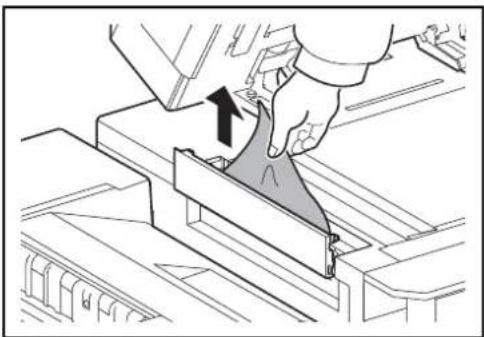
natural_image
Technical line drawing of a mechanical assembly with a hand holding a triangular component (no text or symbols)natural_image
Illustration of a hand inserting a component into a machine (no text or symbols visible)natural_image
Technical line drawing of a mechanical assembly with a person operating a tool (no text or symbols visible)natural_image
Diagram of a hand inserting a component into a device, showing arrows indicating rotation (no text or symbols present)natural_image
Illustration of a printer with a stack of sheets being inserted, showing paper roll and cover (no text or symbols)natural_image
Illustration of hands using a tool to adjust or install a mechanical component (no text or symbols visible)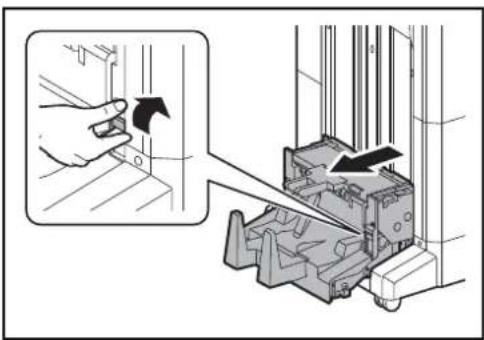
text_image
Diagram showing a hand operating a switch to a mechanical device with directional arrows indicating motion or operation.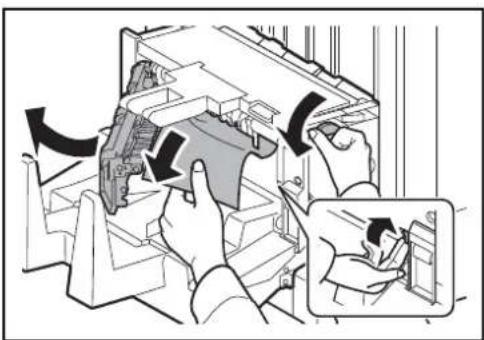
text_image
Diagram illustrating a mechanical assembly process with labeled components and directional arrows indicating motion or movement.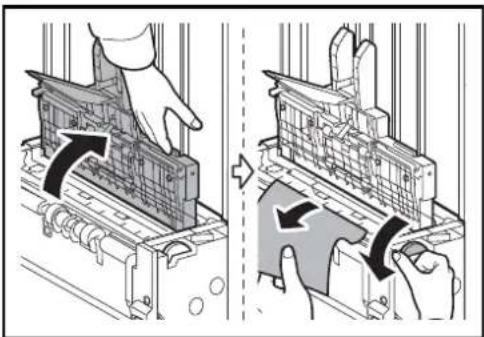
natural_image
Two-step diagram showing a hand operating a device with arrows indicating process, no text or symbols present.text_image
Technical diagram showing mechanical assembly steps with directional arrows indicating movement or force directions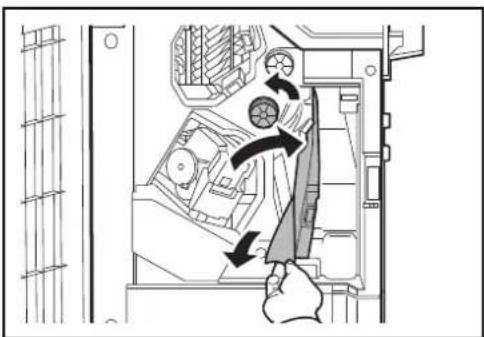
natural_image
Diagram of a computer interior showing a hand inserting a device into a rack, with arrows indicating motion (no text or symbols present)
natural_image
Diagram of a hand inserting a component into a device casing (no text or symbols visible)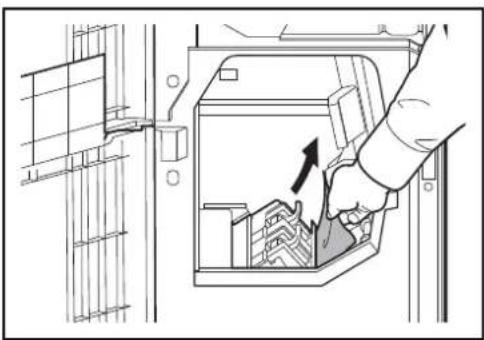
natural_image
Diagram showing a hand inserting a component into a device, with no visible text or symbols.text_image
Diagram showing a hand pressing down on a device with an arrow indicating the process, next to a server rack.natural_image
Line drawing of a hand inserting a card into a device (no text or symbols)natural_image
Diagram of a hand inserting a device into a rack-mounted unit (no text or symbols visible)natural_image
Illustration of two hands inserting a card into a folder (no text or symbols visible)text_image
Diagram showing a hand pressing down on a stack of boxes into a machine, with an arrow indicating the process.natural_image
Line drawing of a hand inserting a device into a cabinet (no text or symbols)natural_image
Diagram of a printer with an open lid and arrows indicating process flow (no text or symbols)natural_image
Illustration of hands operating a printer with a paper clip, showing mechanical components and no text or symbols.natural_image
Illustration of a hand inserting a device into a printer with a ruler inserted (no text or symbols visible)natural_image
Illustration of a hand inserting a component into a printer drawer (no text or symbols visible)text_image
Diagram showing a hand pressing down on a stacker machine with a directional arrow indicating movement or force.natural_image
Line drawing of a hand pressing down on a device with an arrow indicating press direction (no text or symbols)natural_image
Hand inserting a component into a device (no text or symbols visible)natural_image
Diagram of a computer rack with a hand inserting a component, showing internal structure and a black arrow indicating direction (no text or symbols present)natural_image
Illustration of a hand inserting a component into a file drawer (no text or symbols visible)text_image
Diagram showing a hand pressing down on a device with an arrow indicating the process, labeled with Chinese text.natural_image
Illustration of a hand pressing down on a device with a black arrow indicating rotation (no text or symbols)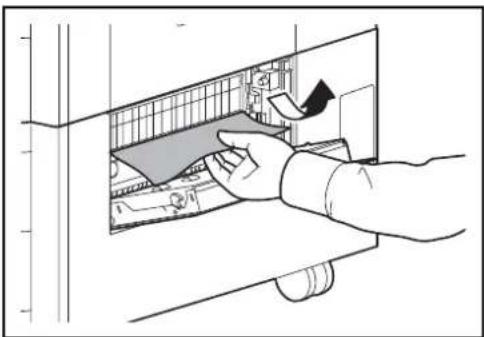
natural_image
Illustration of a hand inserting a component into a device (no text or symbols visible)natural_image
Line drawing of a hand inserting a component into an electronic device (no text or symbols visible)natural_image
Illustration of a hand holding a folder over a file inside a storage or processing facility (no text or symbols visible)natural_image
Technical line drawing of a mechanical assembly or machine component (no visible text or symbols)natural_image
Illustration of hands operating a computer monitor with an arrow indicating rotation (no text or symbols present)natural_image
Line drawing of a printer's internal structure with hands operating it (no text or symbols)natural_image
Illustration of a hand inserting a card into a printer (no text or symbols visible)natural_image
Technical line drawing of a mechanical assembly with internal components and a downward arrow indicating motion (no text or symbols)natural_image
Technical line drawing of a mechanical component with labeled section A (no text or symbols beyond label)natural_image
Technical line drawing of a vehicle chassis frame (no text or symbols)natural_image
Line drawing of a hand inserting a component into a device housing (no text or symbols)text_image
Technical diagram showing mechanical assembly steps with labeled components and directional arrows indicating movement or forcenatural_image
Technical line drawing of a mechanical assembly with a black arrow indicating direction (no text or symbols present)natural_image
Technical line drawing of a mechanical component with labeled parts A and B (no text or symbols beyond labels)natural_image
Technical line drawing of a mechanical component (no text or symbols visible)natural_image
Technical line drawing of a mechanical assembly with a directional arrow indicating motion (no text or symbols present)text_image
Technical diagram of a mechanical assembly with labeled parts A and B, showing internal components and directional arrows.natural_image
Illustration of a hand pressing a stack of books into a container with an arrow indicating compression (no text or symbols)text_image
Grate GrateDHCP (Dynamic Host Configuration Protocol)
KPDL (Kyocera Page Description Language)
NetBEUI (NetBIOS Extended User Interface)
TWAIN (Technology Without Any Interested Name)
WIA (Windows Imaging Acquisition)
Formular speichern 7-22
Freigabeknopf 1-5
FTP Anhang-30
FTP Empfang Protokoll Details 9-102
G
Enhanced WSD (SSL) 9-105
Hostname 9-98
IPSec 9-110
NetWare 9-103