MA405 - Alarm Clock Manta - Free user manual and instructions
Find the device manual for free MA405 Manta in PDF.


| Product Type | Alarm clock radio with FM/AM tuner |
| Brand | Manta |
| Model | MA405 |
| Power Supply | AC 100-240V, 50/60Hz |
| Radio Bands | FM (87.5-108 MHz) and AM (520-1710 kHz) |
| Display | LED digital clock with dimmer (Hi/Lo) |
| Alarm | Dual alarm (Alarm 1 and Alarm 2) with buzzer or radio wake-up |
| Snooze | 9-minute snooze function |
| Sleep Timer | Adjustable from 10 to 90 minutes in 10-minute increments |
| Memory Presets | 10 FM and 10 AM presets |
| Volume Control | 16 levels |
| Audio Output | Built-in speaker |
| Time Setting | Manual setting with hour/minute buttons |
| Time Format | 12-hour display |
| Tuning | Manual or auto search using frequency up/down buttons |
| Cleaning | Wipe with a soft, dry cloth. Do not use solvents. |
| Safety | Keep away from water and moisture. Use only provided AC cord. |
Frequently Asked Questions - MA405 Manta
User questions about MA405 Manta
0 question about this device. Answer the ones you know or ask your own.
Ask a new question about this device
Download the instructions for your Alarm Clock in PDF format for free! Find your manual MA405 - Manta and take your electronic device back in hand. On this page are published all the documents necessary for the use of your device. MA405 by Manta.
USER MANUAL MA405 Manta
natural_image
Abstract black-and-white circular logo with interlocking curved shapes (no text or symbols)MANTA
Radio FM with Alarm Clock
MA405
Instrukcja obsługi
User's Manual
Bedienungsanleitung
Connecting the radio
Plug the ac cord into the power outlet. when electrical power has been interrupted and restored, the clock display will show the time. make sure to reset both the correct time and alarm time for proper operation.
EN
Time setting
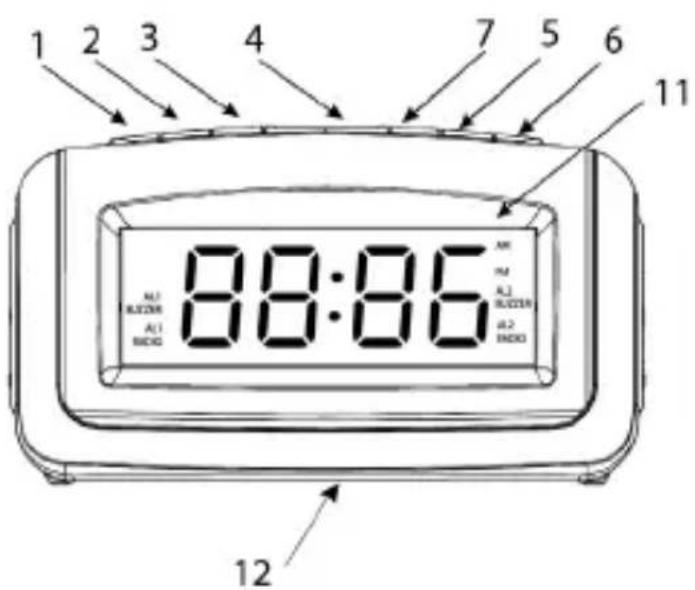
Press and hold the time set/pre/m+ (7), then the clock display will blink. press the min/tu+ (3) or hour/tu- (2) to set the clock display to the correct time. press set/pre/m+ (7) again when finished the setting, the time display will not blink.
Dimmer hi / low
On time display mode, press dimmer sleep/snooze/ dimmer hi/low (4) to set hi or low of the led display.
Radio operation
Press am/fm/on/off (1) once, it will turn on the radio, press am/fm/on/off (1) again to select am band or fm band. short (long) press min/tu+ (3) or hour / tu-(2) to adjust(auto search) your desired frequency. press al 2/vol + (6) to increase the volume, the maximum level up to level 16. press al 1/vol- (5) to decrease the volume, the minimum level of volume is level 0.
Memory operation
The clock radio can store 10am and 10fm presets.
On radio playing mode, select your desired band (fm/am), press up min/tu+ (3) or hour / tu-(2) to choose your desired frequency, long press set/pre/m+ (7) to enter into preset mode, the preset
USER'S MANUAL
Number will show and flash on the led display (11), then short press hour/tu- (2) or min/tu+ (3) to select your desired memory numbers from p1 to p10.
Press the set/pre/m+ (7) to confirm your memory setting.
Repeat the above steps, you can store your desired stations.
After setting is ok, press set/pre/m+ (7) to select your preset frequency to enjoy radio broadcasting.
Long press am/fm/on/off button (1) to turn off the radio.
Alarm function
Setting alarm 1 by buzzer
In clock display mode, press al 1/vol- button (5) once to select alarm by buzzer, the al1 buzzer icon and alarm time display will flash. using hour/tu- button (2) and min/tu+ button (3) to set your desired alarm hour.
Setting alarm 1 by radio
In clock display mode, press al 1/vol- button (5) twice to select alarm by radio, the al1 rad icon and alarm time display will flash. using hour/tu- button (2) and min/tu+ button (3) to set your desired alarm hour.
Setting alarm 2 by buzzer
In clock display mode, press al 2/vol+ button (7) once to select alarm by buzzer, the al2 buzzer icon and alarm time display will flash. using hour/tu- button (2) and min/tu+ button (3) to set your deisred alarm hour.
Setting alarm 2 by radio
in clock display mode, press al 2/vol+ button (7) twice to select alarm by radio, the al2 rad icon and alarm time display will flash. using hour/tu-button (2) and min/tu+ button (3) to set your desired alarm hour.
USER'S MANUAL
Sleep function
If you want to listening the radio while fall asleep. you can use sleep function by setting the sleep time.
With the radio on, press the sleep / snooze button(4) to enter into sleep mode, the 90 no. shows on the led display (11). it states 90-minutes of sleep time and to be setted in sequence 90-80-70-60-50-40-30-20-10-off. press the sleep / snooze button (4) to choose your desired sleep time, the sleep timer will change by 10 minutes each time you press the sleep button (4). the unit will stop playing when the timer countdowns from the preset sleep time to the end and then switch off by itself.
EN
Snooze function
On alarm sound mode, press am/fm/on/off (1) to stop the alarm, the alarm will not resume. but if you press the sleep/snooze button (4) to stop the alarm, the al icon of the led display (11) will blink, and the alarm will resume after 9 minutes.
BEDIENUNGSANLEITUNG
Bedienungsanleitung
Beschreibung
DE
Dimmer+/- (dimmer hi/low)
- MANTA
- Radio FM with Alarm Clock
- MA405
- Connecting the radio
- Time setting
- Dimmer hi / low
- Radio operation
- Memory operation
- USER'S MANUAL
- Alarm function
- Setting alarm 1 by radio
- Setting alarm 2 by buzzer
- Setting alarm 2 by radio
- Sleep function
- Snooze function
- BEDIENUNGSANLEITUNG
- Beschreibung
- Dimmer+/- (dimmer hi/low)
Brand : Manta
Model : MA405
Category : Alarm Clock