
GWO230 - Scale Eldom - Free user manual and instructions
Find the device manual for free GWO230 Eldom in PDF.


| Brand | Eldom |
| Model | GWO230 |
| Product Type | Digital Kitchen Scale |
| Weighing Capacity | Up to 5 kg (11 lb) |
| Graduation | 1 g (0.1 oz) |
| Units | g, kg, lb, oz, ml (water) |
| Display Type | LED / LCD digital display |
| Platform Material | Tempered glass or stainless steel |
| Power Supply | 2 x CR2032 batteries (included) |
| Auto-Off Function | Yes, after approx. 60 seconds inactivity |
| Tare Function | Yes |
| Overload Indicator | Yes |
| Low Battery Indicator | Yes |
| Dimensions (L x W x H) | Approx. 20 x 15 x 2 cm |
| Weight (scale only) | Approx. 350 g |
| Water Resistance | Not waterproof; clean with damp cloth only |
| Cleaning Instructions | Wipe with soft damp cloth; do not immerse |
| Safety Notes | Use on flat, dry surface; avoid overloading |
| Spare Parts Availability | Contact Eldom customer service |
| Repair Service | Authorized service centers only |
| Warranty | 2 years (EU) |
| Manual Language | English, and other languages (see manual) |
Frequently Asked Questions - GWO230 Eldom
User questions about GWO230 Eldom
0 question about this device. Answer the ones you know or ask your own.
Ask a new question about this device
Download the instructions for your Scale in PDF format for free! Find your manual GWO230 - Eldom and take your electronic device back in hand. On this page are published all the documents necessary for the use of your device. GWO230 by Eldom.
USER MANUAL GWO230 Eldom
natural_image
Digital kitchen scale with orange and red buttons, displaying a digital display (no text or symbols visible)model: GWO230



natural_image
Simple gray horizontal bar with two vertical tick marks at the bottom (no text or symbols)WSKAZÓWKI BEZPIECZEŃSTWA
Please read all these instructions carefully before using this appliance.
-
This device may be used by children of 8 years of age or more and by persons with limited physical and mental capacity, as well as by persons without experience and knowledge of the device, provided that supervision or instruction is ensured as regards operation of the equipment in a safe way, so as to make the related hazards understandable. Children should not play with the device. Children without supervision should not clean and maintain the appliance.
-
The device is intended only for household use.
-
Do not stand on the scales when it is wet.
-
Do not stand on the scales with wet feet.
-
Store the scales in a place shady and dry place.
-
When in storage, the scales should not be placed under other items.
-
The accuracy of reading of the scales depends on the way it is used. Use the scales carefully. Do not jump on the scales, do not drop the scales.
-
Use damp, soft cloth without chemical agents to clean, then wipe dry. Do not immerse in water.
-
Only authorised service centres may repair the device. Any modernisations or using of non-original spare parts or elements of the device is forbidden and threatens safety of its use.
-
Eldom Sp. z o.o. shall not be liable for any damages resulting from improper use of the device.
EN
INSTRUCTION MANUAL DIGITAL BATHROOM SCALE GWO230

TECHNICAL DATA
- weight capacity 150 kg (330lb)
- resolution 100g (0,2lb)
- power: CR2032 battery
HOW TO USE
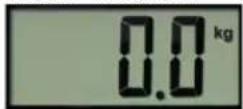
If the scale is supplied with batteries remove the foil cover from the batteries before the first use. Put the scale on a stable and dry surface.
Get on the scale and keep your feet steadily.
Wait few second until a display indication stabilizes.
Read the display indication.
AUTO OFF
Few seconds after you step down the scale will trip. If after switching on nobody gets on the scale it will automatically switch off after few second as well.
OVERLOAD
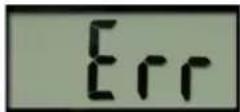
Do not exceed acceptable capacity (330 lb). It can lead to a damage or decalibration. The overload is signalized by "Err" display indication.
BATTERY DISCHARGE INDICATOR
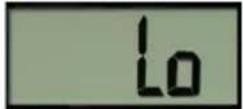
The appliance is powered with CR2032 battery. The necessity of battery change is signalized by "Lo" display indication. Used batteries should be thrown away the containers
specially designed for this purpose.
ERROR INDICATION
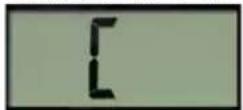
When error indication "[" appears on the display or the scale does not switch on you can take out the batteries for a few seconds. Malfunction of the scale can be also caused by closeness of such
appliances like mobile phones, microwaves, CB radios etc.
If batteries reload and taking away mentioned appliances does not solve the problem please contact authorized service center.
CLEANING AND MAINTENANCE
- The appliance cannot be submersed in water
- Do not use any cleansing agents which are strong and damage the surface
- Wipe the housing with a moistened cloth
PROTECTION
- the appliance is made of materials which can be recovered or recycled
- the appliance should be handed over to the appropriate centre of collection and recycling of electrical and electronic equipment
BEZPEČNOSTNÍ DOPORUČENÍ
Brand : Eldom
Model : GWO230
Category : Scale