
SPK204FM - Loudspeaker Manta - Free user manual and instructions
Find the device manual for free SPK204FM Manta in PDF.


| Product Type | Wireless Bluetooth Speaker (Pipe Speaker) |
| Brand | Manta |
| Model | SPK204FM |
| Power Input | DC 5V |
| Power Adapter | 5V / 1A (not included) |
| Battery | Built-in 1000mAh rechargeable |
| Output Power | 2W x 2 + 5W (9W total) |
| Speaker Size | 4" + 2" x 2 |
| Frequency Response | 80Hz – 20KHz |
| Distortion | ≤0.5% at 1W |
| Wireless Range | Up to 10m |
| Bluetooth Version | 2.1 |
| Supported Modes | Bluetooth, FM Radio, AUX-in, TF Card, USB Disk |
| Controls | Power On/Off, Mode, Play/Pause, Volume +/-, Next/Previous Track |
| Indicators | BT indicator (fast flash = pairing, steady = connected, red = AUX); Battery indicator (red = charging, off = full) |
| Charging Time | Not specified (approx. 2-3 hours typical) |
| Play Time | Not specified (depends on volume) |
| Waterproof Rating | Not waterproof (avoid rain) |
| Package Contents | Speaker, USB Charging Cable, User Manual, Warranty Card |
| Safety Precautions | Do not expose to water, heat, or disassemble |
Frequently Asked Questions - SPK204FM Manta
User questions about SPK204FM Manta
0 question about this device. Answer the ones you know or ask your own.
Ask a new question about this device
Download the instructions for your Loudspeaker in PDF format for free! Find your manual SPK204FM - Manta and take your electronic device back in hand. On this page are published all the documents necessary for the use of your device. SPK204FM by Manta.
USER MANUAL SPK204FM Manta
Pipe Bluetooth Speaker
SPK204FM
Instrukcja obsługi
User's Manual
Bedienungsanleitung
Manual de usuario
Istruzioni d'uso
Návod k obsluze
natural_image
Symbol of a trash bin crossed with a diagonal line, no text or numbers presentnatural_image
Symbol of a trash bin crossed with a diagonal line, no text or numbers presentIn order to maintain good performance, follow the basic precautions when using this product.
Do not use this product in rain or other wet environments.
Keep this product away from heat sources and direct sunlight.
Do not place heavy objects on this product.
Do not disassemble this product , it may cause malfunction.
Packing List
Upon opening the package, please check for the following items:
1×Wireless Barrel Speaker.
1×USB Charging Cable
1×Instruction Manual
1x Warranty Card
Product Overview
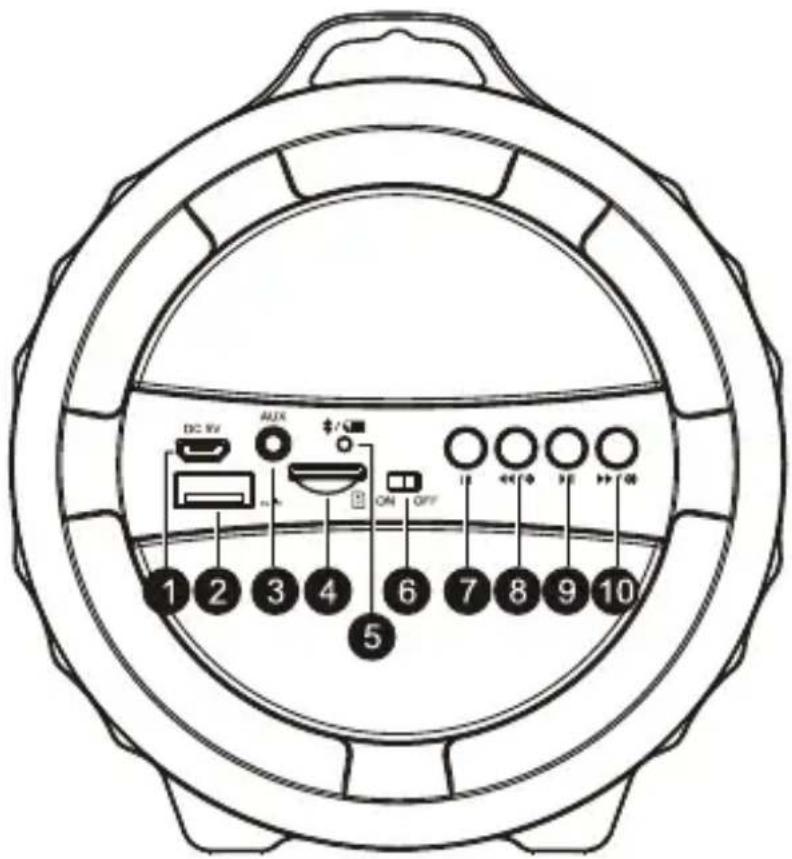
1.DC Input
2. USB Slot
3.AUX-IN Slot
4.TF Card Slot
5.BT Indicator/Battery Indicator
6. Power ON/OFF Switch
7. Mode Button
8. Previous Track/Volume Down
9.Play/Pause
10. Next Track/Volume UP
Indicator Status
| Type | Indicator State | |
| BT indicator Rapid flashing bl | ue Ready to link | |
| Steady-on blue Linked | ||
| Red AUX-in mode | ||
| Battery indicator Red light no | mally on Charging | |
| Red light out Fully charged |
Charging
There are two ways to charge the speaker.
- Plug the charging cable into speaker and connect to another USB power sources like PC/MAC, etc.
- Usea power adapter to charge (not included). The power adapter should be DC 5V and have its maximum power output be 1A.
Please turn off the speaker when charging.
Function:
BT, FM, Vol+/-, Play/Pause, Previous/Next Track, AUX in, TF card and U disk supported
Connecting
Wireless Connection
Slide power key to ON position.
The BT indicator will flash blue.
Search the BT devices on your cellphone, select "SPK204FM" in the list.
BT indicator will stop flashing after the speaker is linked to cellphone.
Connect to audio from the Cell phone/Pad/Computer/Netbook/DVD/CD etc. Plug one end of the audio cable into the speaker and the other end into a cellphone or other audio device.
FM Radio
Press M button to enter FM, the BT indicator will flash blue slowly.
Press Play/Pause button to start channel auto searching, the BT indica tor will flash blue rapidly. Press Play/Pause button again to pause searching, the BT indicator will flash blue slowly.
Press M button again to exit FM radio, the BT indicator will flash blue rapidly and BT is ready to pair.
Specifications:
BT Version: 2.1
Input: DC 5V
Output Power: 2W×2+5W
Speaker Size: 4" + 2"×2
Distortion: 0.5%@1W
Frequency: 80Hz–20KHz
Transmission Distance: 10m
Battery: built-in 1000mAh rechargeable battery
FAQ
- Unable to turn on the speaker
Make sure the battery is full and the battery indicator light is on.
- Unable to connect to BT-enabled device
Make sure that the device is in BT mode, and is within 10 meters from the speaker.
Ensure that neither the speaker nor the device is wirelessly connected to any other devices.
- No sound heard
The volume is at its lowest, please turn up the volume.
- Button doesn't work
Please press button longer
- The speaker has no response
Please power off and try again.

Correct Disposal of this product.
This marking indicates that this product should not be disposed with other household wastes throughout the EU. To prevent possible harm to the environment or human health from uncontrolled waste disposal, recycle it responsibly to promote the sustainable reuse of material resources. To return your used device, please use the return and collection systems or contact the retailer where the product was purchased. They can take this product for environmental safe recycling.
Note!
Product design and Technical parameters may be change without notice. This mainly concerns parameters technical, software and user manual present. User's Manual is a general orientation on service product. Manufacturer and distributor do not assume any responsibility as compensation for any inaccuracies errors in the descriptions appearing in this user manual.
Vorsichtsmaßnahmen
natural_image
Abstract black-and-white circular logo with interlocking curved shapes (no text or symbols)MANTA
INFOLINIA SERWISOWA
from Monday to Friday. 9.00-17.00
The manufacturer reserves the right to make changes to product specifications without notice.
Home: www.manta.com.pl Home
support: www.manta.info.pl


Made in P.R.C.
FOR MANTA EUROPE
Brand : Manta
Model : SPK204FM
Category : Loudspeaker