SPK416 Miami - Loudspeaker Manta - Free user manual and instructions
Find the device manual for free SPK416 Miami Manta in PDF.


| Brand | Manta |
| Model | SPK416 Miami |
| Product Type | Portable Bluetooth Speaker |
| Power Supply | DC 9V / 1.5A adapter (included) |
| Audio Inputs | AUX (3.5mm), USB, TF Card, Bluetooth |
| Bluetooth Version | Not specified (typical 4.2 or 5.0) |
| FM Radio | Yes, with auto-scan and storage |
| Microphone Inputs | 1 x 6.3mm MIC, 1 x 3.5mm Ear-MIC |
| LED Lighting | Flashing LED light (on/off via long press MODE) |
| Playback Modes | USB, TF, Bluetooth, AUX, FM (sequential) |
| Equalizer (EQ) | Preset EQ modes in AUX/USB/TF modes |
| Repeat Modes | Repeat One, Random, Repeat Folder, Repeat All |
| Remote Control | Yes, included with full function |
| Dimensions | Approx. 28 x 18 x 18 cm (estimated) |
| Weight | Approx. 1.5 kg (estimated) |
| Battery | Rechargeable, typ. 2000-3000 mAh (not specified) |
| Warranty | Standard manufacturer warranty |
Frequently Asked Questions - SPK416 Miami Manta
User questions about SPK416 Miami Manta
0 question about this device. Answer the ones you know or ask your own.
Ask a new question about this device
Download the instructions for your Loudspeaker in PDF format for free! Find your manual SPK416 Miami - Manta and take your electronic device back in hand. On this page are published all the documents necessary for the use of your device. SPK416 Miami by Manta.
USER MANUAL SPK416 Miami Manta
natural_image
Abstract black-and-white circular logo with interlocking curved shapes (no text or symbols)MANTA
SPEAKER MIAMI
Model:
SPK416
Instrukcja obsługi
User's Manual
Bedienungsanleitung
Manual de usuario
Istruzioni d'uso
Návod k obsluze
Gniazdo AUX
natural_image
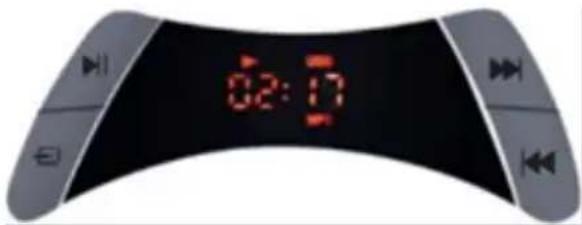
Symbol of a trash bin with crossed lines indicating no waste or discharge (no text or labels)Under USB, TF or Blue-tooth mode, press this buon to PAUSE and resume playing.
Under AUX, press this button to mute playing.
Under FM mode, press to initiate the FM programs auto searching from 87.5MHz to 108MHz, and store the programs.
MODE
Long-press to switch on/o of the flashing LED light.
Short-Press to change the playing mode in sequence of USB->TF->BT->AUX IN->FM, in case of no USB and TF card plugged, default mode will be BT while power on the unit.
NEXT
Under USB and TF mode, short-press to move to next Song and play; Long-press move to next Folder if exists.
Under BT mode, short-press to move to next Song and play.
Under FM mode, short-press to change to next neighbor Program of higher frequency.
PREVIOUS
Under USB and TF mode, short-press to move to previous song and play; Long-press move to previous Folder if exists.
Under BT mode, short-press to move to previous Song and play.
Under FM mode, short-press to change to previous neighbor Program of lower frequency
REAR PANEL FUNCTION
VOL+/-
Turn this knob to control the main Vol of the unit.
MIC+/-
Turn this knob to control the MIC Vol while you connect microphone or Ear-MIC.
ECHO+/-
Turn this knob to control the ECHO Vol while you the connected microphone or Ear-MIC.

AUX
To connect external playing equipment like mobile phones, MP3 players etc.
TF CARD
To insert TF Card and play the MP3 music.
USB
To insert USB Pen-drive and play the Mp3 music.
EAR-MIC
To insert and connect EAR Microphone.
MIC
To insert and connect Microphone.
ON/OFF
To power on and o the unit.
DC 9V
Connect adaptor (9V 1.5A) to this unit and charge the unit.
REMOTE CONTROL FUNCTION
POWER
To turn on/off the unit by short-press.
MODE
Long-press to switch on/o of the flashing LED light.
Short-Press to change the playing mode in sequence of USB->TF->BT->AUX IN->FM, in case of no USB and TF card plugged, default mode will be BT while power on the unit.
MUTE
To mute on/o the sound under all playing modes.
STOP
No funcon under FM Radio and AUX IN playing status.
Under Blue-Tooth, USB and TF playing mode, short-press to stop playing, and one more short-press, it will play from first song.

REPEAT
Under USB and TF playing status, press this button to change the REPEAT modes, repeat one/random/repeat folder/repeat all.
EQ
Under AUX, USB or TF playing mode, press this buon to change the EQ mode.
Vol-
Press this button to reduce playing volume.
Vol+
Press this button to increase playing volume.
PLAY/PAULSE
Same function as PLAY/PAULSE on the front panel.
NEXT
Same funcon as NEXT on the front panel.
PREVIOUS
Same funcon as PREVIOUS on the front panel.
Number Keys
Under USB and TF Card playing modes, input numbers to select song playing, for example input 7 to select song number 7, input 1 and 5 connuously to select song number 15.
Under FM radio playing status, input numbers to select stored programs.

natural_image
Symbol of a trash bin with no text or numbers presentCorrect Disposal of this product.
This marking indicates that this product should not be disposed with other household wastes throughout the EU. To prevent possible harm to the environment or human health from uncontrolled waste disposal, recycle it responsibly to promote the sustainable reuse of material resources. To return your used device, please use the return and collecon systems or contact the retailer where the product was purchased. They can take this product for environmental safe recycling.
Note!
Product design and Technical parameters may be change without noce. This mainly concerns parameters technical, soware and user manual present. User's Manual is a general orientation on service product. Manufacturer and distributor do not assume any responsibility as compensation for any inaccuracies errors in the descripons appearing in this user manual.
TASTENFUNKTIONEN DES VORDEREN BEDIENPULTES
WIEDERGABE / PAUSE
Presa AUX
natural_image
Abstract black-and-white circular logo with interlocking curved shapes (no text or symbols)MANTA
INFOLINIA SERWISOWA
The manufacturer reserves the right to make changes to product specificaons without noce.
Home: www.manta.com.pl Home support: www.manta.info.pl



Made in P.R.C.
FOR MANTA EUROPE
- MANTA
- SPEAKER MIAMI
- Gniazdo AUX
- MODE
- NEXT
- PREVIOUS
- REAR PANEL FUNCTION
- VOL+/-
- MIC+/-
- ECHO+/-
- AUX
- TF CARD
- USB
- EAR-MIC
- MIC
- ON/OFF
- DC 9V
- REMOTE CONTROL FUNCTION
- POWER
- MUTE
- STOP
- REPEAT
- EQ
- Vol-
- Vol+
- PLAY/PAULSE
- Number Keys
- Correct Disposal of this product.
- Note!
- TASTENFUNKTIONEN DES VORDEREN BEDIENPULTES
- WIEDERGABE / PAUSE
- Presa AUX
- INFOLINIA SERWISOWA
Brand : Manta
Model : SPK416 Miami
Category : Loudspeaker