
HS-82 - Hi-Fi System NOKIA - Free user manual and instructions
Find the device manual for free HS-82 NOKIA in PDF.


| Product Type | Stereo Headset |
| Brand | Nokia |
| Model | HS-82 |
| Connectivity | Micro USB plug |
| Compatibility | Nokia mobile devices with micro USB port |
| Controls | Volume key, Answer/End key |
| Microphone | Built-in, adjustable distance via earphone cables |
| Headphone Type | Over-ear stereo |
| Dimensions (approx.) | 15 x 10 x 5 cm (folded) |
| Weight (approx.) | 100 g |
| Power Source | Powered by connected device via micro USB |
| Mute Function | Press middle of volume key during call |
| Voice Dial Support | Yes (hold answer/end key if device supports) |
| Call Answer/End | Via answer/end key or mobile device keys |
| Call Reject | Press answer/end key twice |
| Safety Warnings | Do not use when safety endangered; keep away from small children; magnetic parts may erase magnetic media |
| Care Instructions | Keep dry, avoid dust, extreme temperatures, do not drop or use harsh chemicals |
| Spare Parts | Not available as separate parts |
| Repair | Authorised service facility only |
Frequently Asked Questions - HS-82 NOKIA
User questions about HS-82 NOKIA
0 question about this device. Answer the ones you know or ask your own.
Ask a new question about this device
Download the instructions for your Hi-Fi System in PDF format for free! Find your manual HS-82 - NOKIA and take your electronic device back in hand. On this page are published all the documents necessary for the use of your device. HS-82 by NOKIA.
USER MANUAL HS-82 NOKIA
Nokia Stereo Headset HS-82
Issue 1
CE
© 2007 Nokia. All rights reserved.
Nokia and Nokia Connecting People are registered trademarks of Nokia Corporation. Other product and company names mentioned herein may be trademarks or tradenames of their respective owners.
Reproduction, transfer, distribution, or storage of part or all of the contents in this document in any form without the prior written permission of Nokia is prohibited.
Nokia operates a policy of ongoing development. Nokia reserves the right to make changes and improvements to any of the products described in this document without prior notice.
To the maximum extent permitted by applicable law, under no circumstances shall Nokia or any of its licensors be responsible for any loss of data or income or any special, incidental, consequential or indirect damages howsoever caused.
The contents of this document are provided "as is". Except as required by applicable law, no warranties of any kind, either express or implied, including, but not limited to, the implied warranties of merchantability and fitness for a particular purpose, are made in relation to the accuracy, reliability or contents of this document. Nokia reserves the right to revise this document or withdraw it at any time without prior notice.
The availability of particular products may vary by region. Please check with your Nokia dealer for details.
Export Controls
This device may contain commodities, technology or software subject to export laws and regulations from the US and other countries. Diversion contrary to law is prohibited.
Get started
The Nokia Stereo Headset HS-82 can be connected to a compatible Nokia mobile device that has a micro USB port.
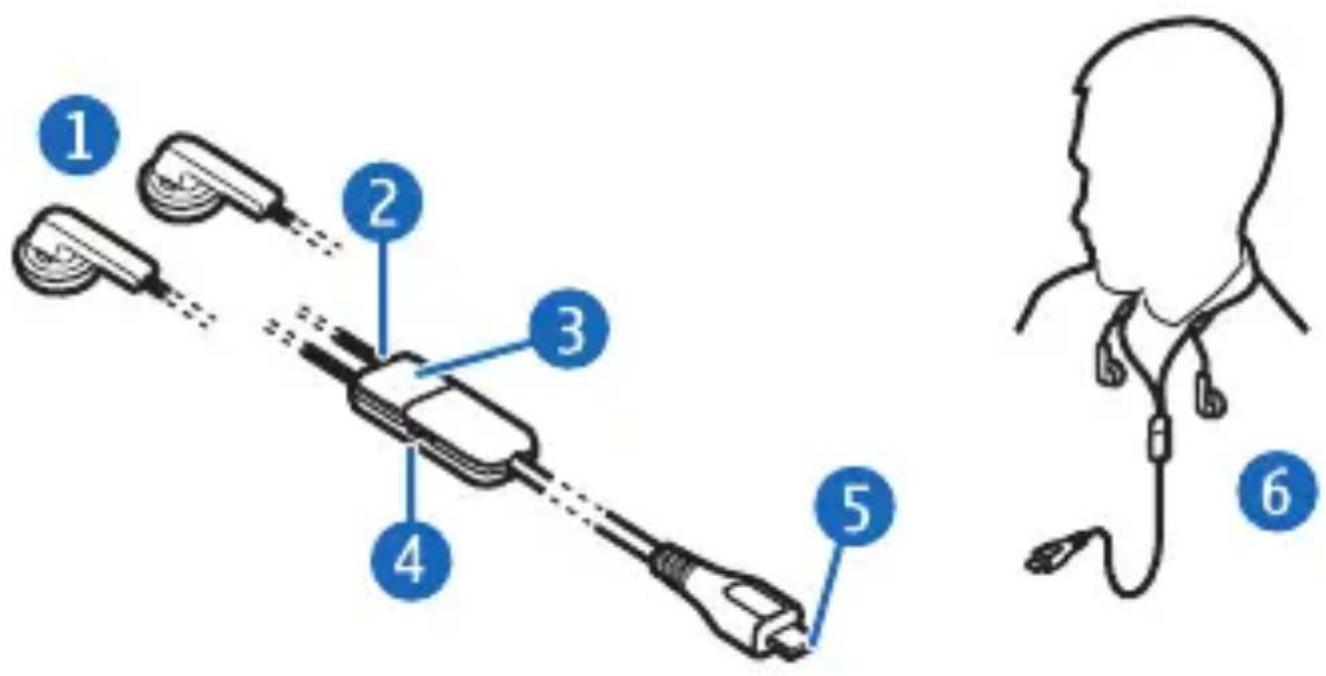
Insert the headset plug (part 5 shown on the title page) into the micro USB connector on your mobile device. Wear the headphones (1) so that you can adjust the distance between the microphone (2) and your mouth by pulling the headphone cables (see Figure 6). The headset is now ready for use.
Keep all accessories and enhancements out of the reach of small children.
Parts of the headset are magnetic. Metallic materials may be attracted to the headset. Do not place credit cards or other magnetic storage media near the headset, because information stored on them may be erased.

Warning: When you use the headset, your ability to hear outside sounds may be affected. Do not use the headset where it can endanger your safety.
Adjust the volume
To adjust the volume, press the volume key (4) up or down.
Call handling
To make a call, use your mobile device in the normal way when the headset is connected to your mobile device. During the call, speak into the microphone of the headset.
If your mobile device supports voice dialling, press and hold the answer/end key (3), and proceed as described in the user guide of your mobile device.
To answer an incoming call, press the answer/end key, or use the keys of the mobile device. To reject an incoming call, press the answer/end key twice.
To end a call, press the answer/end key, or use the keys of the mobile device.
Mute the microphone
To mute or unmute the microphone of the headset during a call, briefly press the middle of the volume key.
Care and maintenance
Your device is a product of superior design and craftsmanship and should be treated with care. The following suggestions will help you protect your warranty coverage.
- Keep the device dry. Precipitation, humidity, and all types of liquids or moisture can contain minerals that will corrode electronic circuits. If your device does get wet, allow it to dry completely.
-
Do not use or store the device in dusty, dirty areas. Its moving parts and electronic components can be damaged.
-
Do not store the device in hot areas. High temperatures can shorten the life of electronic devices, damage batteries, and warp or melt certain plastics.
- Do not store the device in cold areas. When the device returns to its normal temperature, moisture can form inside the device and damage electronic circuit boards.
- Do not attempt to open the device.
- Do not drop, knock, or shake the device. Rough handling can break internal circuit boards and fine mechanics.
- Do not use harsh chemicals, cleaning solvents, or strong detergents to clean the device.
- Do not paint the device. Paint can clog the moving parts and prevent proper operation.
If the device is not working properly, take it to the nearest authorised service facility for service.

Brand : NOKIA
Model : HS-82
Category : Hi-Fi System