
WH-500 - Hi-Fi System NOKIA - Free user manual and instructions
Find the device manual for free WH-500 NOKIA in PDF.


| Product Type | Stereo Headset |
| Brand | Nokia |
| Model | WH-500 |
| Compatibility | Nokia devices with 3.5 mm or 2.5 mm AV connector, other devices with standard 3.5 mm audio connector |
| Connector Type | 3.5 mm (with adapters for 2.5 mm and standard 3.5 mm) |
| Controls | Volume up/down, answer/end key, play/pause, fast forward, rewind |
| Microphone | Built-in, positioned near mouth |
| Main Functions | Make and answer calls, listen to music, control FM radio |
| Voice Dialing Support | Yes (press and hold answer/end key) |
| Adapter Included | AD-52 (2.5 mm AV) and AD-63 (standard 3.5 mm audio) |
| Color | Black (typical) |
| Weight | Approximately 150 g |
| Dimensions (unfolded) | Approximately 180 x 160 x 50 mm |
| Cable Length | Approximately 1.2 m |
| Care Instructions | Keep dry, avoid dust, do not use harsh chemicals |
| Safety Warnings | Do not use when hearing outside sounds is critical; contains small parts and nickel |
| Environmental Disposal | Separate collection for electrical/electronic products per EU directive |
| Warranty | Standard manufacturer warranty (refer to device documentation) |
| Package Contents | Headset, AD-52 adapter, AD-63 adapter, user manual |
Frequently Asked Questions - WH-500 NOKIA
User questions about WH-500 NOKIA
0 question about this device. Answer the ones you know or ask your own.
Ask a new question about this device
Download the instructions for your Hi-Fi System in PDF format for free! Find your manual WH-500 - NOKIA and take your electronic device back in hand. On this page are published all the documents necessary for the use of your device. WH-500 by NOKIA.
USER MANUAL WH-500 NOKIA
Nokia Stereo Headset WH-500
9211093/1
ENGLISH
© 2009 Nokia. All rights reserved.
Nokia, Nokia Connecting People and the Nokia Original Accessories logo are trademarks or registered trademarks of Nokia Corporation.
Introduction
With the Nokia Stereo Headset WH-500, you can make and answer calls and listen to music from a compatible device.
This product may contain small parts. Keep them out of the reach of small children. The headband hinges of this device may contain a small amount of nickel. Persons who are sensitised to nickel may have symptoms from prolonged contact with the hinges.
ENGLISH
Parts of the device are magnetic. Metallic materials may be attracted to the device. Do not place credit cards or other magnetic storage media near the device, because information stored on them may be erased.
Warning: When you use the headset, your ability to hear outside sounds may be affected. Do not use the headset where it can endanger your safety.
Get started
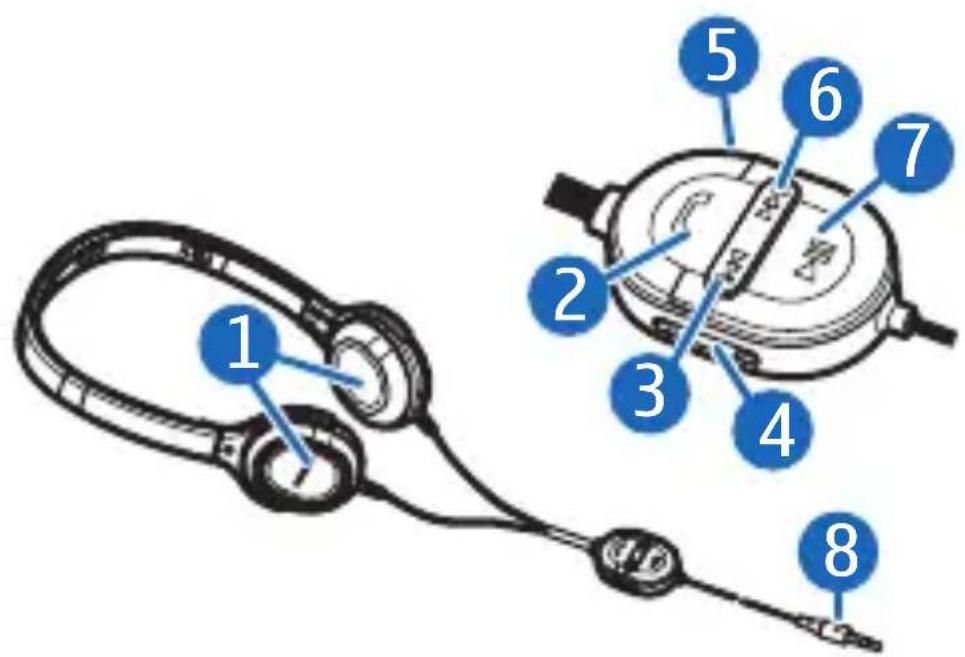
Gently unfold the headset, turn the speaker pads (part 1 shown on the title page) so that they point towards each other, and connect the headset to a compatible device.
To connect the headset to a compatible Nokia device that has the Nokia 3.5 mm AV connector, insert the headset plug (8) into the AV connector. For details, see the user guide of your device.
ENGLISH
To connect the headset to a compatible Nokia device that has the Nokia 2.5 mm AV connector, connect the supplied AD-52 adapter to the headset plug and then the adapter to the device.
To connect the headset to a compatible device (such as a music player) that has the standard 3.5 mm audio connector, connect the supplied AD-63 adapter to the headset plug and then the adapter to the device. When you use this adapter, you can only use the headset to listen to music.
Place the headset over your head so that the speaker pads rest comfortably on your ears. Place the pad indicated with L on the left ear and the pad with R on the right ear. Wear the headset so that the microphone (5) is near to your mouth. The headset is now ready for use.
Adjust the volume
To adjust the volume, press the volume key (4) up or down.
ENGLISH
Calls
To make a call, use your mobile device in the normal way when the headset is connected to your mobile device. During the call, speak into the microphone of the headset.
If your mobile device supports voice dialling, press and hold the answer/end key (2), and proceed as described in the user guide of your mobile device.
To answer or end a call, press the answer/end key. To reject a call, press the answer/end key twice.
Listen to music
You can use the headset to listen to music on your compatible device.
Warning: Listen to music at a moderate level. Continuous exposure to high volume may damage your hearing.
ENGLISH
To play a song, select the song in the music player, and press the play/pause key (7). For details, see the user guide of your device.
To select the next song, press the fast forward key (6). To select the previous song, press the rewind key (3). To scroll through the songs quickly during playback, press and hold either key. To pause or restart the music player, press the play/pause key.
Listen to radio
To listen to the radio, start the FM radio feature on your compatible device. For details, see the user guide of your device. To search for a previously saved radio channel, press the fast forward or rewind key repeatedly.
Care and maintenance
Your device is a product of superior design and craftsmanship and should be treated with care. The following suggestions will help you protect your warranty coverage.
ENGLISH
- Keep the device dry. Precipitation, humidity, and all types of liquids or moisture can contain minerals that will corrode electronic circuits. If your device does get wet, allow it to dry completely.
- Do not use or store the device in dusty, dirty areas. Its moving parts and electronic components can be damaged.
- Do not store the device in hot areas. High temperatures can shorten the life of electronic devices, damage batteries, and warp or melt certain plastics.
- Do not store the device in cold areas. When the device returns to its normal temperature, moisture can form inside the device and damage electronic circuit boards.
- Do not attempt to open the device.
- Do not drop, knock, or shake the device. Rough handling can break internal circuit boards and fine mechanics.
ENGLISH
- Do not use harsh chemicals, cleaning solvents, or strong detergents to clean the device.
- Do not paint the device. Paint can clog the moving parts and prevent proper operation.
If the product is not working properly, take it to the nearest authorised service facility for service.
Disposal
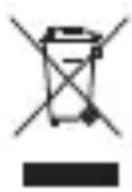
The crossed-out wheeled-bin symbol on your product, literature, or packaging reminds you that all electrical and electronic products, batteries, and accumulators must be taken to separate collection at the end of their working life. This requirement applies to the European Union and other locations where separate collection systems are available. Do not dispose of these products as unsorted municipal waste.
By returning the products to collection you help prevent uncontrolled waste disposal and promote the reuse of material resources. More
ENGLISH
detailed information is available from the product retailer, local waste authorities, national producer responsibility organizations, or your local Nokia representative. For the product Eco-Declaration or instructions for returning your obsolete product, go to country-specific information at www.nokia.com.
Brand : NOKIA
Model : WH-500
Category : Hi-Fi System