
TL933 - Cordless phone TOSHIBA - Free user manual and instructions
Find the device manual for free TL933 TOSHIBA in PDF.


| Product Type | Cordless Phone |
| Brand | TOSHIBA |
| Model | TL933 |
| Dimensions (approx.) | 180 × 140 × 80 mm (base) |
| Weight (handset) | 120 g |
| Power Supply | 2 rechargeable NiMH AAA batteries |
| Standby Time | Up to 100 hours |
| Talk Time | Up to 10 hours |
| Indoor Range | Up to 50 meters |
| Outdoor Range | Up to 300 meters |
| Phonebook | 100 names and numbers |
| Caller ID | Yes, compatible |
| Call List | 50 entries |
| Hands-free | Yes, built-in speaker |
| Ringer | Polyphonic, adjustable |
| Additional Handsets | Up to 4 handsets |
| Intercom Function | Yes, between handsets |
| Call Blocking | Yes, blacklist |
| Care and Cleaning | Clean with a soft, dry cloth |
| Safety | Do not expose to moisture or extreme temperatures |
| Spare Parts and Repairability | Replaceable battery and charger |
| General Information | User manual available for download |
Frequently Asked Questions - TL933 TOSHIBA
User questions about TL933 TOSHIBA
0 question about this device. Answer the ones you know or ask your own.
Ask a new question about this device
Download the instructions for your Cordless phone in PDF format for free! Find your manual TL933 - TOSHIBA and take your electronic device back in hand. On this page are published all the documents necessary for the use of your device. TL933 by TOSHIBA.
USER MANUAL TL933 TOSHIBA
2.4GHz DIGITAL SPREAD SPECTRUM CORDLESS TELEPHONE
SG-1801
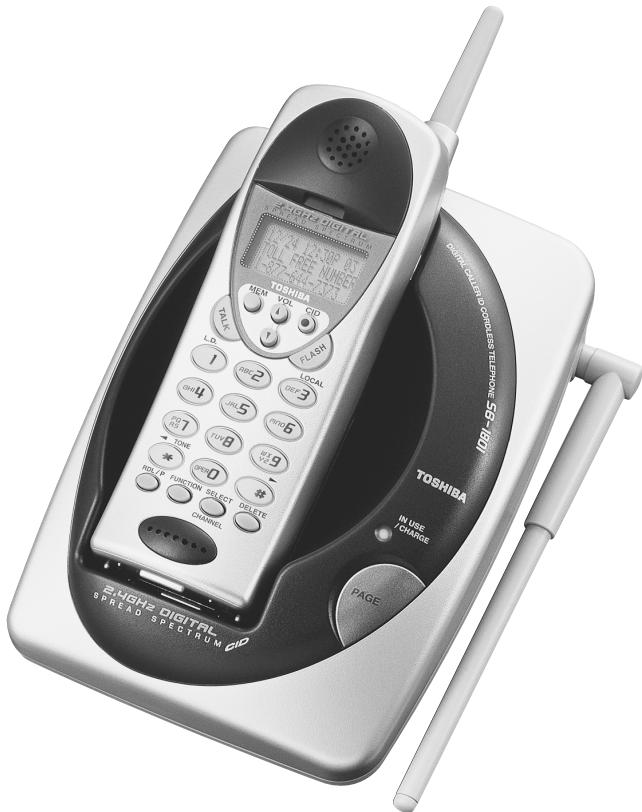
The FIRST thing to do after unpacking your new
cordless telephone is:
CHARGE THE BATTERY!
Please read and follow the few instructions on
PAGE 2
BEFORE YOU DO ANYTHING ELSE.
GETTING STARTED: DO THIS FIRST!
FIRST, CHARGE THE HANDSET BATTERY!
- Set your new phone in an out-of-the-way place near a power outlet where it will not be disturbed.
- Plug the AC adaptor into the wall outlet.
- Plug the AC adaptor cord into the power jack on the base unit.
- Take the cover off the handset battery compartment; plug the battery connector into the receptacle inside the battery compartment and replace the cover. The connector only goes in one way.
- Place the handset into the base unit's charging cradle. The IN USE/CHARGE LED should light. If not, see TROUBLESHOOTING, page 35.
- The battery charging period has now started. From now until the 12-16 hours period is complete, do not let anything cause the handset to be removed from electrical contact with the base unit's charging pins or power to be removed from the base unit.
SECOND,
- Before you can take advantage of the Caller ID and Call Waiting features, you must subscribe to these services from your local telephone company.
- Name and number caller ID only work in conjunction with service provided by your local telephone company.
THIRD, Enter your AREA CODE, see page 16.
FEATURES
Toshiba America Consumer Products, Inc., takes pride in presenting the new 2.4 GHz digital spread spectrum cordless telephone. The Toshiba cordless telephone features a 16-digit x 3-line dot matrix liquid crystal display (LCD) for caller ID on Call Waiting and speed-dial programming and calling. The sleek new design provides face-up battery charging even when wall mounted. Other features are summarized below.
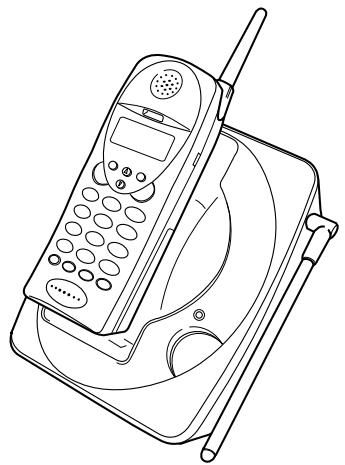
2.4 GHz Digital Spread Spectrum Transmission with Extended Talk Range
35 Channel Auto Scanning
- 50 Name & Number Caller ID
- Caller ID on Call Waiting
- Call Waiting Options
- Digital Call Protect Privacy
- Scrambling and Digital Security Code
- Digital Security Code (about 65,000)
20 Speed Dial (20 digits each)
- Long Standby Battery Life (10 days)
One Way Page/Handset Locator
-3-Number Redial (32 digits)
- Any-Key Answer
Reversible Charging System
Hearing Aid Compatible/HAC Volume
- Desk/Wall Mountable (Bracket included)
- Headset Jack
- Backlit 3-Line Alphanumeric LCD Display
Volume Control (4 Level)
Ringer Volume and Tone Control
Preparation
INTRODUCTION 3
Features 3
IMPORTANT SAFETY INSTRUCTIONS 6
LOCATION OF CONTROLS 8
Handset 8
Base unit 9
INSTALLATION 10
Setting up the base unit (Desk top mounting) 10
AC adaptor information 10
Setting up the base unit (Wall mounting) 11
Charging the battery pack 12
Setting the tone/pulse switch 14
Setting or canceling the Auto Talk function 15
Setting or canceling caller ID on call waiting 15
Setting the area code 16
Using the headset and belt clip (option) 17
Basics
BASIC OPERATION 18
Making a call 18
Receiving a call 18
3-numberredial 19
Out of range 19
Handset earpiece volume setting 19
Handset ringer volume setting 19
Ringer off 19
Tone/Pause 20
Interference or static 20
Paging the handset 21
MEMORY DIALING 22
Storing numbers 22
TABLE OF CONTENTS
Steps for entering names and special characters 24
If you make a mistake while entering a name 25
Dialing a stored number 25
Editing and deleting stored numbers 26
Caller ID/Call waiting
CALLER ID/CALL WAITING 28
Answering a call with caller ID service 28
Searching caller ID memory 29
Calling back from the caller ID list 29
Editing caller ID data 30
Transfering CID number to speed-dial memory 30
Deleting caller ID data 31
Call waiting 32
Call waiting options 33
Additional Information
TROUBLESHOOTING 35
WARRANTY/SERVICE 38
WALL MOUNT TEMPLATE 11
IMPORTANT SAFETY INSTRUCTIONS
When using your telephone equipment, basic safety precautions should always be followed to reduce the risk of fire, electric shock and injury.
1 Read and understand all instructions.
2 Follow all warnings and instructions marked on the product.
3 Unplug this product from the wall outlet before cleaning. Do not use liquid cleaners or aerosol cleaners. Use a dry cloth for cleaning.
4 Do not use this product near water sources, such as bath tubs, wash bowls, kitchen sinks, laundry tubs, wet basements, or swimming pools.
5 Do not place this product on an unstable cart, stand, or table. The telephone may fall, causing serious damage to the telephone.
6 Slots and openings in the cabinet and the back or bottom are provided for ventilation. To protect it from overheating, these openings must not be blocked or covered. The openings should never be blocked by placing the product on a bed, sofa, rug, or other similar surface. This product should never be placed near or over a radiator or heat register. This product should not be placed in a built-in installation unless proper ventilation is provided.
7 Do not allow anything to rest on the power cord. Do not locate this product where the cord can be stepped on or tripped over.
8 Do not overload wall outlets and extension cords as this can result in the risk of fire or electric shock.
9 Never push objects of any kind into this product through cabinet slots as they may touch dangerous voltage points or short out parts that could result in a risk of fire or electric shock. Never spill liquid of any kind on the product.
10 Do not disassemble this product. Opening or removing covers puts you at risk of electrical shock, and incorrect reassembly can cause shocks, sparks or other damage during subsequent use.
11 Take this product to a qualified service technician under any of the following conditions:
A. When the power supply cord is damaged or frayed.
B. If liquid has been spilled into the product.
C. If the product has been exposed to rain or water.
D. If the product does not operate normally according to the operating instructions. Adjust only those controls covered by this manual. Improper adjustment of other controls may result in serious damage to the unit or your home.
E. If the product has been dropped or the cabinet has been damaged.
F. If the product exhibits a distinct change in performance.
12 Do not use the telephone in the vicinity of a gas leak.
The RBRC™ Seal

The RBRC^TM Seal on the (easily removable) nickel-cadmium battery (contained in our product) indicates that Toshiba America Consumer Products, Inc. (TACP) is voluntarily participating in an industry program to collect and recycle these batteries at the end of their useful lives, when taken out of service within the United States. The RBRC^TM program provides a convenient alternative to placing used nickel-
cadmium batteries into the trash or municipal waste, which is illegal in some areas.
TACP's payments to RBRC^TM make it easy for you to drop off the spent battery at local retailers of replacement nickel-cadmium batteries, or at authorized TACP product service centers. You may also contact your local recycling center for information on where to return the spent battery. Please call 1-800-8-BATTER for information on Ni-Cd battery recycling in your area. TACP's involvement in this program is part of its commitment to protecting our environment and conserving natural resources.
RBRC^TM is a trademark of Rechargeable Battery Recycling Corporation.
CAUTION: TO REDUCE THE RISK OF FIRE OR INJURY TO PERSONS BY THE BATTERY, READ AND FOLLOW THESE INSTRUCTIONS.
BATTERIES
1 Use only the appropriate type and size battery pack specified in the instruction manual provided for this product.
2 Do not dispose of the battery pack in a fire. The cell may explode. Check with State and local codes for possible special disposal instructions.
3 Do not open or mutilate the battery pack. Released electrolytes are corrosive and may cause damage to the eyes or skin. It may be toxic if swallowed.
4 Exercise care in handling the batteries. Contact with conductive materials such as rings, brackets and keys may cause the battery to short out, resulting in overheating which could burn.
5 Charge the battery pack provided with or identified for use with this product only in accordance with the instructions and limitations specified in the instruction manual provided for this product.
6 Observe proper polarity orientation between the battery pack and the battery charger.
ATTENTION: THE PRODUCT THAT YOU HAVE PURCHASED CONTAINS A RECHARGEABLE BATTERY. UNDER VARIOUS STATE AND LOCAL LAWS, IT MAY BE ILLEGAL TO DISPOSE OF THIS BATTERY INTO THE MUNICIPAL WASTE STREAM. PLEASE CHECK WITH YOUR LOCAL GOVERNMENT FOR DETAILS IN YOUR AREA REGARDING RECYCLING OPTIONS OR PROPER DISPOSAL.
SAVE THESE INSTRUCTIONS
TO HELP PROTECT THE ENVIRONMENT, THIS PRODUCT MAY CONTAIN RECYCLED OR RECONDITIONED PARTS AND MATERIALS.
HANDSET
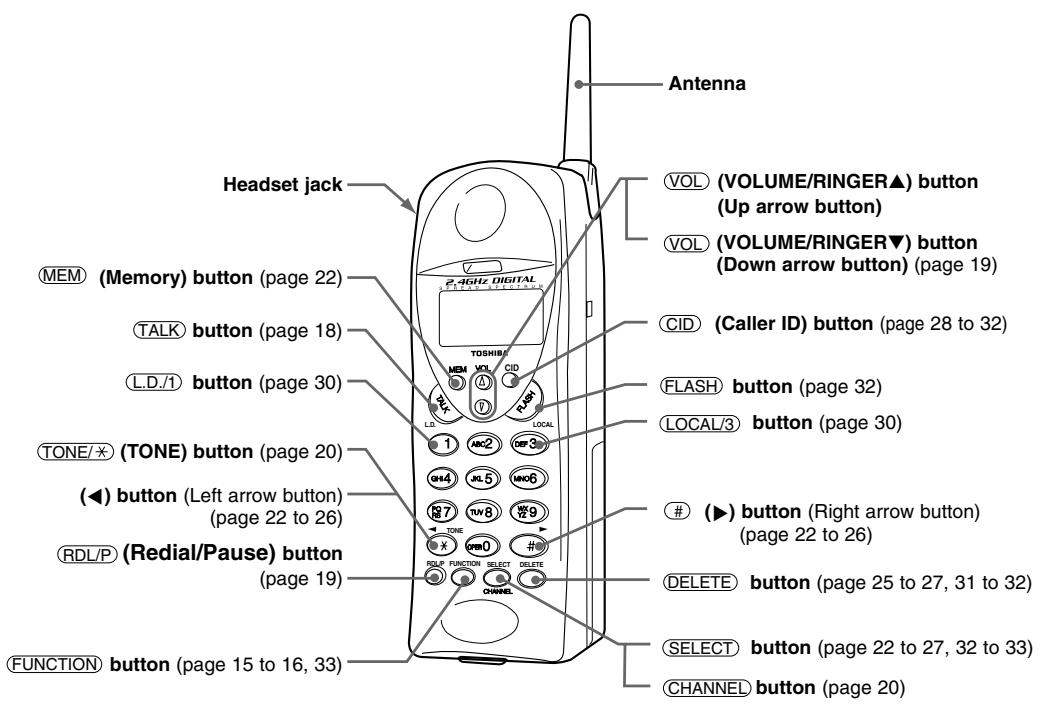
SUPPLIED ACCESSORIES:
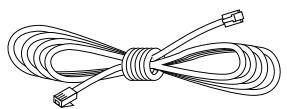
Modular Line Cord Part # RC008231
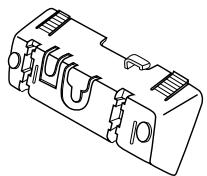
Wall Mount Bracket Part#.RC009262
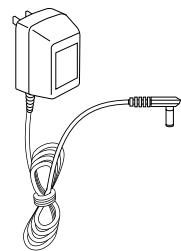
AC Adaptor TAC-2981 Part # RC009792
BASE UNIT
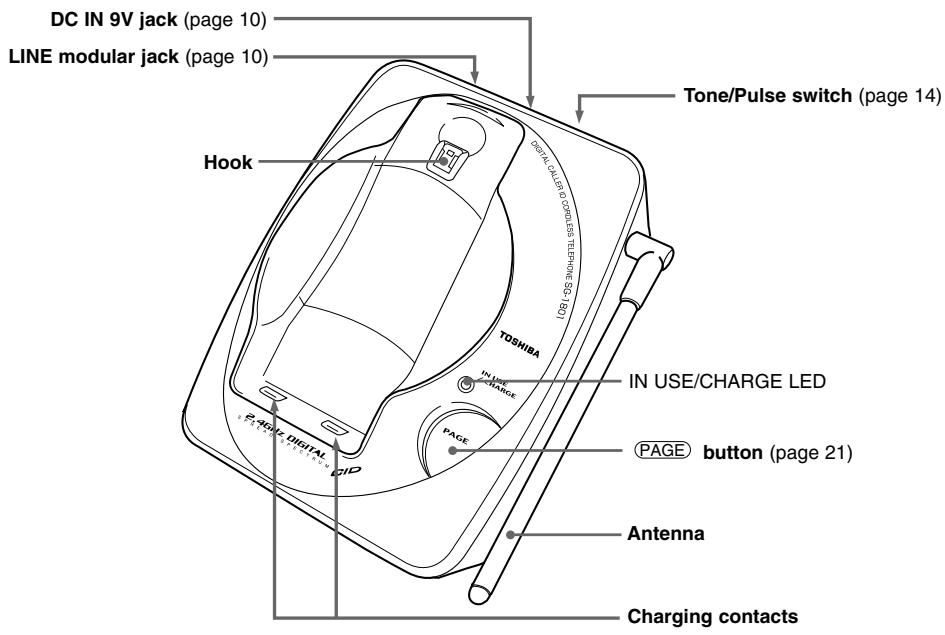
For purchase of accessories, please call 1-877-644-7373.

Rechargeable Battery Pack
Toshiba TRB-1981
Part # RC009814
Owner's manual
Part # RC009816
Quick Reference Guide
Part # RC009817
SETTING UP THE BASE UNIT (DESK TOP MOUNTING)
For setting up the base unit follow the instructions below.
Snap the bracket's tab into the notches on the base.
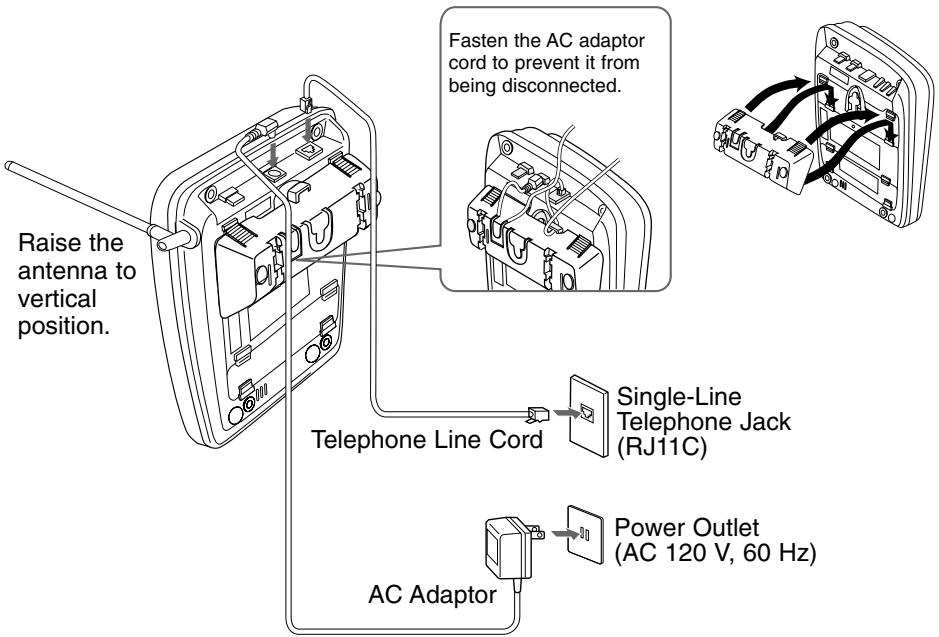
- Plug the AC adaptor firmly into the base unit and the AC 120V outlet.
- USE ONLY WITH Supplied AC ADAPTOR (TAC-2981 power source AC 120V 60Hz/DC9V).
- Connect the AC adaptor to a continuous power supply.
AC ADAPTOR INFORMATION
Use only the supplied AC adaptor, or one matching its specifications exactly with this product. Incorrect voltage may damage the unit or cause it to function improperly.
TOSHIBA
AC ADAPTOR
MODEL NO.: TAC-2981
INPUT:AC120V60Hz7W
OUTPUT:DC 9V 350mA
- -
3509035003CT
CLASS 2 POWER SUPPLY
FOR USE WITH TELEPHONES
TOSHIBA AMERICA
CONSUMERPRODUCTS,INC.
F4 MADE IN CHINA
SETTING UP THE BASE UNIT (WALL MOUNTING)
MOUNTING ON A STANDARD WALL PLATE:
Insert the bracket's tabs into the base's lower tab slots, then press down on the top of the bracket to snap it into the clip slots.
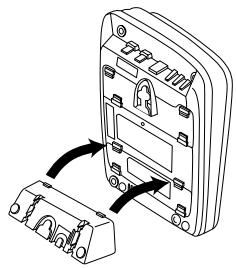
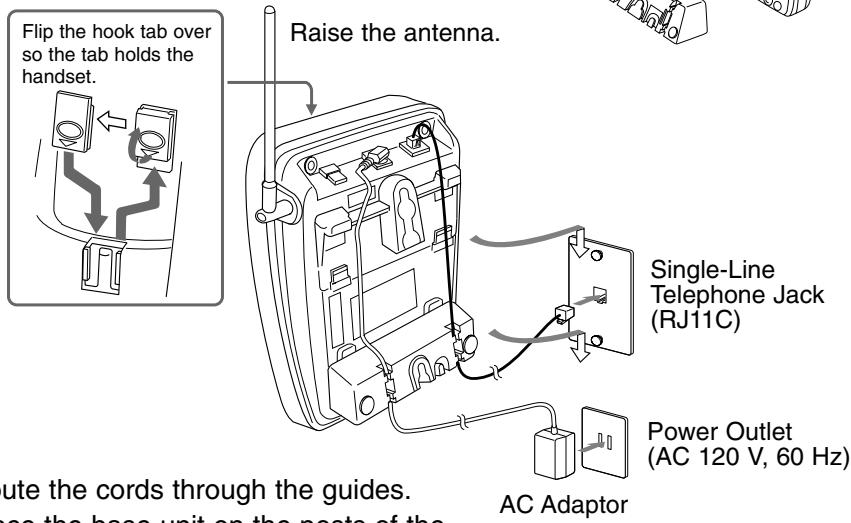
- Route the cords through the guides.
- Place the base unit on the posts of the wall plate and push down until it is firmly seated.
NOTES:
- Do not use any outlet controlled by a wall switch.
- If you don't have a standard wall plate, cut out the template on this page and use it to position two screws (minimum length of 1^3/8 inches) into the wall with the heads protruding about 1/4 inch.
CUT
Wall mount template
IMPORTANT:
- Before mounting, select a wall area of sufficient strength. If mounting on wallboard or in an area of questionable strength, locate a stud for maximum support of your telephone.
- Avoid electrical cables, pipes, or other items behind the mounting location that could cause a hazard.
CHARGING THE BATTERY PACK
It is important to charge the battery for 12-16 hours continuously without any interruption before you use the handset for the first time.
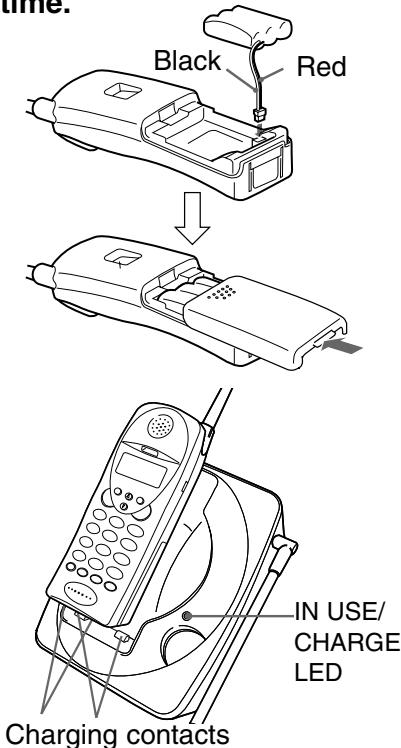
1 Remove the battery cover on the back of the handset by sliding it down.
2 Plug the battery pack cord into the connector with the correct polarity. (black and red wires).
3 Place the battery pack in the battery compartment.
4 Put the battery cover back by sliding until it snaps into place. Make sure not to get the wires of the battery pack caught in the cover.
5 Place the handset on the base unit. Be sure the IN USE/CHARGE LED lights. If the IN USE/CHARGE LED does not light, make sure the AC adaptor is plugged in securely.
NOTES:
- Use only the supplied battery pack (TRB-1981 power source 800mAh, 3.6VDC)
- The battery pack is not charged properly if the charging contacts are dirty or tarnished. Clean the contacts occasionally with a dry cloth.
After the battery pack is fully charged;
| Operation | Approx. battery life |
| While in use (Talk mode) | up to 6 hours |
| While not in use (Standby mode) | up to 10 days |
When "Low Battery" blinks on the LCD, all handset buttons except TALK are disabled and the battery needs to be charged. If this occurs during a call, you hear short beeps. Finish the call as soon as possible and place the handset on the base unit.
Low Battery
NOTES:
- If a call comes in when the battery is too low to operate properly, you will be unable to answer the call or the call will be disconnected.
- The radial memory numbers backup for up to 2 minutes while you replace the battery pack.
- If you must replace the battery pack during a telephone call, complete the replacement of the battery pack within 30 seconds, and you can return to the original call.
Before using the Handset, make sure to read the following instructions.
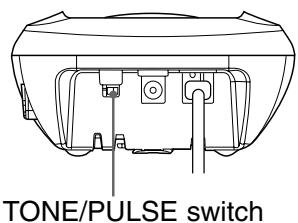
SETTING THE TONE/PULSE SWITCH
Set the TONE/PULSE switch to TONE.
Place a call.
If the call does not connect with the TONE setting, set the TONE/PULSE switch to PULSE.
SETTING OR CANCELING THE AUTO TALK FUNCTION
If the handset is placed on the base unit, you can answer a call by lifting the handset from the base unit (Auto Talk). If the handset is not on the base unit, you can answer a call by pressing any one of the buttons (Any-key Answer function). When the Auto Talk function is set to ON, the Any-key Answer function is also set to ON.
When the Auto Talk function is set to OFF, you can lift the handset and view the caller ID information before taking the call. This function is factory preset to OFF.
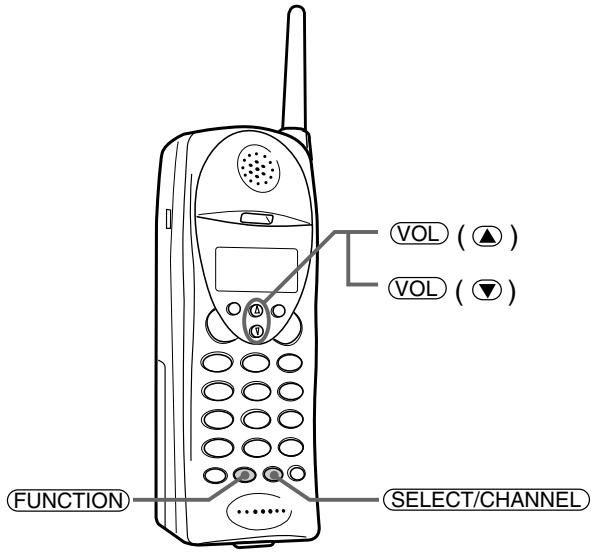
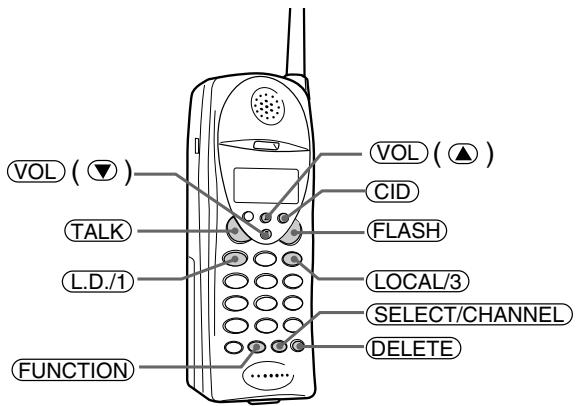
1 Press (FUNCTION). The LCD displays the current setting.
Press SELECT/CHANNEL. Each time you press SELECT/CHANNEL, the On/Off setting will be switched.
3 Press FUNCTION. The handset returns to standby mode.
1Auto Talk:Off
2CIDCW :On
3 Area Code:
1▶Auto Talk:On
2CIDCW :On
3 Area Code:
SETTING OR CANCELING CALLER ID ON CALL WAITING
This function is preset to ON so that you will receive caller ID on Call Waiting when you subscribe to both local telephone company services.
When you set this function to Opt, you can use seven pre-programmed call waiting options (See page 33, "Call Waiting Options").
If you do not subscribe to these services, be sure to set this function to OFF.
1 Press FUNCTION. The LCD displays the current setting.
2 Press l or 2 to move the pointer to CIDCW and press SELECT/CHANNEL. Each time you press SELECT/CHANNEL, the On/Off/Opt setting will be switched.
3 Press FUNCTION and replace the handset on the base unit.
1Auto Talk:Off
2CIDCW :On
3 Area Code:615
1 Auto Talk:Off
2▶CIDCW :On
3 Area Code:615
SETTING THE AREA CODE
It is necessary to program your area code so that local calls will be displayed properly on caller ID.
1 Press (FUNCTION).
1Auto Talk:Off
2CIDCW :On
3 Area Code:
2 Press or 3 to move the pointer to Area Code.
1 Auto Talk:Off
2CIDCW :On
3Area Code:
3 Press SELECT/CHANNEL
1 Auto Talk:Off
2CIDCW :QnI
3 Area Code:6-15
Enter your 3-digit area code. For example, enter "615." If you enter a wrong number, press DELETE.
4 Press SELECT/CHANNEL
1 Auto Talk:Off
2CIDCW :On
3Area Code:615
Confirmation tone sounds.
5 Press FUNCTION
The handset returns to the standby mode.
NOTES:
- Change your area code when you move to another location that has a different area code.
- When you make a call or redial to a number within your area code, only the last 7 digits of the phone number are dialed when you set the area code.
- During call-back, however, the phone will include the area code from where the call originated when it automatically redials the number. To avoid this problem, always be sure to set the area code of your phone so that the phone will automatically exclude the area code when the incoming code is the same as that of the phone.
USING THE HEADSET AND BELT CLIP (OPTION)
For purchase of an optional accessory, please call 1-877-644-7373.
HEADSET
You can use an optional headset (part#: RC 008260) that has a 3/32-inch (2.5mm) plug.
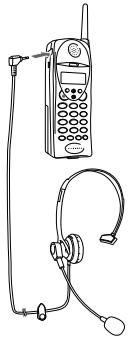
To connect the headset, open the rubber cover on the left side of the handset, then insert the headset's plug into the jack.
With a headset connected, you can make or answer calls as usual using the keys on the handset.
When you finish using the headset, disconnect it from the handset and close the rubber cover to protect the jack.
NOTES:
- The handset's earspeaker and microphone are turned off with a headset connected.
- Pressing the ( , ) button of the handset also controls the connected headset's volume.
- If you place the handset on the base unit while the headset is connected, be sure the handset is placed properly.
BELTCLIP
You can attach an optional Belt Clip (part # RC009263) to the handset in order to carry it on your belt.
Attaching the Belt Clip to the Handset
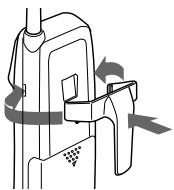
Insert the Belt Clip tabs into the holes on each side of the handset until they click.
NOTE:
Be sure to insert the tabs properly into each hole to prevent the Belt Clip from falling off.
Removing the Belt Clip from the Handset
Pull both sides of the Belt Clip to release the tabs from the grooves.
NOTE:
Remove the Belt Clip carefully from the handset, taking care not to hurt your fingers or damage your nails.
Before using the Handset, make sure to read the following instructions.
MAKING A CALL
| Handset On The Base | Handset Off The Base |
| 1) Pick up the handset. 2) Press TALK. 3) Listen for the dial tone. 4) Dial the number. OR 1) Pick up the handset. 2) Dial the number, then press TALK. | 1) Press TALK. 2) Listen for the dial tone. 3) Dial the number. OR Dial the number, then press TALK. |
| To hang up: press TALK, or return the handset to the base (Auto Standby). | |
NOTE:
To delete a wrong number, press DELETE. To delete all the wrong numbers, press and hold DELETE.
RECEIVING A CALL
| Handset On The Base | Handset Off The Base |
| Pick up the handset (AutoTalk) or press TALK. | Press any button (Any-Key Answer) or press TALK. |
| To hang up: press TALK, or return the handset to the base (Auto Standby). | |
NOTE:
To use Any-key Aanswer and Auto Talk functions, set the Auto Talk to ON (See page 15).
3-NUMBER REDIAL
You can redial any of the last three numbers dialed from the handset:
1 Press / P in standby mode. The last dialed number (Redial 1) appears.
Each time you press / P , the LCD displays one of the three last dialed numbers (Redial 1 to Redial 3).
2 After the desired number has been selected, press TALK. The call will be connected.
NOTES:
- The handset redials only up to 32 digits even for a number that exceeds this limit.
- When you press (RDL/P) after pressing (TALK), the latest dialed number will be dialed automatically.
OUT OF RANGE
During a call, as you begin to move too far from the base unit, the noise increases. Then, you should move close to the base unit. If you travel out-of-range, your call terminates.(See page 20 "Interference or static").
HANDSET EARPIECE VOLUME SETTING
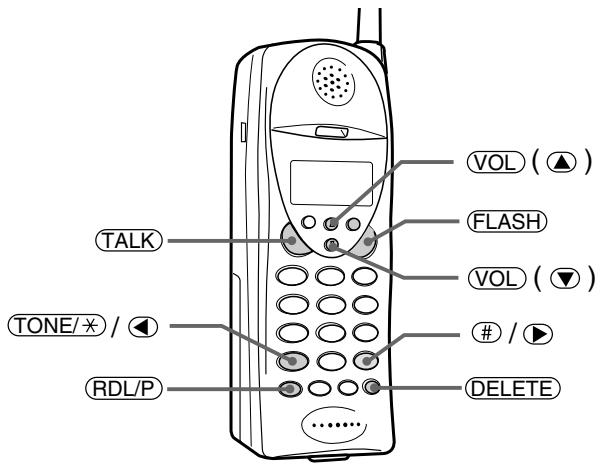
To adjust the earpiece volume, press VOL (or ) during a call.
HANDSET RINGER VOLUME SETTING
To adjust the ringer volume, press VOL (or ) during standby mode.
RINGER OFF
You can turn off the handset ringer volume.
During standby mode or when you set the ringer volume, press and
hold (②) till "Ringer Off" appears.
To resume the Ringer, press VOL (or ).
Ringer Off
TONE/PAUSE
| To | Do this |
| To temporarily switch to tone dial (When the base is set to pulse mode), see page 14. | Press TONE/×. The following numbers will be sent as tone dialing. |
| To enter a pause within the dialing sequence | Press RDL/P. “P” appears in the display which represents a pause. |
EXAMPLE: To make a call “0 PAUSE 12345678” with tone dialing in pulse mode, press TONE/× 0 RDL/P 1 2 3 4 5 6 7 8.
INTERFERENCE OR STATIC
If you hear noise during a call, press SELECT/CHANNEL to select another channel. The LCD displays "Scanning" while changing channels.
Talk 0:15 Scanning
PAGING THE HANDSET
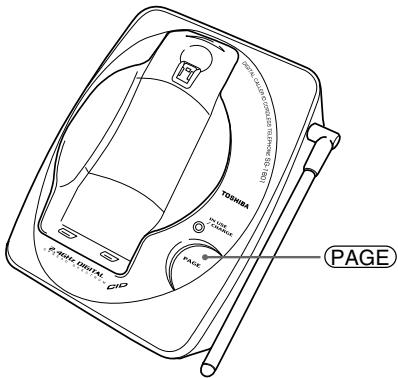
1 To locate the handset while it is off the base, press (PAGE). The handset beeps for 60 seconds.
Paging
To stop paging, press (PAGE) or any key at the handset, or return the handset to the base unit.
NOTES:
- You cannot page the handset during a call.
- Be careful not to get your ear too close to the ringer on the back side of the handset while paging, as the paging tone may be too loud.
You can store up to 20 telephone numbers and their associated names in the memory.
NOTES:
- Always press a button within 20 seconds or the phone will return to standby.
- If you press a wrong button, an error tone sounds and the handset returns to standby mode.
- If you receive an incoming call or a pager call from the base unit during the operation, the operation will be cancelled.
STORING NUMBERS
You can store up to 20 digits including #, *, and PAUSE as a telephone number, and up to 13 characters as a name in one memory address.
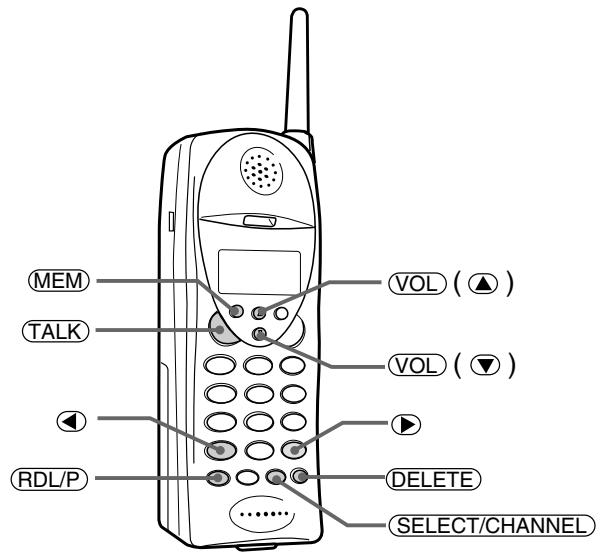
1 Pick up the handset and press and hold (MEM) till a beep sounds.
Memory Store 01 02
2 Enter a two-digit number (01-20), or press to select a free memory location number.
3 Press SELECT/CHANNEL
4 To enter a name, use the number keys.
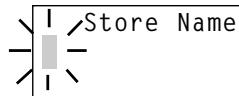
- See the steps for storing names and special characters. (see page 24)
- If a name is not required, go to step 5.
5 Press SELECT/CHANNEL
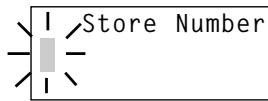
6 Enter a telephone number to be stored.
NOTES:
- By pressing ① RDL/P, you can insert a 2-second pause in the memory dial to make a long distance call or call through a PBX.
- Press DELETE to delete characters as needed.
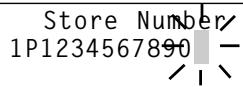
7 Press SELECT/CHANNEL. A confirmation beep sounds and the number is stored.
Memory01 Stored
8 The LCD returns to Memory Store screen. To store more names and numbers, return to step 2.
If you do not store a name, only the memory location < Memory01> appears.
Memory Store 01>
9 To finish the operation, press MEM or return the handset to the base unit.
STEPS FOR ENTERING NAMES AND SPECIAL CHARACTERS
Refer to the letters on the number buttons to select the desired letter.
Each button selects a character as shown below.
| Number of times key is pressed | |||||||||
| Keys | 1 | 2 | 3 | 4 | 5 | 6 | 7 | 8 | 9 |
| 1 | 1 | ||||||||
| ABC2 | A | B | C | a | b | c | 2 | ||
| DEF3 | D | E | F | d | e | f | 3 | ||
| GHI4 | G | H | I | g | h | i | 4 | ||
| JKL5 | J | K | L | j | k | l | 5 | ||
| MNO6 | M | N | O | m | n | o | 6 | ||
| PQRS7 | P | Q | R | S | p | q | r | s | 7 |
| TUV8 | T | U | V | t | u | v | 8 | ||
| WXYZ9 | W | X | Y | Z | w | x | y | z | 9 |
| 0 | * | # | - | & | ( | ) | blank | 0 | |
For example, to enter "Ted Doe" and 1 - 1 2 3 - 4 5 6 - 7 8 9 0
1 Pick up the handset and press and hold MEM till a beep sounds.
2 Enter a number or press , to select a free memory location number.
3 Press SELECT/CHANNEL
4 Press 8 once.
5 Press 3 five times then press to move the cursor to the right.
6 Press 3 four times then press twice to enter a space.
Press 3 once.
8 Press 6 six times.
9 Press 3 five times.
10 When finished, press SELECT/CHANNEL
11 Press 1 1 2 3 4 5 6 7 8 9 0 to be stored.
12 Press SELECT/CHANNEL
IF YOU MAKE A MISTAKE WHILE ENTERING A NAME
Use 4 or 6 to move the cursor to the incorrect character. Press DELETE to erase the wrong entry, then enter the correct character. To delete all characters, press and hold DELETE.
DIALING A STORED NUMBER
1 Pick up the handset and press MEM.
2 Press , or enter a two-digit number (01-20) to display the desired destination.
01▶Ted Doe
02 DOE JOHN
03 MOM AND DAD
NOTES:
- When you press (SELECT/CHANNEL), the LCD displays both the name and the telephone number.
- When the stored phone number has 14 or more digits, is displayed next to the 12th digit. Press ① to see the rest of the numbers, and ④ to return.
Ted Doe
1234567890
3 Press TALK. The selected number will be dialed.
NOTE:
If you press MEM while you are selecting a location, memory selection is cancelled and the handset returns to standby.
EDITING AND DELETING STORED NUMBERS
You can delete a number or simply store another one in its place.
When you store a new phone number, the data stored in that memory location is deleted automatically.
1 Pick up the handset and press and hold (MEM). The confirmation tone sounds.
2 Enter a two-digit number (01-20) or press , to select the memory location you want to edit/delete.
3 Press SELECT/CHANNEL
4 Press or to select the desired function and press SELECT/CHANNEL. To edit the stored data, select "Edit
Memory." To delete the data, select "Delete Memory." To return to the previous screen, select "Go Back."
Edit Memory01 Delete Memory01 Go Back
Edit Memory01 Delete Memory01 Go Back
5 To edit data, go to step a. To delete data, go to step b.
a EDITING THE NAME AND TELEPHONE NUMBER
Use the number buttons and or buttons to edit the name. (See "Storing Numbers" on page 22 for instructions on how to enter names).
(1) Press DELETE to erase a character at the cursor position.
The next character on the right moves to the cursor position.
(2) Press SELECT/CHANNEL
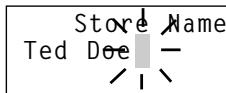
(3) Press DELETE to erase numbers, and enter the correct number.
(4) Press SELECT/CHANNEL. A confirmation tone sounds and the number is stored. Press MEM or return the handset to the base unit.
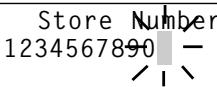
Memory01 Stored

DELETING THE STORED DATA
(1) Press l or to move the pointer to select Yes or No.
(2) Press SELECT/CHANNEL or DELETE
If Yes is selected: a confirmation tone sounds and the number is erased.
If No is selected: the LCD returns to the "Memory Store" display.
Delete Memory01?
Yes
No
Memory01 Deleted
Memory Store 01 ▲Ted Doe 02 DOE JOHN
(3) Press MEM, or return the handset to the base unit.
NOTES
- Before you can take advantage of the Caller ID and Call Waiting features, you must subscribe to these services from your local telephone company.
- Name and number caller ID only work in conjunction with service provided by your local telephone company.
ANSWERING A CALL WITH CALLER ID SERVICE
1
When the caller ID message is received, the display shows the caller's phone number along with the date and time. The incoming call information is stored in the Caller ID record.
If the Caller ID service includes the caller's name, the caller's name appears on the display (up to 15 characters).
| Caller's name | Incoming Call |
| SMITH JOHN | |
| Caller's phone number | 123-456-7890 |
You may receive any one of the following messages;
When invalid data is received Incomplete Data
When a private name is received ....Private Name
When a private number is received ....Private Number
When an unknown name is received . . . . .Unknown Name
When an unknown number is received . . . .Unknown Number
2
When you pick up the phone, the display changes to "TaI k."
NOTES:
- If you answer a call before the Caller ID message is received (for example, before the second ring), the Caller ID message will not appear and store.
- When the call is received via a telephone company that does not offer Caller ID service, the caller's phone number and name do not appear and store. (This includes international calls).
- When the call is via a Private Branch exchange (PBX), the caller's phone number and name may not appear and store.
Data errors appear as "■."
Volume Medium
Talk 0:00
SEARCHING CALLER ID MEMORY
To review who has called, follow the steps below.
The caller ID memory retains a listing of the 50 most recent callers.
1 Pick up the handset and press ⑥ CID
If new caller ID data does not exist:
Total:02
If there is new caller ID data:
New :01
Total:02
2 Press to display the latest incoming call.
Press to see the previous incoming call.
1/7 9:30AM 12
DOE JOHN
555-2563
3 Press ① to return to standby mode.
CALLING BACK FROM THE CALLER ID LIST
1 Pick up the handset and press ©CID. Then, press or to display the number you wish to call.
1/7 9:30AM 12
SMITH JOHN
456-7890
2 Press TALK. The displayed number will be dialed.
TALK
4567890
NOTE:
To enter a number for a long distance call, see "EDITING CALLER ID DATA," page 30. It is not necessary to add a "1" when dialing some area codes. If in doubt, check your local telephone directory.
EDITING CALLER ID DATA
You can edit the Caller ID data.
1 Pick up the handset and press ① . Then, press ⑦ or ④ repeatedly to display the Caller ID data you want to edit.
2 Press L.D./1 for a long distance call prefix "1" and LOCAL/3 for area code setting and cancellation.
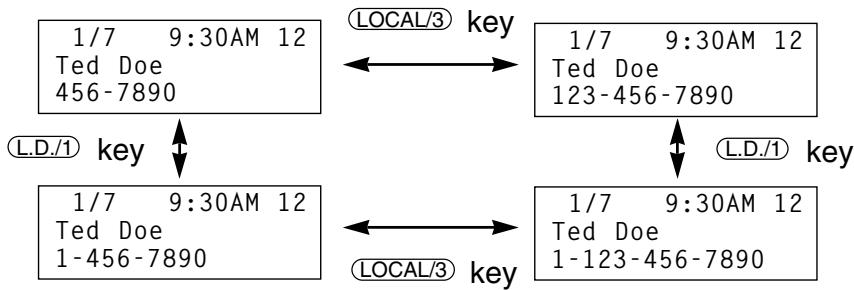
NOTE: Before you use / 3 for area code setting and cancellation, make sure the AREA CODE is set. (See page 16)
3 After editing Caller ID data, you can make the call or store procedures.
To make a call, press TALK.
To store into memory dial, press MEM. Then, select memory location with or and press SELECT/CHANNEL
TRANSFERING CID NUMBER TO SPEED-DIAL MEMORY
1 Pick up the handset and press ① . Then, press ⑦ or ④ to indicate the number you want to store in the memory.
2 Press MEM
3 Enter a two-digit number (01-20) or press , to select memory location.
Select Location 01 02
4 Press SELECT/CHANNEL. A confirmation tone sounds and the Caller ID data is stored. Press CID to return to standby.
If you select a memory location which is already stored:
Press to select “Yes” and press SELECT/CHANNEL.
Replace Memory? Yes No
A confirmation tone sounds and the new data overwrites the old data. The LCD returns to the Caller ID display screen.
If you select No :
The LCD returns to the Caller ID display screen.
Press CID to return to standby mode.
DELETING CALLER ID DATA
DELETE INDIVIDUAL CALLER ID DATA:
1 Pick up the handset and press . Then, press or to display the caller ID number you want to delete from the memory.
2 Press DELETE
Press or to select Yes or No.
Delete Message?
Yes
No
3 Press SELECT/CHANNEL or DELETE. If you
select “Yes,” you hear a confirmation tone and the LCD displays the next caller ID data. If there is none, the LCD displays the number of calls.
If you select "No," the LCD returns to the Call ID display screen.
4 Press CID to return to standby.
DELETE ALL CALLER ID DATA:
1 Press CID.
New :01
Total:02
2 Press DELETE
Press or to select Yes or No.
Delete All?
Yes
No
3 Press SELECT/CHANNEL or DELETE.
If you select Yes, a confirmation tone sounds and the LCD displays "Total:00."
Total:00
If you select No, the LCD displays the number of Caller ID calls.
New :01
Total:02
4 Press CID to return to the standby mode.
CALL WAITING
"Caller ID" and "Call waiting" are separate services. CIDCW (Caller ID on Call Waiting) performs the same as regular Caller ID on a call waiting number. You must subscribe to the CIDCW services before you can use the following features. The "Call waiting" service can also be used independently. Please contact your local telephone company for details.
With Caller ID on call waiting, you can see who is calling to decide if you want to interrupt your current conversation to answer the incoming call.
1 Before answering a call, check to see that the caller's name and telephone number are displayed on the screen. To switch to the waiting call, press (FLASH) on the handset. The first caller is put on hold.
2 To switch back to the first caller, press FLASH again.
NOTES:
- Pressing FLASH without having received a Call Waiting signal may disconnect the current line.
- When CIDCW is set to Opt in the Caller ID setup menu (See page 15), if you press FUNCTION after receiving a call waiting call, you can view a list of ways to handle the new call. Choose an option using the and , and press SELECT/CHANNEL to activate.
CALL WAITING OPTIONS
Your phone gives you new options for call waiting. At the touch of a button, you can ask the caller to hold, send them to your voice mail service, or conference them into your current call. You may be required to subscribe to a voice mail service, call waiting, and call waiting options to use these features.
Follow these steps to use call waiting options. This is an example for "Conference."
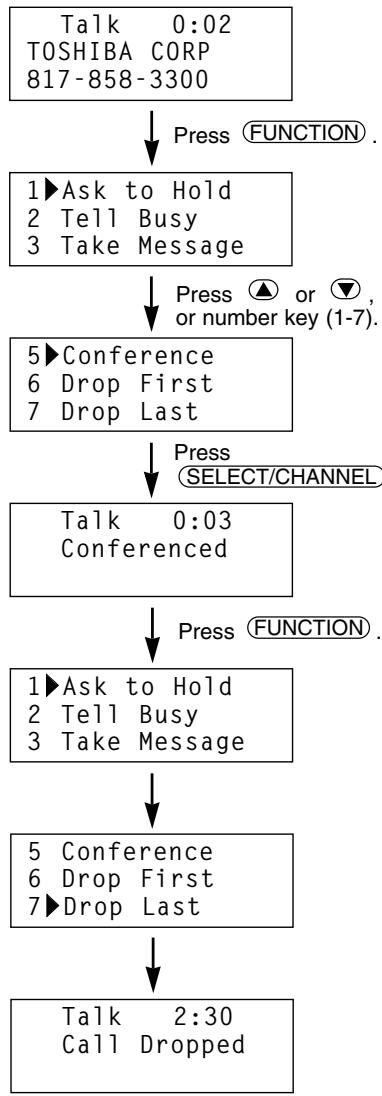
You receive a call waiting call.
A list of options appears. (For more information on the options, see the table on page 34).
Select one of seven options.
To select "Conference," press ⑤ or scroll down to "Conference."
Allows you to speak with your first and second caller to have a 3-way conference call.
The list of options appears.
- To drop 1st caller, press ⑥ or scroll down to "Drop First," then SELECT/CHANNEL
- To drop 2nd caller, press ⑦ or scroll down to "Drop Last," then SELECT/CHANNEL
A confirmation screen appears.
CALLER ID/CALL WAITING
The options you can choose are shown below:
| No. | Option | Meaning |
| 1 | Ask to Hold | Prerecorded message asks 2nd caller to hold, and the waiting call is put on hold. |
| 2 | Tell Busy | Prerecorded message tells 2nd caller you are busy, and the waiting call is disconnected. |
| 3 | Take Message | Send 2nd caller to your voice mail service. |
| 4 | Answer / Drop 1 | Disconnects 1st caller and answers 2nd caller. |
| 5 | Conference | Starts a 3-way conference call with both callers. |
| 6 | Drop First | Disconnects 1st caller. |
| 7 | Drop Last | Disconnects 2nd caller. |
NOTES:
- When using each of the options listed above, an extra charge might apply.
- Not all options are available in all areas. Check with your local telephone company for details.
Should any problem occur with the unit, use the following simple tests to determine whether or not servicing is required.
| PROBLEM | SOLUTION |
| The handset battery pack does not charge. | ·The charging contacts of the handset and base are not clean. → Clean them with a dry cloth. |
| ·The battery is not connected with correct polarity. → Install the battery pack correctly. | |
| ·The battery is several years old. → Replace with a new battery. | |
| Battery pack becomes low quickly. | ·The battery was not fully charged at the initial charging. → Charge the battery for 12-16 hours without any interruption. |
| ·The battery is several years old. → Replace with a new battery. | |
| Can not make or receive calls. Can not hear dialtone. | ·The AC adaptor of the base unit is disconnected. → Plug the AC adaptor into the base unit and the AC 120V outlet. |
| ·The battery is low. → Place the handset on the base unit to recharge. | |
| ·Telephone line cord is disconnected. → Check both ends of the telephone jack. | |
| ·The previous call was not disconnected. → Press TALK to disconnect the line. | |
| ·Trouble with the telephone line. → Check an extension line. | |
| ·Outlet used is controlled by a wall switch in its OFF position. → Relocate it to another outlet. | |
| ·The handset is too far from the base unit. → Bring the handset near the base unit. | |
| Low battery blinks on the display. | ·The battery is low. → Return the handset to the base. |
| The handset does not ring or receive a page. | · The handset is located away from the base or the battery has been discharged. → Return the handset to charge when finished with your call. |
| · The digital security code is changed. → Remove the handset from the base unit and press and hold (PAGE). While the handset is emitting, return the handset to the base unit. | |
| · The battery is low. → Place the handset on the base unit to recharge. | |
| The handset does not ring. | · The ringer volume is set to OFF. → Turn the ringer volume ON. |
| CHARGE LED will not light when the handset is placed on the base. | · The charging contacts of the handset and the base are not clean. → Clean them with a dry cloth. |
| · The AC adaptor of the base unit is disconnected. → Plug the AC adaptor firmly into the base unit and AC 120V outlet. | |
| · The handset is not on the base. → Place the handset on the base properly. | |
| Noise or interference | · The handset is too far from the base unit. → Bring the handset near the base unit. |
| · The battery is low. → Place the handset on the base unit to recharge. | |
| · The base unit is located in a place with high interference. → Relocate to another outlet. | |
| · Interference from TV, Microwave oven, computer and electrical appliances. → Press (SELECT/CHANNEL) to select a clearer channel, or relocate the base unit. | |
| · Excessive line noise. → Check with another telephone. | |
| · The volume control is set too high. → Reduce volume to a lower setting. | |
| · The base antenna is not in a vertical position. → Lift the antenna to a vertical position. | |
| The unit does not operate properly. | · The phone needs to be reset. → Disconnect the AC adaptor and reconnect it within 2 minutes to avoid memory loss. |
| When the handset is returned to the base unit with the volume level set at High, a momentary squeal or howling sound may sometimes be heard. | ·This is normal. →It may be prevented by changing the volume setting to Medium or Low before returning the handset to the base unit. |
| The phone does not display the Caller ID/Call Waiting data. | ·You have to subscribe to Caller ID/Caller ID on Call Waiting services. →Check with your local telephone company. |
| ·You answered the call before Caller ID data was received. →Let the phone ring twice before you answer the call. | |
| ·The call is via PBX. →See page 28. | |
| ·The battery is not fully charged. →Charge the battery. | |
| Auto talk and Any-key feature do not work. | ·Auto talk feature has been set to OFF. →Set this feature to ON (Any-key feature automatically set to ON). |
| Can not use call waiting options. | ·You have to subscribe to Caller ID/Caller ID on Call Waiting services. →Check with your local telephone company. |
| ·CIDCW is not set to Opt. →Set this feature to Opt. See page 15. |
Read the Owner's Manual for details.
SETTING UP THE BASE UNIT
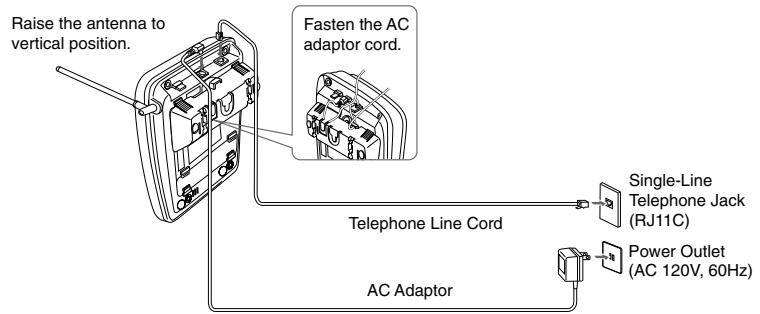
NOTE: Plug the AC adaptor firmly into the base unit and the AC 120V outlet.
CHARGING THE BATTERY PACK
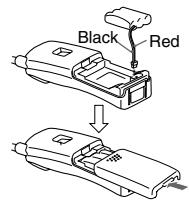
1 Remove the battery cover by sliding it down.
2 Plug the battery pack cord into its socket, observing the correct polarity.
3 Place the battery pack, then close the battery compartment cover.
4 Place the handset on the base unit. You can place the handset with the dialpad facing up or down.
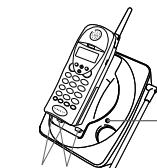
Charging contacts
IN USE/CHARGLED
IMPORTANT
Charge the battery pack for at least 12 to 16 hours.
SETTING / USING THE PHONE
Setting The Tone/Pulse Switch
Set the TONE/PULSE switch to TONE.
Place a call.
If the call does not connect with the TONE setting, set the TONE/PULSE switch to PULSE
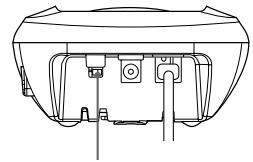
TONE/PULSE switch
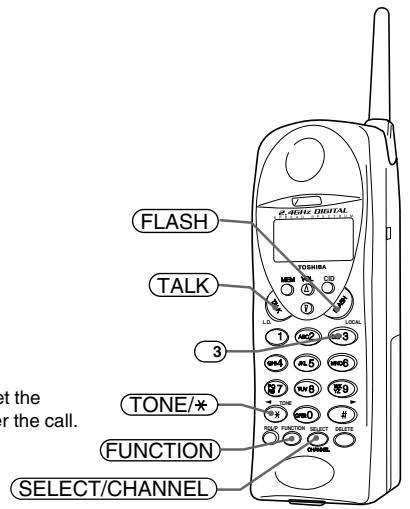
Area Code
1 Press FUNCTION, then press 3.
2 Press (SELECT/CHANNEL) and enter your 3-digit area code.
3 Press SELECT/CHANNEL, then press FUNCTION.
Making a Call
1 Dial the phone number.
2 Press TALK.
3 Press TALK to hang up.
Answering a Call
Press TALK and speak.
NOTE: To indicate Caller ID data, let the phone ring twice before you answer the call.
ELA
CALLER ID SERVICE
Setting Up Caller ID
To use Caller ID/Caller ID on Call Waiting features, you must subscribe to both Caller ID/Caller ID on Call Waiting services provided by your local telephone company.
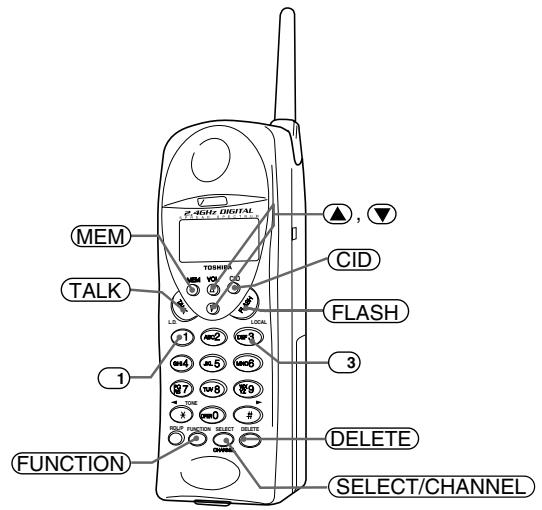
Selecting Caller ID Options
1 Press FUNCTION.
2 Press , , or 2 to move the pointer to CIDCW.
3 Press SELECT/CHANNEL to change the option setting.
4 Press FUNCTION and return the handset to the base.
See page 15 in the owner's manual for more information.
Making a Call with Caller ID Data
1 Press CID, then press or to display the number you want to dial.
2 Press TALK, then the displayed number will be dialed.
Note: For long distance calls, you need a prefix "1" and the area code.
Press L.D./1 and LOCAL/3 to add or cancel "1" and the area code before you press TALK.
Storing Caller ID Data to Speed-Dial Memory
1 Press CID, then press or to display the number you want to store into Speed-dial memory.
2 Press (MEM), then press , or enter a memory location number.
3 Press SELECT/CHANNEL. A confirmation beep sounds and the Caller ID data is stored.
Press to return to standby mode.
Deleting Caller ID Data
1 Press CID, then press A or to display the Caller ID number you want to delete from the memory.
2 Press DELETE, then press or to select Yes or No.
3 Press SELECT/CHANNEL or DELETE.
4 Press CID to return to standby mode.
Call Waiting Options
1 When you receive a call waiting call, press (FUNCTION) for a list of options.
2 Press or to select an option.
3 Press SELECT/CHANNEL) to confirm.
4 Press TALK or return the handset to the base to end the call.
See page 33 in the owner's manual for more information.
If the cordless telephone should malfunction, or need changes or modifications, all repairs will be performed by an authorized Toshiba Service Station. This unit has been registered with the FCC for direct connection to the telephone network. Under the FCC program, no customer is authorized to repair this unit. This applies to units either in or out of warranty. If an unauthorized repair is performed, the registration of the unit for direct connection to the network will be null and void. If the unit is still in warranty, the remainder of the warranty period will also be null and void.
It is the responsibility of users requiring service to report the need for service to the Toshiba dealer.
IMPORTANT INSTRUCTIONS TO USERS
Your telephone equipment has been designed and constructed to conform to federal regulations and can be connected to the phone line as described in this manual.
Please note that each product connected to the telephone line places a certain load on the line. We designate this as the unit's "Ringer Equivalence Number."
It is most unlikely, but...If your telephone equipment should cause problems on the phone line, the phone company has the right to temporarily discontinue your service. If this happens, the phone company will notify you and give you the opportunity to correct the problem. Also, you need to know that the phone company does have the right to make changes in their lines and/or equipment.
If these changes might affect your telephone equipment (or require changes in the telephone equipment or its connection), the phone company will notify you in writing, so you have the chance to take whatever action is necessary to ensure uninterrupted phone service.
FCC REQUIREMENTS
You are no longer required by the FCC to notify your local telephone company of your intent to connect a new telephone. Your local telephone company may call you and request information about your phone such as: the brand name, model number, registration number, and ringer equivalence number. This information is provided on a label located at the bottom of the base unit and handset.
You may not directly connect your telephone equipment to coin telephone services. Check with your local telephone company if you wish to connect your telephone equipment to a party line service. Some party line services require a special adaptor or modification to your telephone.
It should be noted that some cordless telephones operate at frequencies that may cause interference to nearby TVs and VCRs; to minimize or prevent such interference, the base of the cordless telephone should not be placed near or on top of a TV or VCR; and, if interference is experienced, moving the cordless telephone farther away from the TV or VCR will often reduce or eliminate the interference.
TELEPHONE/TELEPHONE ANSWER MACHINE LIMITED WARRANTY
Toshiba America Consumer Products, Inc. ("TACP"), and Toshiba Hawaii, Inc. ("THI"), make the following limited warranties. These limited warranties extend to the original consumer purchaser or any person receiving this set as a gift from the original consumer purchaser and to no other purchaser or transferee.
Limited One (1) Year Warranty of Labor and parts
TACP/THI warrant this product and its parts against defects in materials or workmanship for a period of one (1) year after the date of original retail purchase. During this period, TACP/THI will repair or replace your defective product with a new or refurbished unit at TACP's option.
Owner's Manual
You should read the owner's manual thoroughly before operating this product.
Your Responsibility
The above warranties are subject to the following conditions.
(1) You must provide a copy of your bill of sale or other proof of purchase.
(2) These warranties are effective only if the product is purchased and operated within the USA or Puerto Rico.
(3) Within the continental U.S.A., if you should find a defective product within the warranty period please call 1-877-644-7373.
(4) Warranties extend only to defects in materials or workmanship as limited above and do not extend to any product or parts which have been lost or discarded by you, or to damage to products or parts caused by misuse, accident, damage caused by Acts of God, such as lightning or fluctuations in electric power, improper installation, improper maintenance or use in violation of instructions furnished by us; or to units which have been altered or modified without authorization of TACP/THI, or to damage to products or parts thereof which have had the serial number removed, altered, defaced or rendered illegible.
(5) Physically damaged products are not acceptable for repair or exchange within or after the warranty period expires.
How to Obtain Warranty Service
In the event a problem should develop with your product, please proceed as follows;
In The Continental United States contact:
In Hawaii contact:
www.toshiba.com/tacp
Toshiba Hawaii, Inc.
327 Kamakee Street,
Honolulu, HI 96814
(808)-591-9261
All warranties implied by state law, including the implied warranties of merchantability and fitness for a particular purpose, are expressly limited to the duration of the limited warranties set forth above. With the exception of any warranties implied by state law as hereby limited, the foregoing warranty is exclusive and in lieu of all other warranties, guarantees, agreements and similar obligations of manufacturer or seller with respect to the repair or replacement of any parts. In no event shall TACP/THI be liable for consequential or incidental damages.
No person, agent, distributor, dealer or company is authorized to change, modify or extend the terms of these warranties in any manner whatsoever. The time within which an action must be commenced to enforce any obligation of TACP/THI arising under the warranty or under any statute or law of the United States or any state thereof, is hereby limited to ninety(90) days from the date you discover, or should have discovered, the defect. This limitation does not apply to implied warranties arising under state law.
This warranty gives you specific legal rights and you may also have other rights which may vary from state to state. Some states do not allow limitation on how long an implied warranty lasts, when an action may be brought, or the exclusion or limitation of incidental or consequential damages, so the above provisions may not apply to you.
For technical assistance, purchase of accessories or service, please access www.toshiba.com/tacp.
IMPORTANT
We suggest you record the following information and retain for your records along with your bill of sale or equipment document.
Model no.
Serial no.
Purchase date
Dealer
Dealer address
© 2001 TOSHIBA AMERICA CONSUMER PRODUCTS, INC.