
Duet PCS - Telephone Phoenix Audio - Free user manual and instructions
Find the device manual for free Duet PCS Phoenix Audio in PDF.


| Product Type | USB Speakerphone |
| Brand | Phoenix Audio |
| Model | Duet PCS |
| Dimensions (W x H x D) | 3.75 in x 1.25 in x 4.5 in |
| Weight (with USB cable) | 0.55 lbs |
| Power Source | USB bus-powered |
| Connectivity | USB (mini-USB), 3.5 mm external speaker jack |
| Audio Performance | Full duplex, echo cancellation >40 dB, noise cancellation >10 dB |
| Sampling Rate | 32 kHz |
| Frequency Response | 100 Hz – 16 kHz |
| Microphone | Built-in high-quality microphone with DSP noise suppression |
| Speaker | Integrated loudspeaker; automatically muted when external speaker connected |
| Control Buttons | Mute (center), Volume Up (right), Volume Down (left) |
| LED Indicators | Off (disconnected), On (connected), Blinking (muted) |
| Compatible Operating Systems | Windows 95 and up, macOS, Linux |
| Materials | Aluminum body for durability |
| Care and Maintenance | Clean with a soft, dry cloth; avoid liquids |
| Safety | Use only with USB power; do not expose to moisture or disassemble |
| Warranty | 2 years limited warranty |
| Repair and Support | Contact Phoenix Audio Technologies for RMA; no user-serviceable parts |
Frequently Asked Questions - Duet PCS Phoenix Audio
User questions about Duet PCS Phoenix Audio
0 question about this device. Answer the ones you know or ask your own.
Ask a new question about this device
Download the instructions for your Telephone in PDF format for free! Find your manual Duet PCS - Phoenix Audio and take your electronic device back in hand. On this page are published all the documents necessary for the use of your device. Duet PCS by Phoenix Audio.
USER MANUAL Duet PCS Phoenix Audio
natural_image
White and gray portable electronic device with mesh grille and control panel (no visible text or symbols)
DUET OVERVIEW
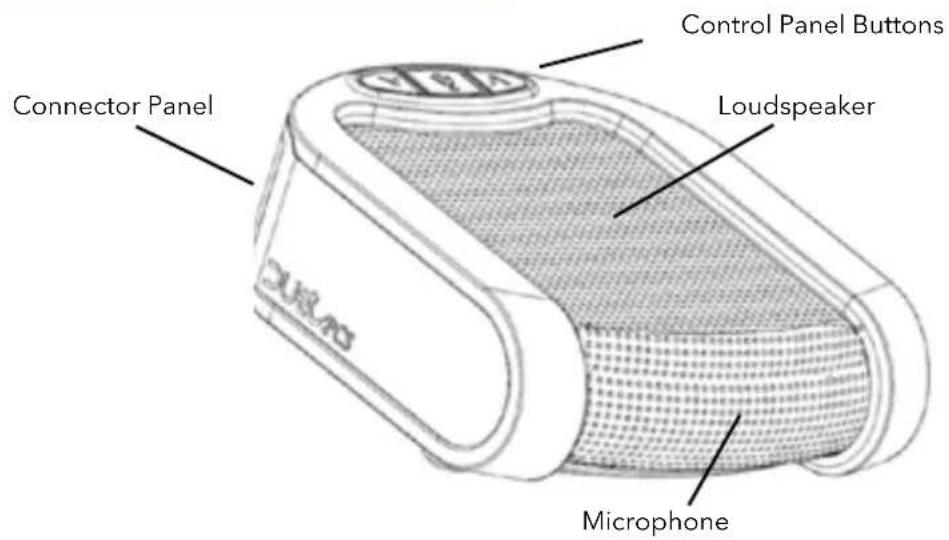
THE DUET IS A HIGH-PERFORMANCE SPEAKERPHONE for desktop use that can cover small to medium room settings. It has a commanding pickup and broadcasting range and is remarkably portable.
The Duet utilizes a high-quality microphone and loudspeaker backed by a powerful DSP that runs advanced echo cancellation and noise suppression technologies.
The Duet's body is made out of aluminum and is exceptionally durable, making it great for travel. It is extremely user-friendly and its plug-and-play design eliminates the need for additional driver installations.
The Duet PCS, which is the USB only model of the Duet family, is a desktop solution specifically geared for Voice over IP (VoIP) conferencing.
This guide will help you learn how to use your speakerphone and will reveal all the features that come with it.
CONNECTING THE DUET
CONNECT TO A COMPUTER
This connection is for any session using your computer, such as Voice over IP applications (Skype, Vidyo, etc.)
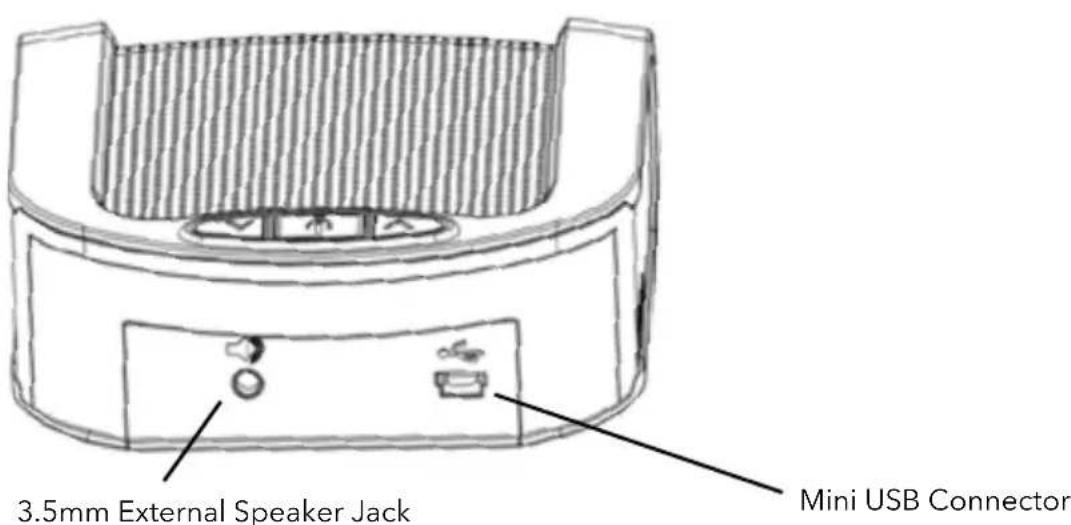
Using the USB cable provided, plug the mini USB side of the cable into the Duet (located on the connector panel behind the unit).
Plug the USB end of the cable into any USB port on your computer.
Your Duet is ready to use. No additional drivers or steps are needed; however we do recommend downloading and using our “Phoenix Audio Setup Utility” for optimal audio controls and performance. This utility can be found on our website:
www.phnxaudio.com
For more connection options, checkout the other members of the Duet family which offer different interfacing options such as telephone, Video Codec, and Smartphones.
USING THE DUET
The Duet's control panel has three buttons:
- Mute (in the middle).
• Volume Up (to the right).
• Volume Down (to the left).

LIGHT INDICATIONS:
- Button panel light off - unit is off (not connected).
- Button panel light on – unit is on (connected).
- Button panel light blinking – unit is on and the microphone is muted.
BASIC UNIT OPERATIONS:
- Turn unit ON: unit is always on when connected to a power source or USB device.
- Turn unit OFF: disconnect unit from power source or USB device.
- Mute microphone: push the Mute button once. The button panel light will start blinking.
- Unmute microphone: push the Mute button once. The button panel light will stop blinking and will stay on.
NOTE: The MUTE button will mute the microphone not the speaker. To mute the speaker, just use the volume buttons to decrease the volume until no sound is audible. The volume buttons will control the level of audio heard from the speaker and not the sensitivity of the Duet's microphone. To adjust the microphone volume level, use the Phoenix Audio Setup Utility, which can be found on our website.
EXTERNAL SPEAKER
The 3.5mm “External Speaker” jack located on the Duet's connector panel can be used to connect any type of amplified speakers. The external speakers will be used by the Duet to play sound and the Duet's internal speaker will be muted.
SPECIFICATIONS
Compatibility
Windows 95 and up, MAC OS, and Linux
Connectivity
USB connector – PC or Laptop connectivity 3.5mm connection – for external loudspeakers or headphone
Size
3.75 in x 1.25 in x 4.5 in (W x H x D)
Weight
0.55 lbs (with USB cable)
Power
USB power for PC and Laptop (LED will illuminate)
Performance
Speech processing and echo suppression at 32KHz sampling rate
Plugging in external speakers will automatically turn off the internal loudspeaker
Audio
100% Full duplex performance – No attenuation (either way) during full duplex
Acoustic echo cancellation >40 dB
High-end performance: conforms to ITU-T G.167 standard
Noise cancellation >10dB
Residual echo is suppressed to the environment noise level to prevent artificial ducking of signal
Voice-level equalization
Convergence speed 40 dB/sec
Tail length (200ms)
Convergence during full duplex (no recovery time after full duplex)
Low delay (10 msec)
Bandwidth 100Hz – 16KHz for speech processing
Integrated loudspeaker
Mute button and loudspeaker volume control buttons (LED will blink in mute mode)
WARRANTY
The following warranty statement is effective for all Phoenix Audio Technologies' products as of October 1st, 2007:
Phoenix Audio Technologies warrants that this product is free of defects in both materials and workmanship. Should any part of this product be defective, the Manufacturer agrees, at its option, to repair or replace with a like new replacement any defective part(s) free of charge (except transportation charges) for a period of two years for all products. This warranty period begins on the date the end user is invoiced for the product, provided the end user provides proof of purchase that the product is still within the warranty period and returns the product within the warranty period to Phoenix Audio Technologies or an authorized Phoenix Audio Technologies dealer according to the Product Return and Repair Policy listed below. All inbound shipping costs are the responsibility of the end user, Phoenix Audio Technologies will be responsible for all outbound shipping costs.
Product Return and Repair Policy
- Return to seller if purchased through an authorized dealer
a. Proof of purchase date from reseller within warranty period must be provided by the end user.
b. Seller may, at its discretion, provide an immediate exchange or repair or may return the unit to the
Manufacturer for repair. - Return to Manufacturer
a. An RMA (return merchandise authorization) number must be obtained by the end user from
Phoenix Audio Technologies.
b. The end user must return the product to Phoenix Audio Technologies with proof of purchase (showing
purchase date) for a warranty claim, and display the RMA number on the outside of the shipping package.
THIS WARRANTY IS VOID IF:
The product has been damaged by negligence, accident, act of God, or mishandling, or has not been operated in accordance with the procedures described in the operating and technical instructions; or; The product has been altered or repaired by other than the Manufacturer or an authorized service representative of the Manufacturer; or; Adaptations or accessories other than those manufactured or provided by the Manufacturer have been made or attached to the product which, in the determination of the Manufacturer, shall have affected the performance, safety or reliability of the product; or; The product's original serial number has been modified or removed.
NO OTHER WARRANTY, EXPRESS OR IMPLIED, INCLUDING WARRANTIES OF MERCHANTABILITY OR FITNESS FOR ANY PARTICULAR USE, APPLIES TO THE PRODUCT. MANUFACTURER'S MAXIMUM LIABILITY HEREUNDER SHALL BE THE AMOUNT PAID BY THE END USER FOR THE PRODUCT.
Manufacturer shall not be liable for punitive, consequential, or incidental damages, expenses, or loss of revenue or property, inconvenience, or interruption in operation experienced by the end user due to a malfunction in the purchased product. No warranty service performed on any product shall extend the applicable warranty period. This warranty extends only to the original end user and is not assignable or transferable. This warranty is governed by the laws of the State of California.
For more information or technical support please refer to our website www.phnxaudio.com, email us at support@phnxaudio.com, or call (818) 937-4779
Phoenix Audio Technologies, 2934 N. Naomi Street, Burbank, CA 91504
Telephone: (818) 937-4774, Fax: (818) 230-9116, info@phnxaudio.com



- DUET OVERVIEW
- CONNECTING THE DUET
- CONNECT TO A COMPUTER
- www.phnxaudio.com
- USING THE DUET
- LIGHT INDICATIONS:
- BASIC UNIT OPERATIONS:
- EXTERNAL SPEAKER
- SPECIFICATIONS
- Compatibility
- Connectivity
- Size
- Weight
- Power
- Performance
- Audio
- WARRANTY
- The following warranty statement is effective for all Phoenix Audio Technologies' products as of October 1st, 2007:
- Product Return and Repair Policy
- THIS WARRANTY IS VOID IF:
Brand : Phoenix Audio
Model : Duet PCS
Category : Telephone