
P 948 - Food processor KING - Free user manual and instructions
Find the device manual for free P 948 KING in PDF.


| Product Type | Food processor |
| Brand | King |
| Model | P 948 |
| Intended Use | Shredding, chopping, grinding/grating fruit, vegetables, nuts, chocolate, hard cheese |
| Not Suitable For | Meat, extremely hard products (nutmeg, coffee beans, cereals) |
| Items Supplied | Motor unit, insert holder, cutter insert, grater inserts (coarse and fine), grinder insert, plunger, feed tube, quarter-turn fastener |
| Continuous Operation Time | Max 2 minutes without interruption |
| Power Supply | Must match technical data (see manual) |
| Safety Features | Overload protection (do not operate empty); sharp blade warnings; child safety warnings |
| Cleaning Instructions | Motor unit: wipe with damp cloth; other parts: wash in warm water with mild detergent or dishwasher |
| Storage | Dry place, out of reach of children and animals |
| Warranty Exclusions | Improper handling, damage, unauthorized repair, normal wear |
| Spare Parts | Use only original manufacturer parts |
| Repair | Do not attempt self-repair; contact customer service |
| Additional Features | Various cutting inserts: thin smooth slices, thick wavy slices, coarse grating, fine grating, grinding |
Frequently Asked Questions - P 948 KING
User questions about P 948 KING
0 question about this device. Answer the ones you know or ask your own.
Ask a new question about this device
Download the instructions for your Food processor in PDF format for free! Find your manual P 948 - KING and take your electronic device back in hand. On this page are published all the documents necessary for the use of your device. P 948 by KING.
USER MANUAL P 948 KING
natural_image
Red background with a white crown and ring design (no text or symbols)king
P 948
natural_image
Black-and-white photo of a kitchen grater with cutlery and fresh lotus on a table (no text or symbols visible)4yyl
GARANTI
king
Meaning of the Symbols in These Instructions

All safety instructions are marked with this symbol. Read these instructions
carefully and follow them to avoid injury to persons or damage to property.

Tips and recommendations are marked with this symbol.

Suitable for use with food.
Safety Instructions
Intended Use
This device is intended to be used for shredding, chopping up and grinding/grating fruit, vegetables, nuts, chocolate or hard cheese.
This device is not suitable for chopping up extremely hard products (e. g. nutmegs, coffee beans or cereals).
■ The device is not a meat grinder! The device is not suitable for chopping up meat.
■ This device is for personal use only and is not intended for commercial applications.
■ The device must only be used as described in the operating instructions. Any other use is deemed to be improper.
Danger of Injury
■ Please keep the device and packaging material out of the reach of children and pets. There is a danger of injury and suffocation!
This device should not be used by people (including children) with impaired sensory or mental faculties or who do not have adequate experience and/or knowledge of such devices, unless they are supervised by a person responsible for their safety, or have supervised in order to ensure that they do not play with the device.
- Keep your head, hands, hair, jewellery and clothing away from rotating parts of the device.
- Do not reach into the feed tube to push food further down. Only use the plunger to push food further down.
The blades and edges of the inserts are sharp! Be careful when changing the inserts. Switch off the device before inserting or removing the inserts. Only ever grasp the inserts by the plastic surfaces when you want to insert or remove the inserts.
king
- Keep the device out of the reach of children! Children must be well supervised if the device is used near to them.
■ The device should not be used if it is damaged.
Health-Specific Safety Instructions
There may still be some production residues on the device. To avoid harmful effects to your health, clean the device thoroughly before you first use it (see the "Cleaning and Storage" chapter).
- Do not use spoilt food. Never keep food longer than the best-before date.
■ Clean the device after each use to prevent germ formation (see the "Cleaning and Storage" chapter).
Danger of Electric Shock and Fire
■ Do not use the device if highly fl ammable gases are present in the air.
■ The device should only be connected to a properly installed socket with earthing contacts.
The socket must also be readily accessible after connection. The mains voltage must match the technical data for the device (see the "Technical Data" chapter). Only use suitable extension cables whose technical data is the same as that of the device.
■ Position the cable in such a way that it does not become squashed or bent and does not come into contact with hot surfaces.
■ Remove the mains plug from the mains socket:
- Before you insert and/or remove the inserts,
- If you do not use the device over a lengthy period of time,
- Before a thunderstorm or
– Before you clean the device.
■ When you want to remove the mains plug from the socket, always pull the plug and not the cable.
■ Never immerse the device in water or other liquids! Ensure that the device, cable or mains plug do not fall into water or become wet. Should the device fall into water, switch off the power supply immediately. Do not attempt to pull the device out of the water while it is still connected to the mains power!
■ Should the device fall into water, switch off the power supply immediately.
■ Never touch the device, cable or plug with wet hands.
■ Never cover the device with cloths or something similar. There is a danger of overheating! - Maintain a sufficient distance from sources of heat such as hobs or ovens.
Notes on Use
■ Always check the device for damage before putting it into operation. If the device, cable or plug shows visible signs of damage, the device must not be used. Do not use the device if it has malfunctioned or been dropped in water.
If the device, the cable or the mains plug is defective, do not attempt to repair the device yourself. In the event of damage, contact the customer service department or contact a specialist in your local area.
king
■ The device should only be used in closed rooms.
■ Always place the device on a dry, level, firm and heat-resistant surface and at a sufficient distance from fl ammable objects. If necessary, place a heat-resistant surface below the device.
- Maintain a sufficient distance from heat sources such as hobs or ovens in order not to damage the device.
■ Ensure that it is not possible for others to trip over the connected mains cable. Do not allow the cable to hang over the edge of tables or kitchen counters. Others may become caught and pull the device down.
- Do not pull or carry the device by the cable.
■ During operation of the device, do not place any objects (spoons, knives etc.) into the feed tube or into the rotating inserts.
■ The device is not suitable for constant use. Do not operate the device for more than two minutes without interruption.
- Do not operate the device for a lengthy period without food.
In the event of damage/faults, switch the device off immediately.
- Do not leave the device unattended when it is switched on.
■ Use only original parts from the manufacturer.
■ Do not drop the device or allow it to be knocked violently.
- Do not expose the device to extreme temperatures, wide temperature variations, or direct sunlight.
⚠ Warranty Terms
The following are excluded from the warranty: all defects caused by improper handling, damage or unauthorised attempts to repair. The same applies for normal wear.
Items Supplied and Device Overview

- Plunger
- Feed tube
- On/Off switch
- Motor unit
- Insert holder with insert placed in it
Not shown:
- Quarter-turn fastener for cutter insert, grater insert or grater insert (see chapter use, section)

natural_image
Red background with a white crown and circular ring design (no text or symbols)king
Accessories
natural_image
Close-up of a metallic conical object with internal markings (no visible text or symbols)
natural_image
Close-up of a metallic conical object with reflective surface (no text or symbols visible)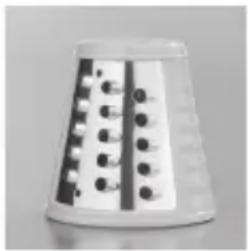
natural_image
White conical container with black and white striped pattern (no visible text or symbols)
natural_image
Close-up of a white conical object with a coiled spring-like structure, no visible text or symbols.
natural_image
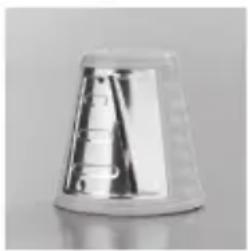
Close-up of a white conical object with black circular indentations and a grid pattern (no visible text or symbols)Cutter insert for cutting thin, smooth slices.
This insert is suitable, for example, for cutting:
Carrots, courgettes, potatoes, cucumbers, peppers, onions, turnips, red cabbage, white cabbage, apples or hard cheese.
Cutter insert for cutting thick, wavy slices.
This insert is suitable, for example, for cutting:
Carrots, courgettes, potatoes, cucumbers, peppers, onions, turnips, red cabbage, white cabbage, apples or hard cheese.
Coarse grater insert.
This insert is suitable, for example, for coarse grating of: Carrots, courgettes, potatoes, peppers, hard cheese (e. g. Parmesan) or chocolate.
Fine grater insert.
This insert is suitable, for example, for fi ne grating of: Carrots, courgettes, hard cheese (e. g. Parmesan), chocolate or coconuts.
Grinder insert
This insert is suitable, for example, for grinding/grating: Hard cheese (e. g. Parmesan), chocolate, dry bread/rolls or pastries, hazelnuts, walnuts, almonds or coconuts.

Before Initial Use
Before you can use the device, you must:
- Unpack the items supplied
- Clean the device

natural_image
Red background with a white crown and circular ring (no text or symbols)king

Unpacking
CAUTION!
- Keep children and animals away from the packaging material. There is a danger of suffocation!
Unpack all parts and check the items supplied for completeness (see the "Items Supplied and Device Overview" chapter) and transport damage. If you find any damage to the components, do not use them (!), but contact the customer service department.
Cleaning
There may still be some production residues on the device. To avoid harmful effects to your health, clean the device thoroughly before you first use it (see the "Cleaning and Storage" chapter).
Use

Unpacking
Keep children away from the device during operation.
■ The device should only be used when it is fully and correctly assembled!
- Do not reach into the rotating inserts or the feed tube during operation.
- Keep hair and clothing away from rotating parts of the device.
■ Be careful when handling the inserts; the blades are sharp! When removing or inserting the inserts, only over touch the plastic parts and never the blades themselves!
■ Switch off the device and pull the mains plug out of the plug socket before you change any inserts or insert or remove the insert holder in order to prevent the device from accidentally switching on!
- Do not operate the device for more than two minutes without interruption!
■ Do not force food into the feed tube.

To achieve the best cutting results, we recommend that you chop the food up into smaller pieces before you place it into the feed tube. This will make it easier to push the food down the tube using the plunger.
Inserting / Removing the Insert Holder

natural_image
Simple line drawing of a mechanical device with a cylindrical component and handle (no text or symbols)- Hold the insert holder tilted slightly to the right and insert it into the motor unit.

natural_image
White crown icon on red background, no text or symbols presentking

natural_image
Simple line drawing of a two-way pipe pump with a valve, no text or symbols present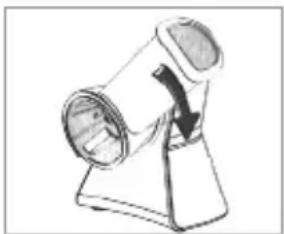
natural_image
Simple line drawing of a mechanical device with a curved arrow indicating rotation (no text or symbols)
natural_image
Illustration of a hand pressing down on a foot with a foot highlighted, showing no text or symbols.
natural_image
Close-up of a hand holding a small mechanical component, possibly a tool or tool, with no visible text or symbols.
natural_image
Close-up of a mechanical component with internal channels and springs (no visible text or symbols)
natural_image
Close-up of a mechanical component with internal channels and springs (no visible text or symbols)-
Rotate the insert holder a quarter turn to the left until it engages.
-
To release the insert holder from the drive shaft, rotate the insert holder a quarter turn to the right and remove it from the motor unit.
Inserting / Removing the insert
- Select a suitable insert (see also the "Items Supplied and Device Overview" chapter, "Accessories" section).
- Insert the insert into the holder. Make sure that the insert is seated correctly on the drive shaft.
- Place the quater-turn fastener on the drive shaft. Make sure that the fasteber is seated correctly on the drive shaft.
- Turn the fastener to the left, to secure the insert.
- In order to remove the insert, turn the fastener to the right to release the fastener.
- Remove the quater-turn fastener.
- Remove the insert.
Using the Device
- Place the device on a level, non-slip surface.
- Connect the device to a properly installed plug socket.
- Place a bowl beneath the opening of the insert holder in order to catch your food.
- Switch on the device by holding down the On/Off switch. Press the On/Off switch briefly one to two times before you place any food into the feed tube so that the cutter insert locks on the drive shaft of the motor unit.
- Then hold down the On/Off switch and place the food which is to be cut up into the feed tube.

natural_image
Red background with a white crown and circular orbit design (no text or symbols)king

natural_image
Illustration of a hand using a tool to adjust a cylindrical component (no text or symbols visible)- Use the plunger to push food further down.
- Let go of the On/Off switch to switch off the device.
- Remove the mains plug from the socket after use.
- Remove the insert after use.
- Clean the device and the accessory parts after each use in the manner described in the "Cleaning and Storage" chapter.

natural_image
Illustration of hands using a tool to lift a bowl of food, with arrows indicating process (no text or symbols)Cleaning and Storage
CAUTION!
■ Remove the plug from the mains socket before cleaning the device.
■ Never immerse the motor unit in water or other liquids.
■ Be careful when handling the inserts; the blades are sharp!
■ Do not use corrosive or abrasive cleaning agents to clean the device. These could damage the surface.
- As required, wipe down the motor unit with a damp cloth. Then dry the device with a dry cloth.
- Clean the insert holder, the inserts and the plungers with clear, warm water and a little mild detergent or clean them in the dishwasher.
- Store the device in a dry place that is not accessible to children and animals.
Troubleshooting
If the device should stop working properly, first check whether you are able to correct the problem yourself. If you are not, contact the customer service department (see the "Customer Service" chapter). Do not try to repair a faulty device yourself!
| Problem | Possible Cause / Solution |
| The device does not work. | Is the plug inserted in the mains socket correctly?Is the mains socket defective? Try another mains socket.Check the fuse of your mains connection.Are you holding down the On/Off switch? To switch on the device, you must hold down the switch. |
king
Sembol Anlamları

natural_image
Red background with a white crown and circular swirl design (no text or symbols)king
natural_image
Red background with a white crown and circular ring (no text or symbols)king
Aksesuarlar

natural_image
Close-up of a metallic conical object with smooth surface and rounded edges (no visible text or symbols)
natural_image
Close-up of a metallic conical object with reflective surface (no text or symbols visible)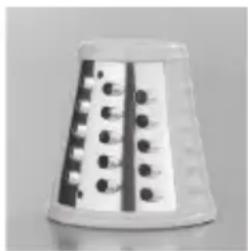
natural_image
Close-up of a white plastic stand with black and white perforated surfaces (no text or symbols visible)
natural_image
Close-up of a white conical object with a coiled spring-like pattern (no text or symbols visible)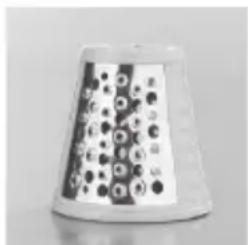
natural_image
Close-up of a conical container with circular patterns and a label (no readable text or symbols)natural_image
Red background with a white crown and circular swirl design (no text or symbols)king
natural_image
Line drawing of a mechanical device with a cylindrical component and handle (no text or symbols)natural_image
White crown icon on red background, no text or symbols presentking

natural_image
Diagram of a mechanical device with a rotating shaft and circular housing (no text or symbols)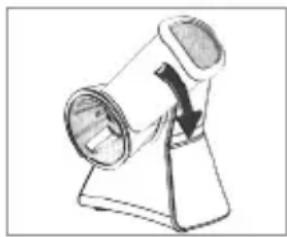
natural_image
Simple line drawing of a mechanical component with a curved arrow indicating rotation (no text or symbols)
natural_image
Illustration of a hand operating a machine with a circular component (no text or symbols visible)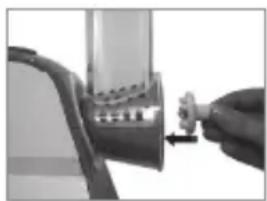
natural_image
Close-up of a hand holding a small mechanical component with a directional arrow (no visible text or symbols)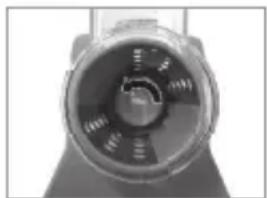
natural_image
Close-up of a mechanical component with no visible text or symbols
natural_image
Close-up of a mechanical component with internal channels and mounting holes (no visible text or symbols)natural_image
Red background with a white crown and circular swirl design (no text or symbols)king

natural_image
Illustration of a hand holding a cylindrical object with a downward arrow, no text or symbols present
natural_image
Illustration of a hand pouring liquid into a container with a spoon (no text or symbols)natural_image
Red background with a white crown and ring design (no text or symbols)king
P 948
natural_image
Red background with a white crown and circular swirl design (no text or symbols)king
natural_image
Red background with a white crown and ring design (no text or symbols)king
natural_image
Close-up of a metallic conical object with internal measurement markings (no visible text or symbols)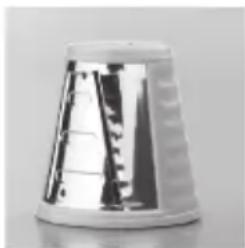
natural_image
Close-up of a metallic plastic cup with visible internal structure (no text or symbols)
natural_image
Close-up of a white conical object with black circular patterns on its surface (no text or symbols visible)
natural_image
Close-up of a white conical object with a coiled spring-like structure, no visible text or symbols.
natural_image
Close-up of a white conical object with black circular indentations and vertical stripes (no visible text or symbols)natural_image
White crown icon on red background, no text or symbols presentking
لا هو مبين:
natural_image
Red background with a white crown and circular swirl design (no text or symbols)king
natural_image
Technical line drawing of a mechanical component with a cylindrical shaft and circular opening (no text or symbols)
natural_image
Line drawing of a kitchen brush with a circular component and a curved handle (no text or symbols)
natural_image
Simple line drawing of a mechanical device with a rotating lever and base (no text or symbols)
natural_image
Red background with a white crown and circular swirl design (no text or symbols)king
التنظيف وال tangزين
تنيه!
natural_image
Illustration of a hand using a sewing machine to press or install a circular component (no text or symbols visible)
natural_image
Illustration of a hand using a tool to measure a cylindrical object with a downward arrow, no text or symbols present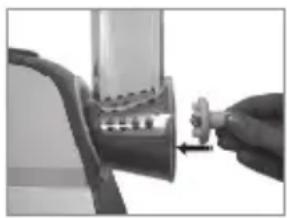
natural_image
Close-up of a hand holding a small mechanical component with a tool, no visible text or symbols
natural_image
Illustration of hands pouring liquid into a bowl with a lid, no text or symbols present
natural_image
Close-up of a mechanical component with concentric circular features and internal channels (no visible text or symbols)
natural_image
Close-up of a mechanical component with internal gear-like structure (no visible text or symbols)king
SATIŞ SONRASI SERVİS
natural_image
Symbol of a trash bin with crossed lines indicating no waste or discharge (no text or labels)natural_image
Red background with a white crown and ring (no text or symbols)king
Üretici Firma:
KING PAZARLAMA VE DIŞ TİCARET A.Ş.
İbrahimağa Cad.2. Emintaş Sanayi Sitesi. No: 20 Daire/2
Bayrampaşa / İSTANBUL
Tel: 0212 544 51 52 Faks: 0212 544 30 32

king
natural_image
White crown icon on red background, no text or symbols presentking
GARANTI BELGESİ ŞARTLARI
- king
- P 948
- Meaning of the Symbols in These Instructions
- Safety Instructions
- Intended Use
- Danger of Injury
- Health-Specific Safety Instructions
- Danger of Electric Shock and Fire
- Notes on Use
- ⚠ Warranty Terms
- Items Supplied and Device Overview
- Not shown:
- Accessories
- Cutter insert for cutting thin, smooth slices.
- Cutter insert for cutting thick, wavy slices.
- Coarse grater insert.
- Fine grater insert.
- Grinder insert
- Before Initial Use
- Unpacking
- CAUTION!
- Cleaning
- Use
- Inserting / Removing the insert
- Using the Device
- Cleaning and Storage
- Troubleshooting
- Sembol Anlamları
- Aksesuarlar
- SATIŞ SONRASI SERVİS
- GARANTI BELGESİ ŞARTLARI
Brand : KING
Model : P 948
Category : Food processor