
C215 - Mp3 player EMTEC - Free user manual and instructions
Find the device manual for free C215 EMTEC in PDF.


| Product Type | Portable MP3 Player |
| Brand / Model | Emtec C215 |
| Dimensions (L x W x H) | 89 x 31 x 20 mm (3.5 x 1.2 x 0.8 in) |
| Weight (without battery) | 25 g (0.88 oz) |
| Power Supply | 1 AAA battery |
| Battery Life | Approximately 10 hours |
| Internal Memory | 1 GB, 2 GB, or 4 GB (depending on version) |
| Supported Audio Formats | MP3, WMA (8–320 kbps, VBR supported) |
| Display | Dot matrix LCD |
| FM Radio | Yes, 87.5–108 MHz |
| Frequency Response | 20 Hz – 20 kHz (-6 dB) |
| Signal-to-Noise Ratio (SNR) | > 85 dB |
| Total Harmonic Distortion (THD) | < 0.6% |
| Channel Separation | > 40 dB |
| Max Output Power | > 6 mW per channel |
| Connectivity | USB 2.0 High Speed (also serves as USB flash drive) |
| Compliance | FCC Part 15, CE (EN55022, EN55024) |
| Operating Temperature | 0°C to 40°C (32°F to 104°F) |
| Storage Temperature | -10°C to 50°C (14°F to 122°F) |
| Relative Humidity | 5% – 95% |
| Operating Altitude | Up to 20,000 ft (6,096 m) |
| Cleaning Instructions | Use a dry cloth; avoid chemicals like benzene or diluents |
| Spare Parts / Repairability | Battery (AAA) replaceable; not user-serviceable internally. Contact Emtec support. |
Frequently Asked Questions - C215 EMTEC
User questions about C215 EMTEC
0 question about this device. Answer the ones you know or ask your own.
Ask a new question about this device
Download the instructions for your Mp3 player in PDF format for free! Find your manual C215 - EMTEC and take your electronic device back in hand. On this page are published all the documents necessary for the use of your device. C215 by EMTEC.
USER MANUAL C215 EMTEC
Regulatory Information:
Declaration of Conformity Trade Name: Emtec Limited Model: C215
This device complies with part 15 of FCC rules. Operation is subject to the following two conditions:
(1) This device may not cause harmful interference, and
(2) This device must accept any interference received, including interference that may cause undesired operation.
FCC Notice:
This equipment has been tested and found to comply with the limits for a Class B digital device, pursuant to part 15 of the FCC Rules. These limits are designed to provide reasonable protection against harmful interference in a residential installation. This equipment generates, uses, and can radiate radio frequency energy and, if not installed and used in accordance with the instructions, may cause harmful interference to radio communications. However, there is no guarantee that interference will not occur in a particular installation. If this equipment does cause harmful interference to radio and television reception, which can be determined by turning the equipment off and on, the user is encouraged to try to correct the interference by one or more of the following measures:
-Reorient or relocate the receiving antenna.
-Increase the separation between the equipment and receiver.
-Connect the equipment into an outlet on a circuit different from that to which the receiver is connected.
-Consult the dealer or an experienced radio / TV technician for help.
For customers in Europe
This product conforms to the following European Directives:
89/336/EEC (EMC Directive)
This product complies with EN55022/A1:2000 and EN 55024/A1:2001 for use in the following areas: residential, commercial and light industrial.
If the product suddenly has no response or power off, it may be caused by electrostatic discharge. If this circumstance, please follow the procedures below for recovery:
- Switch off the unit, if the unit has no prsponse.
- Turn on the unit again.
Preface
Thank you for purchasing Emtec MP3 player. Before using this device, read carefully all the instructions in this manual and keep it for future reference.
Emtec MP3 player built-in flash memory supports 1GB up to 4GB. It's easy to use. As soon as an user plugs it into the USB, the computer identifies the Emtec MP3 player and notifies the user. Just copy the music files from any computer to your Emtec MP3 player, disconnect the player from the computer, push the play button and start listening. No software is needed. The Emtec MP3 player also serves as a USB flash drive, allowing easy transfer and safe storing of any type of files.
We try to provide products with appearance identical to the pictures included in this manual. However, the real one may differ more or less from the pictures. Please see the real product for reference. The PC we mentioned in this manual, except otherwise specified, refers to a desktop computer or notebook with Windows operating system. All products, devices, MP3 players we mentioned in this manual, except otherwise specified, refer to MP3 player.
To make copies or publish this manual in whatever means or in whatever forms without written authorization from Emtec is prohibited. Emtec reserves all rights.
Emtec will not be held responsible for data loss, modification of the device or other indirect loss resulting from mal-operation, maintenance, battery overflow or other accidents. Emtec will not be held responsible for restoration of any personal data lost.
Emtec devotes to improving the function and performance of its products. The functions described in this manual are subject to change for the purposes of technical progress with prior notice.
Liability Exemption Statement
-
All the information included in this manual was produced with our careful caution, but there may still be some errors and mistakes. Emtec will not be held responsible for those errors and mistakes.
-
As we can't control users' understanding of this manual, Emtec will not be held responsible for any accident or other loss caused by misunderstanding of this manual. We shall not be held responsible either for any loss caused by using this product or for any claim by any third party.
-
Emtec will be held responsible only for the inherent problem of the device itself, but not for data loss, modification of the device or other indirect loss resulting from mal-operation of software, maintenance or other accidents. Emtec will not be held responsible for restoration of any personal data lost.
-
Emtec reserves the modification right of any software, hardware and user manual of this device without prior notice.
-
To make copies, publish, transfer, store in a traceable system, or translate to any other language without written authorization from Emtec is strictly prohibited.
Important
- Do not drop or give a hard impact. It may cause malfunction.
- Do not subject the device to high temperature or direct sunlight.
- Keep it far away from humidity or damp.
- Do not disassemble it by yourself.
- Use a dry cloth to clean the device.
- Keep it away from the chemicals such as benzene or diluents.
- Take the battery out if the device is not in use for a long period of time.
Safety Precaution
Before using this device, read carefully and understand all safety instructions included in this chapter, and observe them strictly when using to ensure that the device provides you with pleasure and entertainment for a long period of time.
- Read carefully through this manual, and fully understand all the operation instructions and warnings of this device.
- Check if the contents in the packing comply with the packing list. If not, contact the dealer immediately.
- When it is left unused for a long period of time, the battery must be taken out from battery chamber. If battery liquid leakage is detected and the device works abnormally, do not disassemble the device for cleaning, which may lead to irremediable damage. In this case, contact Emtec customer service center for technical support and help from Emtec professional service team. However, Emtec takes no liability for any damage resulting from battery liquid leakage.
- This device is a hi-tech electronic product, which should be kept away from heat, cold or moisture when being used. Special care should be taken to observe the followings:
a) The device should not be exposed to strong sunlight, and should be kept away from heat sources.
b) Avoid using the device outdoor at low temperature for a long period of time.
c) The device should not be placed in the environment of extra-humidity; Care should be taken so that water and other liquids are not spilled into the device. If it happens, it should be switched off immediately.
d) The device should not be used in dust-plagued or very dirty places.
e) Do not clean the device with any type of detergent containing chemical elements or other solutions in order to avoid damages from corrosion or moisture. If necessary, please clean it with soft cloth or paper slightly. - Never use the device in a strong magnetic field. Avoid strong electric charge or electromagnetic interference environment to prevent data from being lost.
- Do not drop the device to the ground or suffer it from fierce impact by other objects, which may lead to unnecessary damage.
- The device uses a rapid internal storage for data memory. Generally, even when the power is suddenly turned off, the data in the device will not lose. However, mal-operation, malfunction or external strong electromagnetic interference may lead to data loss. So, it is advisable for users to make a copy of all useful data in time. Emtec will be responsible only for the inherent problem of the device, not for data loss or other indirect loss arising from maloperation, maintenance or other accidents. Emtec will not be held responsible for restoration of any personal data lost.
- The device should be opened under no circumstances. The manufacturer takes no liability for any damage resulting from unauthorized tampering.
Highlights of the product
Highlights
- Formats: MP3, WMA
- Enables storing playback and transferring of audio and non-audio files
- Mass storage device
- Built-in flash memory supported
- Dot matrix display
- 8kbps \~ 320kbps (MP3), 64kbps \~ 320kbps (WMA) and VBR files are supported
- USB 2.0 high speed
- Win 98SE / Win2K / WinME / WinXP / WinVista
- No driver required for file/audio transfer (WinME / Win2K / WinXP / WinVista)
- FM Radio
Product dravings

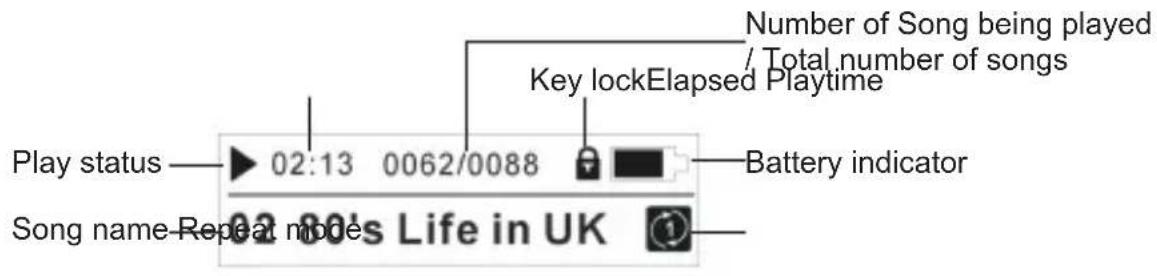
Description of LCD display
Battery installation
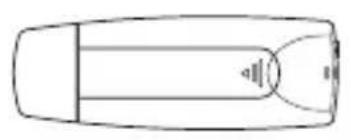
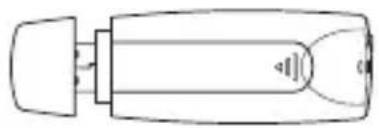


Remove USB cap and open the battery door


Place a AAA battery into the battery compartment.
Pay attention to the polarities

Close the battery door
Operation instructions of function keys
Note:
Short press----press the key for less than one second Long press----press the key for more than one second
Under Music mode
| Pause modeKey | Playback Main menu | ||
| Play/Pause/Power | Long Press | Power off | |
| Short Press | Start playback of MP3, WMA | Pause/Play Select item | |
| FF | Long Press | Fast forwardFast forward | |
| Short Press | Next song Next song | ||
| REW | Long Press | Fast rewind Fast rewind | |
| Short Press | Previous song | current song is replayed from the start | |
| VOL + | Long Press | VOL + continuously | VOL + continuously |
| Short Press | VOL+ | VOL+ | |
| VOL - | Long Press | VOL - continuously | VOL - continuously |
| Short Press | VOL - VOL - | ||
| Short Press | Previous menu Previous menuMENU |
Under FM mode
| Preset modePressKey Manual mode | |||
| Play | S.P. N/A | Save to preset channel | |
| L.P. | Power down | Power downency | |
| FF | S.P. | Next preset | Increase freq. by 0.05MHz |
| Station | |||
| L.P. | Search Up | Search Up | |
| REW | S.P. Previous preset | Decrease freq. by 0.05MHz | |
| Station | |||
| L.P. | Search down | Search down | |
| VOL + | S.P. | Vol. Up | Vol. Up |
| L.P. | Vol. Up | Vol. Up | |
| Continuously | Continuously | ||
| VOL - | S.P. | Vol. down | Vol. down |
| L.P. | Vol. down | Vol. down | |
| Continuously | Continuously | ||
| MENU | S.P. | Previous menu Previous menu | |
Basic Operation
Power on
Press ▶ key to turn on the device when it is off. When powered on, it enters Play state in music mode.
Power off
Long press key in Stop/Pause state, the device will shut down automatically.
Key lock
When the player is locked by switching the "Hold" key, all the keys can't work. Turn "Hold" key to the right, there will be an icon of "Key lock" on the LCD display. With key lock function, mal-operation shall be prevented.
Volume adjustment
You can increase or decrease volume by pressing + or - key. Long press + or - key, you can increase or decrease volume continuously.
Music mode
Press key to turn on the device when it is off. When powered on, it enters Play state in music mode.
FM mode
Press > to select Radio and press ▶ to enter radio mode.
Notes:
Press "Menu" key once in play mode, user can choose to play by a particular folder or play the entire folder.
Press "Menu" key twice in play mode to enter the main menu. User can enter the music mode, radio mode or setting mode.
Menu Tree Diagram
![graph TD A["Main Menu"] --> B["Music Mode"] A --> C["Radio"] A --> D["Setting"] B --> E["Play all"] B --> F["Folder"] C --> G["Presets"] C --> H["Manual Tune"] C --> I["Auto Tune"] D --> J["Play Mode"] D --> K["EQ"] D --> L["Language"] D --> M["Version"] D --> N["Restore Setting Restore"] J --> O["o…](/content/2026/05/775123/images/b591113338db40650b3c17a32496a887db70bdb6a43422a3d2619888a95e4f87.jpg)
Connected to Computer
System requirement
Only supports Windows 98 Second Edition (Win98 requires USB driver downloaded from our web www.emtec-international.com), 2000(SP2), ME, XP(SP1), Vista. Other systems are not supported. (Windows 98 is not supported)
- Pentium II 200MHz
- 64 MB RAM
- 500MB memory space
- CD-Rom drive
- USB 1.1 port or above (USB 2.0 is recommended)
Connected to computer via USB
The device can be connected to computer via USB plug directly or via USB cable as the figure below:
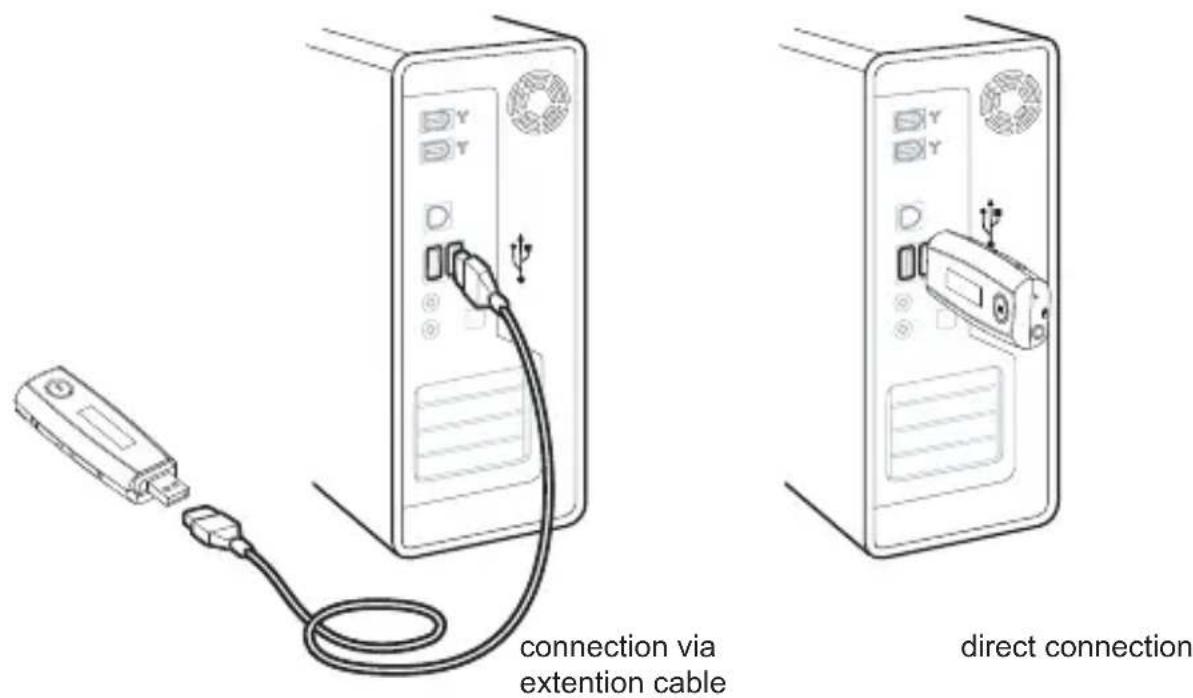
Notes:
1) The device will lock the power pin when it enters USB mode (i.e. The device will be off when it is unplugged from the PC.
2) Before unplugging the unit from PC, make sure that you have safely removed the device on Windows desktop.
File uploading and downloading
After the device is connected to computer for uploading/downloading, no special operation other than simple "drag-drop" is needed.
- Double click "My Computer" in Windows, you will find a new icon "Removable Disk", which represents your music player.
- If you want to download files to the device from your computer, just drag the desired files to "Removable Disk", which represents your music player.
- You can also upload the files in your music player to your computer.
- During uploading / downloading, keep USB connected to the computer. Plug it out from USB port when the uploading / downloading is completed.
- The device can store all types of files in addition to music files.
Notes:
- When transferring files to the player, be sure to copy them from your hard drive to the player. If you move or cut the files from hard driver and paste them to the player, the files will no longer exist on your hard drive.
- Using Windows Explorer, data files can be transferred from the player to PC.
- Data files that are stored on the player cannot be browsed using the player's interface.
- The music files are not required to put onto the Music folder. It can be put in anywhere in the device.
Trouble Shooting
- The device does not work or LCD display does not work.
1) Check it there is enough battery power.
2) Check it the polarities of battery are correct.
- The device does not respond to key press
Check the state of "Key lock". If it is in "Key lock", all the keys cannot work.
- When the device is connected to computer, there is not a device icon on the computer. Connect correctly to the computer via USB. Make sure that the device has been properly installed by checking "device management" of the computer.
Specification
| Dimensions (Lx W x D) 89 x 31 x 20 mm | |
| Weight 25g (without battery) | |
| Supported internal memory capacities 1GB, 2GB, 4GB (depending on version) | |
| Power supply 1 AAA battery for about 10 hours of playtime | |
| Frequency response (-6dB) 20Hz-20 KHz | |
| Signal to noise ratio SNR > 85 dB | |
| < 0.6%Total harmonic distortion THD | |
| Channel separation | > 40 dB |
| Max. output power > 6mW per channel | |
| Compliance FCC and CE | |
| Operating temperature | 0 to 40 °C |
| Storage temperature | -10 to 50 °C |
| Relative humidity 5-95% | |
| Operating altitude Up to 20,000 ft | |
| FM frequency range 87.5 - 108MHz |
Note:
The specification of the device is subject to change for the purpose of performance upgrading without notice.


- REGULATORY INFORMATION
- DECLARATION OF CONFORMITY TRADE NAME: EMTEC LIMITED MODEL: C215
- FCC NOTICE
- FOR CUSTOMERS IN EUROPE
- PREFACE
- LIABILITY EXEMPTION STATEMENT
- IMPORTANT
- SAFETY PRECAUTION
- HIGHLIGHTS OF THE PRODUCT
- HIGHLIGHTS
- PRODUCT DRAVINGS
- DESCRIPTION OF LCD DISPLAY
- BATTERY INSTALLATION
- OPERATION INSTRUCTIONS OF FUNCTION KEYS
- NOTE
- BASIC OPERATION
- POWER ON
- POWER OFF
- KEY LOCK
- VOLUME ADJUSTMENT
- MUSIC MODE
- FM MODE
- NOTES
- CONNECTED TO COMPUTER
- SYSTEM REQUIREMENT
- CONNECTED TO COMPUTER VIA USB
- FILE UPLOADING AND DOWNLOADING
- TROUBLE SHOOTING
Brand : EMTEC
Model : C215
Category : Mp3 player