
CAL E110 - Watch CITIZEN - Free user manual and instructions
Find the device manual for free CAL E110 CITIZEN in PDF.


User questions about CAL E110 CITIZEN
0 question about this device. Answer the ones you know or ask your own.
Ask a new question about this device
Download the instructions for your Watch in PDF format for free! Find your manual CAL E110 - CITIZEN and take your electronic device back in hand. On this page are published all the documents necessary for the use of your device. CAL E110 by CITIZEN.
USER MANUAL CAL E110 CITIZEN
A. BEFORE USING....2
B. SETTING THE TIME AND CALENDAR....3
C. FUNCTIONS OF SOLAR POWERED WATCH 6
Insufficient Charge Warning Function....7
Quick Start Function 7
Overcharge Prevention Function 7
D. CARE AND HANDLING DURING CHARGING 8
E. ABOUT THE RECHARGEABLE CELL 9
F. TIME REQUIRED FOR CHARGING ....10
G. IN THESE CASES....12
H. PRECAUTIONS....14
I. SPECIFICATIONS....20
A. BEFORE USING
This watch is not powered by a conventional battery, but is powered by converting light to electrical energy.
Before using, be sure to fully charge your watch by exposing it to light. (See "F. TIME REQUIRED FOR CHARGING", for charge time reference)
Once fully charged, the watch will continue to run for approximately 6 months without additional charging. We do recommend exposing your watch to light every day to ensure optimum performance. Always be sure to recharge the watch before it stops.
Your watch features an Overcharge Prevention Function so there is no need to worry about overcharging your watch.
A special energy storage cell is used to store electrical energy. This special cell does not require replacement and is a clean energy unit that does not use any toxic substances.
B. SETTING THE TIME AND CALENDAR
[1] Three-hand models without calendar display
* If your watch has a screw-type crown, lift up the crown to loosen it before operation. Be sure to press the crown down firmly after operation.
![CITIZEN CAL E110 - [1] Three-hand models without calendar display - 1](/content/2026/05/774557/images/08abfeee669f49b7b0da363bd3c066886e5dae4085cf01beef9bd09da6487214.jpg)
text_image
Solar cell Time-setting position Crown Normal position■ Setting the time
- Stop the second hand by pulling out the crown.
- Turn the crown to set the time.
- After setting the time, firmly push the crown back into its normal position.
[2] Models with calendar (date and weekday) display
* If your watch has a screw-type crown, lift up the crown to loosen it before operation. Be sure to press the crown down firmly after operation.
[Date display models]
![CITIZEN CAL E110 - [2] Models with calendar (date and weekday) display - 1](/content/2026/05/774557/images/3cad397a46bbae786eadcbf5f2ac5bf9c4aa264471bd5a58fdd1484d69e2d181.jpg)
text_image
Solar cell Calendar setting position Time setting position Crown Normal position Date[Date, day of the week display models]
![CITIZEN CAL E110 - [2] Models with calendar (date and weekday) display - 2](/content/2026/05/774557/images/400d19f11046bb90ab1107fdc8752fe3ded51221630f75fe4ead81c80c693f05.jpg)
text_image
Solar cell SUN7 Calendar setting position Time setting position Crown Normal position Date, day of the weekThe position of the calendar may differ depending on models.
■ Setting the time
- Stop the second hand by pulling the crown out to the 2nd click (time setting position).
- Turn the crown to set the time.
- The watch will start after the crown is firmly pushed back into its normal position.
■ Setting the calendar
- Pull the crown out to the 1st click (calendar setting position).
- Set the desired date by turning the crown counterclockwise.
- Set the desired day of the week by turning the crown clockwise.
- In the case of date display models, turning the crown clockwise will result in the loose play of the crown.
- After you have set the calendar, be sure to press the crown back to its normal position.
- Do not adjust the calendar when the watch is reading as below. Otherwise the calendar may not change correctly.
* Date display models ..... between 9:00 pm and 1:00 am
* Date, day of the week display models ..... between 9:00 pm and 4:00 am
C. FUNCTIONS OF SOLAR POWERED WATCH
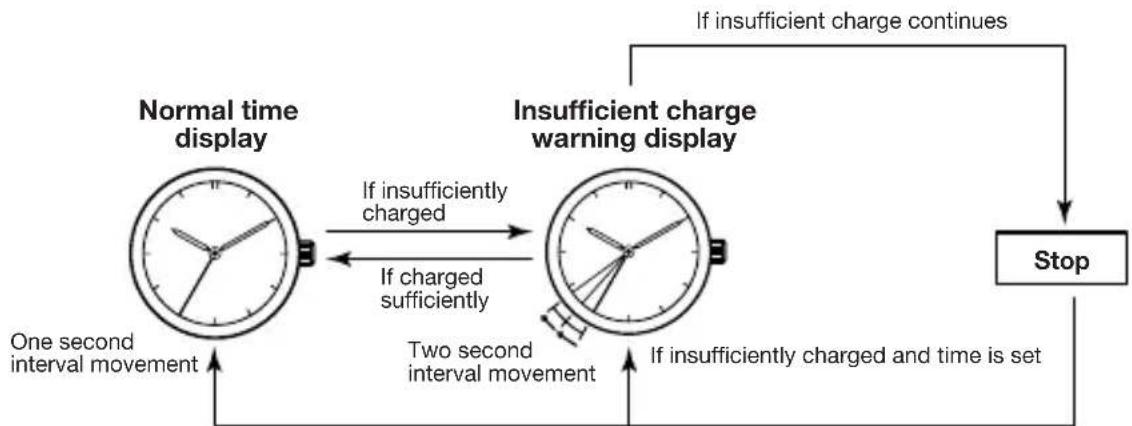
If the charge becomes insufficient, a warning function will operate and the display changes, as below.
flowchart
graph TD
    A["Normal time display"] -->|If insufficiently charged| B["Insufficient charge warning display"]
    B -->|If insufficiently charged and time is set| C["Stop"]
    A -->|One second interval movement| A
    B -->|Two second interval movement| B
    style A fill:#f9f,stroke:#333
    style B fill:#f9f,stroke:#333
    linkStyle 0 stroke:#000,stroke-width:2px
    linkStyle 1 stroke:#000,stroke-width:2px
    linkStyle 2 stroke:#000,stroke-width:2px
    linkStyle 3 stroke:#000,stroke-width:2px
    linkStyle 4 stroke:#000,stroke-width:2px
    linkStyle 5 stroke:#000,stroke-width:2px
    linkStyle 6 stroke:#000,stroke-width:2px
    linkStyle 7 stroke:#000,stroke-width:2px
    linkStyle 8 stroke:#000,stroke-width:2px
    linkStyle 9 stroke:#000,stroke-width:2px
    linkStyle 10 stroke:#000,stroke-width:2px
    linkStyle 11 stroke:#000,stroke-width:2px
    linkStyle 12 stroke:#000,stroke-width:2px
    linkStyle 13 stroke:#000,stroke-width:2px
    linkStyle 14 stroke:#000,stroke-width:2px
    linkStyle 15 stroke:#000,stroke-width:2px
    linkStyle 16 stroke:#000,stroke-width:2px
    linkStyle 17 stroke:#000,stroke-width:2px
    linkStyle 18 stroke:#000,stroke-width:2px
    linkStyle 19 stroke:#000,stroke-width:2px
    linkStyle 20 stroke:#000,stroke-width:2px
When the watch is exposed to light, the Quick Start Function will begin operating and the second hand will start moving. The correct time can be set once the watch is fully charged.
■Insufficient Charge Warning Function
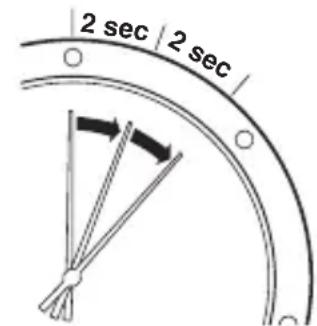
The second hand changes to a two second interval movement to indicate insufficient recharging.
Even in such a case, the watch keeps correct time, but about 4 days after the two second interval movement begins, the watch will stop.
After exposing the watch to light, recharging takes place and the watch returns to one second interval movement.
text_image
2 sec | 2 secTwo second interval movement
■Quick Start Function
The watch will stop if it is completely discharged.
It will begin to operate soon after it is exposed to light.
(However, the time to start may vary according to the brightness of the light.)
■ Overcharge Prevention Function
You can recharge your watch without worry.
Once the special energy storage cell is fully charged, the overcharge prevention function comes into operation and prevents over-charging of the energy storage cell.
D. CARE AND HANDLING DURING CHARGING
Notes on Use
To maintain optimal performance, be sure to expose your watch to light regularly.
Please note that if you wear long sleeves, your watch may be hidden from light and may result in insufficient charging. As such, additional exposure to light may be necessary.
- When you take your watch off, be sure to place it in as bright an area as possible.
■Notes on recharging
- Avoid recharging your watch in areas of high temperatures (over about 60^ / 140^ ), otherwise the sensitive components of the watch may become damaged. (e.g.) Incandescent lights generate heat sufficient to damage your watch. Be sure to keep the watch at least 50cm (20inches) away from the bulb so no damage occurs. We do not recommend the use of Halogen bulbs for recharging.
Never place your watch on the dashboard or rear deck of a vehicle as the heat generated in these areas can damage your watch.
E. ABOUT THE RECHARGEABLE CELL
Unlike ordinary watches, the special rechargeable cell used in your watch does not need regular replacement. This is a clean energy cell that will last the life of the watch.
CAUTION:
The rechargeable cell should last the life of the watch. Never allow anyone other than an Authorized Service Center to replace this cell. The movement is designed to operate with only the original rechargeable cell. If an alternate cell is installed, such as a conventional battery, the battery may become overcharged resulting in damage to the movement and/or bursting of the cell, which could cause injury to the user.
F. TIME REQUIRED FOR CHARGING
Time required for recharging may vary according to the design of the watch (color of the dial, etc) and operating environment. The following table will serve as an approximate reference: (Table of recharging)
| Illuminance (lux) | Environment | Time required | ||
| From the stop state to the one second movement | One day usage | Empty to full | ||
| 500 | Inside an ordinary office | 60 hours | 4 hours | —— |
| 1000 | 60-70cm (24-28in.) under a fluorescent light (30W) | 25 hours 2 hours | —— | |
| 3000 | 20cm (8in.) under a fluorescent light (30W) | 8 hours 40 | minutes 150 hours | |
| 10000 Exterior, cloudy 3 hours | 12 minutes 45 | hours | ||
| 100000 | Exterior, summer, sunny | 18 minutes 2 | minutes 12 hours | |
* The recharging time is the time the watch is continuously exposed to direct light.
Full recharging time...Time required to fully charge when the watch has
(Empty to full) completely stopped.
One day usage ......Time required to charge the watch sufficient for one-day use with one-second interval operation.
CAUTION:
When recharging the watch after it is completely in the stop state, be sure to pull out the crown to the time setting position.
After recharging, set the time and push the crown firmly back into its normal position.
G. IN THESE CASES
natural_image
Simple line drawing of a clock face with hour and minute hands (no numbers or text)Two second interval movement
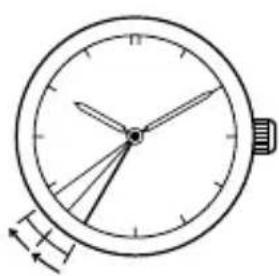
[If the watch warns that the energy is running short] The second hand starts moving at two second intervals in order to warn that the watch will stop functioning after about 1 week. (Insufficient Charge Warning Function) In such a case, expose your watch to light for a while to cancel the warning. (The second hand returns to moving at one second intervals when the energy is recharged.) If the watch is left short of energy, it will stop functioning after 4 days or so.
natural_image
Simple line drawing of a clock face with hour and minute hands (no numbers or text)Hitch movement
[If the watch warns you to set the time.]
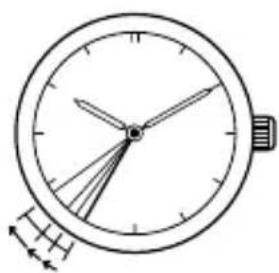
When the watch that has stopped is exposed to light, the second hand starts hitch movement. (Quick Start Function)
The time elapsed before the second hand starts moving depends on the illuminance of the light.
Even so, the second hand continues the hitch movement to tell you that the watch indicates an incorrect time because it had stopped.
In such a case, set the hands to the correct time.
* If the watch is insufficiently exposed to light, the second hand will soon switch to moving at two second intervals in order to warn that the energy is running short.
H. PRECAUTIONS
CAUTION: Water-resistance performance
There are several types of water-resistant watches, as shown in the following table.
| Indication | Specifications | Minor exposure to water (washing face, rain, etc.) | |
| Dial | Case (case back) | ||
| WATER RESIST or No indication | WATER RESIST(ANT) | Water-resistant to 3 atmospheres | OK |
| WR50 or WATER RESIST 50 | WATER RESIST(ANT)5 bar or WATER RESIST(ANT) | Water-resistant to 5 atmospheres | OK |
| WR100/200 or WATER RESIST 100/200 | WATER RESIST(ANT)10/20 bar or WATER RESIST(ANT) | Water-resistant to 10/20 atmospheres | OK |
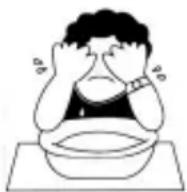
14 The unit "bar" is roughly equal to 1 atmosphere.
For correct use within the design limits of the watch, confirm the level of water-resistance of your watch, as indicated on the dial and case, and consult the table.
| Examples of use | ||||
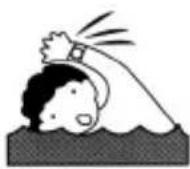 Moderate exposure to water (washing, kitchen work, swimming, etc.) Moderate exposure to water (washing, kitchen work, swimming, etc.) | 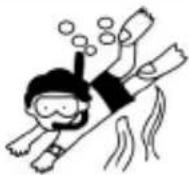 Marine sports (skin diving) Marine sports (skin diving) | 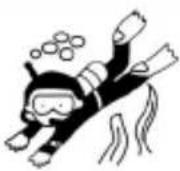 Scuba diving (with air tank) Scuba diving (with air tank) |  Operation of the crown with moisture visible Operation of the crown with moisture visible | |
| NO | NO | NO NO | ||
| OK | NO | NO NO | ||
| OK | OK | NO NO | ||
* WATER RESIST(ANT) xx bar may also be indicated as W.R. xx bar.
- Water-resistance for daily use (to 3 atmospheres): This type of watch is water-resistant to minor exposure to water. For example, you may wear the watch while washing your face; however, it is not designed for use underwater.
- Upgraded water-resistance for daily use (to 5 atmospheres): This type of watch is water-resistant to moderate exposure to water. You may wear the watch while swimming; however, it is not designed for use while skin diving.
- Upgraded water-resistance for daily use (to 10/20 atmospheres): This type of watch may be used for skin diving; however, it is not designed for scuba or saturated diving using helium gas.
CAUTION
- Be sure to use the watch with the crown pressed in (normal position). If your watch has a screw-type crown, be sure to tighten the crown completely.
- Do NOT operate the crown with wet fingers or when the watch is wet. Water may enter the watch and compromise water-resistance.
- If the watch is used in seawater, rinse with fresh water afterward and wipe with a dry cloth.
- If moisture has entered the watch, or if the inside of the crystal is fogged up and does not become clear within a day, immediately take the watch to your dealer or Citizen Service Center for repair. Leaving the watch in such a state will allow corrosion to form inside.
- If seawater enters the watch, place the watch in a box or plastic bag and immediately take it in for repair. Otherwise, pressure inside the watch will increase, and parts (crystal, crown, buttons, etc.) may come off.
CAUTION: Keep your watch clean.
• Leaving dust and dirt deposited between the case and crown may result in difficulty in pulling the crown out. Rotate the crown while in its normal position, from time to time, to loosen dust and dirt and then brush it off.
- Dust and dirt tend to be deposited in gaps in the back of the case or band. Deposited dust and dirt may cause corrosion and soil your clothing. Clean the watch occasionally.
Cleaning the Watch
- Use a soft cloth to wipe off dirt, perspiration and water from the case and crystal.
- Use a soft, dry cloth to wipe off perspiration and dirt from the leather band.
- To clean a metal, plastic, or rubber watchband, wash away dirt with mild soap and water. Use a soft brush to remove dust and dirt jammed in the gaps in the metal band. If your watch is not water-resistant, take it to your dealer.
NOTE: Avoid using solvents (thinner, benzine, etc.), as they may mar the finish.
CAUTION: Operating environment
- Use the watch within the operating-temperature range specified in the instruction manual. Using the watch where temperatures are outside the specified range, may result in deterioration of functions or even stoppage of the watch.
- Do NOT use the watch in places where it is exposed to high temperature, such as in a sauna. Doing so may result in a skin burn.
- D o NOT leave the watch in a place where it is exposed to high temperature, such as the glove compartment or dash-board of a car. Doing so may result in deterioration of the watch, such as deformation of plastic parts.
- Do NOT place the watch close to a magnet. Timekeeping will become inaccurate if you place the watch close to magnetic health equipment such as a magnetic necklace or a magnetic latch of a refrigerator door or handbag clasp or the earphone of a mobile phone. If this has occurred, move the watch away from the magnet and reset the time.
-
Do NOT place the watch close to household appliances that generate static electricity. Timekeeping may become inaccurate if the watch is exposed to strong static electricity, such as is emitted from a TV screen.
-
Do NOT subject the watch to a strong shock such as dropping it onto a hard floor.
- Avoid using the watch in an environment where it may be exposed to chemicals or corrosive gases.
If solvents, such as thinner and benzine, or substances containing such solvents come in contact with the watch, discoloration, melting, cracking, etc. may result. If the watch comes in contact with mercury used in thermometers, the case, band or other parts may become discolored.
Periodical inspections
Your watch needs inspection once in every two or three years for safety and long use.
To keep your watch water-resistant, the packing needs to be replaced regularly. Other parts need to be inspected and replaced if necessary.
Ask for Citizen geruine parts upon replacement.
I. SPECIFICATIONS
-
Type: Analog solar powered watch
-
Accuracy: Within ±15sec/month (within a normal temperature range of 5°C/41°F to 35°C/95°F)
-
Quartz oscillator frequency: 32,768Hz
-
IC: C/MOS-LSI (1 pc.)
-
Operational temperature range: -10^/14^ to +60^/140^
-
Display features: Time: hour, minute, second Calendar: date, day of the week (Models with calendar display)
-
Additional features: Insufficient charge warning/Quick start/Overcharge prevention
-
Duration time: Approx. 6 months (from full recharge to stop) At least 4 days (from two second interval movement to stop)
-
Power Source: Light converted to electrical energy stored in a special rechargeable cell. (Not user replaceable)
* Specifications are subject to change without prior notice.