CAL H113 - Watch CITIZEN - Free user manual and instructions
Find the device manual for free CAL H113 CITIZEN in PDF.


User questions about CAL H113 CITIZEN
0 question about this device. Answer the ones you know or ask your own.
Ask a new question about this device
Download the instructions for your Watch in PDF format for free! Find your manual CAL H113 - CITIZEN and take your electronic device back in hand. On this page are published all the documents necessary for the use of your device. CAL H113 by CITIZEN.
USER MANUAL CAL H113 CITIZEN
natural_image
Illustration of a window with curtains and a sun symbol above (no text or symbols)
When reading this instruction manual please keep the watch diagram at left folded out and in view.
All part of this watch, excluding the band, are to be repaired only at CITIZEN. Please have all inspections and repairs performed at a Citizen Consumer Help Desk or Customer Support Center.
This watch is a radio wave watch that receives Japan standard radio waves
This watch is equipped with an Automatic Tuning Function that receives radio waves by automatically selecting the station with the strongest signal, a Regular Automatic Reception Function that sets the time and date by automatically receiving radio waves at 2:00 AM, or at 4:00 AM when radio waves are unable to be received at 2:00 AM, each day, and a Free Reception Function that allows you set the time and date by arbitrarily receiving radio waves at any time.
● Standard time waves can only be received in Japan. (Radio waves cannot be received overseas.
● This radio wave watch can be used without concern over effects on the body or medical devices.
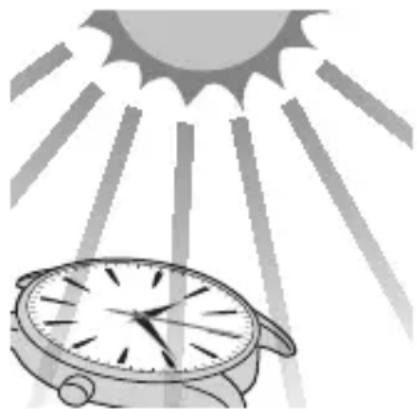
Please fully charge your watch before use by exposing it to light
If the second hand of the watch is moving at 2-second intervals during use, this means that the watch is insufficiently charged. Use the watch after charging by referring to "General Reference for Charging Times". Since the watch may be covered by clothing and so forth particularly during the winter preventing it from being exposed to light, charge the watch once a month by exposing to direct sunlight. In order to ensure that the watch is used comfortably, it is recommended to try to keep the watch charged at all times.
natural_image
Illustration of a wristwatch under a sun with radiating lines (no text or symbols)Thank you for your purchase of this Citizen watch.
Before using the watch, read this instruction manual carefully to ensure correct use.
After reading the manual, store it in a safe place for future reference.
Visit the Citizen website (http://www.citizenwatch-global.com/) to view visual guides for operation of your watch. Some models may be equipped with external features (calculation scale, tachymeter, etc.). Visual guides for operation of such external features can also be found on the website.
To check the movement number
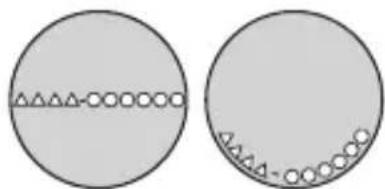
A case number—4 alphanumeric characters and 6 or more alphanumeric characters—is engraved on the case back. (Figure on the right)
The first 4 characters of the case number represent the movement number of the watch. In the example on the right, “△△△△” is the movement number.
Engraving position example
natural_image
Two circular diagrams showing a horizontal line with triangular symbols and circles, one larger and one smaller, both without any text or labels.The engraving position may differ depending on watch model.
Safety precautions (IMPORTANT)
This manual contains instructions that should be strictly followed at all times not only for optimal use, but to prevent any injuries to yourself, other persons or property.
● Safety advisories are categorized and depicted in this manual as follows:
| ⚠️ DANGER | Highly likely to cause death or serious injury. |
| ⚠️ WARNING | Can cause serious injury or death. |
| ⚠️ CAUTION | Can or will cause minor or moderate injury or damage. |
- Important instructions are categorized and depicted in this manual as follows:
 | Warning (caution) symbol followed by instructions that should be followed or precautions that should be observed. |
 | Warning (caution) symbol followed by prohibited matters. |
Be sure to remove any protective stickers that may be on your watch (case back, band, clasp, etc.). Otherwise, perspiration or moisture may enter the gaps between the protective stickers and the parts, which may result in a skin rash and/or corrosion of the metal parts.
We recommend seeking the assistance of an experienced watch technician for sizing of your watch. If adjustment is not done correctly, the bracelet may unexpectedly become detached leading to loss of your watch or injury.
Consult your nearest authorized Citizen Cervice Center.
Please check the following before
using your watch
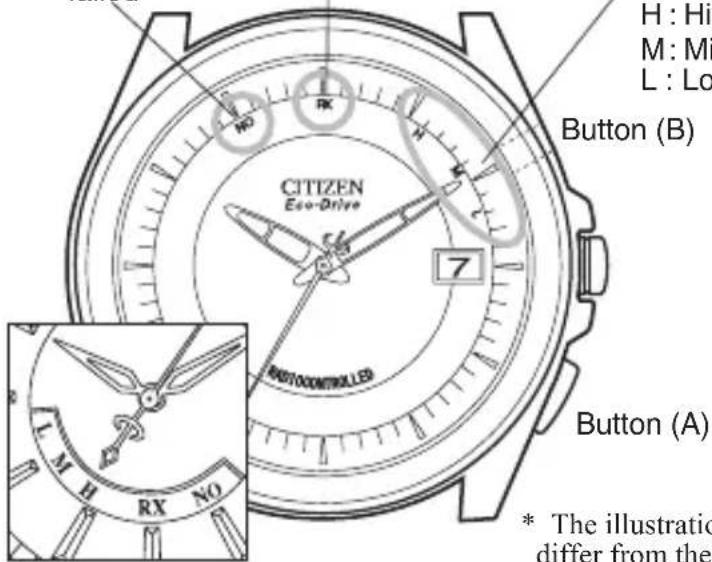
NO:Reception failed
RX:Reception in progress
Reception level/
Reception result
H:High
M: Middle
L:Low
Button (B)
text_image
H : Hi M : Mi L : Lo Button (B) CITIZEN Eco-Drive 7 AUTOCONTROLLED Button (A) * The illustratic differ from theCheck the movement of the second hand.
Second hand moving at 1-second intervals
Second hand moving at 2-second intervals or stopped
Charge the watch sufficiently by placing it in direct sunlight as indicated in “D. General Reference for Charging Times”. (P.92)
* The illustrations in this instruction manual may differ from the actual appearance of your watch.
flowchart
graph TD
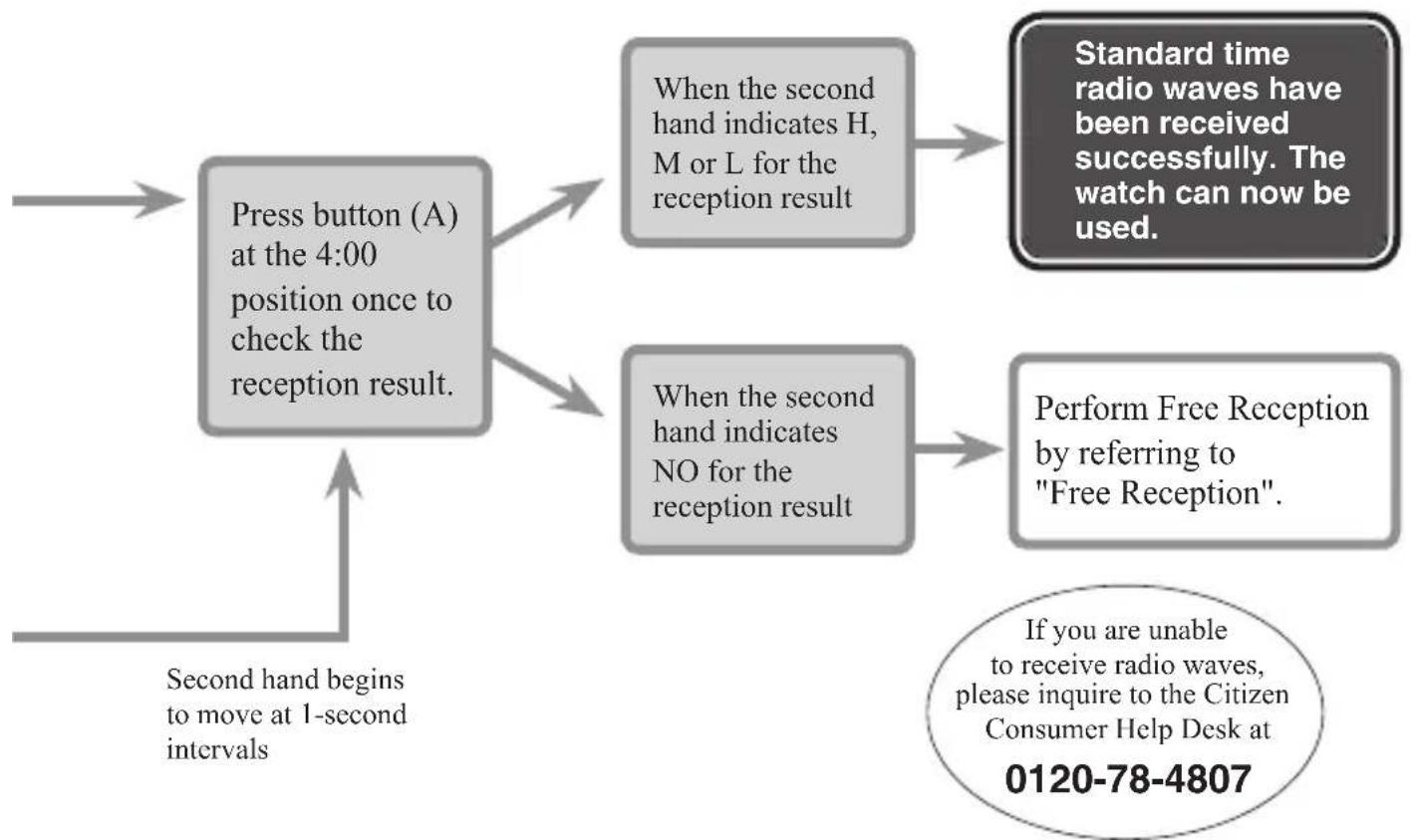
    A["Press button (A) at the 4:00 position once to check the reception result."] --> B["When the second hand indicates H, M or L for the reception result"]
    A --> C["When the second hand indicates NO for the reception result"]
    B --> D["Standard time radio waves have been received successfully. The watch can now be used."]
    C --> E["Perform Free Reception by referring to "Free Reception"."]
    F["Second hand begins to move at 1-second intervals"] --> A
    G["If you are unable to receive radio waves, please inquire to the Citizen Consumer Help Desk at 0120-78-4807"] --> E
Please Remember the Following About Receiving
Radio Waves
Regular Automatic Reception (Automatic reception of radio waves)
● Regular automatic reception does not require any buttons to be pressed. Radio waves are received at 2:00 AM each day, or radio waves are automatically attempted to receive again at 4:00 AM when they are unable to be received at 2:00 AM, to set the time.
text_image
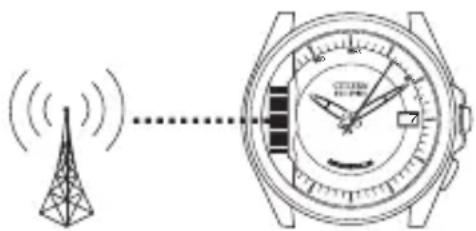
Diagram showing signal transmission from a tower to a digital watch with clock and time display● Take the watch off of your wrist, face the 9:00 position (location of the reception antenna) towards the radio wave transmitter station and place the watch in a stable location that allows radio waves to be received easily such as near a window.
You can check the reception result anytime after the regular automatic reception time.
● Press button (A) once.
- If the second hand points to "H, M or L", this indicates that radio waves have been received.
- If the second hand points to "NO", this indicates that radio waves were unable to be received. If the reception result is "NO", refer to the next page for the procedure for performing free reception.
Free Reception (Manual reception of radio waves)
● This function allows radio waves to be received at any time.
Perform free reception when the reception environment has changed and radio waves are unable to be received by Regular Automatic Reception.
● Take the watch off of your wrist, face the 9:00 position towards the radio wave transmitter station and place the watch in a stable location that allows radio waves to be received easily such as near a window. Do not move the watch during radio wave reception.
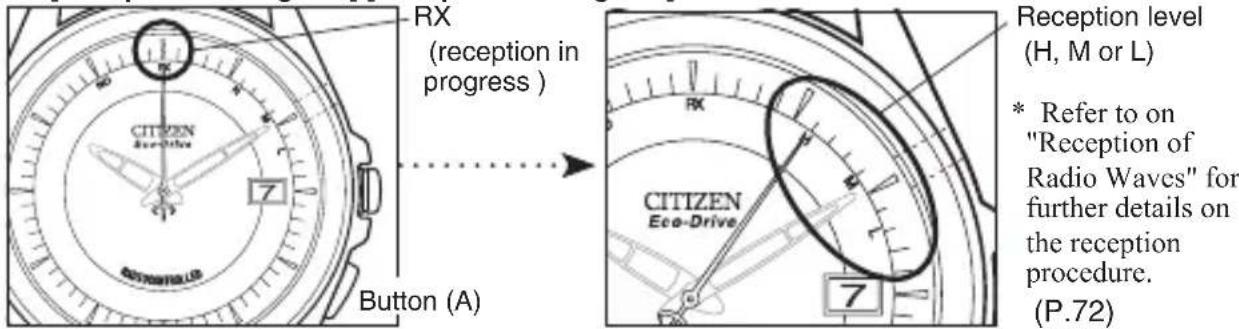
- Press button (A) for at least 2 seconds, and release your finger after the second hand has stopped at the RX (12:00) position.
- The second hand then moves from RX to H, M or L to indicate that reception is in progress.
- When reception is completed, the second hand returns from H, M or L and resumes 1-second interval movement (within a maximum of 15 minutes).
[Reception in Progress] [Reception in Progress]
text_image
RX (reception in progress ) CITIZEN Eco-Drive 7 Button (A) Rx REception level (H, M or L) * * Refer to on "Reception of Radio Waves" for further details on the reception procedure. (P.72)General Reference for Receiving Areas
This watch is provided with an automatic tuning feature that automatically selects the station to be used for reception of standard time radio waves. A general reference for the areas where the watch can receive standard time radio waves is as follows. However, reception status in these areas may vary due to the times of sunrise and sunset, seasonal changes, weather conditions (presence of lightning, etc.). Since this map only provides a general reference of the standard receiving areas, it may not apply in some particular locations even within the range shown in the map.
- Mt. Ohtakadoya standard radio wave transmitter station (Fukushima Station)
- Mt. Hagane standard radio wave transmitter station (Kyushu Station)
In Japan, standard time radio waves are broadcast continually, 24-hours a day, but may occasionally be interrupted for maintenance purposes. To confirm standard time radio wave transmission status, refer to the Japan Standard Time (JST) Project, on the website of the National Institute of Information and Communications Technology
(http//jjy.nict.go.jp/).
The standard time radio wave has no effect on the human body or medical equipment.
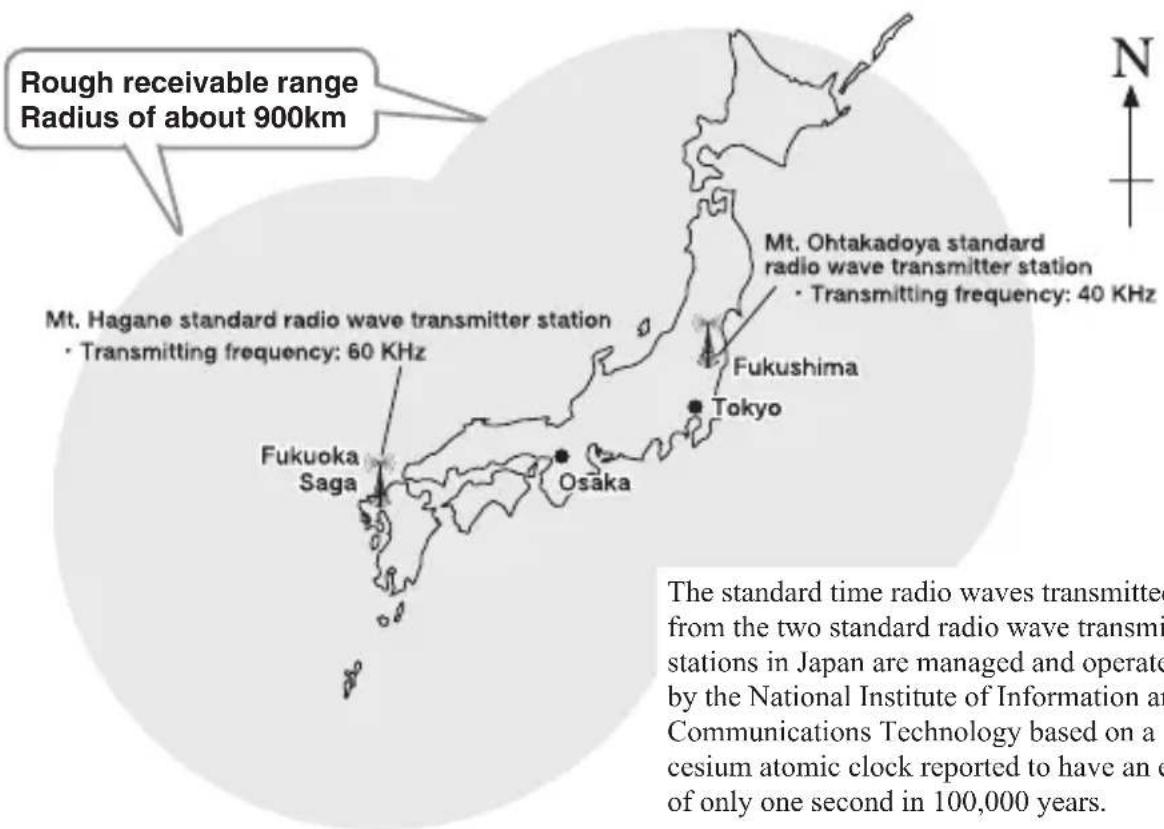
text_image
Rough receivable range Radius of about 900km Mt. Hagane standard radio wave transmitter station • Transmitting frequency: 60 KHz Fukuoka Saga Osaka Tokyo Mt. Ohtakadoya standard radio wave transmitter station • Transmitting frequency: 40 KHz Fukushima The standard time radio waves transmitted from the two standard radio wave transmi stations in Japan are managed and operated by the National Institute of Information and Communications Technology based on a cesium atomic clock reported to have an e of only one second in 100,000 years.The standard time radio waves transmitted from the two standard radio wave transmitter stations in Japan are managed and operated by the National Institute of Information and Communications Technology based on a cesium atomic clock reported to have an error of only one second in 100,000 years.
CONTENTS
- Features 68
- How to use a specially designed crown/push button 69
Radio Wave Reception
- For Good Reception.... 70
- Locations Where Reception May Be Difficult.... 71
- Reception of Radio Waves.... 72
A. Position of the Second Hand During Reception 74
B. Confirmation of Reception Result 75
Manually Setting the Time and Date
- Setting the Time 76
- Setting the Date.... 78
- Time difference correction procedure 81
Checking and Correcting the Reference Position
- Automatic Hand Correction Function 82
- Checking the Reference Position.... 83
- Manually Correcting the Reference Position 84
Eco-Drive
- Charging your watch 86
- Unique Functions of Eco-Drive Watches.... 88
A. Power Save Function.... 90
B. Insufficient Charge Warning Function 91
C. Overcharging Prevention Function 91
D. General Reference for Charging Times 92
E. Eco-Drive Watch Handling Precautions 93
Troubleshooting.... 94
Precautionary Items and Usage Limitations.... 96
Warranty and Service 106
Specifications 108
Customer Support Center.... 110
1. Features
◎ This watch is a radio wave watch that automatically corrects the time and date by automatically selecting the radio wave transmitter station having the optimum reception environment and receiving a standard time radio wave (time information) transmitted from two radio wave transmitter stations located in Fukushima and Kyushu.
© This watch is also an Eco-Drive radio wave watch provided with a photoelectric power generation function that converts light energy into electrical energy to drive the watch. It is also equipped with a power save function that reduces the power consumption of the watch when light does not shine onto the watch dial.
◎ This watch is equipped with a time difference correction function that is convenient when using the watch overseas. This function lets you easily set the watch to the local time when traveling to a region or country in a different time zone.
※ However, this watch receives Japanese radio waves only. If no radio waves are received, the watch operates within the product's accuracy range.
2. How to use a specially designed crown/push button
Some models are equipped with a specially designed crown and/or push button to prevent accidental operation.
Unlock the crown prior to operate your watch.
| Unlock Lock | ||||
| Screw down crown | 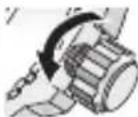 | Rotate the crown counterclockwise until it releases from the case. | 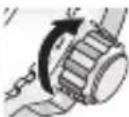 | Push the crown in to the case. With gentle pressure towards the case, rotate the crown clockwise to secure it to the case. Be sure to tighten firmly. |
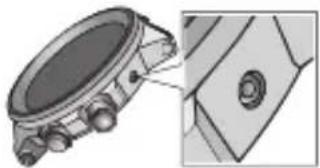
| Screw down push button | 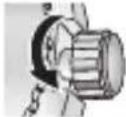 | Rotate the locking screw counterclockwise, and loosen until it stops. | 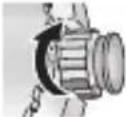 | Rotate the locking screw clockwise, and tighten firmly. |
Press the button with a narrow-tipped object such as a wooden toothpick.
natural_image
Mechanical component diagram showing a circular housing with attached parts and a close-up view of a mechanical part (no text or symbols visible)Radio Wave Reception
3. For Good Reception
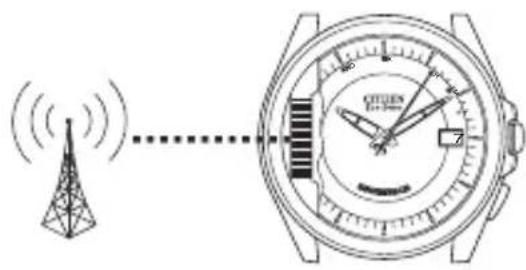
This watch incorporates an antenna for receiving radio waves inside the watch case (at the 9:00 position). For good reception, remove the watch from your wrist and place the watch in a stable location that facilitates reception of radio waves such as near a window with the 9:00 position of the watch facing in the direction of the radio wave transmitter station. Do not move the watch while receiving radio waves.
The reception level varies depending on the environment in which the watch is used.
Try receiving radio waves while changing the orientation or location of the watch several times while referring to H, M or L that indicates the reception level of the watch.
Find the location and direction where radio waves are received easily as indicated by H or M for the reception level.
text_image
Diagram showing signal transmission from a tower to a wristwatch with labeled time and speed indicators4. Locations Where Reception May Be Difficult
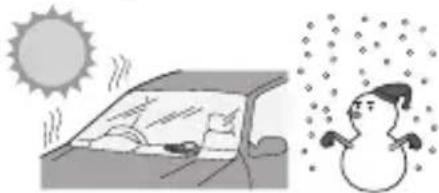
It may not be possible to properly receive radio waves at locations susceptible to generation of radio wave noise or under environmental conditions that cause difficulty in receiving radio waves.
natural_image
Illustration of a car with sun and snowman in snowy weather (no text or symbols)◆ Locations subject to extremely high or low temperatures

natural_image
Three identical power transmission towers connected by parallel lines (no text or symbols)◆ Near high-tension wires (power lines), railroad overhead wires or airports (communication facilities)
natural_image
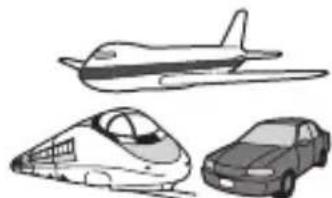
Illustration of four vehicle types: airplane, high-speed train, and sedan (no text or symbols)◆ In a car, train or airplane
natural_image
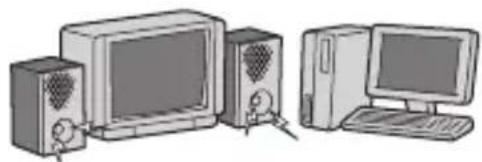
Illustration of desktop computer setup with monitor, tower, and keyboard (no text or symbols)◆ Near household electric appliances or OA equipment such as TV sets, refrigerators, personal computers, fax machines, etc.
◆ Near a cellular telephone in use

natural_image
Illustration of stylized buildings with mountain peaks and clouds above (no text or symbols)◆ Inside a reinforced concrete building, between tall buildings or in valleys between mountains or underground
5. Reception of Radio Waves
There are three ways to receive radio waves consisting of Automatic Regular Reception, Free Reception and Recovery Automatic Reception. Always make sure to remove the watch from your wrist to receive radio waves. When reception is completed, each hand automatically moves forward or backward to the received time.
Regular Automatic Reception (Automatic reception of radio waves)
☐ Place the watch in a stable location where radio waves can be received easily such as by a window with the 9:00 position of the watch facing in the direction of the radio wave transmitter station. Radio waves are automatically received at 2:00 AM every day, or if they are unable to be received at that time, are automatically received at 4:00 every day.
Free Reception (Manual reception of radio waves)
◎ This function allows you receive radio waves at any time.
Step 1) Continuously depress button (A) for about 2 seconds, and release when the second hand has rapidly advanced to "RX" (12:00 position) and stopped.
Step 2) Place the watch in a stable location where radio waves can be received easily such as by a window with the 9:00 position of the watch facing in the direction of the radio wave transmitter station.
● The second hand then moves from RX to H, M or L indicating that radio waves are being received.
- When reception is completed, the second hand moves from H, M or L and returns to 1-second interval movement.
The reception result can be confirmed by referring to "5. B. Confirmation of Reception Result". (P.75)
Recovery Automatic Reception
After the watch has stopped as a result of being insufficiently charged, radio waves are received once automatically when the watch is sufficiently recharged by exposing to light. Try to keep the watch charged at all times so that it does not become insufficiently charged.
natural_image
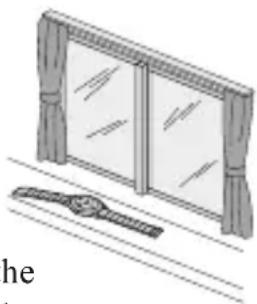
Illustration of a window with curtains and a hanging object (no text or symbols)* When the watch is receiving the radio wave signal, all of the hands will stop. To check the time, hold button (A) for 2 seconds to cancel radio wave reception. The hands will then return to the current time.
A. Position of the Second Hand During Reception
[Reception in Progress] [Reception in Progress] [Completion of Reception]
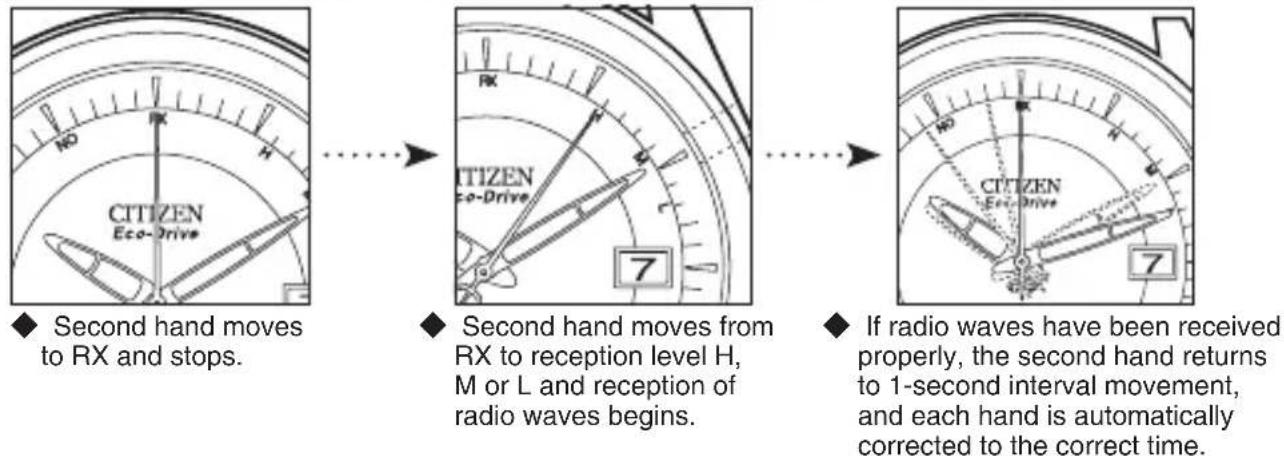
It takes from about 2 to 15 minutes to receive radio waves depending on the weather and radio wave noise conditions on that day.
[NOTE] The second hand may make one revolution and indicate the reception level again if the transmitter station has changed while reception is in progress or radio wave reception has been interrupted by changes in the reception environment and so forth. Do not move the watch until the second hand returns to 1-second interval movement.
B. Confirmation of Reception Result
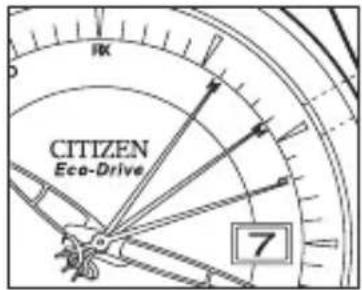
© This function allows you to check whether radio wave reception has been successful or failed. Step 1) Press button (A) once. The second hand rapidly moves to H, M, L or NO to indicate the reception result.
Step 2) The second hand automatically returns to normal hand movement after the reception result has been displayed for 10 seconds. The second hand can also be returned to 1-second interval movement by pressing button (A) while the reception result is displayed.
- If the second hand indicates NO for the reception result, try receiving radio waves by free reception after finding a location and direction where radio waves are received easily.
H, M and L indicate the reception level, and have no effect on performance.
text_image
CITIZEN Eco-Drive 7| Reception level | Reception level and reception status |
| H | Radio wave was received or is being received under very good reception conditions. |
| M | Radio wave was received or is being received under good reception conditions. |
| L | Radio wave was received or is being received under not very good reception conditions. |
| NO | When reception has failed |
(The time display may shift slightly depending on the reception environment and internal watch processing even if radio waves are properly received.)
Manually Setting the Time and Date
6. Setting the Time
The time and date are corrected automatically when this watch receives radio waves. The time and date can also be set manually when using the watch overseas or other locations where radio waves do not reach. Regular automatic reception or free reception can then be performed after returning to a location where radio waves can be received.
[Date Correction] [Time Correction]
text_image
TIZEN co-Drive (0) (1)(1)(0) CONTROLLED 7 Position 1 TIZEN co-Drive 7 CONTROLLED (0)(0)(2)(2) Crown at Position 2 Button(A)◆ The month, year (no. of years elapsed from most recent leap year) and date can be corrected.
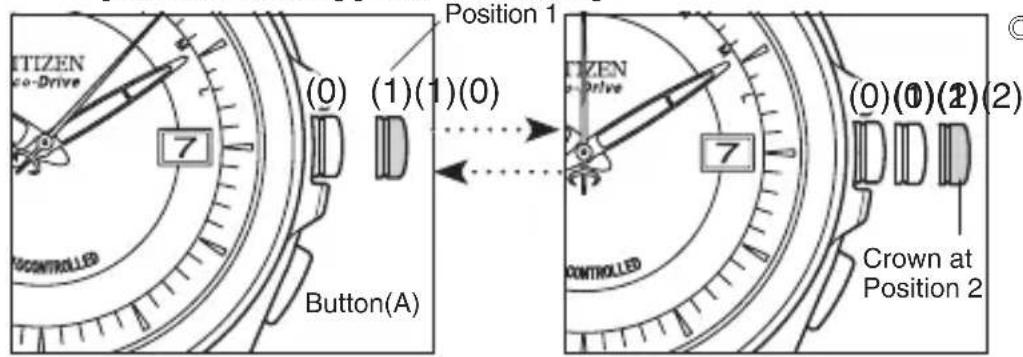
The operation for correcting the minute hand and hour hand can be switched by pressing button (A) once. The minute hand or hour hand being corrected at that time moves to the left and right to indicate that the watch has entered the correction mode.
Step 1) Pull the crown out to Position 2.
- The second hand rapidly moves to the 0 seconds position and stops.
Step 2) Turn the crown to set the minute hand.
① Turning the crown to the right (by 1 click) causes the second hand to make one revolution in the clockwise direction and the minute hand to advance by 1 minute.
② Turning the crown to the left (by 1 click) causes the second hand to make one revolution in the counter-clockwise direction and the minute hand to go back by 1 minute.
- Continuously turning the crown (by 2 clicks or more) causes the second and minute hands to move continuously by one hour.
- Turn the crown to the left or right to interrupt continuous movement of the hands.
Step 3) Press button (A) once and turn the crown to set the hour hand.
① Turning the crown to the right (by 1 click) causes the hour hand to rotate in the clockwise direction and advance by 1 hour.
② Turning the crown to the left (by 1 click) causes the hour hand to rotate in the counterclockwise direction and go back by 1 hour.
- Continuously turning the crown (by 2 clicks or more) causes hour hand to move continuously.
[NOTE] The date changes at 12:00 AM. Please pay attention to AM and PM.
Step 4) Return the crown to the normal position (0) jin synchronization with a telephone time signal or other time service to finish the procedure.
7. Setting the Date
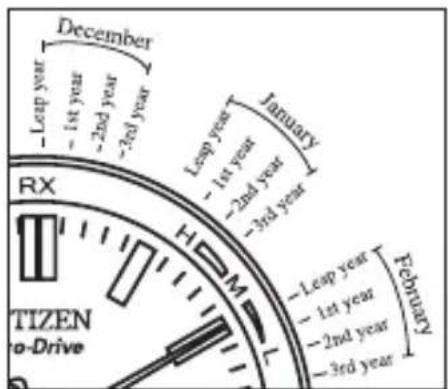
☆ Viewing the Month:
January zone: Between 1:00 and 2:00
February zone: Between 2:00 and 3:00
December zone: Between 12:00 and 1:00
text_image
December -1st year -2nd year -3rd year -1st year -2nd year -3rd year January -1st year -2nd year -3rd year -1st year -2nd year -3rd year -1st year -2nd year -3rd year -1st year -2nd year -3rd year -1st year -2nd year -3rd year -1st year -2nd year -3rd year -1st year -2nd year -3rd year -1st year -2nd year -3rd year -1st year -2nd quarter -1st quarter -2nd quarter -3rd quarter -1st quarter -2nd quarter -3rd quarter -1st quarter -2nd quarter -3rd quarter -1st quarter -2nd quarter -3rd quarter -1st quarter -2nd quarter -3rd quarter -1st quarter -2nd quarter -3rd quarter -1st quarter -2nd quarter -3rd quarter -1st quarter -2nd quarter -3rd quarter -1st quarter -2n quarter -3rd quarter -1st quarter -2n quarter -3rd quarter -1st quarter -2n quarter -3rd quarter -1st quarter -2n quarter -3rd quarter -1st quarter -2n quarter -3rd quarter -1st quarter -2n quarter -3rd quarter -1st quarter -2n quarter -3rd quarter -1st quarter -2n quarter -3rd quarter -1n quarter -2n quarter -3rd quarter -1n quarter -2n quarter -3rd quarter -1n quarter -2n quarter -3rd quarter -1n quarter -2n quarter -3rd quarter -1n quarter -2n quarter -3rd quarter -1n quarter -2n quarter -3rd quarter -1n quarter -2n quarter -3rd quarter -1n quarter -2n quarter -3rd qutary -1n quarter -2n quarter -3rd qutary -1n quarter -2n quarter -3rd qutary -1n quarter -2n quarter -3rd qutary -1n quarter -2n quarter -3rd qutary -1n quarter -2n quarter -3rd qutary -1n quarter -2n quarter -3rd qutary -1n quarter -2n quarter - -1n quarter -2n quarter - -1n quarter -2n quarter - -1n quarter -2n quarter - -1n quarter -2n quarter - -1n quarter -2n quarter - -1n quarter -2n quarter - -1n quarter -2n quarter - -1n quarter -2n quarter - -1n quarter -2n quarter - -1n quarter -2n quarter - -1n quarter -2n quarter - TIZEN to-DriveExamples:
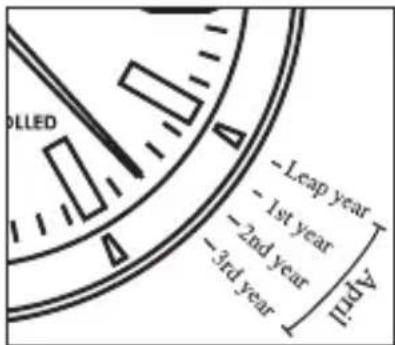
April 2015
Read the number of elapsed years from the most recent leap year f
- Align the second hand at 23 seconds (April zone between 4:00 and 5:00)
text_image
-LEAP year -1st year -2nd year -3rd year April☆ Viewing the Elapsed Year:
Leap year: Starting point of each month zone
1st year after most recent leap year:
1st graduation of each month zone
2nd year after most recent leap year:
2nd graduation of each month zone
3rd year after most recent leap year:
3rd graduation of each month zone
| Year | Elapsed year | Year | Elapsed year | Year | Elapsed year |
| 2014 | 2nd year | 2018 | 2nd year | 2022 | 2nd year |
| 2015 | 3rd year | 2019 | 3rd year | 2023 | 3rd year |
| 2016 | Leap year | 2020 | Leap year | 2024 | Leap year |
| 2017 | 1st year | 2021 | 1st year | 2025 | 1st year |
(Until February 28, 2100)
Step 1) Pull the crown out to Position 1.
- The watch enters the date correction mode, and the second hand moves to the position of the month and elapsed year stored in the memory of the watch and stops.
Step 2) Turn the crown to set the date.
① Turning the crown to the right (by 1 click) advances the date by 1 day.
② Turning the crown to the left (by 1 click) moves the date back by 1 day.
[NOTE] Pay attention to AM and PM when setting the date. Refer to "6. Setting the Time".
Step 3) Press button (A) once and turn the crown to set the month and elapsed year.
① Turn the crown to the right (by 1 click) to align the second hand at the position corresponding to the month and elapsed year.
② Turning the crown to the left (by 1 click) causes the second hand to move backward.
The operation for correcting the date, month and elapsed year can be switched by pressing button (A) once. The date wheel or second hand being corrected at that time moves to the left and right to indicate that the watch has entered the correction mode.
Step 4) Return the crown to the normal position (0) to finish the procedure.
8. Time difference correction procedure
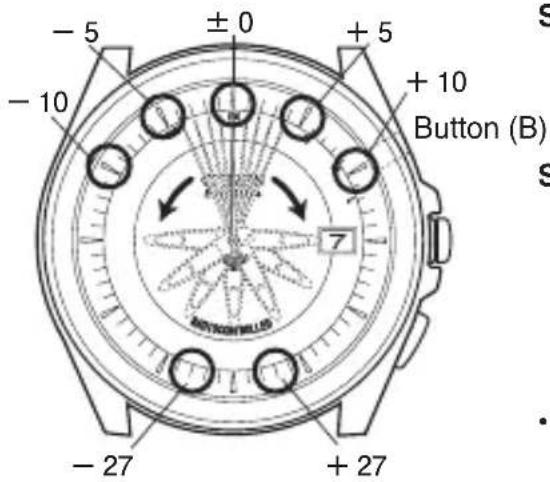
● This function lets you set a time difference in 1 hour units for the local time when traveling to a region or country in a different time zone.
text_image
-5 ±0 +5 -10 +10 Button (B) 7 -27 +27Step 1) Press button (B) once. The second hand indicates the time difference. The zero seconds position of the second hand indicates a time difference of ±0 hours.
Step 2) Turning the crown (by 1 click) to the right without pulling it out causes the second hand to advance by 1 hour in a single step. Turning the crown to the left causes the second hand to go back by 1 hour in a single step.
- The second hand indicates Japan standard time at the 0 seconds position. The time difference can be set to ± 27 hours based on Japan standard time.
Step 3) After setting the time difference, the setting mode is canceled and the second hand returns to 1-second interval movement either when button (B) is pressed once or when none of the buttons are pressed for 10 seconds.
Checking and Correcting the Reference Position
9. Automatic Hand Correction Function
(Hand Reference Position Automatic Correction Function)
What is the Automatic Hand Correction Function?
(Hand Reference Position Automatic Correction Function)
This function checks the hand positions at predetermined intervals to determine if the hand reference positions are correct, and if they are detected to have shifted out of position, rapidly corrects the second and minute hands to keep the correct time.
Shock Detection Function
This function prevents the second and minute hands from shifting when the watch is subjected to shocks.
If the watch should happen to be subjected to a strong impact or placed in an environment subjected to magnetism or static electricity, the correct time may not be displayed even if radio waves are received. If this happens, check the reference position. Refer to "10. Checking the Reference Position" on the following page.
10. Checking the Reference Position
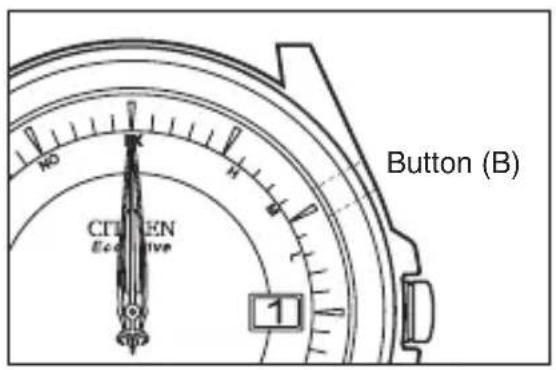
Radio wave watches display the standard time and date received on the basis of a hand reference position of "12:00:00" and a date of the "1st".
text_image
CITIGEN Ecoitive 1 Button (B)◎ Check that the reference position is displayed correctly.
Continuously depress button (B) for about 5 seconds or more with the crown at the normal position, and release once the second hand has begun to move either forward or backward. All of the hands and the date wheel move rapidly and stop at the reference position stored in the memory of the watch.
Indication of correct reference position:
Time: 12:00:00 Date: 1st
*If the hands and date are not in the reference position, the correct date and time will not be displayed even if radio waves are received. If they deviate from the reference position, see “11. Adjusting the Reference Position Manually” on the next page, and correct the position.
11. Manually Correcting the Reference Position
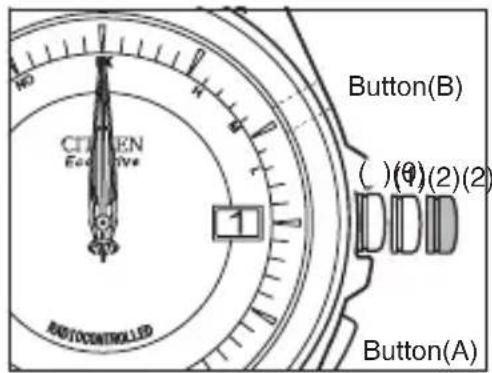
Correct the reference position if the date wheel does not indicate the "1st" or the hands do not indicate "12:00:00".
Step 1) Press button (B) for 5 seconds or more, release when the second hand begins to move rapidly and then pull the crown out to Position 2.
Step 2) Align the date at "1".
① Continuously turning the crown (by 2 clicks or more) causes the data to change continuously.
- Turn the crown to the left or right to stop the date from changing.
② When a "1" appears in the center of the date window on the watch dial, turn the crown to the left or right to stop the date from changing.
text_image
CITIGEN ECOOLIVE AUTOCONTROLLED Button(B) ( ) (0) (2) (2) DDD Button(A)Step 3) Press button (A) once and turn the crown to set the hour hand.
① Turning the crown to the right (by 1 click) causes the hour hand to advance by 1 step while turning to the left causes it to go back by 1 step.
② Continuously turning the crown (by 2 clicks or more) causes the hour hand to move continuously.
☐ Each time button (A) is pressed, hour hand, second hand and the date move left and right in that order to indicate that the watch is in the correction mode.
Step 4) Press button (A) once and turn the crown to set the minute and second hands.
① Turning the crown to the right (by 1 click) causes the second hand to advance rapidly by 1 minute, while turning it to the left causes the second hand to move back by 1 minute.
② Continuously turning the crown (by 2 clicks or more) causes the second hand to rotate rapidly, and the minute hand moves continuously in coordination with the second hand.
Step 5) After setting the reference position, return the crown to the normal position (0) and press button (B) once to return each hand and the date wheel to the current time and date.
- Although this completes the procedure for setting the reference position, perform free reception if the watch does not indicate the current time.
Eco-Drive
12. Charging your watch
Once fully charged, this watch will continue to keep the correct time for about 6 months (about 7 months for the H11A) during normal use.
In order to use this watch comfortably, try to store the watch in a bright location at all times.
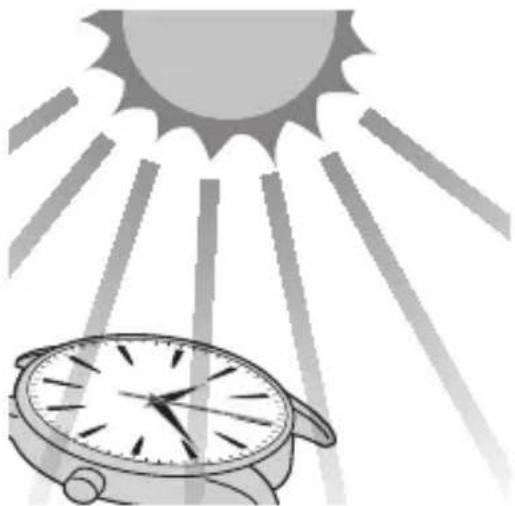
When not wearing your watch, try to place it next to a window or other bright location that allows the dial to be exposed to sunlight. This will keep the watch charged and enable it to continue to run properly at all times.
natural_image
Illustration of a wristwatch under a sun with radiating lines, symbolizing time or urgency (no text or symbols present)◆ Charge the watch by exposing the watch dial to direct sunlight or light from a fluorescent lamp.
If you usually wear long sleeves, the watch may be covered thereby preventing it from being exposed to light resulting in the watch becoming insufficiently charged. It is recommended to charge the watch once a month by exposing to direct sunlight.
13.Unique Functions of Eco-Drive Watches
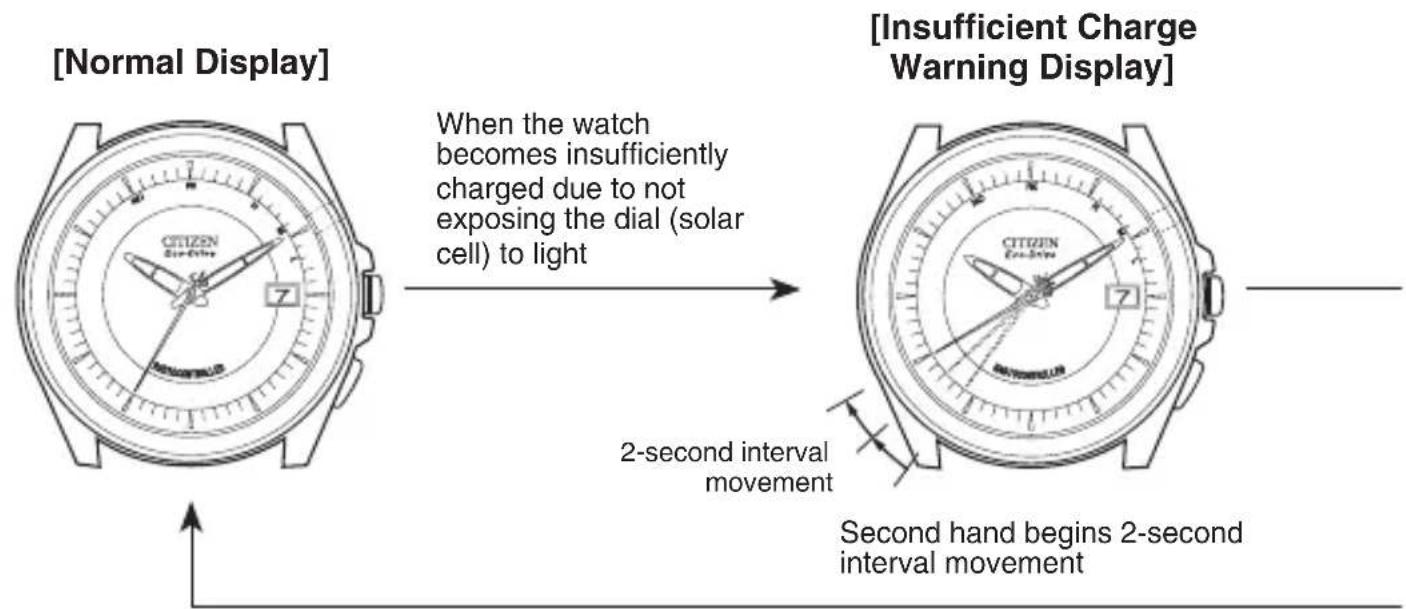
When the watch becomes insufficiently charged, the display changes as shown below.
text_image
[Normal Display] When the watch becomes insufficiently charged due to not exposing the dial (solar cell) to light [Insufficient Charge Warning Display] 2-second interval movement Second hand begins 2-second interval movement*1 If the watch has stopped as a result of being insufficiently charged:
- A minimum of about 30 minutes are required until recovery automatic reception, even if the watch is exposed to light.
*2 If recovery automatic reception has failed:
- Since the time is incorrect even if the second hand is moving at one second intervals, first set the time and date manually or by free reception before using the watch.
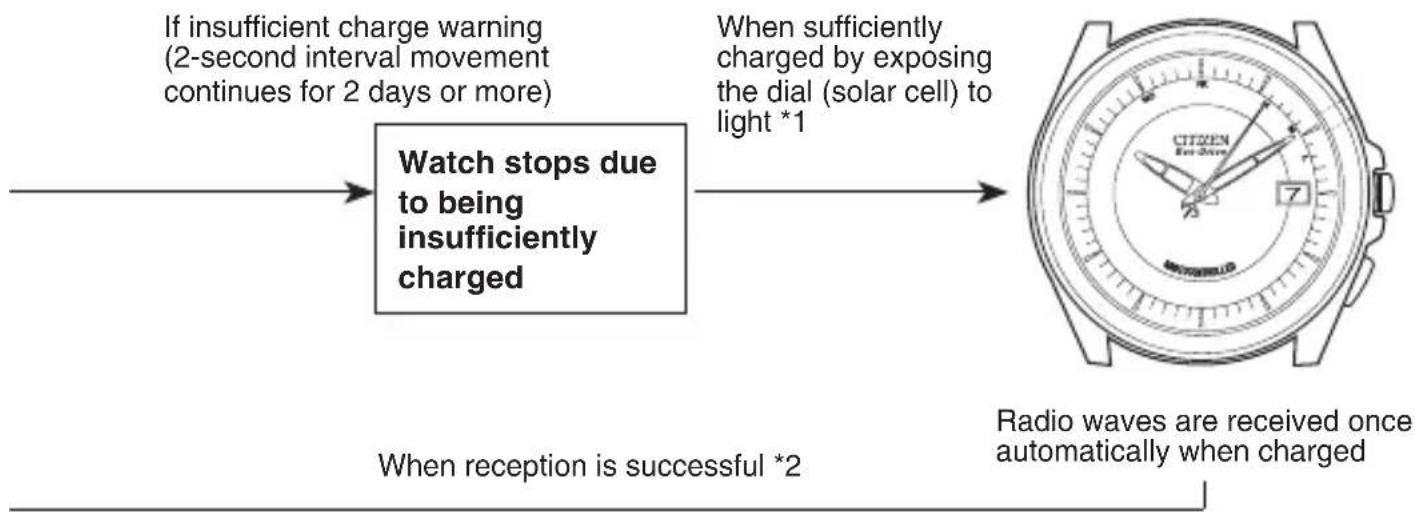
[Recovery Automatic Reception]
flowchart
graph LR
    A["If insufficient charge warning (2-second interval movement continues for 2 days or more)"] --> B["Watch stops due to being insufficiently charged"]
    B --> C["When sufficiently charged by exposing the dial (solar cell) to light *1"]
    C --> D["Radio waves are received once automatically when charged"]
    E["When reception is successful *2"] --> B
A. Power Save Function
When the watch is stored in the place where its solar cell is continuously not exposed to light for 1 week or more, the watch enters the power save mode and some features of the watch will be deactivated.
The power save function is canceled automatically when the watch dial is exposed to light.
- When the power save function is canceled, each hand rapidly returns to the current time and the second hand begins one-second interval movement.
- Two-second interval movement begins if the watch is insufficiently charged. When this happens, sufficiently charge the watch so that it returns to one-second interval movement.
[Note]
Although the watch will continue to be accurate to within the time accuracy range in the power save mode, when the power save function is canceled, be sure to perform free reception before using.
B. Insufficient Charge Warning Function
The second hand changes from 1-second interval movement to 2-second interval movement to indicate that the watch has become insufficiently charged. After about 2 days or more have passed since the start of two-second interval movement without light shining onto the watch, the watch stops 2-second as a result of being insufficiently charged.
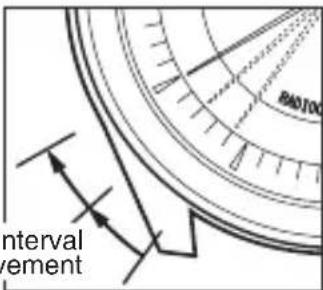
text_image
interval vement[Note] During two-second interval movement, regular automatic and free reception are not available, and the time cannot be corrected manually.
If the watch becomes insufficiently charged while radio wave reception, confirmation of reception result, time difference correction or checking or setting the reference position is in progress, the operation is interrupted and the watch returns to the time prior to the operation being performed. The watch begins 2-second interval movement at this time. Try to keep the watch charged at all times to prevent it from becoming insufficiently charged.
C. Overcharging Prevention Function
This function eliminates any worry regarding effects on the rechargeable cell, timekeeping accuracy, performance or functions of the watch no matter how much the watch is charged.
When the rechargeable cell becomes fully charged by exposing the solar cell to light, the overcharging prevention function is activated automatically to prevent the battery from being charged further.
D. General Reference for Charging Times
* Below are the approximate times required for charging when exposing the watch dial to light continuously.
Please use this table as a reference only.
| Environment | Illuminance (lx) | Charging Time (approx.) | ||
| To work for one day | To start working normally when the cell is discharged | To become fully charged when the cell is discharged | ||
| Outdoors (sunny) | 100,000 | 5 minutes | 40 minutes | 16 hours |
| Outdoors (cloudy) | 10,000 | 12 minutes | 1.5 hours | 40 hours |
| 20 cm from a fluorescent lamp (30W) | 3,000 40 minutes | 2.5 hours | 150 hours | |
| Interior lighting | 500 | 4 hours | 17 hours | — |
* If the second hand is moving in 2-second intervals, refer to “To fully charge” and fully charge.
* If the second hand is moving in 2-second intervals, the watch cannot be operated.
Charge the watch until the second hand moves at 1-second intervals.
E. Eco-Drive Watch Handling Precautions
- Please note that if you wear long sleeves, the watch may stop as a result of being covered by your sleeve and blocked from the light.
- When you take off the watch, try to place it in as bright a location as possible. This will ensure that it will continue to run properly.
- Because the watch uses a rechargeable cell, you do not need periodical cell replacement.
However, power consumption may increase after using for an extended period of time due to deterioration, and the power may run out earlier than expected. To avoid this, we recommend that you have your watch inspected (Charge basis) periodically.
Troubleshooting
Try checking the following when you think a problem has occurred.
| Problem Check Items Corrective Actions | ||
| Watch does not begin reception | ● Does the second hand move to "RX: Reception in progress"? | ● Refer to "5. Receiving the Radio Waves." |
| Time does not match telephone time service even though radio waves can be received | ● Has the reference position been set correctly? | ● Check the reference position. If the reference position is not correct, refer to "11. Manually Correcting the Reference Position" and reset the reference position. |
| Unable to receive radio waves (even within a receivable area) | ● Are there objects that block radio waves or generate noise nearby ?● Are radio waves attempted to be received away from a window ? | ● Try receiving radio waves while facing the 9:00 position of the watch towards a transmitter station while avoiding objects that block radio waves or generate noise. Try changing the direction, location and angle of the watch several times to find the location near a window at which radio waves are received easily. Refer to "4. Locations where Reception may be Difficult" in the section on Radio Wave Reception. |
| ● Has the watch been moved while the second hand is indicating RX or a reception level of H, M or L during reception ? | ● Wait until reception is completed (until it returns to normal hand movement) before moving the watch. | |
Precautionary Items and Usage Limitations

WARNING Handling of Rechargeable Cell
- The rechargeable cell should never be removed from the watch. If for any reason it becomes necessary to remove the rechargeable cell from the watch, keep out of the reach of children to prevent accidental swallowing. If the rechargeable cell is accidentally swallowed, consult a doctor immediately.
- Do not dispose of the rechargeable cell with ordinary garbage. Please follow the instructions of your municipality regarding collection of batteries to prevent the risk of fire or environmental contamination.

WARNING Use Only the Specified Battery
- Never use a battery other than the rechargeable cell specified for use in this watch. Although the watch structure is designed so that it will not operate when another type of battery is installed, if a silver battery or other type of battery is installed in the watch and the watch is recharged, there is the risk of overcharging which may cause the battery to rupture. This can cause damage to the watch and injury to the wearer. When replacing the rechargeable cell, always make sure to use the designated rechargeable cell.

WARNING
Water Resistance
- Refer to the watch dial and the case back for the indication of the water resistance of your watch. The following chart provides examples of use for reference to ensure that your watch is used properly. (The unit “1bar” is roughly equal to 1 atmosphere.)
- WATER RESIST(ANT) ××bar may also be indicated as W.R.××bar.
- Non-water resistant models are not designed to come into contact with any moisture. Take care not to expose a watch with this rating to any type of moisture.
| Name | Indication | Specification |
| Dial or Case back | ||
| Non-water resistant | — | Non-water resistant |
| Everyday-use water resistant watch | WATER RESIST(ANT) | Water resistant to 3 atmospheres |
| Upgraded everyday use water resistant watch | WATER RESIST(ANT)5 bar | Water resistant to 5 atmospheres |
| WATER RESIST(ANT)10/20 bar | Water resistant to 10 or 20 atmospheres |
- Water resistance for daily use (to 3 atmospheres) means the watch is water resistant for occasional accidental splashing.
- Upgraded water resistance for daily use (to 5 atmospheres) means that the watch may be worn while swimming, but is not to worn while skin diving.
- Upgraded water resistance for daily use (to 10/20 atmospheres) means that the watch may be worn while skin diving, but not while scuba or saturated diving using helium gas.
| Water-related use | |||||
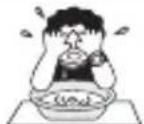 Minor exposure to water (washing face, rain, etc.) Minor exposure to water (washing face, rain, etc.) | 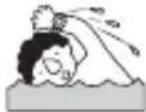 Swimming and general washing work Swimming and general washing work | 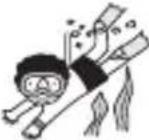 Skin diving, marine sports Skin diving, marine sports | 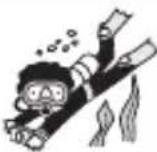 Scuba diving using an air tank Scuba diving using an air tank |  Operate the crown or button when the watch is wet Operate the crown or button when the watch is wet | |
| NO NO | NO NO NO | ||||
| OK NO | NO NO NO | ||||
| OK OK | NO NO NO | ||||
| OK OK | OK NO NO | ||||

CAUTION To Avoid Injury
- Be particularly careful when wearing your watch while holding a small child, to avoid injury.
- Be particularly careful when engaged in strenuous exercise or work, to avoid injury to yourself and others.
- Do NOT wear your watch while in a sauna or other location where your watch may become excessively hot, since there is the risk of burns.
- Be careful when putting on and taking off your watch, since there is a risk of damaging your fingernails, depending on the manner in which the band is fastened.
• Take off your watch before going to bed.

CAUTION Precautions
- Always use the watch with the crown pushed in (normal position). If the crown is of the screw lock-type, make sure it is securely locked.
- Do NOT operate the crown or any push buttons when the watch is wet. Water may enter the watch causing damage to vital components.
- If water enters the watch or the watch fogs up and does not clear up even after a long time, consult your dealer or Authorized Service Center for inspection and/or repair.
- Even if your watch has a high level of water resistance, please be careful of the following.
- If your watch is immersed in sea water, rinse thoroughly with fresh water and wipe with a dry cloth.
- Do not pour water from a tap directly onto your watch.
• Take off your watch before taking a bath.
- If seawater enters the watch, place the watch in a box or plastic bag and immediately take it in for repair. Otherwise, pressure inside the watch will increase, and parts (crystal, crown, push button, etc.) may come off.

CAUTION
When Wearing Your Watch
- Leather, genuine skin and rubber (urethane) bands will deteriorate over time due to perspiration, body oils and dirt. Be sure to replace the band periodically.
- The durability of a leather band may be affected when wet (fading, peeling of adhesive), owing to the properties of the material. Moreover, wet leather may cause a rash.
-
It is recommended to take off the watch if it gets wet, even if the watch itself is water resistant.
-
Do not wear the band too tightly. Try to leave enough space between the band and your skin to allow adequate ventilation.
- The rubber (urethane) band may be stained by dyes or soil present in or on clothing or other accessories. Since these stains may not be removable, caution is required when wearing your watch with items that tend to easily transfer color (articles of clothing, purses, etc.). In addition, the band may be deteriorated by solvents or moisture in the air. Replace with a new one when it has lost elasticity or become cracked.
- Please request adjustment or repair of the band in the following cases:
- You notice an abnormality with the band due to corrosion.
• The pin of the band is protruding. - We recommend seeking the assistance of an experienced watch technician for sizing of your watch. If adjustment is not done correctly, the bracelet may unexpectedly become detached leading to loss of your watch or injury. Consult your nearest authorized Citizen Service Center.
- The watch may stop or the function of the watch may be impaired in extremely high or low temperature. Do not use the watch in places where the temperature is outside the operating temperature range as stated in the specifications.
- Analog quartz watches are powered by a step motor that uses a magnet. Subjecting the watch to strong magnetism from the outside can cause the motor to operate improperly and prevent the watch from keeping time accurately. Do not allow the watch to come into close proximity to magnetic health devices (magnetic necklaces, magnetic elastic bands, etc.) or the magnets used in the latches of refrigerator doors, clasps used in handbags, the speaker of a cell phone, electromagnetic cooking devices and so on.
- Avoid dropping the watch or subjecting it to other strong impact. It may cause malfunctions and/or performance deterioration as well as damage to the case and bracelet.
- The integrated circuits (IC) used in quartz watches are sensitive to static electricity. Please note the watch may operate erratically or not at all if exposed to intense static electricity.
- If paint thinner, benzene or other solvents or products containing these solvents (including gasoline, nail-polish remover, cresol, bathroom cleaners and adhesives, water repellent, etc.) are allowed to come into contact with the watch, they may discolor, dissolve or crack the materials. Be careful when handling these chemicals. Contact with mercury such as that used in thermometers may also cause discoloration of the band and case.
- Be sure to remove any protective stickers that may be on your watch (case back, band, clasp, etc.). Otherwise, perspiration or moisture may enter the gaps between the protective stickers and the parts, which may result in a skin rash and/or corrosion of the metal parts.

CAUTION Always Keep Your Watch Clean
- Rotate the crown while it is pressed in fully and press the buttons periodically so they do not become stuck due to accumulations of foreign matter.
- The case and band of the watch come into direct contact with the skin in the same manner as undergarments. Corrosion of the metal or unnoticed soiling such as that caused by perspiration and dirt can soil sleeves and other portions of clothing. Keep your watch clean at all times.
- The case and band of the watch come into direct contact with the skin. If you think there is something wrong, discontinue wearing the watch immediately and consult your physician. In the case of accumulation of sweat or dirt on a metal band or case, clean thoroughly using a brush and neutral detergent. In the case of a leather band, wipe clean using a dry cloth.
- Leather bands may become discolored by perspiration or dirt. Always keep your leather band clean by wiping with a dry cloth.
Caring for Your Watch
- Wipe any dirt or moisture such as perspiration from the case and crystal with a soft cloth.
- For a metallic, plastic or rubber (urethane) watchband, wash any dirt off with water. Remove the small amounts of dirt trapped between the crevices of the metallic band with a soft brush.
- For a leather band, wipe off dirt using a dry cloth.
- If you will not be using your watch for an extended period of time, carefully wipe off any perspiration, dirt or moisture and store in a proper location, avoiding locations subject to excessively high or low temperatures and high humidity.
The paint on the dial and hands helps you with reading the time in a dark place. The luminous paint stores light (daylight or artificial light) and glows in a dark place.
It is free from any radioactive substance or any other material harmful to a human body or environment.
- The light emission gradually becomes weaker as time passes.
- The duration of the light (“glow”) will vary depending on the brightness, types of and distance from a light source, exposure time, and the amount of the paint.
- The paint may not glow and/or may dissipate quickly if exposure to light was not sufficient.
Warranty and Service
In the case a malfunction has occurred during the course of normal use while the watch is till under warranty, the watch will be repaired free of charge in accordance with the conditions of the warranty included with this manual.
Our standard period for stocking repair parts for each model is generally seven year.
When an exterior part such as the watch case, glass, dial, hand, crown or band is damaged, a spare part with different appearance may sometimes be used.
Repairs can be performed on your watch within the repair parts stock period even after the free guarantee has expired. However, you will be charged for these repairs. Please take the watch to the shop where you purchased it and ask whether it can be repaired because the repair period varies according to the conditions of use, environment and so forth. Moreover, there are cases in which it is difficult to restore the watch to its original accuracy when decreased accuracy has resulted from long-term use.
In the event that you have moved or have received your watch as a gift, and are not able to bring your watch to the shop where it was purchased for serving, please consult Customer Support Center.
- Waterresistance
As the water resistance will be reduced over time, you should have your watch inspected and its water resistance verified every 2-3 years (charge basis) to extend its life and ensure safety. To maintain its water resistance, it is recommended to request us to replace the packings and other parts of your watch.
• Disassembling for internal cleaning (repair)
You should have your watch disassembled and its internal components cleaned periodically to extend its life. Lubrication oils are used to reduce wearing of moving parts such as gears. However, over time the lubrication oils will degrade and wear will increase, eventually resulting in malfunction. Please have your watch undergo internal cleaning once every 5 years as a guide.
All parts of this watch, except for the band, are to be repaired only at CITIZEN.
This is because special technologies and equipment are required to perform repairs, inspections and adjustments. Please make requests for repairs to Customer Support Center when having your watch repaired.
If you have any questions regarding the way warranty, repairs or other matters, please inquire at the shop where you purchased your watch or Customer Support Center.
Specifications
- Caliber No.: H11A, H110, H111, H113, H119
(excludes H112, H115, H116 and H117)
| Operation time | Power saving | Warning period | |
| H11A | 7 months | 30 months | 2 days |
| H110 | 6 months | 24 months | 2 days |
| H111 | |||
| H113 | |||
| H119 |
- Type : Analog solar-powered watch
- Timekeeping accuracy: Not during reception (when not receiving radio waves)
Within ±15 seconds per month on average (when worn at normal
temperatures of +5°C to +35°C and when not receiving radio waves)
-
Operating temperature range: -10^ to +60^
-
Display functions :
● Time: Hours, minutes, seconds
Date
6. Additional functions :
● Solar power function
● Radio wave receiving function (regular automatic reception, free reception, recovery automatic reception)
● Automatic transmitter station selection function (for use exclusively with Japan standard time radio waves)
● Reception in progress display function (RX)
● Reception level display function (H, M, L)
● Reception result confirmation function (H, M, L or NO)
○ JIS type 1 magnetic resistance ○ Shock detection function
○ Automatic hand correction function
● Perpetual calendar
● Time difference monitoring function
● Time difference correction function
● Reference position confirmation/correction function
● Power save function (reduces power consumption)
● Insufficient charge warning function (2-second interval movement)
● Overcharging prevention function
- Battery : Rechargeable cell (lithium button cell), 1 pc.
* Specifications are subject to change without notice.