
CAL H380 - Watch CITIZEN - Free user manual and instructions
Find the device manual for free CAL H380 CITIZEN in PDF.


User questions about CAL H380 CITIZEN
0 question about this device. Answer the ones you know or ask your own.
Ask a new question about this device
Download the instructions for your Watch in PDF format for free! Find your manual CAL H380 - CITIZEN and take your electronic device back in hand. On this page are published all the documents necessary for the use of your device. CAL H380 by CITIZEN.
USER MANUAL CAL H380 CITIZEN
All repairs performed on this watch are to be performed at the CITIZEN.
When desiring to have your watch repaired or insepected, please contact the Citizen Service Center either directly or through the store where you purchased your watch.
This radio controlled watch receives standard radio waves broadcast from the People's Republic of China
- Only standard time radio waves (BPC) broadcast from the People's Republic of China are received.
- The radio controlled watch has no effect on the human body or medical equipment.
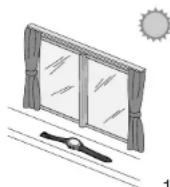
Fully charge your watch before use by exposing it to sufficient light
The second hand will move at 2-second intervals when the watch is insufficiently charged. Charge your watch as indicated in “Guide to Charging Time” (p.146).
- Charge the watch in direct sunlight for a long time once a month.
text_image
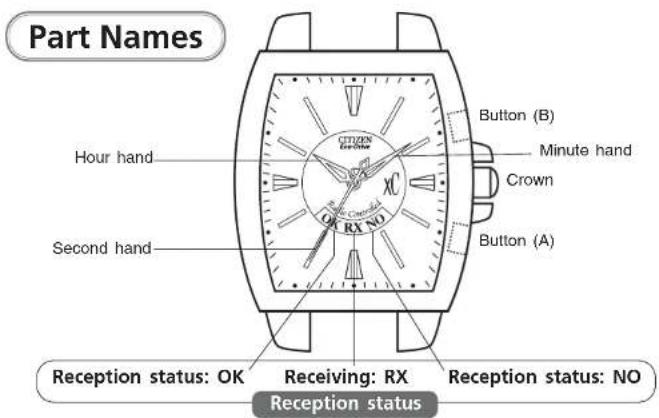
Part Names Button (B) Minute hand Crown Button (A) Hour hand CX RX NO Second hand Reception status: OK Receiving: RX Reception status: NO Reception status* The illustrations shown in this manual may differ from the actual watch you have purchased.
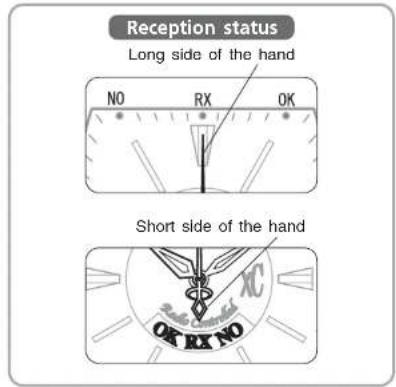
- Depending on the particular watch model, some indicate the reception status with the long side of the second hand, while others indicate with the short side of the second hand.
text_image
Reception status Long side of the hand NO RX OK Short side of the hand OK RX NOTable of Contents
-
Your Watch 116
-
Operating the Crown 117
-
Before Use 118
- Checking the Reference Position 120
- Functions List 122
Radio Wave Reception
-
For Best Reception 124
-
Poor Reception Areas 125
-
Receiving the Radio Waves 126
• Automatic Reception 126
- On Demand Reception 126
• Recovery Automatic Reception 127
- Confirming the Reception Status 128
- Reception Area Guidelines 130
Setting the Time Manually
-
Setting the Time 132
-
Correcting the Time Difference 134
-
Correcting the Reference Position 136
Solar Power
-
Solar Power Function 138
-
Characteristics of the Solar Powered Watch 140
• Power Saving Function 142
• Insufficient Charge Warning Function 144
• Overcharging Prevention Function 145
• Guide to Charging Time 146
• Handling Your Solar Powered Watch 148
Troubleshooting 150
Precautions 154
- Specifications 160
1. Your Watch
Automatic reception function: Every morning at 2 a.m. and 4 a.m. the watch will automatically receive the radio wave and adjust the time.
However, if reception is successful at 2 a.m., automatic reception will not be performed at 4 a.m.
On demand reception function: The radio waves can be received at any time of the day to adjust the time.
* Not possible when the radio wave is interrupted
Eco-Drive function: This solar powered Eco-Drive watch is equipped with a solar power function for powering the watch by converting light energy into electric energy. The watch incorporates a power saving function that reduces the electrical power consumption when the watch face is not exposed to light.
◎Time difference adjustment function: The watch incorporates a convenient time difference adjustment function (±27 hours).
A simple method is available for changing to the local time if you are going to an area in a different time zone.
2. Operating the Crown
There are two models available for the crown: normal and screw lock.
- Turn the crown to the left.
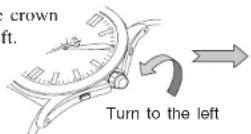
- When the screw lock is released, the crown pops out a little and stops in the normal position. After finishing the operation, lock the crown again.
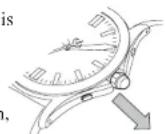
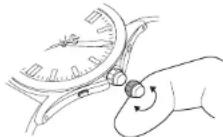
Using the side of your finger, quickly turn the crown by two or more clicks.
When the crown is pulled out to the position 1 and quickly turned to the left or right (more than 2 clicks), the hands will rotate continuously.
To stop the continuous movement of the hands, turn the crown to the left or right by one click.
* A gentle "click" can be felt by the fingertips.
- Before Use
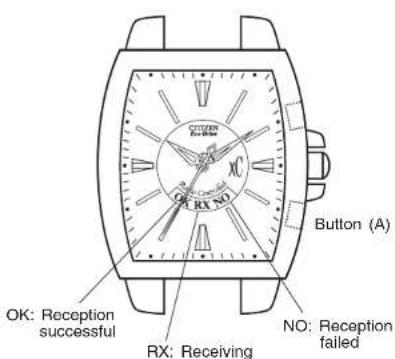
text_image
OK: Reception successful RX: Receiving NO: Reception failed Button (A)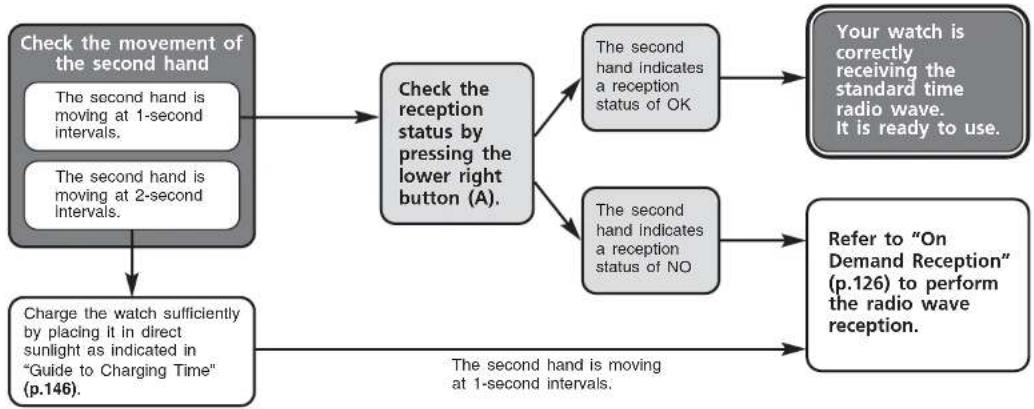
flowchart
graph TD
    A["Check the movement of the second hand\nThe second hand is moving at 1-second intervals."] --> B["Check the reception status by pressing the lower right button (A)."]
    C["Check the second hand is moving at 2-second intervals."] --> B
    B --> D["The second hand indicates a reception status of OK"]
    B --> E["The second hand indicates a reception status of NO"]
    D --> F["Your watch is correctly receiving the standard time radio wave. It is ready to use."]
    E --> G["Refer to "On Demand Reception" (p.126) to perform the radio wave reception."]
    H["Charge the watch sufficiently by placing it in direct sunlight as indicated in "Guide to Charging Time" (p.146)."] --> I["The second hand is moving at 1-second intervals."]
Checking the Reference Position
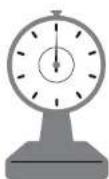
Before using the watch, check that the hands are aligned with "0", similar to when setting weighing scales
The reference position may become misaligned when the watch is exposed to strong magnetism, static electricity or impacts. Even if radio waves are received, the correct time will not indicated unless the watch hands are aligned to the correct reference position. Check that the hands are properly aligned with "0".
Examples of magnetic products that can affect the watch.
- Health products (for example, medical necklaces and waist bands that have magnetic fields)
• Refrigerators (magnetic part of the door)
• Electromagnetic cookers - Bags (with magnet fasteners)
• Mobile phones (speaker part)
Keep the watch away from items similar to those above.
text_image
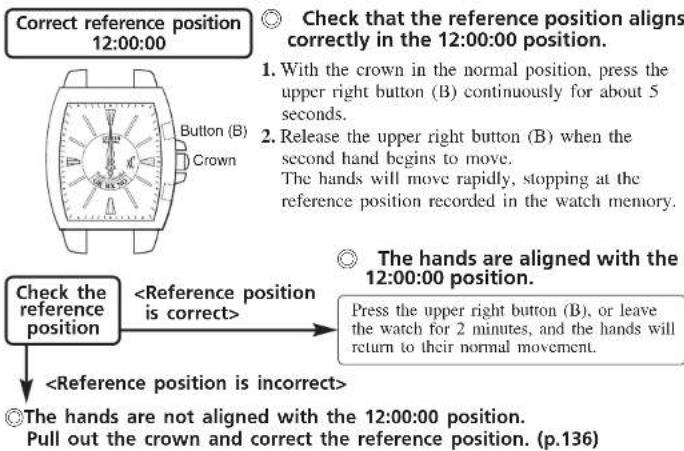
Correct reference position 12:00:00 Check that the reference position aligns correctly in the 12:00:00 position. 1. With the crown in the normal position, press the upper right button (B) continuously for about 5 seconds. 2. Release the upper right button (B) when the second hand begins to move. The hands will move rapidly, stopping at the reference position recorded in the watch memory. Check the reference position4. Functions List
text_image
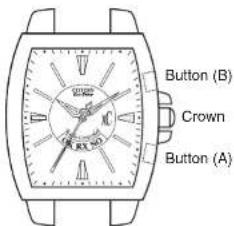
Button (B) Crown Button (A)| Function Button or crown operation Hand movement | ||
| On demand reception (p.126) | Press the lower right button (A) for more than 2 seconds and release when the second hand stops in the RX position. | The second hand will stop at RX and reception will begin. |
| Confirm reception status (p.128) | Press the lower right button (A) once. | The second hand will stop at OK or NO. |
| Correcting the Time Difference (p.134) | Press the upper right button (B) once, turn the crown to set the time difference, and press the upper right button (B) once more to complete the operation. | The second hand will stop at the 12:00 position. (If a time difference setting has been made, it will stop at the position appropriate for the time difference.)The second hand at the 12:00 position indicates time difference of ±0 hours. Turn the crown to set the time difference. One step of the second hand indicates a one hour time difference. |
| Setting the time manually (p.132) | Pull out the crown to position 1. | Second hand, minute hand, hour hand:Turn the crown to the right to rotate the second hand clockwise once and move the minute hand ahead by 1 minute.Turn the crown to the left to rotate the second hand counterclockwise once and move the minute hand back by 1 minute.Turn the crown quickly to move the hour and minute hands continuously. |
Radio Wave Reception
5. For Best Reception
There are three kinds of reception: automatic reception, on demand reception, and recovery automatic reception. When the radio wave has been properly received, your watch will automatically adjust the time. When reception is complete, each of the hands will move either clockwise or counterclockwise to the received time.
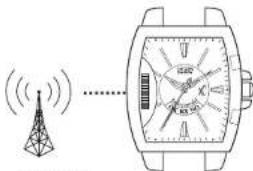
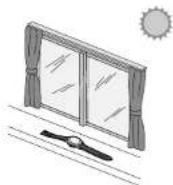
Remove the watch from your wrist and place on a stable surface near a window where the radio wave can be easily received, pointing the 9:00 position in the direction of the radio wave transmitter.
Do not move the watch during reception.
text_image
Diagram showing a wireless signal transmission line with a tower icon and a wristwatch displaying X, Y, Z axes.- Reception may be difficult due to the surroundings or metal shielding.
When inside a building, place the watch as close to a window as possible for good reception. - Radio wave reception may be difficult during the hours around sunrise and sunset. Avoid attempting to receive radio waves during these times.
6. Poor Reception Areas
It may be difficult to properly receive the radio waves under certain environmental conditions or in areas susceptible to radio noise.
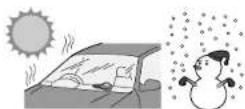
◆ Extremely hot or cold locations
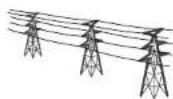
◆ Near high-tension electrical lines, railway overhead wires or communication facilities
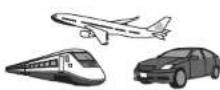
◆ Inside vehicles, including cars, trains and aero planes

◆ Near TVs, refrigerators, computers, fax machines and other electrical equipment or office appliances
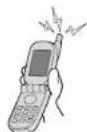
◆ Near cellular phones that are in use

◆ Inside reinforced concrete buildings
Between tall buildings or mountains, or underground
7. Receiving the Radio Waves
Automatic Reception
Place the watch in a stable location near a window where the radio wave can be easily received with the 9:00 position pointing towards the transmitter. The watch will receive the radio waves at 2 a.m. every day. If the radio wave cannot be received at 2 a.m., it will try again automatically at 4 a.m.
On Demand Reception (Manual Reception)
Radio waves can be received at any time.
* Not possible when the radio wave is interrupted
Use this function when automatic reception is impossible due to changes in the reception environment.
(Depending on the weather or noise conditions, reception can take up to 15 minutes.)
- Remove the watch from your wrist and place on a stable surface near a window where the radio wave can be easily received, pointing the 9:00 position in the direction of the radio wave transmitter.
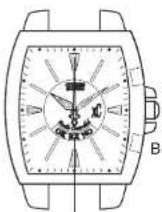
Button (A)
The second hand stops at the RX position.
-
Press the lower right button (A) for more than 2 seconds and release it when the second hand stops at the RX position.
-
When reception is complete, the second hand will leave the RX position and return to normal movement.
Referring to "Confirming the Reception Status" (p.128), check the reception status.
Recovery Automatic Reception
If the watch stops due to insufficient charging, expose the watch to sunlight to recharge it. When the watch is recharged sufficiently, it will automatically receive the radio wave once. Please remember to keep the watch charged to prevent this situation from occurring
◆If the lower right button (A) is pressed for more than 2 seconds during reception, the reception will be cancelled and the hands will return to their normal movement.
Confirming the Reception Status
©The reception status (reception successful or failure) can be confirmed.
- Press the lower right button (A). The second hand will stop at the OK or NO position indicating the last reception status.
[NOTE]
Do not press the lower right button (A) for more than 2 seconds. If you do this, the second hand will move to the RX position and on demand reception will begin.
◆OK indication
![CITIZEN CAL H380 - [NOTE] - 1](/content/2026/05/774544/images/92450ec40f9c0ad3b7f9764d65af11508aed81fbe83f5967673cf4b5623c5098.jpg)
text_image
Tobcn CX O RX NOReception was successful.
The watch has been set to the correct time.
* If reception was successful, but the time is not correct, refer to "Checking the Reference Position" (p.120), and
"Correcting the Reference Position" (p.136).
◆NO indication
![CITIZEN CAL H380 - [NOTE] - 2](/content/2026/05/774544/images/fc94b4c3eea50507f5a8ea64932b6f057fa62d1a23390bd38c2bbbafbb83d390.jpg)
text_image
Take Control OK RX NO XCUnable to receive the radio wave. Retry reception, either on demand reception or automatic reception.
- Press the lower right button (A). The hands will return to their normal movement.
If the watch is left, the hands will return to their normal movement after 10 seconds.
Reception Area Guidelines
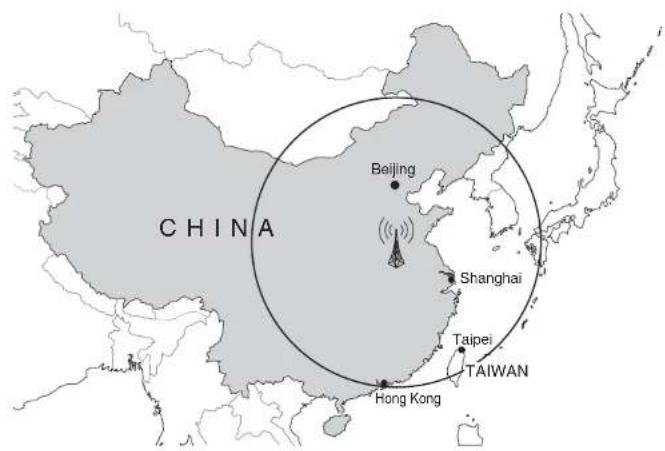
The map shows the approximate reception area. Suitable reception areas may vary according to changes in conditions for the radio wave due to factors including time, season and weather.
The reception area on the map is only guideline, and it may be difficult to receive the radio wave even within the areas indicated on the map.
| Standard time radio wave | Radio wave transmitter |
| BPC Shangqiu, Henan | |
The standard time radio wave used by this radio controlled watch is broadcast almost continuously, but may be interrupted occasionally due to special circumstances at the radio wave transmitter. Radio waves cannot be received during this period.
text_image
CHINA Beijing Shanghai Taipei TAIWAN Hong KongSetting the Time Manually
8. Setting the Time
text_image
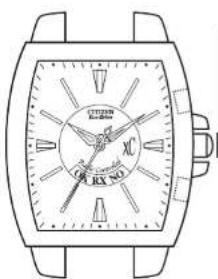
EXX NO EXX NO- Pull out the crown. The second hand will align with the 0 seconds position.
Crown
[NOTE]
If the second hand does not align with the 0 seconds position, it is possible that the reference position is incorrect. Refer to "Checking the Reference Position" (p.120), and "Correcting the Reference Position" (p.136).
- Turn the crown to set the time.
With every click, each of the hands moves sequentially one minute at a time.
(Turn to the right to move forward; turn to the left to move back.)
Turn the crown quickly (more than 2 clicks) to move the hands continuously.
To stop the continuous movement, turn the crown one click to the left or right.
- Set the time by using a time signal and press in the crown to complete the operation.
9. Correcting the Time Difference
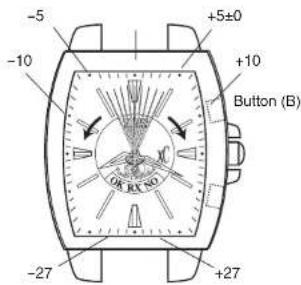
When traveling to a different time zone, the time difference can be set (in 1-hour units, ±27 hours) to match the local time using the second hand.
text_image
-5 -10 +5±0 +10 Button (B) -27 +27- Press the upper right button (B) once. The second hand will stop at the 12:00 position. The second hand 12:00 position indicates a time difference of ±0 hours.
* If the time difference has already been set, this time difference is indicated.
- Turn the crown without pulling it out. Turn the crown to the right by 1 click to move the second hand ahead by 1 step. Time difference of +1 hour is set. Turn the crown to the left by 1 click to move the second hand back by 1 step. Time difference of -1 hour is set.
Example:
When going to an area with a time difference of +1 hour relative to China, align the second hand with the 1 second position.
- After setting the time difference, press the upper right button (B) once. The time difference will be indicated and then the hands will return to their normal movement.
(If the watch is left for 60 seconds, the hands will return to their normal movement.)
10. Correcting the Reference Position
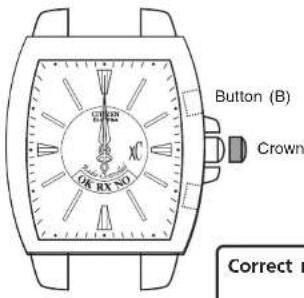
If the reference position does not indicate "12:00:00", the reference position must be corrected.
text_image
Button (B) Crown OK RX NO Correct n- Press the upper right button (B) for more than 5 seconds, and release when the second hand begins rotating rapidly. While the hand is still moving, pull out the crown and wait until the hand stops moving.
Correct reference position 12:00:00
-
Align the hands with the "12:00:00" reference position. Turn the crown one click to the right to advance the hand by one second, and one click to the left to retard it by one second. Turn the crown quickly (more than 2 clicks) to move the hands continuously. To stop the continuous movement, turn the crown one click to the left or right.
-
After correcting the reference position, press in the crown to record the new reference position.
-
Press the upper right button (B) once. The hands will rapidly return to the current time. If the watch is left for 2 minutes, the hands will return to their normal movement.
In the event that the time is not correct, carry out "On Demand Reception" (p.126).
Solar Power
11. Solar Power Function
This watch uses a secondary battery to store electrical energy.
When the watch is fully charged, it will maintain its accuracy for about 6 months.
Always store the watch in a bright location for best results.
Placing the watch near a window where its face can receive sunlight or near another source of light when you are not wearing it will ensure that the watch is regularly charged, allowing it to maintain its accuracy.
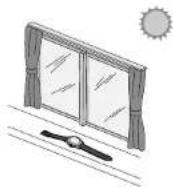
◆ Wearing clothes with long sleeves makes it difficult for the watch to get the necessary light, resulting in insufficient charging.
It is recommended that the watch be left in direct sunlight once a month to charge it.
[NOTE]
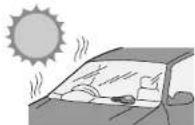
Do not charge on surfaces that can easily become hot, such as a car dashboard.
12. Characteristics of the Solar Powered Watch
When the watch is insufficiently charged, the indication will be changed as follows:
[Normal indication] [Insufficient charge warning]
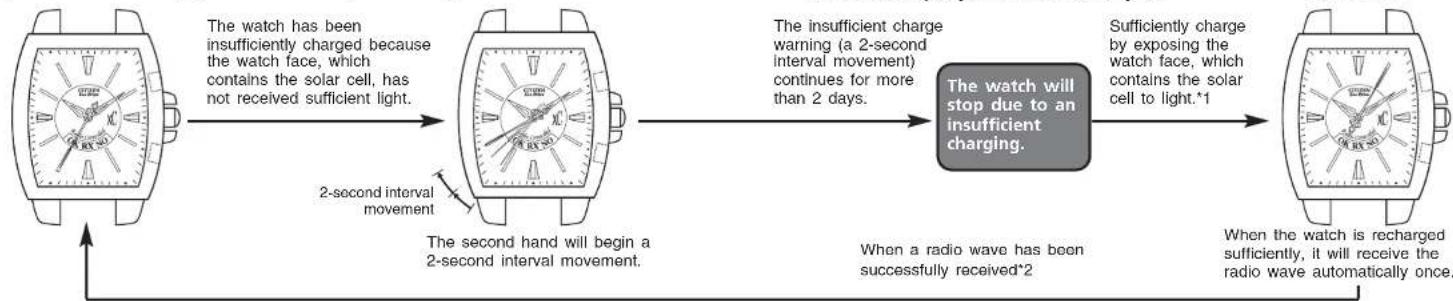
flowchart
graph LR
    A["Watch with 2-second interval movement"] -->|The watch has been insufficiently charged because the watch face, which contains the solar cell, has not received sufficient light.| B["Watch with 2-second interval movement"]
    B -->|The insufficient charge warning (a 2-second interval movement) continues for more than 2 days.| C["Watch will stop due to an insufficient charging."]
    C -->|Sufficiently charge by exposing the watch face, which contains the solar cell to light.*1| D["Watch with recharged sufficiently, it will receive the radio wave automatically once."]
    D -->|When a radio wave has been successfully received*2| E["Watch still remains unchanged"]
    E --> F["Two seconds are shown on the watch face"]
    F --> G["2-second interval movement"]
    G --> H["The second hand will begin a 2-second interval movement"]
*1. When the watch stopped due to insufficient charging
- It takes at least 30 minutes to recharge sufficiently to perform recovery automatic reception, even if the watch is being exposed to light. After recovery, refer to "Guide to Charging Time" (p.146) and sufficiently charge the watch.
*2. If the watch failed to perform recovery automatic reception
- The time is incorrect even if the second hand moves at 1-second intervals, so after fully charging the watch, set the time manually or perform on demand reception.
The insufficient charge warning (a 2-second interval movement) continues for more than 2 days.
When a radio wave has been successfully received*2
[Recovery automatic reception]
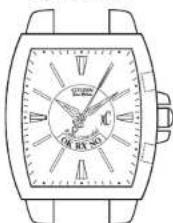
When the watch is recharged sufficiently, it will receive the radio wave automatically once.
Power Saving Function
If the watch face is not exposed to light for 7 days in succession, when the time reaches 12:00 midnight, the hands will stop and the watch will go into power saving mode.
- Even in power saving mode the watch will continue to keep time internally.
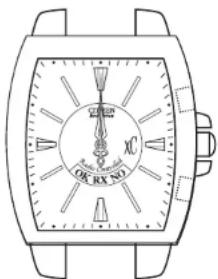
text_image
OK RX NO X Y ZAll hands stop at the 12:00:00 position.
The power saving function will be automatically canceled when the watch face is exposed to light.
- When power saving function is canceled, the hands will return to their normal movement.
- If the watch is insufficiently charged, the second hand will begin the 2-second interval movement. Charge the watch adequately to restore normal movement of the hands.
[NOTE]
- The power saving function cannot be canceled with crown or button operations. Cancel the power saving function by placing the watch in light.
- After the power saving function has been canceled, press the lower right button (A) once to check the reception status.
If it is not showing the correct time, carry out "On demand reception" (p.126) or "Setting the Time Manually" (p.132) before using.
Insufficient Charge Warning Function Overcharge
The second hand's movement changes from 1-second intervals to 2-second intervals to show that the watch is insufficiently charged. The watch will stop due to an insufficient charging about 2 days after starting the 2-second interval movement.
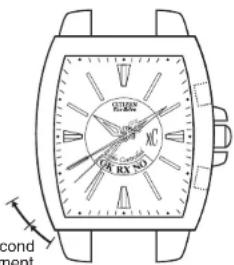
text_image
RUS RX NO cond mont[NOTE]
During 2-second interval movement, automatic reception, on demand reception, time difference setting and manual time setting are unavailable.
2-second movement
◆If the charging insufficiency occurs during “Radio wave reception”, “Confirming reception status”, “Time difference correction” or “Checking/correcting the reference position”, the operation will stop automatically, the watch will return to the time before the operation, and 2-second interval movement will begin. Regularly charge your watch so it does not become insufficiently charged.
ention Function
Whenever the secondary battery becomes fully charged by exposing the solar cell to light, the overcharging prevention function is automatically activated to prevent the battery from being charged further.
No matter how much the watch is charged, it will not affect the secondary battery, timekeeping, functions or performance of the watch.
Guide to Charging Time
The charging time varies according to the model (including the color of the watch face). The following data should only be used as a guideline.
* The charging time is based on continuous exposure.
| Illuminance (lx) | Environment | Charging time | ||
| For a 1-day movement charging time | Time from stopping to resuming the 1-second interval movement | Time for full charging | ||
| 500 | Indoor lighting | 4 hours | 20 hours | ---- |
| 1,000 | 60-70cm beneath a 30W fluorescent light | 2 hours | 9 hours | ---- |
| 3,000 | 20cm beneath a 30W fluorescent light | 40 minutes | 3 hours | 190 hours |
| 10,000 | Cloudy sky | 12 minutes | 1.5 hours | 60 hours |
| 100,000 | Direct summer sunlight | 3 minutes | 40 minutes | 18 hours |
* If the second hand is moving in 2-second intervals, refer to "Time for full charging" and fully charge.
For a 1-day movement charging time ... The charging time to run the watch for one day with normal movement.
Time for full charging ... The time for full charging after the watch has stopped due to an insufficient charging.
[NOTE]
A fully charged battery will run the watch for about 6 months without further charging. The watch will maintain its accuracy for about 2 and a half years when running in the power saving mode.
Charge the watch every day, as it will take a long time to recharge it, as is indicated in the table, when it stops due to an insufficient charging.
Furthermore, it is recommended to charge your watch by exposing to direct sunlight for a long time once a month.
Handling Your Solar Powered Watch
CAUTION Charging precautions
◆ Overheating while charging can cause the watch exterior to become discolored, the watch to deform or the movement to be damaged.
Do not charge the watch in a high-temperature environment (about 60°C or more).
Example: • Charging close to incandescent lighting, halogen lamps, or other lighting sources that easily become hot.
- Charging on surfaces that can easily become hot, such as a car dashboard.
When charging with incandescent lighting, halogen lamps, or other lighting sources that easily become hot, place the watch at least 50 cm away from the source to avoid overheating.
WARNING Handling the secondary battery
Do not remove the secondary battery from the watch yourself, unless unavoidable.
If you must remove the battery, store it out of reach of children to avoid accidental ingestion.
◆ If the secondary battery is ingested, consult a doctor immediately.
WARNING Changing the secondary battery
Although the secondary battery should never need to be changed, in rare instances, the watch may be unable to be charged due to a problem with the battery. If a problem occurs, have the watch repaired as soon as possible.
Troubleshooting
If you believe your watch may be inoperative, consult the following chart:
| Problem Check Remedy | ||
| The watch does not receive radio waves. | Does the second hand align with the RX (receiving) position? | Press and hold the lower right button (A) until the second hand has reached the RX position. |
| The watch can receive the radio wave, but it does not show the correct time.The second hand does not align accurately with the OK/RX/NO positions. | Is the reference position set correctly? | Confirm the reference position.(p.120)If the reference position is not correctly set, refer to "Correcting the Reference Position" and correct the reference position.(p.136) |
| Problem Check Remedy | ||
| Reception is successful, but the time is out by a factor of hours. | ·Check the time difference setting. | ·Set the correct time difference setting. (p.134) |
| Radio wave cannot be received (where reception is possible). | ·Radio waves may be interrupted occasionally due to special circumstances at the radio wave transmitter. | ·Try to receive the wave again after a few hours. |
| ·Are there objects nearby that could block radio waves or generate noise? ·Are you attempting to receive the radio wave in a location far from a window? | ·Avoiding objects that shield the radio waves and sources of radio noise, try to receive the wave with the 9:00 position of the watch pointing towards a window. Find a location such as window that is conducive to radio wave reception and change the watch location, direction and angle. (p.124) | |
| ·Was the watch moved during reception while the second hand was aligned with the RX position? | ·Do not move the watch until the radio wave has been properly received (until normal hand movement returns). | |
| Problem Check | Remedy | |
| The second hand is moving at 2-second intervals.The watch has stopped.The watch does not work even after charging. | Did you charge the watch sufficiently in sunlight? | Charge the watch sufficiently, as indicated in "Guide to Charging Time". (p.146)If the watch does not work even after charging, contact the Citizen Service Center. |
| Problem Check | Remedy | |
| The hands moved forward quickly at the moment that the watch was removed from a desk or drawer. | This is because the power saving mode was canceled when the watch was exposed to light, and the hands moved forward quickly to the current time. It is ready to use. (p.142) |
Precautions
For correct use within the design limits of the watch, confirm the level of water-resistance of your watch, as indicated on the dial and case, and consult the table.
WARNING: Water-resistance performance
There are several types of water-resistant watches, as shown in the following table.
The unit "bar" is roughly equal to 1 atmosphere.
* WATER RESIST(ANT) xx bar may also be indicated as W.R. xx bar.
| Indication | Specifications | |
| Dial | Case(case back) | |
| WATER RESISTor no Indication | WATERRESIST(ANT) | Water-resistant to3 atmospheres |
| WR 50 or WATERRESIST 50 | WATERRESIST(ANT) 5 bar orWATER RESIST(ANT) | Water-resistant to5 atmospheres |
| WR 100/200 orWATER RESIST100/200 | WATER RESIST(ANT)10bar/20 bar orWATER RESIST(ANT) | Water-resistant to10/20 atmospheres |
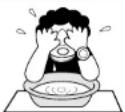
Minor exposure to water (washing face, rain, etc.)
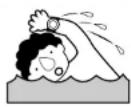
Moderate exposure to water (washing, kitchen work, swimming, etc.)
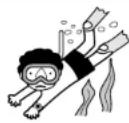
Marine sports (skin diving)
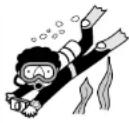
Scuba diving (with air tank)
WARNING: Water-resistance performance
- Water-resistance for daily use (to 3 atmospheres): This type of watch is water-resistant to minor exposure to water. For example, you may wear the watch while washing your face; however, do not use while swimming.
- Upgraded water-resistance for daily use (to 5 atmospheres): This type of watch is water-resistant to moderate exposure to water. You may wear the watch while swimming; however, do not use while skin diving or scuba diving.
- Upgraded water-resistance for daily use (to 10/20 atmospheres): This type of watch may be used for skin diving; however, it is not designed for scuba or saturated diving using helium gas.
CAUTION
- Be sure to use the watch with the crown pressed in (normal position). If your watch has a screw-lock type crown, be sure that the crown is locked securely.
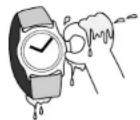
- Do NOT operate the crown or button when the watch is wet. Water may enter the watch and compromise water-resistance.
- The durability of a leather band may be affected when wet, owing to the properties of the material. In the case of a watch of upgraded water resistance for daily use that is frequently used in water, fading, peeling of adhesive or other problems may occur. It is therefore recommended to use another type of band (metal or rubber watchband).
-
If the watch is used in seawater, rinse with fresh water afterward and wipe with a dry cloth.
-
If moisture has entered the watch, or if the inside of the crystal is fogged up and does not become clear within a day, take the watch to your nearest Citizen Service Center for repair. Leaving the watch in such a state will allow corrosion to form inside.
- If seawater enters the watch, place the watch in a box or plastic bag and immediately take it in for repair. Otherwise, pressure inside the watch will increase, and parts (crystal, crown, buttons, etc.) may come off.
CAUTION: Keep your watch clean.
- Leaving dust and dirt deposited between the case and crown may result in difficulty in pulling the crown out. Rotate the crown while in its normal position, from time to time, to loosen dust and dirt and then brush it off.
- Dust and dirt tend to be deposited in gaps in the back of the case or band. Deposited dust and dirt may cause corrosion and soil your clothing. Clean the watch occasionally.
Cleaning the Watch
- Use a soft cloth to wipe off dirt, perspiration and water from the case and crystal.
- Use a soft, dry cloth to wipe off perspiration and dirt from the leather band.
- To clean a metal, plastic, or rubber watchband, wash away dirt with mild soap and water. Use a soft brush to remove dust and dirt jammed in the gaps in the metal band. If your watch is not water-resistant, take it to your dealer.
NOTE: Avoid using solvents (thinner, benzine, etc.), as they may damage the finish.
CAUTION: Operating environment
- Use the watch within the operating-temperature range specified in the instruction manual. Using the watch where temperatures are outside the specified range, may result in deterioration of functions or even stoppage of the watch.
- Do NOT use the watch in places where it is exposed to high temperature, such as in a sauna. Doing so may result in a skin burn.
- Do NOT leave the watch in a place where it is exposed to high temperature, such as the glove compartment or dash-board of a car. Doing so may result in deterioration of the watch, such as deformation of plastic parts.
- Do NOT place the watch close to a magnet.
Timekeeping will become inaccurate if you place the watch close to magnetic health equipment such as a magnetic necklace or a magnetic latch of a refrigerator door or handbag clasp or the carphone of a mobile phone. If this has occurred, move the watch away from the magnet and reset the time. - Do NOT place the watch close to household appliances that generate static electricity. Timekeeping may become inaccurate if the watch is exposed to strong static electricity, such as is emitted from a TV screen.
- Do NOT subject the watch to a strong shock such as dropping it onto a hard floor.
- Avoid using the watch in an environment where it may be exposed to chemicals or corrosive gases.
If solvents, such as thinner and benzine, or substances containing such solvents come in contact with the watch, discoloration, melting, cracking, etc. may result. If the watch comes in contact with mercury used in thermometers, the case, band or other parts may become discolored.
Periodical inspections
Your watch needs inspection once in every two or three years for safety and long use.
To keep your watch water-resistant, the packing needs to be replaced regularly.
Other parts need to be inspected and replaced if necessary.
Ask for Citizen guine parts upon replacement.
13. Specifications
- Cal. No.: H38*
- Type: Analog solar powered watch
- Time accuracy:
Without reception (when watch is not receiving a radio wave) Average monthly deviation: ±15 seconds (when used in of room temperature +5°C to +35°C)
- Acceptable temperature range: -10^ to +60^
- Display function:
• Time: Hour, minute and second
-
Additional functions:
-
Radio wave reception function (automatic reception, on demand reception, recovery automatic reception)
• Receiving indication (RX) - Reception result confirmation function (OK, NO)
• Time difference correction function
• Reference position confirmation/correction (12:00:00)
• Power saving function
- Solar power function
- Insufficient charge warning function (2-second interval movement)
• Overcharging prevention function
- Operation time:
• Time from a full charge until the watch stops without charging: About 6 months
About 2.5 years (when in the power saving mode)
Operating time may vary depending on the various factors such as how many times radio reception has been performed.
• Time from insufficient charge warning to watch stopping: About 2 days
(Operating time may vary depending on the various factors such as how many times radio reception has been performed.)
- Battery: Secondary battery 1
* Specifications may change without notice.