
CAL J290 - Watch CITIZEN - Free user manual and instructions
Find the device manual for free CAL J290 CITIZEN in PDF.


User questions about CAL J290 CITIZEN
0 question about this device. Answer the ones you know or ask your own.
Ask a new question about this device
Download the instructions for your Watch in PDF format for free! Find your manual CAL J290 - CITIZEN and take your electronic device back in hand. On this page are published all the documents necessary for the use of your device. CAL J290 by CITIZEN.
USER MANUAL CAL J290 CITIZEN
Thank you for your purchase of this Citizen watch.
Before using the watch, read this instruction manual carefully to ensure correct use. After reading the manual, store it in a safe place for future reference.
Be sure to visit the Citizen website at http://www.citizenwatch-global.com/. Here you will find a variety of information such as electronic setting guides, answers to frequently asked questions, Eco-Drive recharging information and more.
To check the movement number
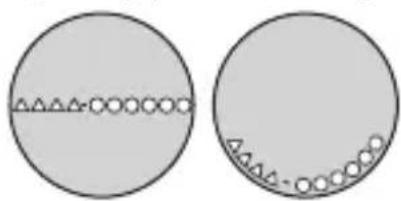
A case number—4 alphanumeric characters and 6 or more alphanumeric characters—is engraved on the case back. (Figure on the right)
The first 4 characters of the case number represent the movement number of the watch. In the example on the right, “△△△△” is the movement number.
Engraving position example
natural_image
Two circular diagrams showing a horizontal line with triangular markers and circles, no text or symbols present.The engraving position may differ depending on watch model.
Safety precautions — IMPORTANT
This manual contains instructions that should be strictly followed at all times not only for optimal use, but to prevent any injuries to yourself, other persons or property. We encourage you to read the entire booklet (especially, pages 3, 4, and 58 to 71) and understand the meaning of the following symbols:
■ Safety advisories are categorized and depicted in this manual as follows:
| ⚠️ DANGER | Highly likely to cause death or serious injury |
| ⚠️ WARNING | Can cause serious injury or death |
| ⚠️ CAUTION | Can or will cause minor or moderate injury or damage |
- Important instructions are categorized and depicted in this manual as follows:
 | Warning (caution) symbol followed by instructions that should be followed or precautions that should be observed. | |
 | Warning (caution) symbol followed by prohibited matters. |
About altitude measurement
This watch does not function as a specialized altitude-measuring equipment certified by any authority or regulating standards. Use the indicated altitude only as a reference.
| WARNING | Do not use the altitude measurement function of this watch in the following cases:When actions or situation judgments involving risks are required.When rapid changes in altitude occur such as when skydiving or hang-gliding.When wearing the watch under water such as in skin diving.When the situation requires special treatments. |
| CAUTION | Altitude may be measured improperly in the following cases:When air temperature changes sharply.When atmospheric pressure largely changes accompanying with changes of weather conditions.When the function is used in places where atmospheric pressure is conditioned constant (such as in an airplane). |
About the compass
This watch does not function as a specialized compass instrument certified by any authority or regulating standards. Use the indicated compass direction only as a reference.
| WARNING | Do not use the compass function of this watch in the following cases:When precise directional indication is required for navigational or other activities with serious risks. |
| CAUTION | Compass direction may be measured improperly in the following cases:When the watch is not kept level.When the surrounding magnetic field is disturbed.When air temperature changes sharply.When surrounded by reinforced concrete wall or things made of iron.When electric cables, electric trains or electric products exist around. |
When storing the watch
Avoid places or things with strong magnetism when storing this watch.
Before using this watch
After unpacking, the following must be done before using the watch:
- Checking the power reserve▶ see page6
For optimal performance, ensure your watch is fully charged prior to use. Refer to pages 12 to 15 for charging procedures and times.
natural_image
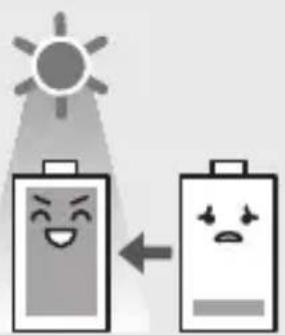
Illustration of two battery icons with smiling faces, one emitting a sun and the other with a sad face, connected by an arrow (no text or symbols)This watch has a rechargeable cell which is charged by exposing the dial to light.
Expose the dial to direct sunlight regularly to charge the watch.
For details of charging, see pages 12 to 17.
Before using this watch
Band adjustment
We recommend seeking the assistance of an experienced watch technician for sizing of your watch. If adjustment is not done correctly, the bracelet may unexpectedly become detached leading to loss of your watch or injury. Consult your nearest authorized Citizen service center.
Protective stickers
Be sure to remove any protective stickers that may be on your watch (case back, band, clasp, etc.). Otherwise, perspiration or moisture may enter the gaps between the protective stickers and the parts, which may result in a skin rash and/or corrosion of the metal parts.
How to use a specially designed crown/button
Some models are equipped with a specially designed crown and/or push button to prevent accidental operation.
Screw down crown/button
Unlock the crown/button prior to operate your watch.
| Unlock Lock | ||||
| Screw down crown | 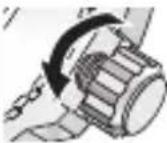 | Rotate the crown counterclockwise until it releases from the case. | 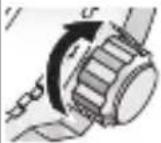 | Push the crown in to the case. With gentle pressure towards the case, rotate the crown clockwise to secure it to the case. Be sure to tighten firmly. |
| Screw down push button | 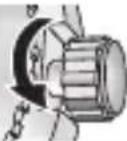 | Rotate the locking screw counterclockwise, and loosen until it stops. | 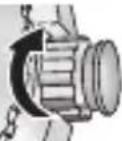 | Rotate the locking screw clockwise, and tighten firmly. |
Recessed buttons
natural_image
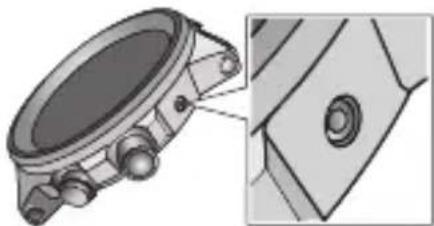
Mechanical component diagram showing a circular housing with bolt holes and a close-up view of a mechanical part (no text or symbols)Press the button with a non-marring narrow-tipped object such as a wooden toothpick.
• Metal objects may cause marring or scratching of the button.
Features
[Non-Text]
Altitude measurement Indicates altitude by measuring atmospheric pressure with a sensor
N
Compass function
Indicates compass direction by measuring geomagnetism with the built-in magnetism sensor
Eco-Drive (solar powered)
Never needs a new battery. This watch is fueled by light.
- “Eco-Drive” is an original technology of Citizen.
CONTENTS
Parts identification (when measuring altitude) ..... 10
Parts identification (when using the compass)...... 11
Charging your watch ...... 12
Checking the current power reserve.... 16
Measuring altitude......18
Using the compass......24
Setting the time...... 26
Adjusting the calendar ...... 27
Calibrating altitude indication ....28
Calibrating compass indication .... 32
Checking and correcting the reference position....44
Using the scale 48
Troubleshooting......50
Eco-Drive (solar powered) watch handling precautions...... 58
Water resistance......62
Precautionary items and usage limitations 65
Information......72
Specifications...... 76
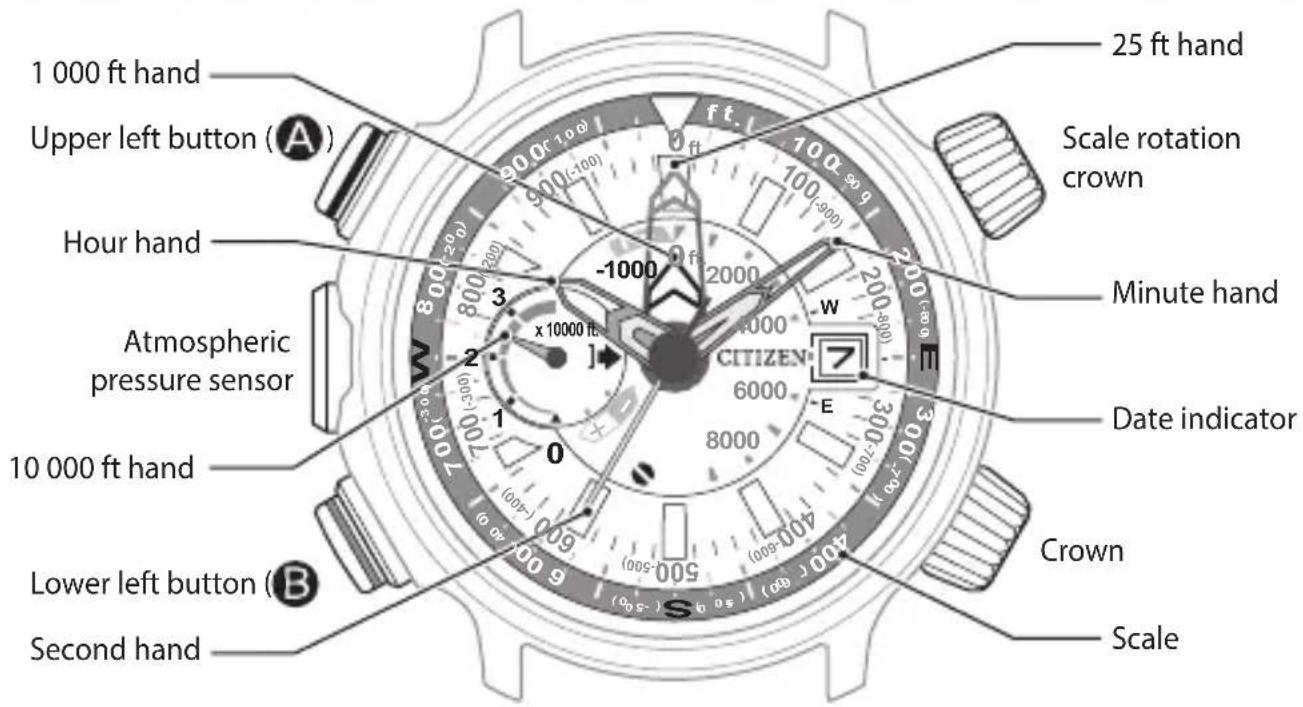
Parts identification (when measuring altitude)
text_image
1 000 ft hand Upper left button (A) Hour hand Atmospheric pressure sensor 10 000 ft hand Lower left button (B) Second hand 25 ft hand Scale rotation crown Minute hand Date indicator CITIZEN E 8000 6000 4000 2000 1000 -900 -1000 x 10000 ft ft ft ft ft ft ft ft ft ft ft ft ft ft ft ft ft ft ft ft ft ft ft ft ft ft ft ft ft ft ft ft ft ft ft ft ft ft ft ft ft ft ft ft ft ft ft ft- Some models are not equipped with the scale and the scale rotation crown.
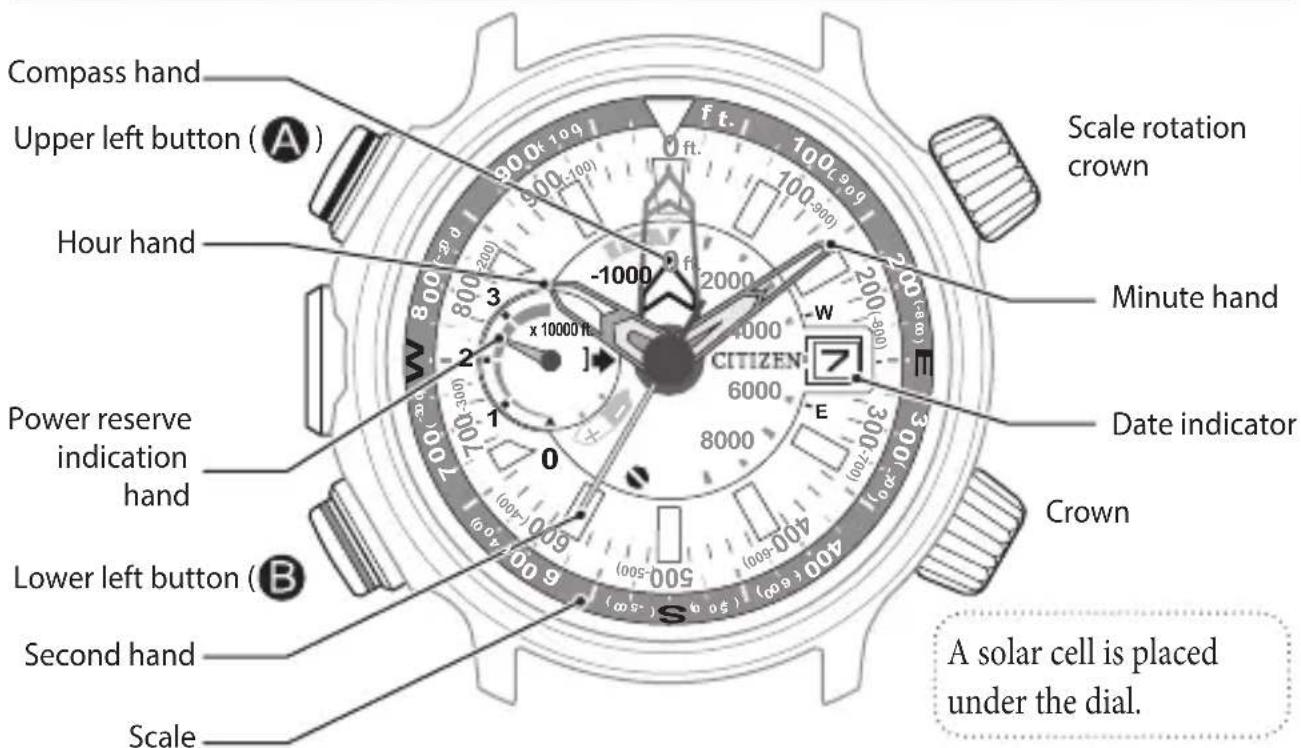
Parts identification (when using the compass)
text_image
Compass hand Upper left button (A) Hour hand Power reserve indication hand Lower left button (B) Second hand Scale Scale rotation crown Minute hand Date indicator Crown 6000 8000 4000 (30-20) (10-50) (50-100) (100-200) (200-300) (300-400) (400-500) (500-600) (600-700) (700-800) (800-900) (900-1000) ft. -1000 x 10000 ft 3 2 1 O E S A solar cell is placed under the dial.- The illustrations in this instruction manual may differ from the actual appearance of your watch.
Charging your watch
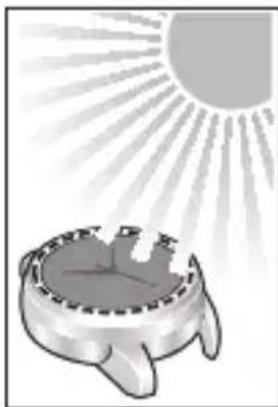
This watch has a rechargeable cell which is charged by exposing the dial to light, such as direct sunlight or fluorescent lamps (refer to pages 14 and 15 for charging guidelines).
After taking off the watch, put it in a location where the dial is exposed to bright light, such as by a window.
For optimal performance, be sure to:
- Expose it to direct sunlight for 5 or 6 hours at least once a month.
- Avoid leaving the watch in dark places for long periods of time.
Caution
- Do not charge the watch at high temperature (about 140^ (60^) or higher).
- If the watch is obscured from light by long sleeves frequently, supplemental charging may be needed to ensure continual operation. Refer to pages 14 and 15.
natural_image
Illustration of a sun shining over a stylized bowl with a small figure, no text or symbols present.When the watch reaches a low charge state (insufficient charge warning function)
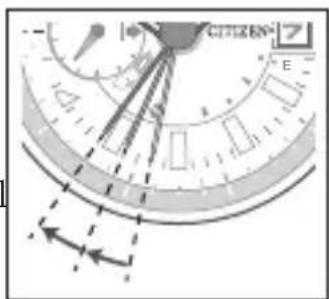
When the power reserve becomes low, the second hand moves once every two seconds. This is the insufficient charge warning function. Be sure to fully charge your watch as outlined on pages 14 and 15.
- When the watch is sufficiently charged, the second hand will move normally.
- If you do not charge the watch for 4 days or longer after the insufficient charge warning movement has begun, the watch all power and stop.
text_image
CITIZEN ECaution
- When in the insufficient charge warning state, the current time and date are indicated. However, measurement functions of the watch will not be available for use.
Charging time by environment
Below are the approximate times required for charging when exposing the watch dial to light continuously. Please use this table as a reference only.
| Environment | Illuminance (lx) | Charging time (approx.) | ||
| To work for one day | To start working normally when the cell is discharged | To become fully charged when the cell is discharged | ||
| Outdoors (sunny) 100 000 | 3 minutes 2 | hours 35 hours | ||
| Outdoors (cloudy) 10 000 | 12 minutes 3 | .5 hours 90 hours | ||
| 8 inches (20 cm) away from a fluorescent lamp (30 W) | 3 000 | 40 minutes 8 | hours 290 hours | |
| Interior lighting 500 | 4 hours 50 | hours – | ||
- To charge your watch, it is recommended to expose the dial to direct sunlight. Optimal charging is achieved by exposing the dial to direct sunlight outdoors for a short time each day.
- After charged fully, the watch runs without additional charging for about 11 months.
Checking the current power reserve
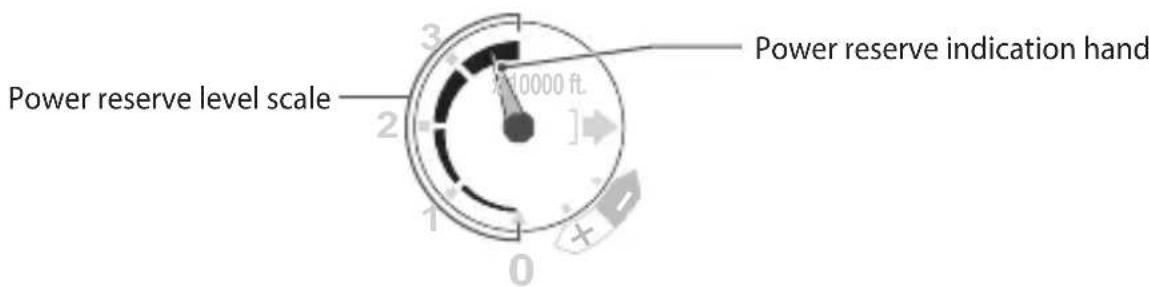
Power reserve indication (Power reserve indication hand on the left sub dial)
text_image
Power reserve level scale 3 2 1 0 Power reserve indication hand- Power reserve is not indicated during altitude measurement (page 18) or altitude calibration (page 28).
The power reserve level
| Level 32 | 10 | |||
| Level indication | 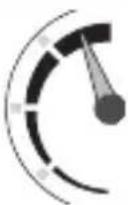 | 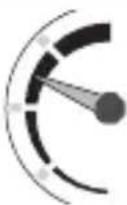 | 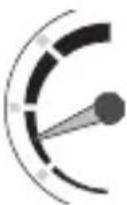 | 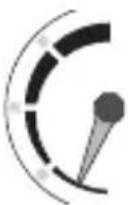 |
| Approximate duration | 280 - 340 days | 180 - 280 days 4 - | 180 days 4 days or less | |
| Meaning of the level indication | Power reserve is sufficient for all features and functions. | Power reserve is sufficient for all operations at this level. | Power reserve is getting low. | Power reserve is not sufficient for normal operation. |
| OK for normal use | immediately. | |||
- You cannot use measurement functions while the power reserve level is in "0". However, you can see the current time.
Frequent use of measurement functions makes the duration shorter.
Measuring altitude
- Use the measuring result only as a reference.
- Use a commercial specialized device when highly accurate measurement is required.
- Confirm the power reserve is in level "2" or higher before measurement.
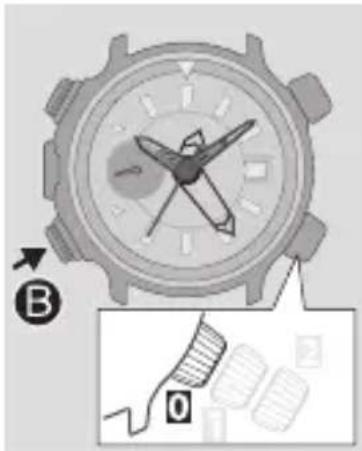
text_image
Diagram showing a watch with labeled parts and a magnified detail view labeled 'B' and 'O'.1 Press and release the lower left button Ⓑ
Altitude is indicated.
- It may take a moment to indicate altitude. Wait until movement of the hands stop.
- If you press and release the upper left button ^A while indicating altitude, the 1 000 ft hand temporarily indicates compass direction ( page 24).
Press and release the upper left button Ⓐ to return to altitude indication.
2 After finishing altitude measurement, press and release the lower left button Ⓑ to turn off the function.
About altitude measurement
This watch continuously measures altitude during the first 5 minutes of measurement. After that, measurement occurs every 3 minutes for up to 12 hours.
How to read altitude indication
Altitude is indicated by the 3 hands, the 10 000 ft, 1 000 ft and 25 ft hands.
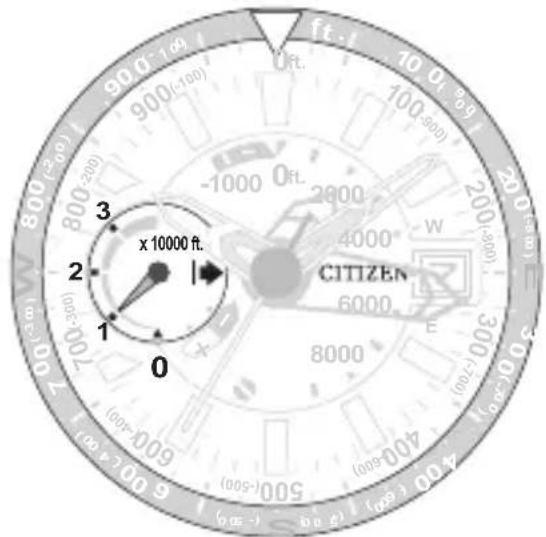
10 000 ft hand indication
Indication range: 10 000 ft to 30 000 ft The hand points “0” when measured altitude is lower than 10 000 ft. On the example in the left, the measured altitude is indicated as 10 000 ft level.
text_image
90.0 (2-10) 800 (-200) 700 (-300) 600 (-400) 500 (-500) 400 (-600) 3 x 10000 ft. 2 1 0 ft. ft. ft. 200 200 200 200 CITIZENMeasuring altitude
How to read altitude indication (continued)
1 000 ft hand indication
Indication range: -1 000 ft to 9 000 ft
The hand points "0" when measured altitude is 0 ft or higher and lower than 1 000 ft.
On the example in the left, the measured altitude is indicated as 2 000 ft level.
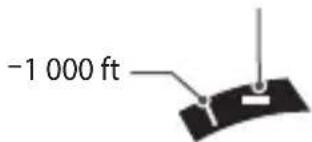
When measured altitude is lower than 0 ft
When higher than -1 000 ft and lower than 0 ft
text_image
-1 000 ft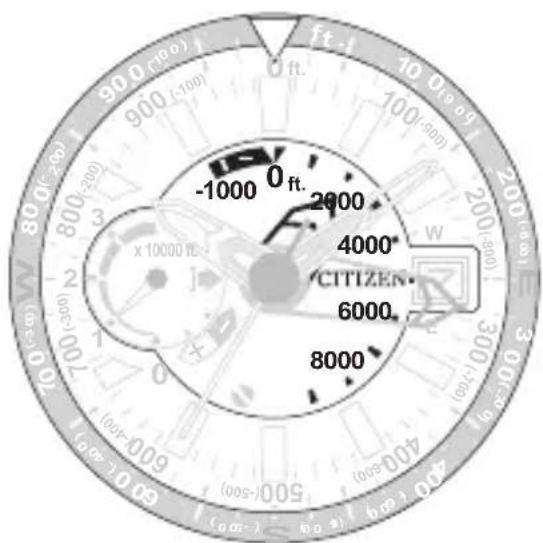
text_image
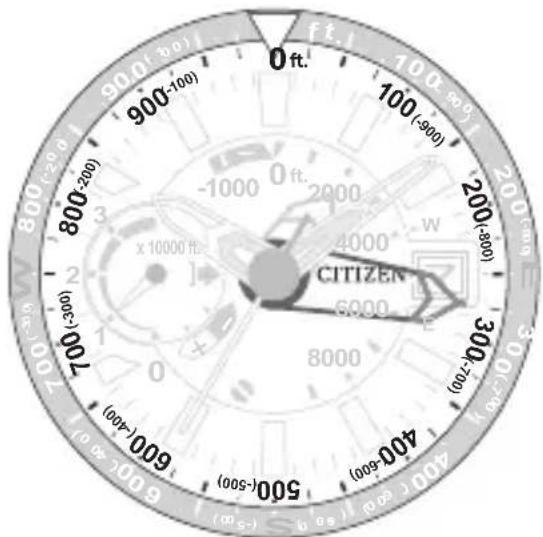
-1000 0 ft. 2000 4000 6000 800025 ft hand indication
Indication range: -975 ft to 975 ft
The 1 000 ft hand points minus indication when measured altitude is lower than 0 ft. In this case, use figures in parentheses to read the 25 ft hand.
On the example in the right, the last 3 digits of measured altitude are indicated as “275 ft” or “-750 ft”.
- When your watch has the scale, setting the ▽ mark on the scale to the position that the 25 ft hand points makes it easier to determine altitude difference at the next altitude measurement.
text_image
0 ft. 900 (-900) 100 (-900) 200 (-800) 300 (-700) 400 (-600) 500 (-500) 600 (-400) 700 (-300) 800 (-200) 900 (-100) CITIZEN (×10000 ft.) (×10000 ft.) (×10000 ft.) (×10000 ft.) (×10000 ft.) (×10000 ft.) (×10000 ft.) (×10000 ft.) (×10000 ft.) (×10000 ft.) (×10000 ft.) (×10000 ft.)Continued on the next page
Measuring altitude
How to read altitude indication (continued)
Indication examples
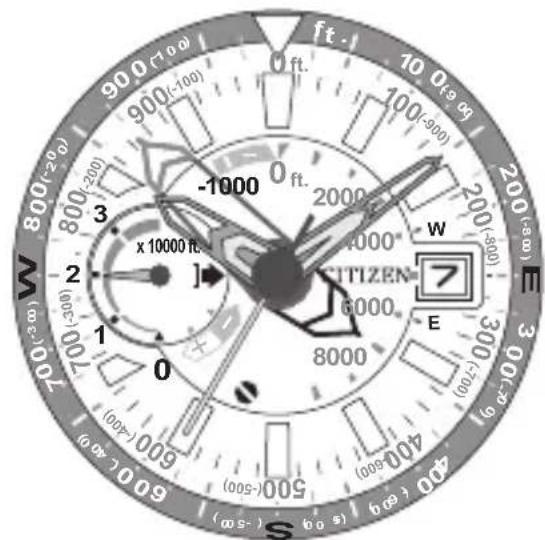
text_image
90.0 (7 0.0) ft 10 0.9 80 100 (-900) 200 (-800) 3 -1000 2000 4000 6000 8000 W E S (00s-) (00s-) (00s-) (00s-) (00s-) (00s-) (00s-) (00s-) (00s-) (00s-) (00s-) (00s-) (00s-) (00s-) (00s-) (00s-)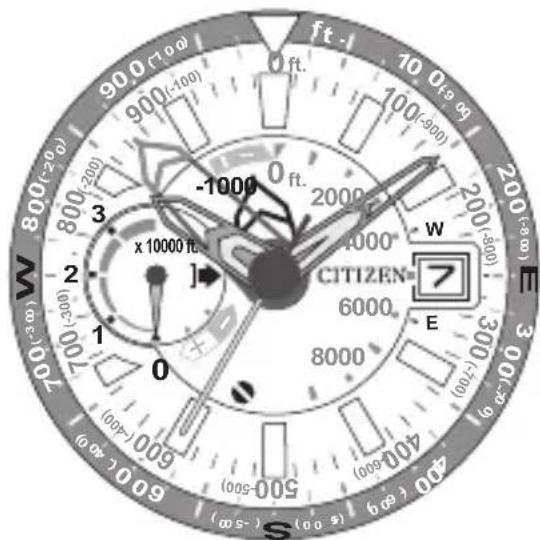
text_image
900 (10 o) 900 (-100) ft 10 0.19 0.05 100 (-900) -1000 0 ft. 2000 4000 6000 8000 CITIZEN W E (0+/-) (0-300) (0-200) (0-100) (0-0) (0-0) (40 - 60 - 80 - 100 - 120 - 140 - 160 - 180 - 200 - 220 - 240 - 260 - 280 - 300 - 320 - 340 - 360 - 380 - 400 - 420 - 440 - 460 - 480 - 500 - 520 - 540 - 560 - 580 - 600 - 620 - 640 - 660 - 680 - 700 - 720 - 740 - 760 - 780 - 800 - 820 - 840 - 860 - 880 - 900 - 920 - 940 - 960 - 980 - 100 W EMeasured altitude: 27 875 ft Measured altitude: -125 ft
When the measured altitude is out of the indication range
Indication range: -1 000 ft to 32 000 ft
When the measured altitude cannot be indicated, the 10 000 ft hand points to (3 o'clock position) and stops.

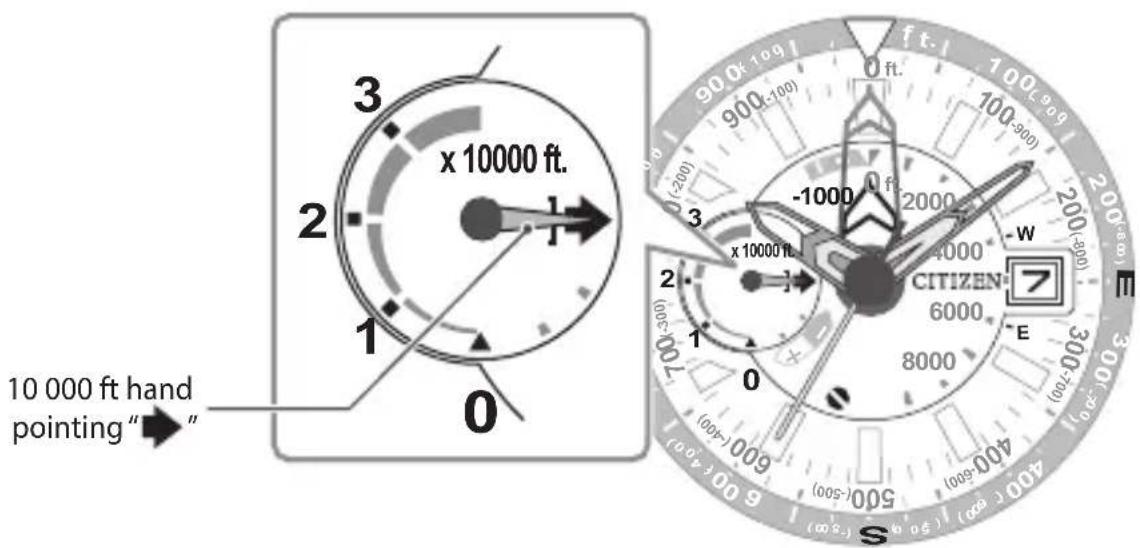
text_image
3 x 10000 ft. 2 1 0 10 000 ft hand pointing "→" 2 1 0 -1000 900 ft 900 ft 100-900 ft 200 -200 -1000 -200 -4000 CITIZEN 6000 8000 E W SUsing the compass
- Use the compass direction result only as a reference.
- Use a commercial specialized device when highly accurate measurement is required.
- Confirm the power reserve is in level "2" or higher before measurement.
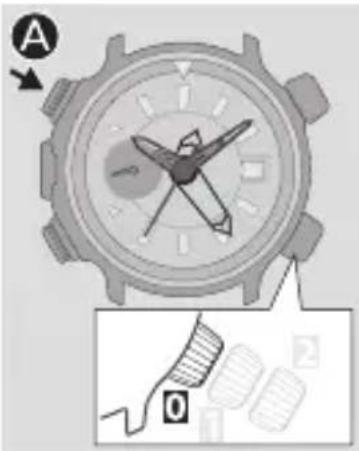
text_image
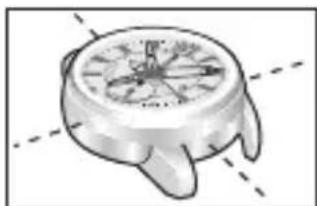
A O1 Press and release the upper left button while keeping the watch's dial level.
Compass function starts.
- It may take a moment to indicate the compass direction. Wait until movement of the hands stop.
- Keep the watch as level and still as possible until compass direction finishes.
natural_image
Illustration of a hand holding a clock face with directional arrows (no text or symbols)2 After finishing measurement, press and release the upper left button Ⓐ to turn off the function.
- Compass indication ends in 30 seconds without pressing the button.
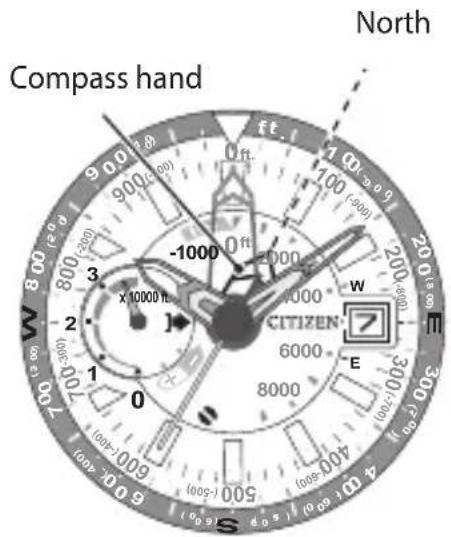
How to read the compass indication
The compass hand points north.
text_image
Compass hand North ft 100 -4000 -1000 200 300 400 600 800 900 1000 1100 1200 1300 1400 1500 1600 1700 1800 1900 2000 2100 2200 2300 2400 2500 2600 2700 2800 2900 3000 3100 3200 3300 3400 3500 3600 3700 3800 3900 4000 4100 4200 4300 4400 4500 4600 4700 4800 4900 5000 5100 5200 5300 5400 5500 5600 5700 5800 5900 6000 6100 6200 6300 6400 6500 6600 6700 6800 6900 7000 7100 7200 7300 7400 7500 7600 7700 7800 7900 8000 8100 8200 8300 8400 8500 8600 8700 8800 8900 9000 9100 9200 9300 9400 9500 9600 9700 9800 9900 1 2 3 4 5 6 7 8 9 1 2 3 4 5 6 7 8 9 1 2 3 4 5 6 7 8 9 1 2 3 4 5 6 7 8 9 1 2 3 4 5 6 7 8 9 1 2 3 4 5 6 7 8 9 1Compass direction result may become significantly inaccurate near things which generate strong magnetic fields.
Confirm there are no things or places such as following ones before using the compass.
• High-tension electrical lines, railway overhead wires or airport
• Inside a car or electric train
- Cellular phones, electric equipment or office appliances
- Magnets
It is recommended to calibrate ( page 32) frequently for better compass direction.
Setting the time
text_image
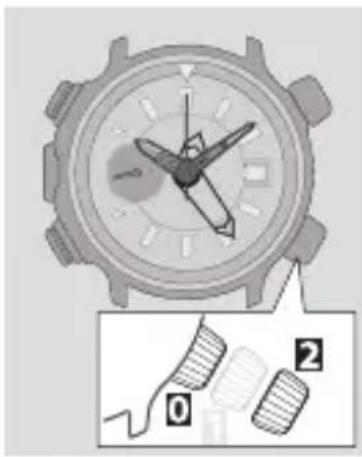
Diagram of a watch with labeled parts and a magnified detail showing parts numbered 0 and 2.1 Pull the crown out to position as the second hand points 0 second.
2 Rotate the crown to set the time.
• Take care the time set is AM or PM.
- Date indicator starts to change to the next as the setting passes 10PM. Rotating the crown counterclockwise does not turn back date indicator.
3 Push the crown in to position in accordance with a reliable time source to finish the procedure.
Adjusting the calendar
You must correct the date on the first day of March, May, July, October and December.
- Do not set the date during the period below as the date indicator is changing. Otherwise the date indicator may change improperly.
Period of time: From 10PM to 0AM (12:00AM)
text_image
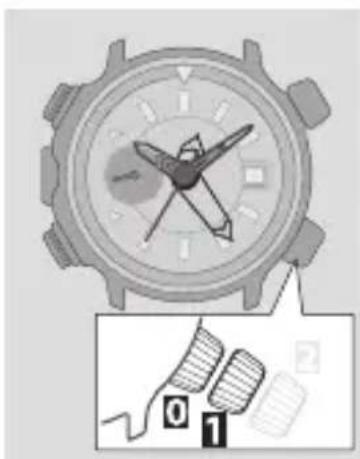
Diagram showing a watch with a dial and a hand gesture, labeled with numbers 0 and 1, alongside a magnified view of the hand.1 Pull the crown out to position
2 Rotate the crown clockwise to set the date.
3 Push the crown in to position C to finish the procedure.
Calibrating altitude indication
About altitude indication
This watch measures atmospheric pressure with a specialized sensor and calculates altitude by applying the standard atmosphere model (set by ICAO, International Civil Aviation Organization) used for altitude measurement of civil aircrafts.
The standard atmosphere model sets a theoretical atmosphere and how pressure, temperature, density and viscosity vary accompanying with change of altitude in it. Therefore, expected altitude may significantly differ from actual one when the weather changes drastically such as in climbing.
You can calibrate altitude indication by entering altitude already known.
- You can calibrate the value in the range of ± 3000 ft of currently measured altitude.
Calibrating altitude indication
You can correct altitude measured by the watch when you know the actual height from map, sign or other sources for future measurement.
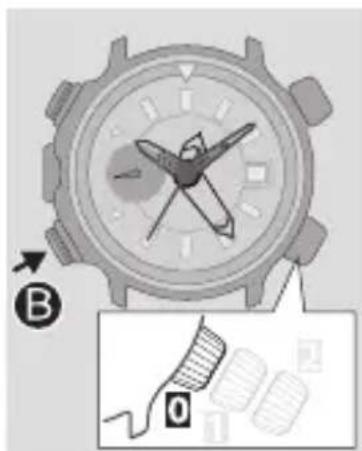
natural_image
Close-up of a wristwatch with a close-up diagram showing a finger pointing to the dial (no text or symbols present)1 Press and release the lower left button Ⓑ
The measured altitude is indicated.
- It may take a moment to indicate altitude. Wait until movement of the hands stop.
2 Press and hold the lower left button for 3 seconds or more.
The 10 000 ft hand points “+” and calibration of altitude indication becomes available.
Calibrating altitude indication
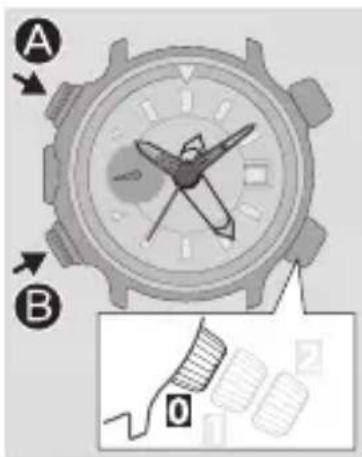
text_image
A B 03 Press and release the lower left button choose + or -.
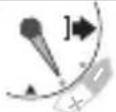 | Choose this when the actual altitude is higher than the measured one. |
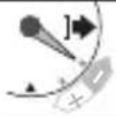 | Choose this when the actual altitude is lower than the measured one. |
- Each time you press and release the button, choice of “+” and “-” changes alternately.
- Repeat steps 3 and 4 to control the altitude value after calibration.
4 Press and release the upper left button ⚠ correct the indication to the actual altitude.
Move the 1 000 ft and 25 ft hands to indicate an approximate value of the altitude.
- Indication keeps changing while you are pressing and holding the button.
- Press and release the upper left button Ⓐ and lower left button Ⓗ at the same time to reset the calibration value.
5 Press and hold the lower left button for 3 seconds or more.
The corrected altitude is set as the current one and the hands return to measured altitude indication.
- The corrected altitude is set as the current one and the hands return to measured altitude indication in 1 minute without any operation.
6 Press and release the lower left button to finish the procedure.
Calibrating compass indication
About compass indication
This watch measures earth magnetism directly with the built-in magnetic sensor for compass indication.
Earth magnetism measurement is apt to be easily affected by environmental conditions near a magnet or thing emitting strong electromagnetic waves.
In addition, generally, the north which a compass points to (magnetic north) is different from that on a map (true north). You can determine the true north through the compass function by calibration and adjustment of the watch.
You can use 2 methods to calibrate the compass of this watch: 2 point correction (page 34) and declination correction (page 40).
Take care not to try to find compass direction around things generating strong magnetic fields same as using an ordinary compass.
Avoid such an environment also while calibrating the compass.
About 2 point correction
2 point correction adjust the watch's status according to the surrounding environment.
Use it when temperature drastically changed or the watch itself may be magnetized.
2 point correction is more effective if you do it before using the compass.
First point of correction
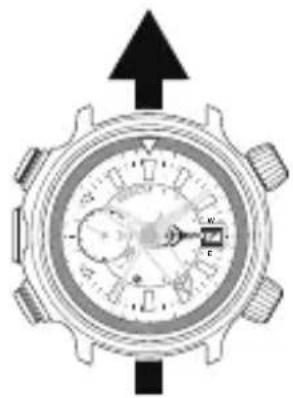
natural_image
Top-down view of a mechanical dial with directional arrows (no text or symbols)Second point of correction (Turn the watch by 180°)
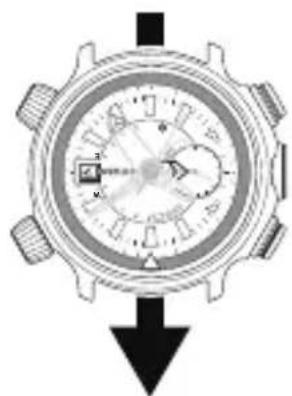
natural_image
Close-up of a mechanical dial with gear and rotary knob, no visible text or symbolsCalibrating compass indication
Executing 2 point correction
When executing 2 point correction, you must turn the watch just 180° while keeping it level. Take enough care of surrounding conditions before starting correction.
Confirm you are not near an item with strong magnetism (electric equipment, magnets, etc.) before starting correction.
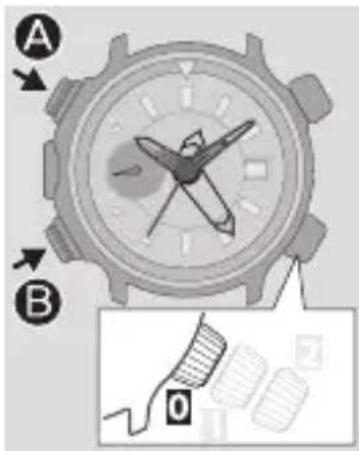
text_image
A B 01 Press and release the upper left button A
Compass function starts.
- It may take a moment to indicate compass direction. Wait until movement of the hands stop.
2 Press and hold the upper left button for 3 seconds or more.
The compass hand points the 3 o'clock position.
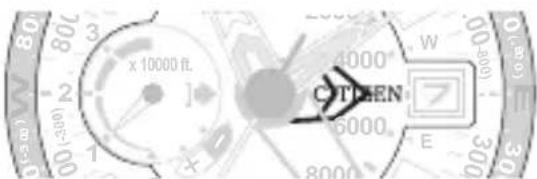
text_image
80 3 x 10000 ft. 2 - 1 + 0 - C THEN 5000 E W 0-5000 300 33 Press and release the lower left button B
The first surrounding environment data is stored and the compass hand turns 180^ to point the 9 o'clock position.
text_image
x 10000 n CITIZENContinued on the next page
Calibrating compass indication
text_image
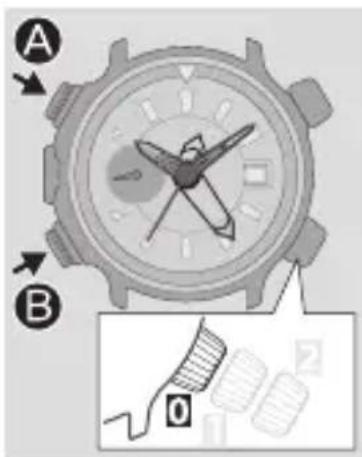
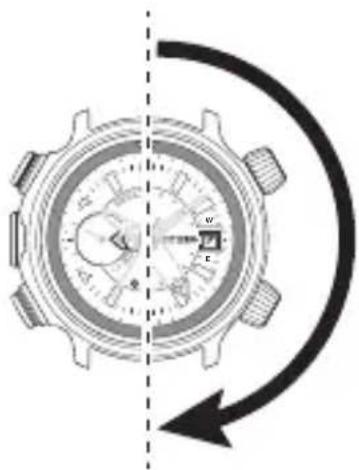
A B 04 Turn the watch by 180°.
text_image
Diagram of a mechanical watch with labeled components and directional arrow indicating rotation or cycle5 Press and release the lower left button B
The second surrounding environment data is stored and the compass hand points the 12 o'clock position. 2 point correction completes and compass function starts.
- If the compass hand returns to the 3 o'clock position, try again from step 3.
- Press and hold the upper left button Ⓐ for 3 seconds or more to cancel the correction. When canceled, no correction is executed and the previous correction result remains effective.
- Pressing and releasing the upper left button Ⓐ and lower left button Ⓗ at the same time before finishing step 5 reset the values of 2 point correction and declination correction and the watch returns to compass function.
6 Press and release the upper left button ⚠ finish the procedure.
Calibrating compass indication
About declination correction
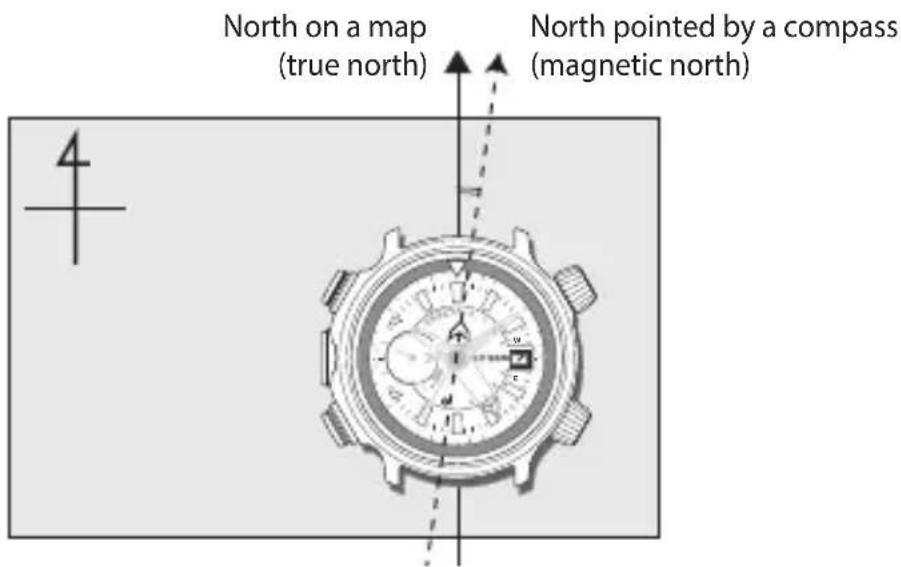
Due to physical characteristics of the Earth as an astronomical body, the magnetic north and true north as indicated on a map are different. The difference is called “declination”. Declination varies by location.
text_image
North on a map (true north) North pointed by a compass (magnetic north)Declination correction is a correction method to adjust the compass of the watch to indicate true north as indicated on a map by setting the declination value of the location where you wants to find compass direction on the watch previously.
On this watch, declination of 0^ to 59^ east and west can be set by 1^ .
You can use the results of geomagnetism survey published by governmental or other organizations.
Executing declination correction
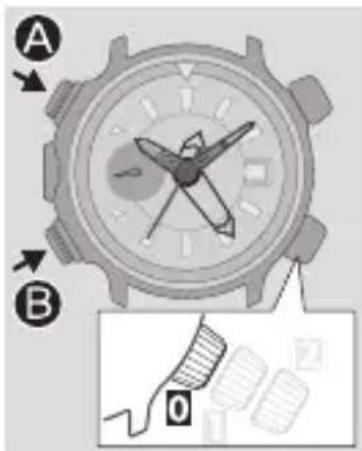
text_image
A B 01 Press and release the upper left button
Compass function starts.
- It may take a moment to indicate compass direction. Wait until movement of the hands stop.
2 Press and hold the upper left button for 3 seconds or more.
The compass hand points the 3 o'clock position.
3 Press and hold the lower left button for 3 seconds or more.
The compass hand points the direction of declination (east or west) and the 25 ft hand shows the degree of declination by pointing a second tick mark.
4 Press and release the lower left button ⏻ choose east or west.
| Choose this when the direction of declination is west (W). | Choose this when the direction of declination is east (E). |
• Each time you press the button, choice of "E" and "W" changes alternately.
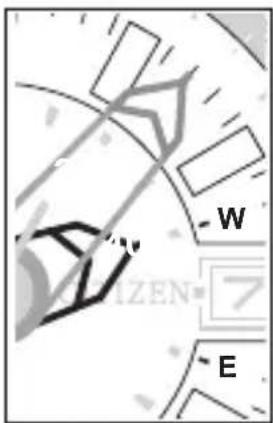
5 Press and release the upper left button ⚫ set the degree of declination.
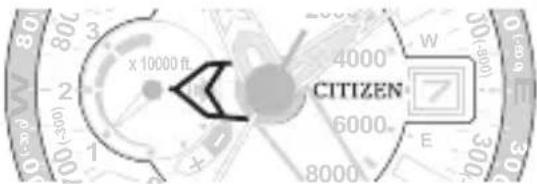
- For example, as the declination in Tokyo is “7° W”, set it as shown in the right.
- Indication keeps changing while you are pressing and holding the button.
- Pressing and releasing the upper left button Ⓐ and lower left Ⓑ at the same time before finishing step 5 resets the values of 2 point correction and declination correction and the watch returns to compass indication.
text_image
- W IZEN - ECalibrating compass indication
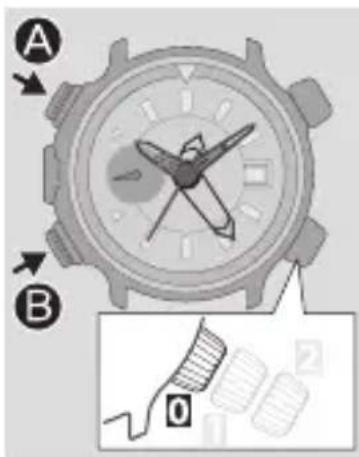
text_image
A B 06 Press and hold the lower left button for 3 seconds or more.
Declination correction completes and compass function starts.
- It may take a moment to indicate compass direction. Wait until movement of the hands stop.
7 Press and release the upper left button finish the procedure.
About declination correction and 2 point correction
2 point correction is a method to detect earth magnetism surely and declination correction is a method to correct the declination of earth magnetism itself. Appropriate implementation of the both methods makes the compass function of the watch more accurate.
Checking and correcting the reference position
Check whether the reference position is correct if altitude or compass indication is incorrect even after calibration.
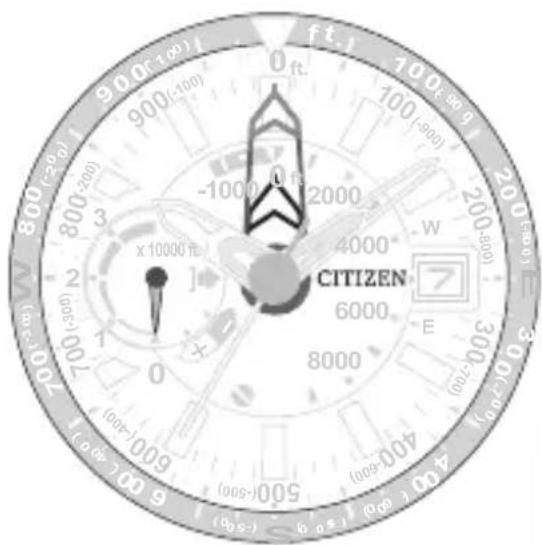
What is the reference position?
The base position of hands to indicate altitude and compass direction.
• Position of the 10 000 ft hand: 6:00
- Position of the 1 000 ft hand (compass hand): 12:00
• Position of the 25 ft hand: 12:00
- The hour, minute and second hands do not have the reference position.
Correct reference positions
text_image
90.0 (100) 900 (-100) 800 (-200) 800 (-300) 800 (-400) -1000 x 10000 m CITIZEN 6000 8000 (000+) (000-) (000-) (00s-)Checking the reference position
Check whether the reference positions of the 10 000 ft hand, 1 000 ft hand (compass hand) and 25 ft hand are correct.
text_image
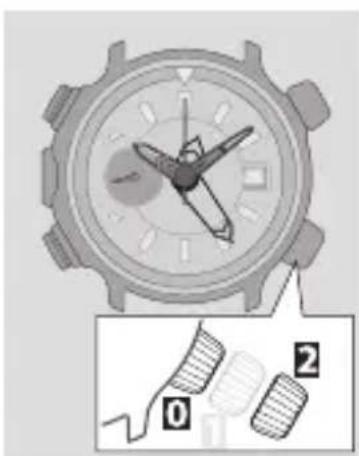
Diagram of a watch with labeled parts showing two numbered parts (0 and 2) and a close-up of the watch's face.1 Stop altitude measurement or compass function and check the power reserve indication.
- Charge the watch if the power reserve is lower than "2".
2 Pull the crown out to position 2
The hands move to their reference position.
3 Check the reference positions.
Check the reference positions of the hands by referring to the illustration of the previous page.
If any reference position is incorrect, correct it following step 3 and after on page46.
4 Push the crown in to position to finish the procedure.
Checking and correcting the reference position
Correcting the reference position
Correct the hands and indication to make them show their correct reference positions.
- Adjust the time after finishing correction of the reference position.
text_image
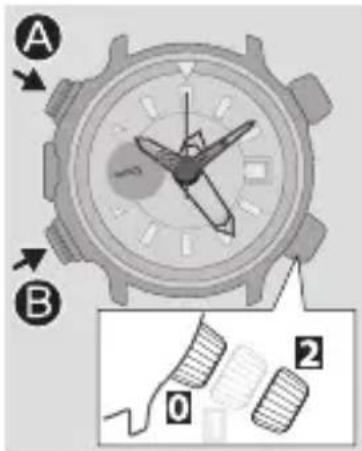
A B 0 21 Stop altitude measurement or compass function and check the power reserve indication.
- Charge the watch if the power reserve is lower than "2".
2 Pull the crown out to position?
The hands move to their reference position.
3 Press and hold the lower left button or 2 seconds or more.
The reference position of the 1 000 ft hand (compass hand) becomes adjustable.
- The 1 000 ft hand (compass hand) and the 25 ft hand move left when other hand is adjusted.
4 Press and release the upper left button A
Each time you press the button, the hand moves by 1 step.
- The hand moves continuously while you are pressing and holding the button.
5 Press and release the lower left button ⚫ change the hand to be corrected.
Each time you press and release the lower left button, the target hand moves slightly to indicate it is adjustable.
- The target hand changes in the following order: 1 000 ft hand (compass hand) 25 ft hand 10 000 ft hand (back to the beginning)
6 Repeat steps 4 and 5 to correct the reference positions of all the hands.
7 Push the crown in to position to finish the procedure.
Using the scale
- Adjust the time after finishing correction of the reference position.
Measuring altitude difference
You can see altitude difference by setting the mark on the scale to the current position of the 25 ft hand. To move the scale, turn the scale rotation crown.
Scale rotation crown
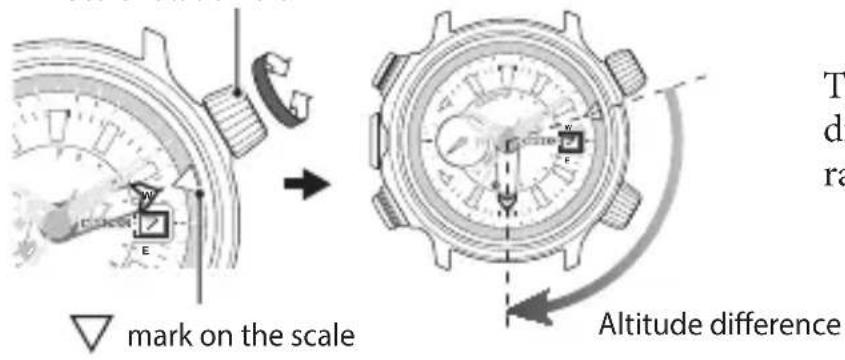
text_image
mark on the scale Altitude differenceThe scale shows altitude difference of -975 ft to 975 ft range by 25 ft.
Seeing the bearings
You can see the other bearings than the north by setting the mark on the scale to the current position of the compass hand. To move the scale, turn the scale rotation crown.
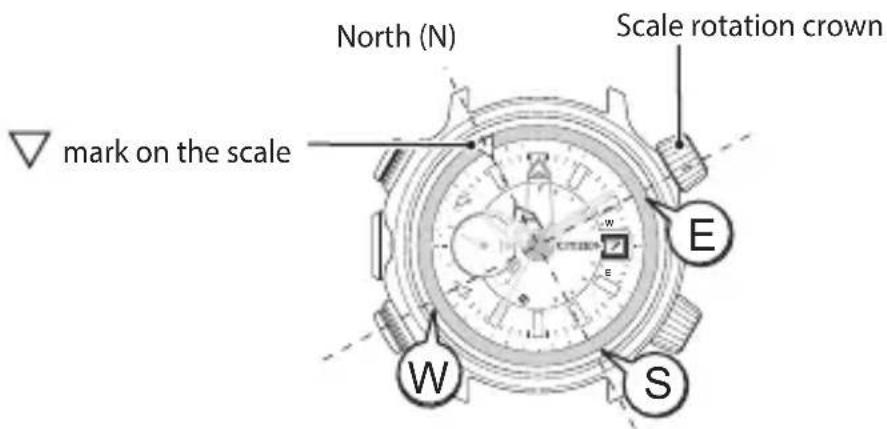
text_image
North (N) Scale rotation crown mark on the scale E W S- Set the mark on the scale to the 12 o'clock position after using the scale.
Troubleshooting
If you have a problem with your watch, check the items below.
Symptom Remedies
Page
Cannot measure compass direction
A hand points to “” and stays still.
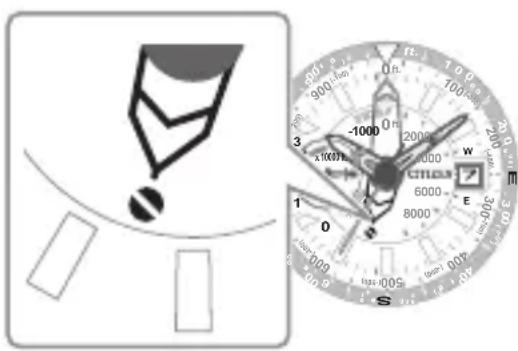
text_image
Diagram showing a device with a magnified view of a dial with labeled points and scale, alongside a schematic diagram.Abnormal magnetism is detected by the sensor.
Try again in a place with normal magnetism.
If you cannot solve your problem with the remedy, consult the nearest authorized Citizen service center.
- Press either button to return to time indication.
24
| Symptom Remedies | Page | |
| Cannot perform altitude measurement or compass function | ||
Two hands point to “and stay still. 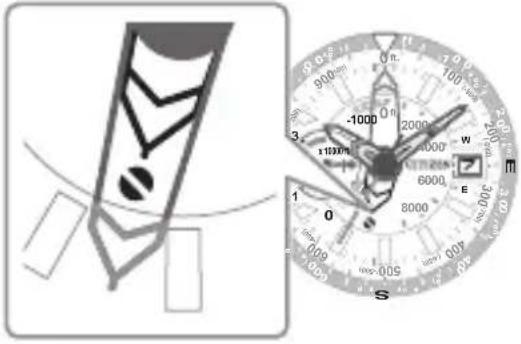 | A malfunction of the measurement system has occurred.Consult the nearest authorized Citizen service center.• Press either button to return to time indication. | - |
Troubleshooting
| Symptom Remedies | Page |
Cannot perform 2 point correction
A hand points to “and stays still.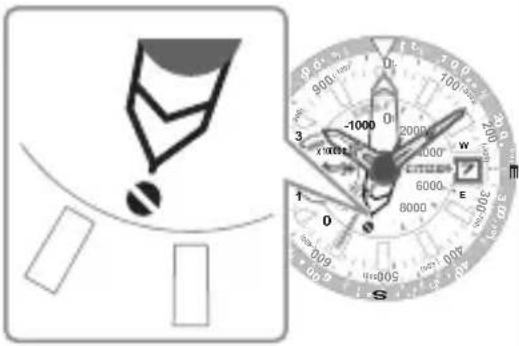 | 2 point correction of the compass hand has not finished properly. Execute 2 point correction from the beginning again.• Press either button to return to time indication. The watch returns to time indication in 30 seconds without any operation. | 34 |
Troubleshooting
| Symptom Remedies | Page | |
| Movement of a hand seems strange | ||
| Hands move in unexpected directions. | Stop altitude measurement or compass function. | 18, 24 |
| Altitude indication is incorrect. | Check and correct the reference position. | 44 |
| Execute altitude calibration. | 28 | |
| Compass indication is incorrect. | Check and correct the reference position. | 44 |
| Execute compass calibration. | 32 | |
Troubleshooting
| Symptom Remedies | Page | |
| Movement of a hand seems strange (continued) | ||
| The second hand moves once every two seconds. | Charge the watch. | 12 |
| The second hand does not move. | Push the crown in to position0. | - |
| It is required to charge in direct sunlight for about 1 hour. | 12 | |
| Cannot check the power reserve. | Push the crown in to position0. | - |
| Stop altitude measurement. | 18 | |
| Stop altitude calibration. | 28 | |
| Stop compass calibration. | 32 | |
Troubleshooting
| Symptom Remedies | Page | |
| Calendar is incorrect | ||
| Date indicator is incorrect. Adjust the calendar. | 27 | |
Troubleshooting
You can reset the watch to the initial status (All Reset).
When you reset the watch, the following values return to the initial.
• Calibration value of altitude measurement
• Correction value of 2 point correction
• Correction value of declination correction
Be sure to perform the following operations after All Reset.
- Correct the reference positions.
After All Reset, the watch is in the reference position adjustment mode. Refer to step 3 and after on page 46.
- Adjust the time and calendar (after correcting the reference position).
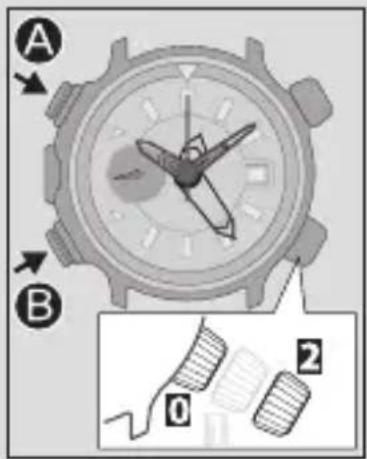
text_image
A B 0 21 Stop altitude measurement or compass function and check the power reserve indication.
- Charge the watch if the power reserve is lower than "2".
2 Pull the crown out to position?
The 10 000 ft hand, 1 000 ft hand (compass hand) and 25 ft hand move to their current reference positions. Do not execute any operation until all the hands stop.
3 Press and hold the upper left button and lower left button B at the same time for 4 seconds or more.
As you release the buttons, the hands move slightly to indicate that reset completed.
Eco-Drive (solar powered) watch handling precautions
- For optimal performance, your watch should remain fully charged.
- Long sleeves may inhibit light transmission to your watch.
This may result in your watch loosing charge. In these cases supplemental charging may be necessary. - When you take off the watch, place it in a bright location to ensure optimal performance.

CAUTION Recharging Precautions
- Do not charge the watch at a high temperature (about 140 °F (60 °C) or higher) as doing so may cause the movement to malfunction.
Examples:
- Charging the watch too close to a light source which generates a large amount of heat such as an incandescent lamp or halogen lamp.
* When charging under an incandescent lamp, be sure to leave 20 inches (50 cm) or more between the lamp and the watch to avoid exposing the watch to excessive heat. - Charging the watch in a location where the temperature may become extremely high such as on the dashboard of a vehicle.
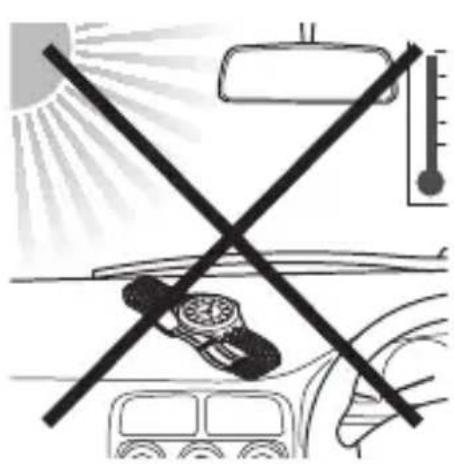
natural_image
Diagram showing a car with a cross crossed over the windshield, indicating no visible text or symbols.
Eco-Drive (solar-powered) watch handling precautions
- This watch utilizes a special rechargeable cell that does not require periodical replacement. However power consumption may increase after using the watch for a number of years due to wear of internal components and deterioration of oils. This may cause stored power to be depleted at a faster rate. For optimal performance, we recommend having your watch inspected every 2-3 years for proper operation and condition check.
WARNING Handling of Rechargeable Cell
- The rechargeable cell should never be removed from the watch.
If for any reason it becomes necessary to remove the rechargeable cell from the watch, keep out of the reach of children to prevent accidental swallowing.
If the rechargeable cell is accidentally swallowed, consult a doctor immediately. - Do not dispose of the rechargeable cell with ordinary garbage. Please follow the instructions of your municipality regarding collection of batteries to prevent the risk of fire or environmental contamination.

WARNING Use Only the Specified Battery
- Never use a battery other than the rechargeable cell specified for use in this watch.
Although the watch structure is designed so that it will not operate when another type of battery is installed, if a conventional watch battery or other type of battery is installed in the watch and the watch is recharged, there is the risk of overcharging which may cause the battery to rupture.
This can cause damage to the watch and injury to the wearer.
When replacing the rechargeable cell, always make sure to use the designated rechargeable cell.
Water resistance

WARNING Water Resistance
- Refer to the watch dial and/or the case back for the indication of the water resistance of your watch. The following chart provides examples of use for reference to ensure that your watch is used properly. (The unit “1 bar” is roughly equal to 1 atmosphere.)
- WATER RESIST(ANT) × × bar may also be indicated as W. R. × × bar.
| Name | Indication | Specification |
| Dial or Case back | ||
| Non-water resistant — Non-water resistant | ||
| Everyday-use water resistant watch | WATER RESIST | Water-resistant to 3 atmospheres |
| Upgraded everyday use water-resistant watch | W. R. 5 bar | Water-resistant to 5 atmospheres |
| W. R. 10/20 bar | Water-resistant to 10 or 20 atmospheres | |
| Water-related use | |||||
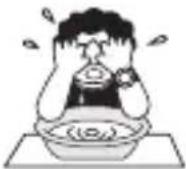 | 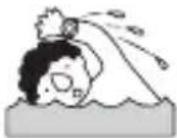 | 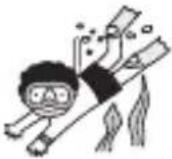 | 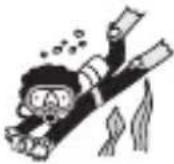 | 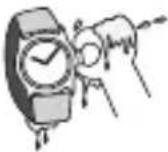 | |
| Minor exposure to water (washing face, rain, etc.) | Swimming and general washing work | Skin diving, marine sports | Scuba diving using an air tank | Operate the crown or button when the watch is wet | |
| NO NO NO NO NO | |||||
| OK NO NO NO NO | |||||
| OK OK NO NO NO | |||||
| OK OK OK NO NO | |||||
Water resistance
- Non-water resistant models are not designed to come into contact with any moisture. Take care not to expose a watch with this rating to any type of moisture.
- Water resistance for daily use (to 3 atmospheres) means the watch is water resistant for occasional accidental splashing.
- Upgraded water-resistance for daily use (to 5 atmospheres) means that the watch may be worn while swimming, but is not to worn while skin diving.
- Upgraded water-resistance for daily use (to 10/20 atmospheres) means that the watch may be worn while skin diving, but not while scuba or saturated diving using helium gas.
Precautionary items and usage limitations
⚠️ CAUTIONTo Avoid Injury
- Be particularly careful when wearing your watch while holding a small child, to
- Be particularly careful when engaged in strenuous exercise or work, to avoid inj and others.
- Do not wear your watch while in a sauna or other location where your watch may excessively hot, since there is the risk of burns.
- Be careful when putting on and taking off your watch, since there is a risk of dama fingernails, depending on the manner in which the band is fastened.
• Take off your watch before going to bed.
CAUTION Precautions
- Always use the watch with the crown pushed in (normal position). If the crown is of the screw lock-type, make sure it is securely locked.
- Do not operate the crown or any push buttons when the watch is wet. Water may enter the watch causing damage to vital components.
- If water enters the watch or the watch fogs up and does not clear up even after a long time, consult your dealer or customer support center for inspection and/or repair.
-
Even if your watch has a high level of water resistance, please be careful of the following.
-
If your watch is immersed in sea water, rinse thoroughly with fresh water and wipe with a dry cloth.
- Do not pour water from a tap directly onto your watch.
• Take off your watch before taking a bath.
- If seawater enters the watch, place the watch in a box or plastic bag and immediately take it in for repair. Otherwise, pressure inside the watch will increase, and parts (crystal, crown, push button, etc.) may come off.

CAUTION When Wearing Your Watch
- Leather bands and rubber (urethane) bands will deteriorate over time due to perspiration dirt. Because of the natural materials, leather band will be worn, deformed, and discolored over time. It is recommended to replace the band periodically.
- The durability of a leather band may be affected when wet (fading, peeling of adhesive), owing to the properties of the material. Moreover, wet leather may cause a rash.
- Do not stain a leather band with substances containing volatile materials, bleach, alcohol (including cosmetics). Discoloration and premature aging may be occurred. Ultraviolet light such as direct sunlight may cause discoloration or deformation.
- It is recommended to take off the watch if it gets wet, even if the watch itself is water-resistant.
- Do not wear the band too tightly. Try to leave enough space between the band and your skin to allow adequate ventilation.
- The rubber (urethane) band may be stained by dyes or soil present in or on clothing or other accessories. Since these stains may not be removable, caution is required when wearing your watch with items that tend to easily transfer color (articles of clothing, purses, etc.). In addition, the band may be deteriorated by solvents or moisture in the air. Replace with a new one when it has lost elasticity or become cracked.
CAUTION When Wearing Your Watch (continued)
- Please request adjustment or repair of the band in the following cases:
- You notice an abnormality with the band due to corrosion.
• The pin of the band is protruding.
- We recommend seeking the assistance of an experienced watch technician for sizing of your watch. If adjustment is not done correctly, the bracelet may unexpectedly become detached leading to loss of your watch or injury.
Consult your nearest authorized Citizen service center.
- The watch may stop or the function of the watch may be impaired in extremely high or low temperature. Do not use the watch in places where the temperature is outside the operating temperature range as stated in the specifications.
- Analog quartz watches are powered by a step motor that uses a magnet. Subjecting the watch to strong magnetism from the outside can cause the motor to operate improperly and prevent the watch from keeping time accurately.
Do not allow the watch to come into close proximity to magnetic health devices (magnetic necklaces, magnetic elastic bands, etc.) or the magnets used in the latches of refrigerator doors, clasps used in handbags, the speaker of a cell phone, electromagnetic cooking devices and so on.
- Avoid dropping the watch or subjecting it to other strong impact. It may cause malfunctions and/or performance deterioration as well as damage to the case and bracelet.
- The integrated circuits (IC) used in quartz watches are sensitive to static electricity. Please note the watch may operate erratically or not at all if exposed to intense static electricity.
- If paint thinner, benzene or other solvents or products containing these solvents (including gasoline, nail-polish remover, cresol, bathroom cleaners and adhesives, water repellent, etc.) are allowed to come into contact with the watch, they may discolor, dissolve or crack the materials. Be careful when handling these chemicals. Contact with mercury such as that used in thermometers may also cause discoloration of the band and case.
- Be sure to remove any protective stickers that may be on your watch (case back, band, clasp, etc.). Otherwise, perspiration or moisture may enter the gaps between the protective stickers and the parts, which may result in a skin rash and/or corrosion of the metal parts.
CAUTION Always Keep Your Watch Clean
- Rotate the crown while it is pressed in fully and press the buttons periodically so they do not become stuck due to accumulations of foreign matter.
- The case and band of the watch come into direct contact with the skin. Corrosion of the metal or accumulated foreign matter may result in black residue coming from the bracelet when exposed to moisture or perspiration. Be sure to keep your watch clean at all times.
- Be sure to periodically clean the bracelet and case of your watch to remove accumulated dirt and foreign matter. In rare circumstances, accumulated dirt, foreign matter may cause irritation with the skin. If you notice this, discontinue wearing the watch and consult your physician.
- Be sure to periodically clean foreign matter and accumulated materials from the metal band, synthetic rubber strap (polyurethane) and/or metal case using a soft brush and mild soap. Be careful not to allow moisture on the case if your watch is not water resistant.
- Leather bands may become discolored by perspiration or dirt. Always keep your leather band clean by wiping with a dry cloth.
Caring for Your Watch
- Wipe any dirt or moisture such as perspiration from the case and crystal with a soft cloth.
- For metallic, plastic or synthetic rubber (polyurethane) band, clean it with soap and a soft toothbrush. Be sure to thoroughly rinse the band after cleaning to remove any soap residue.
- For a leather band, wipe off dirt using a dry cloth.
- If you will not be using your watch for an extended period of time, carefully wipe off any perspiration, dirt or moisture and store in a proper location, avoiding locations subject to excessively high or low temperatures and high humidity.
The paint on the dial and hands helps you with reading the time in a dark place. The luminous paint stores light (daylight or artificial light) and glows in a dark place.
It is free from any radioactive substance or any other material harmful to a human body or environment.
- The light emission will appear bright at first and then diminish as time passes.
- The duration of the light ("glow") will vary depending on the brightness, types of and distance from a light source, exposure time, and the amount of the paint.
- The paint may not glow and/or may dissipate quickly if exposure to light was not sufficient.
Information
Basic information of the altimeter
| Measurable range | -1 000 to 32 000 ft | Accuracy assurance temperature | -4 °F (-20 °C) to 104 °F (40 °C) |
| Unit for indication | 25 ft | Assured accuracy | ± ([Altitude difference from the point altitude calibration was executed] x 2% +50) ft |
- The accuracy is guaranteed when temperature is constant after altitude calibration.
- The assured accuracy is that of altitude difference from the altitude calibration point, not accuracy of measured altitude to actual one.
Example: Error range at 1 700 ft height when altitude was calibrated at a point of 1 000 ft height
(1700 - 1000) x 2% + 50 =64 Thus the assured accuracy is ±64 ft and error range is 1 636 to 1 764 ft.
Assured accuracy in various altitude and error range
The table shows assured accuracy in various altitude and error range when altitude is calibrated at 0 ft height for reference.
| Height (ft) | Assured accuracy (ft) | Error range (ft) |
| -1 000 | ±70 -1 070 to -930 | |
| 0 | ±50 -50 to 50 | |
| 500 | ±60 440 to 560 | |
| 5 000 | ±170 4 830 to 5 170 | |
| 10 000 | ±250 9 750 to 10 250 | |
| 32 000 | ±690 31 310 to 32 690 |
Information
Basic information of the compass
| Accuracy assurance temperature -4 °F (-20 °C) to 104 °F (40 °C) |
| Assured accuracy ±10° |
- The accuracy is guaranteed when temperature is constant after 2 point correction.
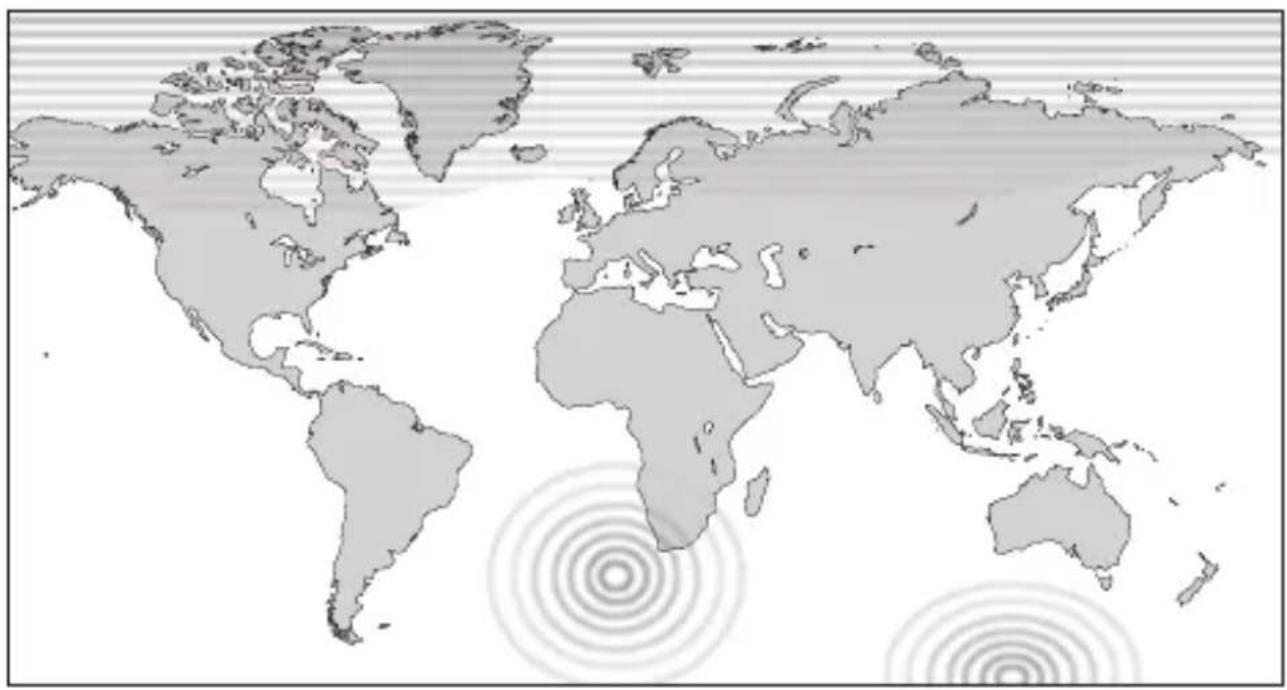
About the regions where the compass function may be hard to use
In the patterned regions on the next page, the compass accuracy of the watch may not be maintained due to the characteristics of the geomagnetic field. When using the compass function of the watch, check the region.
Patterned regions
natural_image
World map showing continents and concentric circles indicating signal or data points (no text or labels)Specifications
| Model | J290 | Type | Analog solar-powered watch |
| Timekeeping accuracy | Average monthly accuracy: ±15 seconds when worn at normal operation temperatures between 41 °F (+5 °C) and 95 °F (+35 °C) | ||
| Operating temperature range | -4 °F (-20 °C) to 140 °F (+60 °C) | ||
| Display functions | • Time: Hours, minutes, seconds• Calendar: Date• Power reserve: 4 levels | ||
| Maximum run time from full charge | • After charged fully, the watch runs without additional charging: Approximately 11 months• Power reserve upon insufficient charge warning function: Approximately 4 days | ||
| Battery | Rechargeable cell (lithium button cell), 1 pc. | ||
| Additional functions | Solar power functionPower reserve indication (in four levels)Overcharging prevention functionInsufficient charge warning function (two-second interval movement)Altitude indication functionAltitude calibration functionCompass indication functionCompass calibration functionReference position check and adjustment function for altitude/compass indication hands | ||
Specifications and contents of this booklet are subject to change without prior notice.
CE
Model No.BN5 *
Cal.J290
CTZ-A8174