
LifeBook S781 - Laptop FUJITSU - Free user manual and instructions
Find the device manual for free LifeBook S781 FUJITSU in PDF.


| Product Type | Laptop |
| Brand | Fujitsu |
| Model | LifeBook S781 |
| Display Size | 13.3 inches |
| Processor | Intel Core i5-3320M (2.6 GHz, up to 3.3 GHz) |
| RAM | 4 GB DDR3 (expandable to 16 GB) |
| Storage | 500 GB HDD (7200 rpm) |
| Graphics | Intel HD Graphics 4000 |
| Operating System | Windows 7 Professional (64-bit) |
| Battery | 6-cell Li-Ion (4400 mAh) |
| Power Adapter | Output: 19 V DC, 2.1 A, 40 W |
| Dimensions (W x D x H) | 316 x 227 x 26.5 mm |
| Weight | 1.8 kg (with battery) |
| Ports | 1x USB 3.0, 2x USB 2.0, VGA, HDMI, Ethernet, headphone/mic combo |
| Wireless Connectivity | Wi-Fi 802.11 b/g/n, Bluetooth 4.0 |
| Webcam | 1.3 MP webcam |
| Security Features | Fingerprint sensor, TPM 1.2, Kensington lock slot |
| Cleaning Instructions | Use a soft, dry cloth. Do not use liquids or abrasive cleaners. |
| Repairability | Accessible RAM and HDD bays; user-replaceable battery. |
Frequently Asked Questions - LifeBook S781 FUJITSU
User questions about LifeBook S781 FUJITSU
0 question about this device. Answer the ones you know or ask your own.
Ask a new question about this device
Download the instructions for your Laptop in PDF format for free! Find your manual LifeBook S781 - FUJITSU and take your electronic device back in hand. On this page are published all the documents necessary for the use of your device. LifeBook S781 by FUJITSU.
USER MANUAL LifeBook S781 FUJITSU
"http://support.ts.fujitsu.com/com/support/index.html"
http://ts.fujitsu.com/support
InnovativeTechnologie 7
Save Changes and Power Off 82
ProblemlösungenundTipps 83
InnovativeTechnologie
1=WebCam(optional)
2=WebCam-LED(optional)
3=Lautsprecher
4=TouchStick(optional)
5=Statusanzeigen
6=Applikationstasten
7=Ein-/Ausschalter
8=Statusanzeigen
natural_image
Simple diagram with a downward arrow and concentric circles, no text or symbols present.natural_image
Simple diagram showing a black arrow pointing downward to a circular button with a power symbol (no text or labels)natural_image
Simple icon showing a downward arrow pointing to a circular button with a power symbol (no text or labels)natural_image
Line drawing of a laptop keyboard with labeled parts (1 and 2), no text or symbols present.natural_image
Line drawing of a laptop keyboard with an attached drive module (no text or symbols)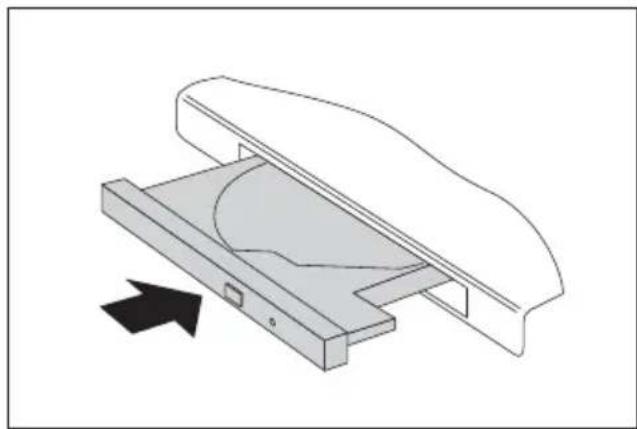
natural_image
Technical line drawing of a mechanical component with an arrow indicating direction (no text or symbols)natural_image
Diagram showing a rolled document being placed on a flat surface with an arrow indicating direction (no text or symbols)natural_image
Diagram showing a folded paper or sheet with two directional arrows labeled 1 and 2, and a small triangular symbol below (no text or symbols present)natural_image
Diagram of a mechanical component with two directional arrows labeled 1 and 2, showing a cutaway view (no text or symbols beyond labels)natural_image
Diagram of a mechanical component with a labeled arrow and number 2, no text or symbols present
natural_image
Diagram of a mechanical component with two directional arrows labeled 1 and 2, showing a cutaway view (no text or symbols beyond labels)natural_image
Diagram of a mechanical component with a curved blade and a rectangular block, showing an arrow indicating direction (no text or symbols)1=KensingtonLock-Vorrichtung
2=LAN-Anschluss
3=USB-Anschlüsse
natural_image
Technical line drawing of a mechanical component with labeled part 'a' and arrow indicator (no text or symbols beyond label)natural_image
Pure technical diagram showing a mechanical component with a downward arrow and a circular feature, no text or symbols present.natural_image
Isometric line drawing of a laptop with a labeled component (no text or symbols present)natural_image
Diagram showing a plug being inserted into a socket connected to a padlock (no text or symbols present)▶ BringenSiedenKensingtonLockCablean derVorrichtungIhresNotebookan.

natural_image
Line drawing of a laptop with an attached card showing a location (no text or symbols)natural_image
Line drawing of a cable connector with a port, showing no text or symbolsnatural_image
Diagram showing a VGA connector with an arrow pointing to a screen icon (no text or symbols present)natural_image
Diagram showing a USB plug inserted into a port with an arrow indicating the direction (no text or symbols present)natural_image
Diagram showing a USB plug inserted into a socket with an arrow indicating the insertion point, alongside a symbol of a USB plug (no text or labels present)natural_image
Diagram showing a mechanical component being inserted into a threaded rod, with no text or symbols present.natural_image
Diagram showing a mechanical component being inserted into a connector with an ear symbol (no text or labels)If there is no FCC logo and also no FCC ID on the device then this device is not approved by the Federal Communications Commission (FCC) of the USA. Although it is not explicitly forbidden to travel the US trading area carrying this device, but to avoid trouble at customs clearance Fujitsu Technology Solutions GmbH recommends not to bring this device into the US trading area.
Regulatory information for notebooks without radio device
NOTICE:
Changes or modifications not expressly approved by Fujitsu Technology Solutions could void this user's authority to operate the equipment.
Notice to Users of Radios and Television
Theselimitsaredesignedtoprovidereasonableprotectionagainsttharmfulinterferenceina residentialinstallation. This equipment generates, uses, and can radiateradiofrequency energy and, if not installed and used in accordance with the instructions, may cause harmful interference to radio communications. However, there is no guarantee that interference will not occur in a particular installation. If this equipment does cause harmful interference to radio or television reception, which can be determined by turning the equipment off and on, the user is encouraged to try to correct the interference by one or more of the following measures:
• Reorient or relocate the receiving antenna.
- Increase the separation between the equipment and receiver.
- Connecttheequipmentintoanoutletthatisonadifferentcircuitthanthereceiver.
- Consultthedealeroranexperiencedradio/TVtechnicianforhelp.
NoticetoUsersoftheUSTelephoneNetwork
YournotebookmaybesuppliedwithaninternalmodemwhichcomplieswithPart68ofthe FCCrules.OnthisnotebookisalabelthatcontainstheFCCRegistrationNumberandthe RingerEquivalenceNumber(REN)forthisequipmentamongotherinformation.Ifrequested, theusermustprovidetheirtelephonecompanywiththefollowinginformation:
- Thetelephonenumbertowhichthenotebookisconnected.
- The Ringer Equivalence Number (REN) forthisequipment.
-
The equipment requires a standard modular jack type USOCRJ-11C which is FCC Part 68 compliant.
-
The FCC Registration Number.
This equipment is designed to be connected to the telephone network or premises wiring using astandardmodularjacktypeUSOCRJ-11CwhichisFCCPart68compliantandalinecord betweenthemodemandthetelephonenetworkwithaminimumof26AWG.
TheRENisusedtodeterminethenumberofdevicesthatyoumayconnecttoyourtelephone line and still have all of those devices ring when your number is called. Too many devices ononelinemayresultinfailuretoringinresponsetoanincomingcall.Inmost,butnotall, areas the sum of the RENs of all of the devices should not exceed five (5). To be certain ofthenumberofdevicesyoumayconnecttoyourline,asdeterminedbytheRENs,contact yourlocaltelephonecompany.Ifthisequipmentcausesharmtothetelephonenetwork,your telephone company may discontinue your service temporarily. If possible, they will notify you in advance. If advance notice is not practical they will notify you as soon as possible. You will also be advised of your right to file a complaint with the FCC.
ThisfaxmodemalsocomplieswithfaxbrandingrequirementsperFCCPart68.
Your telephone company will probably ask you to disconnect this equipment from the telephone network until the problem is corrected and you are sure that the equipment is not malfunctioning. This equipment may not be used on coin-operated telephones provided by your telephone company. Connection to party lines is subject to state tariffs. Contact your state's public utility commission, public service commission or corporation commission form more information.
This equipment includes automatic dialing capability. When programming and/or making test call to emergencies:
- Remainonthelineandbrieflyexplaintothedispatcherthereasonforthecall.
- Performsuchactivitiesinoff-peakhours,suchasearlymorningorlateevening.
FCCrulesprohibittheuseofnon-hearingaidcompatibletelephonesinthe followinglocationsorapplications:
- Allpublicorsemipubliccoin-operatedorcreditcardtelephones.
- Elevators, highways, tunnels (automobile, subway, railroad or pedestrian) where a personwithimpairedhearingmightbeisolatedinanemergency.
- Places where telephones are specifically installed to alert emergency authorities suchasfire,policeormedicalassistancepersonnel.
• Hospital rooms, residential health care facilities, convalescent homes and prisons.
•Hotel, motelorapartmentlobbies. -
Storeswheretelephonesareusedbypatronstoordermerchandise.
-
Publictransportationterminalswheretelephonesareusedtocalltaxisortoreservelodgingorrentalcars.
- Inhotelandmotelroomsasatleasttenpercentoftheroomsmustcontainhearing aid-compatible telephones or jacks for plug-in hearing aid compatible telephones which willbeprovidedtohearingimpairedcustomersonrequest.
DOC(IndustryCANADA)Notices
NoticetoUsersofRadiosa ndTelevision
ThisClassBdigitalappa ratusmeetsallrequirementsofCanadianInterference-CausingEquipment Regulations.
This equipment meet the applicable Industry Canada Terminal Equipment Technical Specifications. Th is is confirmed by the registration number. The abbreviation, IC, before theregistrationn umber signifies that registration was performed based on a Declaration of Conformityindica ting that Industry Canada technical specifications were met. It does not implythatIndustryCanadaapprovedtheequipment.Beforeconnectingthisequipmentto atelephonelinet heusershouldensurethatitispermissibletoconnectthisequipmentto thelocaltelecommunicationfacilities.Theusershouldbeawarethatcompliancewiththe certifications standardsdoesnotpreventservicedegradationinsomesituations.
Repairstotele communicationequipmentsshouldbemadebyaCanadianauthorized maintenancefacility.AnyrepairsoralterationsnotexpresslyapprovedbyFujitsuor anyequipment failuresmaygivethetelecommunicationcompanycausetorequestthe usertodiscon necttheequipmentfromthetelephoneline.
NOTICE:
TheRingerE quivalenceNumber(REN)forthisterminalequipmentis0.0.TheRENassigned toeachterm inalequipmentprovidesanindicationofthemaximumnumberofterminals allowedtob econnectedtoatelephoneinterface.Theterminationonaninterfacemay consistof anycombinationofdevicessubjectonlytotherequirementthatthesumofthe RingerEquivalenceNumbersofallthedevicesdoesnotexceedfive.

CAUTION:
Forsafet y, users should ensure that the electrical ground of the power utility, the telephonelinesandthemetallicwaterpipesareconnectedtogether.UsersshouldNOT attempt tomakesuchconnectionsthemselvesbutshouldcontacttheappropriateelectric inspectionauthorityorelectrician.Thismaybeparticularlyimportantinruralareas.
flowchart
graph LR
    A[" "] --> B["●"]
    B --> C["+"]

CAUTION:
To reduce the risk of fire, use only 26AWG or larger telecommunications line cord.
For Authorized Repair Technicians Only

CAUTION:
For continued protection against risk of fire, replace only with the sametypeandratingfuse.

WARNING:
DangerofexplosionifLithium(CMOS)batteryisincorrectlyreplaced.Replaceonly withthesameorequivalenttyperecommendedbythemanufacturer.
Disposeofusedbatteriesaccordingtothemanufacturer'sinstruction.
FCCRegulatoryinformationfornotebookswithradiodevice
FederalCommunicationsCommissionstatement
ThisdevicecomplieswithPart15ofFCCRules.Operationissubjecttothefollowing twoconditions:(1)thisdevicemaynotcauseinterference,and
(2) this device must accept any interference, including interference that may cause undesired operation of this device.
FCCInterferenceStatement
This equipment has been tested and found to comply with the limits for a Class B digital device, pursuant to Part 15 of the FCC Rules. These limits are designed to provide reasonable protection against harmful interference in a residential installation. This equipment generates, uses, and can radiate radio frequency energy. If not installed and used in accordance with the instructions, it may cause harmful interference or radiocommunication.
However, there is no guarantee that interference will not occur in particular installation.
If this equipment does cause harmful interference or radioortelevision reception, which can be determined by turning the equipment off and, the user is encouraged to try to correct the interference by one or more of the following measures:
- Reorientorrelocatethereceivingantenna.
- Increasechedistancebetweentheequipmentandthereceiver.
- Connecttheequipmenttoanoutletonacircuitdifferentfromtheonethereceiverisconnectedto.
- Consultthedealeroranexperiencedradio/TVtechnicianforhelp.
Pleasenotethefollowingregulatoryinformationrelatedtotheoptionalradiodevice.
FCCRadioFrequencyExposurestatement
This radiodevice has been evaluated under FCC Bulletin OET65 Cand found compliant with the requirements asset forth in CFR47 Sections 2.1091, 2.1093, and 15.247(b)(4) addressing RF Exposure from radio frequency devices. The radiated output power of this radio device is far below the FCC radio frequency exposure limits. Nevertheless, this device shall be used in such a manner that the potential for human contact during normal operation is minimized. When using this device, a certain separation distance between antenna and nearby persons must be maintained to ensure RF exposure compliance. In order to comply with RF exposure limits established in the ANSI C95.1 standards, the distance between the antennas and the users should not be less than 20 cm (8 inches).
RegulatoryNotesandStatements
Radiodevice, Health and Authorization for use
Radio frequency electromagnetic energy is emitted from the radio devices. The energy levels of theseemissions, however, are far much less than the electromagnetic energy emissions from wireless devices such as mobile phones. Radiodevices are safe for use by consumers because they operate within the guidelines found in radio frequency safety standards and recommendations.
The use of the radiodevices may be restricted in some situations or environments, such as:
- onboardanairplane,or
•inanexplosiveenvironment,or - in situations where the interference risk to other devices or services is perceivedoridentifiedasharmful.
Incasesinwhichthepolicyregardinguseofradiodevicesinspecificenvironmentsisnot clear (e.g., airports, hospitals, chemical/oil/gas industrial plants, private buildings), obtain authorizationtousethesedevicespriortooperatingtheequipment.
RegulatoryInformation/Disclaimers
Installation and use of this radiodevicemustbeinstrictaccordancewiththeinstructionsincluded in the user documentation provided with the product. Any changes or modifications made to this device that are not expressly approved by the manufacturer may void the user's authority to operate the equipment. The manufacturer is not responsible for any radio or television interference caused by unauthorized modification of this device, or the substitution or attachment of connecting cables and equipment other than those specified by the manufacturer. It is the responsibility of the user to correct any interference caused by such unauthorized modification, substitution or attachment. The manufacturer and its authorized resellers or distributors will assume no liability for any damage or violation of government regulations arising from failure to comply with these guidelines.
Exportrestrictions
Thisproductorsoftwarecontainsencryptioncodewhichmaynotbeexportedor transferredfromtheUSorCanadawithoutanapprovedUSDepartmentofCommerce exportlicense. ThisdevicecomplieswithPart15ofFCCRules,aswellasICES003B/NMB003B.Operationissubjecttothefollowingtwoconditions:
(1) this device may not cause harmful interference, and
(2) this device must accept any interference received, including interference that may cause undesirable operation.
Modifications not expressly authorized by Fujitsu Technology Solutions may invalidatetheuser'srighttooperatethisequipment.
Stichwörter
56k-Modem47
A
Akku35
aufladen35
Ladezustand35,42
lagern35
Lebensdauer35
pflegenundwarten35
Selbstentladung35
Regulatoryinformation
Notebookswithradiodevice97
Notebookswithoutradiodevice93
Reinigung16
Reise, Notebook15
Return25
RollenLock
Anzeige22