
i602 - Loudspeaker ILUV - Free user manual and instructions
Find the device manual for free i602 ILUV in PDF.


| Product Type | Portable Bluetooth Speaker |
| Brand | iLuv |
| Model | i602 |
| Dimensions | Approx. 7.5 x 3.5 x 3.5 inches (19 x 9 x 9 cm) |
| Weight | Approx. 1.2 lbs (540 g) |
| Power Source | Built-in rechargeable lithium-ion battery, USB charging (5V/1A) |
| Battery Life | Up to 10 hours at moderate volume |
| Charging Time | Approx. 3-4 hours |
| Bluetooth Version | Bluetooth 5.0 |
| Wireless Range | Up to 33 feet (10 meters) |
| Speaker Type | Full-range mono driver with passive radiator |
| Output Power | 5W RMS |
| Frequency Response | 80 Hz - 20 kHz |
| Audio Inputs | Bluetooth, 3.5mm AUX-in |
| Controls | Power, Volume +/-, Play/Pause, Bluetooth pairing, LED indicator |
| Water Resistance | IPX5 (splash-proof) |
| Microphone | Built-in for hands-free calls |
| Care & Cleaning | Wipe with a soft, dry cloth. Avoid exposing to extreme temperatures or direct sunlight. |
| Safety Notes | Do not disassemble. Use only certified chargers. Keep away from water if not IPX rated. |
| Spare Parts & Repairability | Contact iLuv support for replacement battery or charging port repair. Not user-serviceable. |
Frequently Asked Questions - i602 ILUV
User questions about i602 ILUV
0 question about this device. Answer the ones you know or ask your own.
Ask a new question about this device
Download the instructions for your Loudspeaker in PDF format for free! Find your manual i602 - ILUV and take your electronic device back in hand. On this page are published all the documents necessary for the use of your device. i602 by ILUV.
USER MANUAL i602 ILUV
Please read this manual carefully before operating and save it for future reference.
USER SAFETY GUIDE
YOU CAN HELP TO PROTECT THE ENVIRONMENT!
Please remember to respect the local regulations. Hand in the non-working electrical equipment to an appropriate waste disposal center.
FOR RECHARGEABLE BATTERY
Attention: All rechargeable batteries must be recycled and disposed of properly.

IMPORTANT SAFETY INSTRUCTIONS
- READ INSTRUCTIONS – All the safety and operating instructions should be read before the appliance is operated.
- RETAIN INSTRUCTIONS – The safety and operating instructions should be retained in a secure place for future reference.
- HEED WARNINGS – All warnings on the appliance and in the operating instructions should be observed.
- FOLLOW INSTRUCTIONS – All operating and use instructions should be followed.
- WATER AND MOISTURE – The appliance should not be used near water, including a bathtub, kitchen sink, laundry tub, and/or swimming pool.
- HEAT – The appliance should be situated away from heat sources such as radiators, heat registers, stoves, or other appliances (including amplifiers) that produce heat.
- POWER SOURCES – The appliance should be connected to a power supply only of the type described in the operating instructions or as marked on the appliance.
- CLEANING – The appliance should be cleaned with a dry cloth.
- OBJECT and LIQUID ENTRY – Care should be taken so that objects do not fall and liquids are not spilled into the device's openings.
- CARTS AND STANDS – The appliance should be used only with a cart or stand that is recommended by the manufacturer. An appliance and cart combination should be moved with care. Quick stops, excessive force, and uneven surfaces may cause the appliance and cart combination to overturn

- DAMAGE REQUIRING SERVICE – The appliance should be serviced by qualified service professional when:
a. The power-supply cord or plug has been damaged.
b. Objects have fallen into, or liquid has been spilled into the appliance's apertures.
USER SAFETY GUIDE
c. The appliance has been exposed to rain.
d. The appliance has been dropped and suffered damage.
e. The appliance does not appear to operate normally, or exhibits a change in performance.
-
LEAD AND MERCURY – This product may contain lead and/or mercury. Disposal of these materials may be regulated by your local authorities due to environmental considerations. For more detailed disposal or recycling information, please contact your local authorities or the EIA (Electronic Industries Alliance) – www.eiae.org
-
SERVICING – The user should not attempt to service the appliance beyond what is described in the user's operating instructions. All other servicing should be referred to qualified service professional.
Important Note:
iLuv recommends that you use the rechargeable battery at room temperature (27°C / 80°F) for best operating performance. If you plan not to use the rechargeable battery for a long period of time, please discharge the battery completely and store it in a cool, (0°C / 32°F – 27°C / 80°F) dry place.
FCC RULE
This device complies with Part 15 of the FCC Rules. Operation is subject to the following two conditions: (1) this device may not cause harmful interference, and (2) this device must accept any interference received, including interference that may cause undesired operation.
Note: Changes or modifications not expressly approved by the party responsible for compliance could void the user's authority to operate the equipment.
CONTENTS
Introduction
General Features 5
Accessories included 5
Operating Instructions
Attention 6
How to install the iLuv _TM rechargeable battery to your iPod ^® ..... 6
How to recharge your iPod with the iLuv rechargeable battery .... 6
How to synchronize your iPod with the computer using the iLuv rechargeable battery 8
Specifications 9
INTRODUCTION
Extend the playing time of your iPod with iLuv _TM premium batteries housed in attractive colorful silicone skins.
As great as your iPod is, its battery charge can't last forever. But with these attractive, rechargeable, high-capacity, lithium polymer battery add-ons, “forever” can get just a little bit closer. They also come in 4 attractive and colorful “skins”. Each unit can be charged through a traditional USB connection, or through the supplied AC adapter.
General Features
- Built-in high-capacity rechargeable lithium polymer battery extends the playback time of
- iPod nano up to a maximum of 36 hours (with i601)
- iPod nano up to a maximum of 56 hours (with i602)
- iPod with video (30GB) up to a maximum of 42 hours (with i603)
- iPod with video (60GB) up to a maximum of 55 hours (with i604)
-
iPod with video (80GB) up to maximum of 74 hours (with i604)
-
Supplied AC power adapter with USB port for battery charging
- iLuv skins provide your iPod with maximum protection against scratches.
Accessories Included
- Instruction manual
• AC power adaptor with USB port - Silicone battery holder
OPERATING INSTRUCTIONS
Attention:
To support a long life cycle of the rechargeable battery:
- Please charge your iPod fully the first-time you use i601 / i602 / i603 / i604.
- Additionally, please charge i601 / i602 / i603 / i604 fully for the first three times.
How to install iLuv rechargeable battery to your iPod
- Turn off your iPod before installing i601 / i602 / i603 / i604 to your iPod.
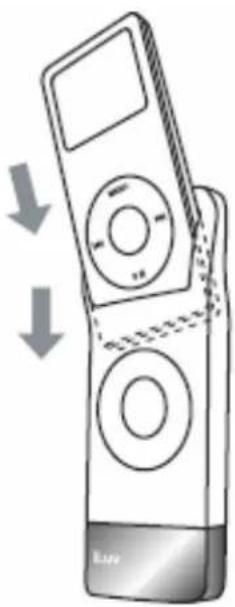
- Insert your iPod into the supplied battery holder (skin) of i601 / i602 / i603 / i604 as shown right.
- Ensure that your iPod is fully inserted into the supplied battery holder. Once properly inserted, the LCD screen of your iPod will turn on automatically.
natural_image
Illustration of a mobile phone with two buttons and a scroll, showing a downward arrow indicating compression or disassembly (no text or symbols present)How to recharge your iPod with the iLuv rechargeable battery
- Connect the USB-to-30PIN cable (supplied with your iPod) to the 30-pin connector, located at the bottom of i601 / i602 / i603 / i604 as shown on the next page.
OPERATING INSTRUCTIONS

Note: i601 / i602 / i603 / i604 do NOT come with a USB-to-30PIN cable included.
- Connect the other end of the USB-to-30PIN cable to the supplied AC adaptor.
- Plug the AC adaptor to the power supply (or wall outlet). If it is correctly installed, you can see the recharging icon on the LCD screen of your iPod and the red light on the left side of i601, i602, i603 and i604. (The red light indicates the recharging state and the green light indicates the fully-charged state.)
Note:
- i603 and i604 work the same as i601 and i602, except with regard to the headphone jack.
- i601/i602/i603/i604 rechargeable batteries will not charge your iPod.
OPERATING INSTRUCTIONS
How to synchronize your iPod with the computer using the iLuv rechargeable battery
- Follow the instructions under “How to install the iLuv rechargeable battery to your iPod” on Page 3 to install the iLuv rechargeable battery to your iPod.
- Connect the USB-to-30PIN cable (supplied with your iPod) to the 30-pin connector, located at the bottom of i601 / i602 / i603 / i604 as shown on the previous page.
- Connect the other end of the USB-to-30PIN cable to your computer. If it is connected properly, your iPod will be recognized automatically by your computer.
SPECIFICATIONS
• Description: Li-Polymer battery
- Capacity
○ i601: 750mAh / 3.7V
- i602: 1250mAh / 3.7V
- i603: 2700mAh / 3.7V
- i604: 2700mAh / 3.7V
• Charging Voltage: DC 5V / 0.8A
- Charging Time
- i601: Approx. 3.0 hours
- i602: Approx. 4.5 hours
- i603: Approx. 6.0 hours
- i604: Approx. 6.0 hours
• Maximum Playback Time (incld. iPod playback time)*
○ i601: ≤ 36 hours
○ i602: ≤ 56 hours
○ i603: ≤ 42 hours
- i604: ≤ 55 hours for 60GB iPod with video
- i604: ≤74 hours for 80GB iPod with video
• Unit Dimensions (WHD):
○ i601: Approx. 1.7" x 4.6" x 0.6" (43.3 x 118 x 16.3mm)
○ i602: Approx. 1.7" x 4.6" x 0.7" (43.3 x 118 x 18mm)
○ i603: Approx. 2.6" x 4.8" x 0.9" (64.8 x 121.9 x 23.3mm)
○ i604: Approx. 2.6" x 4.8" x 1.0" (64.8 x 121.9 x 26.3mm)
- Unit Weight
- i601: Approx. 0.28lbs
- i602: Approx. 0.30 lbs
- i603: Approx. 0.41 lbs
- i604: Approx. 0.42 lbs

TEL: 516-626-7188
FAX: 516-626-7105
website: www.i-Luv.com
e-mail: info@i-Luv.com
C ∈

iLuv is a trademark of jWIN Electronics Corp. iPod is a trademark of Apple Inc. All other logos and brands are property of their respective owners. iPod is not included in this package. Features and specifications are subject to change without prior notification.
© 2007 jWIN Electronics Corp. All rights reserved. No portion of this printed material or product enclosed herewith including design, shape and graphics, may be reproduced or transmitted in any form without the expressed written consent of jWIN Electronics Corp. by any means, electronic or mechanical, including photocopying, recording or use of an information storage and retrieval system. Any unauthorized distribution or reproduction of this printed material or product, or any portion thereof, will be prosecuted to the fullest possible extent of the law.
- USER SAFETY GUIDE
- YOU CAN HELP TO PROTECT THE ENVIRONMENT!
- FOR RECHARGEABLE BATTERY
- IMPORTANT SAFETY INSTRUCTIONS
- Important Note:
- FCC RULE
- CONTENTS
- Introduction
- Operating Instructions
- Extend the playing time of your iPod with iLuv _TM premium batteries housed in attractive colorful silicone skins.
- General Features
- Accessories Included
- Attention:
- How to install iLuv rechargeable battery to your iPod
- How to recharge your iPod with the iLuv rechargeable battery
- Note:
- How to synchronize your iPod with the computer using the iLuv rechargeable battery
- SPECIFICATIONS
Brand : ILUV
Model : i602
Category : Loudspeaker