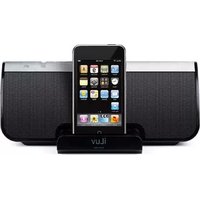
i189 - Loudspeaker ILUV - Free user manual and instructions
Find the device manual for free i189 ILUV in PDF.


| Product Type | Docking Speaker for iPod/iPhone |
| Model | i189 |
| Brand | iLuv |
| Audio Output Power | 2 x 5W RMS |
| Signal-to-Noise Ratio | >70 dB |
| Frequency Response | 20 Hz – 20 kHz |
| Power Supply | AC 100-240V, 50/60Hz (via included adapter) |
| Charging | Charges iPod/iPhone battery when docked |
| Audio Input | 3.5mm AUX stereo jack |
| Speaker System | Stereo with 3D Surround Sound effect |
| Controls | Power button, Volume +/-, 3D button, LED indicators |
| Dock Type | Slide-type universal dock with interchangeable adapters |
| Compatibility | iPod Video, iPod nano (1st & 2nd Gen), iPod Photo, iPod Mini, any device with 3.5mm output |
| Package Includes | i189 speaker, AC adapter, 3.5mm audio cable, dock adapters, user manual, warranty card |
| Safety Compliance | FCC Part 15, Industry Canada ICES-003 |
| Usage Environment | Indoor only; keep away from water, heat, and moisture |
| Cleaning | Soft dry cloth; do not use solvents |
| Service | Do not open; refer to qualified service personnel |
| Dimensions | Not specified |
| Weight | Not specified |
Frequently Asked Questions - i189 ILUV
User questions about i189 ILUV
0 question about this device. Answer the ones you know or ask your own.
Ask a new question about this device
Download the instructions for your Loudspeaker in PDF format for free! Find your manual i189 - ILUV and take your electronic device back in hand. On this page are published all the documents necessary for the use of your device. i189 by ILUV.
USER MANUAL i189 ILUV
natural_image
iLuv portable electronic device with black speaker and iPod screen (no visible text or symbols on device body)Instruction Manual
Model: i189
Please read this manual carefully before operating and save it for future reference. Have a question? Please visit http://www.i-Luv.com
USER SAFETY GUIDE

INSTRUCTIONS ON ENVIRONMENT PROTECTION
Do not dispose of this product in the usual household garbage at the end of its life cycle; bring it to a collection point for the recycling of electrical and electronic appliances. This symbol on the product means the instructions for use or the packing will inform about the methods for disposal. The materials are recyclable as mentioned in its marking. By recycling, material recycling, or other forms of re-utilization of old appliances, you make an important contribution to protect the environment. Please inquire at your local community administration for the authorized disposal location.
FCC RULES
This device complies with Part 15 of the FCC Rules. Operation is subject to the condition that this device does not cause harmful interference.
Do not make changes or modify the device in any way. Changes or modifications not expressly approved by the party responsible for compliance could void the user's authority to operate the equipment.
IMPORTANT SAFETY WARNINGS
- FCC regulations state that any change or modification to the equipment, not expressly approved by the manufacturer or its authorized parties, could void user's authority to operate this equipment.
- To prevent fire or electric shock, do not expose the unit to rain or moisture.
- Never attempt to open the cabinet. Always refer servicing to a qualified technician.
IMPORTANT SAFETY INSTRUCTIONS
- READ INSTRUCTIONS - All safety and operating instructions should be read before the appliance is operated.
- RETAIN INSTRUCTIONS - These safety and operating instructions should be retained in a secure place for future reference.
- HEED WARNINGS - All warnings on the appliance and in the operating instructions should be observed.
- FOLLOW INSTRUCTIONS - All operating and use instructions should be followed.
- WATER AND MOISTURE - The appliance should not be used near water. For example: near a bathtub, kitchen sink, laundry tub, and/or swimming pool.
- HEAT - The appliance should be situated away from heat sources such as radiators, heat registers, stoves, or other appliances (including amplifiers) that produce heat.
USER SAFETY GUIDE
IMPORTANT SAFETY INSTRUCTIONS – CONTINUED
-
POWER SOURCES - The appliance should be connected to a power supply only of the type described in the operating instructions or as marked on the appliance itself.
-
CLEANING - The appliance should only be cleaned with a dry cloth.
-
OBJECT and LIQUID ENTRY - Care should be taken that objects do not fall and liquids are not spilled into the device's openings.
-
CARTS AND STANDS - The appliance should be used only with a cart or stand recommended by the manufacturer. An appliance and cart combination should be moved with care. Quick stops, excessive force, and uneven surfaces may cause the appliance and cart combination to overturn
-
DAMAGE REQUIRING SERVICE - The appliance should be serviced by qualified service professional when:
a. The power-supply cord or plug has been damaged.
b. Objects have fallen into, or liquid has been spilled into the appliance's apertures.
c. The appliance has been exposed to rain.
d. The appliance has been dropped and suffered damage.
e. The appliance does not appear to operate normally, or exhibits a change in performance.
-
SERVICING - The user should not attempt to service the appliance beyond what is described in the user's operating instructions. All other servicing should be referred to qualified service professional.
-
LEAD AND MERCURY - This product may contain lead and/or mercury. Disposal of these materials may be regulated by your local authorities due to environmental considerations. For more detailed disposal or recycling information, please contact your local authorities or the EIA (Electronic Industries Alliance) – http://www.eiae.org

IMPORTANT NOTES ON HEARING
Your hearing is very important to you and to us, so please take care when operating this equipment. It is strongly recommended that you follow the listed guidelines in order to prevent possible damage or loss of hearing.
USER SAFETY GUIDE
ESTABLISH A SAFE SOUND LEVEL
Over time hearing will adapt to continuous exposure to loud sounds and what can seem normal, may in fact be harmful.
To guard against this BEFORE HEARING ADAPTS, set the volume at a low level.
- Slowly increase the level until sound can be heard comfortably and clearly, without distortion.
• Hearing damage is cumulative and is irreversible. - Ringing or discomfort in the ears indicates the volume is too loud.
Once a comfortable listening level has been established, DO NOT INCREASE THE SOUND LEVEL FURTHER.
The following list of typical sound levels may assist you in recognizing how loud you have set the volume level.
DECIBEL Level Example
30dB Quiet library, soft whisper
40dB Living room, fridge freezer bedroom away from traffic
50dB Normal conversation, quiet office, light traffic
60dB Electric sewing machine
70dB Vacuum cleaner, hair dryer, noisy restaurant
THE FOLLOWING NOISES CAN BE HARMFUL WITH CONSTANT EXPOSURE
80dB Average city traffic, alarm clock buzzer at 2 feet, food mixer
90dB Motorcycle, heavy goods vehicle, petrol lawn mower
100dB Pneumatic drill, chain saw, garbage truck, disco / night-club
120dB Rock concert, thunderclap
THE FOLLOWING NOISES CAN RESULT IN PERMANENT HEARING LOSS
140dB Gunshot 2 feet away (THRESHOLD OF PAIN)
180dB Rocket Launching pad
USER SAFETY GUIDE
FCC NOTICE (USA)
As specified in Part 15 of the FCC Rules, this equipment complies within the limits of a Class B digital device. These restrictions provide sufficient protection against radio and TV interference in residential areas. However, even during normal operation, this device may cause TV or radio interference. In attempting to eliminate some or all interference, you should try one or more of the following corrective measures:
- Increase the distance between the device and the radio and/or TV
- Try a different outlet on various electrical circuits for the device, the radio and/or TV.
- Reposition the receiving antenna
Do not attempt to repair technical problems yourself if they continue to exist. Refer servicing only to a qualified technical professional. Interfering or modifying with your product's internal components may cause a malfunction and an invalidation of the system's warranty. This tampering can also void the user's FCC authorization to operate it.
IMPORTANT NOTES
Since digital circuitry may cause interference to other radio or television tuners nearby, switch this unit off when not in use or move it away from the affected radio/television tuner.
IC NOTICE (CANADA)
This digital apparatus does not exceed the Class B limits for radio noise emissions from digital apparatus as set out in the Radio Interference Regulations of Industry Canada. These limits are designed to provide reasonable protection against harmful interference in a residential installation. This equipment generates, uses, and can radiate radio frequency energy and, if not installed and used in accordance with the instructions, may cause harmful interference to radio communications. However, there is no guarantee that interference will not occur in a particular installation. If this equipment does cause harmful interference to radio or television operation (which can be determined by turning the equipment off), the user is encouraged to try to correct the interference by one or more of the following measures:
- Reorient or relocate the receiving antenna.
- Increase the separation between the equipment and receiver.
- Connect the equipment into an outlet on a circuit different from that to which the receiver is connected.
- Consult the dealer or an experienced radio / TV technician for help.
GETTING STARTED
Congratulations on your purchase of the iLuv™ i189 for your iPod or iPhone. Uniquely designed to work with your iPod or iPhone, this speaker with built-in, sliding universal dock provides advanced audio performance to bring out the best in your music. Remember to keep this manual for future reference.
Enhance Your Enjoyment of Music on Your iPod with this Stereo Speaker
- Sleek design compliments iPhone & iPod*.
- AUX stereo input jack for any MP3 player, CD player, computer & other music devices*
• AC powered with iPod battery recharge system - Slide type universal dock and adapter plates to hold your iPod in securely
• Power ON/OFF button with LED indicator
• 3D surround sound switch and LED indicator - AC adapter supports speaker functions and iPod battery recharge
• Digital volume control
In the box
- iPod Docking Speaker
• 100V-240V AC Adapter
• 3.5 mm to 3.5 mm audio cable - Docking adapters
• Instructional manual - Warranty card
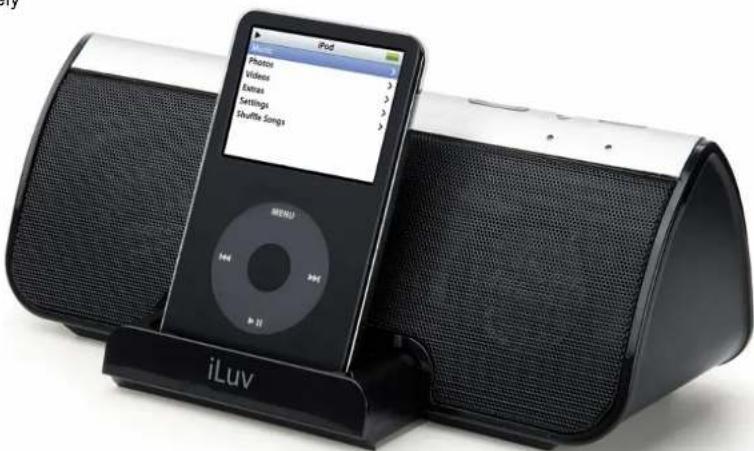
* Note: iPod Models including iPod Video 30GB/60GB/80GB, iPod nano 1^st & 2^nd Gen., iPod Photo, iPod Mini, Any Audio Device with 3.5 mm output (iPod Shuffle 1^st & 2^nd Gen., MP3, CD, DVD players, Laptops, PDA, and more).
GETTING STARTED
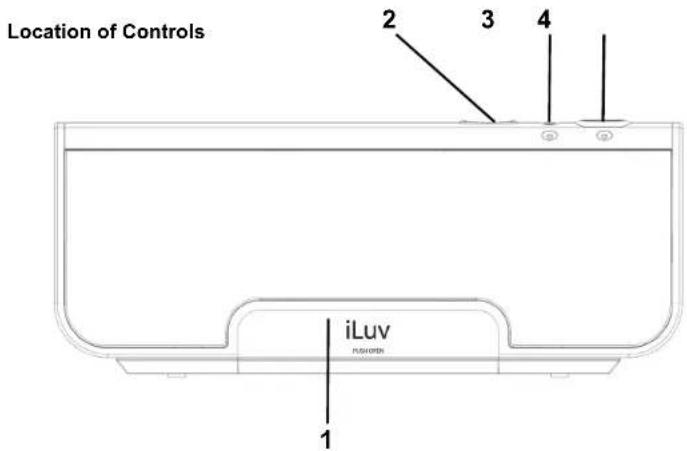
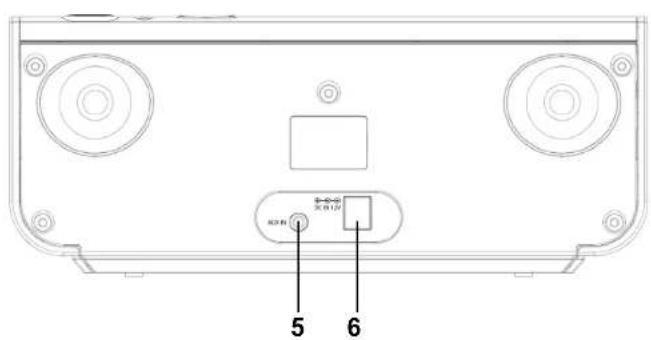
- iPod/iPhone dock (push to open) 4. Power button
- Volume -/+ button 5. AUX In
- 3D effect button 6. 12V DC In
Connecting the AC adapter
- Insert the AC adapter cable into the DC jack in the rear of the unit.
- Plug the AC adapter into the wall outlet as shown.

natural_image
Line drawing of a device with two speakers connected to a wall-mounted power outlet (no text or symbols)GETTING STARTED
Installing the Dock Adapter
To ensure that your iPod will fit properly into the built-in universal dock, we have included several detachable dock adapters for your iPod with this product. Please check the bottom of dock adapters to see the compatibility with your iPod.
-
Push in the drawer for the universal dock. It will slide open.
-
How to insert a dock adapter
a. Choose the dock adapter that corresponds with the iPod you would like to dock. Using the correct dock adapter ensures the proper fit.
b. Gently push the dock adapter down into the universal dock.
c. Carefully place your iPod into the universal dock. Please note that iPod must not be in a case or "Skin".
- How to remove the dock adapter
- Remove your iPod, then grasp the dock adapter and lift upwards carefully.

natural_image
Line drawing of a curved device with an arrow pointing to its side (no text or symbols)
natural_image
Line drawing of a hand inserting a small component into a device (no text or symbols)ATTENTION: To protect your iPod from dropping while iPod is in the dock, do not shake or move i189 around aggressively.
OPERATIONAL INSTRUCTIONS
IMPORTANT:
- To protect your iPod from dropping while it is in the dock, do not shake or move i189 aggressively.
- Occasionally, files on your iPod can become corrupted. This may cause an erratic behavior with your iLuv products. Apple recommends visiting their website www.apple.com to obtain instructions on resetting or restoring your iPod to factory settings.
- It is important that the correct dock adapter is used for the appropriate fit of your iPod into the built-in universal dock. Ignoring these instructions can cause severe damage to your iPod. Please refer to the section "Installing the Dock Adapter" to install the dock adapter properly before operating the i189 with your iPod.
Listening to Your Favorite Songs on your iPod
- Press the POWER button to turn on the unit. The LED indicator will turn on.
- To listen to music, make sure that your iPod is playing and inserted into the built-in universal dock correctly. Music will begin to play if your iPod is in play mode.
- To play music when your iPod is already in the dock and in the standby mode, use the controls on your iPod to select songs and play music..
- To pause music, use the Pause function on the Click Wheel of your iPod during the play mode. To resume playback, press it again.
- To adjust the volume, use the VOLUME+ and VOLUME- buttons on the top of the unit.
- To power the unit off, press the POWER button.
Charging Your iPod
While it is in the built-in universal dock, your iPod will be charged in both power on and power off modes until it reaches the FULL CHARGE mode. To recharge your iPod, the AC adapter must be connected.
Listening to Other Audio Devices
You can still play music on the i189 from an MP3 player that is not an iPod by using the AUX-IN jack.
-
Use the Volume + and Volume – button to adjust the sound level. You may also need to adjust the device volume.
-
To power off the unit, press the POWER button on the i189.
3D surround sound
- Press the 3D button to turn on the 3D surround sound while play music, the blue LED will light.
- To turn off the 3D surround sound, press the 3D button again, the blue LED will go out.
MAINTENANCE & TROUBLESHOOTING GUIDE
Maintenance
- Place the unit on a level surface away from direct sunlight or excessive heat.
- Protect your furniture when placing the unit on a natural wood and lacquered finish. A cloth or other protective material should be placed between it and the furniture.
- Clean the unit with a soft cloth moistened only with mild soap and water. Stronger cleaning agents, such as Benzine, thinner or similar materials can damage the surface of the unit.
Troubleshooting
- The stereo speaker system (i189) does not turn on.
- The AC adapter may not be connected properly. Check the connection.
- The wall outlet may not function. Try another outlet.
- Your iPod does not fit into the built-in universal dock.
The installed dock adapter is not the correct one. Check whether a correct dock adapter is installed.
There might be some obstructions on the dock. Check whether there are any obstructions on the connector and on the dock. If everything is secured, place your iPod back into the dock.
- It does not have sound output when your iPod is docked.
Your iPod may not be properly docked. Take your iPod out of the dock, and remove any obstructions on the connector from the dock and on your iPod. Place your iPod back into the dock.
Your iPod is frozen or locked up. Check whether your iPod operates correctly before placing it back into the dock. Please refer to the owner's instruction manual of your iPod.
MAINTENANCE & TROUBLESHOOTING GUIDE
Troubleshooting – Continued
- Your iPod is not charged even though it is in the dock.
Your iPod might not be properly docked. Take your iPod out of the dock, and remove any obstructions on the connector from the dock and on your iPod. Place your iPod back into the dock.
Your iPod is frozen or locked up. Check whether your iPod operates correctly before placing it back into the dock. Please refer to the owner's instruction manual of your iPod.
- Your iPod is only charged when the DC adapter is connected.
- When playing music, the sound gets distorted.
The volume level is set too high. Decrease the volume until the distortion has disappeared.
The source sound is distorted. If the original sound source (MP3) on your iPod is poor quality, the distortion and noises are easily noticed with these speakers. Check your iPod separately.
SPECIFICATIONS
• Audio Output: 2 x 5W RMS
- S/N > 70dB
• Frequency Response: 20 Hz – 20 kHz
• Power Supply: AC100V\~240V 60/50Hz Adapter
* Specifications and features are subject to change without notice.

TEL: 516-626-7188
FAX: 516-626-7105
website: www.i-Luv.com
e-mail: info@i-Luv.com
iLuv is a trademark of jWIN Electronics Corp. iPod and iPhone are trademarks of Apple, Inc. All other logos and brands are property of their respective owners. iPod / iPhone not included in this package. Features and specifications are subject to change without prior notification.
© 2007 jWIN Electronics Corp. All rights reserved. No portion of this printed material or product enclosed herewith including design, shape and graphics, may be reproduced or transmitted in any form without the expressed written consent of jWIN Electronics Corp. by any means, electronic or mechanical, including photocopying, recording or use of an information storage and retrieval system. Any unauthorized distribution or reproduction of this printed material or product, or any portion there of, will be prosecuted to the fullest possible extent of the law.
Printed in China


- Instruction Manual
- USER SAFETY GUIDE
- INSTRUCTIONS ON ENVIRONMENT PROTECTION
- FCC RULES
- IMPORTANT SAFETY WARNINGS
- IMPORTANT SAFETY INSTRUCTIONS
- IMPORTANT SAFETY INSTRUCTIONS – CONTINUED
- IMPORTANT NOTES ON HEARING
- ESTABLISH A SAFE SOUND LEVEL
- DECIBEL Level Example
- THE FOLLOWING NOISES CAN BE HARMFUL WITH CONSTANT EXPOSURE
- THE FOLLOWING NOISES CAN RESULT IN PERMANENT HEARING LOSS
- FCC NOTICE (USA)
- IMPORTANT NOTES
- IC NOTICE (CANADA)
- GETTING STARTED
- Enhance Your Enjoyment of Music on Your iPod with this Stereo Speaker
- In the box
- Connecting the AC adapter
- Installing the Dock Adapter
- OPERATIONAL INSTRUCTIONS
- IMPORTANT:
- Listening to Your Favorite Songs on your iPod
- Charging Your iPod
- Listening to Other Audio Devices
- 3D surround sound
- MAINTENANCE & TROUBLESHOOTING GUIDE
- Maintenance
- Troubleshooting
- Troubleshooting – Continued
- SPECIFICATIONS
Brand : ILUV
Model : i189
Category : Loudspeaker