CDL980G - Phone AUDIOLINE - Free user manual and instructions
Find the device manual for free CDL980G AUDIOLINE in PDF.


User questions about CDL980G AUDIOLINE
0 question about this device. Answer the ones you know or ask your own.
Ask a new question about this device
Download the instructions for your Phone in PDF format for free! Find your manual CDL980G - AUDIOLINE and take your electronic device back in hand. On this page are published all the documents necessary for the use of your device. CDL980G by AUDIOLINE.
USER MANUAL CDL980G AUDIOLINE
Cordless Telephone with Digital Answering Machine
Amtskennziffer....19
text_image
Diagram of a mobile phone with numbered labels pointing to various function keys and buttons.r low = leise
r = medium = mittel
r ≡ loud = laut
Ansage1 => Eigene Ansage
Operating Instructions 38
Rechargeable batteries....38
Disposal 38
Care 38
Connection information....38
Temperature and ambient conditions .....39
Base station position....39
Approval and CE marking....39
Operational elements 40
Handset....40
Base station 41
Commissioning 42
Unpacking 42
Belt clip....42
Connecting the telephone....42
Care of the batteries ....43
Battery capacity display ....43
Base station battery 43
The Display ....44
Operation 45
Making calls....45
Automatic cut off after 15 Minutes....45
Exceeding the range 45
Call duration display 46
Receiver volume 46
Receiving calls 46
Secrecy button....46
Recall button 46
Redial 47
Find handset (Paging) 47
Calls between base station and handset .....47
Recording telephone calls ....47
Storing speed dial numbers ....48
Dialling using speed dial numbers .....48
Checking speed dial memory....48
Programming...... 49
Button click....49
Set call tone (ringing tones) .....49
Keypad protection 50
Turning keypad lock off to make a call or for programming ....50
Accept calls automatically ....50
Adjusting the base station volume ....51
Touch-tone (ttd) or pulse (pd) dialling.....51
Temporary changeover to ttd .....52
Automatic call cut off....52
Private exchanges / T-NET .....53
Setting the flash time....53
Outside line code....54
Deleting the outside line code ....54
Answering machine ....55
Operating key functions ....55
Adjust volume 55
Display 55
Number of rings 56
Answering machine on/off....56
Setting the day and time announcement......57
Greeting....57
Recording greetings....58
Checking greetings ....58
Recording messages 59
Listening in at the base station .....59
Listening in at the handset....59
Play back recorded messages
from the base station 60
Memo 61
Recording a memo....61
Play back recorded messages
from the handset....61
Remote access to the
answering machine ....62
PIN code....62
Changing the pin code....62
Toll-free remote access 62
Remote access 63
Remote access functions....63
Switching on the answering
machine remotely 64
Remote access with insufficient
memory capacity 64
Important Information......65
Delete speed dial memory....65
Faults....65
Fault finding....66
Technical Data 67
Guarantee 68
SAFETY INFORMATION
OPERATING INSTRUCTIONS
Please read these operating instructions carefully. If you should have any questions, please call our Service Hotline on 0180 5 00 13 88. Do not open the unit yourself under any circumstances and do not try to carry out your own repairs. For any claims under the guarantee, please refer to your dealer.
Take care to ensure that the charging contacts are never short-circuited.
RECHARGEABLE BATTERIES
Please only use rechargeable batteries approved by AUDIOLINE (type AA, NiCd, 1,2 V 600mAh). Please never use other cells or normal AA alkaline batteries. The correct batteries can be obtained from your AUDIOLINE-dealer.
DISPOSAL
If the useful life of the batteries or the complete equipment has expired, please dispose of these carefully in accordance with the statutory requirements and in a manner friendly to the environment. Never open used batteries, short circuit them or throw them into the fire.
CARE
The surface of the case can be cleaned with a soft, dry, lint-free cloth. Never use cleaning agents, particularly aggressive solvents.
CONNECTION INFORMATION
The unit requires a TAE socket with F/N coding in common with other plug in units such as fax machines, answering machines or modems.
TEMPERATURE AND AMBIENT CONDITIONS
The unit is designed for use in protected rooms with a temperature range of +5 °C to 45 °C. The unit must not be installed in damp rooms such as a bathroom or laundry room. Avoid proximity to sources of heat such as radiators and do not expose the unit to direct sunlight. It is completely normal for the handset and the base station to become warm in daily use. We therefore recommend that this product should not be used on antique furniture, veneers or other wooden surfaces.
BASE STATION POSITION
The position of the base station has a decisive influence on the trouble-free operation of the telephone. The base station should be as exposed as possible so that a good radio connection can be established with the handset. Position the base station near to the telephone connection socket and a mains socket. If you do not get good reception in every room, connect the base station in a different location in the house.
Excessive exposure to smoke, dust, vibrations, chemicals, moisture, heat or the direct rays of the sun must be avoided. The base station should not be set up in the vicinity of radio equipment, televisions, computers, refrigerators or microwave devices.
APPROVAL AND CE MARKING
The unit is approved for use on the European telephone network. The approval mark is on the underside of your telephone.
The unit is approved in accordance with EU Directive 91/263/EEC for telecommunications equipment. Accordingly, anybody can connect the unit to a telephone socket and put it to use.
This telephone fulfils the requirements of the EU Directives:
89/336/EEC "Electromagnetic Compatibility"
73/23/EEC "Electrical Equipment for use within certain
voltage limits".
This unit fulfils the requirements of the EU Directives. Conformity of the unit to the above mentioned directives is confirmed by the CE mark.
OPERATIONAL ELEMENTS
HANDSET
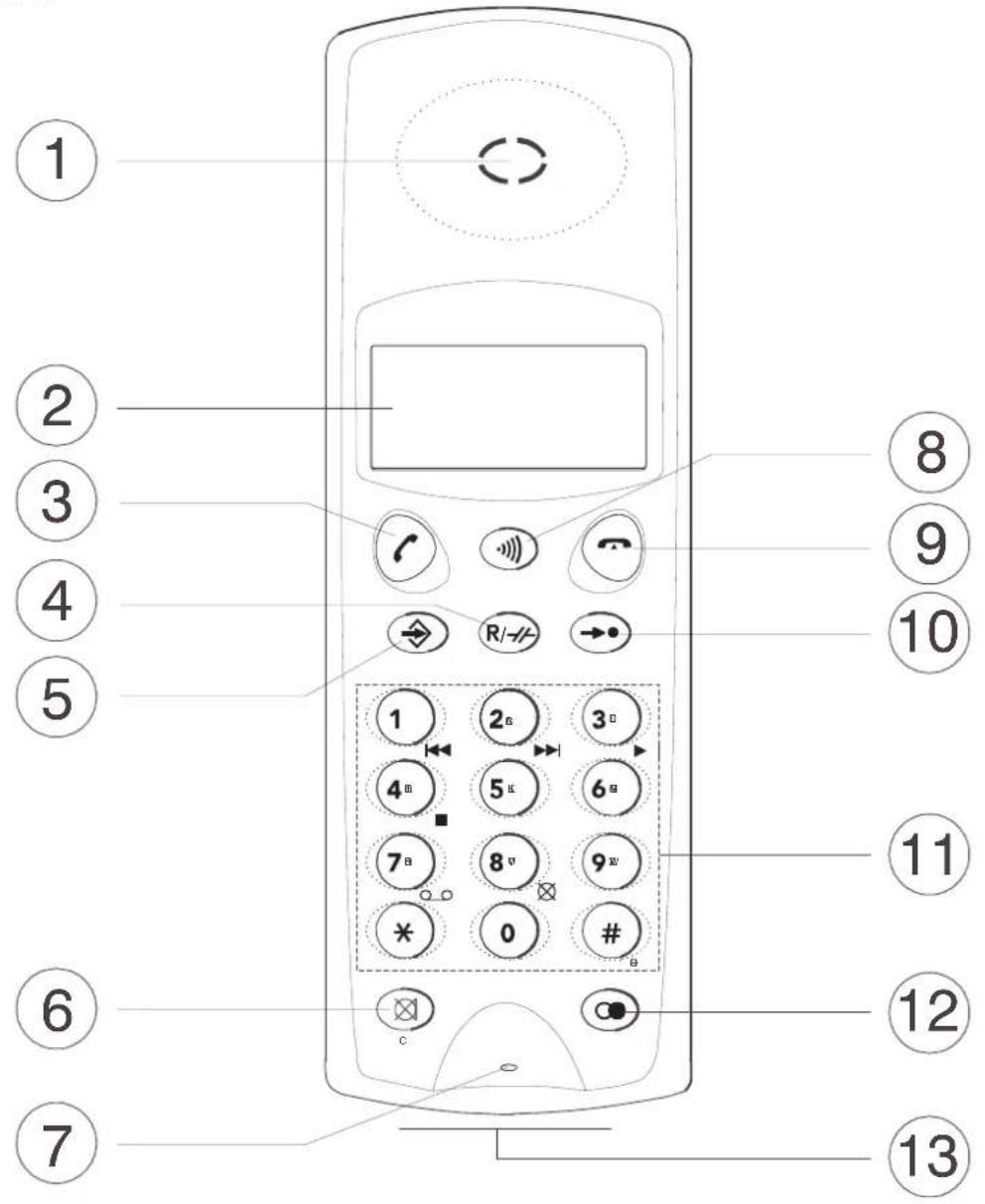
text_image
Diagram of a mobile phone with numbered labels pointing to various function buttons and icons.1 Loudspeaker 8 Internal call/Paging
2 Display 9 End call
3 Call button/Volume 10 Speed dial button
4 R signal button/Recall button 11 Number keys 0-9, *, #
5 Programming button 12 Redial
6 Secrecy button/Break 13 Charger connection
7 Microphone
BASE STATION
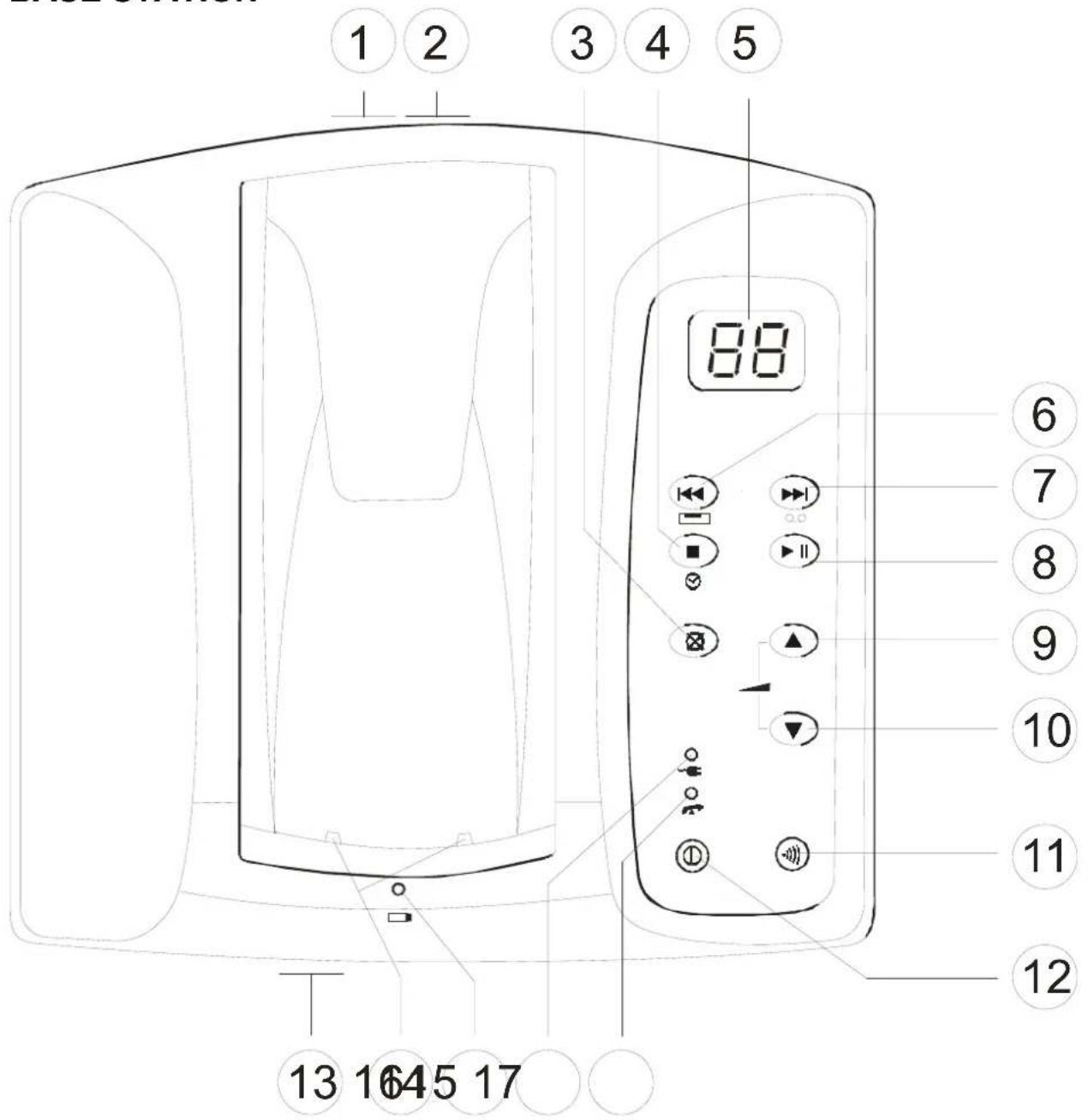
text_image
1 2 3 4 5 88 6 7 8 9 10 11 12 13 1645 171 Telephone cable connection 10 Softer
2 Power supply connection 11 Internal call/Paging
3 Delete key 12 On/Off button
4 Stop/Day-Time announcement 13 Microphone
5 Display 14 Charger connection
6 Repeat message 15 Charging display for handset
7 Skip message 16 Mains indicator
8 Play/Pause 17 Call display
9 Louder
COMMISSIONING
UNPACKING
The following parts will be found in the package:
■ Handset
■ Belt clip
■ Base station ■ Power supply
■ 2 NiCd batteries
■ Telephone cable
■ Operating instructions
■ 9V battery for the base station
BELT CLIP
If you want to carry your AUDIOLINE CDL 980G with you at all times, you can use the fixing clip to fix the handset to your belt, for example.
CONNECTING THE TELEPHONE
■ Connect the telephone cable supplied to the telephone socket and the telephone jack on the underside of the base station. The AUDIOLINE CDL 980G uses Touch-Tone Dialling (TTD) and can be switched over to the older Pulse Dialling system if necessary. More information is provided in the chapter on “Programming”.
■ Insert the power supply plug into the socket on the underside of the base station and plug the power supply into a properly installed mains socket.
■ Open the battery compartment in the handset by sliding the cover of the battery compartment away from the handset using light pressure on the lower end. Now insert the batteries taking care to ensure that the polarity is correct. Close the battery compartment.
■ Place the handset on the base station with the display to the top or to the bottom. The charging light on the base station will come on.
■ Before being used for the first time, the handset must be charged continuously for 18 hours. When the handset is fully charged the charging light on the base station flashes and the battery symbol ■■■ appears in the display.
CARE OF THE BATTERIES
We recommend charging the handset overnight to guarantee optimum battery performance. Your AUDIOLINE CDL 980G rechargeable batteries have a standby time at room temperature of max. 42 hours depending on usage.
If your telephone is not used for long periods (e.g. holidays), please remove the batteries from the handset. The handset must then be charged again for 18 hours before being re-used.
The batteries should be replaced when the handset only remains ready for use for two hours or if the batteries start to leak.
The rechargeable batteries (NiCd) should be disposed of in an environmentally friendly manner.
BATTERY CAPACITY DISPLAY
No further calls can be made when the batteries are discharged. When the batteries are almost discharged, the capacity indicator in the display starts to flash and an audible signal is sounded.
| Fully charged | |
| Half charged | |
| Almost discharged | |
| Batteries discharged. An audible signal is heard. |
BASE STATION BATTERY
As your telephone stores all information digitally, a battery is required to secure the data in the event of a power loss (or if the power supply is unintentionally unplugged from the socket). You will require an alkali 9 V block battery. If no battery has been fitted or the battery is flat, the mains indicator on the base station flashes. Please remove the telephone cable before replacing the battery. The battery compartment is on the underside of the base station. Remove the screw and open the battery compartment. Connect the battery to the battery cable and close the battery compartment.
THE DISPLAY
Display
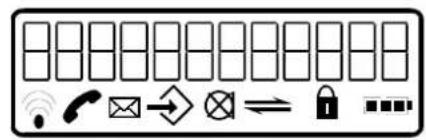
text_image
Diagram showing a grid of rectangular blocks with icons for Wi-Fi, phone, email, and lock symbols, likely representing a basic digital security or security system.Range Battery capacity Call indicator Keypad lock Answering machine Paging Programming Secrecy
Display Indicators
Range - comes on as soon as the handset is switched on.
- flashes if the range is exceeded.
Call indicator
- comes on during a call. - flashes for incoming calls.
Answering machine - flashes when playing back or listening in to the answering machine using the handset.
Programming - comes on during programming.
Secrecy - flashes when the microphone is muted.
Paging/Intercom - flashes for paging and intercom use.
Keypad block - flashes when the keypad lock is switched on.
Battery capacity - indicates the battery capacity.
OPERATION
MAKING CALLS
■ Enter the required telephone number using the keypad. The numbers pressed are shown in the display. If you have entered a wrong digit, the telephone number can be deleted using the Ⓧ button.
■ Press the call button ↗ and the required connection will be made.
■ To end the call, replace the handset on the base station or press the button on the handset.
You can also get a dialling tone by first pressing the call button. On entering the digits of your required telephone number, your AUDIOLINE CDL 980G dials the number directly. With this method of making a call, it is not possible to correct individual digits in the number in the manner described above.
Note! If your telephone cannot find a free channel for the outgoing call, you will hear a signal tone. You may be too far away from the base station or all channels may be engaged.
AUTOMATIC CUT OFF AFTER 15 MINUTES
If the call lasts for longer than 15 minutes, you will hear an acoustic signal on the handset and the call will be cut off. 30 seconds before being automatically cut off the handset transmits a series of signal tones. To continue the call, press any button with the exception of the button. The call can be continued for a further 15 minutes.
Note: This automatic call cut off is not activated in the factory. How to switch this function on is explained in the chapter on programming.
EXCEEDING THE RANGE
If the maximum range is exceeded, the transmission quality degenerates and you will hear warning signals on the handset. In this case, please move nearer to the base station, as otherwise the call will be cut off.
CALL DURATION DISPLAY
The actual call duration is shown in the display during a call. The indication starts 10 seconds after the number has been dialled or the call has been taken.
RECEIVER VOLUME
It is possible to switch the handset volume between loud (hi) and soft (lo) during a call using the button.
RECEIVING CALLS
When a call comes through, the call tone sounds on the handset and on the base station. The handset rings a little later than the base station on account of the radio transmission. Wait until you hear the call tone on the handset in order to take the call.
■ To take the call, press the button.
■ To end the call, replace the handset on the base station or press the button on the handset.
SECRECY BUTTON
The handset microphone can be turned off during a call by using the button. It is thus possible to speak without the other person hearing you. The loudspeaker in the handset remains switched on and you can continue to hear the other person.
■ Press the Ⓧ button during a call. The Ⓧ indicator flashes in the display and the microphone is switched off.
■ To switch the microphone on once more, press the Ⓧ button again. The indicator disappears from the display and you can continue the call as normal.
RECALL BUTTON
If you want to make a new call immediately following a previous call, press the R button for 1 second. The current connection will be cut off and you will immediately obtain a new dialling tone.
REDIAL
Use Redial if the person called is engaged or does not reply. Your telephone stores the last 4 numbers dialled.
■ Press the ⚙ button several times until the stored telephone number is shown in the display.
■ Now press the call button and the telephone number displayed will be automatically dialled.
FIND HANDSET (PAGING)
If you cannot remember where you have left the handset, press the button on the base station for 2 seconds. You will hear the handset audible signal for 20 seconds and thus be easily able to find it again. The audible signal is cancelled using the button on the handset or the button on the base station.
CALLS BETWEEN BASE STATION AND HANDSET
Internal calls can be made between the base station and the handset. To do this, press the button on the base station or the handset once. The other station starts to ring and the call can be accepted there by pressing the button. The base station volume can be controlled by means of the △ and buttons. The call can be ended either from the base station or the handset by pressing the button.
RECORDING TELEPHONE CALLS
Using this function, you can record a telephone call currently in progress. In this way you can listen to the details again later to note down a telephone number for example.
■ During a call, press the ➤ button until the message “2 way rec” shows in the display.
■ To stop recording, briefly press the button. The recording can be played back later using the answering machine message retrieval facility.
Note: The handset cannot send any Touch-Tone signals during recording.
STORING SPEED DIAL NUMBERS
Up to 10 telephone numbers can be stored in the AUDIOLINE CDL 980G, which you can call up quickly using the speed dial button.
■ Press the Save button and the Speed Dial button.
■ Now select the required storage location 0 to 9. A number already stored will be automatically deleted as soon as you save another number in that storage location.
■ Now enter the required telephone number using the keypad. The maximum length of the number can be 24 digits.
■ To insert a pause for obtaining a line from a switchboard, press the button.
■ To save the number, press the button once more.
Storage locations already used can be changed by overwriting.
DIALLING USING SPEED DIAL NUMBERS
■ Press the Speed Dial button and the required storage location 0 to 9. The stored number will be shown in the display.
■ Now press the call button.
After a short time the call indicator will come on and the stored number will be dialled.
CHECKING SPEED DIAL MEMORY
Press the Speed Dial button and the required storage location stored number will be shown for a few seconds in the display. 0 to 9. The
If there is no number stored in a particular location, you will hear a signal tone.
PROGRAMMING
The handset and the base station can be adapted to your needs using the functions described in this chapter. If you make a mistake when programming, you can exit the programming mode at any time by pressing the button. If no button has been pressed for 15 seconds when programming, the programming process is automatically terminated.
BUTTON CLICK
Each time a button is pressed, the CDL980G confirms with a button click. The button click can be switched on or off.
■ Press the Save button and the number shows the current setting.
4 on the number pad. The display
■ Now select whether you would like the button click to be switched on or off:
1 = Button click on (ON)
2 = Button click off (OFF)
■ Press the Save button

SET CALL TONE (RINGING TONES)
Your handset can respond with four different ringing tones when a call comes through.
■ Press the Save button and the number shows the current setting.
5 on the number pad. The display
■ Now select the required ringing tone using the buttons 1 to 4. The ringing tone will sound during selection. The ringing tone can be turned off altogether using the 5 button.
■ Press the Save button .
KEYPAD PROTECTION
If you frequently carry the handset with you, you can lock the keypad so that buttons are not pressed unintentionally. When the keypad lock is switched on, keypad protection is automatically switched on after 15 seconds. Incoming calls can be received as normal. Following a call, the keypad lock is switched on again 15 seconds later.
■ Press the Save button → and the number 7 on the number pad. The display shows the current setting.
■ Now select whether you would like this function to be switched on or off:
1 = Keypad lock ON (ON)
2 = Keypad lock OFF (OFF)
- Press the Save button . While the keypad is protected, the display shows the message “unlock=49”.
Turning keypad lock off to make a call or for programming
Press 4 and 9 to temporarily remove the keypad lock to make a call.
ACCEPT CALLS AUTOMATICALLY
If you want to automatically accept a call when you lift the handset from the base station, then proceed as follows:
■ Press the Save button → and the # button on the number pad. The display shows the current setting.
■ Now select whether you would like this function to be switched on or off:
1 = Automatic call acceptance switched on (ON)
2 = Automatic call acceptance switched off (OFF)
■ Press the Save button .
ADJUSTING THE BASE STATION VOLUME
The base station ringing tone can be set to three volume levels.
■ Press and hold the Ⓘ button.
■ Now set the required volume for the base station with the up and down arrows. The display shows the messages:
r low = soft
r = medium = medium
r ≡ loud = loud
■ Release the button.
TOUCH-TONE (TTD) OR PULSE (PD) DIALLING
This feature enables you to use your telephone on analogue exchanges (PD) or on the new digital exchanges (TTD). The factory setting is Touch-Tone Dialling (TTD).
■ Press the Save button → and the 6 button on the number pad. The display shows the current setting.
■ Now select which dialling mode you need to use for your installation:
1 = Pulse Dialling (PD - analogue)
2 = Touch-Tone Dialling (TTD - digital)
■ Press the Save button .
TEMPORARY CHANGEOVER TO TTD
If you can only use your CDL980G in Pulse Dialling mode, you do not have to forego the facilities of Touch-Tone Dialling such as interrogating an answering machine for example. You can switch over to Touch-Tone Dialling during a call.
■ Dial the telephone number required.
■ When the connection is made, press the * button.
After a delay of 3 seconds your telephone will now work using Touch-Tone Dialling. After the call is finished, your telephone will automatically switch back to Pulse Dialling.
AUTOMATIC CALL CUT OFF
The call cut off after 15 minutes talk time, which was described in detail earlier, can be switched on or off here.
■ Press the Save button → and the * button on the number pad. The display shows the current setting.
■ Now select whether you would like call cut off to be switched on or off.
1 = Automatic Call Cut Off switched on (ON)
2 = Automatic Call Cut Off switched off (OFF)
■ Press the Save button .
PRIVATE EXCHANGES / T-NET
The R button gives access to various different facilities.
If your AUDIOLINE CDL980G is connected to a private exchange, you can use all features such as call transfer, automatic recall, etc. The signal button can be used with private exchanges that work using the “FLASH 100ms, 115ms, 270ms and 600ms” process.
If you are connected to a digital exchange, you can also use the convenient services of DEUTSCHE TELEKOM's "T-NET". For this you will need the 270ms FLASH time.
To subscribe to "T-NET" functions and for further information on "T-NET", please contact your local TELEKOM office.
SETTING THE FLASH TIME
■ Press the Save button shows the current set
and the 2 button on the number pad. The display

■ Now select whether you would like this function to be switched on or off:
2 = Flash time 100ms
3 = Flash time 115ms
4 = Flash time 270ms
5 = Flash time 600ms
■ Press the Save button

OUTSIDE LINE CODE
With some private exchanges, it is necessary to dial a certain number (e.g. “9” or “0”) in order, after a short pause, to obtain a dialling tone for an outside line on the extension. After being set up for your exchange, your AUDIOLINE CDL980G automatically inserts a dialling pause when the outside line code is detected. Three different outside line codes, each having up to two digits, can be entered.
■ Press the Save button → and the number 3 on the number pad. The display shows that you can select one of the three groups.
■ Now select the required group by pressing the numbers 1, 2 or 3. The display shows the current setting for the selected group.
■ Now enter the pre-set pause length of 3 or 6 seconds using the numbers 1 or 2. The display confirms the entry with the message “1P”.
■ Now enter the new outside line code, maximum two digits.
■ Confirm the entry with the Save button .
If your telephone is not connected to a private exchange you should not enter an outside line code.
Deleting the outside line code
■ Press the Save button → and the number 3 on the number pad. The display shows that you can select one of the three groups.
■ Now select the required group by pressing the numbers 1, 2 or 3. The display shows the current setting for the selected group.
■ Confirm the deletion with the Save button.
ANSWERING MACHINE
OPERATING KEY FUNCTIONS

Recording and checking the answering message

Recording a memo (note)

Setting the time and stop

Message playback and pause

Delete messages

Volume adjustment

Answering machine on/off switch
ADJUST VOLUME
The answering machine volume can be adjusted in 8 steps using the arrow keys
and . The display indicates the setting selected with L1 to L8.
DISPLAY
The display gives you constant information as to how many messages or memos are on the answering machine.
-- = Answering machine is switched off.
An = The setting "Answer Only" is selected.
Ph = Incoming/Outgoing call.
AS/oG = A call is being answered and the answer message is being played.
Ir = A message is being recorded.
1r = A memo is being recorded.
2r = A telephone call is being recorded
pg = Paging
pa = Pause
In = Intercom active
Fl = Memory capacity is exhausted
NUMBER OF RINGS
On the underside of the base station is a switch for setting the number of rings after which the answering machine accepts the call.
2 = The call is accepted after two rings.
4 = The call is accepted after four rings.
TS = The "Toll Saver" function is active (toll-free remote access)
Using toll-free remote access (TS) you can establish free of charge whether there are any messages on your answering machine. With the “TS” setting, the first call is answered after 4 rings and all subsequent calls are answered after two rings.
■ If your call is answered after two rings, there are messages on your answering machine.
If no messages have been recorded, your call will not be answered after two rings. Replace the receiver immediately, as your call will not now be answered until after four rings. In this way you can save call charges.
ANSWERING MACHINE ON/OFF
The answering machine can be switched on and off using the ① button.
The display can show the following messages:
00 - 99 = Incoming calls will be recorded, max. length 3 minutes.
An = Only the answering message will be played and no calls will be recorded.
-- = The answering machine is switched off.
SETTING THE DAY AND TIME ANNOUNCEMENT
The day and the exact time are saved with each incoming message so that you always know when callers left their messages. To set the day and time announcement, please proceed as follows:
■ Press and hold the ⏻ button until a signal tone is heard. The voice first gives you the complete day and time announcement and then the day that is set (00=Sunday, 01=Monday...)
■ Select the required day of the week using the arrow keys and .
■ Press the button once. The hours will be shown in the display.
■ Select the required hour using the arrow keys and .
■ Press the button once. The minutes will be shown in the display.
■ Select the required minutes using the arrow keys and .
■ Press the button once and the complete day and time announcement will be heard again.
The current day and time announcement can be called up at any time by briefly pressing the ⏻ button.
GREETING
You can choose between two different greetings on your AUDIOLINE CDL 980G.
Greeting 1 => Your own greeting
Greeting 2 => Your own greeting, following which the caller is not able to leave a message.
The maximum duration of a greeting is 60 seconds.
RECORDING GREETINGS
■ Press the R button. The display shows one of two possible greetings.
oG. = Normal greeting
An = Own greeting, following which the caller is not able to leave a message.
■ Select the required greeting by pressing the R button briefly.
■ Press and hold the R button until a signal tone is heard.
■ Following this signal tone, start recording your greeting. During recording, keep at a distance of ca. 20 cm from the base station so that you can speak into the microphone at the front of the unit easily.
■ Recording is stopped using the button. After a few seconds, the complete recording is played back for checking.
If required, you can now record the alternative greeting.
Note: Remember that, in the case of a mains failure, the greetings and all recorded messages will be lost if no battery is installed in the base station.
CHECKING GREETINGS
You can check the recorded greetings at any time.
■ Select the required greeting by repeatedly pressing the R button briefly. The following messages appear in the display:
oG. = Normal greeting
An = Own greeting, following which the caller is not able to leave a message.
■ Press the ▶ button within 7 seconds and the selected greeting will be played.
RECORDING MESSAGES
The answering machine must be switched on if messages are to be recorded. When the telephone rings, the call is answered after the set number of rings (see Page 22) and the greeting is played.
The maximum recording length per call is 3 minutes. The recording capacity including the greetings is 20 minutes in total. If the recording capacity is exhausted, the display shows the message FL.
A maximum of 59 messages or memos can be recorded.
If the answering machine is set to An (Answer only), no messages are recorded.
If a pause of a few seconds occurs during recording, the recording is automatically stopped.
LISTENING IN AT THE BASE STATION
The inbuilt loudspeaker makes it possible to listen-in to incoming calls without picking up the call. You can personally intervene at any time while the answering machine is playing your greeting or the caller is dictating his message. Simply lift the telephone receiver. The answering machine will stop and you will be able to speak to the caller directly. If the answering machine does not stop straight away, please press the ⏻ button once.
LISTENING IN AT THE HANDSET
You can also listen-in to incoming calls using the handset.
Wait until the recording of the call is running.
Now press the ➕ button and then the ● button. You can now hear the caller without the caller hearing you.
If you want to take the call yourself, press the button.
If you want to stop listening in, press the 🔒 button.
Listening in is automatically ended as soon as the caller hangs up.
PLAY BACK RECORDED MESSAGES FROM THE BASE STATION
The display shows the number of messages recorded as soon as there are any new messages, memos or recordings of telephone calls on the answering machine. Make sure that the answering machine is switched on.
Press the ▶ || button to play back the most recent message. The volume can be adjusted with the arrow buttons △ and ▽.
Before each message, the answering machine tells you when the message was recorded and whether it is a new message. All messages are then played back one after the other. After the last message, the playback is stopped and all messages remain in memory as long as they have not already been deleted during playback.
The following functions can be carried out during playback:
Pause playback
Press ▶ II. Press this button again to continue playing back the messages
End playback
Press the button.
Repeat message
Press the ◀◀ button.
Skip message
Press the ▶▶|button.
Repeat previous message(s)
Press the ◀ button repeatedly.
Delete messages
Delete a single message: Press the ✉ button while the message is running.
Delete all messages: Press and hold the ✉ button until you see the message EA.
Then press the Ⓧ button again until you hear a signal tone.
MEMO
The answering machine can be used as a notebook for you or members of your family. You can leave messages or record a message to listen to again later. The maximum length of a memo is 5 minutes.
RECORDING A MEMO
■ Press the button until a long signal tone is heard.
■ After releasing the button, dictate your text.
■ The recording is stopped using the ■ button. The display now shows an additional message and the memo can be played back using the ▶ || button.
Memos can also be listened to using the remote access facility.
PLAY BACK RECORDED MESSAGES FROM THE HANDSET
You can also play back recorded messages using the handset.
Press the ➤ button and then • to control the answering machine from the handset.
The following list shows all the possible functions:
Button Function
3 Play back new messages and memos.
7 Record a memo. Speak after the signal tone and press button 4 to stop recording.
During playback
1 Repeat current message
2 Skip message
4 Stop - end playback of messages
8 Delete message currently playing
You can stop listening by pressing the button on the handset.
REMOTE ACCESS TO THE ANSWERING MACHINE
You can control the answering machine from another telephone using the remote access facility. If you are calling from a telephone with Touch-Tone Dialling (TTD), you can control your answering machine easily from the telephone keypad. If the telephone from which you want to control your answering machine remotely uses Pulse Dialling, you will require a remote access transmitter.
PIN CODE
Your answering machine has a personal access code (PIN code) so that only you can listen to the incoming messages via the remote access facility. The PIN code is a three digit number and is set in the factory to 8 8 8. You can change the PIN code yourself at any time.
CHANGING THE PIN CODE
■ Press the ➤ button and then • on the handset.
■ Press # on the handset and you will hear a signal tone.
■ Now enter the new three-digit PIN code using the keypad. The new PIN code will be repeated by the inbuilt voice.
■ Press the 🔊 button to save the new PIN code.
TOLL-FREE REMOTE ACCESS
Using the toll-free remote access facility you can establish, without incurring charges, whether there are messages on your answering machine. For this purpose, set the slide control on the underside of the base station to the “TS” position.
If you now telephone while you are away, the answering machine reports as follows:
A. If your call is answered after two rings, there are messages on your answering machine.
B. If no messages have been recorded, your call will not be answered after two rings. Replace the receiver immediately, as your call will not now be answered until after four rings. In this way you can save call charges.
REMOTE ACCESS
■ Call your telephone number and let the greeting play to the end.
■ Enter your personal PIN code after the signal tone by pressing the appropriate numbers on the number pad of the remote control or telephone (factory setting 8 8 8). If the PIN code is correct, you will hear a signal tone. If the answering machine does not accept the PIN code, press the numbers for at least one second.
■ Now select a function from the following list within 20 seconds:
REMOTE ACCESS FUNCTIONS
Number Function
1 Check your greeting. You can stop the playback with the number 4. Your greeting is deleted with the number 8.
2 Check your second greeting for "Answer only". You can stop the playback with the number 4.
3 Play back new messages and memos.
5 Record the first greeting. Recording is stopped with the number 4.
6 Record the second greeting for “Answer only”. Recording is stopped with the number 4.
7 Recording a memo. Speak after the signal tone and press the number 4 to stop recording.
9 Switch the answering machine on or off.
During playback
1 Repeat current message
2 Skip message
8 Delete message currently playing
■ To end remote access, replace the handset on the base station or press the button

SWITCHING ON THE ANSWERING MACHINE REMOTELY
Imagine that you have left your office or your house and have forgotten to switch on your answering machine.
■ Call your number and let it ring 10 times.
■ After your answering machine answers, enter your PIN code (factory setting 8 8 8). The correct entry will be confirmed by a short signal tone.
■ Now enter the number 9 to switch on the answering machine. Other remote access functions can, of course, also be carried out. For more details, see the chapter on “Remote Access Functions” on the previous page
■ Replace the receiver.
REMOTE ACCESS WITH INSUFFICIENT MEMORY CAPACITY
You can control your answering machine at any time using the remote access facility. If, however, there is no memory left for new messages, the CDL980G will no longer accept calls. In this case, please proceed as follows:
- Call your number. If there is insufficient memory capacity, your call will not be answered after 2 or 6 rings.
■ Let it ring 10 times and your answering machine will answer with signal tones.
■ Now enter your PIN code.
You now have the possibility of freeing up new memory space by deleting messages. For more details, see the chapter on “Remote access Functions”.
IMPORTANT INFORMATION
DELETE SPEED DIAL MEMORY
To delete the entire speed dial memory, please proceed as follows:
■ Press the → button.
■ Press the number 1 on the number pad.
■ Press the ➞ button again.
FAULTS
All cordless telephones work using radio transmitters and receivers. It is possible for faults to occur with the radio transmission.
An alternative location for installation can significantly improve radio transmission. A higher installation position such as the first floor, for example, is the most suitable.
Electronic devices, such as televisions, computers, etc., have an electrical field and can interfere with the transmission of radio data.
FAULT FINDING
If your telephone does not work properly, first read the operating instructions. Make sure that the mains power supply and the telephone cable are correctly connected. Remove all other telephones, answering machines and faxes that may be connected. If your telephone now works correctly, the other equipment connected should be checked.
The telephone does not work
■ Have you connected the power supply correctly?
■ Have you connected the telephone cable correctly?
■ Are you using the telephone cable supplied?
■ Are the handset batteries charged?
■ Connect another telephone to the telephone socket. If this telephone does not work either, contact your telephone service provider.
You hear warning tones during a call
■ The batteries are exhausted (please recharge for 15 hours).
■ You are no longer within range of the base station.
No dialling tone on the handset
■ Have you charged the batteries for 15 hours?
■ Is the base station connected to the power supply?
■ Is the telephone cable connected correctly?
The base station rings before the handset
■ This is normal with cordless telephones.
The call cannot be answered on the handset when the base station rings
■ This occurs with any cordless telephone where the call first has to be transferred to the handset. This can take some time. Wait until the handset rings and then answer the call.
The handset does not ring
■ The ringer may have been switched off.
TECHNICAL DATA
Cordless telephone
Standby time: ca. 42 hours
Number of channels: 80
Ambient temperature: -10^ to +35^
Range: max. 300 metres outdoors
max. 50 metres indoors
Speed dial memory: 10 numbers
Batteries: 2 x 1.2V 600mA AA type NiCd, rechargeable
Answering machine
Digital recording capacity: 20 minutes
Number of messages: max. 59
Message length: max. 3 minutes each
Memo length: max. 5 minutes each
Greeting length: max. 1 minute
The technical data are subject to change without previous notice.
GUARANTEE
AUDIOLINE equipment is manufactured and tested in accordance with the most up to date production methods. Selected materials and highly developed technology ensure trouble-free operation and long life. If your unit should develop a fault within the guarantee period, however, please contact the shop where you bought your AUDIOLINE equipment exclusively and have your purchase receipt available for inspection. The guarantee period is 12 months from the day of purchase under the following conditions: within the guarantee period, all defects due to material or manufacturing faults will be repaired free of charge. The guarantee is invalidated if the equipment has been tampered with by the purchaser or third parties.
Any damage caused by improper handling or operation, by incorrect positioning or storage, by improper connection or installation or by excessive force or other external influences is not covered by the guarantee. In the case of complaint, we reserve the right to repair or replace defective parts or to exchange the equipment. Exchanged parts or exchanged equipment become our property.
Claims for compensation are excluded insofar as they do not relate to criminal intent or gross negligence on the part of the manufacturer.
All guarantee claims according to these conditions must be raised exclusively with your dealer. Rights under the guarantee can no longer be enforced after the expiry of one year from purchase and delivery of our products.
In the case of unnecessary or unjustified demands on the customer service department, we will levy our usual service charges for materials, time, postage and packing. Any complaints must be reported as soon as a problem is found. The guarantee is valid within the German Federal Republic.
accept calls automatically 50
answering machine 55
answering machine on/off 56
base station battery 43
Base Station Position 39
base station volume 51
battery capacity 43
belt clip 42
button click 49
call cut off 52
call duration 46
call tone 49
calls between base station and handset 47
Care 38
checking greetings 58
checking speed dial memory 48
connecting the telephone 42
Connection Information 38
day and time announcement 57
delete speed dial memory 65
dialling using speed dial numbers 48
Display 55
Display Indicators 44
Disposal 38
fault finding 66
faults 65
find handset 47
flash time 53
greeting 57
guarantee 68
keypad protection 50
outside line code 54
PIN code 62
private exchanges 53
Programming 49
Range 45
recall button 46
receiver volume 46
receiving calls 46
recording a memo 61
recording greetings 58
recording messages 59
recording telephone calls 47
redial 47
remote access 63
remote access from the answering machine 62
remote access with insufficient memory capacity 64
ringing tones 49
rings 56
Safety Information 38
secrecy button 46
Storing speed dial numbers 48
switching on the answering machine remotely 64
Technical Data 67
Temperature and ambient Conditions 39
T-NET 53
toll-free remote access 62
touch-tone (TTD) or pulse (PD) dialling 51
DECLARATION OF CONFORMITY
WE AUDIOLINE GmbH
OF PROMENADENSTR. 1
D-41460 NEUSS
GERMANY
DECLARE UNDER OUR SOLE RESPONSIBILITY AS EU DISTRIBUTOR THAT THE PRODUCT
MODEL: CDL 980 G
DESCRIPTION: CORDLESS TELEPHONE CT1+ WITH ANSWERING MACHINE
IS IN CONFORMITY WITH THE BASIC REQUIREMENTS OF DIRECTIVE:
1999/5/EC
AUTHORISED SIGNATORY:
Signature:
Name:
Position in the company: MANAGING DIRECTOR
Date of issue : 16.05.2000
text_image
MAYLIM MAN G DIRECTORMANFRED
ZINNOW
A copy of this declaration will be retained for 10 years after cessation of production.

SUPPLIER: AUDIOLINE GmbH, PROMENADENSTR. 1, D-41460 NEUSS PRODUCT: CDL 980 G
This product has been developed for use with an analogue telephone line (PSTN) within Germany. However, no guarantee can be accepted for trouble-free operation on all telecommunications terminal equipment connections due to the differences between the different telecommunications network operators.

This product works on a non EU-harmonised frequency (900 MHz/CT1+ standard) and hence may only be used within Germany.
AUDIOLINE GmbH
Promenadenstrasse 1
41460 Neuss
Service Hotline 0180 5 00 13 88
Internet: www.audioline.de - E-mail: info@audioline.de