DECT A 181 - Phone AUDIOLINE - Free user manual and instructions
Find the device manual for free DECT A 181 AUDIOLINE in PDF.


User questions about DECT A 181 AUDIOLINE
0 question about this device. Answer the ones you know or ask your own.
Ask a new question about this device
Download the instructions for your Phone in PDF format for free! Find your manual DECT A 181 - AUDIOLINE and take your electronic device back in hand. On this page are published all the documents necessary for the use of your device. DECT A 181 by AUDIOLINE.
USER MANUAL DECT A 181 AUDIOLINE
Schnurloses digitales DECT-Telefon Cordless digital DECT telephone
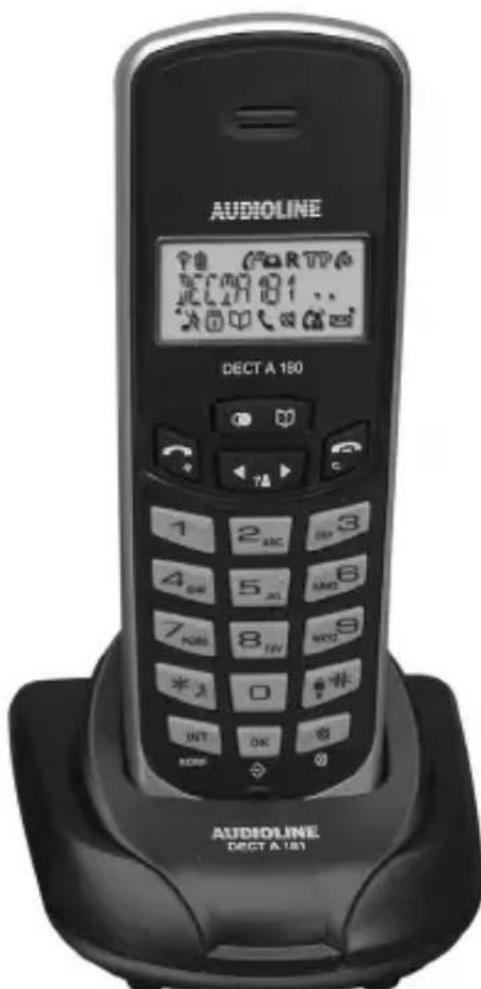
text_image
AUDIOLINE 70 C4RTPA DCCTA 180 DECT A 180 AUDIOLINE DECT A 180Please read this operating instruction manual thoroughly.
1.1 Intended use
The telephone is suitable for telephoning within a public telephone network system. Any other use is considered unintended use.
Unauthorised modification or reconstruction is not permitted. Under no circumstances open the device or complete any repair work yourself.
1.2 Installation location
The telephone is designed for use indoors in rooms with a temperature range from 10 °C to 30 °C. The base station should not be used in rooms exposed to moisture, such as bathrooms or laundries. Prevent excessive exposure to smoke, dust, vibration, chemicals, moisture, heat and direct sunlight. Position the base station with a distance of 1 m to other electronic devices or there is a risk of mutual disturbance.
Do not use the handset in potentially explosive areas.
1.3 Power supply
Only use the power adapter plug supplied because other power supplies could destroy the telephone. Ensure access to the power adapter plug is not obstructed by furniture or such.
1.4 Telephone connection cable
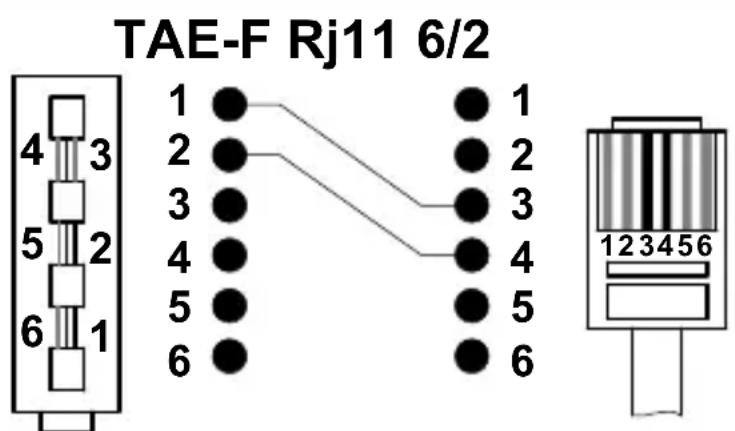
If the telephone connection cable supplied needs to be replaced, ensure the pin assignment is identical on the new one.
1.5 Rechargeable batteries
Do not throw batteries into a fire or immerse them in water.
1.6 Power failure
The telephone cannot be used to make calls in the event of a power failure. Always keep a cord connected telephone which operates without an external power supply available in the case of emergency situations.
1.7 Private branch exchanges
The telephone can be connected to a private branch exchange. There is no guarantee that the telephone will work on every private branch exchange.
- Safety Information -
1.8 Note on medical equipment
Never use the telephone in the vicinity of medical equipment. It cannot be fully ruled out that it will not affect heart pacemakers. DECT ^1 telephones can cause an unpleasant humming sound in hearing aids.
1.9 Cleaning and upkeep
Clean the housing surfaces with a soft, fluff-free cloth. Never use cleaning agents or solvents. The rubber footpads on the base station are not resistant to all cleaning agents.
1.10 Disposal
The implementation of European law in national laws and directives obliges you to dispose of consumable goods appropriately. The adjacent symbol on the telephone indicates that electrical and electronic apparatus and batteries no longer required must be disposed of separate from domestic waste.
Electrical and electronic devices must be disposed of at a suitable collection point provided by the public waste authorities.
Batteries must be disposed of at the point of sale or at the appropriate collection points provided by the public waste authorities.
Packaging materials must be disposed of according to local regulations.


^1 DECT: Digitally Enhanced Cordless Telephone = Standard for cordless telephones.
- Starting Up -
2 Starting Up
This supplementary manual describes how to setup a further handset in the AUDIOLINE DECT A 180 system or another DECT/GAP cordless telephone system. However, all the functions supported by this handset are only available when connected to the AUDIOLINE DECT A 180.

To obtain the complete operating manual and Declaration of Conformity of DECT A 180 applicable to this extension kit, please refer to the free download available from our web site, www.audioline.de.
2.1 Safety Information

Caution: It is essential to read the Safety Information in Chapter 1 before starting up.
2.2 Checking the package contents
The package contains:
| a charging station with power adapter plug | two standard batteries |
| a handset an operating manual |
2.3 Connecting the charging station
Place the charging station for the second handset in the vicinity of a power outlet. Plug the power adapter plug in a properly installed 230 Volt power outlet.

Ensure access to the power adapter plug is not obstructed by furniture or other objects.
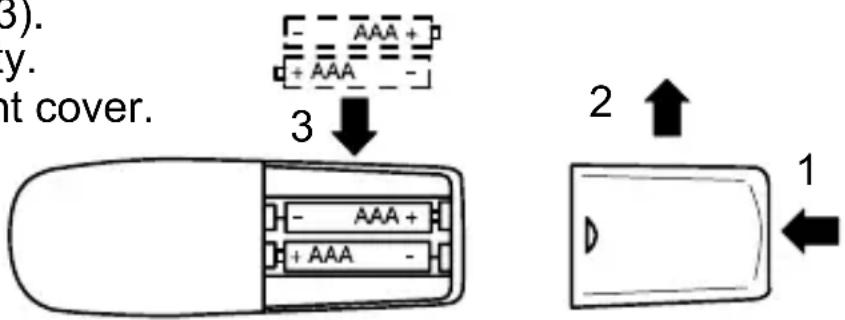
2.4 Inserting the standard batteries
Press on the lower edge of the battery compartment cover (1) and remove the battery compartment by lifting it up (2).
Insert the standard batteries (3).
Pay attention to correct polarity.
Close the battery compartment cover.
text_image
(3). y. nt cover. 3 AAA + + AAA - 2 ↑ 1- Starting Up -
2.5 Charging the standard batteries
When preparing to use the handset for the first time, place it in the base station, with its display facing, the front for at least 14 hours. When the handset is placed in the base properly, an acoustic signal is issued as confirmation. Failure to charge the standard batteries properly can lead to telephone malfunction.
The rechargeable standard batteries in the handset have a maximum standby time of 110 hours at room temperature. The maximum talk time is 8 hours.
The current battery charge status is indicated in the display:
| Full Half empty Low Empty |
When the battery charge level is very low, the BATTERIE message appears in the display.
2.6 Registering DECT A 181 handsets
2 sec ●) ( )
Press the Paging button on the base station
ok Open the main menu
or , OK Select and open the submenu
, OK Enter the PIN code and confirm

The handset is assigned an internal call number. The handset already registered has the internal call number 1. The second handset registered is assigned the internal call number 2. This internal call number appears in the display to the right of the name of the telephone.
2.7 Registering a handset on a DECT/GAP base station from another manufacturer
Follow the instructions in the operating manual from the original manufacturer to set the base station from the external manufacturer to Registration mode. Use the PIN code from the external manufacturer for the registration.
OK Open the main menu
or , OK Select and open the submenu
, OK Enter the PIN code and confirm
- Important Information -
3 Important Information
3.1 Technical data
| Feature | Value |
| Standard DECT-GAP | |
| Power supply Input: 230V, 50Hz | Output: 6VDC 150mA |
| Range (outdoors/indoors) 300 m, 50 h | 50 m |
| Standby Up to 110 h | |
| Max. talk time Up to 8 h | |
| Rechargeable standard batteries 2 | x 1.2 V/650 mAh, size: AAA |
| Dialling method Tone dialling (DTMF) | Pulse dialling |
| Permissible ambient temperature 1 | 0°C to 30°C |
| Permissible relative humidity 20% to 75% | |
| Flash function 100 ms, 300 ms |
DECT: Digitally Enhanced Cordless Telephone = Standard for cordless telephones.
GAP: Generic Access Profile = Standard for the interoperation of handsets and base stations from other manufacturers.
3.2 Replacing the telephone connection cable
If the telephone connection cable needs to be replaced, refer to the diagram below for the cable required.
F-Code - IMPORT standard