
APD710T - Portable DVD Player AKAI - Free user manual and instructions
Find the device manual for free APD710T AKAI in PDF.


| Product Type | Portable DVD Player |
| Brand | AKAI |
| Model | APD710T |
| Display Size | 7 inches TFT LCD |
| Disc Compatibility | DVD, DVD±R/RW, CD, CD-R/RW, MP3, JPEG |
| Playback Formats | DVD Video, Audio CD, MP3, JPEG, DivX |
| Dimensions (Approx.) | 10.2 x 7.5 x 2.0 inches (260 x 190 x 50 mm) |
| Weight (Approx.) | 2.0 lbs (0.9 kg) including battery |
| Power Supply | AC 100-240V adapter or DC 9V input |
| Battery | Rechargeable lithium-ion, 3-4 hours playback |
| Audio Output | Stereo headphone jack (3.5mm), built-in speakers |
| Video Output | AV out (RCA composite) |
| Controls | On-device buttons: play/pause, stop, skip, volume, menu, navigation |
| Region Code | Region 1 (or region-free for some units) |
| Additional Features | Anti-skip protection, resume playback, parental lock |
| Included Accessories | AC adapter, car adapter, AV cable, remote control, user manual |
| Maintenance & Cleaning | Clean with soft, dry cloth. Do not use solvents. Use lens cleaning disc if needed. |
| Safety | Keep away from water and heat. Do not disassemble. Use only specified power sources. |
| Spare Parts & Repairability | Replacement battery and remote may be available. Contact AKAI support for servicing. |
Frequently Asked Questions - APD710T AKAI
User questions about APD710T AKAI
0 question about this device. Answer the ones you know or ask your own.
Ask a new question about this device
Download the instructions for your Portable DVD Player in PDF format for free! Find your manual APD710T - AKAI and take your electronic device back in hand. On this page are published all the documents necessary for the use of your device. APD710T by AKAI.
USER MANUAL APD710T AKAI
2.1.Labels in this manual

WARNING A warning means that injury or death is possible if the instructions are not obeyed.

CAUTION A caution means that damage to the equipment is possible.

A note gives additional information, e.g. for a procedure.
2.2. General safety instructions

This appliance employs a laser system. To prevent direct exposure to the laser beam, do not open the appliance. Visible laser radiation when open and interlock defeated.

WARNING Do not put force on the appliance. The appliance can fall and can cause serious injury.

CAUTION Do not block the ventilation holes.

CAUTION Do not expose the appliance to direct sunlight.

CAUTION Do not spill any liquid on the appliance.
3.Preparations for use
3.1. Unpacking
- Unpack the appliance carefully.
- Check the package contents as described below. If any item is missing, please contact your reseller.

We recommend that you retain the original carton and packing materials in case it ever becomes necessary to return your product for service. This is the only way to safely protect the product against damage in transit. If you do dispose of the carton and the packing materials, please remember to recycle with due care to the environment.
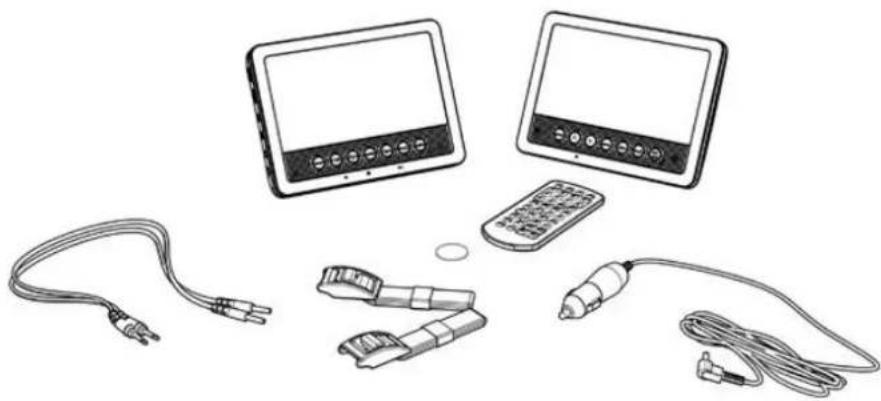
3.2. Package contents
natural_image
Illustration of connected devices including a cable, earplifier, remote control, and a monitor (no text or symbols)The following items are included in the received package:
Portable DVD player
1 x APD710T Secondary Unit
1 x Remote control
1 x Button cell
1 x Quick start guide
1 x 12V Car adapter
1 x CINCH cable
1 x Mounting kit
1 x Carry bag

NOTE: the button cell battery has already been inserted in your remote control

If any item is missing, please contact your reseller.
4. Installation
4.1. Connections
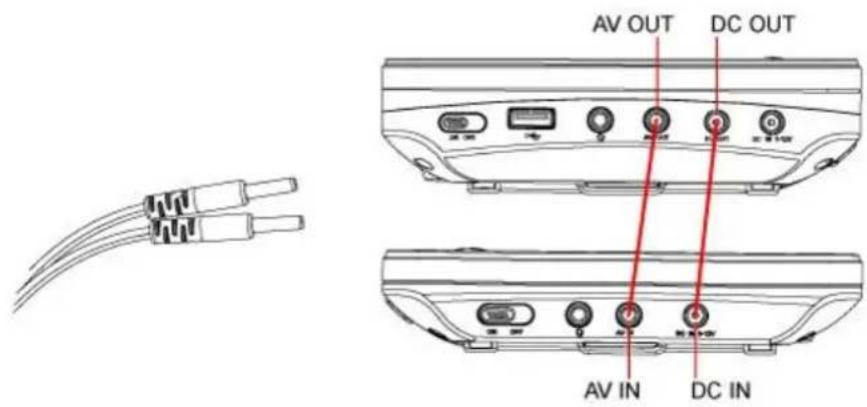
Link the screens
natural_image
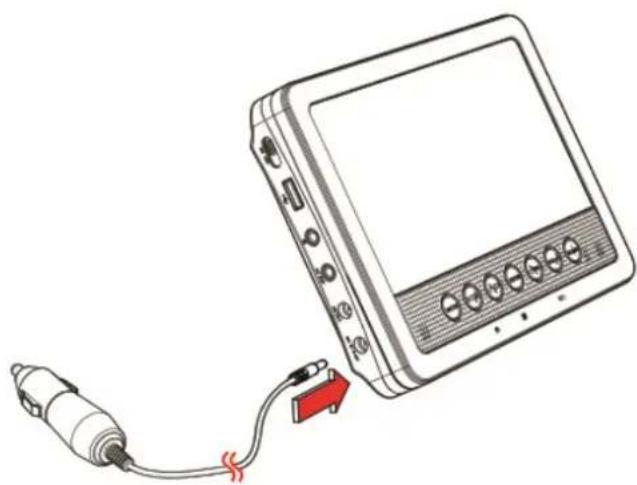
Line drawing of a device with a cable and connector, no text or symbols presentFor the power supply, the system must be connected to the car through the 12V Auto adapter.
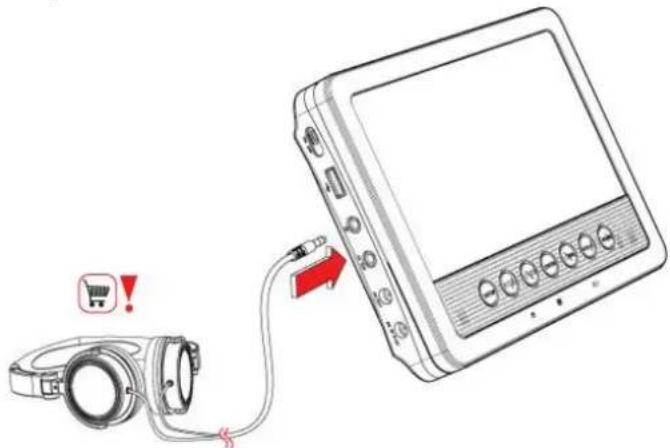
To connect a headphone, insert the cable plug in the headphone jack. To prevent hearing damage, remember to adjust the volume to a comfortable level.
4.2. Change the battery
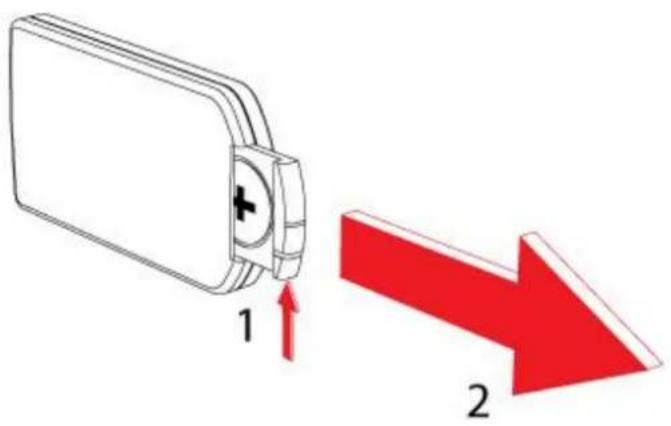
Remote control
- Pull out the battery holder
- Insert 1 lithium battery, type CR2025 3V battery
- When inserting the battery observe the (+) and (-) polarity markings.
- Insert the battery tray into the remote control.
©


©

During playback, the following functions are available:
• To select a chapter (DVD) or track (CD), press the digit buttons (3).
- In order to select a track 10 or greater, first press the 10+ button. For example: select track 12, first press 10+, and then press number 2 button.
- To pause playback, press the PLAY/PAUSE button (20) once; to resume playback, press the button again.
- To stop playback temporarily, press the STOP button (19) once. Press the button again to stop playback permanently, or press the PLAY/PAUSE button (20) to resume playback.
- To select the next or previous chapter (DVD) or track (CD), press the PREV button (23) or the NEXT button (23).
- To forward or rewind the DVD, press the FWD button (24) or the REV button (24). The available speed rates are: 2x, 4x, 8x, 20x.
• To adjust the volume, press the VOL + button or the VOL - button (22).
- To mute or restore sound, press the MUTE button (14).
- SUBTITLE (5): select the subtitles for the VIDEO file that is playing (if available)
- DVD: To select the audio language of a DVD, press the AUDIO button (17) repeatedly until the desired language is set.
• CD VCD: Select the desired sound with this view (STEREO, LEFT, RIGHT)
- To select the camera angle, press the ANGLE button (4).
- To play the DVD frame by frame, press the STEP button (16). Press the PLAY/PAUSE button (20) to resume normal playback.
To repeat a chapter (DVD) or one or all tracks (CD):
- Press the REPEAT button (11) once to repeat the current chapter or track.
- Press the button twice to repeat all chapters or tracks.
The AB (10) function can be used to repeat a specific section of a DVD.
- Press the AB (10) once to select the starting point (A).
- Press the AB (10) button again to select the ending point (B). The appliance plays the section repeatedly.
Navigation
- Press the MENU button (18) to return to the content menu during playback.
- To view a specific title of a DVD, press the TITLE button (6). Use the arrow buttons to select the title.
• Use the SEARCH button (1) to go to a time point, title or chapter of choice in DVD Mode. - Use the SOURCE button (15) to switch between DVD or USB input.
Using the PROGRAM function
With the PROGRAM (12) function favourite tracks from the disks can be stored.
- Press the PROGRAM button (12) to enter the PROGRAM function.
- Press the digit buttons (8) to select a desired track, and use the arrow button down to highlight the next entry.
- Press the PROGRAM (12) button and select CLEAR in the menu to resume playback.
- To view JPEG images you can press the PROGRAM button (12) repeatedly to go to slide show mode.
Using the ZOOM function
This function can be used for zooming in and out on photos and DVDs. The available zoom ratios are: 2x, 3x, 4x, 1/2, 1/3, 1/4, OFF.
- Press the ZOOM button (1).
- Press the ZOOM (1) button again to set the correct size.
- Press the arrow buttons (8) to move through the picture.

Please note:

DVDs and DVD appliances are manufactured under the worldwide agreed DVD regional code system that the appliance will operate only with corresponding disc of the same regional code. If the code number on the label of a DVD does not match that on the label alongside, the DVD will not play on this appliance.
If a disc contains mixed content (e.g. MP3 and video files), the appliance will only recognise, list and play one content type.
Normally, if an MP3 disc is loaded, the unit will take longer time to read the initial data.
©
©
©

Brand : AKAI
Model : APD710T
Category : Portable DVD Player