
20Q2 - TV DAEWOO - Free user manual and instructions
Find the device manual for free 20Q2 DAEWOO in PDF.


User questions about 20Q2 DAEWOO
0 question about this device. Answer the ones you know or ask your own.
Ask a new question about this device
Download the instructions for your TV in PDF format for free! Find your manual 20Q2 - DAEWOO and take your electronic device back in hand. On this page are published all the documents necessary for the use of your device. 20Q2 by DAEWOO.
USER MANUAL 20Q2 DAEWOO
Plug the mains cable into the power socket with 220V/50Hz AC.
SWITCHING THE SET ON AND OFF
Switching On
Switch the set on with the MAIN POWER button, ( )The set will turn on.
If not, press either : - PR UP or DOWN button on the front of set - or POWER button or the UP/DOWN button or one of the NUMBER button 0..9 on the remote controller.
The STAND-BY INDICATOR will turn off and a picture will appear on the screen.
Switching off
Press POWER button ( ) on the remote controller to return the set to its stand-by mode.
The STAND-BY INDICATOR will illuminate.
If you don't use the set for extended period of time, turn it off with MAIN POWER button ①
TUNING THE TV CHANNELS
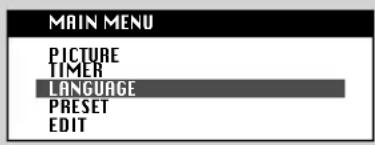
MAIN MENU
Press the MENU button to call up the MAIN MENU.
The MAIN MENU is consist of 5 sub-menus:
PICTURE, TIMER, LANGUAGE, PRESET, EDIT menu.
LANGUAGE SELECTION
Select a LANGUAGE menu at the MAIN MENU by placing the cursor on the LANGUAGE with UP/DOWN button and pressing the OK button. You can choose language you require with UP/DOWN button.
Press the MENU button to return to the MAIN MENU.
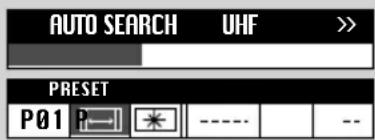
Select the PRESET menu at the MAIN MENU.
Place the cursor to "with the RIGHT button.
Press and hold down OK button until the tuning screen appears above the PRESET menu.
The cursor will move from left to right on the VHF-L line, then VHF-H, then UHF.
Please wait until EDIT menu appears.
EDIT
The EDIT menu shows you the programme position assignment. You can change this programme position assignment according to your personal preferences.
SKIPPING THE CHANNELS
You can select SKIP "YES" or "NO" with the SKIP button.
A programme marked with SKIP "YES" is skipped when changing channel using the UP/DOWN button. A skipped programme number selected by NUMBER button 0..9 will be displayed in red.
DELETE PROGRAMME POSITION DATA
Position the cursor to programme number to delete with the UP/DOWN, LEFT/RIGHT buttons.
Press the DEL button. While this is being carried out the "DELETE" Prog. No." appear and the "deleted" programme is moved to the programme no. 69 and changed SKIP "YES". The programme located in the programme no. 69 will move to the programme no. 68.
CHANGING THE ORDER OF THE CHANNELS
Position the cursor to programme number to move and press the MOVE button. The "MOVE Prog. No." will appear.
Position the cursor to programme number to exchange and press the MOVE button. Two programmes will be exchanged.
ENTER A STATION NAME, CHANGING THE PROGRAMME NUMBER AND COPYING A PROGRAMME
You can go to the PRESET menu directly for entering a station name and changing the programme number and copying a programme to another programme no. by pressing the OK button.
Refer to the MANUAL CHANNEL SETTING.
text_image
MAIN MENU PICTURE TIMER LANGUAGE PRESET EDIT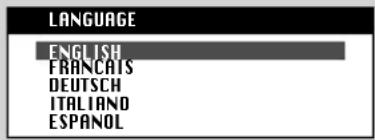
text_image
LANGUAGE ENGLISH FRANCAIS DEUTSCH ITALIANO ESPANOL
text_image
AUTO SEARCH UHF >> PRESET P01 P---- --| EDIT | |||
| P | SKIP P | SKIP | |
| 00 | N0 | 05 | N0 |
| 01 | N0 | 06 | YES |
| 02 | N0 | 07 | N0 |
| 03 | N0 | 08 | N0 |
| 04 | N0 | 09 | N0 |
| EDIT | |||
| P | SKIP | P | SKIP |
| 00 | N0 | 05 | N0 |
| 01 | N0 | 06 | N0 |
| 02 | N0 | 07 | N0 |
| 03 | N0 | 08 | N0 |
| 04 | N0 | 09 | N0 |

| EDIT | |||||
| P | SKIP | P | SKIP | ||
| 00 | ARD | NO | 05 | RTL2 | NO |
| 01 | ZDF | NO | 06 | - - - - - | NO |
| 02 | BR3 | NO | 07 | - - - - - | NO |
| 03 | SAT1 | NO | 08 | - - - - - | NO |
| 04 | PR07 | NO | 09 | - - - - - | NO |

MANUAL CHANNEL SETTING
You can also call up the PRESET menu at the MAIN MENU.
Press the NUMBER button 0..9 or UP/DOWN buttons to select a programme number you want.
The screen will change according to the selected programme number.
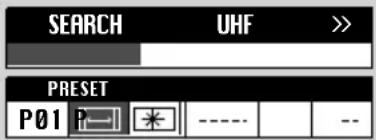
SEARCHING A CHANNELS
Locate a cursor to with LEFT/RIGHT button and then press the UP or DOWN button.
The tuning screen will appear and the cursor will move from left to right.
Pressing and holding down the UP/DOWN button during 2 seconds, the band will change as following:
VL-VH-U (For GB, U only).
After searching a station, the tuning screen will disappear.
To stop searching, press the MENU button.
FINE TUNING
If you are unable to get a good picture or sound because of a poor broadcasting signal, it is possible to adjust the fine tuning.
Move the cursor to and press UP or DOWN button to activate fine tuning up or down.
It obly operates whilst the UP or DOWN button is being pressed.
ENTER A STATION NAME
Select station name in the station name list with UP/DOWN button and press OK button.
If you want to delete a station name, select "----".
If you can't find the desired name in the list, you can enter your own.
To do so, move the cursor to the right and press OK button.
Using the UP/DOWN button, select the desired letter, number or blank.
Press the RIGHT button to select the next position.
Press the OK button to complete this procedure.
TO STORE PROGRAMME IN MEMORY
Move the cursor to the right end with the LEFT/RIGHT button.
Select the programme number that you want to store current displaying programme with station name, fine tuning data and system (FRANCE only) in memory using the UP/DOWN button or NUMBER 0..9.
Press the OK button.

text_image
SEARCH UHF PRESET P01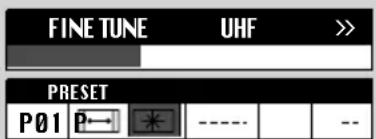
text_image
FINE TUNE UHF >> PRESET P01 P- * ---- --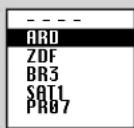


DAILY USE
The set has a total of 70 programme numbers, 0..69.
The NUMBER button 0..9 are used for direct programme selection.
In order to select two-digit program, press the second numbered button within two seconds.
Switch through the programme number step by step with the UP/DOWN button.
VOLUME CONTROL
Adjust the volume with the VOLUME ( ) DOWN/UP buttons on the front of the set, or with the LEFT/RIGHT button on the remote control.
MUTE
Pressing the MUTE button ( ) once turns the sound off.
The sound returns if the button is pressed once more or the programme no. is changed.
NORMAL PICTURE SELECTION
When you press the NORMAL button repeatedly you can call up three picture settings'
for NORMAL I(hard picture), NORMAL II(soft picture), FAVOURITE (adjustable picture).
PICTURE CONTROL
Press the MENU button to call up the MAIN MENU.
Press the OK button to call up the PICTURE menu.
You can select each function with the UP/DOWN buttons.
Use the LEFT/RIGHT button adjust each function:
BRIGHTNESS( )-COLOUR( )-CONTRAST( )-SHARPNESS( )-TINT( ).
31
31
63
31
* The TINT is active only in NTSC system.
The last set value is automatically stored in FAVOURITE mode.
Note that if you set the brightness and contrast values too low, the On-screen-display become dark.
TIMER
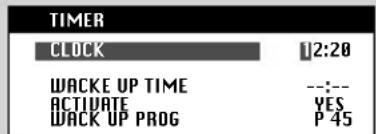
In the MAIN MENU, Select TIMER menu.
SETTING THE CLOCK
Press the button on the CLOCK line.
Set the hours and minutes with the NUMBER button 0..9 Press the OK button to complete. The clock will start.
Note that if you turn the TV off with MAIN POWER button, the clock setting is lost and must be reset if necessary.
SETTING THE WAKE UP TIME
Set WAKE UP TIME in a same way to the above for CLOCK.
Set ACTIVATE "YES" or "NO" with the LEFT/RIGHT button.
When ACTIVATE is "YES", the function is enabled.
Set WAKE UP PROG using the NUMBER button 0..9 or UP/DOWN button.
When WAKE UP TIME is operate, the set will switch on to this programme number.
SLEEP
By pressing the SLEEP button repeatedly, you can select one of the following setting:
The set will turn off after time you select.
Automatic Switch-Off in No broadcast Signal
If a broadcasting signal is not present for about 5-30 minutes, the set will be automatically turned off.
In AV mode, however, this function dose not operate.
RECALL
The RECALL button is used to display the current status: programme number, station name and clock.
This display appear for 5 seconds unless any button is pressed.
CHILD LOCK
You can prevent the use of the TV set without the remote control.
The set is child-locked after switching off the set by pressing the Y, C, TELETEXT(POWER button() in sequence on the remote control within 5 seconds.
The child-lock function is indicated by flashing the STAND-BY-INDICATOR.
The set can only be switched back on using the remote control.
TIME
Pressing the TIME button, the current time is displayed on the screen during 5 seconds.
If the programme you are watching has no Teletext transmission, no time will be displayed
text_image
TIMER CLOCK 12:20 WACKE UP TIME --:-- ACTIVATE YES WACK UP PROG P 45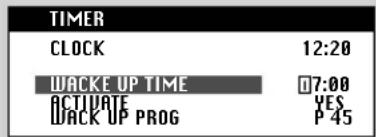
text_image
TIMER CLOCK 12:20 WACKE UP TIME 07:00 ACTIVATE YES WACK UP PROG P 45©
©
©
©