20V1T - TV DAEWOO - Free user manual and instructions
Find the device manual for free 20V1T DAEWOO in PDF.


User questions about 20V1T DAEWOO
0 question about this device. Answer the ones you know or ask your own.
Ask a new question about this device
Download the instructions for your TV in PDF format for free! Find your manual 20V1T - DAEWOO and take your electronic device back in hand. On this page are published all the documents necessary for the use of your device. 20V1T by DAEWOO.
USER MANUAL 20V1T DAEWOO
INSTRUCTION MANUAL COLOR TELEVISION
MODEL NO.
14D4M/20D4M/21D4M/14P2M
20P2M/21P2M/14Q2M/20Q2M
21Q2M/14S2M/20S2M/21S2M
14T2M/20T2M/21T2M/14U1M
20U1M/21U1M/14V1M/20V1M
21V1M/14K8MT/20K8MT/21K8MT
14V4M/20V4M/21V4M/14V4T
20V4T/ 21V4T/ 14U1T/ 20U1T/ 21U1T
14V1T/20V1T/21V1T/14D4T
20D4T/ 21D4T/ 14D3T/ 20D3T
21D3T/ 14D7T/ 20D7T/ 21D7T
14E5M/20E5M/21E5M/14S2T
20S2T/ 21S2T/ 21U3MTS/ 20T1TS
20T1ZS/ 20Q1TS/ 21T5TS/ 21U3T
2131N/2132N/2134N/2130N
21FL6N/2131NT/2132NT/2134NT
2130NT/21FL6NT/14D7N/20D7N
21D7N/14K8M/20K8M/21K8M
14S2/20S2/21S2/14D4/20D4
21D4/14V5TB/14V5TS/14V5TW
14Q1N/20Q1N/21Q1N
KR14E5 / KR20E5 / KR21E5
KR14E5M / KR20E5M / KR21E5M
KR14U1T / KR20U1T / KR21U1T
KR14U2T / KR20U2T / KR21U2T
KR14U3T / KR20U3T / KR21U3T
KR14V1T / KR20V1T / KR21V1T
KR14V4T / KR20V4T / KR21V4T
KR14V4 / KR20V4 / KR21V4
KR14D7T / KR20D7T / KR21D7T
KR14D7 / KR20D7 / KR21D7
KR14U1TS/ KR20U1TS/ KR21U1TS
KR14V1TS/ KR20V1TS/ KR21V1TS
KR14V4TS/ KR20V4TS/ KR21V4TS
KR14V5TB/ KR14V5TS/ KR14V5TW
KR21FL6M/ KR2131FL/ KR2132FL
KR2134FL/ KR2132NT/ KR2134NT
KR2130N/ KR2131N/ KR2132N
KR2134N/ KR2130NT/ KR2131NT
KR21FL6N/ KR15U7FL/ KR15U7T
KR15U5FL/ KR15U5T/ KR14V5T
KR20V5T/ KR21V5T/ KR14D4TS
KR14D3TS/ KR20D3TS/ KR21D3TS
KR14D4TS/ KR20D4TS/ KR21D4TS
KR14D4Z/ KR20D4Z/ KR21D4Z
KR1420Z/ KR2020Z/ KR2120Z
KR21FL6/ KR15A1FL/ KR15U7FL
KR15U5FL-2T/ KR15U7FL-2T
Contents
Important safeguards 1
Before Operation 2
Connecting external equipment 3
Identification of Controls 5
Daily use 6
Menus 8
Teletext (Option) 14
The othello game 16
Specifications 18
Troubleshooting 19
This information is placed by The law of RF on Protection of the Consumer Rights and the Governmental Resolution of RF No.720.
The working life of this set is 7 years since its production date. After the working life, this set may be not work properly and cause damage to the life of the customer or his property.
©
©
©
©
Identification of Controls
Back
Aerial terminal
Aerial Terminal
VIDEO AUDIO
RCA Jack
SCART (OPTION)
REMOTE CONTROL
TT W mode
① POWER
② NUMBER 0-9
③ NORMAL/OK
④ AV
⑤ PR (CURSOR) UP
⑥ VOLUME UP
(CURSOR RIGHT)
⑦ MENU
⑧ PR (CURSOR) DOWN
⑨ VOLUME DOWN
(CURSOR LEFT)
⑩ MUTE
⑪ RECALL
⑫ SLEEP
⑬ MOVE
⑭ SKIP
⑮ DELETE
⑯ Not used
| 1 | 2 | 3 | 1 | ||
| 4 | 5 | 6 | |||
| 7 | 8 | 9 | 2 | ||
| 0 | NORMAL/OK | ||||
| 4 | 3 | ||||
| 7 | MENU | PR | |||
| 5 | |||||
| 9 | 6 | ||||
| 8 | PR | ||||
| 10 | |||||
| 12 | SLEEP RECALL | 11 | |||
| MOVESKIP | |||||
| 15 | 13 | ||||
| DELETE MODE | |||||
| 18 | 14 | ||||
| 17 | 16 | ||||
T E L E T E X T m o d e ( ( O p t i i o n ) )
① ON/OFF
② NUMBER 0-9
③ INDEX
④ MIX
⑤ PAGE UP
⑥ SUBPAGE
⑦ MENU
⑧ PAGE DOWN
⑨ HOLD
⑩ MUTE
⑪ REVEAL
⑫ SIZE
⑬ CANCEL
⑭ Green Key
⑮ Red Key
⑯ TV/TEXT
⑰ Yellow Key
⑱ Cyan Key
PROGRAMME SELECTION

Direct selection
Use remote control NUMBER 0...9 buttons. For two or three digits programme numbers, press the button for the next digit within 2.5 seconds.
Up/Down moves
Use PR UP/DOWN buttons of the remote control unit or on the front of the set.
SOUND CONTROL
Volume adjustment
Use VOLUME UP/DOWN buttons of the remote control unit or on the front of the set.

Mute
Get sound off by pressing the remote control MUTE (✗) button. Then, logo (✗) is displayed. Sound returns by pressing the same button again.
PICTURE CONTROL

You can choose between three picture settings, using repeatedly remote control NORMAL/OK button :
Normal I (standard hard picture) Normal II (standard soft picture) Favourite (you can adjust picture setting as you want, using Picture menu).
For other adjustments : Brightness, contrast, colour, sharpness, see Picture menu. (page 9)
SLEEP FUNCTION

Pressing repetitively the remote control SLEEP button, you can enter one of the following settings :
OFF > 30 min > 60 min > 90 min > 120 min > OFF
The set will be turned off after the time you set.
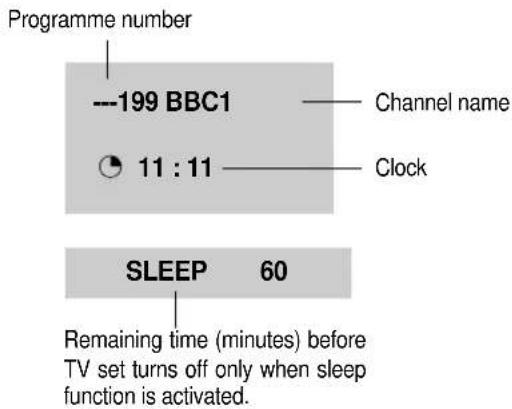
The remaining time before TV turn-off is displayed on programme status.
PROGRAMME STATUS DISPLAY

Accessed by the Remote Control RECALL button.
text_image
Programme number ---199 BBC1 11 : 11 Channel name Clock SLEEP 60 Remaining time (minutes) before TV set turns off only when sleep function is activated.Pressing repetitively the RECALL button, you can change channel digit as follow.

\* NOTE
Language selection
Child lock, Clock setting and wake time setting are available in features menu.
MAIN MENU
All menus are removed within 25 seconds if you don't press any button.
Direct selection
Press remote control MENU button to display main menu.
Then, you have the choice among several sub-menus.
If you want to cancel immediately main menu, press MENU button once more.
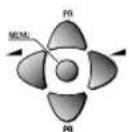
To select one of the sub-menus, use remote control CURSOR buttons UP, DOWN, LEFT, RIGHT.

To enter the selected sub-menu, press remote control NORMAL/OK button.
HOW TO USE SUB MENUS
* The following is applied to all of the sub-menus.
Select the function you want to change using Remote control CURSOR UP or DOWN button.

Confirm (if needed) by pressing Remote control NORMAL/OK button.
Adjust the function using Remote control CURSOR LEFT or RIGHT button.

Then Return to main menu pressing MENU button.
PICTURE
FEATURES
INSTALL
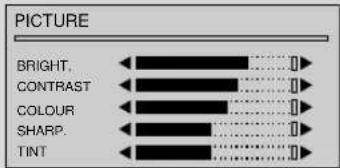
PICTURE MENU
Enter PICTURE in the main menu.
You can select each function with the UP/DOWN buttons.
Use the LEFT/RIGHT buttons to adjust each function.
Explanation for each function will be displayed in the lower screen whenever you select the function. (Tint control for AV NTSC only)
text_image
PICTURE BRIGHT. CONTRAST COLOUR SHARP. TINTFEATURES MENU
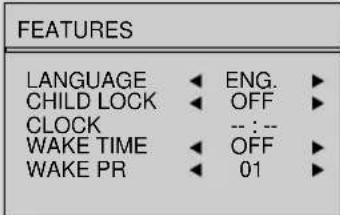
LANGUAGE
Language selection.
CHILD LOCK
Child lock prevent the use of the TV set without remote control unit.
Select this value ON or OFF:
- When switched ON: the stand-by indicator is orange lighted, child lock is operating.
- The set can only be switched ON with the remote control unit.
CLOCK
TV clock setting.
- Set TV clock with remote control 0...9 NUMBER buttons, then clock starts.
- Note that if you turn off the set with the MAIN POWER button, the clock setting is lost and must be reset if necessary.
WAKE TIME
Wake up function.
- The TV set turns on at the time and with the programme chosen by the customer. This function is only available when clock is set and when TV set is switched to stand -by mode.
- Switch "wake up" function ON/OFF with remote control CURSOR LEFT or RIGHT button.
- Enter wake up time with remote control 0...9 NUMBER buttons.
WAKE PR
Select TV turn-on programme number.
text_image
FEATURES LANGUAGE ◀ ENG. ▶ CHILD LOCK ◀ OFF ▶ CLOCK -- : -- WAKE TIME ◀ OFF ▶ WAKE PR ◀ 01 ▶INSTALL MENU
AUTO SETUP
Automatic search system.
EDIT
Programme list edition.
FREQ.
Channel Frequency.
NAME
Channel name.
PROGRAM
Programme number.
STORE TO
Programme storage number.
INSTALL
AUTO SETUP
EDIT
FREQ. 211.25
NAME
PROGRAM 01
STORE TO 01
EDIT MENU
PR
Programme number.
NAME
Station name.
Skip
: programme skipped.
EDIT
| PR | NAME | SKIP |
| 03 | ---- | |
| 02 | ---- | |
| 01 | ---- | |
| 00 | ---- | |
| 199 | ---- |
AUTO SETUP
Select "AUTO SETUP" and Press remote control "NORMAL/OK" button more than 3 seconds to start automatic searching.
PROGRAMME LIST EDITION
Select "EDIT" function and confirm with the remote control "NORMAL/OK" button :
Edit menu appears and shows existing recorded programmes.
The recorded programmes can be modified as follows :
Channel skipping
You can select skip "YES" or "NO" using the remote control SKIP button.
A programme with skip " " doesn't appear on screen when changing programmes with PR UP/ DOWN buttons.
Channel deleting
Select the programme to delete using remote control CURSOR UP/ DOWN buttons.
Press the remote control DELETE button.
The deleted programme is moved to the programme number 199 with skip "".
The existing 199 programme is moved to programme number 198 and so on.
©
©
©
IDOUBLING CHARACTER SIZE
Repeatedly pressing the SIZE( ) button doubles the character size in the following order: Upper half of the page Lower half of the page Return to normal size.
MIX
Pressing the MIX button( ) in teletext mode, you can see an aerial channel also in the back ground. If you control bright and contrast in the Mix mode also TV mode is controlled at the same time.
REVEAL ANSWER
This function can be used on certain pages to reveal the solution of riddles.
Press the REVEAL( EButton to reveal a hidden answer and press again to hide it.
VOLUME, BRIGHTNESS CONTROL
Repeatedly pressing the MENU button in teletext mode, VOLUME or BRIGHTNESS appears at the bottom of the screen.
You can control it with the LEFT/RIGHT button.
The othello game
1. Introduction
Othello is a two player strategy game. Othello is player on an 8 x 8 square board, one taking yellow while the other taking green. The object of Othello is to flip as many of your opponents discs to your color as possible without opponent flipping your discs.
2. The Rules
The initial configuration, before the game starts, is:
Green starts playing first. Each player puts one disc on the board at each turn, unless: either no one can move, or one player cannot move, and then the other player can play again. The game ends when no player can move, and the one who has the most discs of his own colors has won. Now how to put a disc on the board? The idea is one can put a disc of his own color at a square, if and only if there is at least one disc of the opposite color immediately surrounding it, and at the extension of this line there is a disc of his own color. For example, at the beginning of the game, green can play at the following squares marked with an X:
-
How to Play
-
Press the TV/AV() button to open the Game mode RF → AV → S-VHS(Russia option) —GAME
-
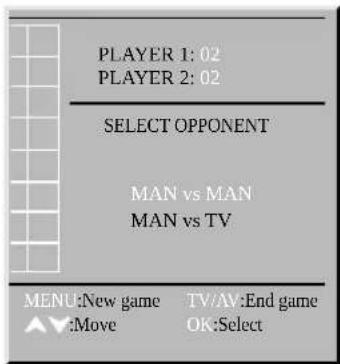
Select Opponent This option allow you to choice opponent. You can select Man vs Man or Man vs TV. If you choose Man vs Man, game start directly.
-
Move to your choice :
-
Select your opponent :OK button
-
Select TV level (When opponent is TV) You can change the difficulty level of the TV player. You can select Easy, Medium or Hard.
-
Move to your choice :
-
Select level of the TV :OK button
-
Start game When game is started, the player1(Man) plays green and the player2(Man or TV) yellow. The player1 plays first.
-
Move to your disc :
Use the Program Up/Down & Volume Up/Down button. - Place your disc : Press the OK button.
- Restart game : Press the MENU button.
- Quit game : Press the TV/AV button.

text_image
PLAYER 1: 02 PLAYER 2: 02 SELECT OPPONENT MAN vs MAN MAN vs TV MENU:New game TV/AV:End game Move OK:Select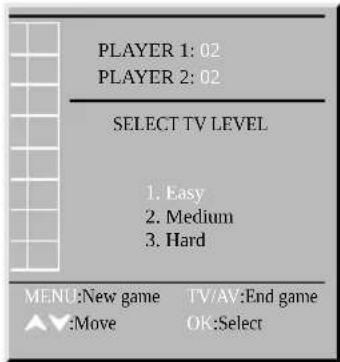
text_image
PLAYER 1: 02 PLAYER 2: 02 SELECT TV LEVEL 1. Easy 2. Medium 3. Hard MENU:New game TV/AV:End game ▲▼:Move OK:Select
Specifications
TV Standard PAL/SECAM-B/G, D/K, H, I/I(NTSC AV ONLY)
Main Voltage AC110-250V\~, 50/60Hz
Power Consumption
14E* : 49W
KR14E5 : 49W
14V* : 49W
KR14V* : 49W
14P2M : 57W
KR14D*: 57W
14Q2M : 57W
KR14U*: 57W
14S2M : 57W
KR1420*: 57W
14T2M : 57W
KR20E5 : 60W
14U*:57W
KR20U2* : 60W
14D*:57W
KR20V* : 60W
14K8MT:57W
KR15*: 64W
20V* : 60W
KR20D*: 66W
20P2M : 66W
KR21E5 : 68W
20Q*:66W
KR21V* : 68W
20D* : 66W
KR21U2*: 68W
20S2M:66W
KR20U1*: 68W
20T* : 66W
KR21V*: 68W
20K8MT : 68W
KR20U3* : 68W
20U*:68W
KR21D*: 73W
21V*: 68W
KR213* : 73W
21P2M:73W
KR2120*: 73W
21Q2M: 73W
KR21F*: 73W
21S2M : 73W
KR21U1*: 74W
21T*: 73W
KR21U3*: 74W
21D*: 73W
213* : 73W
21FL6 : 73W
21U*: 74W
21K8*: 74W
Owing to our policy of continuous product improvement, specifications may change.
©
©
©
©