
APCRBCV202 - Inverter APC - Free user manual and instructions
Find the device manual for free APCRBCV202 APC in PDF.


Pick your language and provide your email: we'll send you a specifically translated version.
User questions about APCRBCV202 APC
0 question about this device. Answer the ones you know or ask your own.
Ask a new question about this device
No questions yet. Be the first to ask one.
Download the instructions for your Inverter in PDF format for free! Find your manual APCRBCV202 - APC and take your electronic device back in hand. On this page are published all the documents necessary for the use of your device. APCRBCV202 by APC.
USER MANUAL APCRBCV202 APC
Quick Installation Guide for Battery Cartridge Replacement
CAUTION:
- Only qualified persons should remove the battery.
- Use APC authorized batteries only.
- Use authorized battery recycler. See www.apc.com/recycle for information on recycling services offered in your country.
SRV/SRVS Rack-Mount 1000/2000/3000 VA
- Remove the front bezel of the UPS and disconnect the battery cable.
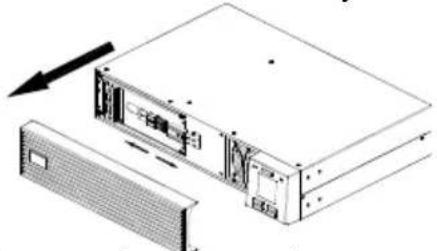
natural_image
Technical line drawing of a server rack with an attached drive unit and a separate panel (no text or symbols)- Remove the battery plate.
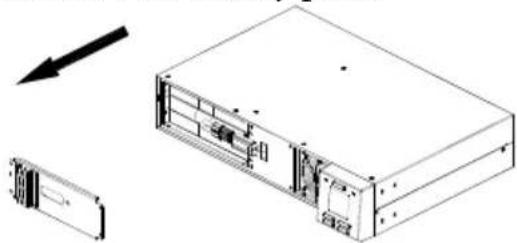
natural_image
Technical line drawing of a server rack unit with internal components and an arrow indicating direction (no text or symbols)- Insert the new battery.
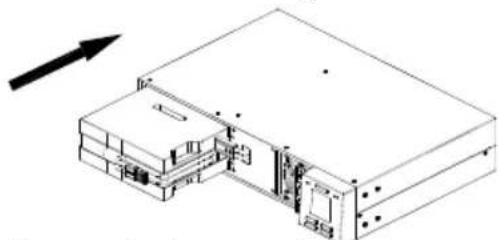
natural_image
Isometric line drawing of a server rack or chassis with internal components and an arrow indicating direction (no text or symbols)- Secure the battery plate by fastening the screws (4 nos.).
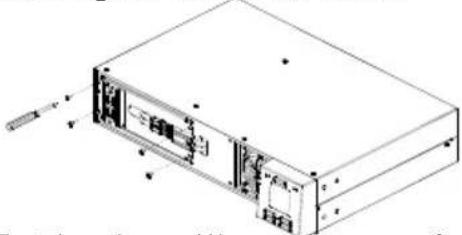
natural_image
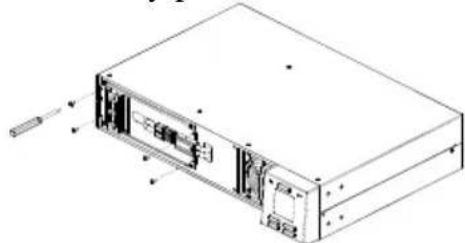
Technical line drawing of a rectangular electronic device with internal components and mounting holes (no text or symbols)- Locate the screws (4 nos.) securing the battery plate and unfasten them.
natural_image
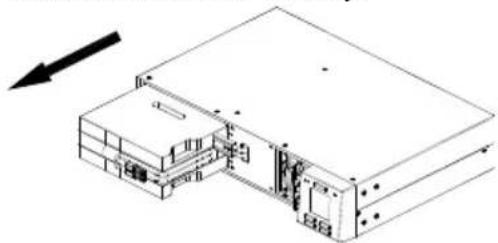
Technical line drawing of a computer rack unit with internal components and mounting holes (no text or labels)- Slide out the old battery.
natural_image
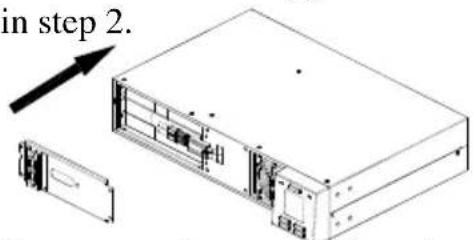
Isometric line drawing of a mechanical or electronic assembly with no visible text, numbers, or symbols.- Re-install the battery plate removed in step 2.
text_image
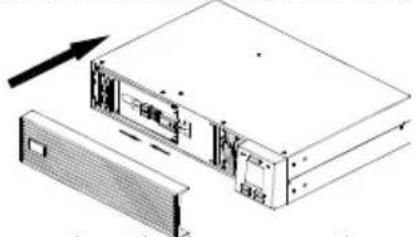
in step 2.- Re -connect battery cable and re-install the front bezel of the UPS.
natural_image
Diagram of a server rack with an open rear panel and an arrow indicating direction (no text or symbols)NOTE: The above illustrations are for representation only. The battery replacement procedure remains the same for all the UPS ratings.