CLIQ - Headphones Intezze - Free user manual and instructions
Find the device manual for free CLIQ Intezze in PDF.


User questions about CLIQ Intezze
0 question about this device. Answer the ones you know or ask your own.
Ask a new question about this device
Download the instructions for your Headphones in PDF format for free! Find your manual CLIQ - Intezze and take your electronic device back in hand. On this page are published all the documents necessary for the use of your device. CLIQ by Intezze.
USER MANUAL CLIQ Intezze
text_image
Diagram of a bottle with numbered labels pointing to different body parts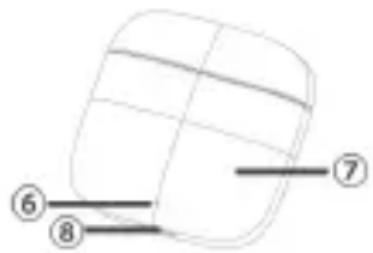
text_image
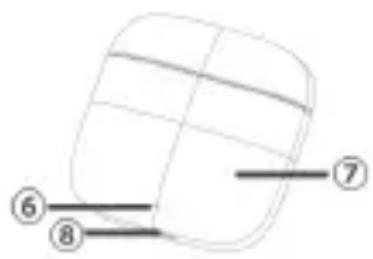
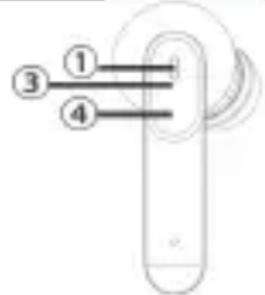
Diagram of a 3D object with numbered annotations pointing to specific sections1 - Microphone 2 - Microphone 3 - LED indication 4 - touch control area 5 - ear tip 6 - LED indication 7 - charging case 8 - USB-C charging interface
Pairing
After being taken out from the charging case, the earphones will be paired automatically. Pairing with the smartphone :
1) Take out the earphones from the charging case and confirm that the earphones are waiting to be paired. At this time, the two earphones flash blue lights quickly.
2) Turn on the smartphone's Bluetooth, search Bluetooth devices and click 'CLIQ'. A voice prompt as 'Connected' will sound then.
3) After the pairing is successful, take out the earphones from the charging case and they will pair with the smartphone automatically.
Powering ON / OFF
Power ON
Method 1: Take out the earphones from the charging case, the earphones will auto-boot.
Method 2: In the off state, press and hold the touch area of the earphones for 1 seconds, the earphones will turn on, and you can hear the prompt "power on".
POWER OFF
Method 1: Put the earphones into the charging box. They will shut down automatically.
Method 2: Turn off the Bluetooth switch of mobile phone, and the earphone will automatically shut down in five minutes.
Method 3: Turn off the Bluetooth switch on your mobile phone, press the earphone for 1 second and the earbuds will shut down.
Listen to the music
Play / Pause Touch the left or right earphone twice gently.
Previous Press and hold the touch area of the left earphone for 2 seconds.
Next Press and hold the touch area of the right earphone for 2 seconds.
Volume + Touch the right earphone once gently.
Volume - Touch the left earphone once gently.
Calling
Answer call Touch the left or right earphone once gently
Hang up Touch the left or right earphone twice gently.
Cancel dialing During dialing, press the left or right earphone for 2 seconds.
Reject call Press the left or right earphone for 2 seconds.
Voice assistant
Wake up / Cancel voice assistant: Touch the left or right earphone three times gently.
RESET function
1) Delete the connection between the earphone and the phone.
2) Take out both earbuds from the case and once the are flashing blue, tap 5x quickly the right earbud and then 5x the left earbud. LED indication on both earbuds goes out, then it starts flashing red / blue alternately and finally it starts flashing blue.
3) Now you can repeat the pairing process with your phone.
Charging
The earbuds and the charging case need to be fully charged prior to first use!
Earphones: Put the earphones into the charging box, the charging case will automatically charge the earphone, and the earphone will display a red light when charging.
Charging case: Use the included USB-C cable to charge the case.
LED indication on the earbuds
| STATUS | Indicator light |
| Not paired | Red and blue lights flash quickly |
| Waiting to be paired | One blue light flash quickly |
| Paired successfully | The indicator light is off |
| Powered ON | Red and blue light up quickly for 1 second |
| Powered OFF | The indicator light is off |
| Play | The indicator light is off |
| Pause | The indicator light is off |
| StandBy | The indicator light is off |
| Incoming call | Blue light flashes twice every 3 seconds |
| Call in progress | The indicator light is off |
| Charging | Red light is always on |
| Charging complete | The indicator light is off |
LED indication on the case
| STATUS | Indicator light |
| Case Charging status | When charging, the indicator light will gradually become bright or dim. Power indicator: Red light: 5-35%; yellow light: 35 -70%; green light: 70%-100%. |
| Buds charging status | When it is put in the charging box, the corresponding LED in the case will be on according to its own power, flashing twice first and then continuously lighting for about 8 seconds. |
| Charging complete | Green light turns off after 8 seconds. |
| Charging error | Red light flashes quickly. |
Voice prompts
| Status | Prompt |
| Power on | power on |
| Power off | power off |
| Low battery | power low |
| Pairing | pairing |
| Paired successfully | connected |
| Disconnect | disconnected |
| Maximum volume | "DiDi" |
| Minimum volume | "DiDi" |
Special instructions
1) Apple iPhones and some Android phones can support the adjustment of phone volume if you need to use headphones to adjust the volume; but for some Android phones, you can only adjust the volume of earphone itself. If you need to restore the default volume, put the earphones in the charging box and take them out after the red light turns on.
2) When holding the earphone, do not touch the touch panel area of the earphone to avoid misoperation.
Precautions
1) The case with earbuds need to be fully charged prior to first-time use.
2) If the earbuds are left unused for over two weeks, please recharge the case with earbuds periodically.
3) Listen with the volume setting as low as possible. Listening at high volume for an extended period may result in permanent damage to your hearing.
4) Keep your earphones and accessories out of reach of children. Children should use the earphones only under adult supervision.
5) Do not expose the earphones to water for a prolonged period. Do not use it when swimming, diving, or in the shower.
6) Using your earphones in a moist or dusty environment, or near a strong magnetic field, may result in an internal circuit failure.
7) Do not store your earphones in an environment where the temperature is below - 15°C or above +S0°C.
8) Do not charge the earphones and the charging case in an environment where the temperature is below 0^ C.
9) Do not expose your earphones or charging case to direct sunlight (such as on a window sill or on a car dashboard) for an extended period of time.
10) To avoid damage to your earphones, do not disassemble or tamper with them, and do not insert any foreign matter into them.

text_image
inteZeAll information in this document is subject to change.
www.intezze.com
InteZe
NÁVOD K OBSLUZE
CLIQ
TWS EARPHONES
Popis produktu
text_image
Diagram of a handheld device with labeled parts 1, 3, and 4 indicating different components or functions.text_image
Diagram of a mechanical component with numbered parts labeled ② and ⑤