
BM 404 - Microphone RCF - Free user manual and instructions
Find the device manual for free BM 404 RCF in PDF.


| Product Type | Desktop Paging Microphone |
| Brand | RCF |
| Model | BM 404 |
| Compatibility | DMA digital matrix amplifiers (BUSINESS MUSIC line) |
| Capsule Type | Electret |
| Polar Pattern | Hypercardioid |
| Sensitivity | -55 dB |
| Frequency Response | 50 Hz - 20 kHz (-3 dB) |
| Output Impedance | 250 Ω |
| Zone Selection | 4 zones (A, B, C, D) + General Call |
| PTT Button | Yes, with chime (switchable) |
| Connector Type | RJ45 (Input and Link) |
| Cable Supplied | FTP CAT5, 5 m (16.4 ft) |
| Max. Microphones in Daisy-Chain | 4 |
| Max. Line Length | 100 m (109 yd) |
| Power Supply | 24 V dc, 250 mA (adapter included) |
| Chime | Yes, with ON/OFF switch |
| Interlock / Priority | Yes, first microphone engaging the line gets priority |
| Automatic Gain Control | Yes |
| Housing Material | Plastic |
| Color | Black (RAL 9005) |
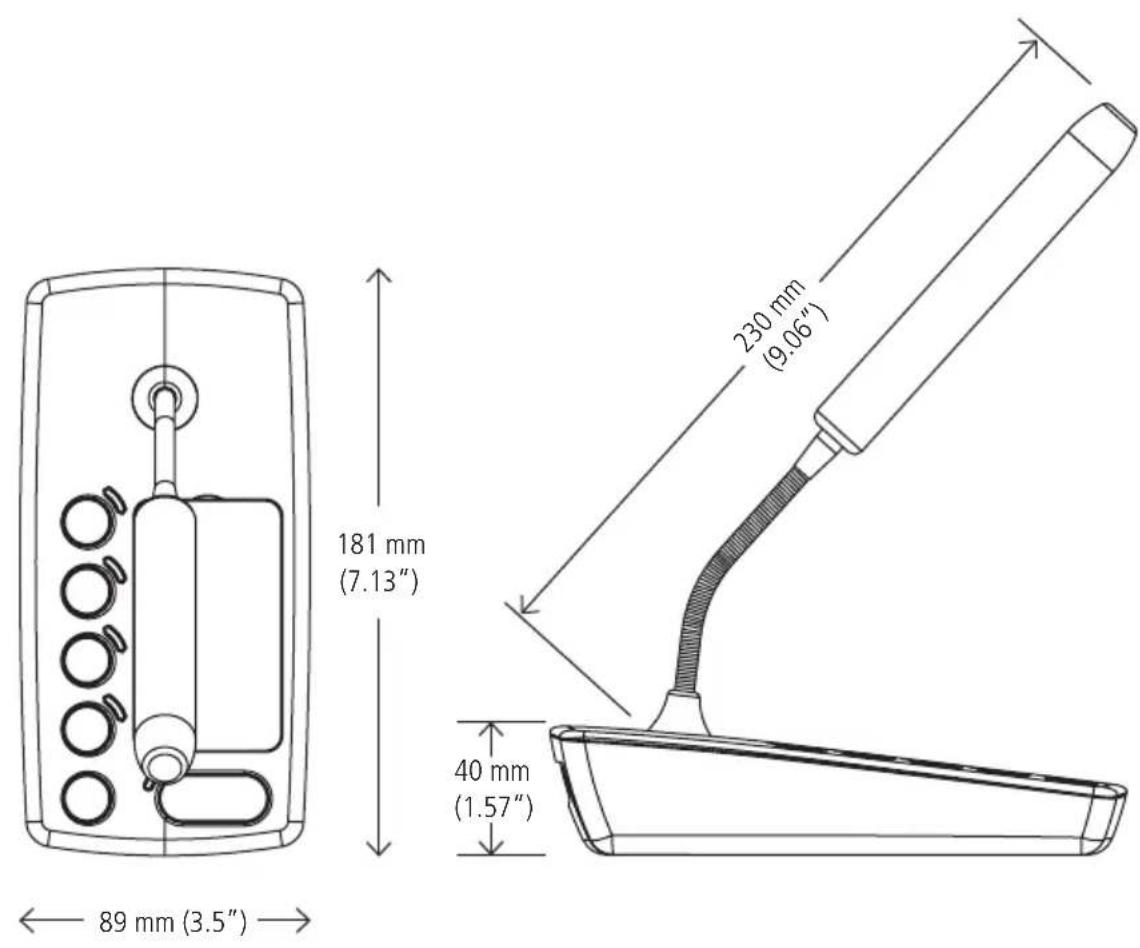
| Dimensions (WxHxD) | 230 x 40 x 181 mm (9.06 x 1.57 x 7.13 in) |
| Net Weight | 0.45 kg (0.99 lbs) |
| Gross Weight (shipping) | 1.1 kg (2.43 lbs) |
| Package Dimensions | 330 x 150 x 130 mm (12.99 x 5.91 x 5.12 in) |
| Cleaning | Use only a dry cloth; no solvents, alcohol, or benzene |
| Safety Precautions | Do not expose to water or excessive heat; disconnect if unusual odor or smoke |
| Installation | Professional installation recommended; cables not laid with mains lines |
| Spare Parts / Repairability | Contact authorized service center; do not attempt repairs |
Frequently Asked Questions - BM 404 RCF
User questions about BM 404 RCF
0 question about this device. Answer the ones you know or ask your own.
Ask a new question about this device
Download the instructions for your Microphone in PDF format for free! Find your manual BM 404 - RCF and take your electronic device back in hand. On this page are published all the documents necessary for the use of your device. BM 404 by RCF.
USER MANUAL BM 404 RCF
USER MANUAL MANUALE D'USO
BM 404
- DESKTOP PAGING MICROPHONE FOR 'DMA' DIGITAL MATRIX AMPLIFIERS
- BASE MICROFONICA DA TAVOLO PER AMPLIFICATORE MATRICE DIGITALE DMA
TABLE OF CONTENTS INDICE

ENGLISH
SAFETY PRECAUTIONS 4
DESCRIPTION 6
FRONT PANEL | 7
REAR CONNECTIONS 8
NOTES ABOUT CONNECTIONS | 10
USE | 11
SPECIFICATIONS 12
DIMENSIONS 13
ITALIANO
AVVERTENZE PER LA SICUREZZA | 14
DESCRIZIONE | 16
PANNELLO FRONTALE | 17
CONNESSIONI SUL RETRO 18
Before connecting and using this paging microphone, please read this instruction manual carefully and keep it on hand for future reference. The manual is to be considered an integral part of this product and must accompany it when changing ownership as a reference for correct installation and use as well as for the safety precautions. RCF S.p.A. will not assume any responsibility for the incorrect installation and / or use of this product.
SAFETY PRECAUTIONS
- All the precautions, in particular the safety ones, must be read with special attention, as they provide important information.
- Make sure all connections have been made correctly before switching all devices on. Do not connect / disconnect paging microphones when the system is operating.
- Protect paging microphone cables from damage and assure they are positioned where these cannot be stepped on or crushed by objects.
- Do not put paging microphones into water (or another liquid), do not throw nor drop them.
- Never attempt to carry out any operations, modifications or repairs. If a paging microphone does not work properly, contact your authorized service centre.
- Should the paging microphone emit any strange odour or even smoke, turn the sound system off immediately and disconnect it (from both the system and the mains supply).
- RCF S.P.A. strongly recommends the sound system installation is only made by professional qualified installers (or specialised firms), who can certify it according to the regulations in force. The entire audio system must comply with the current standards and regulations regarding electrical systems.
- Mechanical and electrical factors need to be considered when installing a professional audio system (in addition to those which are strictly acoustic, such as sound pressure, angles of coverage, frequency response, etc.).
- Do not point a microphone towards a nearby speaker, in order to avoid any possible feedback.
- Hearing loss
Exposure to high sound levels can cause permanent hearing loss. The acoustic pressure level that leads to hearing loss is different from person to person and depends on the duration of the exposure. To prevent potentially dangerous exposure to high levels of acoustic pressure, anyone who is exposed to these levels should use adequate protection devices. When a transducer capable of producing high sound levels is being used, it is necessary to wear ear plugs or protective earphones.
IMPORTANT NOTES

SAFETY PRECAUTIONS
- To prevent inductive effects from causing hum, noise and a bad system operating, paging microphone cables should not be laid together with other electric cables (mains) and speaker lines.
- Keep the paging microphone far from any excessive heat source.
- Do not use solvents, alcohol, benzene or other volatile substances for cleaning the external parts. Just use a dry cloth.
RCF S.p.A. thanks you for purchasing this product, which has been designed to guarantee reliability and high performances.
DESCRIPTION

BM 404 is a desktop paging microphone dedicated for 'DMA' digital matrix amplifiers (part of the BUSINESS MUSIC line) that allows selective calls to max. 4 zones. Up to four BM 404 paging microphones (interlocked one another) can be connected in daisy-chain in the same line.
Main features:
- Simple use and no configuration required
- Four buttons (A, B, C, D) for zone selection
- General call button
- 'Push To Talk' (PTT) to be pressed and held for announcements
- Electret mic. capsule on gooseneck
- Balanced audio input / output on RJ 45 port (CAT 5 cable included, 5 m long)
- Universal adapter included for different types of electrical outlets
- Chime with on/off switch.
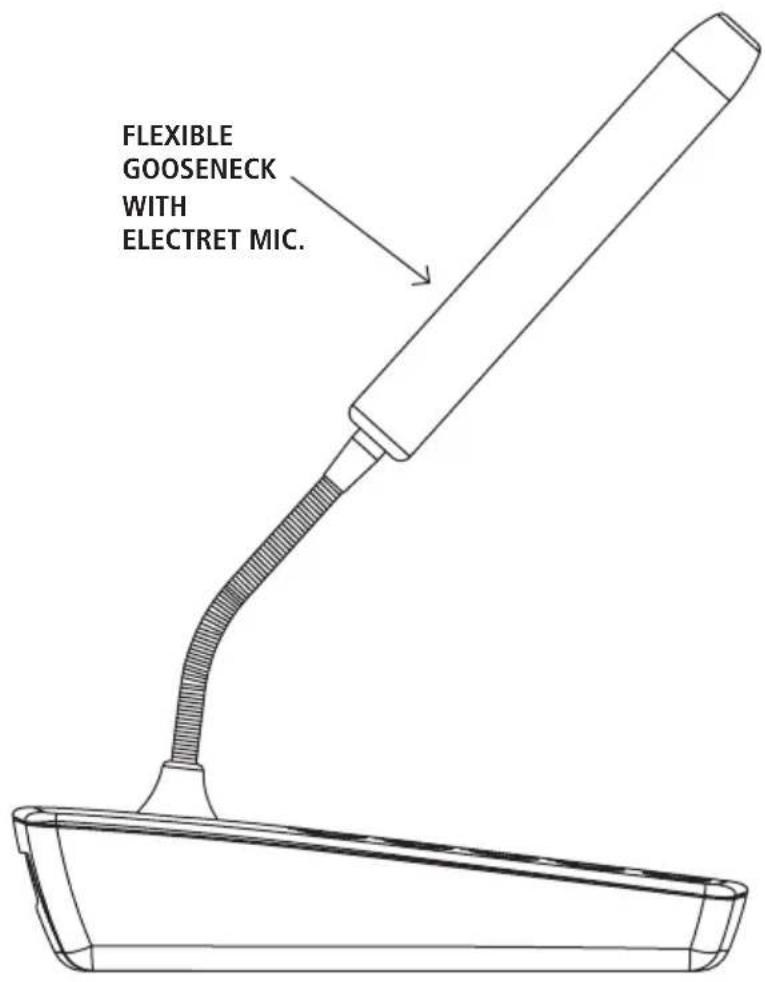
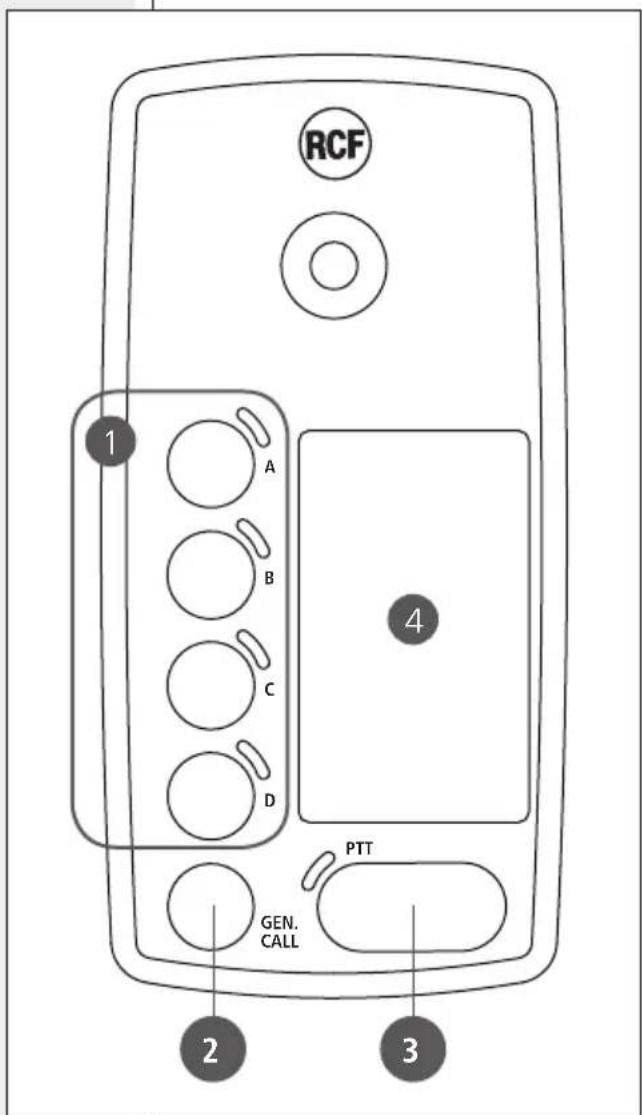
1 Four zone buttons with LEDs.
Press one or more buttons to select the zones to be paged. LEDs (when lit) indicate which zones are selected for paging, which is done by pressing and holding the PTT 3 button. To cancel ore or more zones from the selection, press the respective zone buttons again.
2 GEN. CALL button: press to select all the four zones for paging, which is done by pressing and holding the PTT button.
To cancel the all-zone selection, press it again.
3 PTT button: after selecting the zones, press and hold it to talk: the chime is played (if enabled) and the microphone is activated.
At the end of the announcement, release the PTT button.
If the line has already been engaged by another paging microphone (indicated by the PTT LED flashing after pressing the PTT button), it is momentary not possible to make announcements and you need to try again later.
4 Removable plastic lid under which a cardboard is placed to indicate the name of each zone.
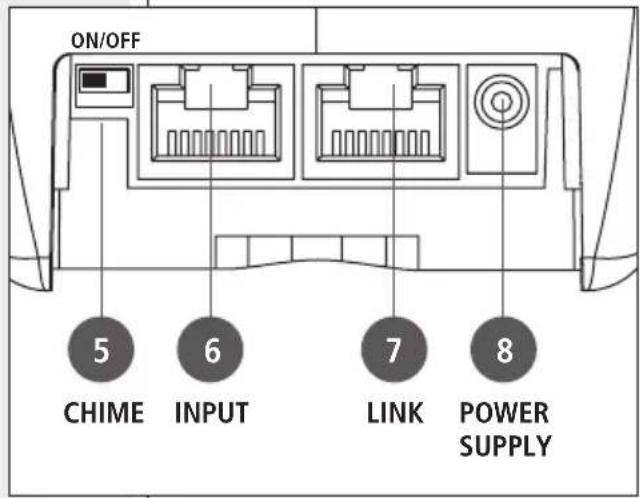
REAR CONNECTIONS

5 CHIME: switch: if set to ON, the chime is played when pressing the PTT 3 button.
6 INPUT: RJ45 port to link either the 'DMA' amplifier or the previous BM 404 paging microphone (through CAT5 cable).
7 LINK: RJ45 port to link the next BM 404 paging microphone (through CAT5 cable).
RJ 45 port (INPUT and LINK) pins:
| PIN DESCRIPTION WIRE COLOUR (T568B) | |
| 1 PAGING AUDIO SIGNAL – white-orange | |
| 2 PAGING AUDIO SIGNAL + orange | |
| 3 GROUND white-green | |
| 4 PAGING ENABLE SIGNAL blue | |
| 5 ZONE A SELECTION white-blue | |
| 6 ZONE B SELECTION | green |
| 7 ZONE C SELECTION | white-brown |
| 8 ZONE D SELECTION | brown |
8 POWER SUPPLY input for the necessary adapter (24 V dc - 250 mA).
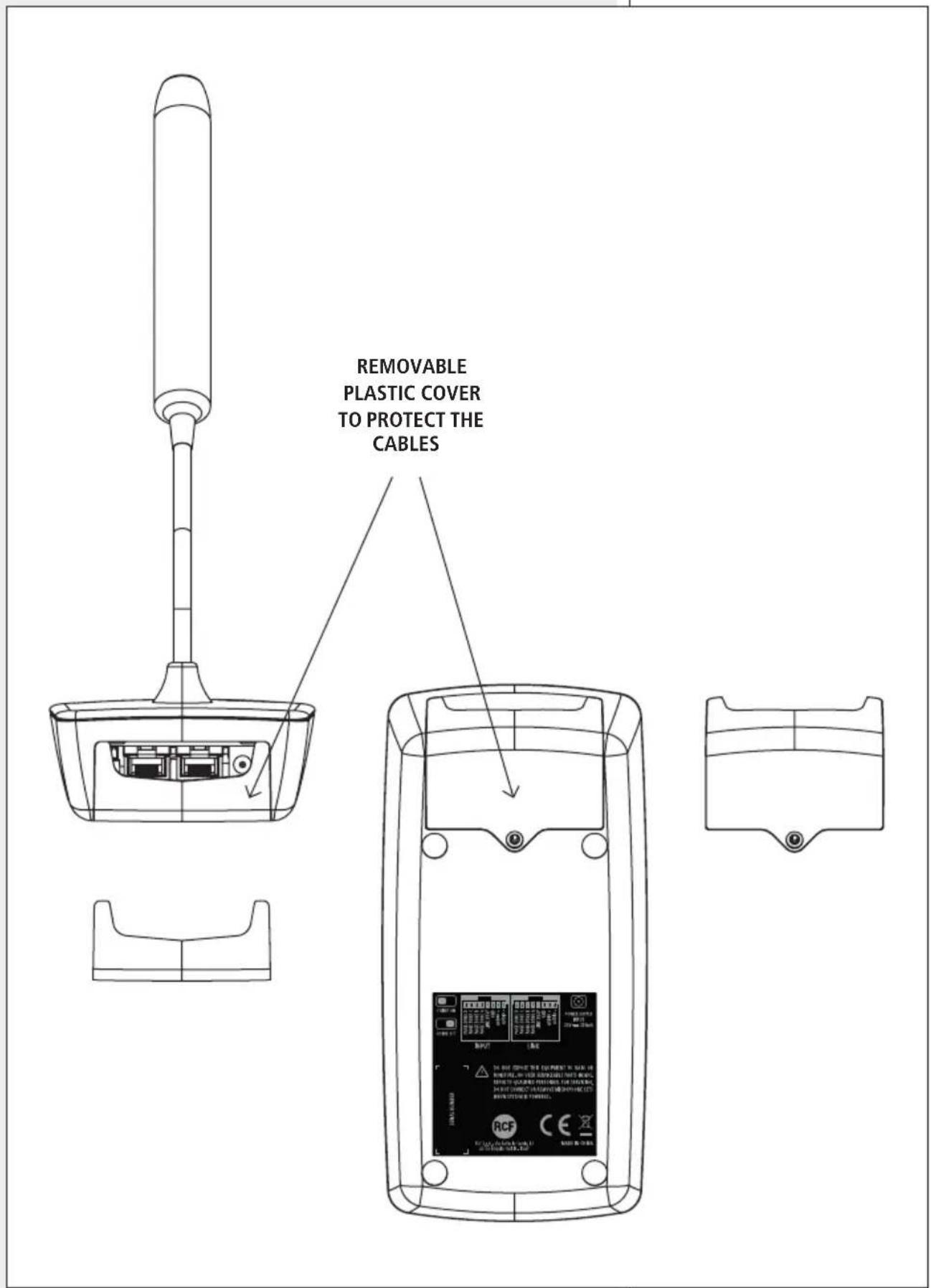
To access the rear connections, it is necessary to remove the cover on the bottom (by unscrewing the screw with a screwdriver).
Up to four BM 404 paging microphones can be connected in daisy-chain in the same line. Paging microphones are interlocked one another: the first that engages the line gets priority.
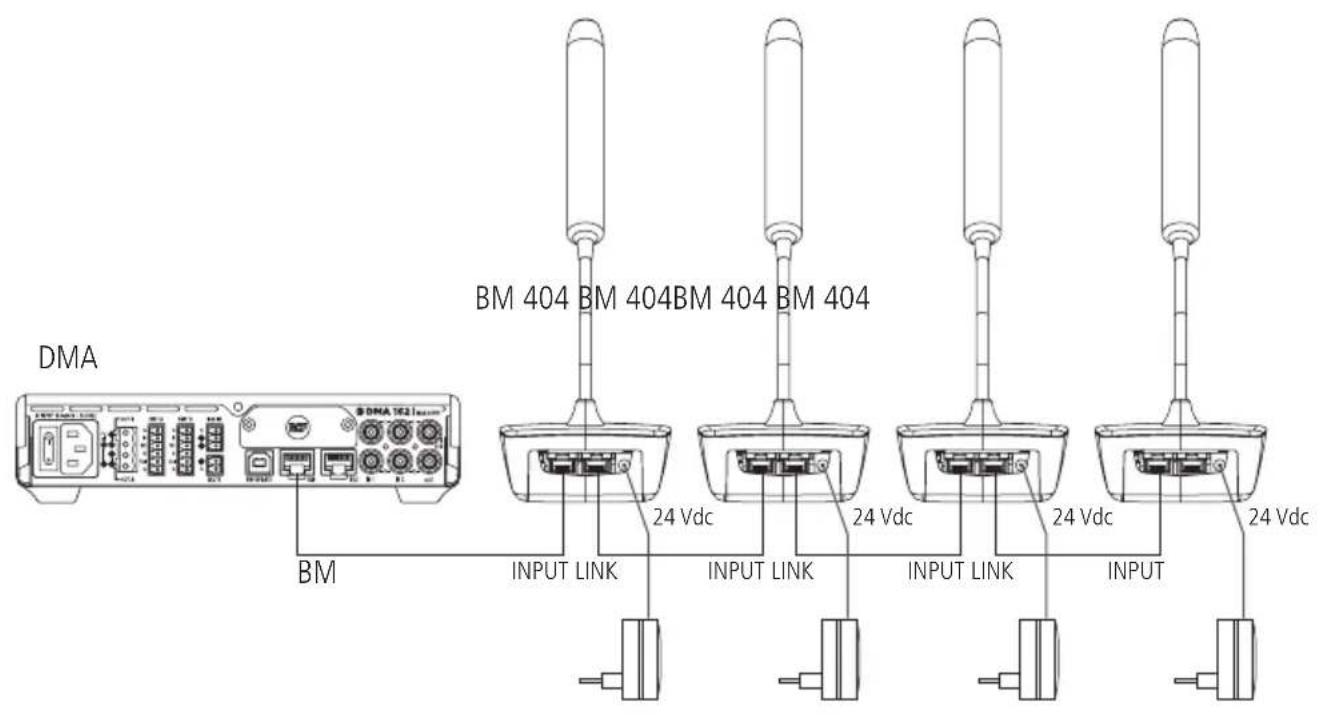
The maximum overall length of the line (from the DMA amplifier to the last BM 404 paging microphone) shall not exceed 100 meters / 109 yards.
NOTE: IF THE MAIN AMPUIFIER IS EITHER THE DMA 82 OR DMA 162 MODEL (BOTH HAVING TWO ZONES) AND SELECTIVE CALLS TO 4 ZONES ARE REQUIRED, IT IS NECESSARY TO ADD AT LEAST A DPA 162 AMPUIFIER, OF WHICH THE CHANNEL A IS ASSIGNED TO BUS 3 (CALLS TO ZONE 3) AND THE CHANNEL B TO BUS 4 (CALLS TO ZONE 4).

- Before turning the amplifiers on, connect all the BM 404 paging microphones and the line to the DMA amplifier.
- Power on (connect the adapters to the mains) the paging microphones and turn the amplifiers on.
-
Select the zones to be paged by pressing the A, B, C, D ① zone buttons. All the respective LEDs light up.
-
Press and hold the PTT 3 button to talk.
If the line has not been engaged by another paging microphone, the chime is played, then the microphone is activated.
If the line has already been engaged by another paging microphone (indicated by the PTT LED flashing after pressing the PTT button), it is momentary not possible to make announcements and you need to try again later.
- After finishing the announcement, release the PTT button.
CONSOLE
Type: desktop, preamplified, for paging
Operating with: DMA amplifiers
Call type: general or selective
Zone number: 4
LED indicators: yes
MIC. CAPSULE AND AUDIO
Type: electret
Directivity (polar pattern): hypercardioid
Sensitivity: -55 dB
Frequency response: 50 Hz ÷ 20 kHz (-3 dB)
Output impedance: 250 Ω
POWER REQUIREMENT
Operating voltage: 24 V dc
Current: 250 mA
CONNECTIONS
Connectors: RJ45
Cable type: FTP CAT 5
Paging mic. connections: daisy-chain (overall max. 100 metres / 109 yards)
Max. paging mic. number: 4
FUNCTIONALITIES
Priority (interlock): yes, got by the first BM 404 engaging the line
Chime tone generator: yes, switchable
Automatic gain control: yes
ACCESSORIES
Adapter: supplied
CAT5 connecting cable: included (5 m long)
PHYSICAL SPECIFICATIONS
Casing material: plastic
Colour: black (RAL 9005)
Net weight: 0.45 kg / 0.99 lbs
SHIPPING INFORMATION
Package dimensions: 150 mm (5.91"), 330 mm (12.99"), 130 mm (5.12")
Gross weight: 1.1 kg / 2.43 lbs
IMPORTANTE
Except possible errors and omissions.
RCF S.p.A. reserves the right to make modifications without prior notice.
www.rcf.it
RCF S.p.A. Italy

Brand : RCF
Model : BM 404
Category : Microphone