
HIVE Bones 3 - Headphones Niceboy - Free user manual and instructions
Find the device manual for free HIVE Bones 3 Niceboy in PDF.


| Product Type | Wireless Bone Conduction Headphones |
| Model | Niceboy HIVE Bones 3 |
| Bluetooth Version | 5.3 |
| Supported Bluetooth Profiles | A2DP, AVRCP, HSP, HFP |
| Supported Audio Codecs | AAC, SBC |
| Wireless Range | Up to 10 meters |
| Frequency Response | 20 Hz – 20 kHz |
| Sensitivity | 86 dB |
| Impedance | 8 Ω |
| Battery Capacity | 180 mAh Li-ion |
| Playback Time | Up to 10 hours (at 70% volume) |
| Charging Time | Approximately 2 hours |
| Charging Method | Magnetic USB cable (5V, 1A) |
| Waterproof Rating | IP68 |
| Built-in Memory | 16 GB |
| Supported Audio Formats | MP3, MP4, WMA, FLAC |
| Weight | 25 g |
| Special Modes | Gaming mode, Voice assistant, Memory card mode |
| Controls | Multifunction button, Volume up/down, Next/Previous track |
| Microphone | Built-in for calls |
| Safety | Do not expose to extreme temperatures or liquids; avoid high volumes to prevent hearing damage |
Frequently Asked Questions - HIVE Bones 3 Niceboy
User questions about HIVE Bones 3 Niceboy
0 question about this device. Answer the ones you know or ask your own.
Ask a new question about this device
Download the instructions for your Headphones in PDF format for free! Find your manual HIVE Bones 3 - Niceboy and take your electronic device back in hand. On this page are published all the documents necessary for the use of your device. HIVE Bones 3 by Niceboy.
USER MANUAL HIVE Bones 3 Niceboy
User Manual / Wireless Headphones

CZ
OBSAH BALENÍ
Sluchátka Niceboy HIVE Bones 3
Nabíjecí USB kabel
Špunty do uší
Návod k obsluze
SPRÁVNÉ NASAZENÍ SLUCHÁTEK
natural_image
Side profile illustration of a human head and ear with an earpin, no text or symbols presentPŘIPOJENÍ K BLUETOOTH
SPRÁVNE NASADENIE SLÚCHADIEL
natural_image
Side profile illustration of a human head and ear with an earpin, no text or symbols presentPRIPOJENIE K BLUETOOTH
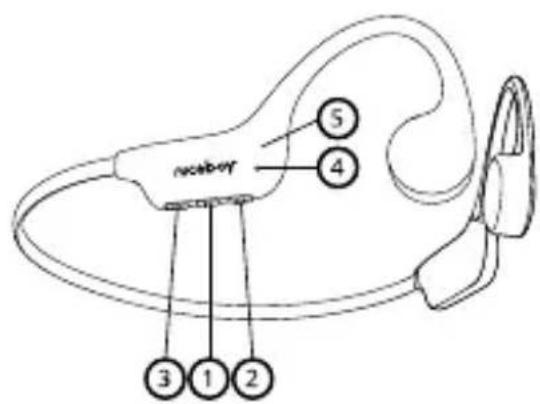
- Multifunction button
- Increase volume / Next song button
- Decrease volume / Previous song button
- Microphone
- LED indicator
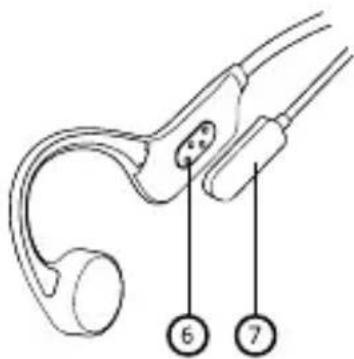
- Magnetic charging port
- Charging cable
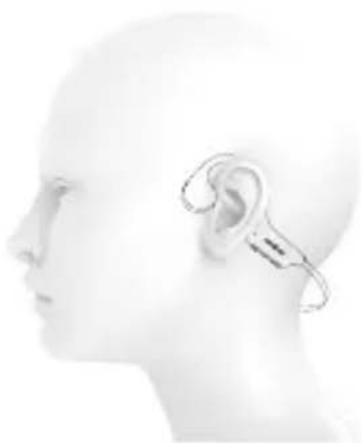
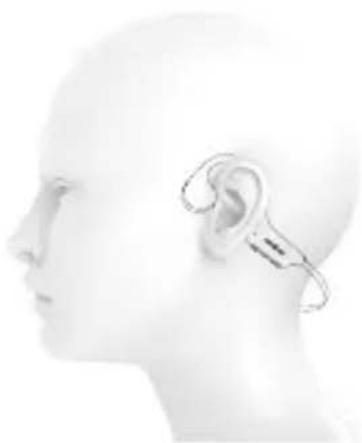
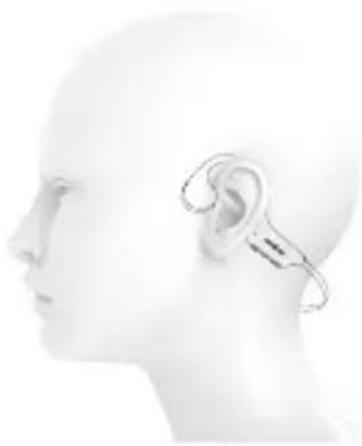
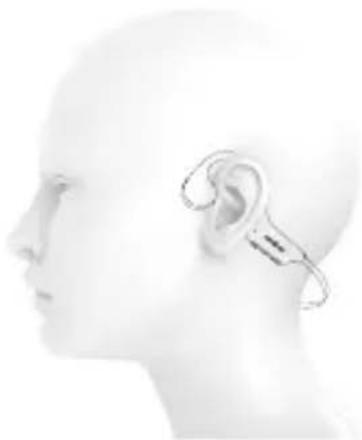
PUTTING THE EARBUDS ON PROPERLY
Put the earbuds on as indicated in the image. Wearing them incorrectly may result in poor playback quality.
natural_image
Side profile illustration of a human head with an ear and medical device (no text or symbols)CONNECTING TO BLUETOOTH
- To connect to a Bluetooth device for the first time, press and hold the multifunction button (1); the earbuds will turn on (a sound will play) and will automatically enter pairing mode. The LED indicator (5) will start flashing red-blue.
- Now, open the Bluetooth settings on your device and select Niceboy HIVE Bones 3 from the list of available devices.
- The earbuds will now connect to the device. Successful pairing is indicated by an audio signal and the LED indicator (6) will start flashing blue.
To reconnect to a previously paired device, simply turn on the earbuds by pressing the on button (1) for 3 seconds (a sound will play) and the earbuds will reconnect automatically.
BASIC CONTROLS
Pressing down the (1) button for 3 seconds turns the earbuds on / off.
Short-pressing the (2) or (3) buttons increases or decreases volume, respectively.
Short-pressing the multifunction button (1) starts / stops playback.
Double-pressing the multifunction button (1) switches between Bluetooth mode and memory card mode.
Double-pressing button (2) goes to the next song.
Double-pressing button (3) goes to the previous song.
Long-pressing button (2) activates voice assistants.
Long-pressing button (3) activates gaming mode.
PHONE CALLS
You can accept/end incoming calls by short-pressing the multifunction button (1). Long-pressing the multifunction button (1) for 3 seconds during an incoming call rejects the call.
VOICE ASSISTANTS
Voice assistants are turned on by long-pressing button (2) for 3 seconds.
GAMING MODE
To activate gaming mode with a short audio delay, long-press button (3). Long-pressing the button also deactivates the mode.
Note: Gaming mode has a higher power demand and thus results in the battery draining faster.
MEMORY CARD MODE
The earbuds have a built-in memory card with 16 GB of capacity. To upload files, connect the supplied USB power cable to a computer. This opens a folder of the memory device where you can upload audio files. To activate memory card mode, press the multifunction button (1) twice. Playback is controlled according to the BASIC CONTROLS section.
To return to Bluetooth mode, again double-press the multifunction button.
CHARGING
It is recommended that you fully charge the earbuds before using them for the first time to maximize battery life. A full charging of the earbuds takes approximately 2 hours.
Low battery power is indicated by an audio warning.
To charge the earbuds, plug the enclosed magnetic USB cable (8) into the charging port (6) on the earbuds and connect it to any charging adapter (voltage of 5 V and output current of at least 1 A) or to a USB port on a PC. The charging process is indicated by a red LED indicator (5); once the battery is fully charged, the indicator turns green.
Once the charging cable is connected, the earbuds turn off and will not connect to any device.
PARAMETERS
BT version: 5.3
Frequency band: 2.4 GHz
Radio frequency power: ≤ 2.5 mW
Supported BT profiles: A2DP, AVRCP, HSP, HFP
Supported BT codecs: AAC, SBC
Transmission range: 10 meters
Frequency range: 20 Hz-20 kHz
Sensitivity: 86 dB
Impedance: 8 Ω
Playback runtime: 10 hours (at 70% volume)
Charge time: 2 hours
Battery: 180 mAh Li-ion
Internal memory: 16 GB
Supported audio formats: mp3, mp4, wma, FLAC
Waterproofness: IP68
Weight: 25 g
SAFETY INFORMATION
Listening to music at very high volume can damage your hearing. Do not expose the device to fluids or humidity. Do not expose the device to extreme temperatures or try to disassemble it. Protect the device from sharp objects and falls from height. Batteries – improper handling (prolonged charging, short circuit, breakage by other objects, etc.) may result in fire, overheating or battery leakage.
The battery or accumulator that may be included with the product has a service life of six months, as it is a consumable.
Information on all frequency bands in which the radio equipment operates and intentionally transmits radio waves as well as the maximum radio frequency power transmitted in the frequency band in which the radio equipment is operated is included in the instructions and safety information.
The manual is available for download in electronic form at www.niceboy.eu in the support section. RTB Media s.r.o. hereby declares that radio device type Niceboy HIVE Bones 3 complies with Directives 2014/53/EU, 2014/30/EU, 2014/35/EU and 2011/65/EU. The full EU Declaration of Conformity is available at the following website:
https://niceboy.eu/cs/podpora/prohlaseni-o-shode-mM38CtmYvX693IHwvu4CWpk3vjGrvnC
INFORMATION FOR USERS ON DISPOSAL OF ELECTRICAL AND ELECTRONIC EQUIPMENT (HOUSEHOLDS)
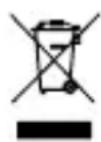
The above symbol on the product or accompanying documentation means that used up electrical or electronic products must not be disposed of as communal waste. To dispose of the product correctly, bring it to designated waste collection points, where it will be disposed of free of charge. Proper disposal of the product helps preserve valuable natural resources and prevent potential negative impact on the environment and human health caused by improper waste disposal. For more information, contact local authorities or the nearest waste collection point. Improper disposal of this type of waste may result in a fine pursuant to national legislation.
Information for Users on Disposal of Electrical and Electronic Equipment (Corporate Use) To properly dispose of electrical and electronic equipment for corporate use, contact the manufacturer or importer of the product. They will provide you information on disposal methods for the product and will inform you on who is obligated to fund the disposal of the electrical device based on the date the product was put on the market. Information on Disposal in Countries outside the European Union The above symbol only applies in EU countries. To properly dispose of electrical and electronic equipment, request more information from your local authority or the seller of the product.
DE
LIEFERUMFANG
Kopfhörer Niceboy HIVE Bones 3
USB-Ladekabel
Ohrstöpsel
Bedienungsanleitung
SICHERHEITSHINWEISE
PRODUKTBESCHREIBUNG
KORREKTES AUFSETZEN DER KOPFHÖRER
natural_image
Side profile illustration of a human head and ear with an earpin, no text or symbols presentA FÜLHALLGATÓ MEGFELELŐ BEHELYEZÉSE
natural_image
Side profile illustration of a human head and ear with an earband device (no text or symbols)BLUETOOTH-OS CSATLAKOZTATÁS
natural_image
Side profile illustration of a human head and ear with an earpin, no text or symbols presentPOVEZIVANJE NA BLUETOOTH
- Da biste se prvi put povezali s Bluetooth uređajem, pritisnite i držite višenamjenski gumb (1); slušalice će se uključiti (reproducira se zvuk) i automatski će ući u način uparivanja. LED indikator (5) počinje treperiti crvenom i plavom bojom.
- Sada otvorite Bluetooth postavke na svom uređaju i odaberite Niceboy HIVE Bones 3 s popisa dostupnih uređaja.
- Slušalice će se sada povezati s uređajem. Uspješno uparivanje označeno je zvučnim signalom, a LED indikator (6) počinje treperiti plavom bojom.
Za ponovno povezivanje s prethodno uparenim uređajem, jednostavno uključite slušalice pritiskom na gumb za uključivanje (1) na 3 sekunde (reproducira se zvuk) i slušalice će se automatski ponovno spojiti.
OSNOVNE KONTROLE

natural_image
Side profile illustration of a human head and ear with an earpin, no text or symbols presentPODŁACZANIE DO SIECI BLUETOOTH
PRAVILNA NAMESTITEV SLUŠALK
natural_image
Side profile illustration of a human head and ear with an earpin, no text or symbols presentPOVEZAVA BLUETOOTH
natural_image
Side profile illustration of a human head and ear with an earpin, no text or symbols presentCONECTAREA LA BLUETOOTH
natural_image
Side profile illustration of a human head with an ear and medical device (no text or symbols)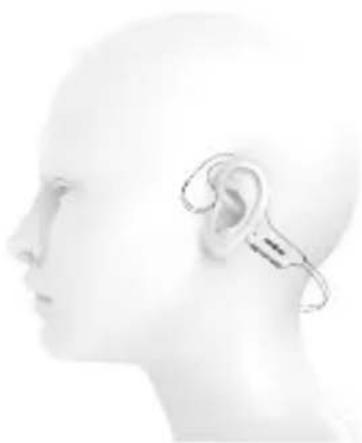
natural_image
Side profile illustration of a human head and ear with an earpin, no text or symbols presentСВЪРЗВАНЕ КЪМ BLUETOOTH
Praha 4, Czech Republic, ID: 294 16 876.
Made in China.
RoHS CE 📧 ✉

- User Manual / Wireless Headphones
- CZ
- OBSAH BALENÍ
- SPRÁVNÉ NASAZENÍ SLUCHÁTEK
- PŘIPOJENÍ K BLUETOOTH
- SPRÁVNE NASADENIE SLÚCHADIEL
- PRIPOJENIE K BLUETOOTH
- PUTTING THE EARBUDS ON PROPERLY
- CONNECTING TO BLUETOOTH
- BASIC CONTROLS
- PHONE CALLS
- VOICE ASSISTANTS
- GAMING MODE
- MEMORY CARD MODE
- CHARGING
- PARAMETERS
- SAFETY INFORMATION
- INFORMATION FOR USERS ON DISPOSAL OF ELECTRICAL AND ELECTRONIC EQUIPMENT (HOUSEHOLDS)
- DE
- LIEFERUMFANG
- PRODUKTBESCHREIBUNG
- KORREKTES AUFSETZEN DER KOPFHÖRER
- A FÜLHALLGATÓ MEGFELELŐ BEHELYEZÉSE
- BLUETOOTH-OS CSATLAKOZTATÁS
- POVEZIVANJE NA BLUETOOTH
- OSNOVNE KONTROLE
- PODŁACZANIE DO SIECI BLUETOOTH
- PRAVILNA NAMESTITEV SLUŠALK
- POVEZAVA BLUETOOTH
- CONECTAREA LA BLUETOOTH
- СВЪРЗВАНЕ КЪМ BLUETOOTH
Brand : Niceboy
Model : HIVE Bones 3
Category : Headphones