
ES-HFB8143WD-EE - Washing machine SHARP - Free user manual and instructions
Find the device manual for free ES-HFB8143WD-EE SHARP in PDF.


| Product Type | Washing Machine |
| Brand | Sharp |
| Model | ES-HFB8143WD-EE |
| Dimensions (H x W x D) | 845 x 597 x 557 mm |
| Power Supply | 220-240 V ~ 50 Hz |
| Power Consumption | 2200 W |
| Current | 10 A |
| Water Pressure Range | 0.1 - 1 MPa |
| Maximum Capacity (dry laundry) | 8 kg |
| Maximum Spin Speed | 1400 rpm |
| Number of Programmes | 15 |
| Half-Load Detection | Yes |
| Delay Timer | Yes (up to 24h, adjustable) |
| Child Lock | Yes |
| Anti-Allergic Function | Yes (additional hot rinse) |
| Easy Ironing Function | Yes (reduces creasing) |
| Pre-Wash Function | Yes |
| Extra Rinse Function | Yes |
| Rapid Wash Function | Yes (15 min programme) |
| Temperature Selection | Yes (adjustable from cold to 90°C) |
| Spin Speed Selection | Yes (adjustable from 0 to 1400 rpm) |
| Pump Filter Cleaning | Recommended every 2 months |
| Water Inlet Filter Cleaning | Recommended every 2 months |
| Detergent Drawer Cleaning | Recommended every 2 months |
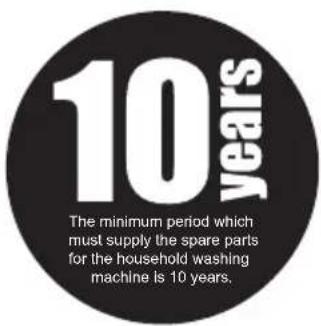
| Spare Parts Availability | Minimum 10 years |
| Safety Features | Overheat protection, child safety, flood protection |
Frequently Asked Questions - ES-HFB8143WD-EE SHARP
User questions about ES-HFB8143WD-EE SHARP
0 question about this device. Answer the ones you know or ask your own.
Ask a new question about this device
Download the instructions for your Washing machine in PDF format for free! Find your manual ES-HFB8143WD-EE - SHARP and take your electronic device back in hand. On this page are published all the documents necessary for the use of your device. ES-HFB8143WD-EE by SHARP.
USER MANUAL ES-HFB8143WD-EE SHARP
Thank you for choosing this product.
This User Manual contains important safety information and instructions on the operation and maintenance of your appliance.
Please take the time to read this User Manual before using your appliance and keep this book for future reference.
| Icon Type Meaning | |
 | WARNING Serious injury or death risk |
 | RISK OF ELECTRIC SHOCK Dangerous voltage risk |
 | FIRE Warning; Risk of fire / flammable materials |
 | CAUTION Injury or property damage risk |
 | IMPORTANT / NOTE Operating the system correctly |
CONTENTS
1.SAFETY INSTRUCTIONS .... 1
1.1 General Safety Warnings ....2
1.2 During Use 6
1.3 Packaging and Environment....7
1.4 Savings Information....7
2.TECHNICAL SPECIFICATIONS....8
2.1 General Appearance....8
2.2 Technical Specifications ....8
3.INSTALLATION....9
3.1 Removing the Transit Bolts....9
3.2 Adjusting the Feet / Adjusting Adjustable Stays....9
3.3 Electrical Connection....9
3.4 Water Inlet Hose Connection....10
3.5 Water Discharge Connection....11
4.CONTROL PANEL OVERVIEW....11
4.1 Detergent Drawer 11
4.2 Sections 12
4.3 Program Dial....12
4.4 Electronic Display....12
5.USING YOUR WASHING MACHINE....13
5.1 Preparing Your Laundry....13
5.2 Putting Laundry in the Machine....13
5.3 Adding Detergent to the Machine....14
5.4 Operating Your Machine....14
5.5 Selecting a Programme....14
5.6 Half-Load Detection System....15
5.7 Additional Functions ......15
5.8 Cancelling the Programme....18
5.9 Programme End 18
6.PROGRAMME TABLE....19
6.1 Important Informations....21
7.CLEANING AND MAINTENANCE 22
7.1 Warning 22
7.2 Water Inlet Filters 22
7.3 Pump Filter 23
7.4 Detergent Drawer 23
9.TROUBLESHOOTING....25
10.AUTOMATIC FAULT WARNINGS AND WHAT TO DO 26
1. SAFETY INSTRUCTIONS
| Operating voltage / frequency | (V/Hz) (220-240)V~/50Hz |
| Total current (A) 10 | |
| Water pressure (Mpa) Maximum | m 1 Mpa /Minimum 0. 1Mpa |
| Total power (W) 2200 | |
| Maximum washing capacity(dry laundry) (kg) | 8. 0 |
- Do not install your machine on a carpet or such grounds that would prevent the ventilation of its base.
- The appliance is not intended for use by people (including children) with reduced physical, sensory or mental capabilities, or lack of experience and knowledge unless they have been given supervision or instruction concerning use of the appliance by a person responsible for their safety.
• Children of less than 3 years should be kept away unless continuously supervised. - Call the nearest authorized service centre for a replacement if the power cord malfunctions.
- Use only the new water inlet hose coming with your machine when making water inlet connections to your machine. Never use old, used or damaged water inlet hoses.
- Children should not play with the appliance. Cleaning and user maintenance should not be made by children without supervision.
NOTE: For a softcopy of this user manual, please contact the following address: “washingmachine@standardtest.info”. In your e-mail, please provide the model name and serial number (20 digits) which you can find on the appliance door.
Read this user manual carefully.
Your machine is for domestic use only. Using it for commercial purposes will cause your warranty to be cancelled.
This manual has been prepared for more than one model therefore your appliance may not have some of the features described within. For this reason, it is important to pay particular attention to any figures whilst reading the operating manual.
1.1 General Safety Warnings
- The necessary ambient temperature for operation of your Washing Machine is 15-25 °C.
- Where the temperature is below 0 °C, hoses may split or the electronic card may not operate correctly.
- Please ensure that garments loaded into your Washing Machine are free from foreign objects such as nails, needles, lighters and coins.
- It is recommended that for your first wash, you select the 90° Cotton programme without laundry and half fill compartment II of the detergent drawer with a suitable detergent.
- Residue may build up on detergent and softeners exposed to air for a long period of time. Only put softener or detergent in the drawer at the beginning of each wash.
• Unplug your Washing Machine and switch off the
water supply if the Washing Machine is left unused for a long time. We also recommend that you leave the door open to prevent build up of humidity inside the Washing Machine.
- Some water may be left in your Washing Machine as a result of quality checks during production. This will not affect the operation of your Washing Machine.
- The packaging of the machine could be hazardous to children. Do not allow children to play with the packaging or small parts from the Washing Machine.
- Keep the packaging materials in a place where children cannot reach them, or dispose of them appropriately.
- Use pre-wash programs only for very dirty laundry. ⚠️Never open the detergent drawer while the machine is running.
- In the event of a breakdown, unplug the machine from the mains supply and turn the water supply off. Do not attempt to carry out any repairs. Always contact an authorised service agent.
- Do not exceed the maximum load for the washing programme you have chosen.
⚠️Never force the door open when your Washing Machine is running.
- Washing laundry containing flour may damage your machine.
- Please follow the manufacturers' instructions regarding the use of fabric conditioner or any similar products that you intend to use in your Washing Machine.
• Make sure that the door of your Washing Machine is not restricted and can be opened fully.
• Install your machine in a location that can be fully ventilated and preferably has constant air circulation.
Read these warnings. Follow the advice given to protect yourself and others from risks and fatal injuries.
RISK OF BURNS
⚠️Do not touch the drain hose or any discharged water while your Washing Machine is running. The high temperatures involved pose a burn risk.
RISK OF DEATH FROM ELECTRICAL CURRENT
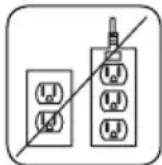
• Do not connect your Washing Machine to the mains
electricity supply using an extension lead.
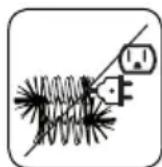
- Do not insert a damaged plug into a socket.
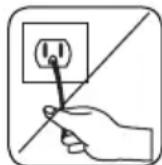
- Never remove the plug from the socket by pulling the cord. Always hold the plug.
- Never touch the power cord/plug with wet hands as this could cause a short circuit or electric shock.
- Do not touch your Washing Machine if your hands or feet are wet.
- A damaged power cord/plug can cause fire of give you an electric shock. When damaged it must be replaced, this should only be done by qualified personnel.
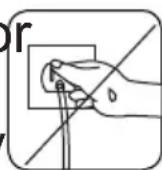
Risk of flooding
- Check the speed of water flow before placing the drain hose in a sink.
• Take necessary measures to prevent the hose from slipping.
• Water flow may dislodge the hose if it is not properly
secured. Make sure the plug in your sink does not block the plug hole.
⚠️Danger of Fire
- Do not store inflammable liquids near your machine.
- The sulphur content of paint removers may cause corrosion. Never use paint removing materials in your machine.
- Never use products that contain solvents in your machine.
- Please ensure that garments loaded into your Washing Machine are free from foreign objects such as nails, needles, lighters and coins.
Risk of fire and explosion
⚠️Risk of falling and injury
- Do not climb on your Washing Machine.
• Make sure hoses and cables do not cause a trip hazard. - Do not turn your Washing Machine upside down or on its side.
- Do not lift your Washing Machine using the door or detergent drawer.
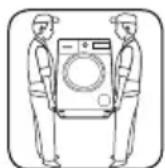
⚠️The machine must be carried by at least 2 people.
! Child safety
- Do not leave children unattended near the machine. Children might lock themselves in the machine resulting in risk of death.
- Do not allow children to touch the glass door during operation. The surface becomes extremely hot and may cause damage to skin.
- Keep packaging material away from children. - Poisoning and irritation may occur if detergent
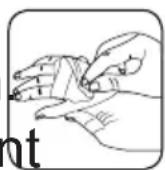
and cleaning materials are consumed or come into contact with the skin and eyes. Keep cleaning materials out of the reach of children.
1.2 During Use
- Keep pets away from your machine.
- Please check the packaging of your machine before installation and the outer surface of the machine once the packaging has been removed. Do not operate the machine if it appears damaged or if the packaging has been opened.
- Your machine must only be installed by an authorised service agent. Installation by anyone other than an authorised agent may cause your warranty to be void.
- This appliance can be used by children aged 8 years and above and persons with reduced physical, sensory or mental capabilities or lack of experience and knowledge if they have been given supervision or instruction concerning use of the appliance in a safe way and understand the hazards involved. Children shall not play with the appliance. Cleaning and user maintenance shall not be done by children without supervision.
- Only use your machine for laundry that is labelled as suitable for washing by the manufacturer.
- Before operating the washing machine, remove the 4 transit bolts and rubber spacers from the rear of the machine. If the bolts are not removed they may cause heavy vibration, noise and malfunction of the machine and cause the guarantee to be void.
- Your warranty does not cover damage caused by external factors such as fire, flooding and other
sources of damage.
- Please do not throw away this user manual; keep it for future reference and pass it onto the next owner.

NOTE: Specifications for the machine may vary pending on the product purchased.
1.3 Packaging and Environment
Removal of packaging materials
Packaging materials protect your machine from any damage that might occur during transportation. The packaging materials are environmentally friendly as they are recyclable. Use of recycled material reduces raw material consumption and decreases waste production.
1.4 Savings Information
Some important information to get the most efficient use out of your machine:
- Do not exceed the maximum load for the washing programme you have chosen. This will allow your machine to run in energy saving mode.
- Do not use the pre-wash feature for lightly soiled laundry. This will help you save on the amount of electricity and water consumed.
CE Declaration of conformity
We declare that our products meet the applicable European Directives, Decisions and Regulations and the requirements listed in the standards referenced.
Disposal of your old machine
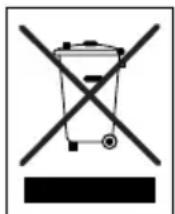
The symbol on the product or on its packaging indicates that this product may not be treated as household waste. Instead it shall be handed over to the applicable collection point for the recycling of electrical and electronic equipment. By ensuring this product is disposed of correctly, you will help prevent potential negative consequences for the environment and human health, which could otherwise be caused by inappropriate waste handling of this product. For more detailed information about recycling of this product,
please contact your local city office, your household waste disposal service or the shop where you purchased the product.
- TECHNICAL SPECIFICATIONS
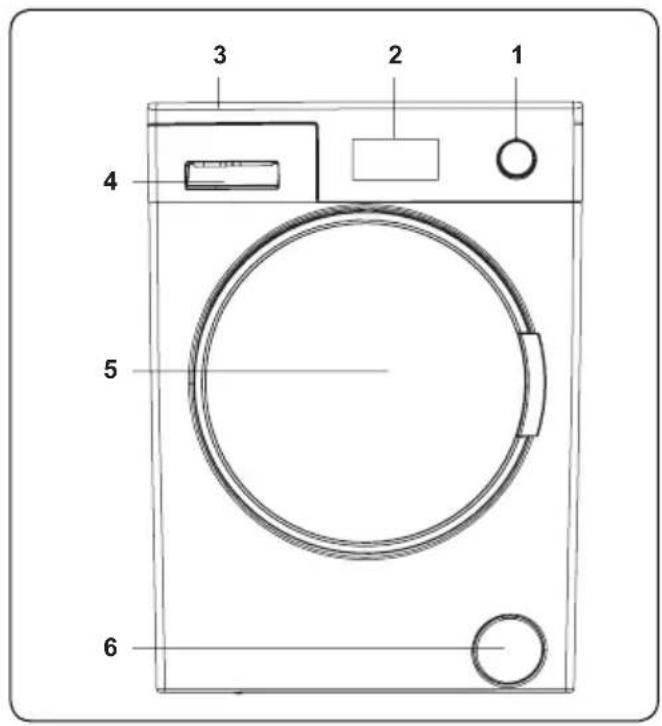
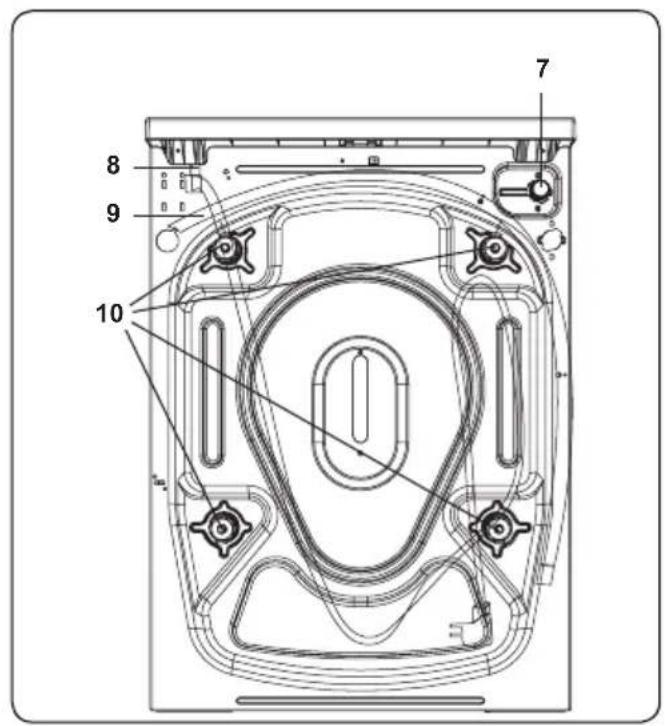
2.1 General Appearance
- Programme Dial
- Electronic Display
- Upper Tray
- Detergent Drawer
- Drum
- Pump Filter Cover
- Water Inlet Valve
- Power Cable
- Discharging Hose
- Transit Bolts
2.2 Technical Specifications
| Operating voltage / frequency (V/Hz) | (220-240)V~/50Hz |
| Total current (A) | 10 |
| Water pressure (Mpa) | Maximum: 1 MpaMinimum : 0.1 Mpa |
| Total power (W) | 2200 |
| Maximum dry laundry capacity (kg) | 8 |
| Spinning revolution (rev / min) | 1400 |
| Programme number | 15 |
| Dimensions (mm) | |
| Height | 845 |
| Width | 597 |
| Depth | 557 |
3. INSTALLATION
3.1 Removing the Transit Bolts
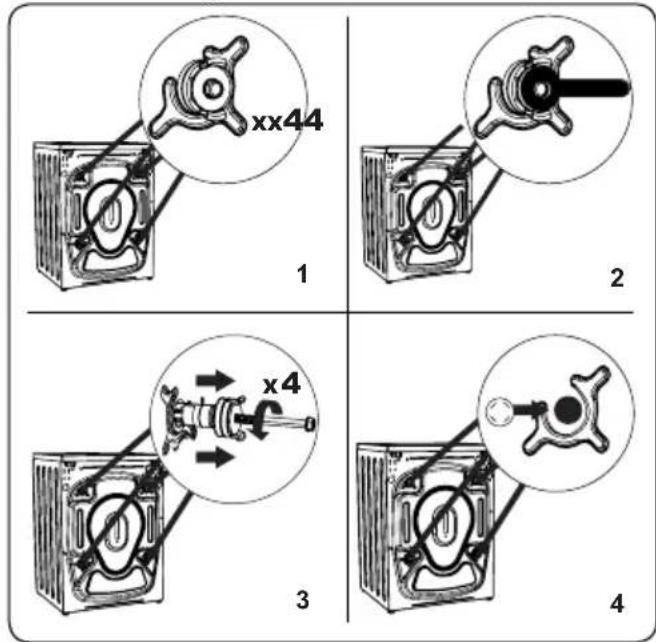
- Before operating the washing machine, remove the 4 transit bolts and rubber spacers from the rear of the machine. If the bolts are not removed, they may cause heavy vibration, noise and malfunction of the machine and void the warranty.
- Loosen the transit bolts by turning them anticlockwise with an appropriate spanner.
- Remove the transit bolts with a straight pull.
- Fit the plastic blanking caps supplied in the accessories bag into the gaps left by the removal of the transit bolts. The transit bolts should be stored for future use.
NOTE: Remove the transit bolts before using the machine for the first time. Faults occurring due to the machine being operated with transit bolts fitted are out of the scope of the warranty.
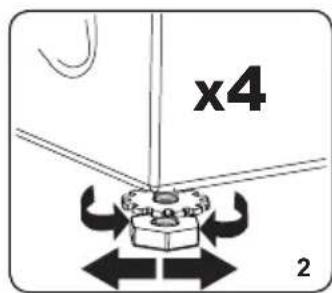
3.2 Adjusting the Feet / Adjusting Adjustable Stays
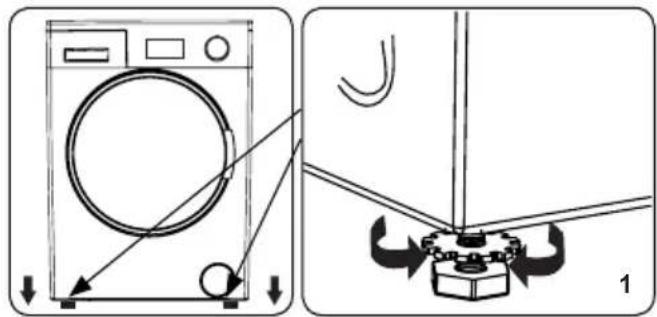
- Do not install your machine on a surface (such as carpet) that would prevent ventilation at the base.
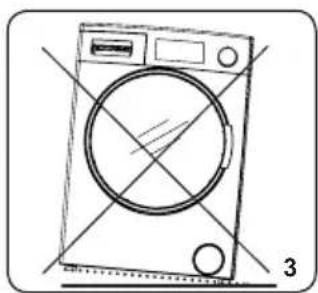
• To ensure silent and vibration-free operation of your machine, install it on a firm surface.
• You can level your machine using the adjustable feet.
- Loosen the plastic locking nut.
natural_image
Line drawing of a washing machine with circular vent and side buttons, no text or symbols present- To increase the height of the machine, turn the feet clockwise. To decrease the height of the machine, turn the feet anticlockwise.
- Once the machine is level, tighten the locking nuts by turning them clockwise.
- Never insert cardboard, wood or other similar materials under the machine to level it.
- When cleaning the ground on which the machine is located, take care not to disturb the level of the machine.
3.3 Electrical Connection
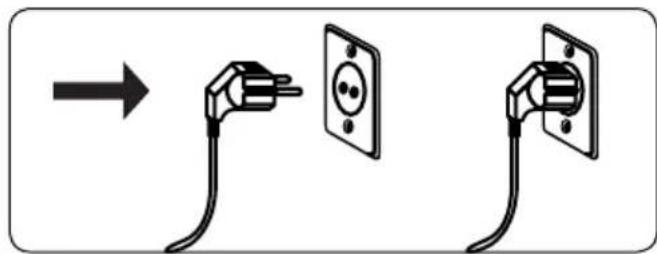
- Your Washing Machine requires a 220-240V, 50Hz mains supply.
- The mains cord of your washing machine is equipped with an earthed plug. This plug should always be inserted to an earthed socket of 10 amps.
- If you do not have a suitable socket and fuse conforming with this, please ensure the work is carried out by a qualified electrician.
• We do not take responsibility for damage that occurs due to the use of ungrounded equipment.

NOTE:
Operating your machine with low voltage will cause the life cycle of your machine to be reduced and its performance to be restricted.
3.4 Water Inlet Hose Connection
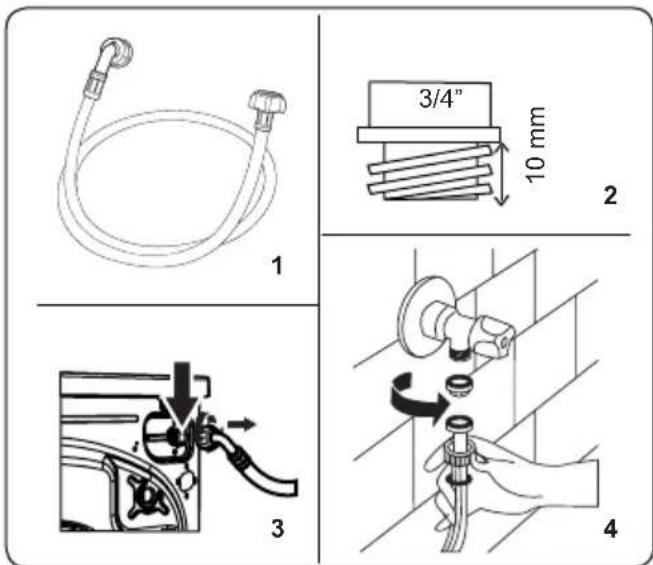
- Your machine may have either a single water inlet connection (cold) or double water inlet connection (hot and cold) depending on the machine specifications. The white capped hose
should be connected to cold water inlet and red capped hose to the hot water inlet (if applicable).
- To prevent water leaks at the joints, either 1 or 2 nuts (depending on your machine's specifications) are supplied in the packaging with the hose. Fit these nuts to the end(s) of the water inlet hose that connect to the water supply.
-
Connect new water inlet hoses to a 34 ", threaded tap.
-
Connect the white capped end of the water inlet hose to the white water inlet valve on the rear side of the machine and the red capped end of the hose to the red water inlet valve (if applicable).
- Hand tighten the connections. If in any doubt, consult a qualified plumber.
- Water flow with pressure of 0.1-1 Mpa will allow your machine to operate at optimum efficiency (pressure of 0.1 Mpa means that more than 8 litres of water per minute will flow through a fully opened tap).
- Once you have made all of the connections, carefully turn the water supply on and check for leaks.
- Ensure that the new water inlet hoses are not trapped, kinked, twisted, folded or crushed.
- If your machine has a hot water inlet connection, the temperature of the hot water supply should not be higher than 70°C.

NOTE:
Your Washing Machine must only be connected to your water supply using the supplied new fill hose. Old hoses must not be reused.
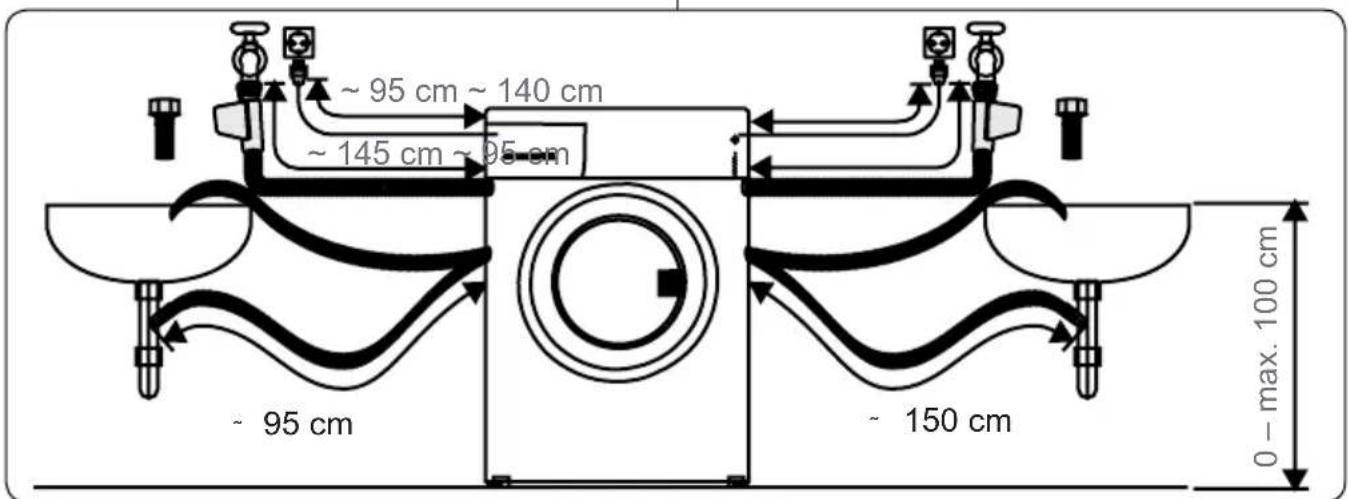
3.5 Water Discharge Connection
natural_image
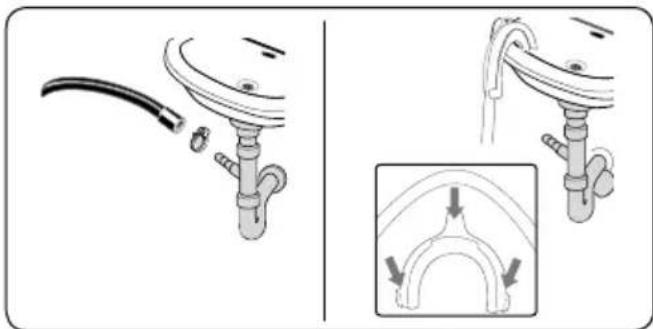
Diagram showing a pipe fitting with a cable and a close-up of the internal structure (no text or symbols)- Connect the water drain hose to a standpipe or to the outlet elbow of a household sink, using additional equipment.
- Never attempt to extend the water drain hose.
- Do not put the water drain hose from your machine into a container, bucket or bathtub.
• Make sure that the water drain hose is not bent, buckled, crushed or extended. - The water drain hose must be installed at a maximum height of 100 cm from the ground.
4. CONTROL PANEL OVERVIEW
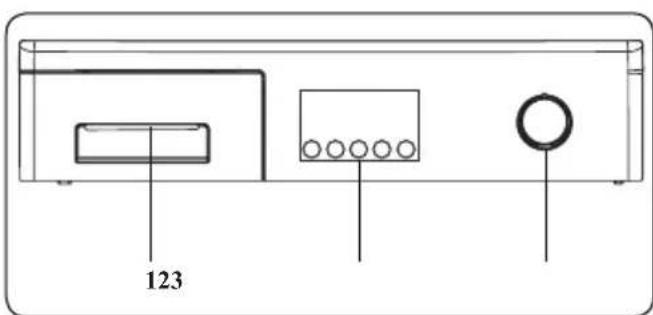
- Detergent Drawer
- Electronic Display and Additional Functions
- Programme Dial
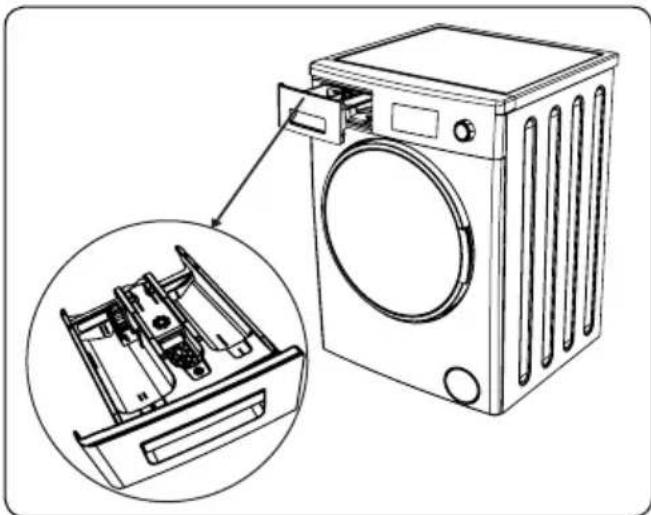
4.1 Detergent Drawer
natural_image
Line drawing of a washing machine with an inset showing internal components (no text or symbols)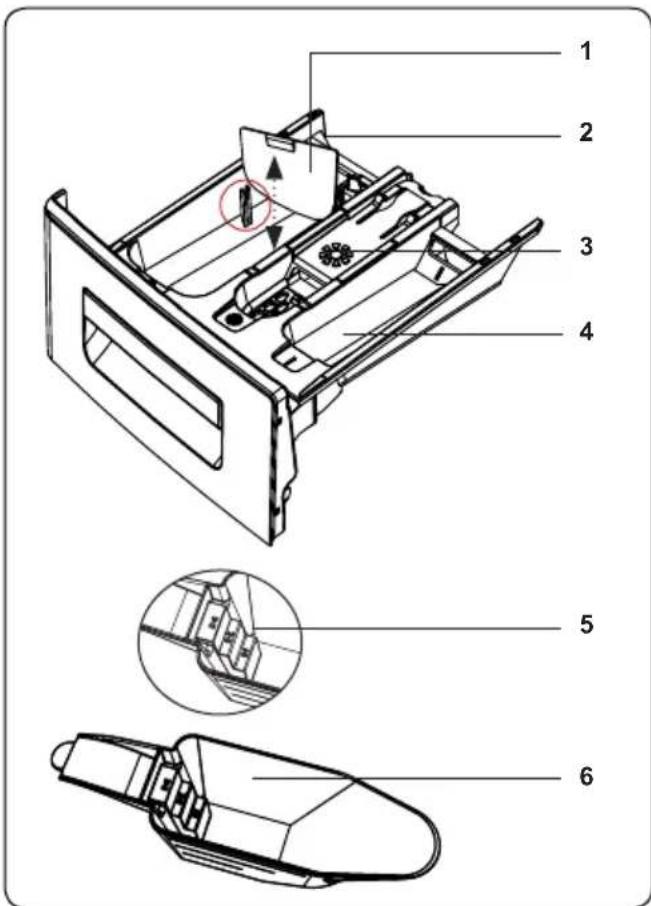
- Liquid Detergent Attachments
- Main Wash Detergent Compartment
- Softener Compartment
- Pre-Wash Detergent Compartment
- Powder Detergent Levels
- Powder Detergent Scoop (*)
(*) Specifications may vary depending on the machine purchased.
4.2 Sections
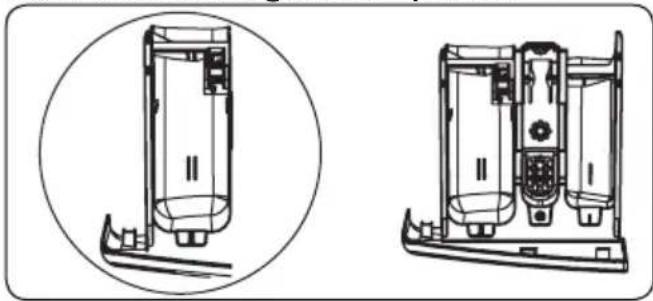
Main wash detergent compartment:
natural_image
Technical line drawing of a device with two views: top shows internal components, bottom shows internal compartments (no text or symbols)This compartment is for liquid or powder detergents or limescale remover. The fluid detergent level plate will be supplied inside your machine. (*)
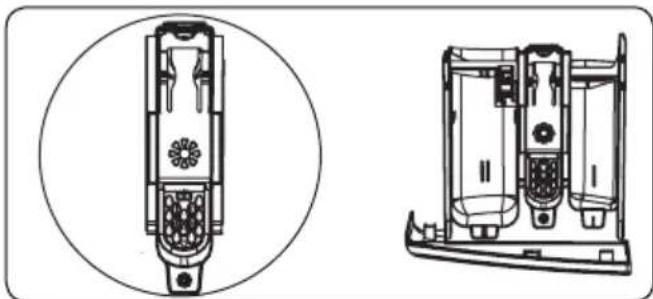
Fabric conditioner, starch, detergent compartment:
natural_image
Technical line drawing of a dual-chamber device with internal components and mounting base (no text or symbols)This compartment is for softeners, conditioners or starch. Follow the instructions on the packaging. If softeners leave residue after use, try diluting them or using a liquid softener.
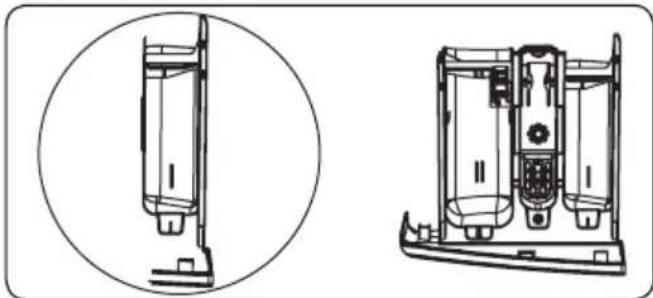
Pre-wash detergent compartment:
natural_image
Technical line drawing of a device with two views: top shows internal components, bottom shows internal structure (no text or symbols)This compartment should be used only when the pre-wash feature is selected. We recommend that the pre-wash feature is used only for very dirty laundry.
(*) Specifications may vary depending on the machine purchased.
4.3 Program Dial
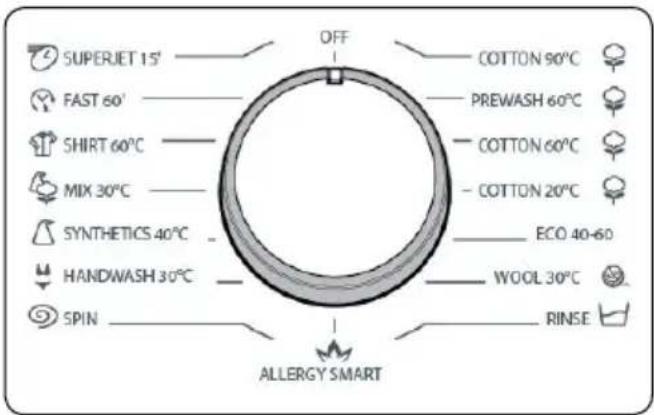
- To select the desired programme, turn the programme dial either clockwise or anti-clockwise until the marker on the programme dial points to the chosen programme.
• Make sure that the programme dial is set exactly to the programme you want.
4.4 Electronic Display
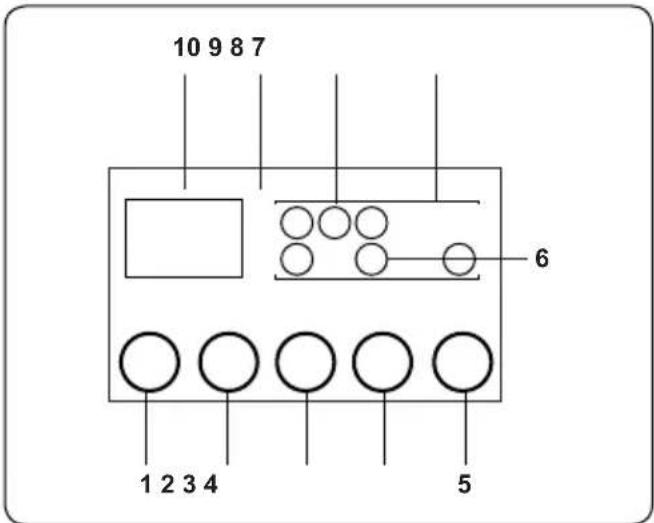
- Water Temperature Adjustment Button
- RPM Speed Adjustment Button
- Delayed Start Additional Function
- Additional Function Button
- Start/Pause Button
- Additional Function Symbol
- Function Display
- Wash Level Display
- Electronic Display
- Digital Display
The display panel shows the washing delay timer (if set), temperature selection, any additional functions you have selected and the current stage of the programme you are running on your machine (prewash/wash, rinsing, spinning).
The display panel shows "End" when the selected programme is complete. The display panel also indicates if a fault has occurred with your machine.
5. USING YOUR WASHING MACHINE
5.1 Preparing Your Laundry
-
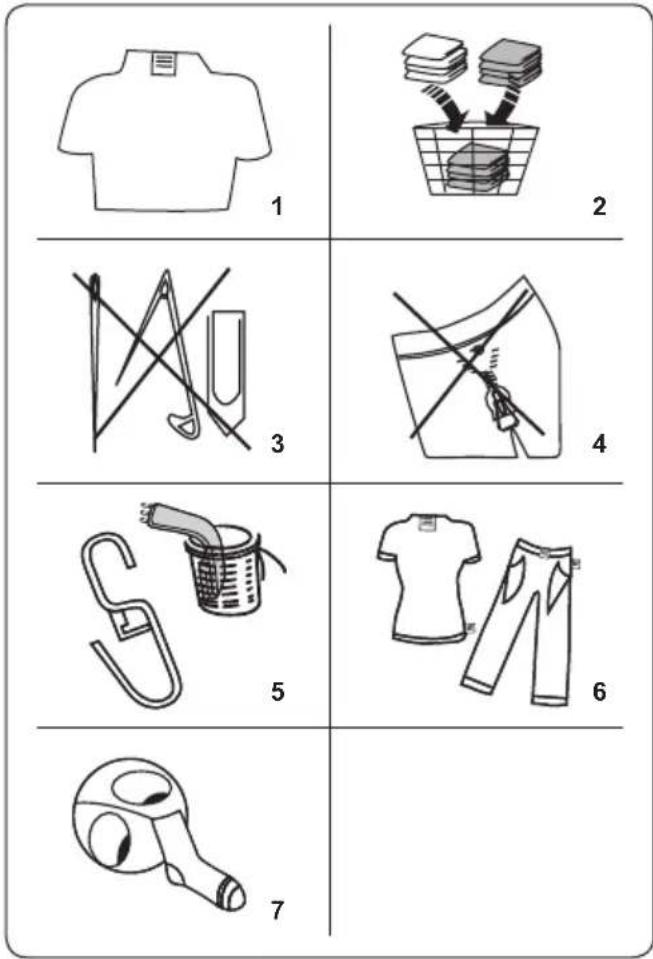
Follow the instructions given in the care labels on the clothing.
-
Separate your laundry according to type (cotton, synthetic, sensitive, wool etc.), washing temperature (cold, 30°, 40°, 60°, 90°) and the degree of dirtiness (slightly stained, stained, highly stained).
- Never wash coloured and white laundry together.
- Dark textiles may contain excess dye and should be washed separately several times.
- Ensure that there are no metallic materials on your laundry or in the pockets; if so, remove them.
CAUTION: Any malfunctions
which occur due to foreign materials damaging your machine are not covered by the warranty.
- Close zips and fasten any hooks and eyes.
- Remove the metallic or plastic hooks of curtains or place them in a washing net or bag.
- Reverse textiles such as pants, knitwear, t-shirts and sweat shirts.
- Wash socks, handkerchiefs and other small items in a washing net.
 Can bebleached Can bebleached | 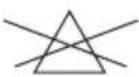 Do not bleach Do not bleach | 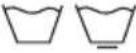 Normal washing Normal washing |
 Maximum ironing temperature 150°C Maximum ironing temperature 150°C |  Maximum ironing temperature 200°C Maximum ironing temperature 200°C | 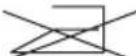 Do not iron Do not iron |
 Can be dry cleaned Can be dry cleaned | 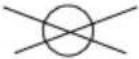 No dry cleaning No dry cleaning |  Dry flat Dry flat |
 Drip dry Drip dry |  Hang to dry Hang to dry | 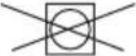 Do not tumble dry Do not tumble dry |
 Dry cleaning in gas oil, pure alcohol and R113 is allowed Dry cleaning in gas oil, pure alcohol and R113 is allowed |  Perchloroethylene R11, R13, Petroleum Perchloroethylene R11, R13, Petroleum |  Perchlorinetyhlene R11, R113, Gas oil Perchlorinetyhlene R11, R113, Gas oil |
5.2 Putting Laundry in the Machine
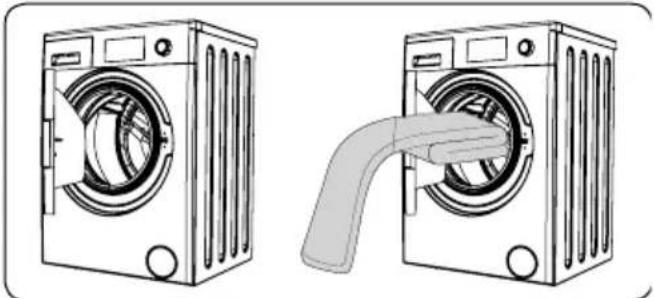
natural_image
Illustration of two washing machines side by side, one with a handle and the other with a handle (no text or symbols)- Open the door of your machine.
- Spread your laundry evenly in the
machine.

NOTE:
Take care not to exceed the maximum load of the drum as this will give poor wash results and cause creasing. Refer to the washing programme tables for information on load capacities.
The following table shows approximate weights of typical laundry items:
| LAUNDRY TYPE WEIGHT (gr) | |
| Towel 200 | |
| Linen 500 | |
| Bathrobe 1200 | |
| Quilt cover 700 | |
| Pillow slip 200 | |
| Underwear 100 | |
| Tablecloth 250 | |
- Load each item of laundry separately.
- Check that no items of laundry are trapped between the rubber seal and the door.
• Gently push the door until it clicks shut.
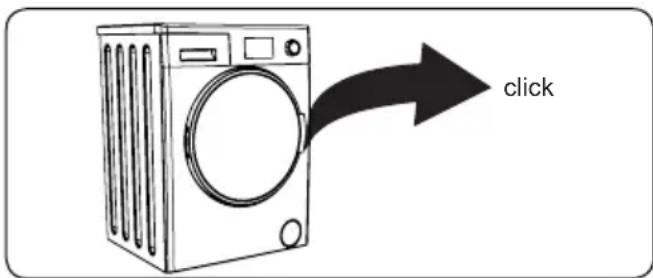
• Make sure the door is fully closed, otherwise the programme will not start.
5.3 Adding Detergent to the Machine
The amount of detergent you will need to put in your machine will depend on the following criteria:
- If your clothes are only slightly soiled, do not pre-wash. Put a small amount of detergent (as specified by the manufacturer) into compartment II of the detergent drawer.
- If your clothes are excessively soiled, select a programme with pre-wash and put 14 of the detergent to be used into compartment I of the detergent drawer and the rest in compartment II.
• Use detergents produced for automatic
washing machines. Follow the manufacturer's instructions on the amount of detergent to use.
- In areas of hard water, more detergent will be required.
- The amount of the detergent required will increase with higher washing loads.
- Put softener in the middle compartment of the detergent drawer. Do not exceed the MAX level.
- Thick softeners may cause clogging of the drawer and should be diluted.
- It is possible to use fluid detergents in all programmes without a pre-wash. To do this, slide the fluid detergent level plate (*) into the guides in compartment II of the detergent drawer. Use the lines on the plate as a guide to fill the drawer to the required level.
(*) Specifications may vary depending on the machine purchased.
5.4 Operating Your Machine
natural_image
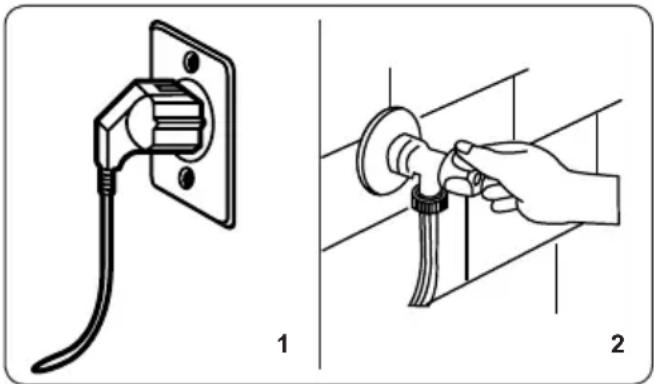
Illustration of two different electrical installation methods: one with a plug, the other with a hand holding a screwdriver (no text or symbols present)- Plug your machine in to the mains supply.
- Turn on the water supply.
- Open the machine door.
• Evenly spread your laundry in the machine.
• Gently push the door until it clicks shut.
5.5 Selecting a Programme
Use the programme tables to select the most appropriate programme for your laundry.
5.6 Half-Load Detection System
Your machine features a half-load detection system.
If you put less than half the maximum load of laundry into your machine it will automatically set the half-load function, regardless of the programme you selected. This means that the selected programme will take less time to complete and will use less water and energy.
(*) Model Dependant
5.7 Additional Functions
natural_image
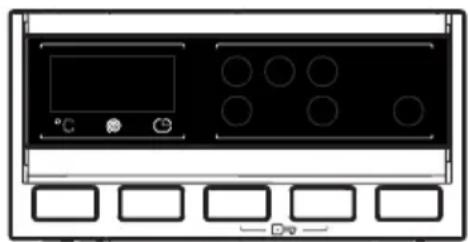
Front view of a black electronic device with indicator lights and circular components, mounted on a white panel with six blank control buttons below (no text or symbols)Before starting a programme, you can select an additional function.
- Press the button on the Control Panel below the symbol of the additional function you wish to select.
- If the symbol of the additional function flashes continuously, the function has been activated.
- If the symbol of the additional function blinks, the function has not been selected.
Reason for non-activation:
- The additional function is not compatible with the selected washing programme.
- Your machine has progressed too far into the programme for the additional function to be possible.
- The additional function you have chosen is not compatible with another additional function you have already selected.
1. Temperature Selection
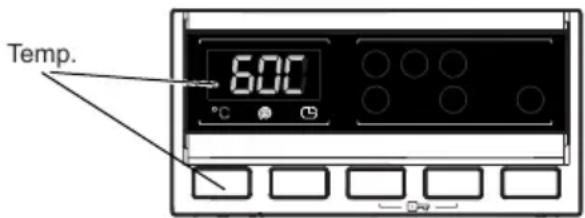
Use the washing water temperature adjustment button to alter the automatically programmed washing water temperature. When you select a programme the maximum temperature for that programme is automatically selected. To adjust the temperature, press the water temperature adjustment button until the desired temperature is displayed on the digital display.
You can gradually decrease the washing water temperature between the maximum washing water temperature of the selected programme and cold washing (--) selections by pressing the temperature adjustment button.
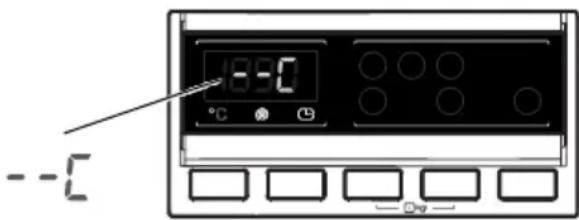
If you have skipped the washing water temperature you wanted, keep pressing the washing water temperature adjustment button until the desired temperature is displayed again.
2. Spin Speed Selection
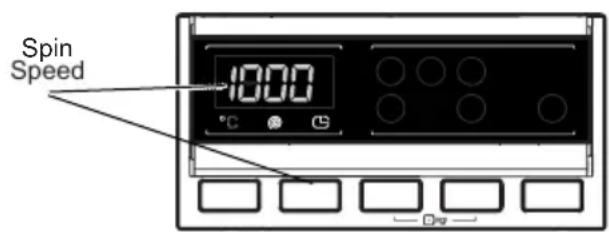
When you select a programme, the maximum spin speed is automatically selected.
To adjust the spin speed between the
maximum spin speed and the cancel spinning option (--), press the Spin speed button until the desired speed is displayed. If you have skipped the spin speed you want to set, keep pressing the spin speed adjustment button until the desired spin speed is displayed again.
3. Delay Timer
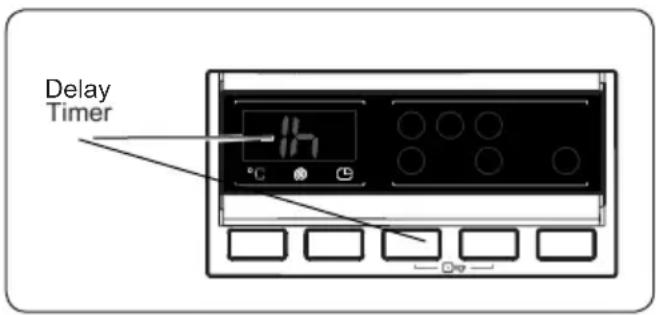
- Press the Delay button once.
• “1 h” will appear on the display.
• The symbol will flash on the electronic display. - Press the Delay button until the desired delayed time appears on the display.
- If you have skipped the delay time you wanted to set, keep pressing the Delay button until the desired delay time is displayed again.
- For the delay timer function to work, you must press Start/Pause button.
- To activate the time delay, press "Start/Pause" button.
- To cancel the time delay once it has been set, press the Delay button once. The Symbol will no longer flash on the electronic display.
- In order to add/remove laundry while delay timer function is working, you must press Start/Pause button. After adding/removing laundry, you must press Start/Pause button again to activate delay timer function.
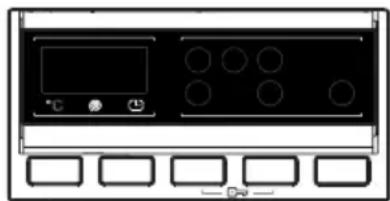
4. Anti- Allergic(\*)
Auxiliary function button 4 Anti-allergic
natural_image
Front panel of a control room with buttons and display (no text or symbols visible)You can add an additional rinse operation to your laundry using this additional function.
Your machine will carry out all rinsing steps with hot water. We recommend this setting for laundry worn on delicate skin, baby clothes and underwear.
To select this function, press the Antiallergic button when the 📄 symbol is displayed.
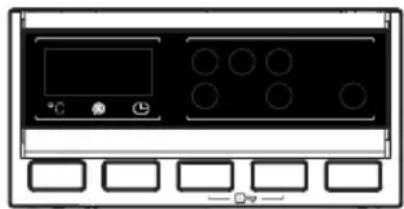
5. Easy Ironing(\*)
Auxiliary function button 4 Easy ironing
natural_image
Front view of a control panel with buttons and display (no text or symbols visible)Using this function will result in your laundry being less wrinkled at the end of the selected washing programme.
To select this function, press the Easy ironing button when the 🔊 symbol is displayed.
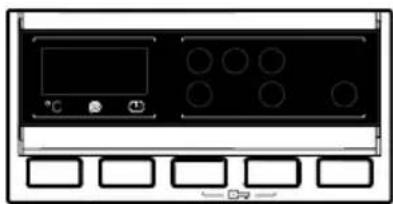
6. Pre-Wash(\*)
Auxiliary function button 4 Pre-wash
natural_image
Front view of a black appliance control panel with buttons and display (no text or symbols visible)This additional function allows you to give heavily soiled laundry a pre-wash before the main washing programme takes place. When using this function, put detergent in front washing compartment of the detergent drawer.
To select this function, press the Pre-wash button when the symbol is displayed.
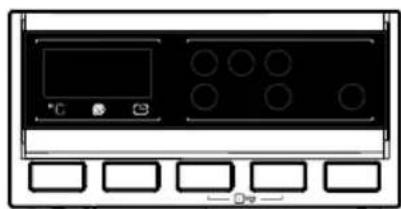
7. Extra Rinse(\*)
Auxiliary function button 4 Extra rinse
natural_image
Front view of a black electronic device with control panel and buttons (no text or symbols visible)You can add an additional rinse operation to the end of the selected wash programme using this additional function.
To select this function, press the Extra rinse button when the 📋 symbol is displayed.
8. Rapid Wash(\*)
Auxiliary function button 4 Rapid wash
natural_image
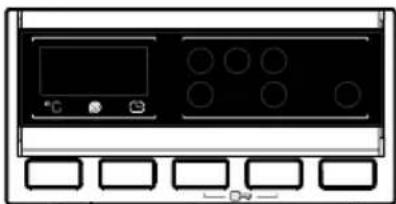
Front panel of a control room with buttons and display (no text or symbols visible)You can wash your laundry in a shorter time, using less energy and water by selecting this additional function.
We recommend that you only use this option if you are washing less than half the maximum dry load for the selected programme.
To select this function, press the Rapid wash button when the symbol is
displayed.
NOTE: If you put less than half the maximum load of laundry into your machine the half-load function will be automatically set, regardless of the programme you selected. This means that the selected programme will take less time to complete and will use less water and energy. When your machine detects half load, the symbol is displayed automatically.
(*) Model Dependant
9. Start/Pause Button
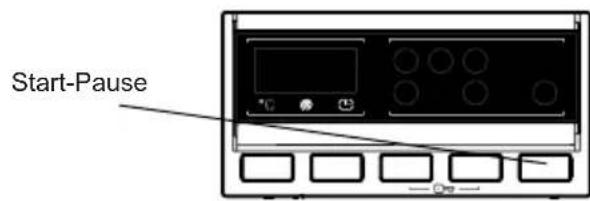
To start the selected programme, press the Start/Pause button.
If you switch your machine to standby mode, the Start/Pause indicator on the electronic display will blink.
10. Child Lock
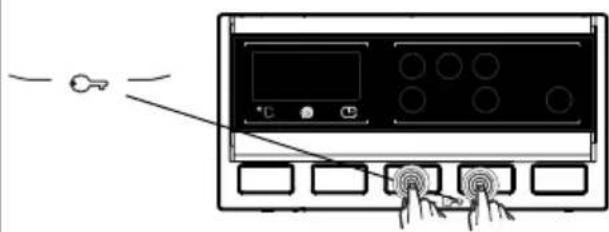
The Child Lock function allows you to lock the buttons so that the wash cycle you have chosen cannot be changed unintentionally.
To activate child lock, press and hold button 3 and 4 simultaneously for at least 3 seconds. "CL" will flash on the electronic display for 2 seconds when the child lock is activated.
If any button is pressed or selected programme is changed by the programme dial while the child lock is active, the "CL" symbol will flash on the electronic display for 2 seconds.
If the child lock function is active and a programme is running, when the programme dial is turned to the CANCEL position and another programme is selected the previously selected programme continues from where it was left.
To deactivate the child lock, press and hold button 3 and 4 simultaneously for at least 3 seconds until the "CL" symbol on the electronic display disappears.
5.8 Cancelling the Programme
To cancel a running programme at any time:
- Turn the programme dial to the "STOP" position.
- Your machine will stop the washing operation and the programme will be cancelled.
- Turn the programme dial to any other programme to drain the machine.
- Your machine will perform the necessary draining operation and cancel the programme.
You can now select and run a new programme.
5.9 Programme End
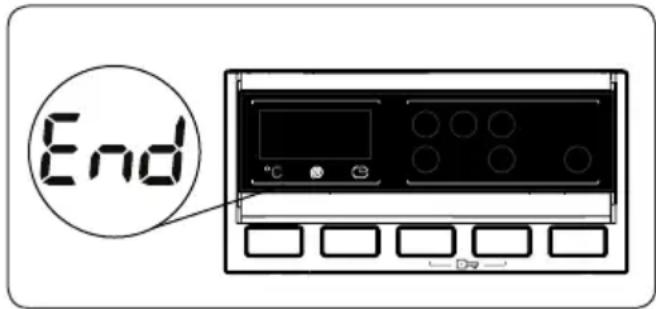
Your machine will stop by itself as soon as the programme you have selected finishes.
- "END" will flash on the electronic display.
- You can open the machine's door and remove the laundry.
- Leave the door of your machine open to allow the inner part of your machine to dry.
- Switch the programme dial to STOP position.
• Unplug your machine. -
Turn the water tap off.
-
PROGRAMME TABLE
| Programme | Washing temperature (°C) | Maximum dry laundry amount (kg) | Detergent compartment | Programme duration (Min.) | Laundry type / Descriptions |
| COTTON 90°C 90° | 8,0 2 187 | Very dirty, cotton and flax textiles. (Underwear, linen, tablecloth, towel (maximum 4.0 kg), bedclothes, etc.) | |||
| COTTON Pre-Wash 60° | 8,0 1&2 164 | Dirty cotton and flax textiles. (Underwear, linen, tablecloth, towel (maximum 4,0 kg), bedclothes, etc.) | |||
| COTTON 60°C 60° | 8,0 2 240 | Dirty cotton and flax textiles. (Underwear, linen, tablecloth, towel (maximum 4,0 kg), bedclothes, etc.) | |||
| COTTON 20°C 20° | 4,0 2 96 | Less dirty, cotton and linen textiles. (Underwear, bedsheet, tablecloth, towel (max. 2,0 kg) bedcloth, etc.) | |||
| ECO 40-60 40° | 3,5 2 210 | Dirty cotton and flax textiles. (Underwear, linen, tablecloth, towel (maximum 2,0 kg), bedclothes, etc.) | |||
| WOOL 30° 2,5 | 2 43 Woollen | laundries | with machine wash labels. | ||
| RINSE - | 8,0 - | 42 | Provides an additional rinse to any type of laundry after the washing cycle. | ||
| ALLERGY SAFE 60° | 4,0 2 226 | Baby laundry | |||
| SPIN | - | 8,0 | - | 17 | Provides an additional spin cycle to any type of laundry after the washing cycle. |
| HAND WASH/ DELICATE | 30° 2,5 | 2 90 | Laundry recommended for hand wash or sensitive laundry. | ||
| EASY CARE/ SPORTS WEAR | 40° | 3,5 | 2 | 110 | Very dirty or synthetic-mixed textiles. (Nylon socks, shirts, blouses, synthetic-including trousers etc.) |
| MIX | 30° 3,5 | 2 81 | Dirty cotton, synthetics, colour and flax textiles can be washed together. | ||
| BLOUSES / SHIRTS | 60° | 4,0 | 2 | 114 | Dirty cotton, synthetic and synthetic-mixed shirts and blouses can be washed together. |
| (*) FAST 60'. | 60° 4,0 | 2 60 | Dirty, cotton, coloured and linen textiles washed at 60°C in 60 minutes. | ||
| (**) RAPID 15' | 30° 2,0 | 2 15 | Lightly soiled, | cotton, colored and linen textiles. | |

NOTE: PROGRAMME DURATION MAY CHANGE ACCORDING TO THE AMOUNT OF LAUNDRY, TAP WATER, AMBIENT TEMPERATURE AND SELECTED ADDITIONAL FUNCTIONS.
(*) If your machine includes the rapid washing additional function and you put 2 kg or less of laundry into your machine, your machine will automatically wash the laundry for 30 minutes.
(**) Due to the short washing time of this programme, we recommend that less detergent is used. The programme may last longer than 15 minutes if your machine detects an uneven load. You can open the door of your machine 2 minutes after the completion of a washing operation. (The 2 minute period is not included in the programme duration).
According to regulation 1015/2010 and 1061/2010, the programme 3 with temperature selections is the 'Standard 60°C cotton programme' and the 'Standard 40°C cotton programme'.
The Eco 40-60 programme is able to clean normally soiled cotton laundry declared to be washable at 40^ C or 60^ C, together in the same cycle, and that this programme is used to assess the compliance with the EU ecodesign legislation.
- The most efficient programmes in terms of energy consumption are generally those that perform at lower temperatures and longer duration.
- Loading the household washing machine up to the capacity indicated by the manufacturer for the respective programmes will contribute to energy and water savings.
- Program duration, energy consumption and water consumption values may vary according to wash load weight and type, selected extra functions, tap water and ambient temperature.
- It's recommended to use liquid detergent for the washing programmes at low temperature. The amount of detergent to be used may vary depending on the amount of laundry and the level of dirtiness of the laundry. Please follow the detergent manufacturers' recommendations for the amount of the detergent to be used.
- The noise and remaining moisture content are influenced by the spinning speed. The higher spinning speed in the spinning phase, the higher noise and the lower remaining moisture content.
- You can access the product database where the model information is stored by reading the QR code on the energy label.
| Programme Name | Rated Capacity kg | Energy Consumption kWh/cycle | Programme Duration Hours:Minutes | Water Consumption Litres/Cycle | max. Temperature °C | Remaining Moisture Content % 1400 Rpm | ||||||||||
| Rated Capacity | 1/2 Load | 1/4 Load | Rated Capacity | 1/2 Load | 1/4 Load | Rated Capacity | 1/2 Load | 1/4 Load | Rated Capacity | 1/2 Load | 1/4 Load | Rated Capacity | 1/2 Load | 1/4 Load | ||
| COTTON 90°C | 8 2, | 38 03:07 | 82 81 | 53% | ||||||||||||
| COTTON 60°C | 8 1, | 1 04:00 | 52 45 | 53% | ||||||||||||
| ECO 40-60 | 8 | 1,12 | 0,66 | 0,34 | 03:30 | 02:45 | 02:30 | 53 | 45 | 41 | 44 | 34 | 20 | 53% | 53% | 53% |
| EASY CARE/ SPORTS WEAR | 3,5 0, | 56 01:50 | 50 50 | 42 53% | ||||||||||||
| FAST 60'. | 4 1, | 02 01:00 | 34 58 | 53% | ||||||||||||
| COTTON 20°C | 4 0, | 2 01:36 | 43 20 | 53% | ||||||||||||
6.1 Important Informations
- Use detergents, softeners and other additives suitable for automatic washing machines only. Excessive foam has occurred and automatic foam absorption system has been activated due to too much detergent usage.
• We recommend that periodic cleaning for washing machine every 2 months. For periodic cleaning please use Drum Clean programme. If your machine do not have Drum Clean programme, use Cottons-90 programme. When required, use limescale removers manufactured specifically for washing machines only. - Never force the door open when your Washing Machine is running. You can open the door of your machine 2 minutes after the completion of a washing operation. *
- Never force the door open when your Washing Machine is running. The door will open immediately after the washing cycle has ended. *
- The installation and repairing procedures should always carried out by the Authorised Service Agent in order to avoid possible risks. The manufacturer shall not be held liable for damages that may arise from procedures carried out by unauthorised persons.
(*) Specifications may vary depending on the machine purchased.
7. CLEANING AND MAINTENANCE
7.1 Warning
natural_image
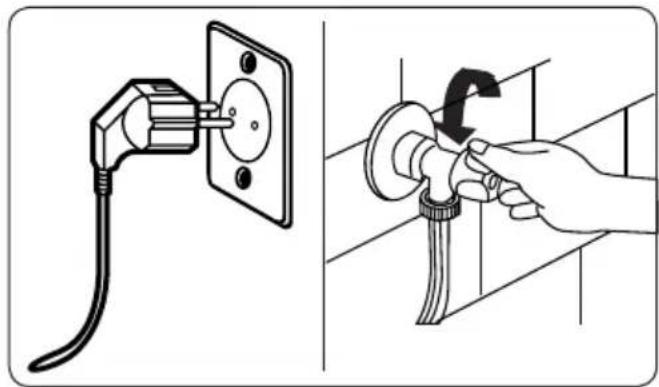
Illustration showing a plug inserted into a wall socket and a hand using a tool to adjust the bulb (no text or symbols present)Turn your mains power supply off and remove the plug from the socket before carrying out maintenance and cleaning of your machine.
Turn off the water supply before starting maintenance and cleaning of your machine.
⚠️CAUTION: Do not use solvents, abrasive cleaners, glass cleaners or all-purpose cleaning agents to clean your Washing Machine. They may damage the plastic surfaces and other components with the chemicals they contain.
7.2 Water Inlet Filters
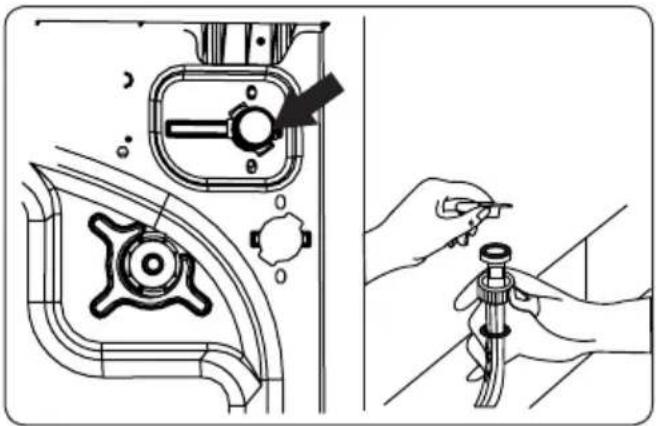
Water inlet filters prevent dirt and foreign materials from entering your machine. We recommend that these filters are cleaned when your machine is unable to receive sufficient water, although your water supply is on and the tap is open. We recommend that you clean your water inlet filters every 2 months.
natural_image
Technical illustration showing a mechanical component being inserted into a pipe fitting, with no visible text or symbols.- Unscrew the water inlet hose(s) from the Washing Machine.
- To remove the water inlet filter from the water inlet valve, use a pair of long-nosed pliers to gently pull on the plastic bar in the filter.
- A second water inlet filter is located in the tap end of the water inlet hose. To remove the second water inlet filter, use a pair of long-nosed pliers to gently pull on the plastic bar in the filter.
- Clean the filter thoroughly with a soft brush and wash with soapy water and rinse thoroughly. Re-insert the filter by gently pushing it back into place.
CAUTION: The filters at the water inlet valve may become clogged due to water quality or lack of required maintenance and may break down. This may cause a water leak. Any such breakdowns are out of the scope of the warranty.
7.3 Pump Filter
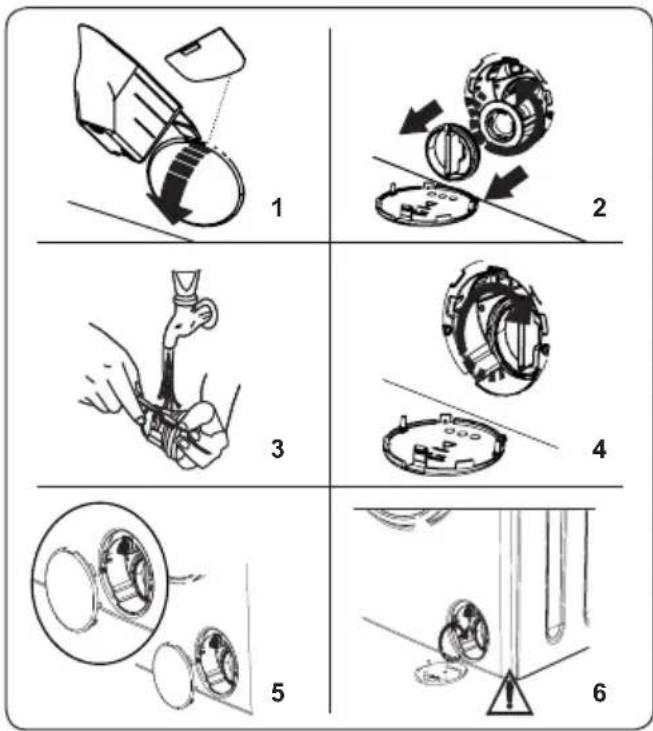
The pump filter system in your Washing Machine prolongs the life of the pump by preventing lint from entering your machine. We recommend that you clean the pump filter every 2 months.
The pump filter is located behind the cover on the front-lower right corner.
To clean the pump filter:
-
You may use the washing powder spade (*) supplied with your machine or liquid detergent level plate to open the pump cover.
-
Lodge the end of the powder spade or liquid detergent level plate in the opening of the cover and gently press backwards. The cover will open.
- Before opening the filter cover, place a container under the filter cover to collect any water left in the machine.
- Loosen the filter by turning anticlockwise and remove by pulling. Wait for the water to drain.

NOTE:
Depending on the
amount of water inside the machine, you may have to empty the water collection container a few times.
-
Remove any foreign materials from the filter with a soft brush.
-
After cleaning, re-fit the filter by inserting it and turning clockwise.
-
When closing the pump cover, ensure that the mountings inside the cover
meet the holes on the front panel side.
- Close the filter cover.
WARNING: The water in the pump may be hot, wait until it has cooled down before carrying out any cleaning or maintenance.
(*) Specifications may vary depending on the machine purchased.
7.4 Detergent Drawer
The use of detergent may cause residual build up in the detergent drawer over time. We recommend that you remove the drawer every 2 months to clean the accumulated residue.
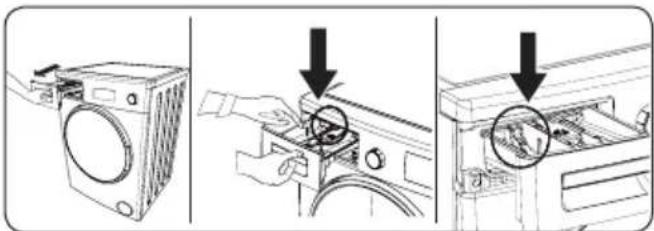
To remove the detergent drawer:
• Pull the drawer forwards until it is fully extended.
• Gently press down on the drawer (as shown below) and pull the drawer from its housing.
- Clean the drawer with water and a soft brush.
- If there is any residue in the drawer housing, remove with a soft brush. Take care to prevent any residue from dropping into the machine.
• Dry the drawer thoroughly and slide it back into the housing.
Do not wash your detergent drawer in dishwasher.
8. FLUSH STOPPER / BODY / DRUM
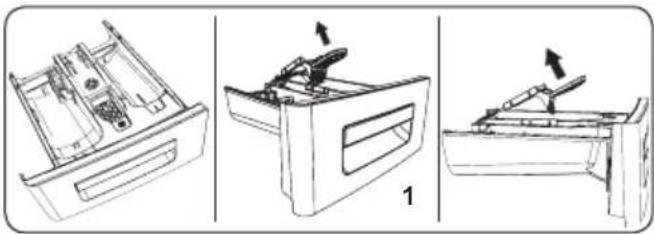
natural_image
Three technical line drawings of a mechanical device with internal components, shown from different angles (no text or symbols)1. Flush stopper
Remove the detergent drawer and disassemble the flush stopper. Clean thoroughly to completely remove any softener residue. Refit the flush stopper after cleaning and check that it is seated properly.
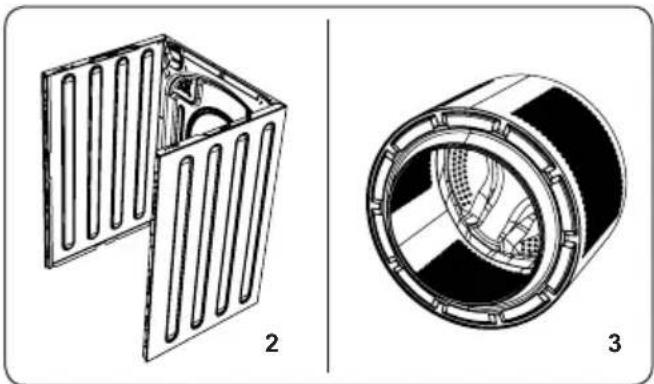
natural_image
Technical diagrams of two mechanical components: a 3D panel with internal slots and a cylindrical housing (no text or symbols)2. Body
Use a mild, non-abrasive cleaning agent, or soap and water, to clean the external casing. Wipe dry with a soft cloth.
3. Drum
Do not leave metallic objects such as needles, paper clips, coins etc. in your machine. These objects lead to the formation of rust stains in the drum. To clean such rust stains, use a non-chlorine cleaning agent and follow the instructions of manufacturer of the cleaning agent. Never use wire wool or similar hard objects for cleaning rust stains.
9. TROUBLESHOOTING
Repair of your machine should be carried out by an authorised service company. If your machine requires repair or if you cannot solve an issue with the information provided below, then you should:
• Unplug your machine from the mains power supply.
• Turn off the water supply.
| FAULT POSSIBLE CAUSE TROUBLESHOOTING | ||
| Your machine does not start. | Machine not plugged in. Plug machine in. | |
| Fuses are faulty. Replace the fuses. | ||
| No mains power supply. Check mains power. | ||
| Start/Pause button not pressed. Press the Start/Pause button. | ||
| Programme dial ‘stop’ position. | Turn the programme dial to the desired position. | |
| The machine door is not completely closed. | Close the machine door. | |
| Your machine does not intake water. | Water tap is turned off. Turn tap on. | |
| Water inlet hose may be twisted. | Check water inlet hose and untwist. | |
| Water inlet hose clogged. Clean water inlet hose filters. (*) | ||
| Inlet filter clogged. Clean the inlet filters. (*) | ||
| The machine door is not completely closed. | Close the machine door. | |
| Your machine does not discharge water. | Drain hose clogged or twisted. | Check the drain hose, then either clean or untwist. |
| Pump filter clogged. Clean the pump filter. (*) | ||
| Laundry is too tightly packed together in the drum. | Spread your laundry in the machine evenly. | |
| Your machine vibrates. | The feet have not been adjusted. | Adjust the feet. (**) |
| Transit bolts fitted for transportation have not been removed. | Remove the transit bolts from the machine. (**) | |
| Small load in the drum. | This will not prevent operation of your machine. | |
| Your machine is overloaded with laundry or laundry is unevenly spread. | Do not overload the drum. Spread laundry evenly in the drum. | |
| Your machine rests on a hard surface. | Do not set up your Washing Machine on a hard surface. | |
| Excessive foam is formed in the detergent drawer. | Excessive amount of detergent used. | Press the Start/Pause button. To stop the foam, dilute one tablespoon of softener into 1/2 litre of water and pour into the detergent drawer. Press the Start/Pause button after 5-10 mins. |
| Wrong detergent used. | Only use detergents produced for automatic Washing Machines. | |
| Unsatisfactory washing result. | Your washing is too dirty for the programme selected. | Use the information in the programme tables to select the most appropriate programme. |
| Amount of detergent used insufficient. | Use the amount of detergent as instructed on the packaging. | |
| There is too much laundry in your machine. | Check that the maximum capacity for the selected programme has not been exceeded. | |
| Unsatisfactory washing result. | Hard water. | Increase the amount of detergent following the manufacturer's instructions. |
| Your laundry is too tightly packed together in the drum. | Check that your laundry is spread out. | |
| As soon as the machine is loaded with water, water discharges. | The end of water drain hose is too low for the machine. | Check that the drain hose is at a suitable height. (**) . |
| No water appears in the drum during washing. | No fault. Water is in the unseen part of the drum. | ...... |
| Laundry has detergent residue. | Non-dissolving particles of some detergents may appear on your laundry as white spots. | Perform an extra rinse, or clean your laundry with a brush after it dries. |
| Grey spots appear on the laundry. | There is untreated oil, cream or ointment on your laundry. | Use the amount of detergent as instructed on the packaging in the next wash. |
| The spin cycle does not take place or takes place later than expected. | No fault. The Unbalanced load control system has been activated. | The Unbalanced load control system will try to spread your laundry. The spinning cycle will begin once your laundry is spread. Load the drum evenly for the next wash. |
(*) See the chapter regarding maintenance and cleaning of your machine.
(**) See the chapter regarding installation of your machine.
10. AUTOMATIC FAULT WARNINGS AND WHAT TO DO
Your Washing Machine is equipped with a built-in fault detection system, indicated by a combination of flashing wash operation lights. The most common failure codes are shown below.
| TROUBLE CODE | POSSIBLE FAULT WHAT TO DO | |
| E01 | The door of your machine is not shut properly. | Shut the door properly until you hear a click. If your machine persists to indicate fault, turn off your machine, unplug it and contact the nearest authorised service agent immediately. |
| E02 | The water pressure or the water level inside the machine may be low. | Check the tap is fully turned on. Mains water may be cut-off. If the problem still continues, your machine will stop after a while automatically. Unplug the machine, turn off your tap and contact the nearest authorised service agent. |
| E03 | The pump is faulty or pump filter is clogged or electrical connection of the pump is faulty. | Clean the pump filter. If the problem persists, contact the nearest authorised service agent. (*) |
| E04 | Your machine has excessive amount of water. | Your machine will discharge water by itself. Once the water has drained, turn off your machine and unplug it. Turn off the tap and contact the nearest authorised service agent. |
(*) See the chapter regarding maintenance and cleaning of your machine.
natural_image
Line drawing of a washing machine with circular vent and side buttons, no text or symbols presentnatural_image
Diagram showing a pipe fitting with a cable and a close-up of the internal structure (no text or symbols)natural_image
Line drawing of a washing machine with an inset showing internal components (no text or symbols)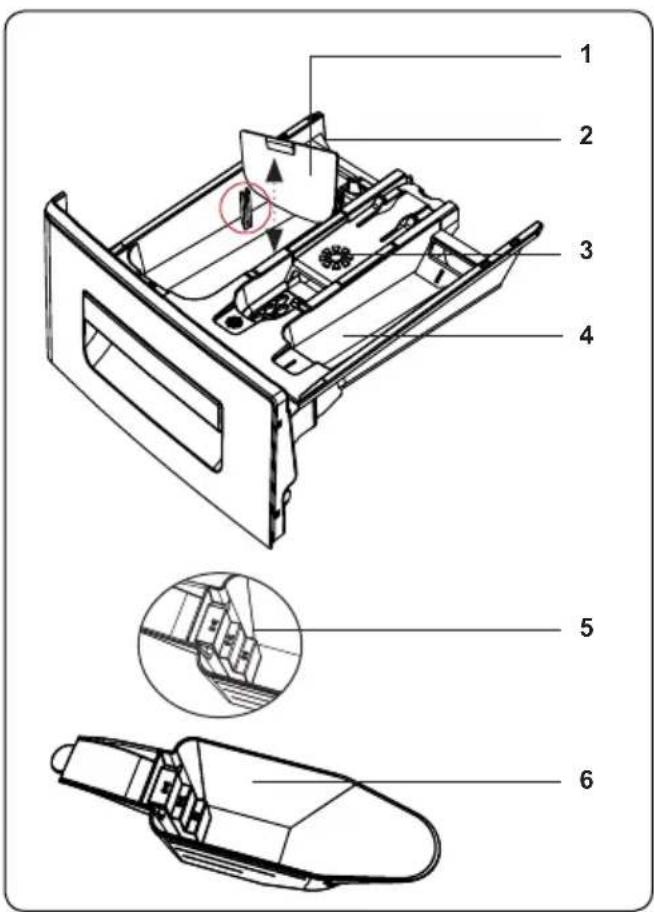
natural_image
Technical line drawing of a device with two views: top shows internal components, bottom shows internal compartments (no text or symbols)natural_image
Technical line drawing of a mechanical device with internal components and cross-sectional views (no text or symbols)natural_image
Technical line drawing of a device with two views: top shows internal components, bottom shows internal compartments (no text or symbols)natural_image
Illustration of two washing machines with a pipe connecting them (no text or symbols)natural_image
Illustration showing two steps of a hairpin installation: one with a plug, the other with a hand holding a screwdriver (no text or symbols present)natural_image
Front view of a black electronic device with indicator lights and control buttons (no text or symbols)natural_image
Front panel of a control room with buttons and display (no text or symbols visible)natural_image
Front panel of a control room with indicator lights and buttons (no text or symbols visible)natural_image
Front view of a control panel with buttons and display (no text or symbols visible)natural_image
Illustration showing a plug inserted into a socket and a hand adjusting the bulb (no text or symbols present)natural_image
Technical illustration showing a mechanical assembly with a valve and tool, alongside a close-up of hands adjusting a pipe fitting (no text or symbols present)natural_image
Three technical line drawings of a printer holder with internal components, showing front, side, and top views (no text or symbols)natural_image
Technical diagrams of two mechanical components: a flanged housing and a cylindrical housing, both shown with cross-sectional views (no text or symbols)2. Ház
| 10.0 | 10.0 | |
| 10.0 | 10.0 | 10.0 |
| 10.0 | 10.0 | 10.0 |
| 10.0 | 10.0 | 10.0 |
| 10.0 | 10.0 | 10.0 |
| 10.0 | 10.0 | 10.0 |
| 10.0 | 10.0 | 10.0 |
| 12.5 | 12.5 | 12.5 |
| 12.5 | 12.5 | 12.5 |
| 12.5 | 12.5 | 12.5 |
| 12.5 | 12.5 | 12.5 |
| 12.5 | 12.5 | 12.5 |
| 12.5 | 12.5 | 12.5 |
| 12.5 | 12.5 | 13.5 |
| 12.5 | 12.5 | 13.5 |
| 12.5 | 12.5 | 13.5 |
| 12.5 | 12.5 | 13.5 |
| 12.5 | 12.5 | 13.5 |
| 12.5 | 12.5 | 13.5 |
| 12.5 | 12.5, 13.5, 14.5, 16.5, 18.5, 20.5, 22.5, 24.5, 26.5, 28.5, 30.5, 32.5, 34.5, 36.5, 38.5, 40.5, 42.5, 44.5, 46.5, 48.5, 50.5, 52.5, 54.5, 56.5, 58.5, 60.5, 62.5, 64.5, 66.5, 68.5, 70.5, 72.5, 74.5, 76.5, 78.5, 80.5, 82.5, 84.5, 86.5, 88.5, 90.5, 92.5, 94.5, 96.5, 98.5, 100.5, 102.5, 104.5, 106.5, 108.5, 110.5, 112.5, 114.5, 116.5, 118.5, 120.5, 122.5, 124.5, 126.5, 128.5, 130.5, 132.5, 134.5, 136.5, 138.5, 140.5, 142.5, 144.5, 146.5, 148.5, 149.5, 151.5, 153.5, 154.5, 156.5, 158.5, 160.5, 162.5, 164.5, 166.5, 168.5, 170.5, 172.5, 174.5, 176.5, 178.5, 180.5, 182.5, 184.5, 186.5, 188.5, 190.5, 192.5, 194.5, 196.5, 198.5, 200. |

1.3 Embalaža in okolje
Odstranjevanje embalažnih materialov
natural_image
Line drawing of a washing machine with circular vent and side buttons, no text or symbols presentnatural_image
Diagram showing two electrical plugs connected to a socket, with an arrow indicating direction (no text or symbols present)natural_image
Diagram showing a mechanical component with a cable and a close-up of its internal structure (no text or symbols)natural_image
Line drawing of a washing machine with an inset showing internal components (no text or symbols)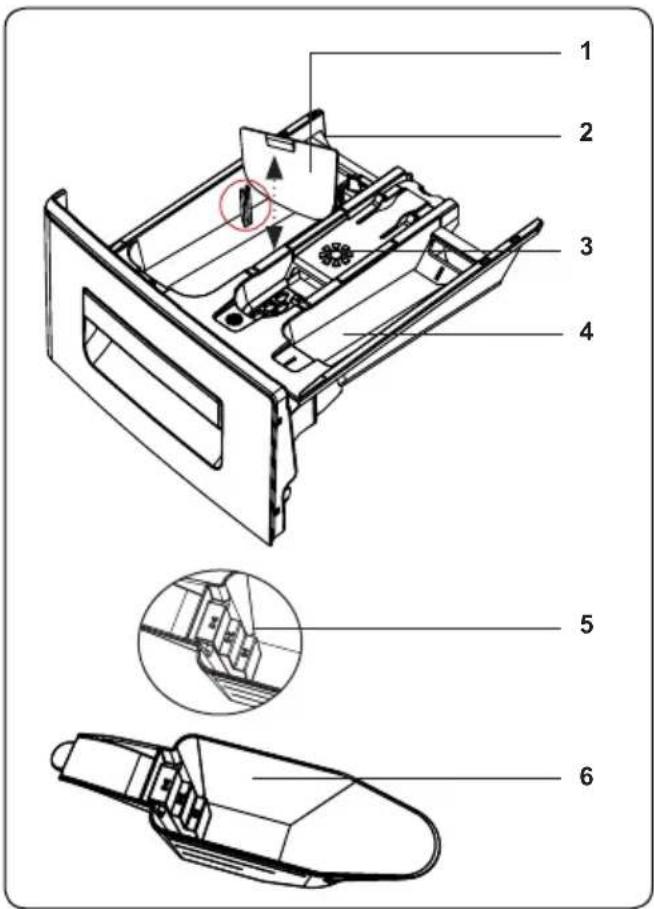
natural_image
Technical line drawings of a device casing and internal components, shown in two views (no text or symbols)natural_image
Technical line drawing of a dual-chamber electronic device with internal components and mounting base (no text or symbols)natural_image
Technical line drawing of a mechanical device with cross-sectional and top views (no text or symbols)natural_image
Illustration of two washing machines side by side, one with a handle and the other with a curved pipe (no text or symbols)• Odprite vrata svojega stroja.
- Perilo enakomerno razporedite po stroju.
OPOMBA: Pazite, da ne
natural_image
Illustration showing two steps of a hairpin installation: one with a plug, the other with a hand holding a screwdriver (no text or symbols present)natural_image
Front view of a computer monitor with indicator lights and control buttons (no text or symbols visible)natural_image
Front panel of a control room with buttons and display (no text or symbols visible)natural_image
Front panel of a control room with indicator lights and buttons (no text or symbols visible)natural_image
Front panel of a control room with display, buttons, and circular indicators (no text or symbols visible)Ta dodatna funkcija vam omogoča, da močno umazano perilo predpranjem opravite pred glavnim programom pranja. Med uporabo te funkcije, dodajte pralno sredstvo v sprednji predelek predala za pralno sredstvo.
natural_image
Front panel of a control room with temperature and buttons (no text or symbols visible)natural_image
Front view of a control panel with buttons and display (no text or symbols visible)natural_image
Front view of a black electronic device with control panel and buttons (no visible text or symbols)Za zagon programa pritisnite gumb za Start/Pause.
natural_image
Illustration showing a hand using a tool to clean or adjust the electrical outlet cable (no text or symbols present)natural_image
Technical illustration showing a mechanical assembly with a valve and a hand holding a pipe fitting (no text or symbols present)natural_image
Three technical line drawings of a printer drawer with internal compartments and a handle, showing mechanical assembly (no text or symbols)natural_image
Technical diagrams of two mechanical components: a flanged housing and a cylindrical housing, both shown with cross-sectional views (no text or symbols)2. Telo
| 10.0 | 10.0 | |
| 10.0 | 10.0 | |
| 10.0 | 10.0 | |
| 10.0 | 10.0 | |
| 10.0 | 10.0 | |
| 10.0 | 10.0 | |
| 10.0 | 10.0 | |
| 10.0 | 10.0 | |
| 10.0 | 12.5 | |
| 10.0 | 12.5 | |
| 10.0 | 12.5 | |
| 10.0 | 12.5 | |
| 10.0 | 12.5 | |
| 10.0 | 12.5 | |
| 10.0 | 12.5 | |
| 10.0 | 12.5 | |
| 10.0, 12.5, 13.5, 14.5, 15.5, 16.5, 17.5, 18.5, 19.5, 20.5, 21.5, 22.5, 23.5, 24.5, 25.5, 26.5, 27.5, 28.5, 29.5, 30.5, 31.5, 32.5, 33.5, 34.5, 35.5, 36.5, 37.5, 38.5, 39.5, 40.5, 41.5, 42.5, 43.5, 44.5, 45.5, 46.5, 47.5, 48.5, 49.5, 50.5, 51.5, 52.5, 53.5, 54.5, 55.5, 56.5, 57.5, 58.5, 59.5, 60.5, 61.5, 62.5, 63.5, 64.5, 65.5, 66.5, 67.5, 68.5, 69.5, 70.5, 71.5, 72.5, 73.5, 74.5, 75.5, 76.5, 77.5, 78.5, 79.5, 80.5, 81.5, 82.5, 83.5, 84.5, 85.5, 86.5, 87.5, 88.5, 89.5, 90.5, 91.5, 92.5, 93.5, 94.5, 95.5, 96.5, 97.5, 98.5, 99.5, 100 | ||
| 10.0 | 10.0 | |
| 10.0 | 10.0 | |
| 10.0 | 10.0 | |
| 10.0 | 12.5 | |
| 10.0 | 12.5 | |
| 10.0 | 12.5 | |
| 10.0 | 12.5 | |
| 10.0 | 12.5 | |
| 10.0 | 12.5 | |
| 10.0 | 12.5 | |
| 10.0 | 12.5 | |
| 10.0, 12.5, 13.5, 14.5, 15.5, 16.5, 17.5, 18.5, 19.5, 20.5, 21.5, 22.5, 23.5, 24.5, 25.5, 26.5, 27.5, 28.5, 29.5, 30.5, 31.5, 32.5, 33.5, 34.5, 35.5, 36.5, 37.5, 38.5, 39.5, 40.5, 41.5, 42.5, 43.5, 44.5, 45.5, 46.5, 47.5, 48.5, 49.5, 50.5, 51.5, 52.5, 53.5, 54.5, 55.5, 56.5, 57.5, 58.5, 59.5, 60.5, 61.5, 62.5, 63.5, 64.5, 65.5, 66.5, 67.5, 68.5, 69.5, 70.5, 71.5, 72.5, 73.5, 74.5, 75.5, 76.5, 77.5, 78.5, 79.5, 80.5, 81.5, 82.5, 83.5, 84.5, 85.5, 86.5, 87.5, 88.5, 89.5, 90.5, 91.5, 92.5, 93.5, 94.5, 95.5, 96.5, 97.5, 98.5, 99.5, 100 |

2.1 Vzhled
natural_image
Line drawing of a washing machine with circular vent and side buttons, no text or symbols presentnatural_image
Diagram showing a cable being inserted into a sink, with an inset illustrating the structural change of a curved pipe (no text or symbols present)natural_image
Line drawing of a washing machine with an inset showing internal components (no text or symbols)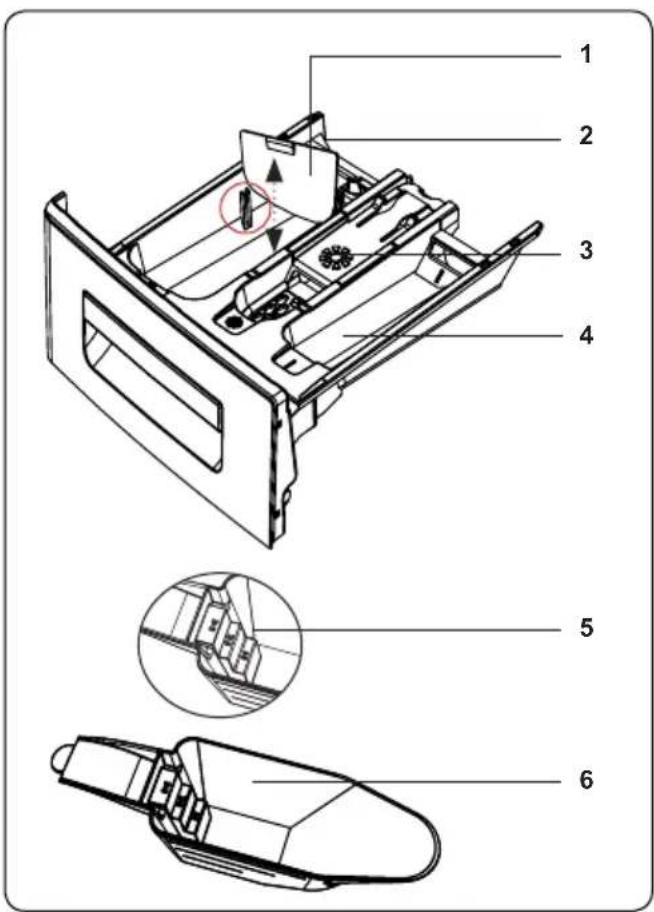
natural_image
Technical line drawings of a device housing and casing (no text or symbols)natural_image
Technical line drawing of a mechanical device with internal components, shown from two views: top is circular (no text or symbols)natural_image
Technical line drawing of a mechanical device with cross-sectional and top views (no text or symbols)natural_image
Illustration of two washing machines with a pipe connecting them (no text or symbols)natural_image
Illustration of two different electrical installation methods: one with a plug, the other with a hand using a power tool (no text or symbols present)natural_image
Front view of a black electronic device with control panel and display (no text or symbols visible)natural_image
Front panel of a control room with buttons and display (no text or symbols visible)natural_image
Front panel of a refrigerator with control buttons and indicator lights (no text or symbols visible)natural_image
Front panel of a computer control unit with indicator lights and buttons (no text or symbols visible)natural_image
Front view of a control panel with buttons and display (no text or symbols visible)natural_image
Front panel of a computer control unit with indicator lights and buttons (no text or symbols visible)natural_image
Front view of a control panel with buttons and display (no text or symbols visible)natural_image
Illustration showing a wall-mounted electrical plug and a hand adjusting a hose (no text or symbols present)natural_image
Three technical line drawings of a mechanical device with internal components, shown from front, side, and top views (no text or symbols)natural_image
Technical drawings of two mechanical components: a flanged housing and a cylindrical bearing (no text or symbols present)2. Tělo
www.sharphomeappliances.com


Service & Support
Visit Our Website
sharphomeappliances.com