
Dolphin - Keyboard Natec - Free user manual and instructions
Find the device manual for free Dolphin Natec in PDF.


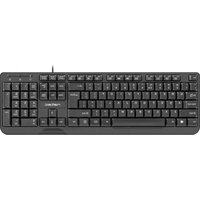
| Type | Keyboard |
| Model | Dolphin |
| Brand | Natec |
| Dimensions | 437 x 125 x 21 mm |
| Connector | USB (for receiver) |
| Number of Keys | 108 |
| Multimedia Keys | 13 |
| Power Supply | 2 x AAA batteries (not included) |
| Wireless Frequency | 2403 - 2480 MHz |
| Maximum RF Power | -1.0 dBm |
| Connectivity Modes | Bluetooth 3.0, Bluetooth 5.0, 2.4 GHz via USB receiver |
| Key Coating | PU protective layer |
| Compatibility | Windows XP/Vista/7/8/10, Linux, Android |
| Battery Saving | ON/OFF switch and auto sleep mode |
| Warranty | 2 years limited manufacturer warranty |
| Package Content | Keyboard, Quick Installation Guide |
Frequently Asked Questions - Dolphin Natec
User questions about Dolphin Natec
0 question about this device. Answer the ones you know or ask your own.
Ask a new question about this device
Download the instructions for your Keyboard in PDF format for free! Find your manual Dolphin - Natec and take your electronic device back in hand. On this page are published all the documents necessary for the use of your device. Dolphin by Natec.
USER MANUAL Dolphin Natec
DOLPHIN
User Manual
SPECIFICATION
- Keyboard size 437x125x21 mm
- Connector USB
• Number of keys 108
• Number of multimedia keys 13
• Power supply 2x AAA
Frequency band: 2403 Mhz - 2480 Mhz
Maximum radio-frequency power: -1,0 dBm
INSTALLATION
PAIRING A NEW DEVICE WITH KEYBOARD IN BLUETOOTH MODE
- Move the ON/OFF switch located at the bottom of the keyboard to ON position
- Turn ON Bluetooth in device which you want to pair with the keyboard
- Use the button for changing the channel to select the channel BT1 (Bluetooth 3.0) or BT2 (Bluetooth 5.0) and then hold down the same button for about 5 seconds to enter into pairing mode. The LED diode will start flashing rapidly
- Then go to the Bluetooth settings on your device and select from the list Natec Dolphin
• After successful pairing, the LED on the keyboard will stop flashing
• The keyboard is ready for use

CONNECTING THE KEYBOARD WITH THE PREVIOUSLY PAIRED DEVICE
- Turn ON Bluetooth on your device that you have previously paired with the keyboard
- Turn ON or wake up the from hibernation
• The keyboard will automatically connect with the device
PACKAGE CONTENT
• Dolphin multimedia keyboard
- Quick installation guide
REQUIREMENTS
• PC or compatible device with a USB port
- Windows® XP/Vista/7/8/10, Linux, Android
SAFETY INFORMATION
- Use as directed.
• Non-authorized repairs or taking the device to pieces make the warranty void and may cause the product damage. - Avoid to hit or friction with a hard object, otherwise it will lead to grind surface or other hardware damage.
- Do not use the product in low and high temperatures, in strong magnetic fields and in the damp or dusty atmosphere.
- Do not drop, knock, or shake the device. Rough handling can break it.
- Slots and openings in the case are provided for ventilation and should not be obscure. Blocking the vents can cause overheating of the device.
FEATURES
- Slim keyboard profile with flat and soft keys
- Triple mode communication
• Multimedia function keys - Protective layer on the keys preventing keys inscriptions from being worn of (PU coating)

INSERTING / REMOVING BATTERY

natural_image
Pure technical line drawing of a mechanical component without any text, numbers, or symbolsCONNECTION OF KEYBOARD VIA USB RECEIVER
- Turn ON your computer or other compatible device
- Make sure the ON/OFF switch located at the bottom of the keyboard is in the ON position
- Use the button for changing the channel located on the keyboard and select the channel indicated with 2.4G symbol
- Connect receiver to a free USB port on your computer
- The operating system will automatically install the required drivers
• The keyboard is ready for use
Note:
- The device is equipped with intelligent technology for energy management. When the keyboard enter into hibernation (sleep) mode, press any key for its revival.
- The keyboard is equipped with an ON/OFF switch to save the battery power when not in use for longer period.


WARRANTY
• 2 years limited manufacturer warranty
GENERAL
• The safe product, conforming to the EU requirements.
• The product is made in accordance with RoHS European standard.
- The WEEE symbol (the crossed-out wheeled bin) using indicates that this product in not home waste. Appropriate waste management aids in avoiding consequences which are harmful for people and environment and result from dangerous materials used in the device, as well as improper storage and processing. Segregated household waste collection aids recycle materials and components of which the device was made. In order to get detailed information about recycling this product please contact your retailer or a local authority.
• Hereby, IMPAKT S.A. declares that that the radio equipment type NKL-1687 is in compliance with Directives 2014/53/UE
- (RED) and 2011/65/UE (ROHS). The full text of the EU declaration of conformity is available via the product tab at www.impakt.com.pl.
SPECYFIKACJA
natural_image
Pure technical line drawing of a mechanical component without any text, numbers, or symbolsPODŁĄCZENIE KŁAWIATURY ZA POMOĆĄ ODBIORNIKA USB

GWARANCJA
natural_image
Pure mechanical assembly diagram without any text, numbers, or symbolsnatural_image
Pure technical line drawing of a mechanical component without any text, numbers, or symbolsCONECTAR EL TECLADO A TRAVÉS DEL RECEPTOR USB
PRIPOJENÍ KLÁVESNICE S DŘÍVE SPÁROVANÝM ZAŘÍZENÍM
natural_image
Pure mechanical component diagram without any text, numbers, or symbolsPŘIPOJENÍ KLÁVESNICE POMOCÍ USB PŘIJÍMAČE
natural_image
Pure technical line drawing of a mechanical component without any text, numbers, or symbolsPRIPOJENIE KLÁVESNICE POMOCOU USB PRIJÍMAČA

ZÁRUČNÁ DOBA
CONECTAREA TASTATURA LA UN DISPOZITIV ASOCIAT ANTERIOR
natural_image
Pure mechanical assembly diagram without any text, numbers, or symbolsCONECTAREA TASTATURA PRINTR-UN RECEPTOR USB
AZ BILLENTYÜZET ÖSSZEKAPCSOLÁSA ELÖZÖLEG MÁR ÖSSZEKÖTÖTT BERENDEZÉSSEL
GARANCIA
natural_image
Pure technical line drawing of a mechanical component without any text, numbers, or symbols
ГАРАНЦИЯ
natural_image
Pure mechanical assembly diagram without any text, numbers, or symbols
ГАРАНТИЯ
Visit our website



- DOLPHIN
- User Manual
- SPECIFICATION
- INSTALLATION
- PAIRING A NEW DEVICE WITH KEYBOARD IN BLUETOOTH MODE
- CONNECTING THE KEYBOARD WITH THE PREVIOUSLY PAIRED DEVICE
- PACKAGE CONTENT
- REQUIREMENTS
- SAFETY INFORMATION
- FEATURES
- CONNECTION OF KEYBOARD VIA USB RECEIVER
- Note:
- WARRANTY
- GENERAL
- SPECYFIKACJA
- PODŁĄCZENIE KŁAWIATURY ZA POMOĆĄ ODBIORNIKA USB
- GWARANCJA
- CONECTAR EL TECLADO A TRAVÉS DEL RECEPTOR USB
- PRIPOJENÍ KLÁVESNICE S DŘÍVE SPÁROVANÝM ZAŘÍZENÍM
- PŘIPOJENÍ KLÁVESNICE POMOCÍ USB PŘIJÍMAČE
- PRIPOJENIE KLÁVESNICE POMOCOU USB PRIJÍMAČA
- ZÁRUČNÁ DOBA
- CONECTAREA TASTATURA LA UN DISPOZITIV ASOCIAT ANTERIOR
- CONECTAREA TASTATURA PRINTR-UN RECEPTOR USB
- AZ BILLENTYÜZET ÖSSZEKAPCSOLÁSA ELÖZÖLEG MÁR ÖSSZEKÖTÖTT BERENDEZÉSSEL
- GARANCIA
- ГАРАНЦИЯ
- ГАРАНТИЯ
Brand : Natec
Model : Dolphin
Category : Keyboard