
EK-08RE - Switch Edimax - Free user manual and instructions
Find the device manual for free EK-08RE Edimax in PDF.


| Product Type | Network Switch |
| Model | EK-08RE |
| Brand | Edimax |
| Number of Ports | 8 |
| Port Speed | 10/100 Mbps |
| Dimensions (L x W x H) | 200 x 130 x 40 mm |
| Weight | 300 g |
| Power Supply | DC 5V / 1A |
| Mounting | Desktop or wall-mountable |
| LED Indicators | Power, Link/Act per port |
| Switching Capacity | 1.6 Gbps |
| MAC Address Table | 1K entries |
| Jumbo Frame Support | Yes, up to 2K bytes |
| Flow Control | IEEE 802.3x (full-duplex), backpressure (half-duplex) |
| Standards Compliance | IEEE 802.3, 802.3u, 802.3x |
| Operating Temperature | 0°C to 40°C |
| Storage Temperature | -40°C to 70°C |
| Humidity (non-condensing) | 10% to 90% |
| Safety Certifications | CE, FCC |
| Included Accessories | Power adapter, user manual |
Frequently Asked Questions - EK-08RE Edimax
User questions about EK-08RE Edimax
0 question about this device. Answer the ones you know or ask your own.
Ask a new question about this device
Download the instructions for your Switch in PDF format for free! Find your manual EK-08RE - Edimax and take your electronic device back in hand. On this page are published all the documents necessary for the use of your device. EK-08RE by Edimax.
USER MANUAL EK-08RE Edimax
natural_image
Exterior view of two black EDIMAX Ethernet network switchers with ports and indicator lights (no readable text beyond branding)EK-08RE EK-16RE
8/16 ports Rack-mount KVM Switch with OSD




EK-08RE(or EK-16RE) is 19" rackmout PS/2 KVM switches which is a cost-effective solution for multiple servers / PCs management. EK-08RE are robust and durable machines in metal enclosure and can control up to 8 PS/2 computers using one PS/2 keyboard, monitor and PS/2 mouse.
Featuring a hot-plugging capability, EK-08RE allows you disconnect from PCs without powering down the whole rack of servers.EK-08RE with OSD (On Screen Display) provides more convenient and intuitive menu-driven operation for KVM switching.
With its password protection, EK-08RE can prevent unauthorized users to access. EK-08RE can be maximized up to 49 ports by stacking up to 8 units. Flexible control control by front-panel push buttons, keyboard hotkeys and OSD menu makes your PCs /servers management hassles-free. EK-08RE offers an operation transparency that any professionals will come to appreciate.
Key Features:
- Rack-mount size (19") 8/16 ports KVM switch
• Supports High Video Resolution up to 1920 x 1440 with bandwidth 250MHz - Supports Microsoft Intellimouse, Microsoft Optical Mouse, Microsoft Intellimouseexplorer, Logitech Net Mouse...etc.
• Supports DOS, Win3.X, Win95/98/98SE/2000/ME/XP/Vista, WinNT, Netware, Unix, Linux.
• Hot Plug - Connect/Disconnect from PCs without powering down PCs
• PC selection via Push Buttons, Hotkeys (user definable) and OSD (On Screen Display Menu)
• Supports Auto Scan (Programmable) to monitor PCs
• Supports Password protection for advanced security - Restores Keyboard status when switching PCs
• LED Display for easy status monitoring - Buzz sound for switching confirmation
FEATURES AND TECHNICAL SPECIFICATIONS
| Model NO. / Type | PS/2 KVM PS/2 KVM | |
| EK-08RE EK-16RE | ||
| Max PC Connections 8 16 | ||
| PC Side Connection HD15M X 8 (VGA) HD15M X 16 (VGA) | ||
| Console Side Connection HD 15F x 1 (VGA) / MD 6F x 2 (K & M) | ||
| PC Selection Hot Keys / Push Buttons / OSD | ||
| Console Cable 1 x 1.8 meter (Max transmission distance : 5 meters) | ||
| PC to Switch Distance 10 meters | ||
| Frequency Horizontal :30-180KHzVertical : 43-250Hz | ||
| Scan Intervals 5,10,15,20,25,30 Sec. | ||
| VGA Resolution 1920 x 1440 | ||
| Max. Bandwidth 250MHz | ||
| Operation information Temperature: 0~50 °C / Humidity: 0~90%, Non-Condensing | ||
| Weight | 1.1kg | 2.32gk |
| Dimension | 438 x 169 x 43mm | 436.5 x 190 x 43mm |
SETUP DIAGRAM
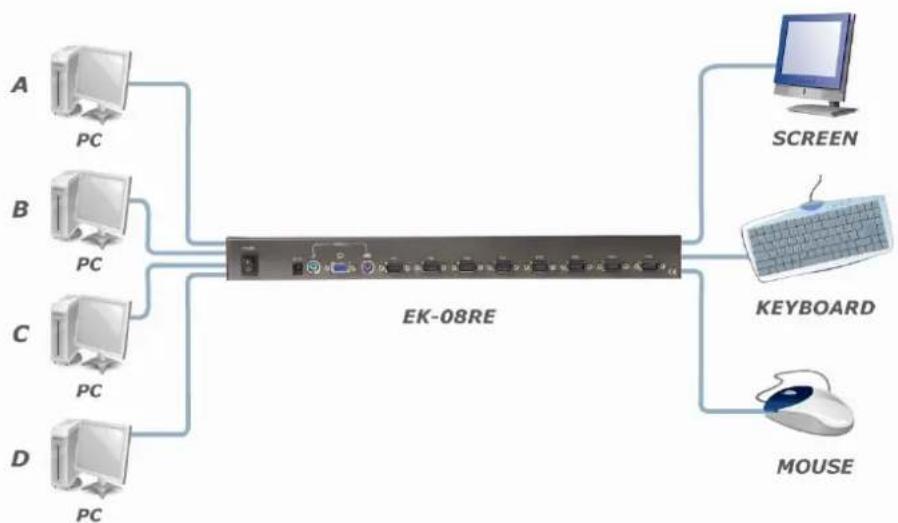
flowchart
graph LR
    A["PC"] --> E["EK-08RE"]
    B["PC"] --> E
    C["PC"] --> E
    D["PC"] --> E
    E --> F["SCREEN"]
    E --> G["KEYBOARD"]
    E --> H["MOUSE"]