
LFT4560WH - Fridge Concept - Free user manual and instructions
Find the device manual for free LFT4560WH Concept in PDF.


User questions about LFT4560WH Concept
0 question about this device. Answer the ones you know or ask your own.
Ask a new question about this device
Download the instructions for your Fridge in PDF format for free! Find your manual LFT4560WH - Concept and take your electronic device back in hand. On this page are published all the documents necessary for the use of your device. LFT4560WH by Concept.
USER MANUAL LFT4560WH Concept
natural_image
Two modern white refrigerators with 'concept' branding, shown from different angles (no visible text or symbols on the front panels)LFT4560ss / LFT4560wh
PODĚKOVÁNÍ
natural_image
Line drawing of a mechanical component with mounting brackets and clamps (no text or symbols)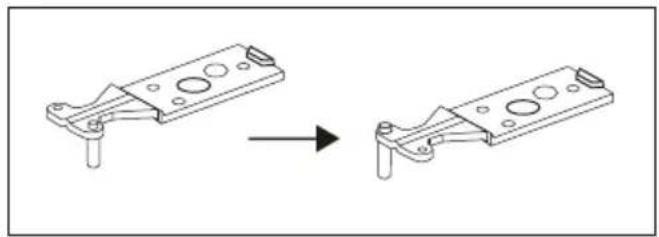
natural_image
Technical line drawing showing a mechanical component before and after assembly (no text or symbols)Obr. 2 Obr. 3
natural_image
Diagram showing a device being processed from a front panel, with an arrow indicating the process (no text or symbols present)Obr. 4
natural_image
Technical line drawing of a metal bracket with two oval cutouts and an upward arrow indicating force or movement (no text or symbols)Obr. 5
natural_image
Pure technical diagram of a lampshade setup with no text, numbers, or symbolsObr. 6
natural_image
Simple line drawing of a rectangular object with a curved arrow indicating rotation or motion (no text or symbols)Obr. 7
natural_image
Pure technical diagram of a mechanical assembly with no text, numbers, or symbolsObr. 8
natural_image
Simple line drawing of a door frame with a scroll and directional arrow (no text or symbols)Obr. 9
natural_image
Simple line drawing of a laptop with a blank screen and base (no text or symbols)Obr. 10 Obr. 11
natural_image
Pure mechanical diagram showing a curved arrow indicating rotation or force direction, without any text, numbers, or symbols.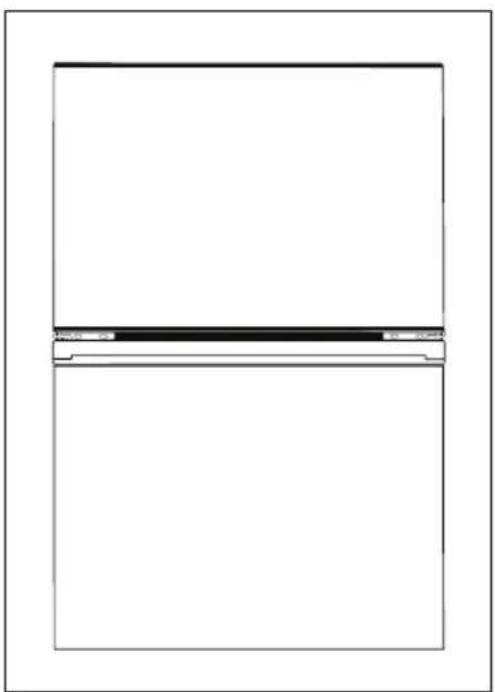
natural_image
Simple line drawing of a rectangular frame with a horizontal bar at the bottom (no text or symbols)Obr. 12
BĚŽNÉ PROVOZNÍ ZVUKY
Zvuk praskání ledu
natural_image
Line drawing of a mechanical component with clamps and a base plate (no text or symbols)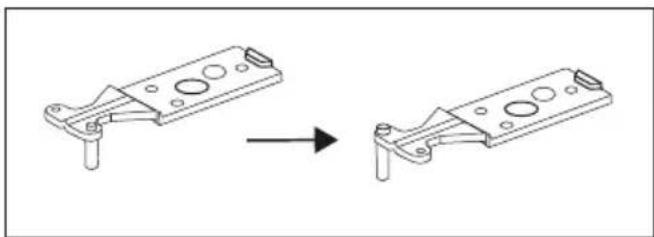
natural_image
Technical line drawing of a mechanical bracket assembly before and after modification (no text or symbols)Obr. 2 Obr. 3
natural_image
Diagram showing a device being processed from a component, with an arrow indicating the process (no text or symbols present)Obr. 4
natural_image
Technical line drawing of a metal bracket with two recessed slots and an upward arrow indicating force or motion (no text or symbols)Obr. 5
natural_image
Technical line drawing of a mechanical assembly with no visible text or symbolsObr. 6
natural_image
Simple line drawing of a rectangular object with an arrow indicating rotation or motion (no text or symbols)Obr. 7
natural_image
Pure technical diagram of a mechanical assembly with no text, numbers, or symbolsObr. 8
natural_image
Simple line drawing of a door frame with an arrow indicating motion or direction (no text or symbols)Obr. 9
natural_image
Simple line drawing of a rectangular frame with a central blank rectangle (no text or symbols)Obr. 10 Obr. 11
natural_image
Pure mechanical diagram showing a curved arrow indicating rotation or force direction, without any text, numbers, or symbols.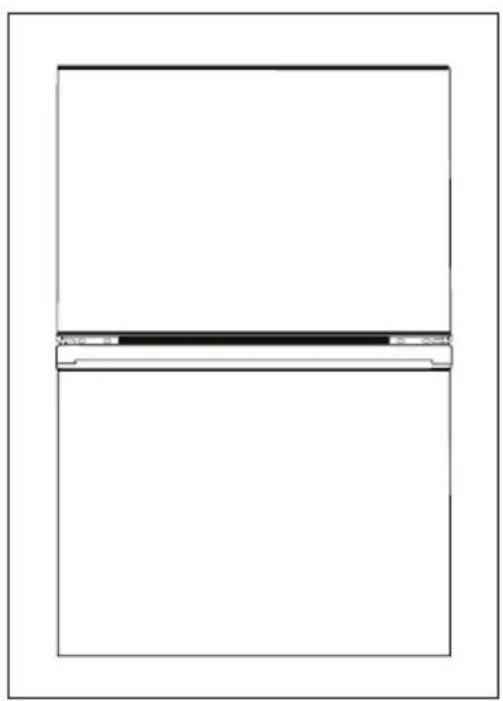
natural_image
Simple line drawing of a rectangular frame with a horizontal bar at the bottom (no text or symbols)Obr. 12
BEŽNÉ PREVÁDZKOVÉ ZVUKY
Zvuk praskania l'adu
natural_image
Line drawing of a mechanical component with clamps and a base, no text or symbols presentRys.2 Rys.3
natural_image
Technical line drawing showing a mechanical component before and after assembly (no text or symbols)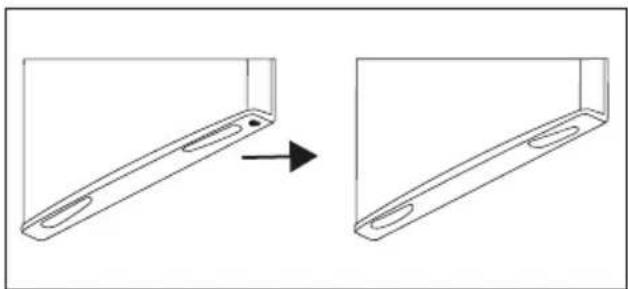
natural_image
Diagram showing a device being processed from a component, with no text or symbols present.Rys.4

natural_image
Technical line drawing of a metal bracket with two recessed slots and an upward arrow indicating force or movement (no text or symbols)Rys.5
natural_image
Diagram of a lampshade setup with a central display and two small objects, no text or symbols present.Rys. 6
natural_image
Simple line drawing of a rectangular object with an arrow indicating rotation or motion (no text or symbols)Rys. 7
natural_image
Pure technical diagram showing a mechanical assembly with no text, numbers, or symbolsRys. 8
natural_image
Simple line drawing of a door frame with a hanging handle and an arrow indicating rotation (no text or symbols)Rys. 9

natural_image
Simple line drawing of a rectangular frame with a central rectangle and a base, no text or symbols present.Rys. 10
natural_image
Simple line drawing of a mechanical component with a curved arrow indicating rotation (no text or symbols)Rys. 11
natural_image
Simple line drawing of a rectangular frame with a horizontal bar at the center (no text or symbols)Rys. 12
ZWYKŁE DŻWIĘKI EKSPLOATACYJNE
Dźwięk pękania lodu
natural_image
Line drawing of a mechanical component with mounting brackets and a central pin (no text or symbols)2.att
natural_image
Technical line drawing showing a mechanical component before and after assembly (no text or symbols)3.att
natural_image
Diagram showing a device being processed from a left-side view, with an arrow indicating the process (no text or symbols present)4.att
natural_image
Technical line drawing of a metal bracket with two slots and an upward arrow indicating force or direction (no text or symbols)5.att
natural_image
Diagram of a lamp setup with a central display unit and three hanging lights (no text or symbols)6.att
natural_image
Simple line drawing of a rectangular object with a curved arrow indicating rotation or motion (no text or symbols)7.att
natural_image
Pure technical diagram of a mechanical assembly with no text, numbers, or symbols8.att
natural_image
Simple line drawing of a ladder leaning against a wall, with an arrow indicating motion direction (no text or symbols)9.att
natural_image
Simple line drawing of a refrigerator with a blank front panel (no text or symbols)10.att 11.att
natural_image
Pure mechanical diagram showing a curved arrow indicating rotation or force direction, without any text, numbers, or symbols.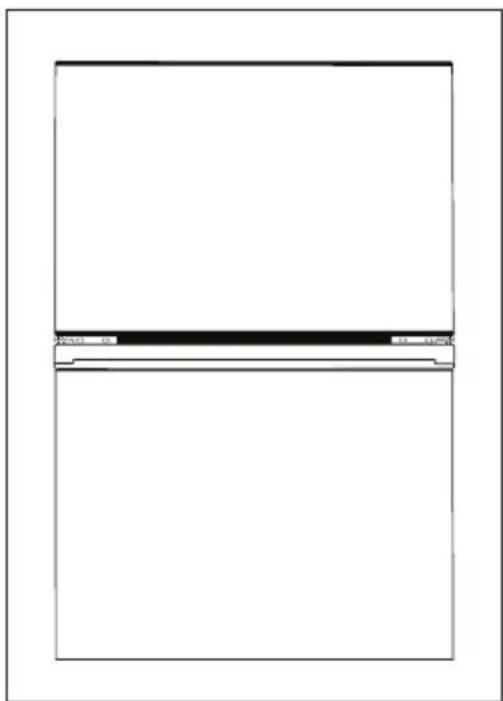
natural_image
Blank rectangular frame with a horizontal line and small mark at the bottom (no text or symbols)12.att
NORMĀLAS EKSPLUATĀCIJAS SKAŅAS
Thank you for purchasing the Concept product. We want you to be satisfied with everything we make every day you use it.
Please read the instructions carefully before initial use. You should retain them for future reference. Ensure that anyone using this product is familiar with the instructions.
TABLE OF CONTENTS
Technical specifications
Important safety information
Product description
Tips for use
User manual
Cleaning and maintenance
Installation of the appliance
Door swing direction
Regular operating noise
Troubleshooting
Service centre
Environmental protection
| TECHNICAL SPECIFICATIONS | |
| Energy class E | |
| Voltage 220 – 240 V ~ 50 Hz | |
| Annual power consumption 176 kWh | |
| Daily power consumption 0,482 KWh | |
| Total volume 204 l | |
| Usable volume (refrigerator/freezer) 164 l / 40 l | |
| Freezing capacity 2 kg / 24 hours | |
| Freezer accumulation time 8 hours | |
| Climate class ST / N | |
| Noise level 40 dB (A) | |
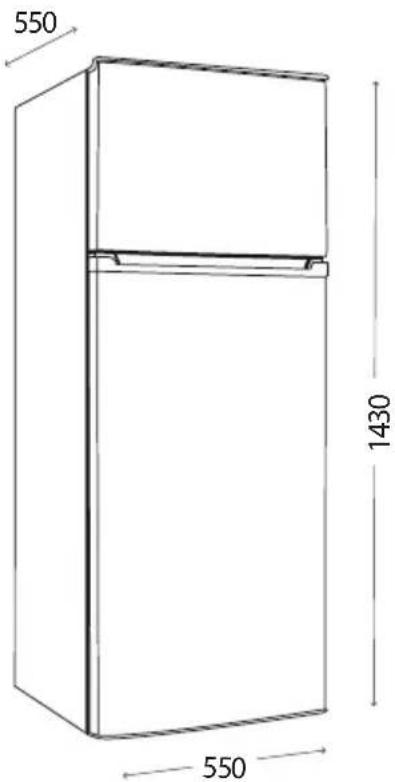
| Height 1430 mm | |
| Width 550 mm | |
| Depth 550 mm | |
| Weight | 36 kg |
The manufacturer reserves the right to make potential technical changes, typographical errors and any differences in the representation without prior notice.
IMPORTANT SAFETY INFORMATION
Upon a delivery of a freestanding refrigerator freezer
- Immediately after delivery, check the package for any damage during shipping.
- Caution! Caution! Some edges of this appliance that are hidden after installation are sharp! Be careful not to get cut when handling an uninstalled unit.
- Do not install the appliance if it has been damaged. Contact the store where you purchased it immediately.
- Remove all the packaging and marketing materials before first use.
- Keep the packaging materials away from children or dispose of them properly.
- If the power cord is damaged, it must be replaced by the manufacturer, manufacturer's service representative or a similarly qualified person in order to avoid the risk of injury.
During installation
- WARNING: When installing the appliance, make sure that the power cord is not trapped or damaged.
- Do not use the appliance in any other way than as described in this manual.
- Make sure the mains voltage corresponds to the values on the rating plate of the appliance.
• This appliance can be used in households and similar places like: - Kitchen cabinets in shops, offices and other workplaces.
- Appliances used in agriculture.
- Appliances used by guests in hotels and other areas in a hotel environment.
-
Appliances used in a Bed and Breakfast environment.
-
Do not use the appliance if you are barefoot.
- Do not touch the appliance with wet hands.
- Do not touch the cooling parts of the freezer with wet hands. Risk of injury!
- Do not stand or sit on the open door of the appliance.
- Do not allow children or unauthorized people to handle the appliance, use it out of their reach.
• Children should not play with the appliance. - Pay extra attention if the appliance is used near children.
- Do not allow the appliance to be used as a toy.
- This appliance can be used by children aged 8 years and over. Persons with reduced physical, sensory or mental capabilities, or lack of experience and knowledge, should be supervised or familiarized with the instructions for use of the appliance in a safe way and have been made aware of the risks involved.
-
Children 3 to 8 years old are only allowed to insert and remove food from the refrigerator.
-
The appliance must be disconnected from the mains before carrying out user maintenance.
- WARNING: Keep the ventilation openings in the appliance cover or in the built-in construction free and unobstructed.
• WARNING: Do not damage the cooling circuit. - WARNING: Operate the refrigerator in accordance with the local regulations for the use of flammable expandable gases and refrigerants.
-
DANGER: Danger of children being trapped in the refrigerator compartment. Before you dispose of your old refrigerator or freezer:
-
Remove the door of the appliance.
- Leave the shelves in place so that children cannot get inside easily.
- If a malfunction occurs, turn off the appliance and unplug it from the wall outlet.
- When disconnecting the unit from the wall outlet, never pull the power cord, grasp the plug end and disconnect it by removing it from the receptacle.
- Do not immerse the power cord or the plug in water or any other liquid.
- Check the appliance and the power cord for damage regularly.
- Do not switch on the appliance if it has been damaged.
- Do not use the appliance if the door or the door seals are damaged. Call the authorised service centre.
- Do not use any accessories other than those recommended by the manufacturer.
- Do not use accessories with damaged surface treatment or if it has been worn out or has other defects.
- When removing ice from the freezer, be careful, there is a risk of injury and frostbite.
- IMPORTANT! Before switching on, let the appliance stand still for at least 3 hours to settle the refrigerant gases in the compressor after shipping.
- Use the appliance in a room with temperatures between +10 °C and +32 °C.
- Do not place the appliance near heat sources, it may increase its consumption and shorten the service life.
- Do not place any objects on the top of the appliance, as it could damage the appliance.
- Do not place any electrical devices such as mixers and others in the appliance.
- Do not store any corrosive or explosive substances such as aerosol cans with a flammable substance in the appliance.
- Do not run any electrical appliances inside the refrigerator or freezer.
- Before use, it is necessary to wipe the inside of the appliance with a solution of baking soda dissolved in tepid water. After cleaning, dry all parts thoroughly.
- Cleaning and user maintenance shall not be made by children unless they are older than 8 years and supervised.
- WARNING! Do not use mechanical devices or other means to speed up the
defrosting process other than those recommended by the manufacturer.
- Do not place the appliance under the direct sun shine.
- Make sure there is enough free space around the appliance for free circulation of air.
- The appliance should be located at least 50 cm from a gas oven or burners and should be placed at least 5 cm away from an electric oven.
- If the appliance is placed close to the freezer, a distance of at least 2 cm should be between them in order to avoid creating moisture on the outside.
Caution!
To avoid injury, open the oven door only for a short period of time to insert or remove food. Children may lock themselves inside the appliance (risk of suffocation) or be exposed to other dangers.
Possible defects
- Only qualified service technicians should repair or perform maintenance to this appliance.
- During the repairs the appliance must be disconnected from the power. Switch off the circuit breaker or remove the plug from the wall outlet.
- When disconnecting the unit from the wall outlet, never pull the power cord, grasp the plug end and disconnect it by removing it from the receptacle.
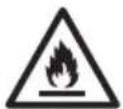
Caution! The risk of fire / Flammable materials.
If you fail to follow these instructions, any possible repair cannot be recognized as a warranty repair.
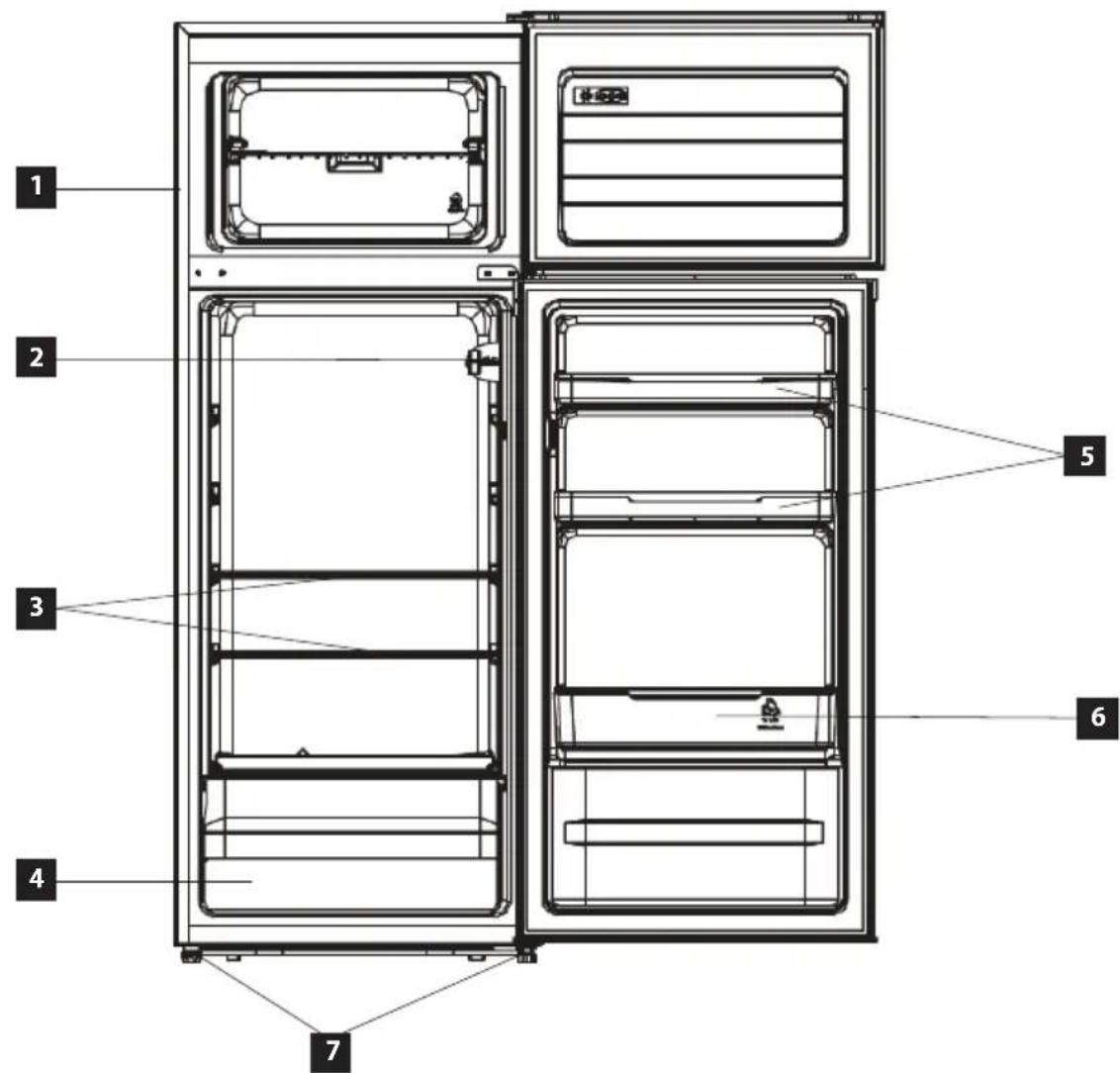
PRODUCT DESCRIPTION
1 Freezer
2 Temperature control
3 Glass shelves
4 Fruit and vegetable drawer
5 Small food compartement
6 Bottle compartment
7 Levelling feet
text_image
1 2 3 4 5 6 7Note: To ensure optimum energy efficiency of the appliance, leave drawers, food boxes, shelves, etc. located according to the position in the picture above.
TIPS FOR USE
- If there is a power failure or the cord has been pulled out of the wall socket, it is necessary to wait at least 5 minutes before reconnecting the appliance. This 5-minute delay is done to prevent compressor damage.
-
During a power failure, food can be stored for several hours inside the refrigerator and freezer. Open the door of the refrigerator and the freezer as little as possible in order to extend the freshness of the stored food.
• FOR ENERGY SAVINGS: -
Sparkling drinks should not be stored in freezer compartments or food boxes or in low-temperature compartments, and some products, such as water ice cream, should not be consumed too cold.
- Do not exceed the storage time recommended by the food manufacturers for any type of food, especially for commercial deep-frozen food in freezers and frozen food storage compartments or boxes.
- Protect frozen food from an unreasonable increase in their temperature when defrosting the refrigeration equipment, for example by wrapping frozen food in several layers of newspaper.
-
Increasing the temperature of frozen food during manual defrosting, maintenance or cleaning could shorten its storage time.
-
If you do not use the appliance for a long time, disconnect the appliance from the mains, clean the inside of the appliance with non-aggressive detergents (see the Cleaning and Maintenance section) and leave the appliance door open to prevent unpleasant odours inside the appliance.
- The ambient temperature in the room, the temperature of the food, the amount of food stored, and how often the door of the appliance gets opened have an effect on the temperature inside the appliance.
- If you do not attend to store frozen food, there is no need to have the freezer set to the maximum cooling power. If you leave the temperature set to the maximum cooling power for a long time, the drain line may get frozen.
- This appliance is designed for use at ambient temperatures of 16 °C to 38 °C. The appliance may not function properly if it is used in environment with ambient temperatures listed in the table.
| Climate class Ambient Temperature | |
| T 16 °C up to 43 °C | |
| ST 16 °C up to 38 °C | |
| N 16 °C up to 32 °C | |
| SN 10 °C up to 32 °C |
Tips for storing food in a refrigerator
The refrigerator is used to store fresh food for several days.
- Be aware that stored food should not touch the back wall. Leave some space around the individual items to ensure air circulation in the refrigerator.
- Do not put hot food or drinks in the refrigerator. It will increase the humidity inside the refrigerator.
• Store the food in closed containers or packed.
• Store liquids in closed containers or bottles.
• It is recommended to place the wrapped meat on the glass shelf above the fruit and vegetable drawer.
Please follow the instructions below to avoid degrading of stored food.
- Do not open the refrigerator door for longer than necessary, as the supply of warm air significantly increases the temperature inside the appliance.
- Clean surfaces that may be in contact with food and drainage channels regularly.
- Fresh meat and fish should be stored in a suitable place to avoid contact with other foods.
Tips for storing food in a freezer
The freezer is used to freeze fresh food, store frozen food for the time specified on the packaging and to produce ice.
- Pack the fresh food airtight. Special freezer bags, polyethylene bags and plastic containers are ideal.
- Prevent fresh food from coming into contact with already frozen food.
- In case of power failure, open the freezer door only when necessary and as little as possible. The freezer keeps the food frozen for up to 12 hours.
- Never place warm food or beverages in the freezer.
- Before putting frozen food into the freezer, make sure the packaging is not damaged.
USER MANUAL
Before first use
Before first use you should wipe the outside and inside of the appliance with a damp cloth for hygiene reasons. Wash all removable parts with warm soapy water.
After installing the refrigerator, leave the appliance standstill for at least half an hour before connecting to the mains. It is necessary to allow the cooling gases to set down. Then you can connect the refrigerator to the mains and let it run for 2-3 hours to stabilize a normal operating temperature. A slight odour may occur during this time. It will go away as soon as the appliance starts to cool. Then put fresh or frozen food inside the appliance.
Note: If a power failure occurs during the first run, wait for at least 5 minutes before switching on again or connecting to the mains.
Setting the Temperature inside the Refrigerator
- Open the door of the appliance.
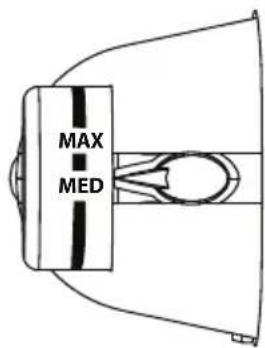
- Internal temperature of the refrigerator and freezer compartment can be set with the internal temperature control (Fig.1).
-
Continuous turning of the controller from position "OFF" to position "MAX" sets cooler temperature inside.
-
The abbreviations shown on the controller do not indicate a specific set temperature, but a temperature level
- If the thermostat is set to "OFF", it is turned off and the appliance does not cool or freeze.
- For short-term food storage in the freezer, set the thermostat between "MIN" – "MED".
- For long-term food storage in the freezer, set the thermostat to position "MED" and above.
• The refrigerator should be operated for at least 24 hours to reach the desired cooling temperature.
Legend:
| “Off” setting - The appliance does not cool | ||
| “Min” setting Minimum | Lower cooling temperature | |
| “Med” setting Medium | Normal operation (suitable for most situations) | |
| “Max” setting Maximum | The coldest temperature |
- At high ambient temperatures, e.g. on hot summer days. You may need to set the thermostat to the coldest setting (position "Max"), which can cause the compressor to run continuously to keep the temperature in the refrigeration chamber low.
- When installing the refrigerator for the first time, set the thermostat knob to "Med".
Allow the refrigerator to cool completely before placing food. It is best to wait 24 hours before placing food in the refrigerator.
text_image
MAX MEDFig. 1
Setting the Temperature of Freezer Zone
- The freezer temperature is set automatically according to the set temperature in the refrigerator and it cannot be altered.
Note: Frozen water droplets may appear on the back wall of the refrigerator, it is a common phenomenon not a defect of the appliance.
CLEANING AND MAINTENANCE
- Disconnect the power cord from the wall outlet or switch off the circuit breaker of the appliance before cleaning and maintenance.
- The inside of the refrigerator should be cleaned according to the frequency of use to avoid unpleasant odours.
- One source of odour can also be dirt deposits around the sealing. Regular cleaning with a damp cloth prevents these unpleasant odours.
- For cleaning, we recommend using non-aggressive products, preferably clear lukewarm water along with a soft sponge or paper towel.
- Let the appliance open to dry out naturally after cleaning.
- For cleaning, we do not recommend cleaning agents such as alcohol, acetone, oil, toothpaste or any other abrasive products.
• We do not recommend using coarse sponges or steel brushes.
• We do not recommend using boiling water as it may cause damage to individual parts of the appliance. - We do not recommend cleaning the appliance with a stream of water that could interfere with the insulation or cause a short circuit of some electronic components of the appliance.
- Clean all the accessories of the appliance with a solution of lukewarm water and a detergent. Never wash the accessories in a dishwasher!
- It is forbidden to use: soap, detergent, cleaning powder, spray cleaners, etc., as they could cause odour inside the refrigerator or contaminate food.
Defrosting
- Disconnect the electrical plug from the mains
- Move food from the refrigerator to place where it will not be spoiled, prepare a container to catch defrosting frost
- Wipe the thawed water on the evaporator and the inner lining with a dry cloth, then wring the cloth out and repeat the process until the ice has completely thawed
- To speed up the defrosting process, you can use an ice scoop (use only a plastic or wooden scoop to avoid damaging the seal and the inner lining) or a very fine brush in combination with the use of an adequate amount of warm water.
- After complete defrosting and wiping the residual water inside the refrigerator with a dry cloth, you can put the food back in the refrigerator and switch on the appliance.
Installation instructions
- The warranty does not cover damages caused by incorrect installation.
• The responsibility for installing the appliance lies with the buyer, not the manufacturer. - The manufacturer bears no responsibility for damage caused to people, animals or property due to incorrect installation.
- Place the appliance on a flat place in a well-ventilated are.
- Do not place the appliance under the direct sun shine.
- The appliance should be placed at least 10 cm from the wall at the back and both sides. There should be a free space of approximately 30 cm above the appliance as it needs to ventilate freely.
- If necessary, use the adjustable feet at the bottom of the appliance to align the appliance in a horizontally stable position.
Connection to the mains
- Make sure the mains voltage and current protection correspond to the values on the rating plate of the appliance. We recommend using a separate outlet with a 16 A circuit breaker.
- Only use grounded sockets.
- Do not use multiple sockets, plugs and extension cords. There is a risk of overheating.
- The plug of the power cord on the appliance must be freely accessible even after the installation.
• Changes in a connection may only be performed by a qualified professional. - Electrical safety of the appliance can be guaranteed only if the protective terminal of the appliance is connected to the protective conductor of the mains.
- The manufacturer bears no responsibility for damage to persons or property as a result of missing or bad protective connection.
- The power cord must be positioned in a way that it is not deformed or excessively bent.
APPLIANCE DIMENSIONS
text_image
550 1430 550CHANGING THE DOOR SWING DIRECTION
- Switch off the circuit breaker or remove the plug from the wall outlet. When disconnecting the unit from the wall outlet, never pull the power cord, grasp the plug end and disconnect it by removing it from the receptacle.
- If you have any food and drinks in the refrigerator door compartments, remove them.
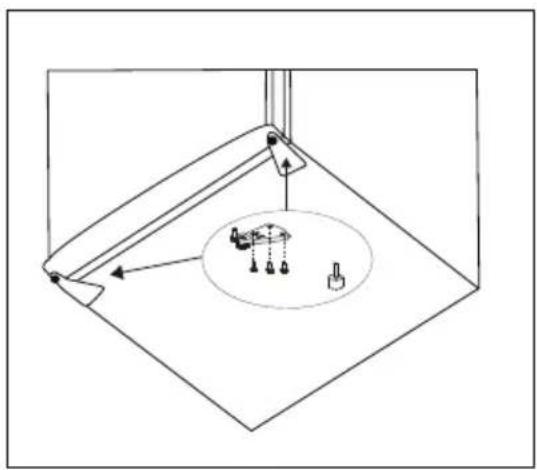
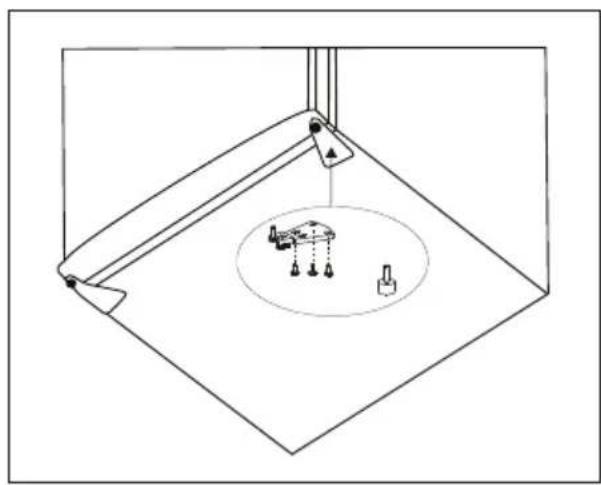
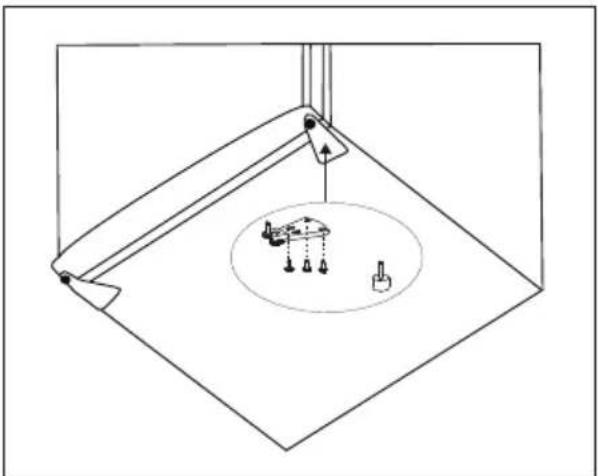
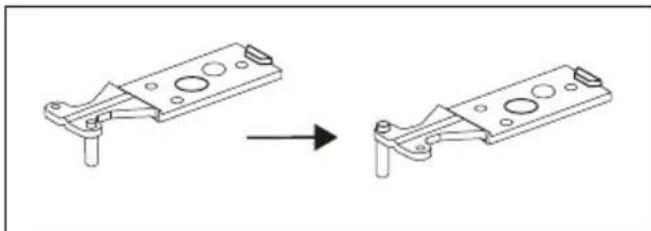
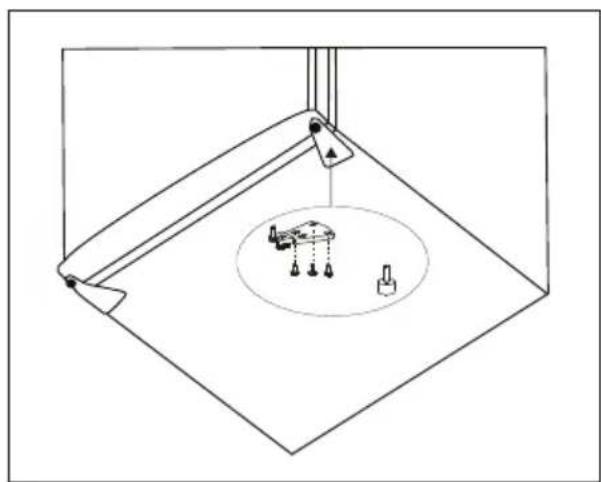
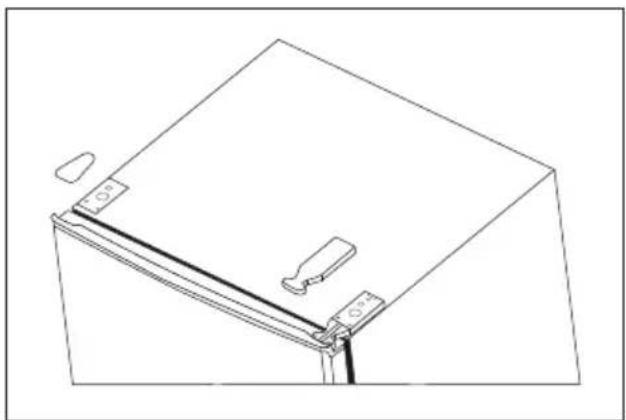
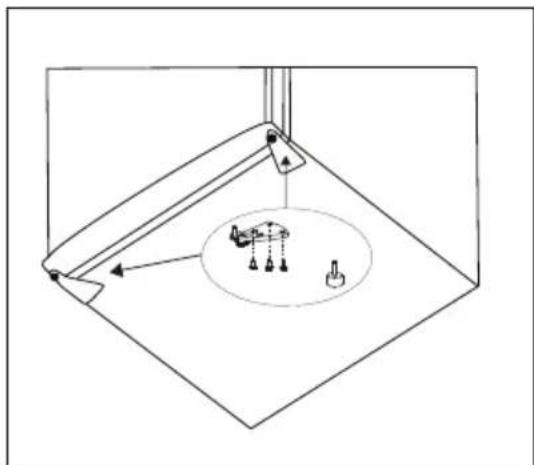
- Remove the hinge covers, then remove the screws from the top hinge of the freezer door using a Phillips screwdriver (Fig. 2) and remove the top hinge. Throughout dismantling hold the door in a vertical position to prevent them from falling and damaging. Remove the freezer door and place it in a safe place.
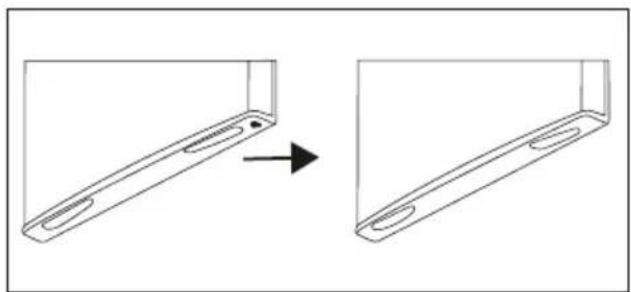
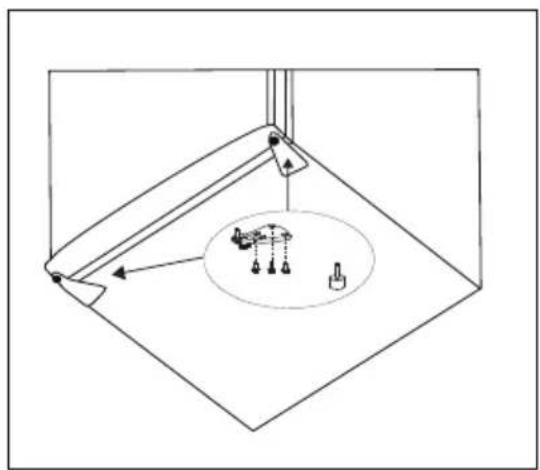
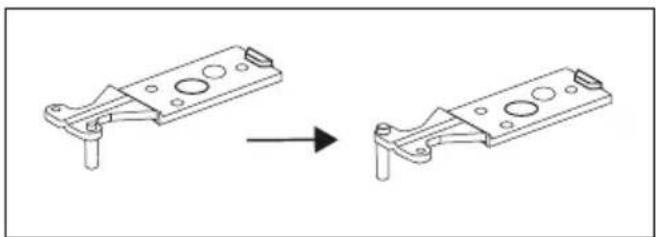
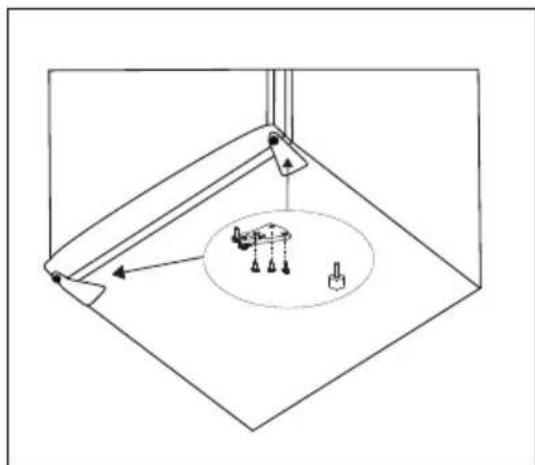
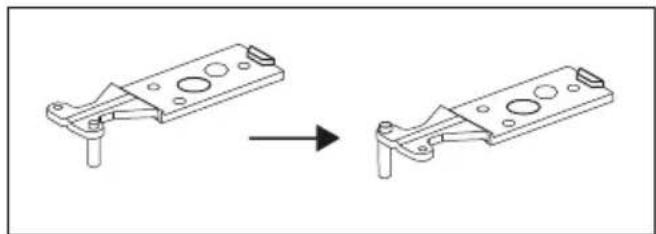
- Move the top hinge of the door, top door spacer and door bearing housing to the other side (Fig. 3).
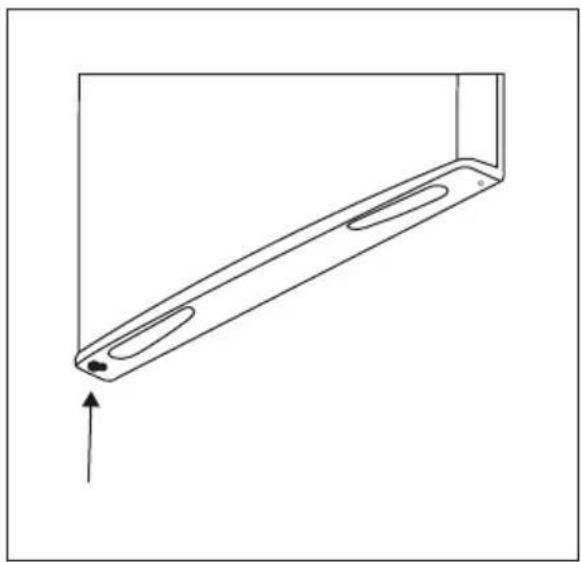
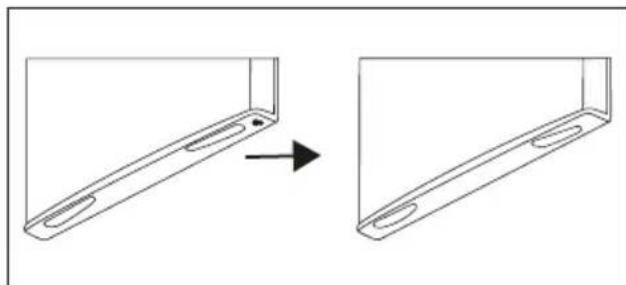
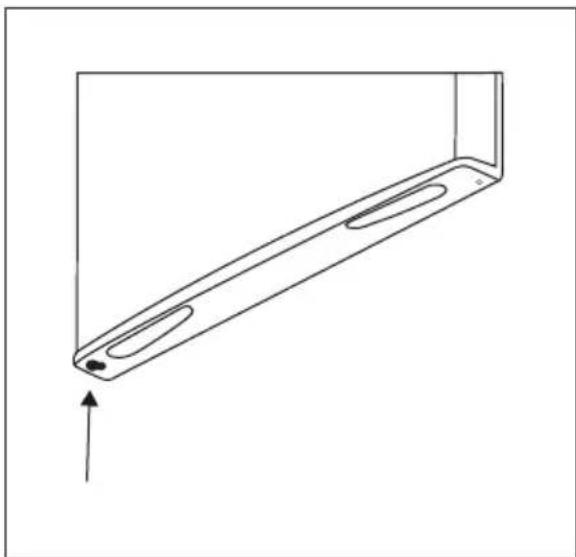
a. Remove the nut with the housing. Remove the washer, then move the pins to the other side and fix.
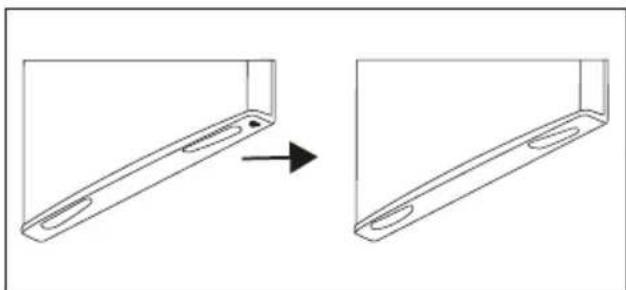
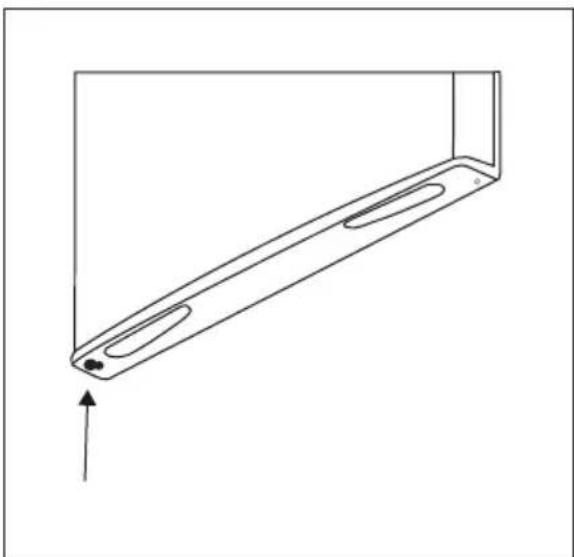
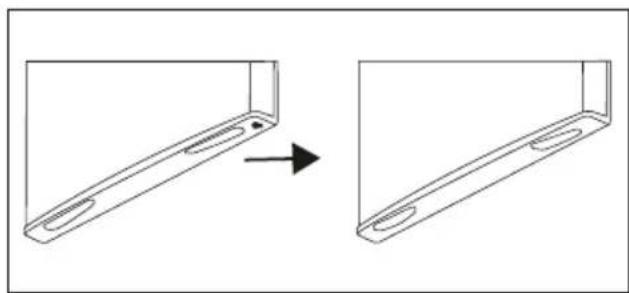
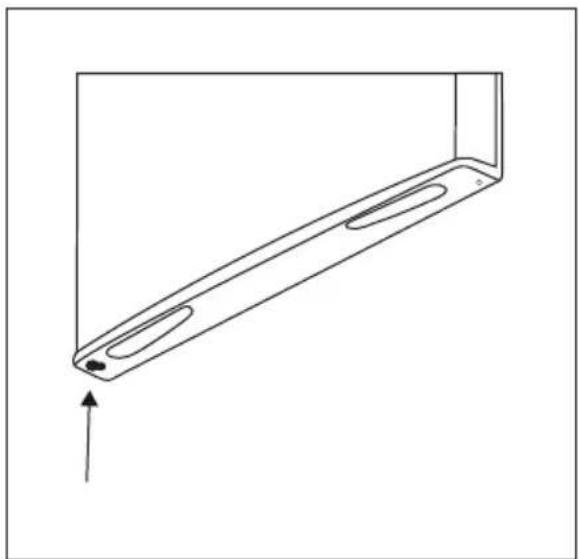
b. Move the spacer to the other side (Fig. 4, 5).
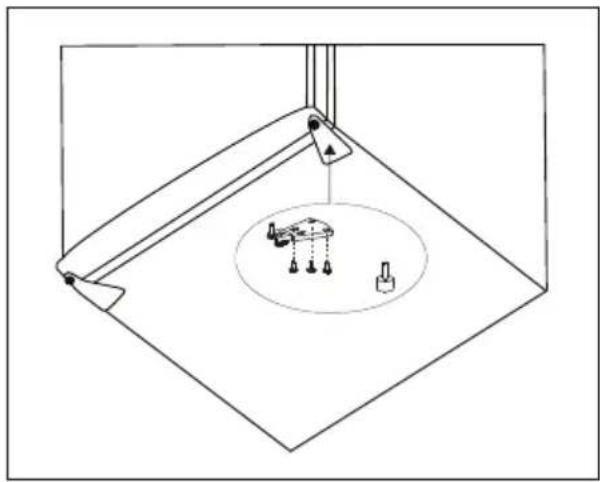
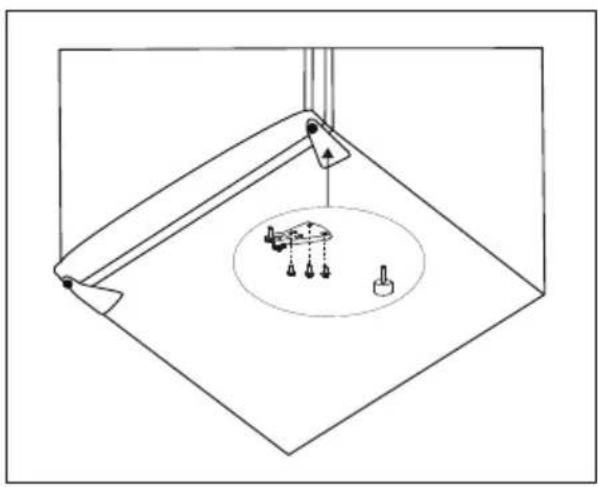
- Using a Phillips screwdriver, remove the screws that secure the lower hinge (Fig. 6).
Note: the tilt angle of the refrigerator must be less than 45^ .
natural_image
Line drawing of a mechanical component with clamps and a base (no text or symbols)Fig. 2
natural_image
Technical line drawing of a mechanical bracket assembly before and after modification (no text or symbols)Fig.3
natural_image
Diagram showing a device being processed from a front panel, with an arrow indicating the process (no text or symbols present)Fig. 4
natural_image
Technical line drawing of a metal bracket with two recessed slots and an upward arrow indicating force or motion (no text or symbols)Fig. 5
natural_image
Pure technical line drawing of a mechanical assembly with no text or symbolsFig. 6
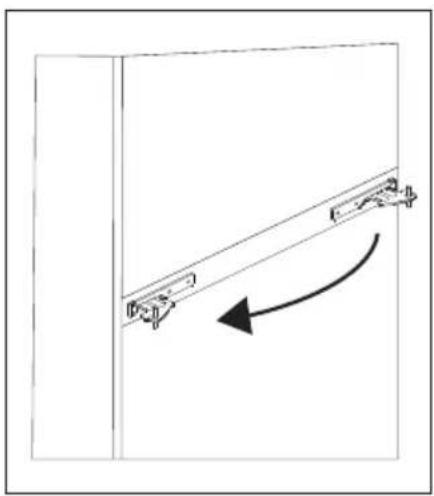
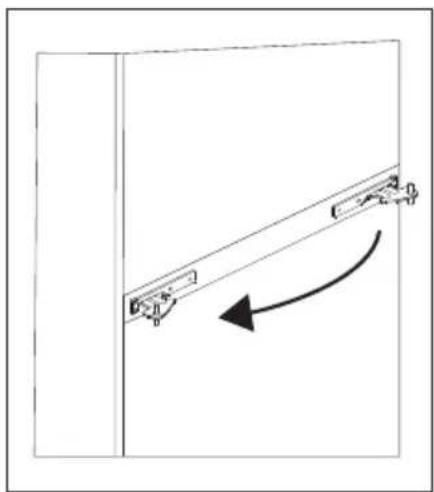
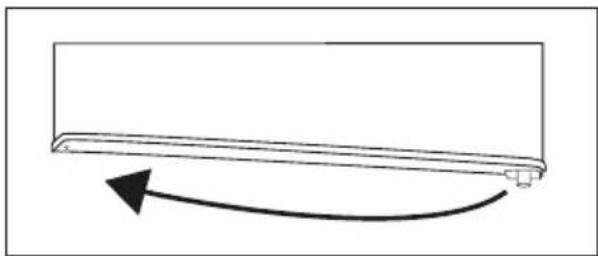
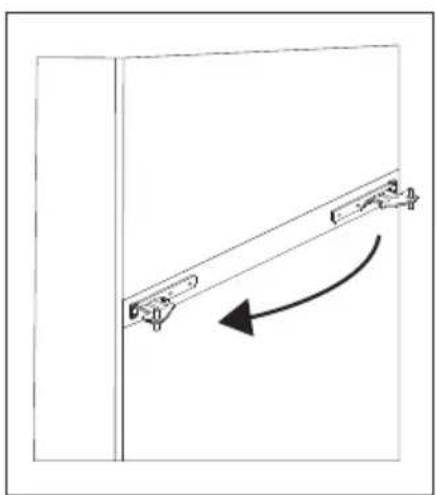
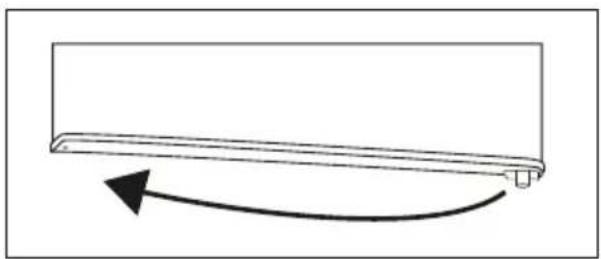
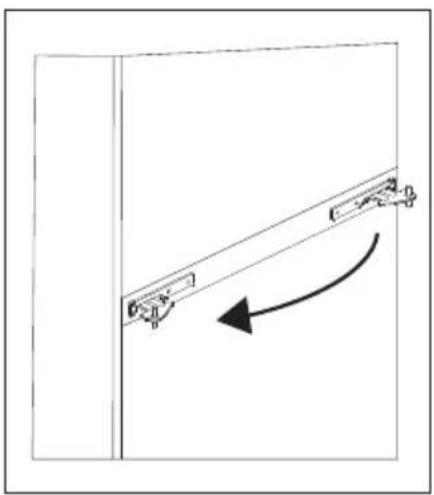
- Move the lower hinge of the door, lower door spacer and door bearing housing to the other side (Fig. 7)
- Install the lower hinge to the other side and fasten it with screws (Fig. 8).
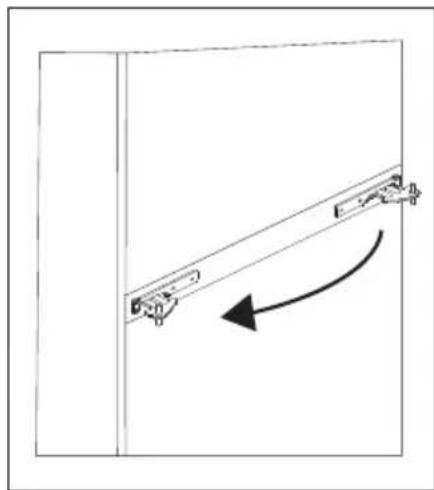
- Move the centre hinge to the other side (Fig. 9).
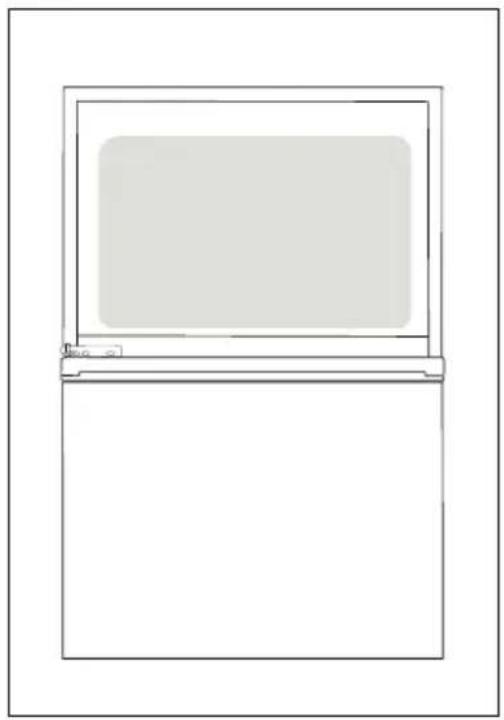
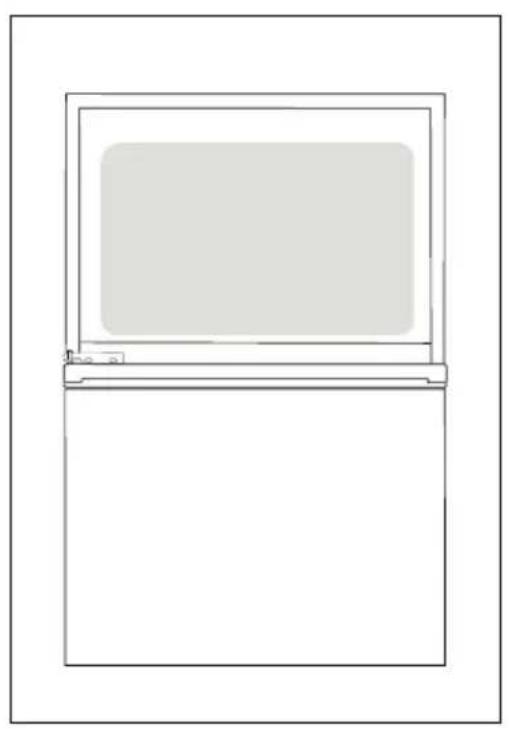
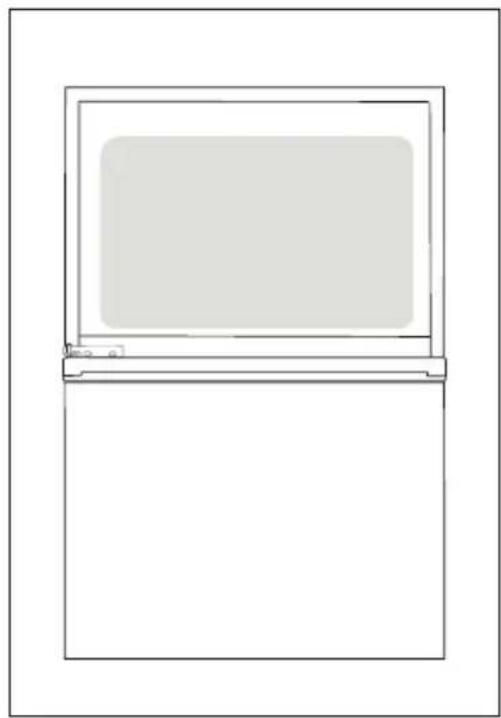
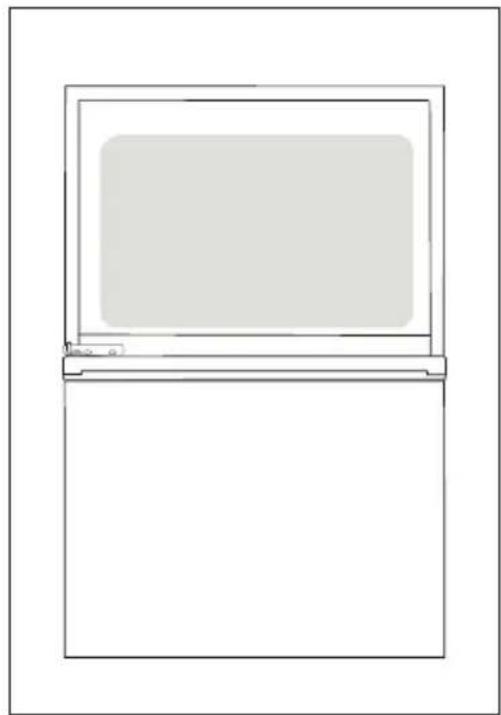
- Position the lower door in the correct position and fasten the centre hinge (Fig. 10).
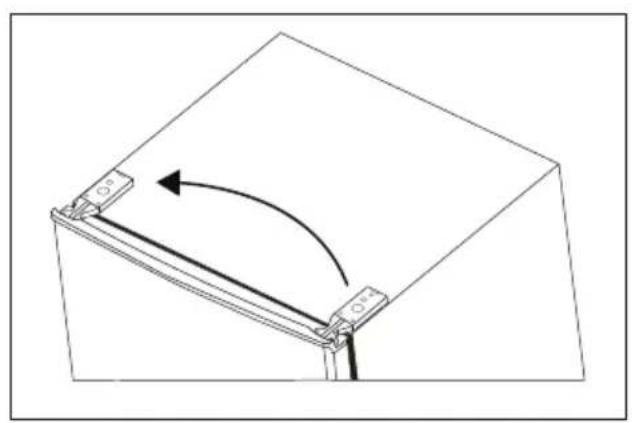
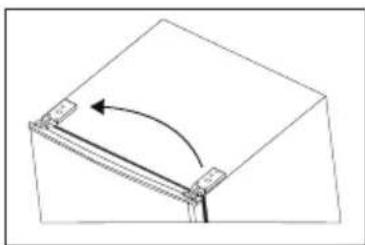
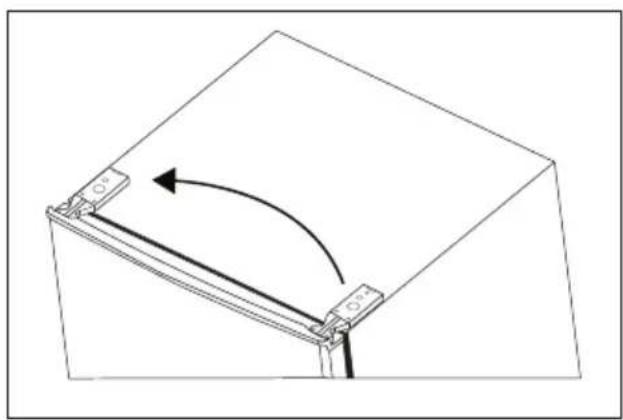
- Move the top hinge of the top door to the other side (Fig. 11).
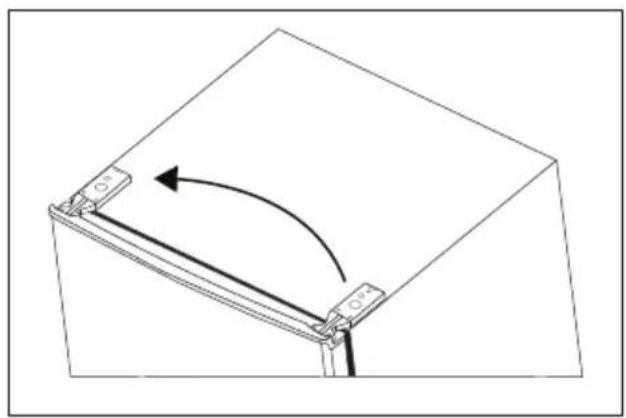
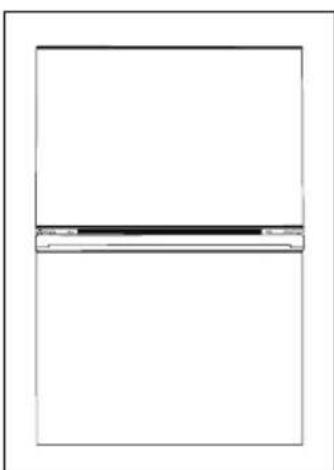
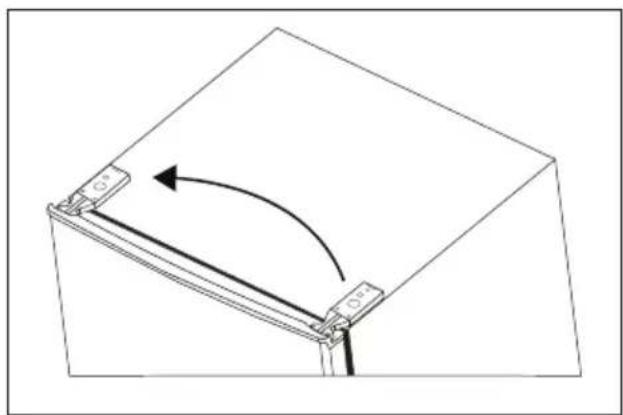
- Position the top door in the correct position, fasten the top hinge and replace the hinge cover (Fig. 12).
- Make sure that the refrigerator door can get closed properly.
- Replace the four screw caps and the two latches in their respective positions.
natural_image
Simple line drawing of a rectangular object with a curved arrow indicating rotation or motion (no text or symbols)Fig. 7
natural_image
Pure technical diagram of a mechanical assembly with no text, numbers, or symbolsFig. 8
natural_image
Simple line drawing of a door frame with an arrow indicating clockwise motion (no text or symbols)Fig. 9
natural_image
Simple line drawing of a refrigerator with a blank front panel (no text or symbols)Fig. 10 Fig. 11
natural_image
Pure mechanical diagram showing a rotating component with arrows indicating rotation (no text or symbols)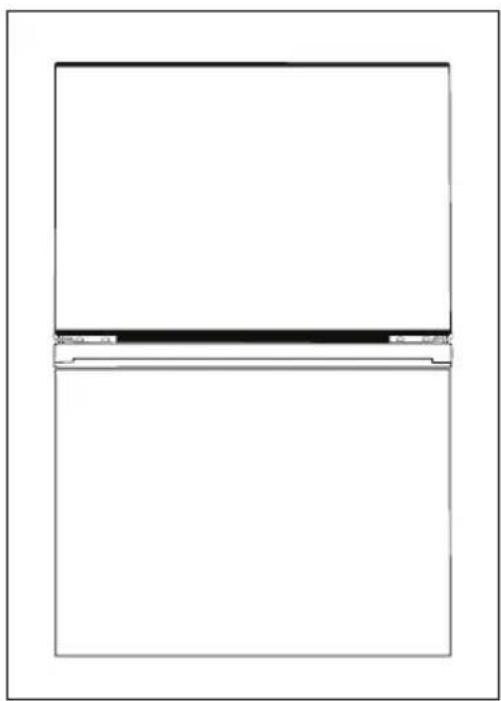
natural_image
Simple line drawing of a rectangular frame with a horizontal divider and corner brackets (no text or symbols)Fig. 12
VVREGULAR OPERATING NOISE
Ice crackling noise
It may occur during the automatic defrosting, or it can be caused by the expansion and contraction of air inside the refrigerator and freezer.
Short cracking
It can be heard when the thermostat turns on and off the compressor.
Noise of the compressor
Running compressor produces noise. After the installation of the appliance, the compressor may be a little louder for a short time.
Bubbling and flowing
This sound is generated when the refrigerant is flowing through the appliance pipes.
Sound of running water
Water flows into the evaporator container during the defrosting process and it is audible throughout the defrosting process.
Sound of an airflow (sound of a ventilator)
The sound is created by the air circulation inside the appliance. This is a normal feature of a freezer equipped with a No-Frost system.
TROUBLESHOOTING
Most of the minor errors that appear when using the refrigerator can be removed by yourself, there is no need to contact an authorized service centre. The following overview should help you find the causes of occurring errors.
If the following overview does not help to remedy the error, please contact an authorized service centre.
| Defect description | Possible cause Solution | |
| The appliance does not work | The power cord plug is not plugged in the wall outlet. | Check the connection of the cord. |
| Damaged power cord | Do not connect the appliance into the mains. Contact a qualified expert or an authorised service. | |
| Faulty main electronics or control electronics | Contact an authorized service centre. | |
| The appliance cannot lower the temperature | Cooling fluids leakage Contact an authorized service centre. | |
| Clogged refrigerator or freezer piping Contact an authorized service centre. | ||
| The compressor is still running | Room temperature is high | Ensure that there is enough space around the appliance for free air circulation. |
| Too many items stored in the refrigerator and freezer | Remove some of the items that do not have to be stored in the appliance. | |
| Hot meals or liquids are placed inside the refrigerator | Remove all hot meals and liquids from the appliance and let them cool down firts. | |
| Door gets opened too frequently Do not open | the door so often. | |
| Faulty main electronics or control electronics | Contact an authorized service centre. | |
| Compressor creates too much noise. | Loose screws securing the compressor Tighten | the screws. |
| The refrigerator is not stable | Align the refrigerator so that it is in the plane. | |
| The light inside the refrigerator does not light up | The power cord plug is not plugged in the wall outlet. | Check the connection of the cord. |
| The light in the refrigerator is damaged Contact an authorized service centre. | ||
| There is too much water in the evaporator container | The door of the refrigerator is not completely closed | Make sure that the door of the refrigerator is closed and that there is no food or containers that could keep the door from closing properly. |
| Inside the refrigerator there is food that contains too much water - constant defrosting | Reduce the amount of food in the refrigerator that contains too much water. | |
| A frost deposit forms inside the freezer. | Insufficiently packaged food or wet containers | Ensure that the food packaging is not damaged or that the containers are dry before placing them in the freezer. |
| Door gets opened too frequently Do not open | the door so often. | |
| Incorrectly placed compartments in the freezer | Check that the freezer compartments are properly placed. | |
| The door sealing is damaged or worn out Contact an authorized service centre. | ||
SERVICE CENTRE
CAUTION!
Extensive maintenance or repair, which requires access to internal parts of the product, has to be performed by a qualified service centre.
ENVIRONMENTAL PROTECTION
- Prefer recycling of packaging materials and old appliances.
- Packaging materials may be disposed of as sorted waste.
- Dispose the plastic bags made of polyethylene (PE) of as sorted waste.
Recycling of the appliance at the end of its lifespan:
This appliance is labelled in accordance with European Directive 2012/19/EU concerning used electrical and electronic appliances (waste electrical and electronic equipment - WEEE). The symbol on the product or its packaging indicates that this product may not be treated as household waste. It is necessary to take it to a container park for the recycling of electrical and electronic equipment. By ensuring the correct disposal of this appliance you will help prevent potential negative consequences to the environment and human health, which could otherwise result from inappropriate disposal of this product. Disposal must be performed in accordance to the regulations for waste disposal. For more detailed information about recycling of this appliance see the authorized local office or service for household waste disposal or the shop, where you purchased the appliance.