
Device MP80 - Chargeur pour appareils mobiles TESLA - Free user manual and instructions
Find the device manual for free Device MP80 TESLA in PDF.


| Product Type | USB-C Hub / Docking Station |
| Brand | TESLA |
| Model | Device MP80 |
| Input Connector | USB-C Male (Built-in Cable) |
| Output Ports | 1x HDMI Female, 2x USB-A 3.0 Female, 1x USB-C PD Female, 1x RJ45 Ethernet |
| HDMI Resolution | Up to 4K (3840x2160) @30Hz, FHD (1920x1080) @60Hz |
| USB-A Data Rate | Up to 5 Gbps (USB 3.0) |
| USB-A Power Output | 5V / 0.9A per port |
| USB-C PD Charging | Up to 60W (20V / 3A) |
| Ethernet Speed | 10/100/1000 Mbps (Gigabit) |
| Dimensions (Approx.) | 120 x 50 x 15 mm |
| Weight (Approx.) | 80 g |
| Operating Temperature | 32° to 131°F (0° to 55°C) |
| Storage Temperature | 14° to 158°F (-10° to 70°C) |
| Power Source | From host device or optional USB-C charger (for PD) |
| Compatibility | Devices with USB-C port supporting DisplayPort Alternate Mode |
| Plug and Play | Yes, no driver required |
| Cleaning Instructions | Wipe with a soft, dry cloth. Do not use liquids. |
| Safety Notes | Use only with compatible chargers. Avoid exposure to extreme temperatures. |
| Spare Parts / Repairability | Not user-serviceable. Contact support for issues. |
Frequently Asked Questions - Device MP80 TESLA
User questions about Device MP80 TESLA
0 question about this device. Answer the ones you know or ask your own.
Ask a new question about this device
Download the instructions for your Chargeur pour appareils mobiles in PDF format for free! Find your manual Device MP80 - TESLA and take your electronic device back in hand. On this page are published all the documents necessary for the use of your device. Device MP80 by TESLA.
USER MANUAL Device MP80 TESLA
- Computer with USB-C™ port that supports USB DisplayPort Alternate Mode
- HDMI monitor
- Ethernet network with speeds up to 10/100/1000 Mbps
Product Feature
USB C adapter (TYPE C to HDMI+3*USB3.0 ports+PD). It is suitable for PC, macbook, mobile phone, digital camera, video camera and other products with popular type-C interface. The output of HDMI is suitable for projector, display screen, TV and other devices. It can support up to 4K (3840*2160 @30Hz) Resolution output; extended USB3.0 can connect USB mouse, keyboard, USB flash disk, mobile hard disk, card reader and other digital products to read and write data, the transmission rate can reach 5Gbps, and can provide 5V/0.9A power supply for external electronic equipment; PD3.0 charging protocol (60W; 20V/3A), and supports the function of 10/100/1000m network card, plug and play.
TESLA
Product Overview
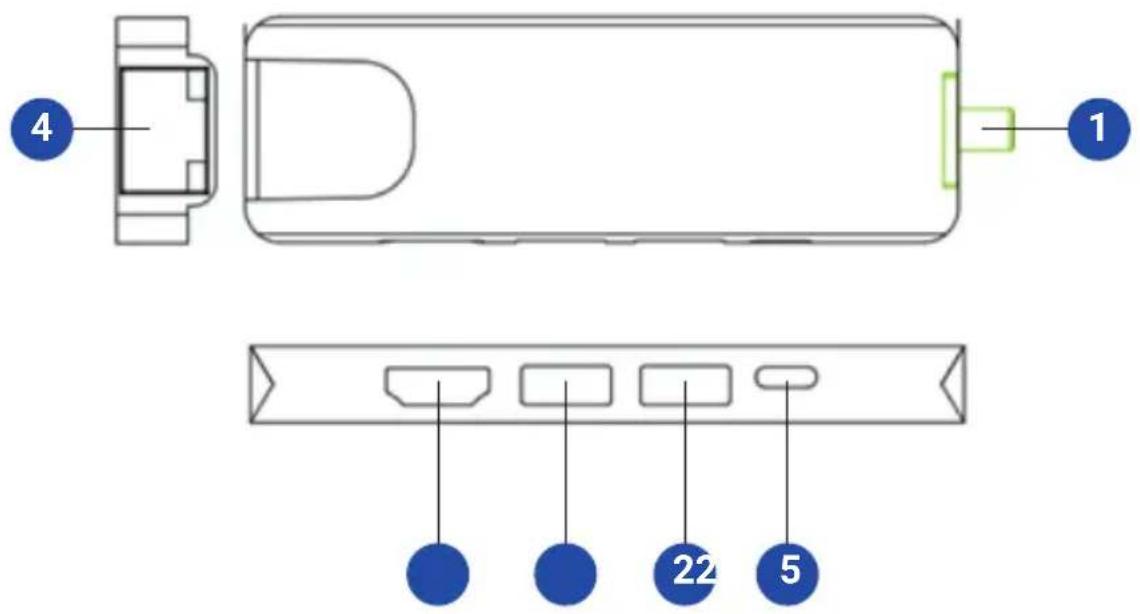
1 USB-C Connector with Built-In Cable
2 USB-A 3.0 Ports
3 4K HDMI port
4 RJ45 Ethernet Network Port
5 USB-C port for PD charging
TESLA
Installation
Notes:
- When connected to an AC power source by way of the USB-C charging port, 5W is dedicated to the docking station and connected USB peripherals. The remaining power is used to charge the connected USB-C device.
- When the unit is connected to the USB-C port on your computer and to a network via Cat5e/6 cabling, a network connection will automatically be established. If no connection is made, one can be established manually by going to your computer's network settings page. For example, when using a Mac, navigate to the Network section found in System Preferences, click the 'Assist Me' button to get to the Network Setup Assistant, then follow the prompts to establish a connection.
TESLA
Installation
- Connect the built-in USB-C cable to USB-C port on your laptop, tablet or other device.
- Use an HDMI cable to connect a monitor or display to the unit's HDMI port.
- Connect USB peripherals to the unit's USB-A 3.0 hub ports.
- For an Ethernet connection, use Cat5e/6 UTP cable to connect to the unit's RJ45 port.
- Charge a device by connecting a USB-C charger to the unit's USB-C port. The USB-C port can also be used to connect a USB-C peripheral device.
Specifications
| Input Connectors | |
| USB 1x USB-C (Male) | |
| Output Connectors | |
| USB-A 2x USB-A (Female) | |
| USB-C 1x USB-C for PD (Female) | |
| HDMI 1x HDMI (Female) | |
| Ethernet 1x RJ45 | |
| Environmental | |
| Operating Temperature 32° to 131°F (0° to 55°C) | |
| Operating Humidity 10% to 85% RH, Non-Condensing | |
| Storage Temperature 14° to 158°F (-10° to 70°C) | |
| Storage Humidity 5% to 90% RH, Non-Condensing | |
| Power Requirements | |
| USB-C Charging Port Supports up to 20V 3A (60W) | |
CE



Brand : TESLA
Model : Device MP80
Category : Chargeur pour appareils mobiles