TESLA TE‒323 - Uncategorized

TE‒323 - Uncategorized TESLA - Free user manual and instructions

Find the device manual for free TE‒323 TESLA in PDF.

📄 2 pages English EN Download 💬 AI Question 10 questions ⚙️ Specs
Notice TESLA TE‒323 - page 1
Pick your language and provide your email: we'll send you a specifically translated version.
Product Type Senior Remote Control
Brand Tesla
Model TE-323
Compatibility TV and Radio devices
Dimensions (Approx.) 24 x 5 x 2.5 cm
Weight (Approx.) 120 g (with batteries)
Power Supply 2 x AAA batteries (1.5V)
Main Functions Power On/Off, Mute, Volume +/- , Channel +/- , OK (confirm), EXIT, TV/Radio switch, EPG, Numeric keypad (0-9) for direct preset selection
Backlight No
Material Plastic
Color Black with gray buttons
Operating Range Up to 8 meters (infrared)
Battery Life Approximately 6 months with normal use
Cleaning Wipe with a soft, dry cloth. Do not use liquids or abrasive cleaners.
Safety Precautions Do not expose to water, heat, or direct sunlight. Remove batteries if not used for long periods.
Repairability Replace batteries. For other issues, consult a professional.

Frequently Asked Questions - TE‒323 TESLA

How do I pair the TE-323 remote with my TV?
The TE-323 is a universal remote for Tesla-compatible devices. Point it at the device, press the TV/RADIO button to select the mode, then press OK to confirm. Most devices work automatically without pairing.
What batteries does the TE-323 require?
It requires 2 x AAA batteries (1.5V). Insert them with correct polarity as shown inside the battery compartment.
How do I mute the volume?
Press the Mute button (speaker icon) on the remote. Press again to unmute.
How can I switch between TV and Radio?
Press the TV/RADIO button to toggle between TV and Radio programs. The current mode is usually indicated on screen.
The remote is not working. What should I do?
First, check the batteries. Replace if weak. Ensure no obstacles between remote and device. Point the remote directly at the device within 8 meters. If still not working, try resetting by removing batteries for 30 seconds.
How do I use the EPG (Electronic Program Guide)?
Press the EPG button to display the program guide. Use P+ and P- to navigate, OK to select a program, and EXIT to close.
Can I directly access a specific channel?
Yes, use the numeric keypad (0-9) to enter the preset number of the channel. For two-digit numbers, press the digits sequentially.
How do I clean the remote control?
Wipe the surface with a soft, dry cloth. Do not use water, alcohol, or abrasive cleaners as they may damage the finish.
The buttons are stuck or unresponsive. What can I do?
Remove the batteries and gently clean around the buttons with a dry cloth. If residue is present, lightly dampen a cloth with isopropyl alcohol and wipe carefully. Let it dry completely before reinserting batteries.
Is the TE-323 remote backlit?
No, the TE-323 does not have a backlight. Buttons are not illuminated. Use in a well-lit area or memorize key positions.

User questions about TE‒323 TESLA

0 question about this device. Answer the ones you know or ask your own.

Ask a new question about this device

The email remains private: it is only used to notify you if someone responds to your question.

No questions yet. Be the first to ask one.

Download the instructions for your Uncategorized in PDF format for free! Find your manual TE‒323 - TESLA and take your electronic device back in hand. On this page are published all the documents necessary for the use of your device. TE‒323 by TESLA.

USER MANUAL TE‒323 TESLA

P- Zmena staníc vzad

OK Potvrdenie vol'by či zobrazenia zoznamu staníc

TV/RADIO Prepnutie medzi TV a Radio programami

EN | Senior remote control

TESLA TE‒323 - EN | Senior remote control - 1

On/Off

TESLA TE‒323 - EN | Senior remote control - 2

Mute the volume

EXIT Return back

VOL+ Increase the volume

VOL- Volume down

P+ Change station forward

P- Change stations backwards

OK Confirming the selection or displaying the list of stations

TV/RADIO Switch between TV and Radio programs

EPG Electronic Program Guide

(0\~9) Direct selection of TV/Radio presets
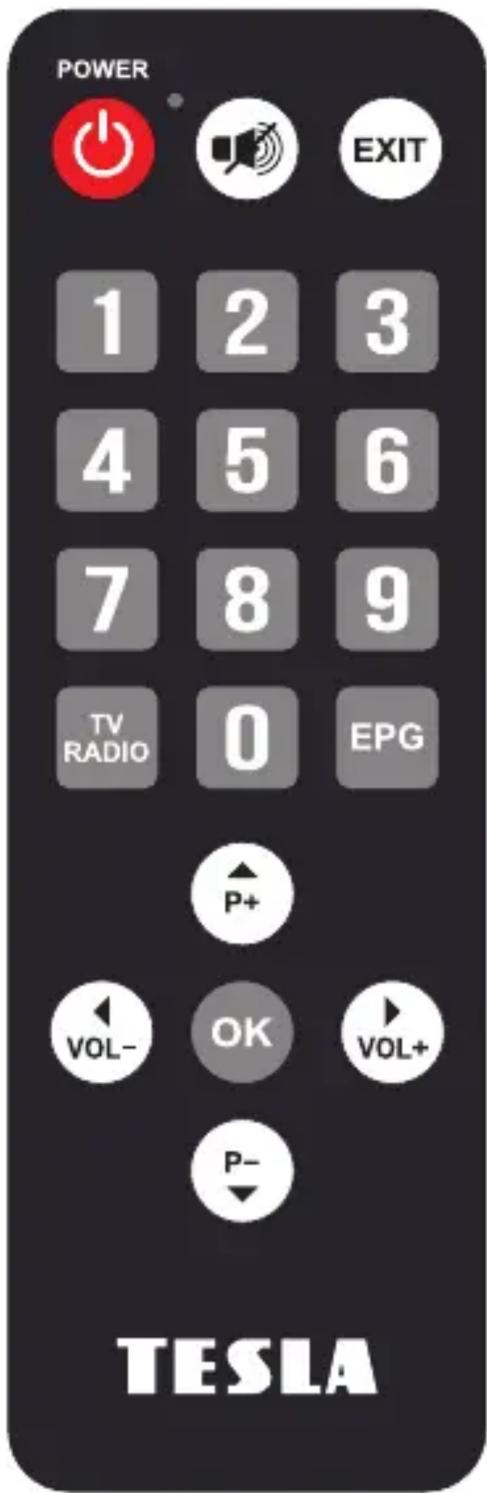
POWER 1 2 3 4 5 6 7 8 9 TV RADIO 0 EPG P+ VOL- OK VOL+ P- TESLA

Table of contents Click a title to access it
Manual assistant
Powered by Anthropic
Waiting for your message
Product information

Brand : TESLA

Model : TE‒323

Category : Uncategorized