
Soul1 - Loudspeaker Lamax - Free user manual and instructions
Find the device manual for free Soul1 Lamax in PDF.


| Type | Portable Bluetooth speaker |
| Brand | Lamax |
| Model | Soul1 |
| Output power | 35 W overall |
| Speaker configuration | 1 × 90 mm woofer, 2 × 42 mm full-range, active subwoofer |
| Frequency response | 20 Hz – 20 kHz |
| Bluetooth | 4.2, range up to 10 m |
| Audio input | 3.5 mm AUX |
| Card reader | Micro SD |
| Microphone | Built-in for handsfree calling |
| Battery | Li-Ion 4400 mAh |
| Playback time | Up to 12 hours |
| Charging time | 3 hours at 5 V / 2 A |
| Charging port | DC 5V (micro USB) |
| Design | Wooden enclosure |
| TWS | True Wireless Stereo pairing |
| Dimensions | 240 × 130 × 80 mm |
| Weight | 1390 g |
| Operating temperature | -15°C to +50°C |
| Controls | Volume +/-, Play/pause, Power, Reset |
| Safety | Avoid water and moisture; use dry cloth for cleaning; keep away from heat sources; do not disassemble; use only supplied charger |
| Maintenance | Clean with soft dry cloth; do not use harsh chemicals; avoid liquid ingress |
| Spare parts | Not user-serviceable; reset restores factory defaults |
| General information | Updated manuals available at https://beat.lamax-electronics.com/Soul1/manuals/ |
Frequently Asked Questions - Soul1 Lamax
User questions about Soul1 Lamax
0 question about this device. Answer the ones you know or ask your own.
Ask a new question about this device
Download the instructions for your Loudspeaker in PDF format for free! Find your manual Soul1 - Lamax and take your electronic device back in hand. On this page are published all the documents necessary for the use of your device. Soul1 by Lamax.
USER MANUAL Soul1 Lamax
AUX MICRO RESET LED 2 DC 5V
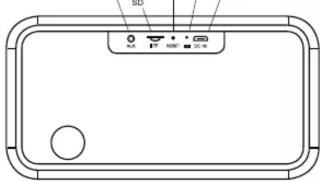
Controls:
| 1 | VOL - | Decrease volume (press), previous track (hold) |
| 2 | VOL + | Increase volume (press), next track (hold) |
| 3 | PLAY | Play / pause (press), accept / end call (press), decline call (hold) redial previously called number (double tap) |
| 4 | POWER | Switch on / off (equipment) |
LED Indicators:
- Ready to be paired – LED 1 blinks blue
- Pairing – LED 1 blinks blue every 5 seconds
- Playing through audio cable – LED 1 blinks blue
- Discharged battery – LED 2 blinks red
- Charging - LED 2 blinks red Fully charged - LED 2 steps
- Fully-charged – LED 2 stops blinking red
Switching On/Off:
Use the POWER button to switch the speaker on. The on/off indicator will light and an audible signal will be heard. The speaker can be switched off by holding down the same button.
An unpaired speaker will switch itself off after 10 minutes of inactivity.
Pairing:
-
Switch the speaker on by holding down POWER. The LED will begin blinking blue and the speaker is ready to be paired
-
On a mobile phone or other device turn on Bluetooth. Search for "LAMAX Soul1" on the list of available devices. On successful pairing, the speaker will emit a sound and the LED will begin to blink blue every 5 seconds.
-
To reattempt pairing press POWER. The LED will begin blinking blue and then repeat step 2.
Audio Connection:
By plugging in the AUX socket with the supplied audio cable, you can play music from any device. When playing through the audio input, it is not possible to control the tracks directly from the speaker.
Pressing the POWER button during playback via the audio cable puts the speaker back into Bluetooth pairing mode.
Handsfree:
When pairing your phone with Bluetooth, the handsfree function is activated. To answer / end the call, press the PLAY button, reject the incoming call by holding down PLAY, and double-tap PLAY to redial the last number.
Charging:
The speaker can be charged by plugging the supplied USB cable into a suitable USB port. Do not charge the speaker with a higher input voltage than 5V, as this may damage the equipment.
Reset:
If the speaker stops responding, insert a paper clip (or other similar object) into the RESET socket and gently press the button inside. The speaker will turn off. In the case of pairing difficulties, press the RESET button in the same manner and hold for a few seconds. The speaker will turn off and restore the factory default settings.
TWS Function:
Turn on the two speakers you want to pair. Press the PLAY button on the same speaker as the master. The MASTER speaker is connected as the left stereo channel, the SLAVE speaker as the right stereo channel.
When pairing the speakers for the first time, ensure your media device is disconnected.
Main Features:
- Overall output 35 W
- Two main speakers complemented by an active subwoofer produce
deep bass
- Elegant wooden design
- Bluetooth 4.2 with a 10 metre range
- Possibility to play through audio cable
- 4400 mAh capacity battery lasts up to 12 hours playback time on a
single charge
- Built-in microphone enabling easy calling
- Battery saver function
- TWS (True Wireless Stereo) function enabling two speakers to be paired together. One speaker will act as the right channel and one as the left.
Parameters:
| Speaker parameters | 1 × 90 mm, 6 + 2 × 42 mm, 4 , 20Hz – 20 KHz |
| Battery | Li-Ion 4400 mAh |
| Continuous play time | Up to 12 hours |
| Charging duration | 3 hours (at 5 V / 2 A) |
| Connectivity options | Bluetooth, audio jack 3.5 mm, Micro SD |
| Wireless technology | Bluetooth 4.2 |
| Pairing distances | Up to 10 metres |
| Handsfree | Integrated speakers and microphone, speaker controls |
| Dimensions | 240 × 130 × 80 mm |
| Weight | 1390 g |
| Operational and storage | From -15°C – up to +50°C |
Updated user guides can be downloaded here:
https://beat.lamax-electronics.com/Soul1/manuals/

CE RoHS
https://beat.lamax-electronics.com/Soul1/manuals/

CE RoHS
AUX MICRO RESET LED 2 DC 5V
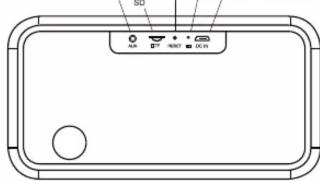
Ovládání:
https://beat.lamax-electronics.com/Soul1/manuals/

CE RoHS
AUX MICRO RESET LED 2 DC 5V

https://beat.lamax-electronics.com/Soul1/manuals/

CE RoHS
LAMAX SOUL1

AUX MICRO RESET LED 2 DC 5V

Sterowanie:
https://beat.lamax-electronics.com/Soul1/manuals/


CE RoHS
AUX MICRO RESET LED 2 DC 5V

Vezérlés:
https://beat.lamax-electronics.com/Soul1/manuals/

CE RoHS
AUX MICRO RESET LED 2 DC 5V

Upravljanje:
https://beat.lamax-electronics.com/Soul1/manuals/

CE RoHS
AUX MICRO RESET LED 2 DC 5V
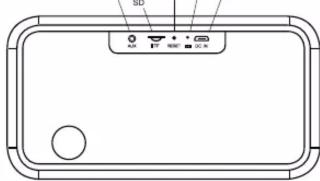
https://beat.lamax-electronics.com/Soul1/manuals/

CE RoHS




Brand : Lamax
Model : Soul1
Category : Loudspeaker