
PartyBoomBox300 - Loudspeaker Lamax - Free user manual and instructions
Find the device manual for free PartyBoomBox300 Lamax in PDF.


| Product Type | Portable PA Speaker with Bluetooth |
| Brand | Lamax |
| Model | PartyBoomBox300 |
| Total Peak Power | 300 W |
| RMS Power | 50 W |
| Subwoofer Diameter | 20 cm |
| Tweeter Diameter | 25 mm |
| Frequency Range | 40 – 20000 Hz |
| Sensitivity | 88 dB |
| Battery | 12 V / 2.2 Ah |
| Power Input | DC 15 V / 2 A (included adapter) |
| Bluetooth | Yes, with up to 10 m range |
| Audio Sources | Bluetooth, USB, SD card, AUX, FM radio |
| Microphone Input | 6.3 mm jack with separate volume and echo control |
| Remote Control | Included |
| LED Lights | Yes, switchable on/off |
| TWS Pairing | Yes, for stereo mode with two speakers |
| Display | LCD showing source and mode |
| Care and Cleaning | Wipe with a dry cloth; keep away from moisture |
| Safety | Do not expose to water or extreme temperatures; use only included adapter |
| General Information | Full manual available at lamax-electronics.com/downloads |
Frequently Asked Questions - PartyBoomBox300 Lamax
User questions about PartyBoomBox300 Lamax
0 question about this device. Answer the ones you know or ask your own.
Ask a new question about this device
Download the instructions for your Loudspeaker in PDF format for free! Find your manual PartyBoomBox300 - Lamax and take your electronic device back in hand. On this page are published all the documents necessary for the use of your device. PartyBoomBox300 by Lamax.
USER MANUAL PartyBoomBox300 Lamax
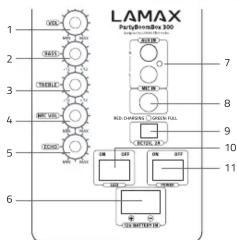
Rear Panel and Controls
| 1 | Volume level control | 7 | AUX INPUT |
| 2 | Bass level control 8 | Microphone input | |
| 3 | Treble level control 9 | Charging adapter input | |
| 4 | Microphone volume level control | 10 | LED On/Off switch |
| 5 | Microphone echo effect level control | 11 | Power switch |
| 6 | 12V battery input |
Charging and LED Indicators
Fully charge the speaker battery before first use, using the adapter included.
Indicators:
- LED glows red – the speaker battery is charging
- LED glows green – the speaker battery is fully charged
Note: Low battery status results in a gradual reduction in performance and possible audio outages. In this case, immediately connect the power to the speaker or turn it off.
Bulages in this case,
Powering On / Off
To turn the speaker on/off, press the POWER button. The display lights up and a beep sounds.
Pairing via Bluetooth
-
Turn on the speaker:
-
Turn on the speaker and make sure bluetooth mode is selected on the display. If it is not selected, press the MODE button below the rear panel display to select it. The speaker is now ready for pairing.
-
Activate the Bluetooth connection on your smartphone or other device. Select "LAMAX PartyBoomBox300" from the list of available devices. When pairing is successful, the speaker beans
-
Playback can be controlled either by a paired device, directly on the speaker or via remote control.
Note: The Bluetooth connection works best within 10 metres in an open area.
NOTE: THIS
TWS To pair two speakers, turn on both speakers and make sure they are not paired with the multimedia device. Set both devices to the Bluetooth mode by pressing the MODE button, the LCD display shows "no B". Hold down the PLAY/PAUSE button for 5s on one of them which will be the main one. A beep sounds and the main speaker acts as the right channel. The other speaker also beeps and acts as the left channel.
To unpair the speakers, hold the same MODE button on the main speaker, or turn one off.
Player Controls

| 1 | SD CARD | Input for an SD card. Select this source using the MODE button. |
| 2 | PLAY/PAUSE | Press to pause or play music. |
| 3 | PREVIOUS | Press to skip to the previous track. |
| 4 | NEXT Press to skip to the next track. | |
| 5 | REPEAT | Press to choose between the "loop current track" and "loop all tracks". |
| 6 | MODE | Press to select the music source: Bluetooth, SD card, USB, AUX, FM radio. The icon on the left of the display will show you which source is currently selected. |
| 7 | USB | Input for a USB device (e.g. flash drive). This input is for music playback only. You cannot charge other devices using this USB input. We do not recommend using USB extension cables. Do not disconnect the USB drive from the device while the USB drive is playing or reading data. |
Using an External AUX Source
-
Select "AUX" using the MODE button on the rear panel of the unit.
-
Connect your audio device to the external AUX IN input on the rear panel. You can then control playback on the external audio device or on the speaker itself.
Using the Microphone
-
Connect the microphone that comes included to the MIC IN input on the rear panel of the unit and turn the microphone switch to the ON position.
-
Turn the MIC VOL control on the rear panel to increase or decrease the microphone volume.
-
Turn the ECHO control on the rear panel of the device to increase the echo effect on the microphone.
Note: If you are placing the microphone next to the speaker, turn off the microphone. Otherwise, the speaker may feed back, causing a loud uncomfortable sound.
Placement
The speaker was designed to be placed on the floor, on any solid and stable surface, or on a tripod stand (tripod not included).
Note: If you will not be using the speaker for a long time, make sure it is turned off and unplugged.
Remote control

| 1 Standby mode ON/OFF |
| 2 Select input |
| 3 Sound modes |
| 4 Volume up |
| 5 Play/Pause |
| 6 Music playback: Next track, FM: + 0.1 mHz(press)/Next FM channel (hold) |
| 7 Repeat mode |
| 8 Select track from USB and SD/Select FM channel |
| 9 Scan FM channels |
| 10 Volume down |
| 11 Music playback: Previous track, FM: - 0.1 mHz(press)/Previous FM channel (hold) |
| 12 Mute |
Parameters
| Total Peak Power | 300 W |
| RMS | 50 W |
| Subwoofer Diameter | 20 cm |
| Tweeter Diameter | 25 mm |
| Frequency Range | 40 – 20000 Hz |
| Sensitivity | 88 dB |
| Number of Bands | 2 |
| Battery | 12 V / 2,2 Ah |
| Input (DC jack) | 15 V / 2 A |
A full and up-to-date version of the user manual is available here:
https://www.lamax-electronics.com/downloads/lamax-partyboombox/manual


LAMAX PARTYBOOMBOX300




Brand : Lamax
Model : PartyBoomBox300
Category : Loudspeaker