
LifeStar UV550 - Vacuum Cleaner TESLA - Free user manual and instructions
Find the device manual for free LifeStar UV550 TESLA in PDF.


| Product Type | Handheld Vacuum Cleaner with UV Sterilization |
| Brand | Tesla |
| Model | LifeStar UV550 |
| Power Supply | Mains (corded) |
| Operating Modes | Vacuum + Brush + UV, Vacuum + Brush, Vacuum + UV |
| UV Lamp | Yes, with automatic shut-off when distance > 5 cm or angle > 30° |
| Filter Type | Washable |
| Cleaning Brush | Rotating brush |
| Safety Features | Overheat protection, UV safety shut-off, do not use on wet surfaces |
| Usage | Indoor, household only |
| Maximum Operating Temperature | 40°C |
| Maintenance | Clean dust tank and filter regularly; clean brush and UV lamp |
| Warranty | Contact dealer for warranty repair |
Frequently Asked Questions - LifeStar UV550 TESLA
User questions about LifeStar UV550 TESLA
0 question about this device. Answer the ones you know or ask your own.
Ask a new question about this device
Download the instructions for your Vacuum Cleaner in PDF format for free! Find your manual LifeStar UV550 - TESLA and take your electronic device back in hand. On this page are published all the documents necessary for the use of your device. LifeStar UV550 by TESLA.
USER MANUAL LifeStar UV550 TESLA
VAŽNA SIGURNOSNA UPOZORENJA
OVAJ PROIZVOD NAMIJENJEN JE SAMO ZA UPORABU U KUĆANSTVU.
Thank you for choosing the TESLA LifeStar UV550.
Please, read the safety rules carefully and follow all common safety rules before using a robotic vacuum cleaner.
- Read through the instructions for use thoroughly before using
- Keep the user manual for future reference
- Follow the rules stated in this manual to reduce the risk of damage to the robotic vacuum cleaner and possible injury
IMPORTANT SAFETY INSTRUCTIONS
THIS PRODUCT IS INTENDED FOR HOUSEHOLD USE ONLY.
This device is a complex electromechanical device, please pay attention to the following instructions:
- The brand bears no responsibility for improper use or for use contrary to the instructions for use and is not covered by the warranty.
- The device is equipped with a UV lamp, so avoid looking at the bottom of the device when turning it on.
- Do not use the UV lamp in one place for a long time, as this may damage the object being cleaned.
- Do not use equipment for cleaning animals and people.
• The device is only intended for indoor use at room temperature (max. 40°C). - If the cord is damaged, do not use the appliance. Avoid the danger and have the entire vacuum cleaner reel and cord replaced by an authorized service center.
- Do not vacuum wet surfaces, water or liquid of any nature, hot or very fine substances (gypsum, cement, ash, etc.), large sharp fragments (glass shards), harmful products (solvents, paint strippers, etc.), aggressive substances (acids, cleaning agents), flammable and explosive substances (based on petrol or alcohol).
- Do not spray flammable sprays, cleaning fluids, paints or their vapors on the device.
- Never immerse the appliance in water, spray water on it or rinse it under the tap water and do not store it outdoors.
• If the appliance falls and shows visible damage or malfunctions, do not use it. - This appliance is intended for use by children under the age of 8 and persons without sufficient experience or knowledge, or by persons with reduced physical, sensory or mental capabilities, provided that they have been instructed and advised in the safe use of the appliance and are aware of the potential risks. Children should be supervised to ensure that they do not play with the appliance.
- User cleaning and maintenance must not be performed by children without supervision. Keep the appliance and its power cord out of the reach of children.
- Use only original accessories designed for this model.
- Do not touch the parts that are connected to the mains when your hands are wet.
-
Do not open or repair the device, as there is a risk of electric shock and loss of warranty.
• Vacuuming can cause an electrostatic charge, which can be dangerous to the user. -
Do not use the device if its dust bin is full.
- The manufacturer and importer into the European Union are not liable for damages caused by the operation of the device, such as injury, scalding, fire, injury, deterioration of other items, etc.
PACKAGE CONTENT
Carefully check that you have unpacked all the supplied accessories, we recommend that you keep the original paper box, user manual and packing material during the warranty period.
BEFORE THE FIRST CLEANING
Remove all packing material, vacuum cleaner and accessories. Remove any transparencies, stickers, or paper. Check that the appliance and any part of it is not damaged.
DESCRIPTION
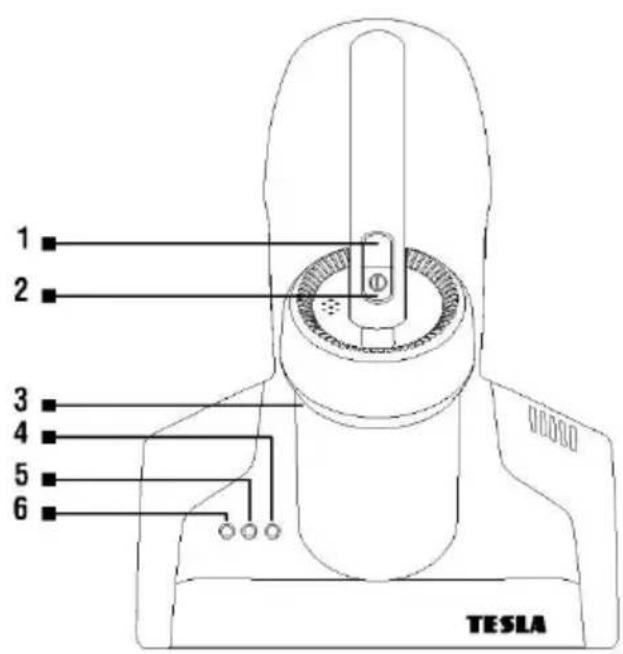
1 Operation mode selection
2 On/Off button
3 Dust tank
4 UV lamp indicator
5 Cleaning brush drive indicator
6 Vacuum indicator
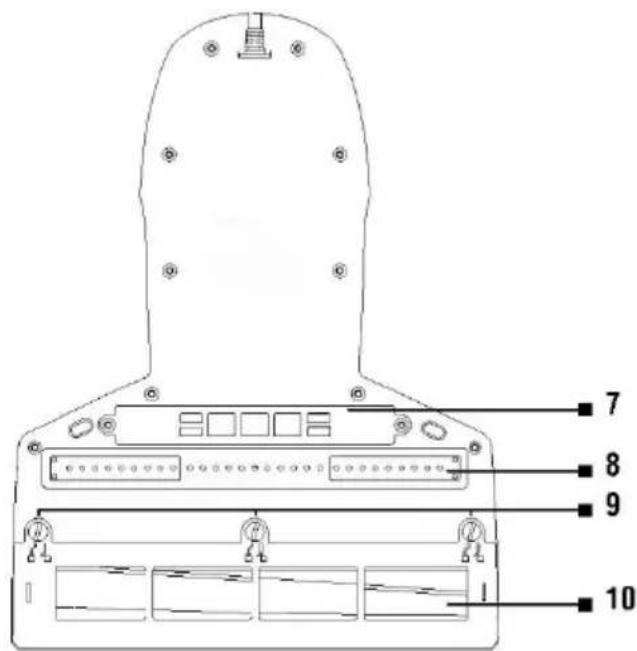
7 UV lamp
8 Hot air outlet
9 Cover screws
10 Cleaning brush
CLEANING
A Vacuum mode + Cleaning brush + UV lamp (removing mites)
After pressing the „2“ button, the device is switched on by default in the mode Vacuum + Cleaning brush + UV lamp (removing mites) and the corresponding indicator lights up.
B Vacuum mode + Cleaning brush
When the appliance is switched on in mode „A“, press the button „1“ to switch it to the Vacuum mode + Cleaning brush.
C Vacuum mode + Cleaning brush + UV lamp (removing mites)
When the device is switched on in mode „B“, pressing the mode button „1“ switches it to the mode Vacuum + UV lamp (removing mites).
By repeatedly pressing the „1“ button, it is possible to switch successively between the 3 operating modes of the vacuum cleaner.
WARNING
- To prevent accidental injury, the UV lamp must be placed within 5 cm of the irradiated object and the inclination of the device must not exceed 30 degrees. Outside this range, the UV lamp turns off automatically.
- When using the UV lamp mode, do not touch the hot air outlet with your hands.
You can switch off the device at any time during use by pressing the „2“ button.
CLEANING AND MAINTENANCE
Failure to clean can damage the vacuum cleaner!
Before cleaning, disconnect the mains plug from the mains socket. Clean the body of the vacuum cleaner with a damp cloth and then make sure that it is dry. Do not use solvents or abrasive cleaners.
Cleaning the dust tank
Turn off the machine, unplug it, press the dirt tank release button, remove the dust tank assembly, and empty the contents. Loosen the top cover of the dirt tank, remove the filter and wash it with warm water. Allow to dry properly before refitting. Also wash and clean the dust applied to the filter. After cleaning, reattach to the device.
Cleaning the washable filter
The maximum suction effect will always be achieved with a clean filter and an empty dirt tank. Wash the filter under running water, do not use hot water or detergents.
CAUTION: The bagless vacuum cleaner requires regular filter cleaning. If you do not clean the filters properly, the passage of air may be blocked, which may lead to overheating and consequent malfunction of the device, and may void your warranty. Filters must always be completely dry before use. Do not use the device without the filter attached. We recommend cleaning the filters of the device after each use. If the dust container is full, clean it immediately.
Cleaning the rotary brush
Loosen the screws of the rotating brush cover and remove it. Carefully cut with scissors to remove any fibers or hair. After cleaning the brush, replace the cover and secure it with the screw.
UV lamp cleaning
To loosen it, unscrew the two screws and remove its cover. Gently clean the UV lamp with a dry soft cloth. After cleaning, replace the UV lamp cover and secure it with two screws. Any dust or grease on the UV lamp will immediately reduce its permeability and therefore the UV lamp must be cleaned regularly. Do not touch the UV lamp with bare hands, as you will leave a mark on its surface, which will impair the transmission of sterilizing light.
If you will not be using the appliance for a long time, please store it in a dry and cool place, do not store the appliance in a humid environment or in direct sunlight.
TROUBLESHOOTING
| Problem | Cause | Solution | |
| 1 | The vacuum cleaner suddenly stopped working. | The vacuum cleaner has overheated. | The vacuum cleaner is equipped with motor protection against overheating. Clean the vacuum cleaner filters, empty the dust tank and let the vacuum cleaner cool down. |
| 2 | The vacuum cleaner does not work. | The vacuum cleaner is not properly connected to the mains. | Zkontrolujte připojením jiného elektrického spotřebiče, že je zásuvka funkční. |
| The vacuum cleaner was not switched on by pressing the „2“ button (On/Off). | To switch on the vacuum cleaner, press the „2“ button (On/Off). | ||
| 3 | The vacuum cleaner has a low suction power. | The inlet filters of the vacuum cleaner and the space for rotating the cleaning brush are clogged. | Clean the inlet filters and cleaning brush. |
| The dust tank is full. | Empty the dust tank. | ||
| 4 | The UV lamp does not work. | The vacuum cleaner is too far from the surface to be cleaned or the cleaning angle is greater than 30°. | When cleaning, it switches on automatically at a distance of 5 cm from the surface to be cleaned and the angle of inclination of the vacuum cleaner must not exceed 30°. |
| The UV lamp is dirty. | Clean the UV lamp with a clean, dry cloth. | ||
| The UV lamp is damaged. | Contact the TESLA service department for a professional UV lamp replacement. |
WARRANTY REPAIR
For warranty repair, contact the dealer where you purchased the TESLA product.
The warranty DOES NOT APPLY to:
• using the device for other purposes than it was designed to
- normal wear and tear
- failure to observe the „Important safety instructions“ stated in the user manual
• electrical or mechanical damage caused by improper use
- damage caused by natural elements such as water, fire, static electricity, power surges etcetera
• damage caused by an unauthorized repair
- unreadable serial number
DECLARATION OF CONFORMITY
We, INTER-SAT LTD, org. složka, declare that this device complies with the essential requirements and other relevant provisions of the standards and regulations relevant to the type of equipment.

This product complies with the requirements of the European Community.
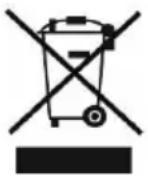
When this crossed-out wheeled bin symbol is attached to a product it means that the product is covered by the European Directive 2002/96/EC. Please inform yourself about the local separate collection system for electrical and electronic products. Please act according to your local rules and do not dispose of your old products with your normal household waste. Correct disposal of your old product helps to prevent potential negative consequences for the environment and human health.
Due to the fact that the product is being developed and improved, we reserve the right to edit the user manual. You can always find the latest version of the this user manual at www.tesla-electronics.eu.
Design and specification may be changed without prior notice, print errors reserved.
- VAŽNA SIGURNOSNA UPOZORENJA
- IMPORTANT SAFETY INSTRUCTIONS
- PACKAGE CONTENT
- BEFORE THE FIRST CLEANING
- CLEANING
- A Vacuum mode + Cleaning brush + UV lamp (removing mites)
- B Vacuum mode + Cleaning brush
- C Vacuum mode + Cleaning brush + UV lamp (removing mites)
- WARNING
- CLEANING AND MAINTENANCE
- Failure to clean can damage the vacuum cleaner!
- Cleaning the dust tank
- Cleaning the washable filter
- Cleaning the rotary brush
- UV lamp cleaning
- TROUBLESHOOTING
- WARRANTY REPAIR
- The warranty DOES NOT APPLY to:
- DECLARATION OF CONFORMITY
Brand : TESLA
Model : LifeStar UV550
Category : Vacuum Cleaner