E205UMKII - Microphone Superlux - Free user manual and instructions
Find the device manual for free E205UMKII Superlux in PDF.


User questions about E205UMKII Superlux
0 question about this device. Answer the ones you know or ask your own.
Ask a new question about this device
Download the instructions for your Microphone in PDF format for free! Find your manual E205UMKII - Superlux and take your electronic device back in hand. On this page are published all the documents necessary for the use of your device. E205UMKII by Superlux.
USER MANUAL E205UMKII Superlux
Manufacturing & logistics
Superlux Enterprise
Development (Shanghai) Co., Ltd.
E205UMKII
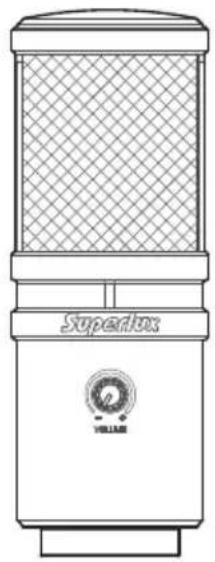
USB CONDENSER MICROPHONE
Contents
SYSTEM REQUIREMENTS, SPECIFICATIONS 03
GENERAL DESCRIPTION, FEATURES 04
ACCESSORIES FURNISHED, FREQUENCY RESPONSE 05
SAFETY PRECAUTIONS 06
LAYOUT 07
MOUNTING 08
TROUBLESHOOTING 13
LIMITED WARRANTY 14
natural_image
Line drawing of a Superbox sound mixer with mesh grille and VELLAR logo (no text or symbols on body)SYSTEM REQUIREMENTS
USB
USB 1.1 or 2.0, powered
RAM
64MB RAM (minimum)
OPERATING SYSTEM
Microsoft Windows 7
Microsoft Windows 10
Microsoft Windows 2000 Professional
Edition
Microsoft Windows XP Home / Professional Edition
( service pack 1.0 or later, or use the
USB audio driver update from Microsoft)
Microsoft Windows Vista™ Business Edition
Apple Computer Mac OS X 10.0 or later Edition
Apple Computer Mac OS X 10.1 or later Edition
SPECIFICATIONS
*Note: Specifications are subject to change.
| Type Back Electret Condenser |
| Polar Pattern Supercardioid |
| Frequency Response 20-20,000 Hz |
| Sensitivity ( at 1,000 Hz -35dBV / Pa ( 12.6 mV )Open Circuit Voltage ) |
| Max. SPL >135 dB SPL |
| Power Requirements USB 5V |
| Resolution Up to 24 bit / 96k Hz sampling rate |
| Finish Black, White, Rose gold |
| Connectors USB B-TYPE, 1/8"( 3.5mm ) phone connector |
| Dimensions ∅54 × 150 mm ( ∅2.13" × 5.9") |
| Net Weight 422g ( 14.9 oz ) |
text_image
Superlux - + VOLUMEE205UMKII
USB CONDENSER MICROPHONE
GENERAL DESCRIPTION
E205UMKII is the upgraded version of USB condenser microphone E205U, which is specialized in delivering high resolution audio and flat and wide frequency response.
E205UMKII can be compatible with Windows and Mac OS system.
E205UMKII is very suitable for Podcasting and personal recording.
The equipped headphone socket and the headphone volume gain control make real-time monitoring easier and better!
FEATURES
- Delivering the high resolution audio with up to 24 bit/96k Hz sampling rate
- Smooth and flat frequency response perfect for podcasting and home studio recording
- Compatible with Windows and Mac OS system
• Equipped with headphone output jack and gain control for easy and perfect real-time monitoring
ACCESSORIES FURNISHED

YA2 threaded adapter
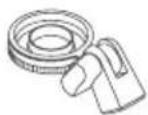
HM85 pivoting
stand mount


Pouch 3-meter
cable
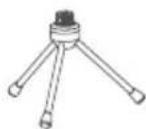
DS01 Table stand
E205UMKII FREQUENCY RESPONSE (SUPERCARDIOID)
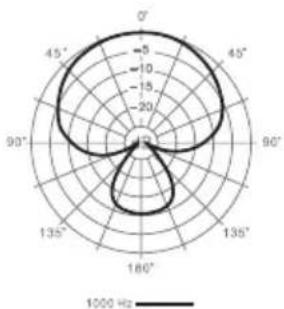
radar
| Angle | Value | |-------|-------| | 0° | 20 | | 45° | 15 | | 90° | 10 | | 135° | 5 | | 180° | 0 |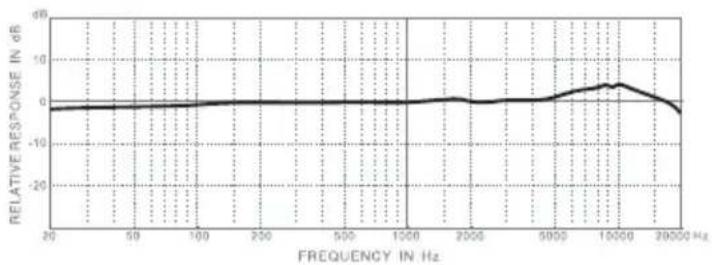
line
| FREQUENCY IN Hz | RELATIVE RESPONSE IN dB | | --------------- | ------------------------ | | 20 | -2 | | 50 | -2 | | 100 | -2 | | 200 | -2 | | 500 | -2 | | 1000 | -2 | | 2000 | -2 | | 5000 | -2 | | 10000 | 4 | | 20000 | -2 |SAFETY PRECAUTIONS
Safety symbols-“WARNING” AND “CAUTION”- and messages described below are used in this manual to prevent bodily injury and property damage which could result from mishandling. Before operating your product, read this manual first and understand the safety symbols and messages so you are thoroughly aware of the potential safety hazards.

WARNING: Indicates a potentially hazardous situation which, if mishandled, could result in death or serious personal injury.

CAUTION: Indicates a potentially hazardous situation which, if mishandled, could result in moderate or minor personal injury, and/or property damage.

WARNING
Do not expose the unit to rain or an environment where it may be splashed by water or other liquids, as doing so may result in fire or electric shock.
Do not attempt to modify this product. Doing so could result in personal injury and/or product failure.

CAUTION
- Do not subject to extreme force and do not pull on the cable or failures may result.
- Keep the device dry and avoid exposure to extreme temperatures and humidity.
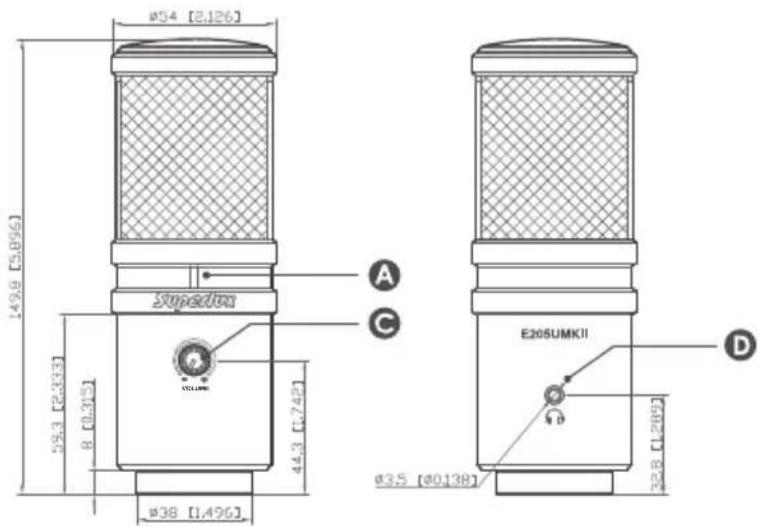
text_image
ø54 [2,126] 149.8 [5,896] 58.3 [2,333] 8 [0.315] 44.3 [7,742] ø38 [1,496] A C E205UMKII ø35 [ø0138] D 32.8 [1,209]
natural_image
Circular diagram with concentric rings and a central icon, no text or symbols presentLAYOUT
Unit:mm/inch
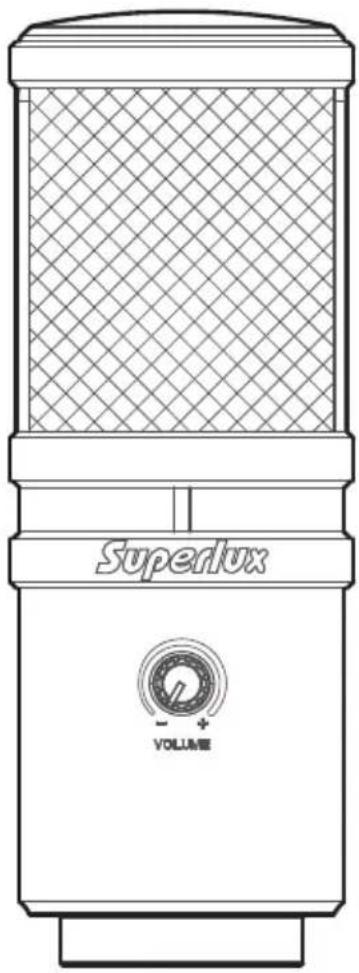
USB indicator: When it is lit up, it means the USB connection is done and E205UMKII get the power from USB interface
USB connector: E205UMKII involves a USB B-type connector, and it is allowed to connect to any device with USB interface
Volume control: Pop-out level control to adjust the overall volume of the Headphone output
Headphone out connector: 1/8-inch (3.5mm) stereo jack for connecting headphones or studio monitors
MOUNTING
ON A TABLE
Through optional table stand HM6, You may put the E205UMKII on a table and do recording.
ON A STAND
By using a microphone stand, the E205UMKII can be mounted on it for recording.
CONNECTIONS
USB Connector
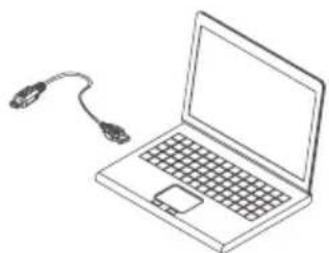
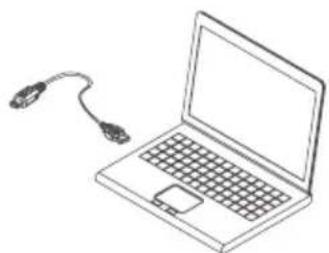
A separated 3-meter cable with USB A-type connector allowed to be connected to a computer with USB port. Note: Make sure to use a powered USB prot.
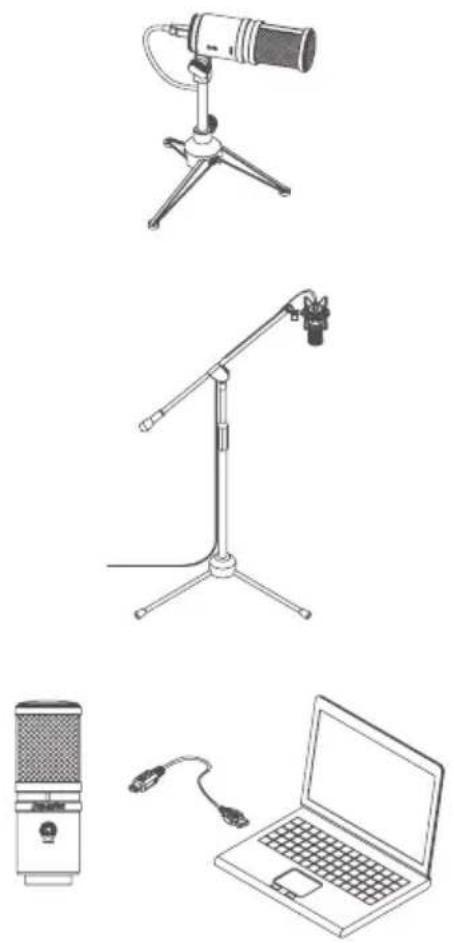
QUICK START
- You can position the E205UMKII on an optional stand by using included accessories.
- Be sure to position the side of grille net to the sound source and keep the Superlux logo and LED indicator face the direction of sound source.
- Plug the B type connector of the included USB cable into the USB socket on the bottom of the E205UMKII.
- Now, plug the other end of the USB cable into an available powered USB port on your computer.
*Note: Be sure to check the USB audio device driver setup for Windows and Mac OS to confirm your computer has recognized the E205UMKII.
- Next, launch your DAW, turn down the main output level and select the E205UMKII for the input.
- Set up a mono record track in your DAW.
- Now, setup the level of the E205UMKII and there are few ways to do this depending on your computer system. You can set the microphone's input level in the Sound playback in Windows or in the Sound dialog box in the System Preferences if you are using the MAC OS.
- Set level of the microphone by raising the Input level control in your DAW or system to about half way up.
- Next, put on your headphones that is connected to the headphone output of E205UMKII, position the E205UMKII to the sound source then adjust the volume control until you reach a comfortable listening level.
Now, follow the instructions of your DAW software to enable the track for recording and you're ready to record.
*Note: if the microphone level of E205UMKII are too loud or not enough, please check your DAW software or refer to Troubleshooting page in this manual to adjust the level in Windows and Mac computer system.
USB AUDIO DEVICE DRIVER
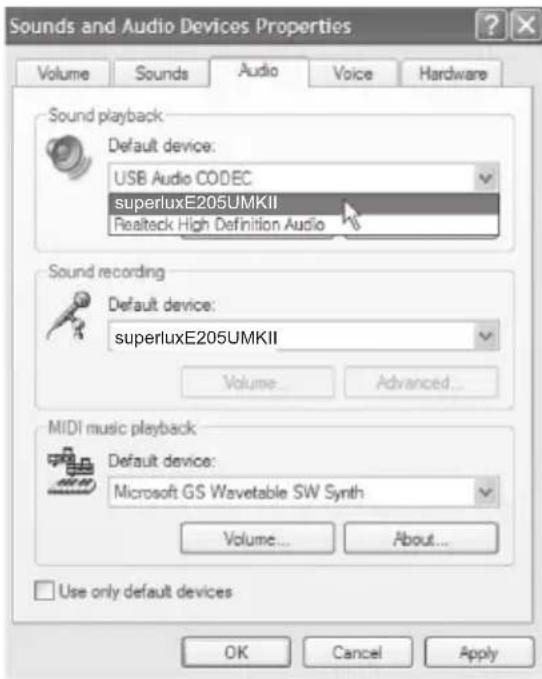
If you encounter problems, make sure the driver was properly installed.
Windows Operating Systems
text_image
Sounds and Audio Devices Properties Volume Sounds Audio Voice Hardware Sound playback Default device: USB Audio CODEC superluxE205UMKII Realtek High Definition Audio Sound recording Default device: superluxE205UMKII Volume... Advanced... MIDI music playback Default device: Microsoft GS Wavetable SW Synth Volume... About... Use only default devices OK Cancel ApplyFrom the Control Panel, open Sounds and Audio Devices.
In the Audio tab, look for Superlux E205UMKII in the drop-down menus for Sound playback and Sound recording.
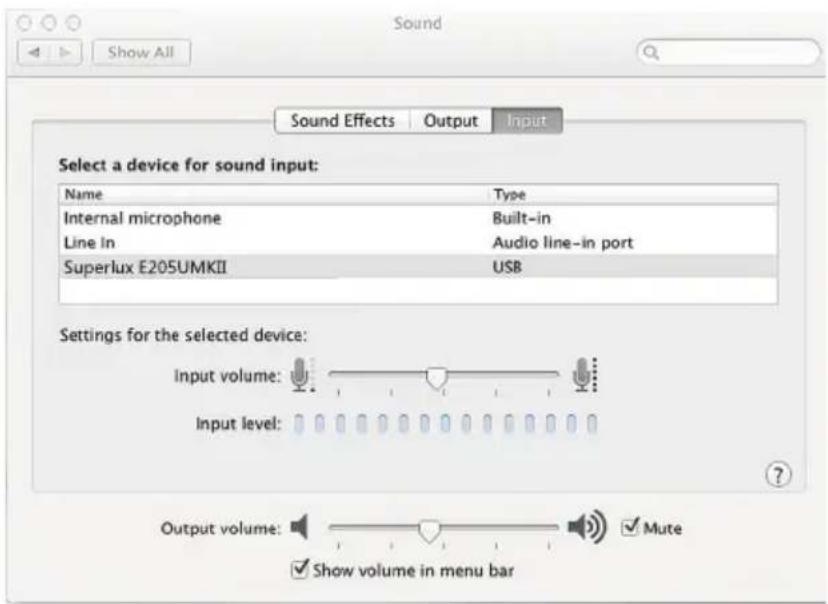
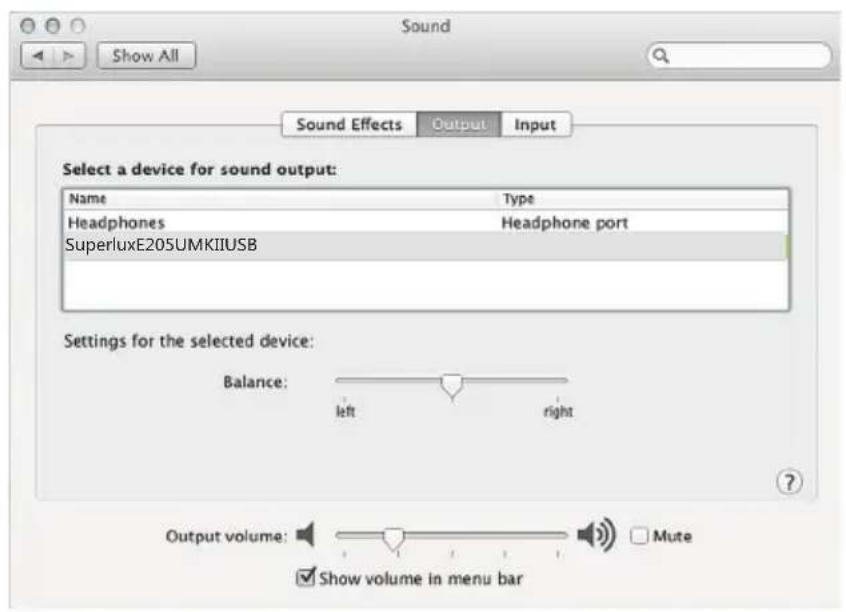
Open the Sound Preference window from System Preferences. Select Superlux E205UMKII from both the Input and Output tabs.
text_image
Sound Show All Sound Effects Output.Input Select a device for sound input: Name Wayte Internal microphone Built-in Line in Audio line-in port Superlux E205UMKII USB Settings for the selected device: Input volume: Input level: Output volume: Mute Show volume in menu barNote: Garage Band users:
open Garage Band before plugging in the microphone to automatically select the USB device.
text_image
Sound Show All Sound Effects Output Input Select a device for sound output: Name Type Headphones Headphone port SuperluxE205UMKIIUSB Settings for the selected device: Balance: left right Output volume: Mali Show volume in menu barTROUBLESHOOTING
| Problem Solution | |
| No sound in headphones | Check the headphone volume control and microphone gain at computer control panel. |
| Microphonesound is too week or distorted | Windows:Audio tab, click Volume under Record and turn up Microphone Gain Control.Mac:From System Preferences, Choose Sound, Select Input tab and turn up Input gain. |
| Headphones are not loud enough | Windows:Audio tab, click Volume under Sound playback and turn up Volume Control.Mac:From System Preferences, Choose Sound, Select Output tab and turn up Output volume. |
LIMITED WARRANTY
Superlux®
Superlux Enterprise warrants all materials and workmanship under use as instructed by the user's manual of this product for a period of one year from the original date of purchase. Warranty period might be different by each area. Please contact your local dealer for more information. If any defects are found in the materials or workmanship or if the product fails to function properly during the applicable warranty period, Superlux Enterprise, at its option, will repair or replace the product. This warranty applies only to equipment sold and delivered by Superlux Enterprise's authorized distributors or dealers. However, the following are not covered: Damage caused by accident, misuse, abuse, product modification or neglect; damage occurring during shipment; damage resulting from failure to follow instructions contained in your Instruction manual; damage resulting from the performance of repairs by someone not authorized by Superlux; claims based upon any misrepresentations by the seller; any Superlux product on which the serial number has been defaced, modified or removed. Service and repairs of Superlux products are to be performed only at a factory-authorized facility or authorized distributors or dealers. Unauthorized service, repairs, or modification will void this warranty. To obtain repairs under warranty, you must have a copy of your sales receipt from the authorized Superlux dealer where you purchased the product. It is necessary to establish purchase date and determine whether your Superlux product is within the warranty period. To obtain factory authorized service, please contact authorized distributors, dealers or mail to support@superlux.com.tw.
THIS DEVICE COMPLIES WITH PART 15 OF THE FCC RULES CLASS B. OPERATION IS SUBJECT TO THE FOLLOWING TWO CONDITIONS:
(1) THIS DEVICE MUST NOT CAUSE HARMFUL INTERFERENCE, AND
(2) THIS DEVICE MUST ACCEPT ANY INTERFERENCE RECEIVED INCLUDING INTERFERENCE THAT MAY CAUSE UNDESIRED OPERATION. SUITABLE FOR HOME OR OFFICE USE.
P/N:LB1E205UM0000 NOV, 2017
www.superlux.com.tw
Superlux®
E205UMKII
USB 电容麦克风
Contact
中国地区营销和业务
旭广企业发展(上海)有限公司
021-69223756
natural_image
Line drawing of a Superbox device with mesh grille and brand logo (no text or symbols on body)系统要求
USB
USB 1.1 或 2.0,含5V供电
内存
64MB 内存(最低要求)
操作系统
text_image
Superlux - + VOLUMEE205UMKII
USB 电容麦克风
概述
natural_image
Circular diagram with concentric rings and a central square symbol, no text or labels present功能说明
尺寸单位:毫米/英寸
USB连接指示灯:
natural_image
Technical line drawings of a tripod-mounted telescope and a tripod-mounted microphone stand (no text or symbols)
natural_image
Line drawing of a laptop with a cord extending from its screen (no text or symbols)快速启用
text_image
Sound Show All Sound Effects Output.Input Select a device for sound input: Name Way Internal microphone Built-in Line In Audio line-in port Superlux E205UMKII USB Settings for the selected device: Input volume: Input level: Output volume: ✓ Mute ✓ Show volume in menu bar*注意: Garage Band 用户
text_image
Sound Show All Sound Effects Output Input Select a device for sound output: Name Type Headphones Headphone port SuperluxE205UMKIIUSB Settings for the selected device: Balance: left right Output volume: Mali Show volume in menu bar故障排除
P/N:LB1E205UM0000 NOV, 2017
www.superlux.com.tw
Superlux®
E205UMKII
USB 電容麥克風
Contact
中國地區行銷和業務
旭廣企業發展(上海)有限公司
021-69223756
natural_image
Line drawing of a Superbox device with mesh grille and brand logo (no text or symbols on body)系統要求
USB
USB 1.1或2.0,含5V供電
記憶體
64MB記憶體(最低要求)
作業系統
text_image
Superlux - + VOLUMEE205UMKII
USB 電容麥克風
概述
natural_image
Circular diagram with concentric rings and a central square symbol, no text or labels present功能說明
尺寸單位:公釐/英吋
USB連接指示燈:
natural_image
Technical line drawings of a tripod-mounted telescope and a tripod-mounted microphone stand (no text or symbols)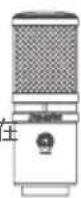
natural_image
Line drawing of a laptop with a cord extending from its screen (no text or symbols)快速啟用
text_image
Sound Show All Sound Effects Output XiInput Select a device for sound input: Name Type Internal microphone Built-in Line in Audio line-in port Superlux E205UMKII USB Settings for the selected device: Input volume: Input level: Output volume: ✓ Mute ✓ Show volume in menu bar*注意: Garage Band用戶
text_image
Sound Show All Sound Effects Output Input Select a device for sound output: Name Type Headphones Headphone port SuperluxE205UMKIIUSB Settings for the selected device: Balance: left right Output volume: Mali Show volume in menu bar故障排除
P/N:LB1E205UM0000 NOV, 2017
www.superlux.com.tw