 ManualGo.com
KEH-P4020 - Car stereo PIONEER - Free user manual and instructions
Find the device manual for free KEH-P4020 PIONEER in PDF.



Download the instructions for your Car stereo in PDF format for free! Find your manual KEH-P4020 - PIONEER and take your electronic device back in hand. On this page are published all the documents necessary for the use of your device. KEH-P4020 by PIONEER.
USER MANUAL KEH-P4020 PIONEER
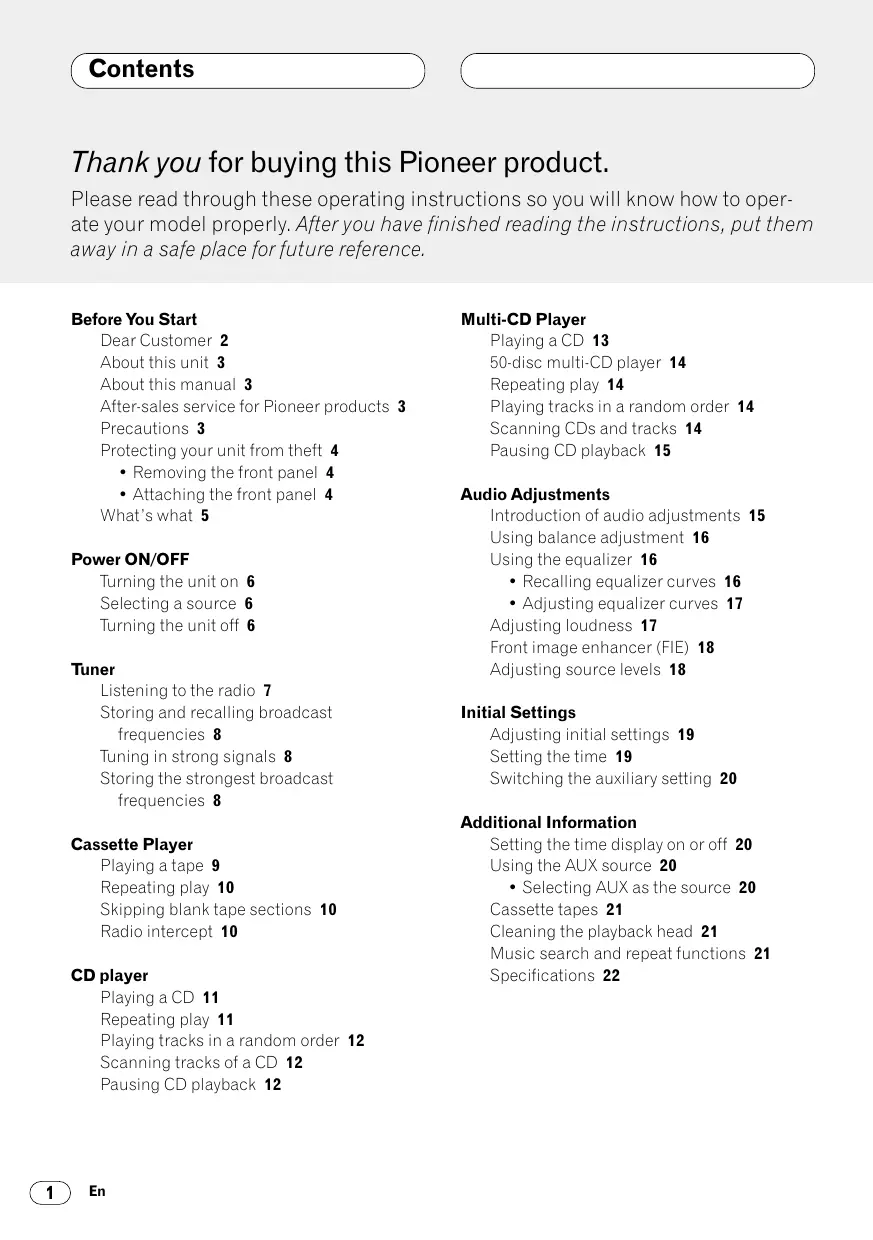
Thank you for buying this Pioneer product. Please read through these operating instructions so you will know how to operate your model properly. After you have finished reading the instructions, put them away in a safe place for future reference. Before You Start Dear Customer 2 About this unit 3 About this manual 3 After-sales service for Pioneer products 3 Precautions 3 Protecting your unit from theft 4
- Removing the front panel 4
- Attaching the front panel 4 What’s what 5 Power ON/OFF Turning the unit on 6 Selecting a source 6 Turning the unit off 6 Tuner Listening to the radio 7 Storing and recalling broadcast frequencies 8 Tuning in strong signals 8 Storing the strongest broadcast frequencies 8 Cassette Player Playing a tape 9 Repeating play 10 Skipping blank tape sections 10 Radio intercept 10 CD player Playing a CD 11 Repeating play 11 Playing tracks in a random order 12 Scanning tracks of a CD 12 Pausing CD playback 12
Multi-CD Player Playing a CD 13 50-disc multi-CD player 14 Repeating play 14 Playing tracks in a random order 14 Scanning CDs and tracks 14 Pausing CD playback 15 Audio Adjustments Introduction of audio adjustments 15 Using balance adjustment 16 Using the equalizer 16
- Recalling equalizer curves 16
- Adjusting equalizer curves 17 Adjusting loudness 17 Front image enhancer (FIE) 18 Adjusting source levels 18 Initial Settings Adjusting initial settings 19 Setting the time 19 Switching the auxiliary setting 20 Additional Information Setting the time display on or off 20 Using the AUX source 20
- Selecting AUX as the source 20 Cassette tapes 21 Cleaning the playback head 21 Music search and repeat functions 21 Specifications 22 Italiano Nederlands
Français Information courtesy of the Deafness Research Foundation. Deutsch Used wisely, your new sound equipment will provide a lifetime of fun and enjoyment. Since hearing damage from loud noise is often undetectable until it is too late, this manufacturer and the Electronic Industries Association’s Consumer Electronics Group recommend you avoid prolonged exposure to excessive noise. This list of sound levels is included for your protection. Decibel Level Example Quiet library, soft whispers Living room, refrigerator, bedroom away from traffic Light traffic, normal conversation, quiet office Air conditioner at 20 feet, sewing machine Vacuum cleaner, hair dryer, noisy restaurant Average city traffic, garbage disposals, alarm clock at two feet. THE FOLLOWING NOISES CAN BE DANGEROUS UNDER CONSTANT EXPOSURE Subway, motorcycle, truck traffic, lawn mower Garbage truck, chain saw, pneumatic drill Rock band concert in front of speakers, thunderclap Gunshot blast, jet plane Rocket launching pad Español We Want You Listening For A Lifetime English Selecting fine audio equipment such as the unit you’ve just purchased is only the start of your musical enjoyment. Now it’s time to consider how you can maximize the fun and excitement your equipment offers. This manufacturer and the Electronic Industries Association’s Consumer Electronics Group want you to get the most out of your equipment by playing it at a safe level. One that lets the sound come through loud and clear without annoying blaring or distortion—and, most importantly, without affecting your sensitive hearing. Sound can be deceiving. Over time your hearing “comfort level” adapts to higher volumes of sound. So what sounds “normal” can actually be loud and harmful to your hearing. Guard against this by setting your equipment at a safe level BEFORE your hearing adapts. To establish a safe level:
- Start your volume control at a low setting.
- Slowly increase the sound until you can hear it comfortably and clearly, and without distortion. Once you have established a comfortable sound level:
- Set the dial and leave it there. Taking a minute to do this now will help to prevent hearing damage or loss in the future. After all, we want you listening for a lifetime.
Before You Start About this unit The tuner frequencies on this unit are allocated for use in North America. Use in other areas may result in improper reception. Important The serial number is located on the top of this unit. For your own security and convenience, be sure to record this number on the enclosed warranty card. About this manual This unit features a number of sophisticated functions ensuring superior reception and operation. All the functions have been designed for the easiest possible use, but many are not selfexplanatory. This operation manual will help you benefit fully from this product’s potential and to maximize your listening enjoyment. We recommend that you familiarize yourself with the functions and their operation by reading through the manual before you begin using this unit. It is especially important that you read and observe precautions on this page and in other sections. After-sales service for Pioneer products Please contact the dealer or distributor from where you purchased this unit for after-sales service (including warranty conditions) or any other information. In case the necessary information is not available, please contact the companies listed below: Please do not ship your unit to the companies at the addresses listed below for repair without advance contact.
U.S.A. Pioneer Electronics Service, Inc.
CUSTOMER SERVICE DEPARTMENT
P.O. Box 1760 Long Beach, CA 90801 800-421-1404 CANADA Pioneer Electronics of Canada, Inc.
CUSTOMER SATISFACTION DEPARTMENT
300 Allstate Parkway Markham, Ontario L3R OP2 (905) 479-4411 1-877-283-5901 For warranty information please see the Limited Warranty sheet included with this unit. Precautions CAUTION:
USE OF CONTROL OR
ADJUSTMENT OR PERFORMANCE OF PROCEDURES OTHER THAN
THOSE SPECIFIED HEREIN
MAY RESULT IN
HAZARDOUS RADIATION EXPOSURE. CAUTION:
THE USE OF OPTICAL
THIS PRODUCT WILL
INCREASE EYE HAZARD.
- Keep this manual handy as a reference for operating procedures and precautions.
- Always keep the volume low enough so you can hear sounds outside of the car.
- Protect this product from moisture.
- If the battery is disconnected or discharged, the preset memory will be erased and must be reprogrammed. Before You Start Attaching the front panel The front panel can be detached from the head unit and stored in the protective case provided to discourage theft.
- Keep the front panel closed while driving. Replace the front panel by holding it upright to this unit and clipping it securely into the mounting hooks. English Protecting your unit from theft Important Español
- Never use force or grip the display and the buttons tightly when removing or attaching.
- Avoid subjecting the front panel to excessive shocks.
- Keep the front panel out of direct sunlight and high temperatures. Deutsch Removing the front panel 1 Press OPEN to open the front panel. Français 2 Grip the left side of the front panel and pull it gently outward. Take care not to grip it tightly or drop it. Italiano 3 Put the front panel into the protective case provided for safe keeping. Nederlands
What’s what 1 VOLUME button Press to increase or decrease the volume. 2 LOCAL button (tuner) Press to switch local function on or off. PAUSE/SCAN button Press to switch pause function on or off. Press and hold for two seconds to switch scan function on or off. 3 BSM button (tuner) Press and hold for two seconds to switch BSM function on or off. REPEAT/RANDOM button Press to switch repeat function on or off. Press and hold for two seconds to switch random function on or off. 4 OPEN button Press to open the front panel. 5 AUDIO button Press to select various sound quality controls.
6 5/∞/2/3 buttons Press to do manual seek tuning, fast forward, reverse and track search controls. Also used for controlling functions. 7 LOUDNESS button Press to switch loudness function on or off. 8 BAND button Press to select among three FM and one AM band and cancel the control mode of functions. 9 1–6 (PRESET TUNING) buttons Press for preset tuning and disc number search when using a multi-CD player. 0 SOURCE button This unit is switched on by selecting a source. Press to cycle through all of the available sources. - EQ button Press to select various equalizer curves. = CLOCK button Press to switch clock display on or off. Power ON/OFF Turning the unit on You can select a source you want to listen to. To switch to the cassette player, load a cassette tape in this unit (refer to page 9). Deutsch Press SOURCE to select a source. Press SOURCE repeatedly to switch between the following sources: CD player (one disc only)—Tuner—Cassette player—Multi-CD player—External unit—AUX Español Selecting a source English Press SOURCE to turn the unit on. When you select a source the unit is turned on. Notes
- In the following cases, the sound source will not change: — When a product corresponding to each source is not connected to this unit. — When no cassette is set in this unit. — When no magazine is set in the multi-CD player. — When the AUX (external input) is set to off (refer to page 20).
- External Unit refers to a Pioneer product (such as one available in the future) that, although incompatible as a source, enables control of basic functions by this product. Only one External Unit can be controlled by this product.
- When this unit’s blue/white lead is connected to the car’s auto-antenna relay control terminal, the car’s antenna extends when this unit’s source is switched on. To retract the antenna, switch the source off. Français Turning the unit off Press SOURCE and hold for at least one second to turn the unit off. 1 Press SOURCE to select the tuner. Listening to the radio 2 Use VOLUME to adjust the sound level. When you press VOLUME up/+, the volume is raised and when pressed down/–, the volume is lowered.
1 BAND indicator Shows which band the radio is tuned to, AM or FM. 2 FREQUENCY indicator Shows to which frequency the tuner is tuned. 3 PRESET NUMBER indicator Shows what preset has been selected. 4 STEREO () indicator Shows that the frequency selected is being broadcast in stereo. 3 Press BAND to select a band. Press BAND until the desired band is displayed, F1, F2, F3 for FM or AM. 4 To perform manual tuning, press 2 or 3 with quick presses. The frequencies move up or down step by step. 5 To perform seek tuning, press and hold 2 or 3 for about one second and release. The tuner will scan the frequencies until a broadcast strong enough for good reception is found.
- You can cancel seek tuning by pressing either 2 or 3 with a quick press.
- If you press and hold 2 or 3 you can skip broadcasting stations. Seek tuning starts as soon as you release the buttons. Note
- When the frequency selected is being broadcast in stereo the STEREO () indicator will light.
Tuner If you press any of the PRESET TUNING buttons you can easily store up to six broadcast frequencies for later recall with the touch of a button. 2 When you want to return to normal seek tuning, press LOCAL to turn local seek tuning off. Storing the strongest broadcast frequencies BSM (best stations memory) lets you automatically store the six strongest broadcast frequencies under PRESET TUNING buttons 1–6 and once stored there you can tune in to those frequencies with the touch of a button. Italiano Press and hold BSM for about two seconds to turn BSM on. BSM begins to flash. While BSM is flashing the six strongest broadcast frequencies will be stored under PRESET TUNING buttons in order of their signal strength. When finished, BSM stops flashing.
- To cancel the storage process, press BSM. Français
- Up to 18 FM stations, 6 for each of the three FM bands, and 6 AM stations can be stored in memory.
- You can also use 5 and ∞ to recall radio station frequencies assigned to PRESET TUNING buttons. 1 Press LOCAL to turn local seek tuning on. Local seek sensitivity (LOC) appears in the display. Deutsch Notes Local seek tuning lets you tune in only those radio stations with sufficiently strong signals for good reception. Español When you find a frequency that you want to store in memory press a PRESET TUNING button and hold until the preset number stops flashing. The number you have pressed will flash in the PRESET NUMBER indicator and then remain lit. The selected radio station frequency has been stored in memory. The next time you press the same PRESET TUNING button the radio station frequency is recalled from memory. Tuning in strong signals English Storing and recalling broadcast frequencies Note
- Storing broadcast frequencies with BSM may replace broadcast frequencies you have saved using PRESET TUNING.
Cassette Player 4 Use VOLUME to adjust the sound level. When you press VOLUME up/+, the volume is raised and when pressed down/–, the volume is lowered. Playing a Tape
1 TAPE DIRECTION indicator Shows the direction of the tape transport. 2 PLAY TIME indicator Shows the elapsed playing time of the current track. 1 Press OPEN to open the front panel. Cassette loading slot appears. 2 Insert a cassette tape into the cassette loading slot. Playback will automatically start. Cassette loading slot 5 To perform fast forward or rewind, press 2 or 3. FF or REW appears in the display.
- To cancel fast forward or rewind and return to playback, press BAND.
- You can cancel fast forward or rewind by pressing 2 or 3 in the same direction twice. 6 To perform forward or rewind music search, press 2 or 3 twice. F-MS (forward music search) or R-MS (rewind music search) appears in the display. The cassette player will fast forward or rewind to the next or previous blank spot on the tape and begin to play.
- To cancel music search and return to playback, press BAND.
- You can cancel music search by pressing 2 or 3 in the same direction again. 7 To change the direction of the tape transport, press BAND. Notes
- You can eject a cassette tape by pressing TAPE EJECT. 3 Close the front panel.
- After a cassette tape has been inserted, press SOURCE to select the Cassette player.
- Do not insert anything other than a cassette tape into the cassette loading slot.
- PLAY TIME indicator starts from 00’00” in the following cases: — When a tape is inserted — When the tape direction is changed — When you rewind the tape to the beginning
- PLAY TIME indicator is halted when fast forward, rewind or music search is operating. Cassette Player Radio intercept Repeat play lets you hear the same track over again. This function allows you to listen to the radio during tape fast-forwarding/rewinding. 1 Press REPEAT/RANDOM to turn repeat play on. RPT appears in the display. The track presently playing will play and then repeat. 1 Press 6 to turn radio intercept on. RI ON appears in the display. 2 Press 6 to turn radio intercept off. RI OFF appears in the display. Español 2 Press REPEAT/RANDOM to turn repeat play off. The track presently playing will continue to play and then play the next track. English Repeating play Deutsch Skipping blank tape sections Blank skip automatically fast forwards to the next song if there is a long period of silence (12 seconds or longer) between songs. Français 1 Press 5 to turn blank skip on. BS ON appears in the display. Long periods of silence between songs will be skipped. 2 Press 5 to turn blank skip off. BS OFF appears in the display. The complete cassette tape will play. Repeating play Repeat play lets you hear the same track over again.
You can use this unit to control a CD player (one disc only), which is sold separately. 1 TRACK NUMBER indicator Shows the track currently playing. 2 PLAY TIME indicator Shows the elapsed playing time of the current track. 1 Press SOURCE to select the CD player (one disc only). 2 Use VOLUME to adjust the sound level. When you press VOLUME up/+, the volume is raised and when pressed down/–, the volume is lowered. 3 To perform fast forward or reverse, press and hold 2 or 3. 4 To skip back or forward to another track, press 2 or 3. Pressing 3 skips to the start of the next track. Pressing 2 once skips to the start of the current track. Pressing again will skip to the previous track. Note
- If the built-in CD player does not operate properly, an error message such as ERROR-14 may be displayed. Refer to the CD player owner’s manual.
1 Press REPEAT/RANDOM to turn repeat play on. RPT appears in the display. The track presently playing will play and then repeat. 2 Press REPEAT/RANDOM to turn repeat play off. The track presently playing will continue to play and then play the next track. Note
- If you perform track search or fast forward/ reverse, repeat play is automatically cancelled. CD player Random play lets you play back tracks on the CD in a random order. Pause lets you temporarily stop playback of the CD. 1 Press REPEAT/RANDOM for about two seconds to turn random play on. RDM appears in the display. Tracks will play in a random order. 1 Press PAUSE/SCAN to turn pause on. PAUSE appears in the display. Play of the current track pauses. 2 Press REPEAT/RANDOM for about two seconds to turn random play off. Tracks will continue to play in order. Español Pausing CD playback English Playing tracks in a random order 2 Press PAUSE/SCAN to turn pause off. Play will resume at the same point that you turned pause on. Deutsch Scanning tracks of a CD Scan play lets you hear the first 10 seconds of each track on the CD. Français 1 Press PAUSE/SCAN for about two seconds to turn scan play on. SCAN appears in the display. The first 10 seconds of each track is played. 2 When you find the desired track, press PAUSE/SCAN for about two seconds to turn scan play off. The track will continue to play. Italiano Note
- After scanning of a CD is finished, normal playback of the tracks will begin again. Nederlands
Multi-CD Player 1 Press SOURCE to select the multi-CD player. Playing a CD 2 Use VOLUME to adjust the sound level. When you press VOLUME up/+, the volume is raised and when pressed down/–, the volume is lowered.
3 Select a disc you want to listen to with the 1 to 6 buttons. You can use this unit to control a multi-CD player, which is sold separately. 1 TRACK NUMBER indicator Shows the track currently playing. 2 PLAY TIME indicator Shows the elapsed playing time of the current track. 3 DISC NUMBER indicator Shows the disc currently playing. For discs located at 1 to 6, press the corresponding number button. If you want to select a disc located at 7 to 12, press and hold the corresponding numbers such as 1 for disc 7, until the disc number appears in the display.
- You can also sequentially select a disc by pressing 5/∞. 4 To perform fast forward or reverse, press and hold 2 or 3. 5 To skip back or forward to another track, press 2 or 3. Pressing 3 skips to the start of the next track. Pressing 2 once skips to the start of the current track. Pressing again will skip to the previous track. Notes
- When the multi-CD player performs the preparatory operations, READY is displayed.
- If the multi-CD player does not operate properly, an error message such as ERROR-14 may be displayed. Refer to the multi-CD player owner’s manual.
- If there are no discs in the multi-CD player magazine, NO DISC is displayed.
Multi-CD Player Playing tracks in a random order Only those functions described in this manual are supported for 50-disc multi-CD players. Random play lets you play back tracks in a random order within the repeat range, multi-CD player repeat and disc repeat. Repeating play Tracks will continue to play in order. Scanning CDs and tracks While you are using DISC (disc repeat), the beginning of each track on the selected disc plays for about 10 seconds. When you are using multi-CD player repeat, the beginning of the first track of each disc is played for about 10 seconds. Italiano
- If you select other discs during repeat play, the repeat play range changes to multi-CD player repeat.
- If you perform track search or fast forward/reverse during RPT (one-track repeat), the repeat play range changes to DISC (disc repeat). 3 Press and hold REPEAT/RANDOM for about two seconds to turn random play off. Français Notes 2 Press and hold REPEAT/RANDOM for about two seconds to turn random play on. DRDM(random playing in a disc) or RDM(random playing in a magazine) appears in the display. Tracks will play in a random order within the previously selected multi-CD player repeat or disc repeat ranges. Deutsch Press REPEAT/RANDOM to select the repeat range. Press REPEAT/RANDOM until the desired repeat range appears in the display.
- Nothing’s displayed — Repeat all discs in the multi-CD player
- RPT — Repeat just the current track
- DISC — Repeat the current disc 1 Select the repeat range. Refer to Repeating play on this page. Español There are three repeat play ranges for the multiCD player: Multi-CD player repeat, one-track repeat, and disc repeat. English 50-disc multi-CD player Nederlands
Multi-CD Player 1 Select the repeat range. Refer to Repeating play on page 14. Audio Adjustments Introduction of audio adjustments 2 Press and hold PAUSE/SCAN for about two seconds to turn scan play on. DSCN (scanning tracks) or SCAN (scanning discs) appears in the display. The first 10 seconds of each track of the present disc (or the first track of each disc) is played. 3 When you find the desired track (or disc) press and hold PAUSE/SCAN for about two seconds to turn scan play off. The track (or disc) will continue to play. Note
- After track or disc scanning is finished, normal playback of the tracks will begin again. Pausing CD playback Pause lets you temporarily stop playback of the CD. 1 Press PAUSE/SCAN to turn pause on. PAUSE appears in the display. Play of the current track pauses. 2 Press PAUSE/SCAN to turn pause off. Play will resume at the same point that you turned pause on.
1 AUDIO display Shows the audio adjustments status. 2 LOUD indicator Appears in the display when loudness is turned on. Press AUDIO to display the audio function names. Press AUDIO repeatedly to switch between the following audio functions: FAD (balance adjustment)—EQ-L (equalizer)— LOUD (loudness)—FIE (front image enhancer)—SLA (source level adjustment)
- When selecting the FM tuner as the source, you cannot switch to SLA.
- To return to the display of each source, press BAND. Note
- If you do not operate the audio function within about 30 seconds, the display is automatically returned to the source display. Audio Adjustments Using the equalizer You can select a fader/balance setting that provides an ideal listening environment in all occupied seats. The equalizer lets you adjust the equalization to match car interior acoustic characteristics as desired. Display Equalizer curve SPR-BASS Super bass POWERFUL Powerful NATURAL Natural VOCAL Vocal CUSTOM Custom EQ FLAT Flat
- CUSTOM is an adjusted equalizer curve that you create.
- When EQ FLAT is selected no supplement or correction is made to the sound. This is useful to check the effect of the equalizer curves by switching alternatively between EQ FLAT and a set equalizer curve. Italiano Press EQ to select the equalizer.
- If the equalizer has been previously set to an equalizer curve other than POWERFUL then the title of that previously selected equalizer curve will be displayed, such as SPR-BASS, NATURAL, VOCAL, CUSTOM, or EQ FLAT. Français 3 Press 2 or 3 to adjust left/right speaker balance. When you press 2 or 3, BAL 0 is displayed. Each press of 2 or 3 moves the left/right speaker balance towards the left or the right.
- BAL L9 – BAL R9 is displayed as the left/right speaker balance moves from left to right. There are six stored equalizer curves which you can easily recall at any time. Here is a list of the equalizer curves: Deutsch 2 Press 5 or ∞ to adjust front/rear speaker balance. Each press of 5 or ∞ moves the front/rear speaker balance towards the front or the rear.
- FAD F15 – FAD R15 is displayed as the front/rear speaker balance moves from front to rear.
- FAD 0 is the proper setting when only two speakers are used. Recalling equalizer curves Español 1 Press AUDIO to select FAD. Press AUDIO until FAD appears in the display.
- If the balance setting has been previously adjusted, BAL will be displayed. English Using balance adjustment Nederlands
Audio Adjustments Adjusting equalizer curves Adjusting loudness You can adjust the currently selected equalizer curve setting as desired. Adjusted equalizer curve settings are memorized in CUSTOM. Loudness compensates for deficiencies in the low- and high-sound ranges at low volume. 1 Press AUDIO to select the equalizer mode. Press AUDIO until EQ-L/EQ-M/EQ-H appears in the display. 2 Select the band you want to adjust with the 2/3. EQ-L (low) —EQ-M (mid) —EQ-H (high) 3 Press 5 or ∞ to adjust the equalizer curve. Each press of 5 or ∞ increases or decreases the equalizer curve respectively.
- +6 – –6 is displayed as the equalizer curve is increased or decreased.
- The actual range of the adjustments are different depending on which equalizer curve is selected. Notes
- If you make adjustments when a curve other than CUSTOM is selected, the newly adjusted curve will replace the previous curve. Then a new curve with CUSTOM appears on the display while selecting the equalizer curve.
- You can create different CUSTOM curves for different sources.
- The CD player (one disc only) and multi-CD player are set to the same equalizer adjustment setting automatically.
1 Press AUDIO to select LOUD. Press AUDIO until LOUD appears in the display. 2 Select LOUD on or off with 5/∞. 3 Select the desired level with 2/3. LOW (low) —MID (mid) —HI (high) Note
- You can also switch LOUD on or off by pressing the LOUDNESS. Audio Adjustments Adjusting source levels The F.I.E. (Front Image Enhancer) function is a simple method of enhancing front imaging by cutting mid- and high-range frequency output from the rear speakers, limiting their output to low-range frequencies. You can select the frequency you want to cut. SLA (Source level adjustment) lets you adjust the volume level of each source to prevent radical changes in volume when switching between sources.
- Settings are based on the volume level of the FM tuner, which remains unchanged.
- When the F.I.E. function is deactivated, the rear speakers output sound of all frequencies, not just bass sounds. Reduce the volume before disengaging F.I.E. to prevent a sudden increase in volume. 2 Press AUDIO to select SLA. Press AUDIO until SLA appears in the display. 3 Press 5 or ∞ to adjust the source volume. Each press of 5 or ∞ increases or decreases the source volume.
- SLA +4 – SLA –4 is displayed as the source volume is increased or decreased. Deutsch 1 Press AUDIO to select FIE. Press AUDIO until FIE appears in the display. 1 Compare the FM tuner volume level with the level of the source you wish to adjust. Español Precaution English Front image enhancer (FIE) 2 Select FIE on or off with 5/∞. Notes
- Since the FM tuner volume is the control, it is not possible to apply source level adjustments to the FM tuner.
- The AM tuner volume level can also be adjusted with source level adjustments. Italiano
- After switching the F.I.E. function ON, select the Fader/Balance mode in the Audio Menu, and adjust front and rear speaker volume levels until they are balanced.
- Switch the F.I.E. function OFF when using a 2speaker system. Notes Français 3 Select the desired frequency with 2/3. 100—160—250 (Hz) Nederlands
Initial Settings Adjusting initial settings Setting the time This is used to set the time on the unit’s clock display. 1 Press AUDIO to select the time. Press AUDIO until the time appears in the display. Initial settings lets you perform initial set up of different settings for this unit. 1 Press SOURCE and hold until the unit turns off. 2 Press AUDIO and hold until TIME appears in the display. Press AUDIO repeatedly to switch between the following settings: TIME—AUX Use the following instructions to operate each particular setting.
- To cancel initial settings, press BAND.
- You can also cancel initial settings by holding down AUDIO until the unit turns off.
2 Select the portion of the time display you wish to set with 2/3. Pressing 2/3 will select a portion of the clock display: HOUR—MINUTE As you select portions of the clock display the portion selected will blink. 3 Select the correct time with 5/∞. Pressing 5 will increase the selected hour or minute. Pressing ∞ will decrease the selected hour or minute. Initial Settings Additional Information Setting the time display on or off It is possible to use auxiliary equipment with this unit. Activate the auxiliary setting when using external equipment connected to this unit. You can turn the time display on even when the sources and the demonstration are off. 2 Select AUX on or off with 5/∞. Pressing 5/∞ will switch AUX between on and off and that status will be displayed. Español 1 Press AUDIO to select AUX. Press AUDIO repeatedly until AUX appears in the display. Press CLOCK to select the time display. Each press of CLOCK turns time display on or off.
- The time display disappears temporarily when you perform other operations, but the time indication is displayed again after 25 seconds. English Switching the auxiliary setting Using the AUX source Press SOURCE to select AUX as the source.
- If the auxiliary setting is not switched on, AUX cannot be selected. For more details, see Switching the auxiliary setting on this page. Français Selecting AUX as the source Deutsch An IP-BUS-RCA Interconnector such as the CD-RB20 or CD-RB10 (sold separately) lets you connect this unit to auxiliary equipment featuring RCA output. For more details, refer to the IP-BUS-RCA Interconnector owner‘s manual. Cassette tapes
- A loose, torn or warped label on a cassette tape can jam the cassette player. Do not use cassette tapes with loose, torn or warped labels.
- Cassette tapes longer than C-90 (90-minute tapes) can cause the tape to jam in the cassette player. Do not use tapes longer than C-90.
- Cassette tapes exposed to high temperatures may warp and jam the cassette player. Keep cassettes out of direct sunlight or places where there are high temperatures.
- Store unused tapes in a tape case where there is no danger of them becoming loose, dirty or dusty. Cleaning the playback head If the head becomes dirty, the sound quality will get bad and there will be sound dropouts and other problems. If you have any of these problems the head may need cleaning.
Music search and repeat functions Music search and repeat functions may not work with these tapes:
- A tape with a gap of 4 seconds or less between songs
- A tape containing dialog or other non-musical content, with pauses lasting 4 seconds or longer
- A tape with an extremely quiet passage in the music lasting for 4 seconds or longer Additional Information Specifications Tape ..................................... Compact cassette tape (C-30 – C-90) Tape speed .......................... 4.8 cm/sec Fast forward/rewinding time ............................................. Approx. 100 sec (C-60) Wow & flutter ...................... 0.09% (WRMS) Frequency response ........... 30 – 16,000 Hz (±3 dB) Stereo separation ............... 45 dB Signal-to-noise ratio ........... 61 dB (IHF-A network) Frequency range ................. 87.9 – 107.9 MHz Usable sensitivity ............... 11 dBf (1.1 µV/75 Ω, mono, S/N: 30 dB) 50 dB quieting sensitivity ... 17 dBf (2.2 µV/75 Ω, mono) Signal-to-noise ratio ........... 58 dB (IHF-A network) Distortion ............................ 0.5% (at 65 dBf, 1 kHz, stereo) Frequency response ........... 30 – 15,000 Hz (±3 dB) Stereo separation ............... 24 dB (at 65 dBf, 1 kHz) Selectivity ............................ 71 dB (2 ACA) Three-signal intermodulation (desired signal level) .........47 dBf (two undesired signal level: 100 dBf) AM tuner Français Frequency range ................. 530 – 1,710 kHz (10 kHz) Usable sensitivity ............... 20 µV (S/N: 20 dB) Selectivity ............................ 50 dB (±10 kHz) Note
- Specifications and the design are subject to possible modifications without notice due to improvements. Italiano Continuous power output is 20 W per channel min. into 4 ohms, both channel driven 50 to 15,000 Hz with no more than 5% THD. Maximum power output ..... 45 W × 4 Load impedance ................. 4 Ω (4 – 8 Ω allowable) Preout max output level/output impedance ............................................. 2.2 V/1 kΩ Equalizer (3-Band Equalizer): (LOW) ...........................Level : ±12 dB (MID) ............................Level : ±12 dB (HIGH) ..........................Level : ±12 dB Loudness contour (LOW) ...........................+3.5 dB (100Hz), +3 dB (10 kHz) (MID) ............................+10 dB (100Hz), +6.5 dB (10 kHz) (HIGH) ..........................+11 dB (100Hz), +11 dB (10 kHz) (volume : –30 dB) FM tuner Deutsch Audio Español Cassette player Power source ...................... 14.4 V DC (10.8 – 15.1 V allowable) Grounding system .............. Negative type Max. current consumption ............................................. 8.5 A Dimensions (W × H × D): (DIN) Chassis ................ 178 × 50 × 157 mm (7 × 2 × 6-1/8 in) Nose ..................... 170 × 58 × 20 mm (6-3/4 × 2-1/4 × 3/4 in) (D) Chassis ................ 178 × 50 × 162 mm (7 × 2 × 6-3/8 in) Nose ..................... 170 × 46 × 15 mm (6-3/4 × 1-3/4 × 5/8 in) Weight ................. 1.4 kg (3.08 lbs) English General Nederlands
Accentuation des graves POWERFUL PIONEER CORPORATION 4-1, MEGURO 1-CHOME, MEGURO-KU, TOKYO 153-8654, JAPAN PIONEER ELECTRONICS (USA) INC. P.O. Box 1760, Long Beach, California 90801, U.S.A. TEL: (800) 421-1404
PIONEER EUROPE NV
Haven 1087, Keetberglaan 1, B-9120 Melsele, Belgium TEL: (0) 3/570.05.11 PIONEER ELECTRONICS AUSTRALIA PTY. LTD. 178-184 Boundary Road, Braeside, Victoria 3195, Australia TEL: (03) 9586-6300 PIONEER ELECTRONICS OF CANADA, INC. 300 Allstate Parkway, Markham, Ontario L3R OP2, Canada TEL: (905) 479-4411 PIONEER ELECTRONICS DE MEXICO, S.A. de C.V. San Lorenzo 1009 3er. Piso Desp. 302 Col. Del Valle Mexico, D.F. C.P. 03100
TEL: 5-688-52-90
Published by Pioneer Corporation. Copyright © 2001 by Pioneer Corporation. All rights reserved. Publication de Pioneer Corporation. Copyright © 2001 Pioneer Corporation. Tous droits de reproduction et de traduction réservés. Printed in Malaysia Imprimé en Malaisie <KSNNN/01G00001>