
TV 4K (2021) - Media player APPLE - Free user manual and instructions
Find the device manual for free TV 4K (2021) APPLE in PDF.
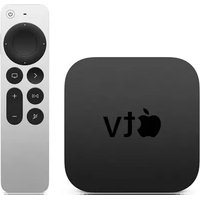


| Product Type | Media Player |
| Brand | Apple |
| Model | TV 4K (2021) |
| Dimensions (approx) | 3.9 x 3.9 x 3.9 cm |
| Weight (approx) | 425 g |
| Power Supply | 6W typical (via included power cord) |
| Video Output | HDMI 2.1, 4K HDR, Dolby Vision |
| Audio Output | HDMI eARC, Dolby Atmos via built-in speaker or AirPods |
| Connectivity | HDMI 2.1, Wi-Fi 6, Bluetooth 5.0, Gigabit Ethernet |
| Remote Control | Siri Remote (Clickpad, Back, Play/Pause, Mute, Power, Siri, TV, Volume) |
| Processor | A12 Bionic chip |
| Storage | 32 GB or 64 GB flash storage |
| Operating System | tvOS |
| HomeKit Support | Yes (built-in Thread) |
| Energy Star Certified | Yes |
| Warranty | One-year limited warranty |
| Safety Compliance | FCC, ISED Canada, EU Directive 2014/53/EU |
| Battery Type (remote) | Lithium-ion (non-user-replaceable) |
| Disposal | Recycle separately from household waste |
| Languages Supported | Multiple via manual translation service |
Frequently Asked Questions - TV 4K (2021) APPLE
User questions about TV 4K (2021) APPLE
0 question about this device. Answer the ones you know or ask your own.
Ask a new question about this device
Download the instructions for your Media player in PDF format for free! Find your manual TV 4K (2021) - APPLE and take your electronic device back in hand. On this page are published all the documents necessary for the use of your device. TV 4K (2021) by APPLE.
USER MANUAL TV 4K (2021) APPLE
Power HDMI
Ethernet
1
Using an HDMI cable (not included), connect an HDMI port on the back of your TV to the HDMI port on your Apple TV.
Hello
2
Turn on your TV, select the input that matches your HDMI input (from step 1), and follow the onscreen setup instructions.

Clickpad
Press up/down/left/right or swipe to navigate. Press center to select.
Back
Press to return to previous menu. Press and hold for Home screen.
Play/Pause
Mute

Power
Press to wake.
Press and hold to sleep.
Siri
Press and hold to talk.
TV
Press for Apple TV app.
Press and hold for Control Center.
Volume

Learn more about Apple TV features at apple.com/appletv.
For instructions and safety and handling information, see the Apple TV User Guide at support.apple.com/guide/tv or use Apple Books to download the guide (where available).
For support, go to apple.com/support/appletv.
Not all features are available in all areas.
© 2021 Apple Inc. All rights reserved. Designed by Apple in California.
Printed in China. 034-03935-B

Before using Apple TV, review the Apple TV User Guide. Go to support.apple.com/guide/tv. You can also use Apple Books to download the user guide (where available). Retain documentation for future reference.
Safety and Handling
On Apple TV, go to Settings > General > Legal & Regulatory > Safety for important safety instructions. Or see "Safety, handling, and support" in the Apple TV User Guide.
WARNING: Failure to follow these safety instructions could result in fire, electric shock, or other injury or damage to Apple TV or other property. Read all safety information before using Apple TV.
Battery and Charging
Don't attempt to replace the remote battery yourself—you may damage the battery, which could cause overheating, fire, and injury. The lithium-ion battery in the remote should be serviced or recycled by Apple or an authorized service provider, and must be recycled or disposed of separately from household waste. Dispose of batteries according to your local environmental laws and guidelines. For information about Apple lithium-ion batteries and battery service and recycling, go to apple.com/batteries/service-and-recycling. For information about charging, see "Important safety information" in the Apple TV User Guide.
Regulatory
Regulatory certification information is available on device. Go to Settings > General > Legal & Regulatory > Regulatory. Additional regulatory information is in "Safety, handling, and support" in the Apple TV User Guide.
FCC and ISED Canada Compliance
This device complies with part 15 of the FCC Rules and ISED Canada licence-exempt RSS standard(s). Operation is subject to the following two conditions: (1) this device may not cause harmful interference, and (2) this device must accept any interference received, including interference that may cause undesired operation.
ENERGY STAR® Compliance

Apple TV meets the ENERGY STAR guidelines for energy efficiency. Reducing energy consumption saves money and helps conserve valuable resources. For more information about ENERGY STAR, go to energystar.gov.
To save energy, Apple TV is set to sleep after 15 minutes of user inactivity. To put Apple TV to sleep immediately, or to wake Apple TV, press the Power button on the remote. To change sleep settings, go to Settings > General > Sleep After.
EU Compliance
Apple Inc. hereby declares that this wireless device is in compliance with Directive 2014/53/EU.
A copy of the EU Declaration of Conformity is available at apple.com/euro/compliance. Apple's EU representative is Apple Distribution International Ltd., Hollyhill Industrial Estate, Cork, Ireland.

Use Restriction
This device is restricted to indoor use when operating in the 5150 to 5350 MHz frequency range. This restriction applies in: AT, BE, BG, CH, CY, CZ, DE, DK, EE, EL, ES, FI, FR, HR, HU, IE, IS, IT, LI, LT, LU, LV, MT, NL, NO, PL, PT, RO, SE, SI, SK, TR, UA, UK.
Disposal and Recycling
Dispose of this product and/or its battery separately from household waste, and in accordance with local environmental laws and guidelines. For information about battery service and recycling, go to apple.com/batteries/service-and-recycling. For information about Apple's recycling program, recycling collection points, restricted substances, and other environmental initiatives, go to apple.com/environment.
European Union—Disposal Information

The symbol above means that according to local laws and regulations your product and/or its battery shall be disposed of separately from household waste. When this product reaches its end of life, take it to a collection point designated by local authorities. The separate collection and recycling of your product and/or its battery at the time of disposal will help conserve natural resources and ensure that it is recycled in a manner that protects human health and the environment.
Apple One-Year Limited Warranty Summary
Apple warrants the included hardware product and accessories against defects in materials and workmanship for one year from the date of original retail purchase. Apple does not warrant against normal wear and tear, nor damage caused by accident or abuse. To obtain service, call Apple or visit an Apple Store or an Apple Authorized Service Provider—available service options are dependent on the country in which service is requested and may be restricted to the original country of sale. Call charges and international shipping charges may apply, depending on the location. Subject to the full terms and detailed information on obtaining service available at apple.com/legal/warranty and support.apple.com, if you submit a valid claim under this warranty, Apple will either repair, replace, or refund your Apple TV at its own discretion. Warranty benefits are in addition to rights provided under local consumer laws. You may be required to furnish proof of purchase details when making a claim under this warranty.
For Australian Consumers: Our goods come with guarantees that cannot be excluded under the Australian Consumer Law. You are entitled to a replacement or refund for a major failure and for compensation for any other reasonably foreseeable loss or damage. You are also entitled to have the goods repaired or replaced if the goods fail to be of acceptable quality and the failure does not amount to a major failure. Apple Pty Ltd, PO Box A2629, Sydney South, NSW 1235. Tel: 133-622.
© 2021 Apple Inc. All rights reserved. Apple, the Apple logo, and Apple TV are trademarks of Apple Inc., registered in the U.S. and other countries. Apple Books is a trademark of Apple Inc. Apple Store is a service mark of Apple Inc., registered in the U.S. and other countries. ENERGY STAR and the ENERGY STAR mark are registered trademarks owned by the U.S. Environmental Protection Agency. Printed in China. 034-03934-A
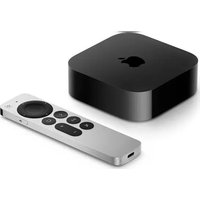
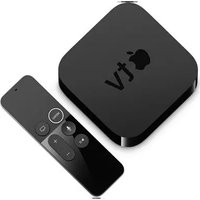
Brand : APPLE
Model : TV 4K (2021)
Category : Media player