
TV 4K (3rd gen) - Media player APPLE - Free user manual and instructions
Find the device manual for free TV 4K (3rd gen) APPLE in PDF.
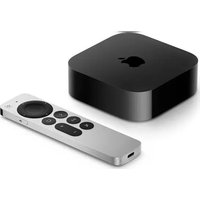


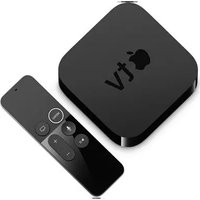
| Type de produit | Lecteur multimedia (streaming device) |
| Dimensions (H x L x P) | 0.7 x 3.9 x 3.9 in (17.5 x 98 x 98 mm) |
| Poids | 7.3 oz (208 g) |
| Alimentation | 12V DC via adaptateur secteur (fourni) |
| Processeur | Puce A15 Bionic |
| Stockage | 64 Go ou 128 Go (selon modele) |
| Resolution video | Jusqu'a 4K (2160p) avec HDR et Dolby Vision |
| Audio | Dolby Atmos, Dolby Digital 7.1, stereo |
| Connectivite | Wi-Fi 6, Bluetooth 5.0, Ethernet Gigabit, HDMI 2.1, recepteur IR |
| Systeme d'exploitation | tvOS |
| Services de streaming | Apple TV+, Netflix, Disney+, Amazon Prime Video, etc. |
| Telecommande | Siri Remote (2e generation) avec surface tactile |
| Couleur | Noir |
| Garantie | Garantie limitee d'un an |
| Entretien et nettoyage | Essuyer avec un chiffon doux et sec. Eviter les liquides. |
| Securite | Ne pas exposer a l'humidite. Utiliser uniquement des accessoires agrees. |
| Pieces detachees et reparabilite | Telecommande vendue separement. Pas de pieces remplacables par l'utilisateur. Reparation par Apple ou centres agrees. |
Frequently Asked Questions - TV 4K (3rd gen) APPLE
User questions about TV 4K (3rd gen) APPLE
0 question about this device. Answer the ones you know or ask your own.
Ask a new question about this device
Download the instructions for your Media player in PDF format for free! Find your manual TV 4K (3rd gen) - APPLE and take your electronic device back in hand. On this page are published all the documents necessary for the use of your device. TV 4K (3rd gen) by APPLE.
USER MANUAL TV 4K (3rd gen) APPLE
Welcome. You're watching Apple TV.
This guide contains all the information you need to get from setup to your sofa.
Contents.
2. Configure
18 Network Configuration 19 Connecting to iTunes
1. Connect
7 What's in the Box 8 What You Need 10 Apple TV at a Glance 12 Setting Up Apple TV

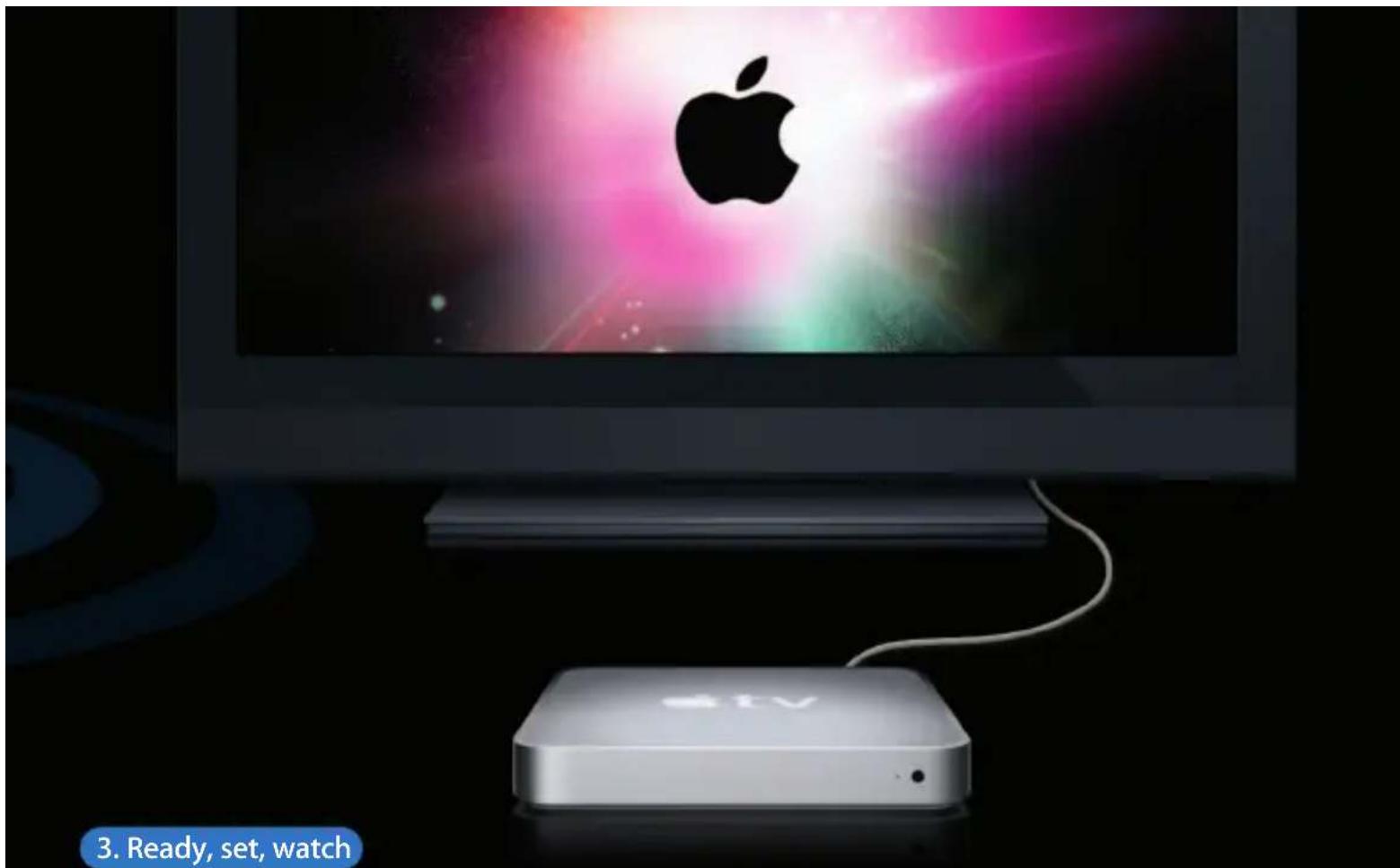
3. Ready, set, watch
22 Using Your Apple Remote 23 Basic Remote Functions 23 Pairing Apple TV with a Remote 24 Unpairing Apple TV with a Remote 25 Changing the Remote Battery 26 Renting Movies
4. Problem? No problem
28 Troubleshooting 33 Status Light 34 Service and Support 35 Serial Number 35 Care and Cleaning

1
Connect.
www.apple.com/support/appletv
With Apple TV, you can rent high definition movies or purchase TV shows, music, and music videos from the iTunes Store, as well as watch podcasts and YouTube videos—all without leaving the comfort of your couch. You can enjoy digital photos in high definition from your .Mac Web Gallery, Flickr, or your Mac or PC. You can also enjoy your favorite content from your Mac or PC at any time.
Use the information in this chapter to get started.
| For information about | See |
| What you need to get started | “What You Need” on page 8 |
| Setting up | “Setting Up Apple TV” on page 12 |
| Setting up your network connection | “Configure.” on page 17 |
| Using the Apple Remote | “Ready, set, watch.” on page 21 |
| Troubleshooting Apple TV | “Problem? No problem.” on page 27 |
| Apple TV safety and warranty | The Apple TV Important Product Information Guide |
What's in the Box
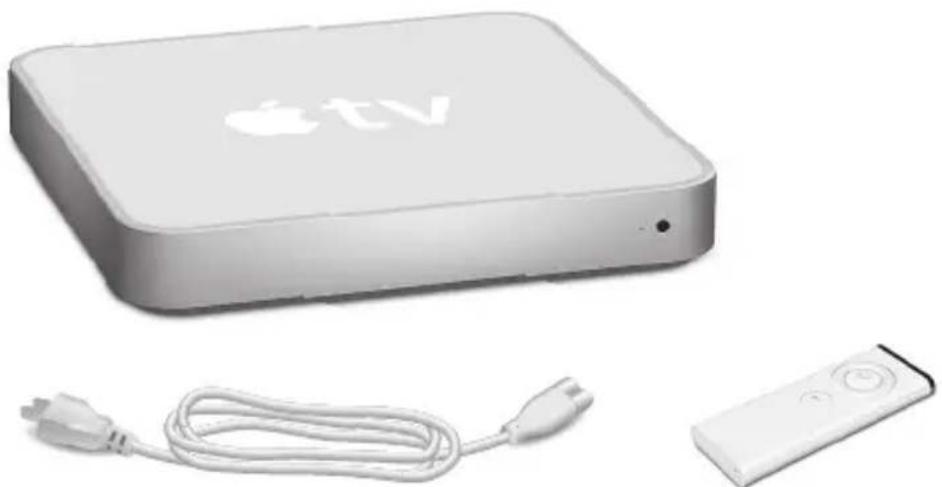
AC power cord Apple Remote
Note: Your power cord may look different from the one pictured here.
What You Need
To start using your Apple TV, you need the following:
Widescreen TV
A widescreen, enhanced-definition or high-definition TV capable of at least one of the following resolutions:
• 1080p • 1080i • 720p • 576p • 480p
Cables
- An HDMI cable, or
- Component video cables, with analog audio cables or an optical audio cable
Network
• A wired or wireless network - A broadband Internet connection (DSL, cable, LAN) - Your wireless network password (if you use one)
Computer and Software
To play content from a Mac or PC on Apple TV, your computer must meet the following system requirements:
- A Mac with Mac OS X v10.3.9, or v10.4.7 or later
- A PC with Windows XP Home or Professional (SP2), or a 32-bit edition of Windows Vista
- iTunes 7.6 or later • An iTunes Store account
Apple TV at a Glance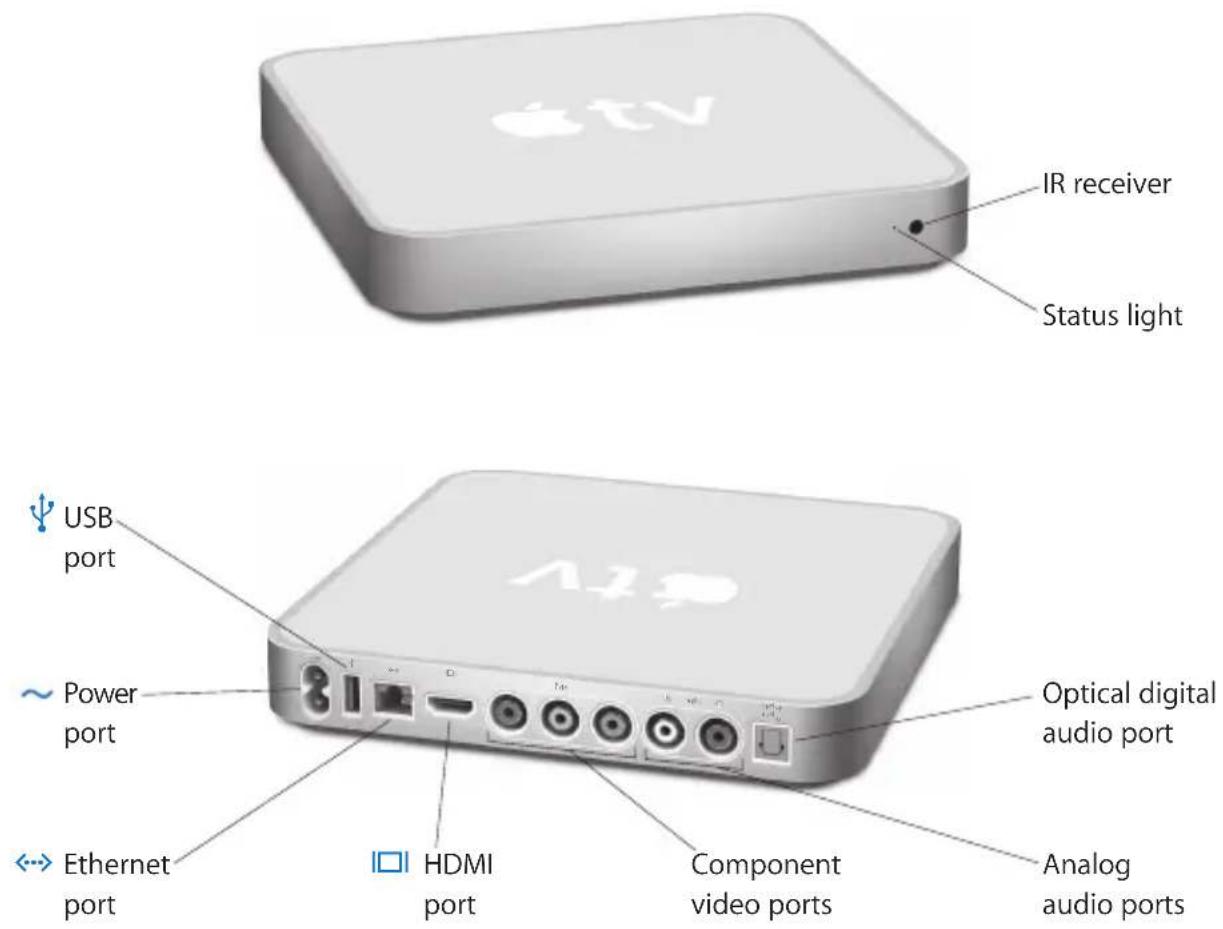
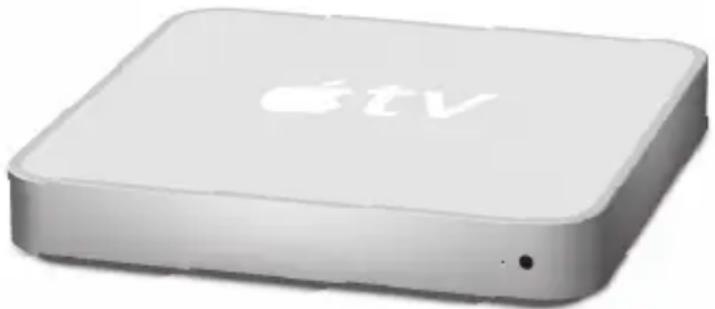
| IR receiverUse with the included Apple Remote to control Apple TV. | |
| Status lightThe status light blinks amber when Apple TV starts up. When Apple TV is on, the status light glows solid white. For more information about the status light, see “Status Light” on page 33. | |
| ψ | USB portFor service and diagnostics. |
| ~ | Power portPlug the included AC power cord into Apple TV. |
| <--> | Ethernet portIf you connect to your network using Ethernet, connect an Ethernet cable. |
| |□| | HDMI portConnect Apple TV to a widescreen TV that has an HDMI port using an HDMI cable, or a DVI port using an HDMI-to-DVI cable. |
| Component video portsConnect Apple TV to a widescreen TV that has component video (Y, Pb, and Pr) ports, using a component video cable with green, blue, and red connectors. | |
| Analog audio portsConnect Apple TV to a widescreen TV or home theater receiver with analog audio ports (red and white), using an analog audio cable. | |
| Optical digital audio portConnect Apple TV to a home theater receiver that has an optical digital audio port, using an optical digital audio (also called S/PDIF or TOSLINK) cable. | |
| Sunshine | Built-in Wi-Fi/AirPort wirelessConnect Apple TV to your wireless network. |
Setting Up Apple TV
Apple TV connects to your TV through an HDMI port that delivers both audio and video to your TV, or through component video and audio ports. Before you set up, look at the ports on the back of your TV to make sure you have the appropriate cables.
To get started:
- Connect audio and video cables to Apple TV and your widescreen TV
- Connect Apple TV to your wireless or Ethernet network • Install the latest version of iTunes on your computer if you want to play content from your computer on Apple TV
You can connect Apple TV to a widescreen TV that has:
- An HDMI port, using an HDMI cable for both video and audio
- Component video (Y, Pb, and Pr) ports, using a component video cable with green, blue, and red connectors, and an audio cable
You can also connect Apple TV to a home theater receiver or to a TV that has a DVI port using an HDMI-to-DVI cable for video and an audio cable.
Important: Before you plug Apple TV into a power outlet, carefully read all of the following installation instructions and the safety information in the included Important Product Information Guide.
Step 1: Connecting the cables
Choose the setup that matches the ports on your TV or receiver.
To connect a widescreen TV with an HDMI port:
1. Connect one end of an HDMI cable to the back of your TV. 2. Connect the other end to the back of Apple TV.
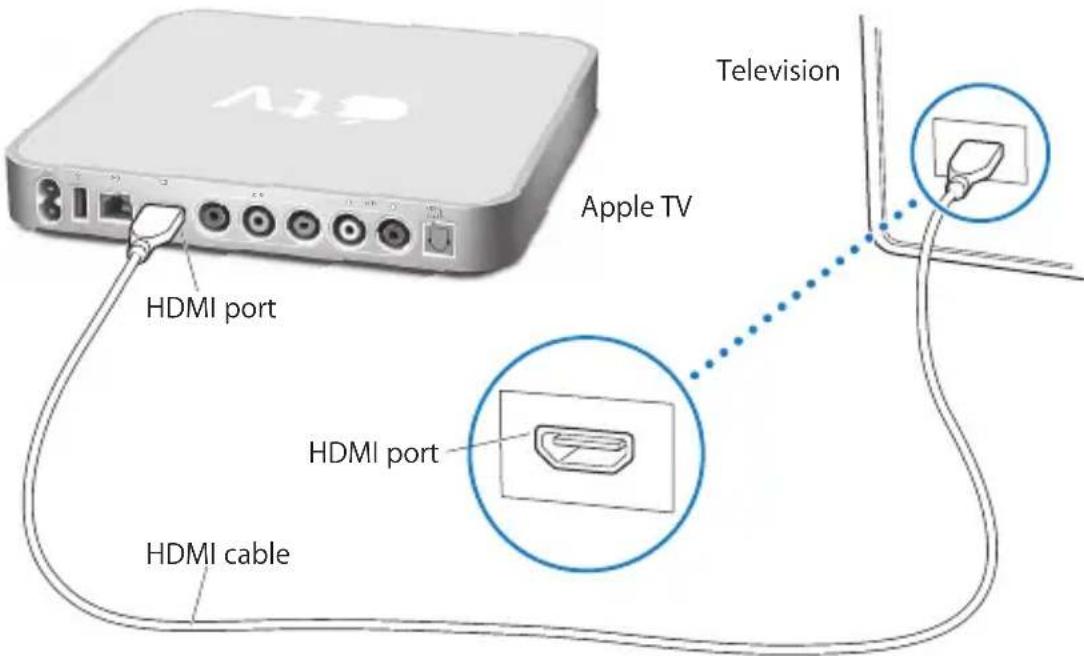
If your TV's HDMI port is being used by another device, or if your TV doesn't have an HDMI port, you can connect to Apple TV using component video and audio.
To connect a widescreen TV with component video and analog audio ports:
1. Connect the green, blue, and red connectors on one end of a component video cable to the Y, Pb, and Pr ports on your TV and the connectors on the other end to Apple TV.
2. Connect an analog audio cable, with red and white connectors, between Apple TV and your TV.
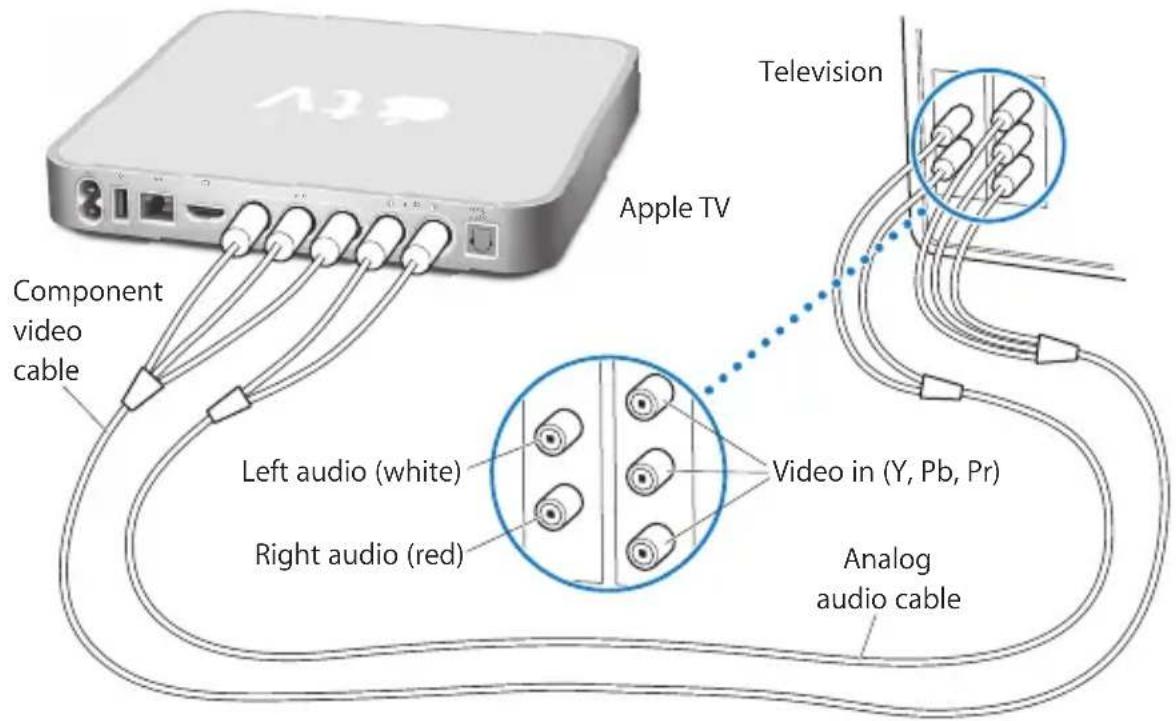
Note: The built-in 802.11 Wi-Fi capability connects Apple TV to your wireless network. If your network is Ethernet-based, connect Apple TV to your network using an Ethernet cable (sold separately).
Step 2: Connect the power cord
Plug one end of the power cord into the back of Apple TV and the other end into a power outlet.
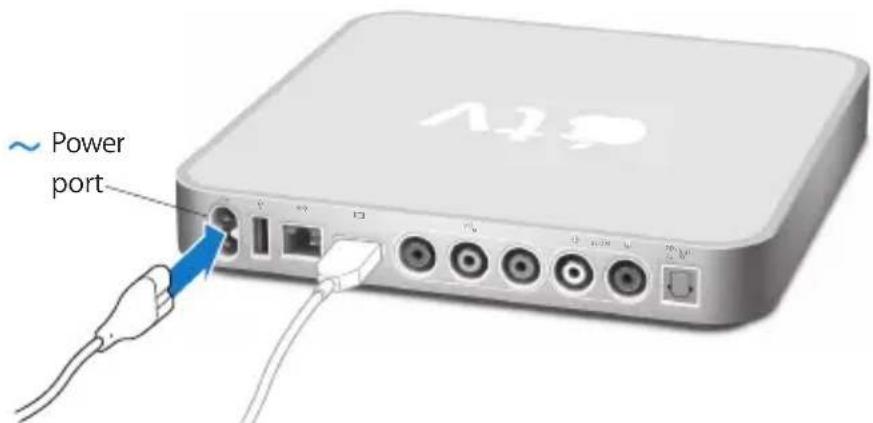
Important: Don't place anything on top of Apple TV. Objects placed on top may cause interference with the wireless signal.
Step 3: Turn on your TV and select the input
The first time you use Apple TV, it takes you through a series of steps including choosing a language, selecting a network, configuring Apple TV to work with your network if necessary, and connecting to iTunes. See Chapter 2, "Configure," on page 17.
Note: If you see just a black screen the first time you use Apple TV, make sure the input you've selected on your TV matches the input you've plugged the cables into on your TV or receiver. If the input matches, you might need to select a screen resolution your TV supports. See "Problem? No problem." on page 27 and refer to the documentation that came with your TV for information about its inputs.
2
Configure.
www.apple.com/support/appletv
Apple TV helps you select and configure your wireless network connection, and, if you want to watch or listen to the content in your iTunes library, connect to iTunes on your computer.
Network Configuration
Have your network password (if you use one) and your Apple Remote handy to configure your Apple TV. Make sure there are no obstructions between the remote and Apple TV. See "Ready, set, watch." on page 21 for information about using your remote. If you:
- Use a wired Ethernet network to connect, Apple TV automatically detects your network.
- Use a wireless network to connect, Apple TV helps you select and configure your network connection.
Connecting to Your Wireless Network
Apple TV will help you connect to your wireless network. If you use a password to access your network, have it ready. Use the Apple Remote to:
- Select your network from the list, or enter your network name if the network is hidden
- Enter your password (if you have one)
- Enter your IP address, subnet mask, router, and DNS address (if you're manually configuring your network)
If you don't connect using DHCP, you may have to enter your IP address, subnet mask, router, and DNS addresses.
To finish the network connection, follow the onscreen instructions.
Connecting to iTunes
To access the content in your iTunes library on Apple TV, you need iTunes 7.6 or later installed on your computer. See “Computer and Software” on page 9 for a complete list of system requirements.
Updating Your iTunes Software
You can download the latest version of iTunes at www.apple.com/itunes/download.
On a Mac, you can also use Software Update to update to the latest version of iTunes. To use Software Update, choose Apple (✗) > Software Update.
To use iTunes 7.6 on a Mac, you need to update your system software to Mac OS X v10.3.9, or v10.4.7 or later, and update to QuickTime 7.4 or later.
On a Windows-based computer, you can also go to iTunes Help to update to the latest version of iTunes. Open iTunes, and then choose Help > Check for Updates.
To use iTunes 7.6 on a Windows-based computer, you need to be running Windows XP or later.
Pairing with iTunes
After you set up your network connection, your TV screen displays a five-digit passcode, which you'll need to enter in iTunes to sync or stream content from your computer to Apple TV.
To set up Apple TV with your iTunes library:
1 Open iTunes on your computer. 2 Select the Apple TV icon with "Click to set up" next to it in the Devices list. 3 Enter the 5-digit passcode from your TV screen.
After you enter your passcode, you can name your Apple TV and set up iTunes to manage your content.
For more information about iTunes, open iTunes and choose Help > iTunes Help.
3
Ready, set, watch.
www.apple.com/support/appletv
Read on to learn about pairing and using your remote with Apple TV.
Using Your Apple Remote
Use the Apple Remote to control Apple TV settings and navigate through your content. Make sure there are no obstructions between the remote and Apple TV.
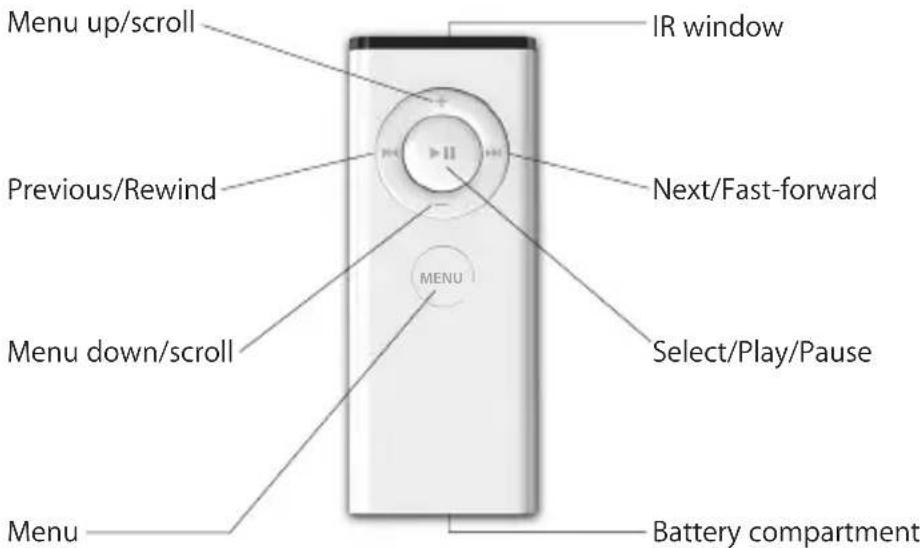
Basic Remote Functions
Your Apple Remote has the basic functions described below.
| To Do this | |
| Move through the menu options Press | + or - |
| Select an option from a menu Press ▶II | |
| Return to a previous menu Press MENU | |
| Return to the main menu Press and hold MENU | |
| Put Apple TV in standby mode | Press and hold ▶II for about 6 seconds |
| Reset Apple TV Press and hold | MENU and - for about 6 seconds |
| Pair Apple TV and a remote Press and hold | MENU and ▶I for about 6 seconds |
Note: The + and - on the Apple Remote don't control the volume on your TV or receiver. Use the remote that came with your TV or receiver to change the volume.
Pairing Apple TV with a Remote
The Apple Remote works with the built-in IR receiver on Apple TV. You can set Apple TV to work only with the included remote by pairing Apple TV and the remote.
To pair Apple TV with the included remote:
1. Choose Settings from the Apple TV main menu. 2. Choose Pair Remote Control.
You can also press and hold MENU and the play/pause button for 6 seconds to pair Apple TV and the remote.
When you've successfully paired your Apple Remote, Apple TV displays a chainlink symbol above a picture of a remote. Apple TV now works only with the paired remote.
Unpairing Apple TV with a Remote
If you lose the Apple Remote that you paired with Apple TV, you can use any Apple Remote to unpair Apple TV from the lost remote by pressing and holding MENU and ↔ for 6 seconds. You can also follow these steps.
To unpair Apple TV from a previously paired remote:
1 Choose Settings from the Apple TV main menu. 2 Choose Unpair Remote.
When you've successfully unpaired the lost remote, Apple TV displays a broken chainlink ( ) symbol above an image of a remote. You can now pair Apple TV with a new Apple Remote.
Changing the Remote Battery
When the battery charge in your Apple Remote is low, Apple TV displays a picture of a remote and a warning (△) symbol. Replace the battery with a CR2032 battery.
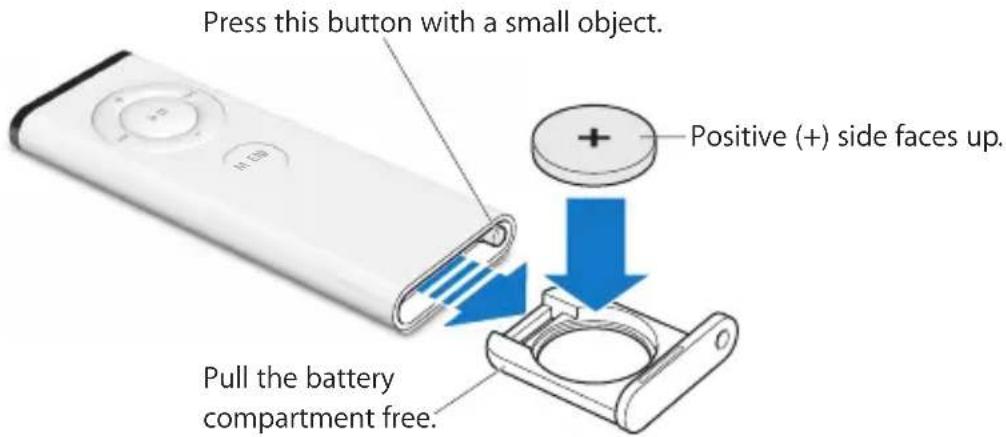
To replace the battery:
1 Open the battery compartment by pressing the button with a small object until the compartment is partially ejected. 2 Pull the battery compartment out and remove the battery. 3 Insert the replacement battery with the positive (+) side facing up. 4 Reinsert the battery compartment into the remote. 5 Dispose of the used battery according to your local environmental laws and guidelines.
Renting Movies
You can rent standard definition movies with stereo sound or high definition movies with Dolby Digital 5.1 surround sound directly from Apple TV. When you rent a movie, you have 30 days to start watching it. Once you press Play, you have 24 hours to finish watching before it expires.
The Rented Movies menu shows when your rented movie is due to expire. When a movie expires, it's deleted to save storage space on Apple TV.
Note: Rented movies are not available in all regions.
Problem? No problem.
www.apple.com/support/appletv
Most problems with Apple TV can be solved quickly by following the advice in this chapter. For additional tips and troubleshooting information, see the Apple TV Support page at www.apple.com/support/appletv.
Troubleshooting
When you have a problem with Apple TV, there's usually a quick and simple solution. First, make sure:
- The audio and video cables between Apple TV and your TV are pushed in all the way.
- The power cords for Apple TV and your TV are securely connected to a working power source.
- Your TV is turned on and switched to the correct input.
- Apple TV is connected to your network. Go to the Settings menu on Apple TV, select Network, and see if Apple TV has an IP address.
- Your network and Internet connections are on and working properly.
If you're still having trouble, try resetting your equipment by unplugging Apple TV, your TV, your wireless networking equipment or AirPort Base Station, and your router from the power outlet. Wait 30 seconds and then plug everything back in again.
If the remote isn't working
- If you've paired Apple TV and an Apple Remote, make sure you're using the paired remote.
- If you're using the paired remote and the Apple TV status light flashes white when you press buttons on the remote, the problem isn't with the remote. See "If you can see a picture but Apple TV isn't responding" on page 30.
- If you're using an unpaired remote, the Apple TV status light flashes amber.
- If you've paired Apple TV and an Apple Remote, and you can't find the paired remote, set Apple TV to work with any Apple Remote by pressing and holding MENU and ↔ for 6 seconds.
- Point the remote directly at Apple TV.
- Make sure the IR receiver on the front of Apple TV isn't blocked.
- If Apple TV displays a picture of a remote and a warning (⚠️) symbol, you need to replace the battery in the remote. See “Changing the Remote Battery” on page 25.
If Apple TV can't access the network
- Check the IP address Apple TV is using. If it starts with 169.x.x.x, then the router or base station may not be configured properly. Check to see if DHCP access is available or configure Apple TV with a manual IP address.
- Check for any obstructions and adjust the location of the base station or Apple TV.
- If security is enabled on the network, temporarily disable it on the base station and try connecting again.
- Apple TV cannot connect to a wireless network that contains high (extended) ASCII or double-byte (Unicode) characters (such as Japanese, Korean, or Chinese) in their name or password.
- If your network has security enabled, make sure you've entered the correct password.
If your TV screen appears fuzzy or black
- Make sure you're using the correct video cables and that they are connected firmly to Apple TV and to your TV.
- Make sure the input setting you've selected on your TV matches the input your video cables are connected to. See the documentation that came with your TV for more information.
If your TV screen still appears fuzzy or black, you may need to select a video mode your TV supports.
To select a video mode:
1 Press and hold both MENU and + on the Apple Remote for about 6 seconds. 2 Press + or - on the Apple Remote to cycle through the display resolutions. 3 When Apple TV reaches an acceptable display resolution and "If you can see the Apple logo, select OK" appears on your TV screen, press ▶.
If you can see a picture but Apple TV isn't responding
- Try pressing and holding MENU on the Apple Remote to return to the Apple TV main menu.
- Make sure your TV is turned on and functioning correctly. See the documentation that came with your TV for more information.
- If you paired an Apple Remote with Apple TV, make sure you're using the paired remote. See "Pairing Apple TV with a Remote" on page 23.
- Reset Apple TV by unplugging it from the power outlet, waiting about five seconds, and plugging it in again. You can also press and hold both MENU and – on the Apple Remote for about 6 seconds to reset Apple TV. Your movies and other content will remain on Apple TV.
If Apple TV still doesn't respond, try restoring it to the original factory settings
- Press and hold both MENU and – on the Apple Remote for 6 seconds or until the status light blinks amber.
- Choose a language.
- Choose Factory Restore.
During a factory restore, the progress indicator (a spinning gear) may spin for a while, so be patient.
- If your network doesn't use DHCP, choose Configure TCP/IP and enter the TCP/IP configuration.
- If you still don't see Apple TV in the Source list in iTunes, go to the Apple TV Support page for more information: www.apple.com/support/appletv
If you can't hear sound
- If Apple TV is connected to an A/V receiver, make sure the receiver is turned on.
- Make sure the input setting you've selected on your receiver matches the input you have your audio cables connected to. See the documentation that came with your receiver for more information.
- Make sure the volume on your TV or receiver is turned up and isn't muted.
- Make sure you're using the correct audio cable (see page 13) and that it's connected firmly to Apple TV and to your TV.
- If you're using the HDMI port on your TV and Apple TV, make sure your TV supports audio through its HDMI port. The HDMI ports on some older TVs support only video.
If Apple TV doesn't appear in iTunes
- Make sure Apple TV is turned on and connected to your network. Go to the Settings menu on Apple TV, select Network, and see if Apple TV has an IP address.
- Choose Preferences in iTunes, click Apple TV, and make sure "Look for Apple TVs" is selected.
- If Firewall is on (in the Sharing pane of System Preferences), make sure “Apple TV Sharing” is selected to allow content to pass through the firewall.
If other Apple TVs show up periodically in your iTunes Devices list
- This means that iTunes has found other Apple TVs on your network. To prevent this, choose Preferences in iTunes, click Apple TV, and make sure “Look for Apple TVs” is not selected.
If Apple TV isn't playing your photo albums or slideshows
- Make sure you have photos in your photo library or in a folder on your computer.
Status Light
Apple TV has a status light on the front that indicates what's happening.
| If Apple TV is The status light | |
| On Glows solid white | |
| Off or in standby Is off | |
| Starting up Blinks amber | |
| Accepting a command from the remote Flashes white once | |
| Rejecting a command from the remote (you've paired a remote with Apple TV but you're using a remote that's not paired) | Flashes amber once |
| Having problems Alternates between white and amber | |
Service and Support
More information about using Apple TV is available in onscreen help and on the web. The following table describes where to get software and service information.
| To learn about Do this | |
| Service and support, discussions, tutorials,and Apple software downloads | Go to: www.apple.com/support/appletv |
| Using iTunes Open iTunes and choose Help >iTunes Help.For an onscreen iTunes tutorial (available in some areas only), go to:www.apple.com/support/itunes | |
| Using iPhoto (in Mac OS X) Open iPhoto and choose Help >iPhoto Help. | |
| The latest Apple TV information Go to: www.apple.com/support/appletv | |
| Safety and regulatory compliance information | See the Important Product Information Guide that comes with Apple TV. |
| Obtaining warranty service First follow the advice in this booklet, the Important Product Information Guide, the onscreen help, and online resources.If the unit still doesn’t function, go to www.apple.com/support/appletv for information about how to obtain warranty service. | |
| Registering Apple TV Go to: www.apple.com/register | |
Serial Number
The serial number is printed on the bottom of Apple TV. You can also find the serial number in the Apple TV Settings menu. On Apple TV, choose Settings > About.
Care and Cleaning
NOTICE: Failure to follow these care and cleaning instructions could result in damage to Apple TV or other property.
Using Connectors and Ports
Never force a connector into a port. Check for obstructions on the port. If the connector and port don't join with reasonable ease, they probably don't match. Make sure that the connector matches the port and that you have positioned the connector correctly in relation to the port.
Keeping Apple TV Within Acceptable Temperatures
Operate Apple TV in a place where the temperature is always between 0° and 40° C (32° to 104° F).
Keeping the Outside of Apple TV Clean
To clean Apple TV, unplug the power cord and all cables. Then use a soft, lint-free cloth. Avoid getting moisture in openings. Don't use window cleaners, household cleaners, aerosol sprays, solvents, alcohol, ammonia, or abrasives to clean Apple TV.
Disposing of Apple TV Properly
For information about the proper disposal of Apple TV, and other important regulatory compliance information, see the Important Product Information Guide.
Apple Inc.
© 2008 Apple Inc. All rights reserved.
Under the copyright laws, this manual may not be copied, in whole or in part, without the written consent of Apple.
The Apple logo is a trademark of Apple Inc., registered in the U.S. and other countries. Use of the "keyboard" Apple logo (Option-Shift-K) for commercial purposes without the prior written consent of Apple may constitute trademark infringement and unfair competition in violation of federal and state laws.
Every effort has been made to ensure that the information in this manual is accurate. Apple is not responsible for printing or clerical errors.
Apple
1 Infinite Loop
Cupertino, CA 95014-2084
408-996-1010
www.apple.com
Apple, the Apple logo, AirPort, Apple TV, iLife, iPhoto, iTunes, Mac, Macintosh, Mac OS, and QuickTime are trademarks of Apple Inc., registered in the U.S. and other countries.
Apple Store and .Mac are service marks of Apple Inc., registered in the U.S. and other countries.
iTunes Store is a service mark of Apple Inc.
Manufactured under license from Dolby Laboratories. "Dolby," "Pro Logic," and the double-D symbol are trademarks of Dolby Laboratories. Confidential Unpublished Works, © 1992-1997 Dolby Laboratories, Inc. All rights reserved.
The product described in this manual incorporates copyright protection technology that is protected by method claims of certain U.S. patents and other intellectual property rights owned by Macrovision Corporation and other rights owners. Use of this copyright protection technology must be authorized by Macrovision Corporation and is intended for home and other limited viewing uses only unless otherwise authorized by Macrovision Corporation. Reverse engineering or disassembly is prohibited.
Apparatus Claims of U.S. Patent Nos. 4,631,603, 4,577,216, 4,819,098, and 4,907,093 licensed for limited viewing uses only.
Other company and product names mentioned herein may be trademarks of their respective companies. Mention of third-party products is for informational purposes only and constitutes neither an endorsement nor a recommendation. Apple assumes no responsibility with regard to the performance or use of these products.
- WELCOME. YOU'RE WATCHING APPLE TV
- CONTENTS
- CONFIGURE
- CONNECT
- READY, SET, WATCH
- PROBLEM? NO PROBLEM
- WHAT'S IN THE BOX
- WHAT YOU NEED
- WIDESCREEN TV
- CABLES
- NETWORK
- COMPUTER AND SOFTWARE
- SETTING UP APPLE TV
- TO GET STARTED
- YOU CAN CONNECT APPLE TV TO A WIDESCREEN TV THAT HAS
- STEP 1: CONNECTING THE CABLES
- TO CONNECT A WIDESCREEN TV WITH AN HDMI PORT
- TO CONNECT A WIDESCREEN TV WITH COMPONENT VIDEO AND ANALOG AUDIO PORTS
- STEP 2: CONNECT THE POWER CORD
- STEP 3: TURN ON YOUR TV AND SELECT THE INPUT
- NETWORK CONFIGURATION
- CONNECTING TO YOUR WIRELESS NETWORK
- CONNECTING TO ITUNES
- UPDATING YOUR ITUNES SOFTWARE
- PAIRING WITH ITUNES
- TO SET UP APPLE TV WITH YOUR ITUNES LIBRARY
- USING YOUR APPLE REMOTE
- BASIC REMOTE FUNCTIONS
- PAIRING APPLE TV WITH A REMOTE
- UNPAIRING APPLE TV WITH A REMOTE
- CHANGING THE REMOTE BATTERY
- TO REPLACE THE BATTERY
- RENTING MOVIES
- TROUBLESHOOTING
- IF THE REMOTE ISN'T WORKING
- IF APPLE TV CAN'T ACCESS THE NETWORK
- IF YOUR TV SCREEN APPEARS FUZZY OR BLACK
- TO SELECT A VIDEO MODE
- IF YOU CAN SEE A PICTURE BUT APPLE TV ISN'T RESPONDING
- IF APPLE TV STILL DOESN'T RESPOND, TRY RESTORING IT TO THE ORIGINAL FACTORY SETTINGS
- IF YOU CAN'T HEAR SOUND
- IF APPLE TV DOESN'T APPEAR IN ITUNES
- IF OTHER APPLE TVS SHOW UP PERIODICALLY IN YOUR ITUNES DEVICES LIST
- IF APPLE TV ISN'T PLAYING YOUR PHOTO ALBUMS OR SLIDESHOWS
- STATUS LIGHT
- SERVICE AND SUPPORT
- SERIAL NUMBER
- CARE AND CLEANING
- USING CONNECTORS AND PORTS
- KEEPING APPLE TV WITHIN ACCEPTABLE TEMPERATURES
- KEEPING THE OUTSIDE OF APPLE TV CLEAN
- DISPOSING OF APPLE TV PROPERLY
Brand : APPLE
Model : TV 4K (3rd gen)
Category : Media player