
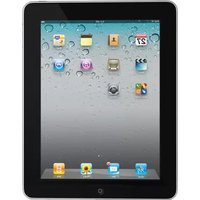
iPad 3G 16 GB - Telephone APPLE - Free user manual and instructions
Find the device manual for free iPad 3G 16 GB APPLE in PDF.


Pick your language and provide your email: we'll send you a specifically translated version.
| Product Type | Tablet with 3G connectivity |
| Brand | Apple |
| Model | iPad 3G 16 GB |
| Storage Capacity | 16 GB |
| Display Size | 9.7 inches |
| Display Resolution | 1024 x 768 pixels |
| Processor | Apple A4 chip |
| Operating System | iOS (up to 5.1.1) |
| Connectivity | Wi-Fi, Bluetooth 2.1, 3G (UMTS/HSDPA) |
| Dimensions | 242.8 mm x 189.7 mm x 13.4 mm |
| Weight | 730 g (1.61 lb) |
| Battery Life | Up to 10 hours (Wi-Fi), 9 hours (3G) |
| Battery Type | Built-in rechargeable lithium-polymer (25 Wh) |
| Camera | None |
| Ports | 30-pin dock connector, 3.5 mm headphone jack |
| Wireless | Wi-Fi 802.11a/b/g/n, Bluetooth 2.1 + EDR |
| GPS | Assisted GPS (3G model) |
| Sensors | Accelerometer, ambient light sensor |
| Audio | Built-in speaker, microphone |
| Maintenance | Clean with a soft, lint-free cloth slightly dampened with water |
| Safety | Avoid heat, water, and use only Apple-certified accessories |
| Spare Parts and Repairability | Battery and screen replacements available at Apple Store; internal parts not user-serviceable |
| Release Year | 2010 |
| General Information | Part of Apple's first-generation iPad series, supports iOS multimedia and internet |
Frequently Asked Questions - iPad 3G 16 GB APPLE
Can the iPad 3G make phone calls?
No, the iPad 3G is a tablet, not a phone. However, you can use internet-based calling apps like Skype for voice calls over Wi-Fi or 3G.
How do I insert the SIM card?
The iPad 3G uses a micro-SIM card. Insert the SIM eject tool into the small hole on the top left edge, push to eject the tray, then place the SIM and reinsert the tray.
What is the battery life of the iPad 3G?
The built-in lithium-polymer battery delivers up to 10 hours of Wi-Fi browsing, video playback, or music listening. On 3G, browsing time is up to 9 hours.
How do I reset the iPad if it freezes?
Press and hold the Sleep/Wake button and the Home button simultaneously for at least 10 seconds until the Apple logo appears. This forces a restart without erasing your data.
How do I update the iOS version?
Connect to Wi-Fi, go to Settings > General > Software Update, and tap Download and Install. Your iPad will install the latest supported version (up to iOS 5.1.1).
Can I clean the screen with alcohol?
Do not use alcohol or harsh chemicals. Use a soft, lint-free cloth, slightly dampened with water, to wipe the screen. Avoid getting moisture in openings.
How much free storage is available out of 16 GB?
Out-of-the-box, iOS and preinstalled apps consume about 3 GB, leaving roughly 13 GB of usable space for your content.
Does the iPad 3G support GPS?
Yes, the 3G model includes assisted GPS, which gives accurate location through satellites and mobile networks, useful for Maps and navigation apps.
What type of SIM card is required?
The iPad 3G uses a micro-SIM card, unlike the smaller nano-SIM used in newer iPads. Check with your carrier for a compatible data plan.
How do I manage storage space on the iPad?
Go to Settings > General > Usage. You can view storage usage per app, delete unused apps, and offload documents. Music and videos can be managed through iTunes.
User questions about iPad 3G 16 GB APPLE
0 question about this device. Answer the ones you know or ask your own.
Ask a new question about this device
No questions yet. Be the first to ask one.
Download the instructions for your Telephone in PDF format for free! Find your manual iPad 3G 16 GB - APPLE and take your electronic device back in hand. On this page are published all the documents necessary for the use of your device. iPad 3G 16 GB by APPLE.
USER MANUAL iPad 3G 16 GB APPLE


Manual assistant
Powered by Anthropic
Waiting for your message
Product information
Brand : APPLE
Model : iPad 3G 16 GB
Category : Telephone