CMO-3570 - Mouse Connect IT - Free user manual and instructions
Find the device manual for free CMO-3570 Connect IT in PDF.


User questions about CMO-3570 Connect IT
0 question about this device. Answer the ones you know or ask your own.
Ask a new question about this device
Download the instructions for your Mouse in PDF format for free! Find your manual CMO-3570 - Connect IT and take your electronic device back in hand. On this page are published all the documents necessary for the use of your device. CMO-3570 by Connect IT.
USER MANUAL CMO-3570 Connect IT
USER MANUAL BENUTZERHANDBUCH PODREÇZNIK UŻYTKOWNIKA UŻIVATELSKÝ MANUÁL UŻÍVATELŠKÝ MANUÁL
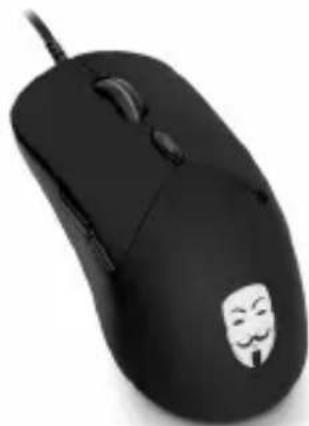
natural_image
Black computer mouse with a white cartoon face logo on its side (no text or symbols visible)OPTICAL GAMING MOUSE OPTISCHE GAMING MAUS MYSZ OPTYCZNA GAMINGOWA OPTICKÁ HERNÍ MYŠ OPTICKÁ HERNÁ MYŠ
CMO-3570-BK
Before putting this product into operation, please read carefully all the instructions, even if you are already familiar with using similar products. Use the product only as described in this manual. Keep this manual in case you need it for future reference.
The electronic version of this user manual can be downloaded on the website www.connectit-europe.com.
We recommend keeping the original packaging of the product, invoice and warranty certificate at least for the time the warranty is valid. When shipping the product, we recommend using the original packaging that the product was delivered in that will provide the best protection for it from being damaged during transport:
1 Specification
■ Accurate and responsive optical sensor
■ Ergonomically designed
■ 6 buttons including ultra precise 3D scroll wheel
■ Adjustable DPI switch: 1000/1600/2400/3200 DPI
■ Compatibility: Windows XP/Vista/7/8/10, Mac OS 8.6 or higher
■ Gold-plated USB connector
■ Braided cable: 180 cm
■ Size: 127 × 68 × 40 mm
■ Weight: 137 g
Compatibility:
■ Operating system: Microsoft Windows XP/Vista/7/8/10 and Mac OS
This product is compatible with Mac OS although some features unsupported by Mac OS may not work properly.
2 Installation
Plug the USB cable into an available USB port on your computer and wait for the drivers to install.
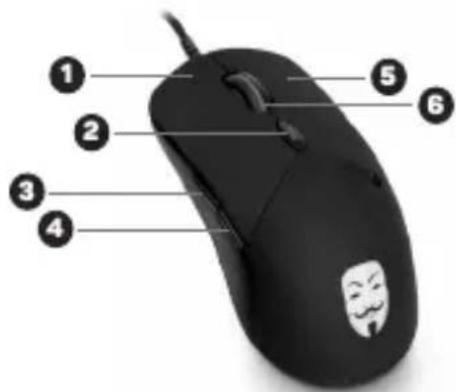
3 Overview
- Left button
- DPI - Toggle
- Forward button
- Back button
- Right button
- Scroll wheel
text_image
Diagram of a computer mouse with numbered parts labeled 1 through 6, highlighting a face mask design.connect IT

4 Troubleshooting
■ We recommend connecting this device straight to a USB port on your computer.
If this device is plugged in to a USB hub, make sure that the USB hub and the USB port to which it is connected can provide this device and other devices connected to the same USB hub with enough power.
■ Alternatively, we recommend using an external power source with the USB hub (if the USB hub supports such functionality).
INSTRUCTIONS AND INFORMATION REGARDING THE DISPOSAL OF USED PACKAGING
Dispose of packaging material at a public waste disposal site.
DISPOSAL OF USED ELECTRICAL AND ELECTRONIC APPLIANCES
The meaning of the symbol on the product, its accessory or packaging indicates that this product shall not be treated as household waste. Please dispose of this product at your applicable collection point for the recycling of electrical & electronic equipment waste. Alternatively in some states of the European Union or other European states you may return your products to your local retailer when buying an equivalent new product. The correct disposal of this product will help save valuable natural resources and help in preventing the potential negative impact on the environment and human health, which could be caused as a result of improper liquidation of waste. Please ask your local authorities or the nearest waste collection center for further details. The improper disposal of this type of waste may fall subject to national regulations for fines.
For business entities in the European Union
If you wish to dispose of an electrical or electronic device, request the necessary information from your seller or supplier.
Disposal in other countries outside the European Union
If you wish to dispose of this product, request the necessary information about the correct disposal method from local government departments or from your seller.

This product meets all the basic EU regulation requirements that relate to it. EU declaration of conformity is available on www.connectit-europe.com.
text_image
Labeled diagram of a computer mouse with numbered parts for identificationconnect IT

text_image
Diagram of a computer mouse with numbered parts labeled 1 to 6, highlighting a cartoon face on the mouse.connect IT

text_image
Labeled diagram of a computer mouse with numbered parts for identificationconnect IT

text_image
Labeled diagram of a computer mouse with numbered parts and a smiling face icon on the head.connect IT

natural_image
Two stylized animal figures, one in teal and one in black, walking side by side (no text or symbols)connect IT®
MANUFACTURER
HERSTELLER
PRODUCENT
VÝROBCE
VÝROBCA
IT TRADE, a.s.
Poděbradská 65a
198 00 Praha 9
Czech Republic
tel.: +420 734 777 444
service@connectit-europe.com
www.connectit-europe.com