
Q Tablet INP-120Q32-PR - Graphic tablet INFOCUS - Free user manual and instructions
Find the device manual for free Q Tablet INP-120Q32-PR INFOCUS in PDF.


User questions about Q Tablet INP-120Q32-PR INFOCUS
0 question about this device. Answer the ones you know or ask your own.
Ask a new question about this device
Download the instructions for your Graphic tablet in PDF format for free! Find your manual Q Tablet INP-120Q32-PR - INFOCUS and take your electronic device back in hand. On this page are published all the documents necessary for the use of your device. Q Tablet INP-120Q32-PR by INFOCUS.
USER MANUAL Q Tablet INP-120Q32-PR INFOCUS
- Windows Key
- Volume
- Headphone Jack
- Power Button
- USB 2.0 Port
- Power Indicator
- Power
- Docking Port
- SD Card
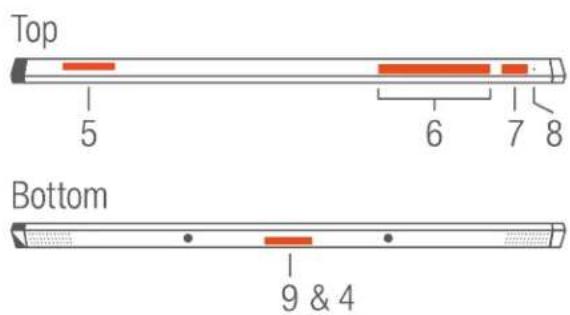
text_image
Top 5 6 7 8 Bottom 9 & 4Front

text_image
2 3 1Connect Power & Windows 8 Setup
- Connect Power
- Press Power Button
- Follow Instructions On-screen To Set Up Windows 8
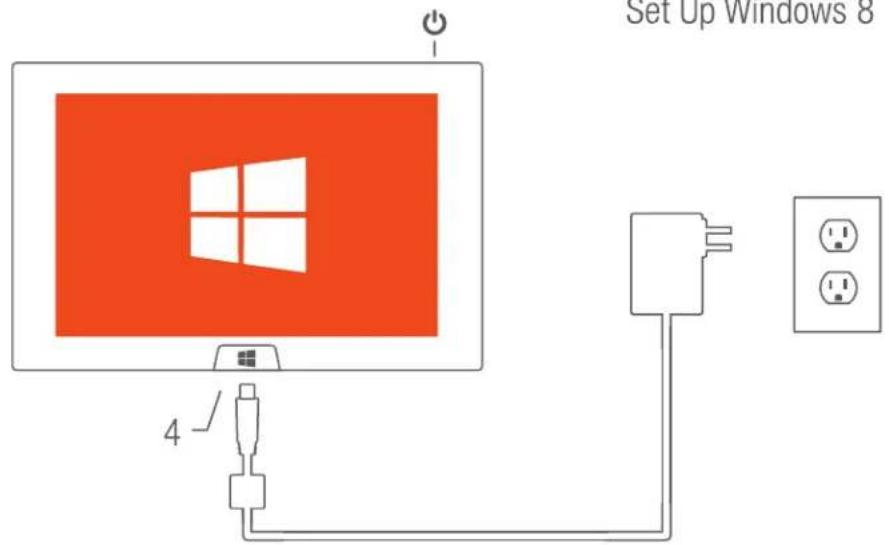
text_image
Set Up Windows 8 4InFocus Collaboration & Annotation Apps
One touch access to InFocus Collaboration Apps; just select the InFocus Live Tile in the Metro interface.
Control View
Control and Interact with InFocus Mondopad
Present 2
Send you screen to Mondopad for presentations and interaction
EZ Display
Present your documents wirelessly to an enabled InFocus projector
Big Note
Whiteboard, annotate and save your best ideas simply and easily (trial copy)
Optional Accessories
Visit www.infocus.com for accessories.