
GC-F459NQDZ - Freezer LG - Free user manual and instructions
Find the device manual for free GC-F459NQDZ LG in PDF.


User questions about GC-F459NQDZ LG
0 question about this device. Answer the ones you know or ask your own.
Ask a new question about this device
Download the instructions for your Freezer in PDF format for free! Find your manual GC-F459NQDZ - LG and take your electronic device back in hand. On this page are published all the documents necessary for the use of your device. GC-F459NQDZ by LG.
USER MANUAL GC-F459NQDZ LG
Before beginning installation, read these instructions carefully. This will simplify installation and ensure that the product is installed correctly and safely. Leave these instructions near the product after installation for future reference.
ENGLISH
MFL71400039
Rev.01_111020
www.lg.com
Copyright © 2020 LG Electronics Inc. All Rights Reserved.
TABLE OF CONTENTS
This manual may contain images or content that may be different from the model you purchased.
This manual is subject to revision by the manufacturer.
SAFETY INSTRUCTIONS
READ ALL INSTRUCTIONS BEFORE USE....3
WARNING....3
CAUTION 8
INSTALLATION
Before Installation ....10
Levelling the Appliance ....11
Turning on the Power....12
Moving the Appliance for Relocation 12
OPERATION
Before Use 13
Product Features....15
Control Panel 17
Water Dispenser....18
Icemaker 19
Fridge Drawer....20
Door Basket 21
Shelf 21
Freezer Drawer....21
SMART FUNCTIONS
LG ThinQ Application....22
Smart Diagnosis ....23
MAINTENANCE
Cleaning 25
TROUBLESHOOTING
Before Calling for Service....26

natural_image
Pure geometric lines and shapes without any text, numbers, or symbols
natural_image
Pure geometric diagram with intersecting lines and shapes, no text or symbols presentSAFETY INSTRUCTIONS
READ ALL INSTRUCTIONS BEFORE USE
The following safety guidelines are intended to prevent unforeseen risks or damage from unsafe or incorrect operation of the appliance. The guidelines are separated into 'WARNING' and 'CAUTION' as described below.
Safety Messages

This symbol is displayed to indicate matters and operations that can cause risk. Read the part with this symbol carefully and follow the instructions in order to avoid risk.

WARNING
This indicates that the failure to follow the instructions can cause serious injury or death.

CAUTION
This indicates that the failure to follow the instructions can cause the minor injury or damage to the product.
WARNING

WARNING
• To reduce the risk of explosion, fire, death, electric shock, injury or scalding to persons when using this product, follow basic precautions, including the following:
Technical Safety
- This appliance is not intended for use by persons (including children) with reduced physical, sensory or mental capabilities, or lack of experience and knowledge, unless they have been given supervision or instruction concerning use of the appliance by a person
4 SAFETY INSTRUCTIONS
responsible for their safety. Children should be supervised to ensure that they do not play with the appliance.
- This appliance is intended to be used in household and similar applications such as:
- staff kitchen areas in shops, offices and other working environments;
- farm houses and by clients in hotels, motels and other residential type environments;
- bed and breakfast type environments;
- catering and similar non-retail applications.
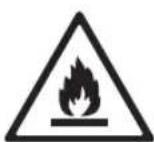
This symbol alerts you to flammable materials that can ignite and cause a fire if you do not take care.
- This appliance contains a small amount of isobutane refrigerant (R600a), but it is also combustible. When transporting and installing the appliance, care should be taken to ensure that no parts of the refrigerating circuit are damaged.
- The refrigerant and insulation blowing gas used in the appliance require special disposal procedures. Consult with service agent or a similarly qualified person before disposing of them.
- Do not damage the refrigerant circuit.
- If the power cord is damaged or the hole of the outlet socket is loose, do not use the power cord and contact an authorized service centre.
- Do not locate multiple portable outlet sockets or portable power supplies at the rear of the appliance.
- Securely plug the power plug in the outlet socket after completely removing any moisture and dust.
- Never unplug the appliance by pulling on the power cable. Always grip the power plug firmly and pull straight out from the outlet socket.
- Keep ventilation openings, in the appliance enclosure or in the built-in structure, clear of obstruction.
natural_image
Pure geometric lines and crosshair symbols without any text or labels
natural_image
Pure geometric diagram with intersecting lines and shapes, no text or symbols presentSAFETY INSTRUCTIONS
5
- Do not store explosive substances such as aerosol cans with a flammable propellant in this appliance.
- Do not tilt the appliance to pull or push it when transporting.
- When positioning the appliance, ensure the supply cord is not trapped or damaged.
- Do not use mechanical devices or other means to accelerate the defrosting process.
- Do not use a hair drier to dry the inside of the appliance or place a candle inside to remove the odours.
- Do not use electrical appliances inside the refrigerator.
• Make sure not to get a body part such as a hand or foot stuck while moving the appliance. - Disconnect the power cord before cleaning the appliance interior or exterior.
- Do not spray water or inflammable substances (toothpaste, alcohol, thinner, benzene, flammable liquid, abrasive, etc.) over the interior or exterior of the appliance to clean it.
- Do not clean the appliance with brushes, cloths or sponges with rough surfaces or which are made of metallic material.
- Only qualified service personnel from LG Electronics service centre should disassemble, repair, or modify the appliance. Contact an LG Electronics customer information centre if you move and install the appliance in a different location.
Risk of Fire and Flammable Materials
- If a leak is detected, avoid any naked flames or potential sources of ignition and air the room in which the appliance is standing for several minutes. In order to avoid the creation of a flammable gas air mixture if a leak in the refrigerating circuit occurs, the size of the room in which the appliance is used should correspond to the amount of refrigerant used. The room must be 1 ~m^2 in size for every 8 g of R600a refrigerant inside the appliance.
• Refrigerant leaking out of the pipes could ignite or cause an explosion.

natural_image
Pure geometric lines and crosshair symbols without any text or labels
natural_image
Pure geometric diagram with intersecting lines and circles, no text or symbols present6 SAFETY INSTRUCTIONS
- The amount of refrigerant in your particular appliance is shown on the identification plate inside the appliance.
Installation
- This appliance should only be transported by two or more people holding the appliance securely.
• Install the appliance on a firm and level floor.
- Do not install the appliance in a damp and dusty place. Do not install or store the appliance in any outdoor area, or any area that is subject to weathering conditions such as direct sunlight, wind, rain, or temperatures below freezing.
- Do not place the appliance in direct sunlight or expose it to the heat from heating appliances such as stoves or heaters.
- Be careful not to expose the rear of the appliance when installing.
• Install the appliance in a place where it is easy to unplug the power plug of the appliance.
- Be careful not to let the appliance door fall during assembly or disassembly.
- Be careful not to pinch, crush, or damage the power cable during assembly or disassembly of the appliance door.
- Be careful not to point the power plug up or let the appliance lean against the power plug.
- Do not connect a plug adapter or other accessories to the power plug.
- Do not modify or extend the power cable.
- Ensure that the outlet socket is properly grounded, and that the earth pin on the power cord is not damaged or removed from the power plug. For more details on grounding, inquire at an LG Electronics customer information centre.
- This appliance is equipped with a power cord having an equipment-grounding conductor and a grounding power plug. The power plug must be plugged into an appropriate outlet socket that is installed and grounded in accordance with all local codes and ordinances.
natural_image
Pure geometric lines and crosshair symbols without any text or labels
natural_image
Pure geometric diagram with intersecting lines and shapes, no text or symbols presentSAFETY INSTRUCTIONS
7
- Never start up an appliance showing any signs of damage. If in doubt, consult your dealer.
- Dispose of all packaging materials (such as plastic bags and styrofoam) away from children. The packaging materials can cause suffocation.
- Do not plug the appliance into a multi socket adapter which does not have a power cable (mounted).
- The appliance should be connected to a dedicated power line which is separately fused.
- Do not use a multi socket outlet which is not properly grounded (portable). In case of using a properly-grounded multi socket outlet (portable), use the multi socket outlet with the current capacity of the power cord rating or higher and use the multi socket outlet only for the appliance.
Operation
- Do not use the appliance for any purpose (storage of medical or experimental materials or shipping) other than any domestic household food storage use.
- If water penetrates electrical parts of the appliance, disconnect power plug and contact an LG Electronics customer information centre.
- Unplug the power plug during a severe thunderstorm or lightening or when not in use for a long period of time.
- Do not touch the power plug or the appliance controls with wet hands.
- Do not bend the power cable excessively or place a heavy object on it.
- Immediately unplug the power plug and contact an LG Electronics customer information centre if you detect a strange sound, odour, or smoke coming from the appliance.
- Do not place hands or metallic objects inside the area emitting the cold air, cover or heat releasing grille on the back.
- Do not apply excessive force or impact to the back cover of the appliance.
natural_image
Pure geometric lines and crosshair symbols without any text or labels
natural_image
Pure geometric diagram with intersecting lines and shapes, no text or symbols present8 SAFETY INSTRUCTIONS
- Be careful of nearby children when you open or close the appliance door. The door may bump the child and cause injury.
- Avoid the danger of children getting trapped inside the appliance. A child trapped inside the appliance can cause suffocation.
- Do not put animals, such as pets into the appliance.
- Do not place heavy or fragile objects, containers filled with liquid, combustible substances, flammable objects (such as candles, lamps, etc.), or heating devices (such as stoves, heaters, etc.) on the appliance.
- Do not place any electronic appliance (such as heater and mobile phone) inside the appliance.
- If there is a gas leakage (isobutane, propane, natural gas, etc.), do not touch the appliance or power plug and ventilate the area immediately. This appliance uses a refrigerant gas (isobutane, R600a). Although it uses a small amount of the gas, it is still combustible gas. Gas leakage during appliance transport, installation or operation can cause fire, explosion or injury if sparks are caused.
- Do not use or store flammable or combustible substances (ether, benzene, alcohol, chemical, LPG, combustible spray, insecticide, air freshener, cosmetics, etc.) near the appliance.
Disposal
- When discarding the appliance, remove the door gasket while leaving the shelves and baskets in place and keep children away from the appliance.
CAUTION
CAUTION
- To reduce the risk of minor injury to persons, malfunction, or damage to the product or property when using this product, follow basic precautions, including the following:
SAFETY INSTRUCTIONS
9
Operation
- Do not touch frozen food or the metal parts in the freezer compartment with wet or damp hands. It may cause frostbite.
- Do not place glass containers, bottles or cans (especially those containing carbonated drinks) in the freezer compartment, shelves or ice bin that will be exposed to temperatures below freezing.
- The tempered glass on the front side of the appliance door or the shelves can be damaged by an impact. If it is broken, do not touch it with hands.
- Do not hang from the appliance doors, storage room, shelf or climb up into it.
- Do not store an excessive amount of water bottles or containers for side dishes on the door baskets.
- Do not open or close the appliance door with excessive force.
- If the hinge of the appliance door is damaged or operates improperly, stop using the appliance and contact an authorized service centre.
- Prevent animals from nibbling on the power cable or water hose.
- Never eat frozen foods immediately after they have been taken out in the freezer compartment.
- Make sure not to get a hand or foot stuck upon opening or closing the appliance door or door in door.
Maintenance
- Do not clean glass shelves or covers with warm water when they are cold. They may shatter if exposed to sudden temperature changes.
- Do not insert the shelves upside down. The shelves may fall.
• To remove frost from the appliance, contact an LG Electronics customer information centre. - Dispose of the ice inside the ice bin in the freezer compartment during an extended power outage.
natural_image
Pure geometric lines and crosshair symbols without any text or labels
natural_image
Pure geometric diagram with intersecting lines and shapes, no text or symbols present10 INSTALLATION
INSTALLATION
Before Installation
Dimensions and Clearances
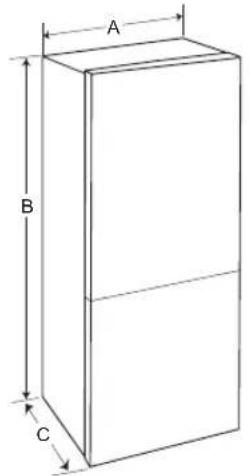
Too small of a distance from adjacent items may result in the degradation of freezing capability and increased electricity costs. Allow over 50 mm of clearance from each adjacent wall when installing the appliance.
text_image
A B C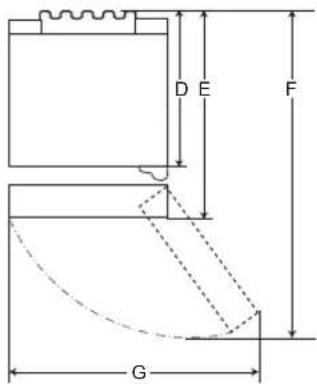
text_image
D E F G1
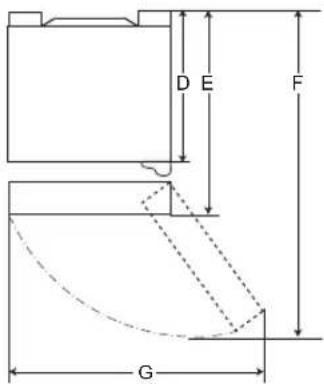
text_image
D E F G2
| 1 | 2 | |
| Size (mm) | ||
| A | 5 | 9 |
| B 1720/1860/2030 | 1720/1860/2030 | |
| C | 6 | 8 |
| D | 6 | 1 |
| E | 6 | 8 |
| F 1230 1225 | ||
| G | 9 | 9 |
NOTE
- You can determine what type of appliance it is by looking at the label inside the appliance.
5
2
5
2
5
natural_image
Pure geometric lines and shapes without any text, numbers, or symbols
natural_image
Pure geometric diagram with intersecting lines and shapes, no text or symbols presentAmbient Temperature
- The appliance is designed to operate within a limited range of ambient temperatures, depending on the climate zone.
- The internal temperatures could be affected by the location of the appliance, the ambient temperature, the frequency of door opening and so on.
- The climate class can be found on the rating label.
| Climate Class Ambient Temperature Range °C | |
| SN (Extended Temperate) | +10 - +32 |
| N (Temperate) +16 - | +32 |
| ST (Subtropical) +16 - | +38 / +18 - +38** |
| T (Tropical) +10 - +43* | / +16 - +43 / +18 - +43** |
* Australia, India, Kenya
** Argentina
NOTE
- The appliances rated from SN to T are intended to be used at an ambient temperature between 10 °C and 43 °C.
Accessories
*1 This feature is only available on some models.

①
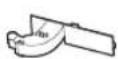
2
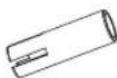
3

4
1 Lower Hinge*1
② Cord Holder*1
③ Stopper
④ Sticker*1
Reversing Doors
This feature is only available on some models. Your appliance is designed with reversible doors, so that they may open from either the left or right hand side to suit your kitchen design.
NOTE
- Reversing the doors must be performed by the qualified personnel of LG Electronics. If not, the doors will not be covered by the warranty.
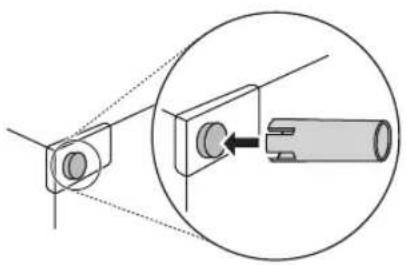
Inserting the Stoppers
Insert the stoppers to the upper edge on the rear plate of the appliance. The stoppers are supplied with the kit in the appliance.
natural_image
Diagram showing a mechanical assembly with a cylindrical component inserted into a housing, enclosed in a circle (no text or symbols)NOTE
- Stoppers should be inserted to reduce the electricity consumptionget in operation of the appliance.
Levelling the Appliance
Adjusting the Levelling Leg
If the appliance seems unsteady, or the doors do not close easily, adjust the appliance's tilt using the instructions below.
natural_image
Pure geometric lines and crosshair symbols without any text or labels
natural_image
Pure geometric diagram with intersecting lines and shapes, no text or symbols present
natural_image
Pure electrical circuit lines without any symbols
natural_image
Pure geometric diagram with intersecting lines and circles, no text or symbols present12 INSTALLATION
1 Turn the levelling leg clockwise to raise that side of the appliance or counterclockwise to lower it.
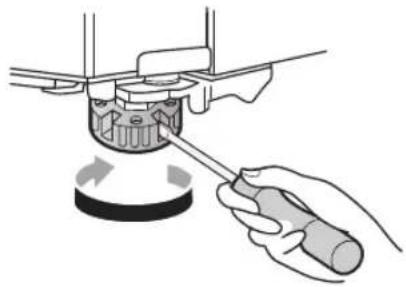
natural_image
Illustration of a hand using a screwdriver to adjust a mechanical component (no text or symbols visible)4 Move the appliance with more than two people carefully. When transporting the appliance over a long distance, keep the appliance upright.
5 After installing the appliance, connect the power plug into a mains outlet socket and switch it on.
2 Open the doors and check to make sure that they close easily.
Turning on the Power
Connecting the Appliance
After installing the appliance, connect the power plug into the outlet socket.
NOTE
• After connecting the power supply cord (or plug) to the outlet, wait 3 or 4 hours before you put food into the appliance. If you add food before the appliance has cooled completely, your food may spoil.
Moving the Appliance for Relocation
Preparing for Relocation
1 Remove all food from inside the appliance.
2 Pull the power plug out, insert and fix it into the power plug hook at the rear or on top of the appliance.
3 Tape parts such as shelves and the door handle to prevent from falling off while moving the appliance.
natural_image
Pure geometric lines and shapes without any text, numbers, or symbols
natural_image
Pure geometric diagram with intersecting lines and shapes, no text or symbols presentOPERATION
Before Use
Notes for Operation
- Users should keep in mind that frost can form if the door is not closed completely or if the humidity is high during the summer.
- Ensure there is sufficient space between food stored on the shelf or door basket to allow the door to close completely.
- Opening the door for long periods can cause a significant increase of the temperature in the compartments of the appliance.
- If the refrigerating appliance is left empty for long periods, switch off, defrost, clean, dry, and leave the door open to prevent mould developing within the appliance.
Door Open Alarm
The alarm sounds 3 times in 30 second intervals if the fridge door is left open or not completely closed for 1 minute.
NOTE
- Contact the LG Electronics customer information centre if the alarm sound continues even after closing all doors.
Failure Detection
The appliance can automatically detect problems during the operation.
NOTE
- If a problem is detected, the appliance may not operate and an error code is displayed even when any button is pressed.
- If an error code is indicated on the display, do not turn off the power. Immediately contact the LG Electronics customer information centre and report the error code. If you turn off the power,
the repair technician from the our information centre may have difficulty finding the problem.
Suggestion for Energy Saving
- For the most efficient use of energy, make sure that door bins, drawers and shelves are assembled properly.
- Ensure there is sufficient space between stored foods. This allows cold air to be circulated evenly and lowers electricity bills.
- Store hot food only after it has cooled in order to prevent dew or frost.
- When storing food in the freezer compartment, set the freezer temperature lower than the temperature indicated on the food.
- Do not set the temperature of the appliance lower than needed.
- Do not put food near the temperature sensor of the fridge compartment. Keep a distance of at least 3 cm from the sensor.
• Note that a temperature rise after defrosting has a permissible range in the appliance specifications. If you wish to minimise the impact on the food storage due to a temperature rise, seal or wrap the stored food in several layers. - The automatic defrosting system in the appliance ensures that the compartment remains free of ice buildup under normal operating conditions.
Storing Foods Effectively
- Food may freeze or spoil if stored at the wrong temperature. Set the refrigerator to the correct temperature for the food being stored.
- Store frozen food or refrigerated food inside sealed containers.
- Check the expiration date and label (storage instructions) before storing food in the appliance.
14 OPERATION
- Do not store food for a long period of time if it spoils easily at a low temperature.
- Do not place unfrozen food in direct contact with food that is already frozen. It could be necessary to reduce the quantity to be frozen if freezing every day is anticipated.
- Place the refrigerated food or frozen food in each fridge or freezer compartment immediately after purchasing.
- Store raw meat and fish in suitable containers in the refrigerator, so that it is not in contact with or drip onto other food.
• Refrigerated foods and other food items can be stored on top of the vegetable drawer.
- Avoid refreezing any food which has been completely thawed. Freezing any food which has been completely thawed again will lower its taste and nutrition.
- Cool hot food before storing. If too much hot food is placed inside, the internal temperature of the appliance can increase and negatively affect other foods stored in the appliance.
- Do not overfill the appliance. Cold air can not circulate properly if the appliance is overfilled.
- If you set an excessively low temperature for food, it may become frozen. Do not set a temperature lower than the required temperature for the food to be stored correctly.
- If there are chill compartments in the appliance, do not store vegetables and fruits with higher moisture content in the chill compartments as they may freeze due to the lower temperature.
• In the event of a blackout, call the electricity company and ask how long it is going to last.
- You should avoid door openings while the power is off.
-
When the power supply gets back to normal, check the condition of the food.
-
Express Freeze must be switched on for 7 hours before fresh products are placed in the freezer compartment.
• To get better air circulation, insert all inner parts like baskets and shelves.
Freezing the Maximum Amount of Food
If large quantities of food are to be stored, all the freezer drawers shall be taken out of the appliance and the food shall be stacked directly on the freezer shelves in the freezer compartment.
CAUTION
• To remove the drawers, first remove the food from drawers and then pull out the drawers carefully. Not doing so could cause injury or damage to the drawers.
NOTE
• To get better air circulation, insert all drawers.
- The shape of each drawer may be different, insert in the right position.
Maximum Freezing Capacity
- Express Freeze function will allow the freezer to reach its maximum freezing capacity. This generally takes up to 24 hours and automatically switches off.
natural_image
Pure geometric lines and shapes without any text, numbers, or symbols
natural_image
Pure geometric diagram with intersecting lines and shapes, no text or symbols presentProduct Features
The appearance or components of the appliance may differ from model to model.
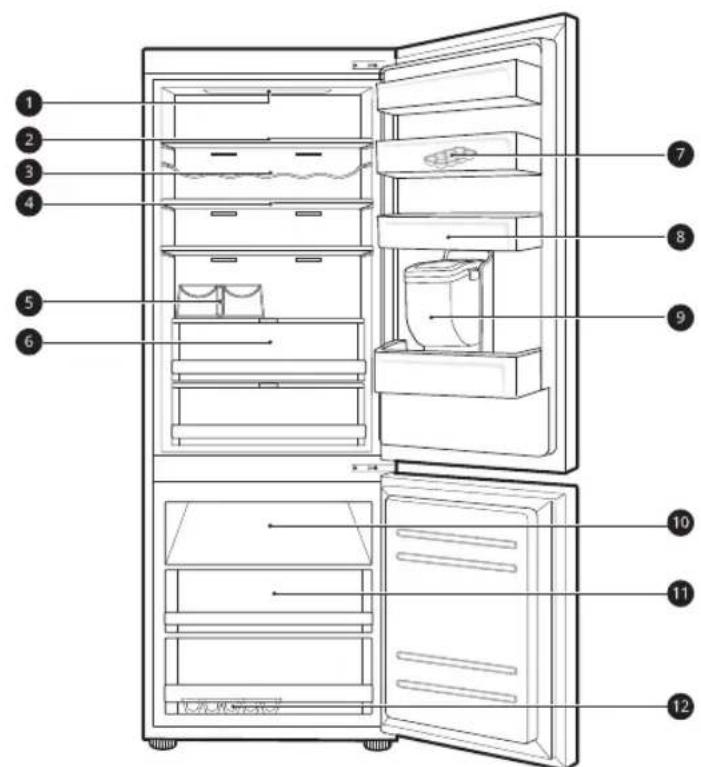
Interior
The appearance or components of the appliance may differ from model to model.
*1 This feature is only available on some models.
text_image
Diagram of a refrigerator interior with numbered labels pointing to different compartments and fixtures.1 LED Lamp
The LED lamps inside the appliance light up when you open the door.
② Fridge Shelf
Stores refrigerated foods and fresh foods.
- Stores the foods with higher moisture content at the front of the shelf.
- The shelf height can be adjusted by inserting the shelf in another groove of different height.
- The actual number of shelves will differ from model to model.
3 Bottle Rack*1
Stores containers and tall bottles using the bottle rack.
natural_image
Pure geometric lines and crosshair symbols without any text or labels
natural_image
Pure geometric diagram with intersecting lines and shapes, no text or symbols present16 OPERATION
CAUTION
- Do not store short bottles on the bottle rack. The items may fall and cause an injury or appliance damage.
4 Folding Shelf*1
This is adjustable to meet individual storage needs.
5 Bottle Rack*1
Stores containers and tall bottles using the bottle rack.
6 Fridge Drawer*1
Stores fruits and vegetables to keep fresh for as long as possible.
- The actual number of drawers will differ from model to model.
⑦ Movable Egg Tray
Stores eggs.
- You can move this egg tray to a desired position except for the top shelf of the fridge or the vegetable drawer.
8 Fridge Door Basket*1
Stores small packages of refrigerated foods, drinks and sauce containers.
9 Water Dispenser Tank*1
Stores water to supply the dispenser. It requires manual filling.
10 Freezer Shelf ^*1
Stores small packaged frozen food or frequently-used foods.
11 Freezer Drawer*1
Stores frozen food for longer storage.
12 Ice Tray
This is where ice is manually produced.
- For more space, you can remove the ice tray or ice cubes bucket.
Control Panel
The actual control panel may differ from model to model.
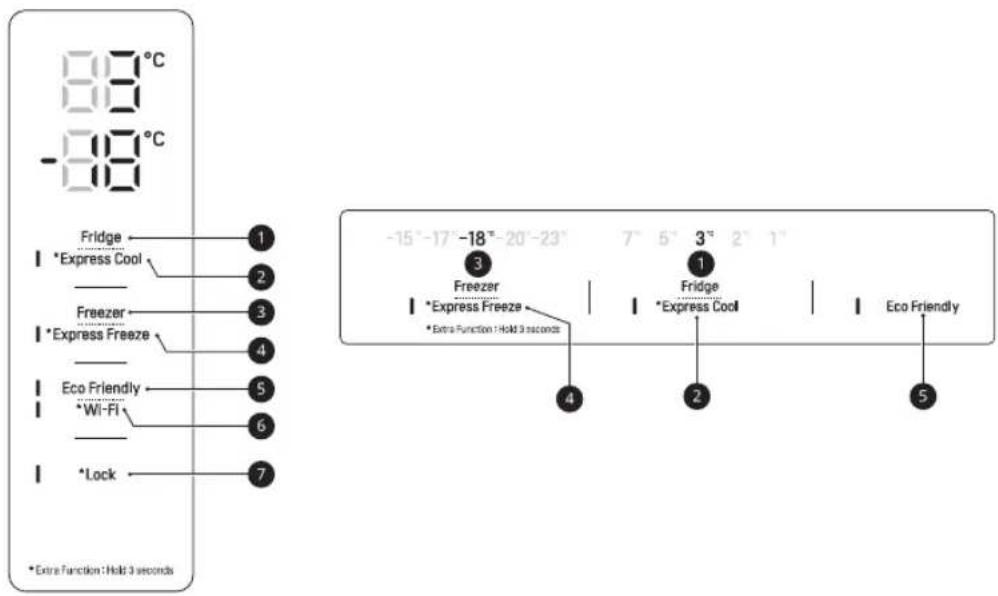
Control Panel and Functions
*1 This feature is only available on some models.
The control panel can be found either on the Fridge Door or inside the Fridge depending on the model.
text_image
-88°C -88°C Fridge 1 *Express Cool 2 Freezer 3 *Express Freeze 4 Eco Friendly 5 *Wi-Fi 6 *Lock 7 *Extra Function : Hold 3 seconds -15°-17°-18°-20°-23° 3 Freezer 1 *Express Freeze *Extra Function : Hold 3 seconds 4 Fridge 2 *Express Cool Eco Friendly 5① Fridge
Press this button repeatedly to select a desired temperature between 1 °C and 7 °C.
• The default fridge temperature is 3^ C.
② Express Cool
This function can quickly cool a large amount of foods such as vegetable, fruit and so on.
- This function is enabled and disabled in turn each time you press the button for 3 seconds.
3 Freezer
Press this button repeatedly to select a desired temperature between -15 °C and -23 °C.
• The default freezer temperature is -18 °C.
4 Express Freeze
This function can quickly freeze a large amount of ice or frozen foods.
- This function is enabled and disabled in turn each time you press the button for 3 seconds.
- This function automatically terminates after a specific period has passed.
- When this mode is on, noise may occur and energy consumption may increase.
natural_image
Pure geometric lines and shapes without any text, numbers, or symbols
natural_image
Pure geometric diagram with intersecting lines and shapes, no text or symbols present18 OPERATION
5 Eco Friendly
This function is useful when you are away on a holiday as it reduces energy consumption. When this mode is on, the fridge temperature is 7 °C and the freezer temperature -15 °C. When this mode is off, the fridge and freezer temperature return to the previous temperature settings.
- This function is enabled and disabled in turn each time you press the button.
- When this mode is on, the other buttons except Lock and Wi-Fi buttons will not operate.
6 Wi-Fi\*1
This button allows the appliance to connect to a home Wi-Fi network. Refer to SMART FUNTIONS for information on the initial setup of the LG ThinQ application.
⑦ Lock ^*1
This locks the buttons on the control panel.
- To lock the control panel buttons, press and hold the Lock button for 3 seconds until the function is activated.
- To disable the function, press and hold the Lock button for 3 seconds until the function is deactivated.
NOTE
- The control panel will turn off automatically for energy saving.
- If there is any finger or skin contacts to the control panel while cleaning it, the button function may operate.
Water Dispenser
This feature is only available on some models.
Using the Dispenser
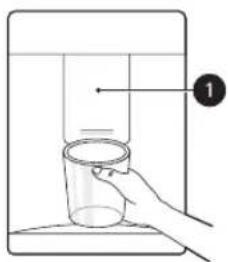
You can dispense water by pressing the lever.
- Press the paddle of the water dispenser to get cold water.
text_image
Diagram showing a hand holding a glass over a container with a numbered label pointing to it.CAUTION
- Keep children away from the dispenser to prevent children playing with or damaging the controls.
NOTE
- If the cup rim is small, water may splash out of the glass or miss it completely.
natural_image
Pure geometric lines and shapes without any text, numbers, or symbols
natural_image
Pure geometric diagram with intersecting lines and shapes, no text or symbols presentCleaning the Dispenser Tray
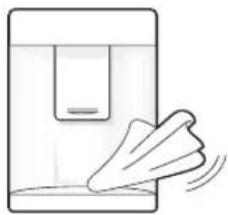
Wipe the entire area with a damp cloth. The dispenser tray may become wet easily due to spilled water.
natural_image
Simple line drawing of a hand holding a device with motion lines indicating movement (no text or symbols)Cleaning the Dispenser Outlet
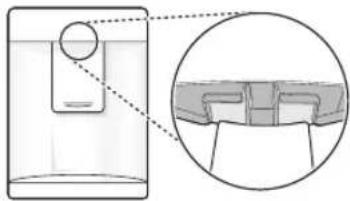
Wipe the dispenser outlet frequently with a clean cloth as it may get dirty easily.
natural_image
Diagram showing a container with a sphere and an inset close-up of its side panel (no text or symbols)NOTE
- Lint from a cloth may adhere to the outlet.
Filling the Water Tank
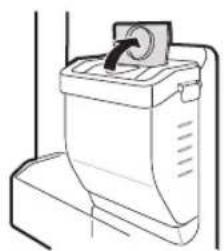
The water tank holds the water which is to be dispensed.
1 Open the cap on the top of the water tank.
natural_image
Line drawing of a toilet with a handle and ventilation slots (no text or symbols)2 Fill the water tank with potable water and close the cap.
WARNING
- Fill with potable water only. Do not fill the water tank with beverages or hot water.
• Children should not be allowed near the water tank.
CAUTION
- Do not apply excessive force or impact when removing or assembling the water tank.
- If water does not come out, fill the water tank with potable water.
NOTE
- The water tank should be washed before filling it with potable water.
- If water does not come out, fill the water tank with potable water.
Icemaker
This feature is only available on some models.
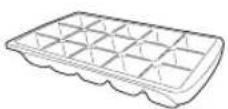
Using the Ice Tray
This is where ice is manually produced.
Fill the ice tray with water up to the marked water line.
WARNING
- Fill with potable water only.
CAUTION
- Be careful not to twist the ice tray with force as it can be broken.
natural_image
Pure geometric lines and shapes without any text, numbers, or symbols
natural_image
Pure geometric diagram with intersecting lines and shapes, no text or symbols present20 OPERATION
- If you open and close the freezer door frequently, it may take longer for water to be frozen.
NOTE
- If the ice tray is overfilled, the ice cubes may stick together and be difficult to remove.
- Ice can be removed more easily by pouring water on the ice tray.
Fridge Drawer
Using the Fresh Converter
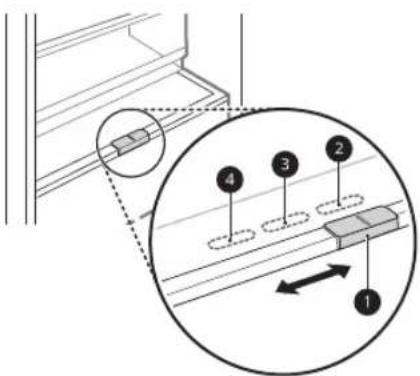
This feature is only available on some models. As a chill compartment, the temperature in the Fresh Converter can be controlled by sliding the lever ①, where located in front of compartment, in either direction.
text_image
Technical diagram showing a mechanical assembly with numbered components and an inset magnified view of a component with labeled parts 1 to 4.② For storing vegetables. (Recommended)
③ For storing fish.
4 For storing meat
NOTE
- Do not store vegetables and fruits with Meat and Fish mode in the chill compartment as they may freeze due to the lower temperature.
Using the Fresh Balancer
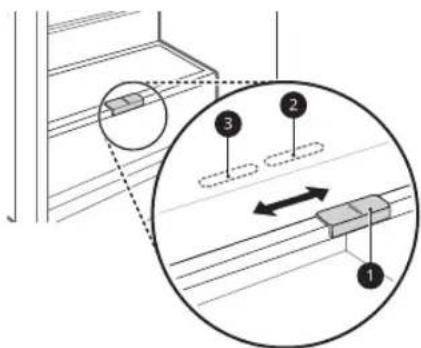
This feature is only available on some models. Vegetable compartment can adjust the humidity by moving the knob ①.
text_image
Technical diagram showing a mechanical assembly with labeled components and an inset magnified view of a shaft connection.② For storing vegetables. (Recommended)
③ For storing fruit.
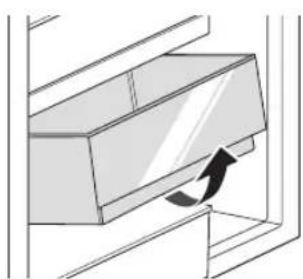
Removing/Refitting the Fridge Drawer
1 Remove the contents of the drawer. Hold the handle of the drawer and pull it out completely until it stops.
2 Lift the drawer up and remove it by pulling it out.
natural_image
Diagram of a mechanical component with an arrow indicating motion or force direction (no text or symbols)3 Refit the drawer in the reverse order of the removal process.
Door Basket
Removing/Refitting the Door Basket
1 Hold both edges of the basket and remove it by lifting it upward.
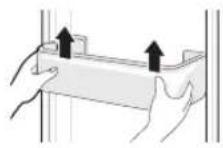
2 Refit the door basket in the reverse order of the removal process.
Shelf
Using Folding Shelf
This feature is only available on some models. Store taller items, such as a gallon container or bottles, by pushing the front half of the shelf underneath the back half the shelf.
- Pull the front of the shelf forward to return to a full shelf.
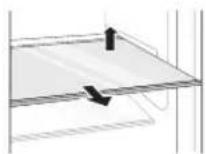
2 Refit the shelf by sliding it inward until the shelf snaps into the frame.
Freezer Drawer
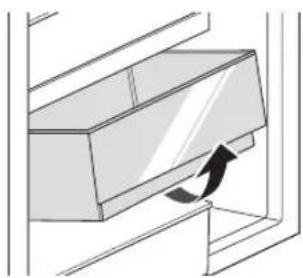
Removing/Refitting the Freezer Drawer
1 Remove the contents of the drawer. Hold the handle of the drawer and pull it out completely until it stops.
2 Lift the drawer up and remove it by pulling it out.
natural_image
Diagram of a mechanical component with an arrow indicating direction (no text or symbols)3 Refit the drawer in the reverse order of the removal process.
natural_image
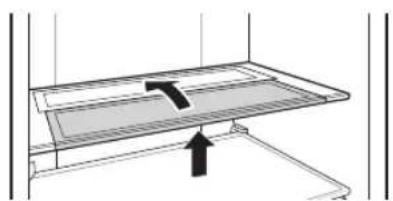
Diagram of a mechanical assembly with a highlighted component and an arrow indicating direction (no text or symbols)Removing/Refitting the Shelf
1 Hold the both side of the shelf. Lift the shelf up and remove it by pulling it out.
natural_image
Pure geometric lines and shapes without any text, numbers, or symbols
natural_image
Pure geometric diagram with intersecting lines and shapes, no text or symbols present22 SMART FUNCTIONS
SMART FUNCTIONS
LG ThinQ Application
This feature is only available on models with Wi-Fi. The LG ThinQ application allows you to communicate with the appliance using a smartphone.
LG ThinQ Application Features
Communicate with the appliance from a smartphone using the convenient smart features.
Smart Diagnosis
- If you experience a problem while using the appliance, this smart diagnosis feature will help you diagnose the problem.
Settings
- Allows you to set various options on the appliance and in the application.
NOTE
- If you change your wireless router, internet service provider, or password, delete the registered appliance from the LG ThinQ application and register it again.
• The application is subject to change for appliance improvement purposes without notice to users.
• Functions may vary by model.
Before Using LG ThinQ Application
1 Check the distance between the appliance and the wireless router (Wi-Fi network).
- If the distance between the appliance and the wireless router is too far, the signal strength becomes weak. It may take a long time to register or installation may fail.
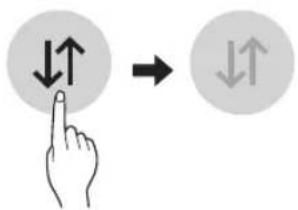
2 Turn off the Mobile data or Cellular Data on your smartphone.
text_image
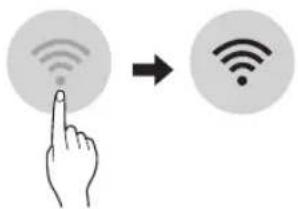
Diagram showing hand press icon pointing to two directional arrows with up/down bidirectional arrows3 Connect your smartphone to the wireless router.
text_image
Diagram showing a hand interacting with a Wi-Fi icon, illustrating wireless signal transformationNOTE
- To verify the Wi-Fi connection, check that 📞 icon on the control panel is lit.
- The appliance supports 2.4 GHz Wi-Fi networks only. To check your network frequency, contact your Internet service provider or refer to your wireless router manual.
- LG ThinQ is not responsible for any network connection problems or any faults, malfunctions, or errors caused by network connection.
- If the appliance is having trouble connecting to the Wi-Fi network, it may be too far from the router. Purchase a Wi-Fi repeater (range extender) to improve the Wi-Fi signal strength.
- The Wi-Fi connection may not connect or may be interrupted because of the home network environment.
- The network connection may not work properly depending on the Internet service provider.
- The surrounding wireless environment can make the wireless network service run slowly.
- The appliance cannot be registered due to problems with the wireless signal transmission. Unplug the appliance and wait about a minute before trying again.

natural_image
Pure geometric lines and shapes without any text, numbers, or symbols
natural_image
Pure geometric diagram with intersecting lines and shapes, no text or symbols present- If the firewall on your wireless router is enabled, disable the firewall or add an exception to it.
- The wireless network name (SSID) should be a combination of English letters and numbers. (Do not use special characters.)
- Smartphone user interface (UI) may vary depending on the mobile operating system (OS) and the manufacturer.
- If the security protocol of the router is set to WEP, you may fail to set up the network. Please change it to other security protocols (WPA2 is recommended) and register the product again.
Installing the LG ThinQ Application
Search for the LG ThinQ application from the Google Play Store or Apple App Store on a smartphone. Follow instructions to download and install the application.
Connecting to Wi-Fi
The Wi-Fi button, when used with the LG ThinQ application, allows the appliance to connect to a home Wi-Fi network. The 📋 icon shows the status of the appliance's network connection. The icon illuminates when the appliance is connected to the Wi-Fi network.
• Initial Appliance Registration
Run the LG ThinQ application and follow the instructions in the application to register the appliance.
• Re-registering the Appliance or Registering Another User
Press and hold the Wi-Fi button for 3 seconds to temporarily turn it off. Run the LG ThinQ application and follow the instructions in the application to register the appliance.
NOTE
- To disable the Wi-Fi function, press and hold the Wi-Fi button for 3 seconds. The 🔺 icon will be turned off.
Open Source Software Notice Information
To obtain the source code under GPL, LGPL, MPL, and other open source licenses, that is contained in this product, please visit http://opensource.lge.com.
In addition to the source code, all referred license terms, warranty disclaimers and copyright notices are available for download.
LG Electronics will also provide open source code to you on CD-ROM for a charge covering the cost of performing such distribution (such as the cost of media, shipping, and handling) upon email request to opensource@lge.com. This offer is valid for a period of three years after our last shipment of this product. This offer is valid to anyone in receipt of this information.
Smart Diagnosis
This feature is only available on models with the ⏻ or ⏻ logo.
Use this feature to help you diagnose and solve problems with your appliance.
NOTE
- For reasons not attributable to LGE's negligence, the service may not operate due to external factors such as, but not limited to, Wi-Fi unavailability, Wi-Fi disconnection, local app store policy, or app unavailability.
- The feature may be subject to change without prior notice and may have a different form depending on where you are located.
Using LG ThinQ to Diagnose Issues
If you experience a problem with your Wi-Fi equipped appliance, it can transmit troubleshooting data to a smartphone using the LG ThinQ application.
- Launch the LG ThinQ application and select the Smart Diagnosis feature in the menu. Follow the instructions provided in the LG ThinQ application.
24 SMART FUNCTIONS
Using Audible Diagnosis to Diagnose Issues
*1 This control panel is only available on some models.
Follow the instructions below to use the audible diagnosis method.
- Launch the LG ThinQ application and select the Smart Diagnosis feature in the menu. Follow the instructions for audible diagnosis provided in the LG ThinQ application.
Control Panel 1: On the Fridge Door ^*1
1 Press the Lock button to activate the lock function.
- If the display has been locked for over 5 minutes, you must deactivate the lock and then reactivate it.
2 Press and hold the Freezer button for 3 seconds or longer.
3 Open the door and then hold the phone near the speaker hole.
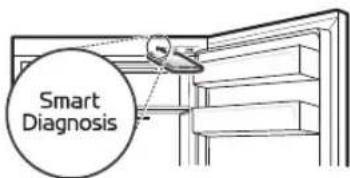
text_image
Smart Diagnosis4 After the data transfer is complete, the diagnosis will be displayed in the application.
Control Panel 2: Inside the Fridge ^*1
1 Open the fridge door.
2 Press the Eco Friendly button.
- If the door has been open for longer than 60 seconds, close the door and repeat steps 1 and 2.
3 Hold the phone near the speaker hole.
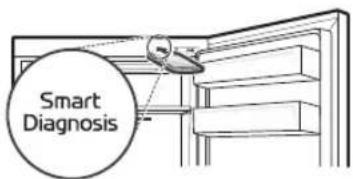
text_image
Smart Diagnosis4 Press and hold the Freezer button for 3 seconds or longer while holding your phone to the speaker until the data transfer is complete.
5 After the data transfer is complete, the diagnosis will be displayed in the application.
NOTE
- For best results, do not move the phone while the tones are being transmitted.
natural_image
Pure geometric lines and shapes without any text, numbers, or symbols
natural_image
Pure geometric diagram with intersecting lines and shapes, no text or symbols presentMAINTENANCE
Cleaning
General Cleaning Tips
- Performing manual defrosting, maintenance or cleaning of the appliance while food is stored in the freezer can raise the temperature of the food and reduce its storage life.
• Regularly clean any surfaces that can come in contact with food. - When cleaning the inside or outside of the appliance, do not wipe it with a rough brush, toothpaste, or flammable materials. Do not use cleaning agents containing flammable substances. This may cause discolouration or damage to the appliance.
- Flammable substances: alcohol (ethanol, methanol, isopropyl alcohol, isobutyl alcohol, etc.), thinner, bleach, benzene, flammable liquid, abrasive, etc.
• After cleaning, check if the power cable is damaged.
Cleaning the Interior
- When removing a shelf or drawer from inside the appliance, remove all stored foods from the shelf or drawer to prevent injury or damage to the appliance. Otherwise, injury may occur due to the weight of stored foods.
- Detach the shelves and drawers and clean them with water, and then dry them sufficiently, before replacing them.
- Regularly wipe the door gaskets with a wet soft towel.
- Door basket spills and stains should be cleaned as they can compromise storage ability of the basket and could even be damaged.
- Never clean the shelves or containers in the dishwasher. The parts may become deformed due to the heat.
Cleaning the Exterior
- When cleaning the outside air vents of the appliance by means of vacuuming, then the power cord should be unplugged from the outlet to avoid any static discharge that can damage the electronics or cause an electric shock. Regular cleaning of the rear and side ventilation covers is recommended to maintain reliable and economical operation of the unit.
- Keep the air vents on the exterior of the appliance clean. Blocked air vents can cause fire or appliance damage.
- For the appliance exterior, use a clean sponge or soft cloth and a mild detergent in warm water. Do not use abrasive or harsh cleaners. Dry thoroughly with a soft cloth. Do not use contaminated cloths when cleaning the stainless steel doors. Always use a dedicated cloth and wipe in the same direction as the grain. This helps reduce surface staining and tarnishing.

natural_image
Pure geometric lines and crosshair symbols without any text or labels
natural_image
Pure geometric diagram with intersecting lines and shapes, no text or symbols present26 TROUBLESHOOTING
TROUBLESHOOTING
Before Calling for Service
Cooling
| Symptoms Possible Cause & Solution | |
| There is no refrigeration or freezing. | Is there a power interruption?Check the power of other appliances. |
| Check the power of other appliances.Plug the power plug in the outlet properly. | |
| A fuse in your home may be blown or the circuit breaker tripped. Or the appliance is connected to a GFCI (Ground Fault Circuit Interrupter) outlet, and the outlet's circuit breaker has tripped.Check the main electrical box and replace the fuse or reset the circuit breaker. Do not increase fuse capacity. If the problem is a circuit overload, have it corrected by a qualified electrician.Reset the circuit breaker on the GFCI. If the problem persists, contact an electrician. | |
| There is poor refrigeration or freezing. | Is the fridge or freezer temperature set to its warmest setting?Set the fridge or freezer temperature to a colder setting. |
| Is the appliance in direct sunlight, or is it near a heat generating object such as cooking oven or heater?Check the installation area and reinstall it away from heat generating objects. | |
| Did you store hot food without cooling it first?Cool the hot food first before putting it in the fridge or freezer compartment. | |
| Did you put in too much food?Maintain an appropriate space between food. | |
| Are the appliance doors completely closed?Completely close the door and make sure that stored food is not obstructing in the door. | |
| Is there enough space around the appliance?Adjust the installation position to make enough space around the appliance. | |
natural_image
Pure geometric lines and shapes without any text, numbers, or symbols
natural_image
Pure geometric diagram with intersecting lines and shapes, no text or symbols presentTROUBLESHOOTING
| Symptoms Possible Cause & Solution | |
| The appliance contains a bad smell. | Is the fridge or freezer temperature set to 'Warm'?Set the fridge or freezer temperature to a colder setting. |
| Did you put in food with a strong smell?Store foods with strong smells in a sealed containers. | |
| Vegetables or fruit may have spoiled in the drawer?Throw away rotten vegetables and clean the vegetable drawer. Do not store vegetables too long in the vegetable drawer. | |
Water
| Symptoms Possible Cause & Solution | |
| Water does not come out. | The water dispenser tank may be empty. (Non plumbed models only)• Fill the water dispenser tank. |
Condensation & Frost
| Symptoms Possible Cause & Solution | |
| There is condensation inside the appliance or on the bottom of the vegetable drawer cover. | Did you store hot food without cooling it first?• Cool the hot food first before putting it inside the fridge or freezer. |
| Did you leave the appliance door open?• Although the condensation will disappear soon after you close the appliance door, you can wipe it with a dry cloth. | |
| Do you open and close the appliance door too frequently?• Condensation can form due to the temperature difference from the outside. Wipe out the dampness with a dry cloth. | |
| Did you put warm or moist food inside without sealing it in a container?• Store food in a covered or sealed container. | |
natural_image
Pure geometric lines and shapes without any text, numbers, or symbols
natural_image
Pure geometric diagram with intersecting lines and shapes, no text or symbols present28 TROUBLESHOOTING
| Symptoms Possible Cause & Solution | |
| Frost has formed in the freezer compartment. | Doors may not be closed properly?Check if the food item inside the appliance is blocking the door and make sure that the door is tightly closed. |
| Did you store hot food without cooling it first?Cool the hot food first before putting it in the fridge or freezer compartment. | |
| Is the air entry or exit of the freezer compartment blocked?Make sure that air entry or exit is not blocked so that the air can circulate inside. | |
| Is the freezer compartment overfilled?Maintain an appropriate space between items. | |
| Frost or condensation has formed inside or outside the appliance. | Did you open and close the appliance door frequently or is the appliance door improperly closed?Frosts or condensation can form if the outside air penetrates inside the appliance. |
| Is the installation environment humid?Condensation can appear on the exterior of the appliance if the installation area is too humid or on a humid day such as a rainy day. Wipe off any moisture with a dry cloth. | |
| The side or front of the appliance is warm. | There are anti condensation pipes fitted to these areas of the appliance to reduce condensation forming from around the door area.The heat releasing pipe to prevent condensation is installed on the front and side of the appliance. You may feel it particularly hot right after the appliance is installed or during the summer. You can be assured that this is not a problem and is quite normal. |
| There is water inside or outside of the appliance. | Is there water leakage around the appliance?Check if the water has leaked from a sink or another place. |
| Is there water on the bottom of the appliance?Check if the water is from the thawed frozen food or a broken or dropped container. | |
Parts & Features
| Symptoms Possible Cause & Solution | |
| The appliance door is not closed tightly. | Is the appliance leaning forward?Adjust the front feet to raise the front side slightly. Were the shelves properly assembled?Refit the shelves if needed. |
| Did you close the door with excessive force?If you apply too much force or speed when closing the door, it may remain briefly open before closing. Make sure that you do not slam the door closed. Close without force. | |
| It is difficult to open the appliance door. | Did you open the door right after you closed it?If you try to open the appliance door within one minute after you closed it, you may have difficulties because of the pressure inside the appliance. Try to open the appliance door again in a few minutes so that the internal pressure stabilizes. |
| The inside lamp in the appliance does not turn on. | Lamp failureClose the door and re-open. If the lamp does not turn on, please contact the LG Electronics customer information centre. Do not attempt removal of the lamp. |
Noises
| Symptoms Possible | Cause & Solution |
| The appliance is noisy and generates abnormal sounds. | Is the appliance installed on a weak floor or improperly levelled?• Install the appliance on a solid and flat area. |
| Does the rear of the appliance touch the wall?• Adjust the installation position to allow enough clearance around the appliance. | |
| Are objects scattered behind the appliance?• Remove the scattered objects from behind the appliance. | |
| Is there an object on top of the appliance?• Remove the object on top of the appliance. | |
| Clicking noises The defrost control will click when the automatic defrost cycle begins and ends. The thermostat control (or appliance control on some models) will also click when cycling on and off.• Normal Operation | |
natural_image
Pure geometric lines and crosshair symbols without any text or labels
natural_image
Pure geometric diagram with intersecting lines and shapes, no text or symbols present30 TROUBLESHOOTING
| Symptoms Possible Cause & Solution | |
| Rattling noises Appliance is not resting evenly on the floor.• Floor is weak or uneven or levelling legs need to be adjusted. | |
| Whooshing noises Evaporator fan motor is circulating air through the fridge and freezer compartments.• Normal Operation | |
| Gurgling noises Appliance flowing through the cooling system.• Normal Operation | |
| Popping noises Contraction and expansion of the inside walls due to changes in temperature.• Normal Operation | |
| Vibrating If the side or back of the appliance is touching a cabinet or wall, some of the normal vibrations may make an audible sound.• To eliminate the noise, make sure that the sides and back do not make any contact with any wall or cabinet. |
natural_image
Pure geometric lines and shapes without any text, numbers, or symbols
natural_image
Pure geometric diagram with intersecting lines and shapes, no text or symbols presentWi-Fi
| Symptoms Possible Cause & Solution | |
| Your home appliance and smartphone are not connected to the Wi-Fi network. | The password for the Wi-Fi that you are trying to connect to is incorrect.· Find the Wi-Fi network connected to your smartphone and remove it, then register your appliance on LG ThinQ. |
| Mobile data for your smartphone is turned on.· Turn off the Mobile data of your smartphone and register the appliance using the Wi-Fi network. | |
| The wireless network name (SSID) is set incorrectly.· The wireless network name (SSID) should be a combination of English letters and numbers. (Do not use special characters.) | |
| The router frequency is not 2.4 GHz.· Only a 2.4 GHz router frequency is supported. Set the wireless router to 2.4 GHz and connect the appliance to the wireless router. To check the router frequency, check with your Internet service provider or the router manufacturer. | |
| The distance between the appliance and the router is too far.· If the distance between the appliance and the router is too far, the signal may be weak and the connection may not be configured correctly. Move the location of the router so that it is closer to the appliance. | |
global_main.book.book Page 32 Tuesday, November 10, 2020 5:36 PM
LG
Life's Good