
WatchBP O3 A - Blood pressure monitor MICROLIFE - Free user manual and instructions
Find the device manual for free WatchBP O3 A MICROLIFE in PDF.


User questions about WatchBP O3 A MICROLIFE
0 question about this device. Answer the ones you know or ask your own.
Ask a new question about this device
Download the instructions for your Blood pressure monitor in PDF format for free! Find your manual WatchBP O3 A - MICROLIFE and take your electronic device back in hand. On this page are published all the documents necessary for the use of your device. WatchBP O3 A by MICROLIFE.
USER MANUAL WatchBP O3 A MICROLIFE
Professional 24-hour ambulatory blood pressure monitor with Atrial Fibrillation (AFIB) detection
Instruction Manual
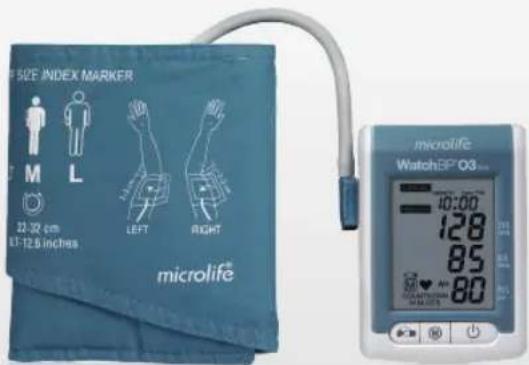
text_image
MP SIZE INDEX MARKER ML 22-32 cm 67-12.5 inches LEFT RIGHT microlife® microlife WatchEP O3... 10:00 128 85 80EN → 3
microlife
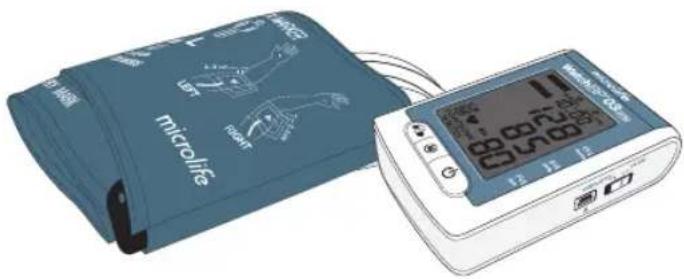
The Microlife WatchBP O3 AFIB is designed to provide reliable and unbiased ambulatory blood pressure measurement results, and strictly follows European Society of Hypertension (ESH) and American Heart Association (AHA) recommendations for ambulatory blood pressure measurement. The WatchBP O3 AFIB device has been clinically validated according to the ESH protocol. In addition, this ambulatory blood pressure monitor has an implemented algorithm that allows the detection of atrial fibrillation (AFIB) during 24-hour blood pressure measurement.
Table of Contents
WatchBP 03 AFIB
Product description
Name of parts and display 6-7
Before using WatchBP O3 AFIB for the first time
Activating the device 8
Confirm the cuff size....9
Selecting operation mode 10
In «AMBULATORY» mode 10-11
Measurement programming....12-14
Taking blood pressure measurements 15-19
In «CASUAL» mode 20
Taking blood pressure measurements 21
Recording intake medication
Medication record 22-23
Special Function: AFIB detection
Screening for atrial fibrillation during
blood pressure measurement 24
Atrial fibrillation detector 24
Important facts about atrial fibrillation 25
Viewing, transferring and deleting measurement data
Viewing measurement data....26-27
Transferring measurement data 28
Deleting measurement data 29
Appendix
Battery indicator and how to replace batteries ....30
Safety, care, accuracy test and disposal 31-33
Error messages.... 34-36
Technical specifications 37
Product description
Name of parts
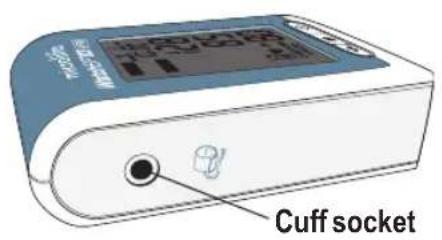
text_image
Cuff socket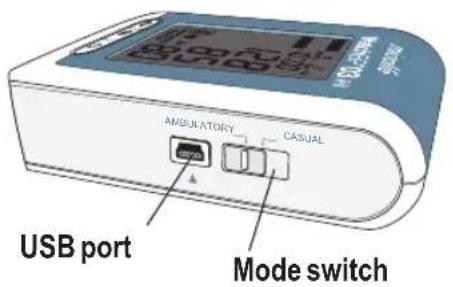
text_image
USB port AMBULATORY CASUAL Mode switch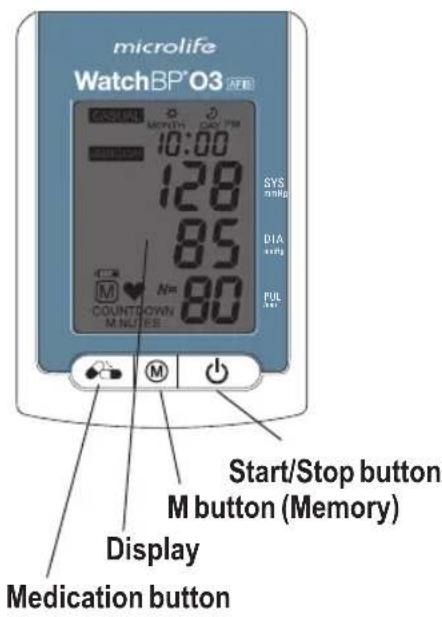
text_image
microlife WatchBP'03 M SYS mmHg DIA mmHg PUL m 10:00 128 85 N= 80 COUNTO COWN M NUTES M Start/Stop button M button (Memory) Display Medication button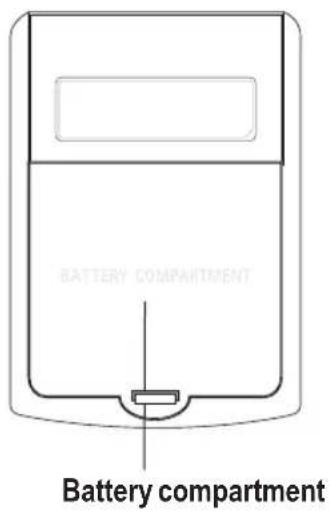
text_image
BATTERY COMPARTMENT Battery compartmentDisplay
text_image
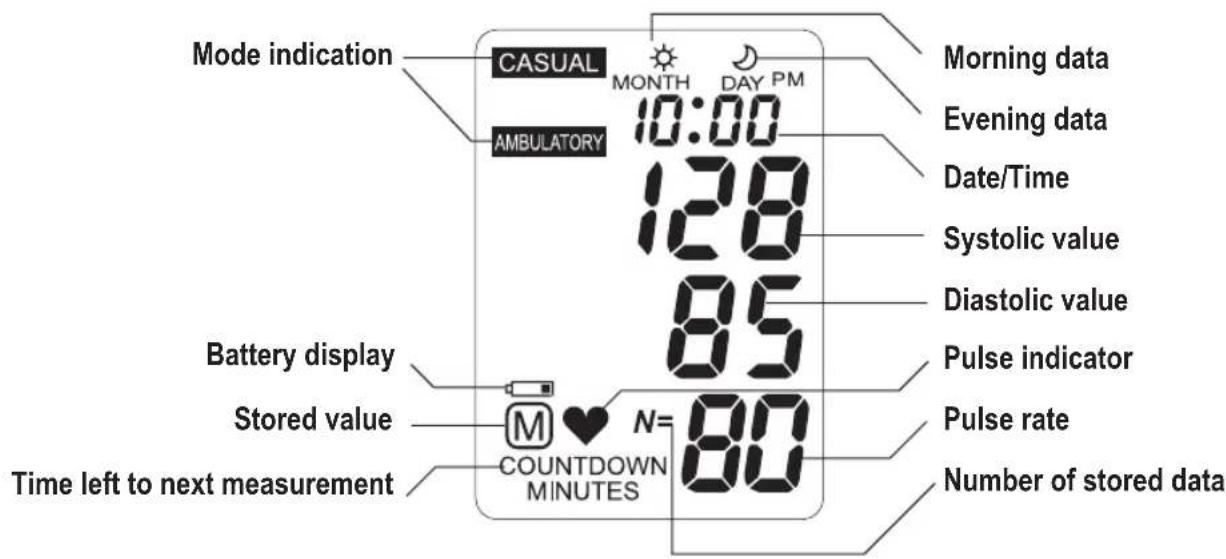
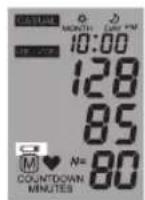
Mode indication CASUAL MONTH DAY PM 10:00 AMBULATORY 128 85 Battery display Stored value M ♥ N= 80 COUNTDOWN MINUTES Time left to next measurement Morning data Evening data Date/Time Systolic value Diastolic value Pulse indicator Pulse rate Number of stored dataBefore using the WatchBP O3 AFIB for the first time
Activating the device
Open the battery compartment on the rear of the device and insert 4x AAA alkaline batteries according to the battery polarities (+ / - ) and close the compartment. Upon installing new batteries, the year number flashes in the display.
Setting the date and time
Upon removing the protective strip or installing new batteries, the year number flashes in the display.
1) Set the year – Use the M button to select the year. Press the Start/Stop button to confirm your selection.
text_image
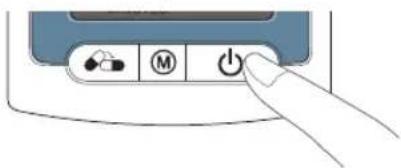
Diagram showing a hand pressing a button labeled with icons for battery, battery, and power symbols
text_image
≥20 14 → Ⓜ → ⏻2) Set the month – Use the M button to set the month. Press the Start/Stop button to confirm.

text_image
≥05 28≤ → Ⓜ → ⏻3) Set the day – Press the M button to set the day. Press the Start/Stop button to confirm.

text_image
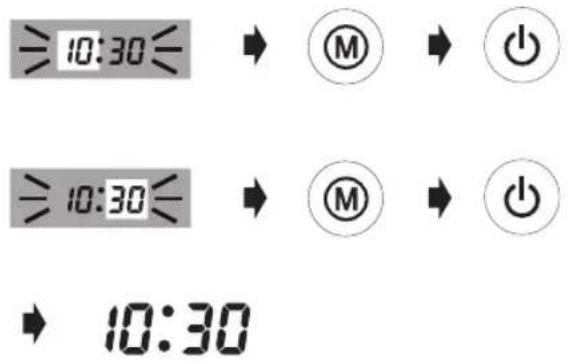
≥05 28≤ → Ⓜ → ⏻4) Set the time – Once you have set the hour and minutes and pressed the Start/Stop button the date and time are set, and the current time is displayed.
text_image
≥10:30≤ ⑧ ⑨ 10:30 ⑩ 10:305) To change the date and time, briefly take out and put back one battery from the battery compartment. The Year number will flash. Complete the process as described above.
Confirm the cuff size
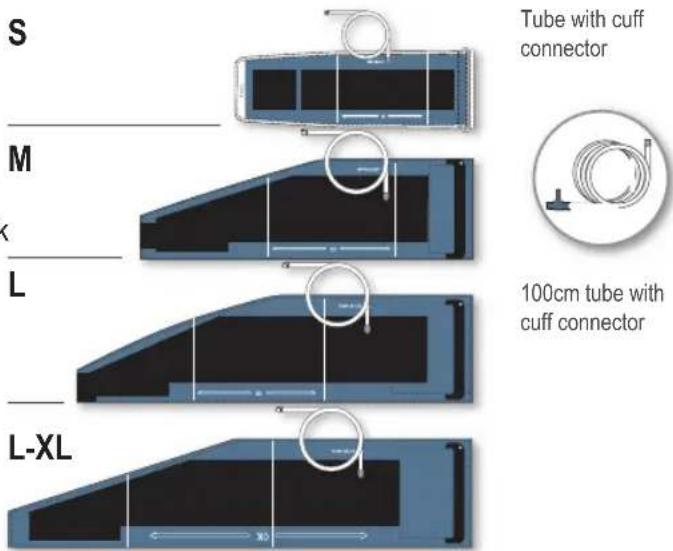
A variety of different cuff sizes are available.

Only use Microlife cuff!
Washable cuffs are available in both nylon and cotton.
text_image
S M L L-XL Tube with cuff connector 100cm tube with cuff connectorS, L-XL size cuffs can be ordered optionally.
M, L size cuffs are standard delivered.
Selecting the operation mode
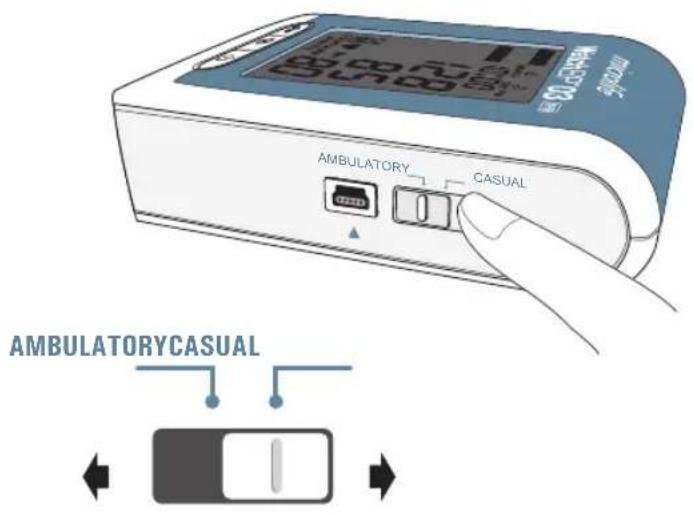
Prior to each measurement, use the mode switch on the side of the device to select the preferred measurement mode. The WatchBP O3 AFIB offers two measurement modes: «AMBULATORY» and «CASUAL».
«AMBULATORY» mode
Select «AMBULATORY» mode for fully programmable 24-hour ambulatory blood pressure measurement.
text_image
AMBULATORY CASUAL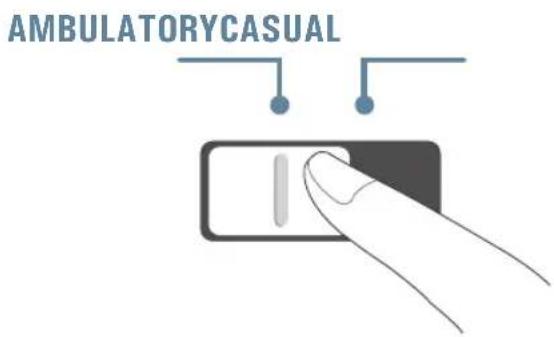
text_image
AMBULATORY CASUALProgrammable measurement intervals
The device automatically takes measurements at fixed intervals of 15, 20, 30, or 60 minutes, as can be programmed.
| 15 | 30 |
| 20 | 60 |
The default measurement interval is 30 minutes for the awake hours and 60 minutes for the asleep hours.
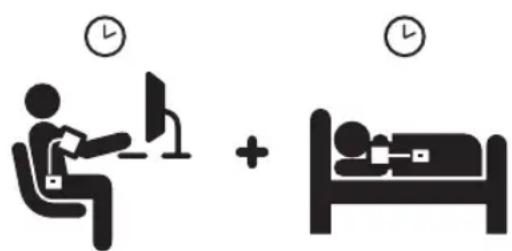
Two measurement periods
The awake (day) measurement period can be programmed to start at any hour between 00 to 23, and the asleep (night) measurement period can be set to any hour between 00 to 23. Measurement intervals can be set to 15, 20, 30, or 60 minutes for both awake and asleep time periods.
text_image
Diagram showing a person using a computer and another in bed, both with time-labeled iconsMeasurement programming in «AMBULATORY» mode
Installing the software program
1) The latest WatchBP Analyzer Software is available from the Microlife website.
https://www.microlife.com/support/software-professional-products
2) Simply follow the instructions provide in the installation window on the computer screen.
3) When installation is finished, be sure to restart the computer before working with the program for the first time.

Restart your computer
User manual can be found in the software by clicking on «Help» in the main window.
Connecting the device to a computer
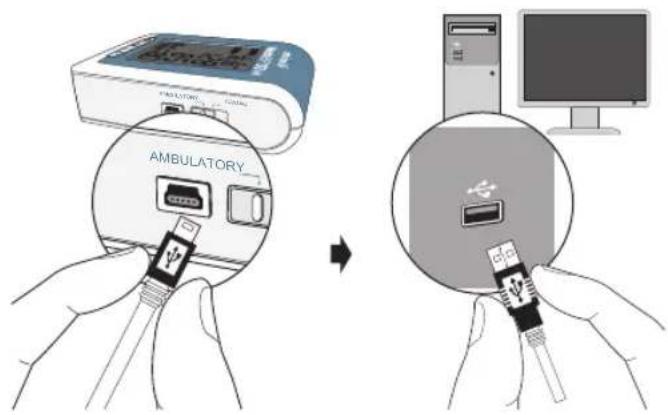
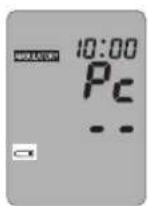
1) Connect the device to the PC. A successful connection is displayed by «PC» on the device.
2) Start the software program.
3) Enter name, identity number, and date of birth to create a new record (if required).
text_image
AMBULATORYProgramming the measurement procedure
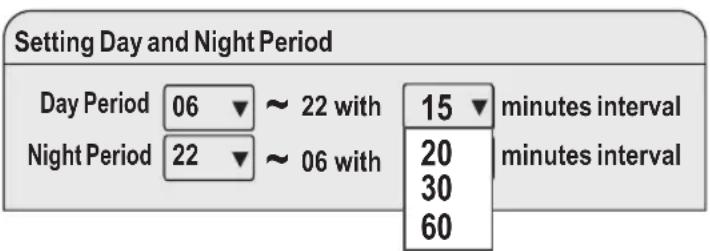
1) With "Ambulatory settings" the 24-hour measurement procedure can be programmed. Choose at what time the Day Period and Night Period starts. Using the drop-down menu on the lower-left of the screen, choose from 00 to 23 as the start of day and night periods. For instance the awake time is 06 AM and asleep time is 10PM.
2) Assign the measurement intervals for the awake and asleep hours by using the drop-down menu to choose from 15, 20, 30, and 60 minutes as the measurement interval.
text_image
Setting Day and Night Period Day Period 06 ~ 22 with 15 minutes interval Night Period 22 ~ 06 with 20 minutes interval 60Measurement interval programming in «AMBULATORY» mode (cont.)
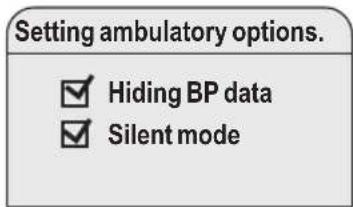
3) Setting ambulatory options.
text_image
Setting ambulatory options. ✓ Hiding BP data ✓ Silent modeOn default the blood pressure data are hidden and the device is in silent mode. In order to show the measured blood pressure values on the LCD screen and to provide a beep before each measurement, click on the squares to the left.
The display of blood pressure values on the LCD screen can be enabled or disabled.
The beeper of «AMBULATORY» mode can be enabled or disabled.
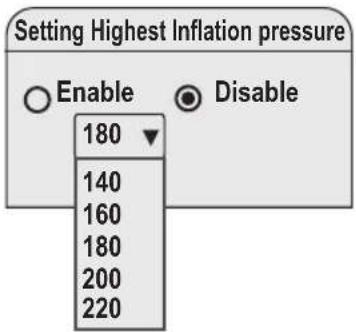
4) For setting the highest inflation pressure click on the circle left to "Enable" and click on the arrow to determine the height of the inflation pressure. "Disable" means that the device will automatically search for the right inflation pressure (default).
text_image
Setting Highest Inflation pressure Enable Disable 180 140 160 180 200 2205) Once you have completed the settings, press "Program" to program the schedule into the device.
text_image
ProgramTaking blood pressure measurements in «AMBULATORY» mode
WatchBP 03 AFIB
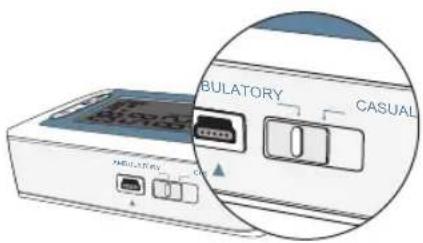
Be sure the device is set to «AMBULATORY» mode.
text_image
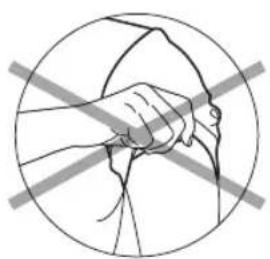
CABULATORY CASUAL1) Preparing measurement arm – Remove all clothing covering or constricting the measurement arm.
natural_image
Illustration of a hand holding a tool within a circle, crossed by two diagonal lines (no text or symbols)Avoid rolling up long sleeves, as this may lead to constriction of blood flow to the measurement arm.
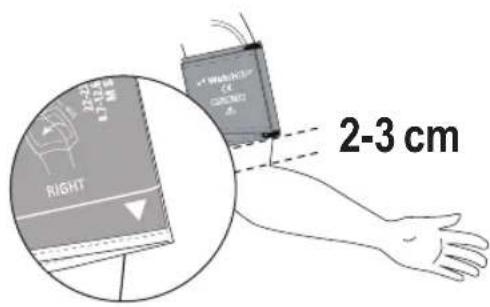
2) Positioning the cuff and device – Fit the cuff closely, but not too tight. Make sure that the cuff is 2\~3 cm (1 inch) above the elbow with the tube on the inside of the arm. The cuff tube should point upward and be mounted over the patient's shoulder.
text_image
RIGHT 2-3 cm Wavelength (4) 0.5mm 4 2-3 cm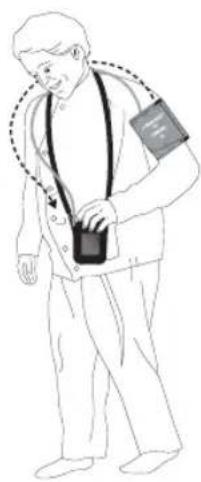
natural_image
Illustration of a person wearing an arm and holding a device (no text or symbols present)Adjust the tube holder on the belt of the pouch so it is properly positioned on the shoulder.
Attach the tube to the holder so the tube goes up over the shoulder to the other side of the body.
Add the device to the pouch with the shoulder sling to carry it.
An alternative method is to use a waist belt.
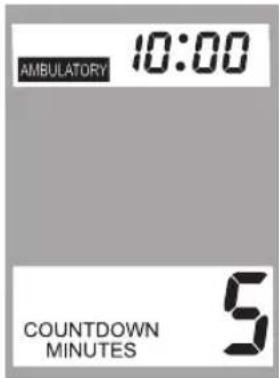
3) Next measurement indicator – The device will display the next measurement time, indicated by a countdown in minutes on the display.
text_image
AMBULATORY 10:00 COUNTDOWN MINUTES 5The screen will display X countdown minutes to indicate the time to the next measurement.
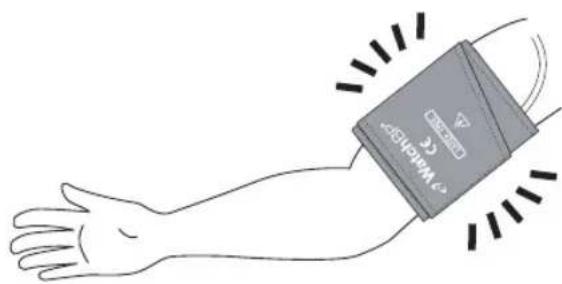
4) One minute before the next scheduled measurement, the device will partially inflate and immediately deflate the cuff to remind the patient of the upcoming measurement.
natural_image
Illustration of a human forearm with a medical device attached, showing blood flow direction (no text or symbols)Measurement reminders will be disabled for asleep hours.
5) Measurement reminder – Five seconds before the next measurement, the device can emit a short series of beeps to notify the patient of the coming measurement (optionally). The beep will be off on default.
The beeper of «AMBULATORY» mode can be enabled via software setting. (see P.14)
The device will not beep prior to asleep measurement in «AMBULATORY» mode.
6) During measurements – the patient should be reminded to remain still, refrain from talking, and to breathe normally during the measurement. If the patient is occupied when a measurement begins, the patient should, when safe, relax the measurement arm.
The patient can stop any single measurement at anytime by pressing the Start/Stop button.
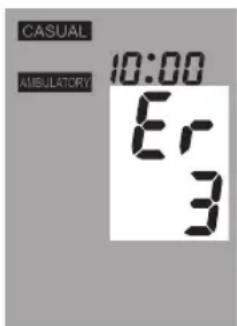
7) Repeat measurements in case of an error – The device will automatically repeat the measurement after a two minute countdown should an error occur during measurement.
text_image
CASUAL AMBULATORY 10:00 Er 3If the repeat measurement encounters an error again, the device will take an extra measurement after a four minutes countdown. If the extra measurement is not successfully either, the device will record an error message.
If the device stops taking measurements, the patient should return the device to the physician to determine the cause of error.
8) Storing measurement data – The WatchBP O3 AFIB device can store up to 250 single measurements in «AMBULATORY»mode.
When the memory is full, each new measurement will automatically overwrite the earliest measurement.
The display of blood pressure values on the LCD screen can be disabled in <
Taking blood pressure measurements in «CASUAL» mode
WatchBP 03 AFIB
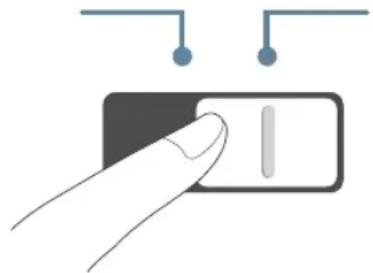
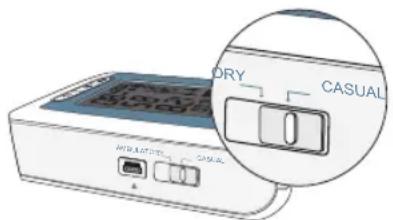
In «CASUAL» mode, the device functions like a regular blood pressure monitor – single measurements are automatically stored and can be reviewed at a later stage. The casual mode can be used to perform a single blood pressure measurement to test if the device is functioning properly. Do not forget to put the device back in «Ambulatory» mode before sending away the patient for 24-hour blood pressure measurement.
AMBULATORY CASUAL
natural_image
Hand pointing at a toggle switch (no text or symbols visible)Taking blood pressure measurements
Be sure the device is set to «CASUAL» mode.
text_image
AUTO ELECTRIC DRY CASUAL1) Applying the cuff – The cuff should fit closely around the arm, but not too tight, and be placed 2\~3cm above the elbow with the tube on the inside of the arm. The patient should support the arm at the same height as the heart during the measurement.
Additional instructions on taking proper blood pressure measurement can be found on www.watchbp.com.
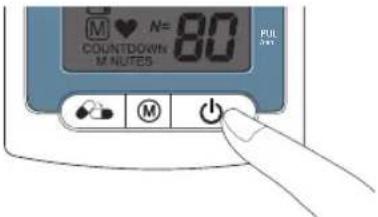
2) Start the measurement – Press the Start/Stop button to start the measurement.
text_image
M ♥ N= 80 COUNTDOWN M NOTES PUL 3453) During the measurement – The cuff will inflate automatically. A single measurement will be performed by each push on the Start/Stop button.
4) Finishing the measurement – Once the measurement is complete, the measurement value is automatically stored for later reference. If an error displays after the measurements, the process should be repeated.
5) 250 measurements safely stored – The WatchBP O3 AFIB device can store up to 250 single measurements in «CASUAL» mode.
When the memory is full, each new measurement will automatically overwrite the earliest measurement.
Recording the taking of medication
WatchBP 03 AFID
Medication record
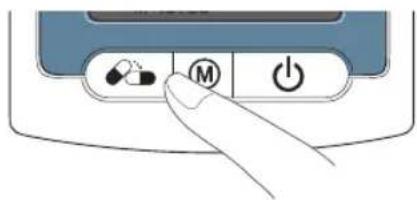
The patient can record the time of medication intake by pressing the medication button.
text_image
Diagram showing a hand pressing a button on a device control panel with icons for pills, battery, and power.1) Press and hold the medication button for 2 seconds and the Pill icon will appear.

Press the pill button and hold two seconds until "Pill" appears.
Medication record can be used in both modes.
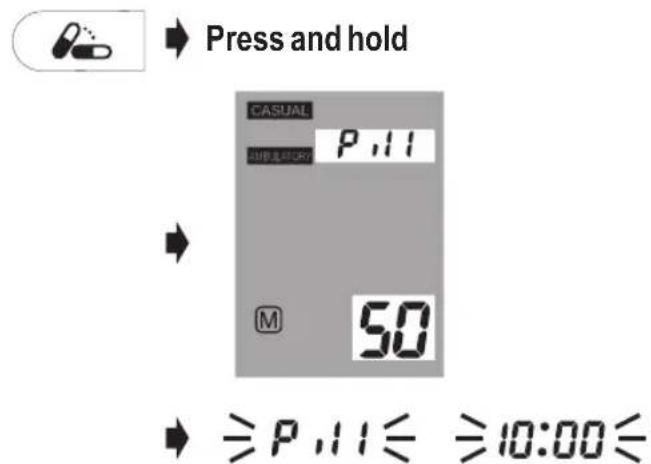
2) Release the Medication button and the Pill icon will flash in alternation with the recorded time.
text_image
Press and hold CASUAL P,11 SUBLOCK M 50 ≥P,11≤ ≥10:00≤3) Medication record is saved after the beep sound.
The beeper can be disabled via software setting.
50 records safely stored
The WatchBP O3 AFIB device can store up to 50 medication records.
When the memory is full, the device will display "Full".
Delete stored medication records
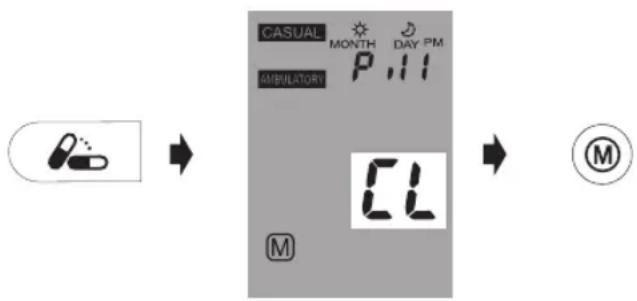
To clear the memory of all medication records, press and hold the medication button for 7 seconds. The "CL" symbol will ash. Press the M button to delete the memory or the Start/Stop button to cancel the deletion.
flowchart
graph LR
    A["Patient Medication"] --> B["AMBULATORY"]
    B --> C["CASUAL MONTH DAY PM"]
    C --> D["CL"]
    D --> E["M"]
Pressing the M button to delete data will erase all medication recordings in the selected mode.
Special Function: atrial fibrillation (AFIB) screening
WatchBP 03 AFIB
Screening for atrial fibrillation during blood pressure measurement
The device is designed to screen atrial fibrillation during blood pressure measurements in the «AMBULATORY» mode. This device is able to detect atrial fibrillation with high accuracy: a sensitivity of 97% and a specificity of 89%*. If atrial fibrillation is detected this will be shown in the report.
AFIB Detector
The device can screen for atrial fibrillation during blood pressure measurement.
Occasionally, the device might falsely detect atrial fibrillation which can have two causes:
1) The arm has moved during blood pressure measurement. For this reason it is of essential importance to keep the arm still during the measurement.
2) Some arrhythmia (irregular heart beat) other than atrial fibrillation might be present.
* Wiesel J, et al. Detection of atrial fibrillation using a modified microlife blood pressure monitor. Am J Hypertens, 2009; 22: 848-52.
* Stergiou GS, et al. Diagnostic accuracy of a home blood pressure monitor to detect atrial fibrillation. J Hum Hypertens, 2009; 23: 654-8..
This device detects atrial fibrillation, a major cause of stroke. Not all risk factors for stroke, including atrial flutter, may be detected by this device.
This device may not detect atrial fibrillation in people with pacemakers or defibrillators.
Important facts about atrial fibrillation
Atrial fibrillation is a common heart rhythm problem and a common cause of major strokes. It affects 8% of those 65 years and older and about 20% of all strokes are caused by atrial fibrillation.
Atrial fibrillation is a rhythm problem that can last from a few minutes, to days or weeks and even years. Atrial fibrillation can lead to the formation of blood clots in the heart. These clots can break off and flow to the brain causing stroke.
One sign of atrial fibrillation is palpitations. However, many people have no symptoms and therefore may remain undetected whereas diagnosing atrial fibrillation early followed by adequate treatment can largely reduce the chance of getting a stroke.
Viewing, transferring and deleting measurement data
WatchBP 03 AFIB
Viewing measurement data
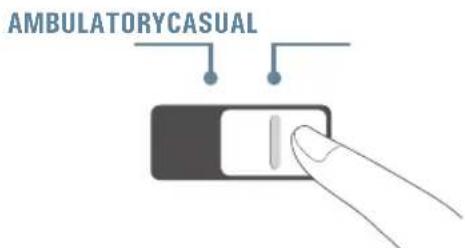
1) Use the mode switch to first select the type of measurements to be viewed.
text_image
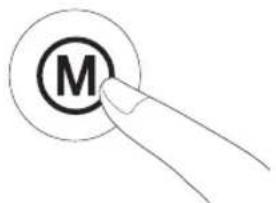
AMBULATORY CASUAL2) Then press the M button
text_image
MIn «AMBULATORY» mode
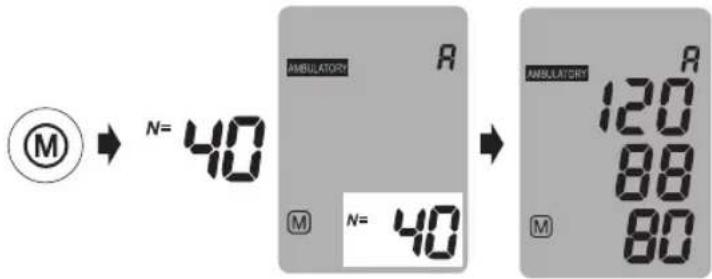
1) When the M button is pressed, it briefly displays the total number of measurements stored, e.g. N=40, followed immediately by the average of all measurement data stored in the memory.
text_image
M N= 40 AMBULATORY R M N= 40 AMBULATORY R 120 88 80 M《A》is displayed when the number shown is the average of all data.
- » will display when the number of measurements is less than 12.


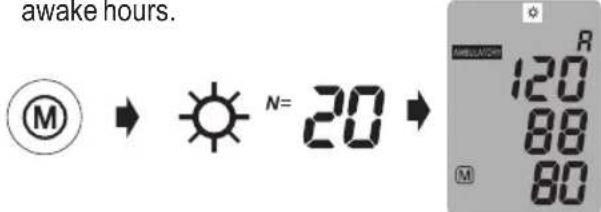
2) Pressing the M button briefly displays the total number of awake measurements stored, e.g. N=20, followed immediately by the average of all measurements during awake hours.
text_image
awake hours. M → ⬤ N= 20 → R 120 88 803) Pressing M button once again briefly displays the total number of nighttime measurements stored, e.g. N=20, followed immediately by the average of all measurements during night hours.
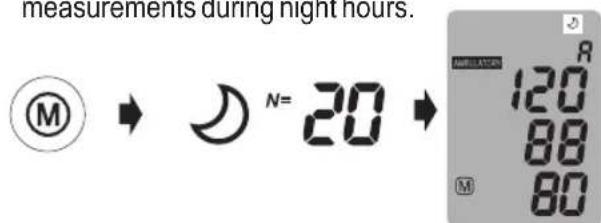
text_image
measurements during night hours. M N= 20 R 120 88 80All individual readings can be viewed by repeatedly pressing the M button.
The display of BP reading and memory of Ambulatory Mode can be disabled via software setting.
In «CASUAL» mode
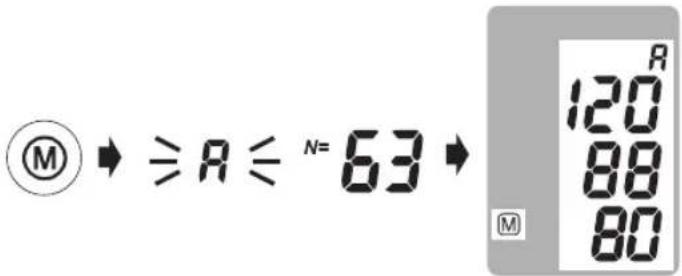
1) When the M button is pressed, it briefly displays the total number of measurement data stored, e.g. N=63, followed immediately by the average of all measurement data stored in memory.
text_image
MⓍ ≧ R ⋮ N= 63Ⓧ 120 88 80 M2) All individual readings can be viewed by repeatedly pressing the M button.
Viewing, transferring and deleting measurement data on the PC. (cont.)
WatchBP 03 AFIB
Transferring measurement data
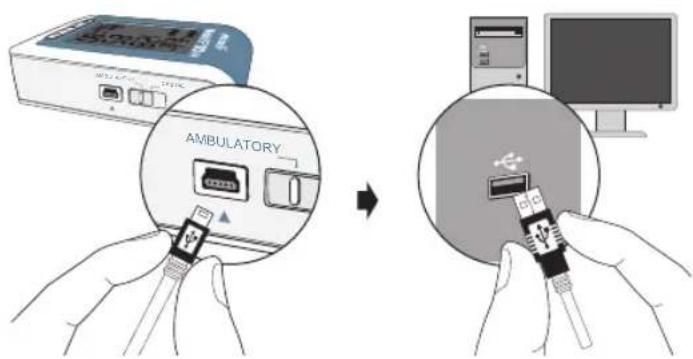
1) Connect the device to the PC. A successful connection is displayed by «PC» on the device.
2) Start the software program.
3) To transfer the data in both modes and the medication compliance record, click «Download BP data to PC».
text_image
AMBULATORYSystem Requirements: 1GHz CPU. 512MB Memory, 4.5GB free hard disk space, Microsoft Windows 10/11.
| Software commands | |
| Store data Click « | Save Excel report» or«Save PDF report», the file name is formed automatically from the patient's identity number and the suffix «WatchBPO3 AFIB_(date).xls». or WatchBPO3 AFIB_(date).pdf» |
| View the data Click | «Open file» |
| Delete the memories | Click «Clear Memory» |
| Close the program | Click «Exit» |
Please unplug and re-plug the USB cable to the PC if the software instructs to do so.
The program will prompt to synchronize the date/time of the device to that of the PC.
Before using «Clear Memory» or «Exit» make sure the data are stored.
Press «Help» to open user manual of software
Deleting measurements
Data from «AMBULATORY» and «CASUAL» mode measurements can be deleted independent of each other.
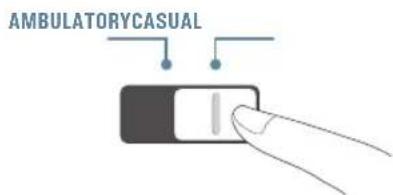
1) Use the mode switch to first select the type of measurements you wish to delete.
text_image
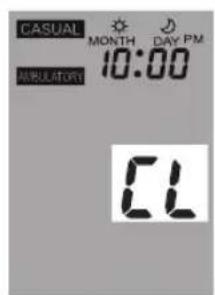
AMBULATORY CASUAL2) Press the M button and hold it until the CL symbol flashes.

3) Release the M button and press it once more while the delete symbol flashes.
text_image
CASUAL MONTH DAY PM 10:00 AMULATORY CL

Each deletion will erase the entire records of each mode.
Appendix
WatchBP 03 AFIB
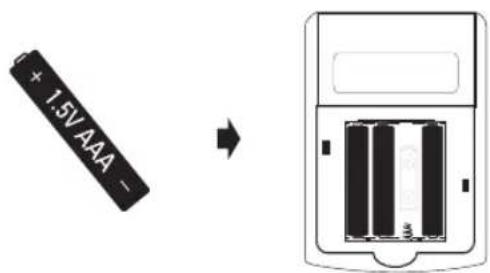
New batteries should be used for each patient monitoring session. "AAA" alkaline batteries are the main power source of WatchBP O3 AFIB.
How to Replace batteries
1) Open the battery compartment at the back of the device.
2) Replace the batteries – ensure correct polarity as shown by the symbols in the compartment
text_image
1.5V AAA -Battery indicator
When the batteries are approximately 25% left, the low battery symbol (partly filled battery displayed) is displayed on the LCD. Although the device will continue to measure reliably, it's recommended to replace the batteries as soon as possible.
When the batteries are flat, the empty battery symbol (flat battery displayed) is displayed on the LCD. You cannot take any further measurements and must replace the batteries.
The buzzer keeps beeping when connecting to the PC, even in low battery and empty battery status, until the batteries are replaced.
Seution: do not use rechargeable batteries.
Close 4 new, long-life 1.5V, size AAA alkaline batteries.
☐ do not use batteries out of expiration date.
Remove batteries if the device will not be used for a prolonged period.
The "Device Area" in the WatchBP Analyzer software displays the battery status when the device is connected to the software. If the voltage is too low and may not last for a 24-hour session, the "Renew battery" message will be highlighted.
Safety, care, accuracy test and disposal
Safety and protection
This device may only be used for the purposes described in these instructions. The device comprises of sensitive components and must be treated with caution. The manufacturer cannot be held liable for damage caused by incorrect application.

Read the instruction manual carefully before using this device, especially the safety instructions, and keep the instruction manual for future use.

- Ensure that children do not use the device unsupervised; some parts are small enough to be swallowed.
- Only activate the pump when the cuff is installed.
- Do not use the device if you think it is damaged or if anything appears unusual.
- Read the further safety instructions in the individual sections of the instruction manual.
- Do not connect the device to a computer until prompted to do so by the computer software.
Observe the storage and operating conditions described in the “Technical specifications” section of this manual.

Protect the device from water and moisture

Protect the device from direct sunlight

Protect the device from extreme heat and cold

Avoid proximity to electromagnetic fields, such as those produced by mobile phones

Never open the device

Protect the device from impact and drops

Do not immerse or spray the device
Device care
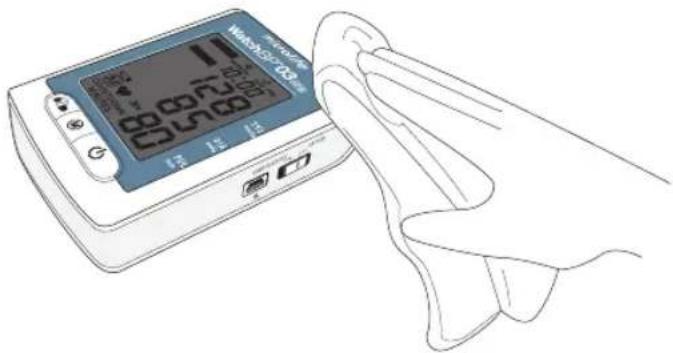
Use a soft cloth with one of the following recommended cleaning solutions to wipe the exterior of the device:
- Mild soap and water
• Hydrogen peroxide solution (3% diluted with water)
• Sodium hypochlorite solution
(1:10 dilution of household chloride bleach in water)
• Isopropyl alcohol (70% solution)
Then wipe the exterior of the device with a soft, dry cloth.
text_image
WBC-103 12 12 12 12 12 12 12 12 12 12 12 12 12 12 12 12 12 12 12 12 12 12 12 12 12 12 12 12 12 12 12 12 12 12Cleaning the cuff
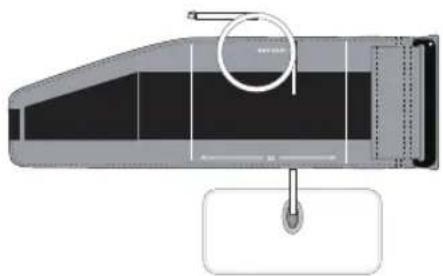
Take out the bladder. Fold and place the cuff cover inside a washing bag. Wash the cuff cover with warm water (43°C; 110°F) and a mild detergent in the washing machine.
Pasteurization: wash the cuff cover in 75°C(167°F) hot water for 30 minutes.
natural_image
Technical diagram of a mechanical component with a circular feature and a hanging pin (no text or symbols)
Do not iron the cuff!
Accuracy test
We recommend the WatchBP O3 AFIB device to be tested for accuracy every 2 years or after mechanical impact (e.g. being dropped). Please contact Microlife to arrange an accuracy test.

Disposal
Batteries and electronic instruments must be disposed of in accordance with the locally applicable regulations, and not as domestic waste.
Error messages
WatchBP 03 AFIB
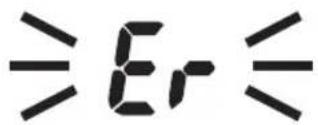
If an error occurs during measurement, the measurement is interrupted and an error message «Er» is displayed.
text_image
≥Er≤- The device will take another measurement automatically when an error occurs.
- Please consult your doctor, if this or any other problem occurs repeatedly.
- If you think the results are unusual, please read through the information in this instruction manual carefully.
text_image
CASUAL AMBULATORY 10:00 Er 3| Error Description Potential cause and remedy | ||
| «Er 1» Signal too weak | The pulse signals on the cuff are too weak. Re-position the cuff and repeat the measurement. | |
| «Er 2» Error signal | During the measurement, error signals were detected by the cuff, caused for instance by movement or muscle tension. Repeat the measurement, keeping your arm still. | |
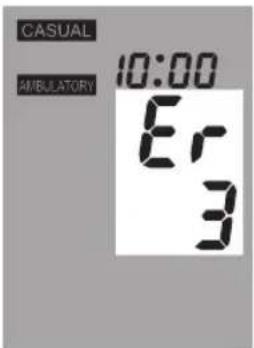
| «Er 3» No pressure in the cuff | An adequate pressure cannot be generated in the cuff. A leak may have occurred. Replace the batteries if necessary. Repeat the measurement. | |
| «Er 5» Abnormal result | The measuring signals are inaccurate and no result can therefore be displayed. Read through the checklist for performing reliable measurements and then repeat the measurement. | |
| «HI» Pulse | or cuff pressure too high | The pressure in the cuff is too high (over 300 mmHg) OR the pulse is too high (over 200 beats per minute). Relax for 5 minutes and repeat the measurement. |
| «LO» Pulse | too low | The pulse is too low (less than 30 beats per minute). Repeat the measurement. |
| «ErF» | The device has gone into “single fault condition” | Single fault condition means that the measurement is aborted to protect the patient from being harmed or the device from being damaged. Re-position the cuff and repeat the measurement. Replace the batteries if necessary. If the error persists, contact microlife or the local distributor. |
Technical Specifications
WatchBP 03 AFIB
Operating temperature: • 10 - 40 °C / 50 - 104 °F
Storage temperature: •-20 - +55 °C / -4 - +131 °F
• 15 - 90 % relative maximum humidity
Weight: • 260g (including batteries)
Dimensions: • 115 x 80 x 35 mm
Measuring procedure: • oscillometric, corresponding to Korotkoff
Measurement range: • SYS: 60\~255 mmHg
• DIA: 30\~200 mmHg
• 30 - 199 beats per minute – pulse
Cuff pressure display: • Range: 0 - 299 mmHg
• Resolution: 1 mmHg
• Static accuracy: pressure within ±3 mmHg
- Pulse accuracy: ±5 % of the readout value
Power source: • 4X1.5 V Batteries; size AAA
Ingress Protection (IP) Rating:
IP22: Protected against solid foreign objects of 12.5 mm diameter and greater. Protected against vertically falling water drops when the device is tilted up to 15°
* The device must be worn inside the "WatchBP O3 Zipper Pouch" just can approach IP22.
Reference to Standards:
- Device corresponds to the requirements of the standard for non-invasive blood pressure monitor.
EN 60601-1
EN 60601-1-2
EN 60601-1-11
EN IEC 80601-2-30
EN ISO 81060-2
Electromagnetic compatibility:
C€0044
• Device fulfils the stipulations of the standard EN 60601-1-2
The stipulations of the EU Directive 93/42/EEC for Medical Devices Class all have been fulfilled.

Type BF applied part
Microlife reserves the right to alter technical specifications without prior written notice.
Guarantee Card
WatchBP 03 AFIB
This device is covered by a two-year guarantee from the date of purchase. This guarantee is valid only on presentation of the guarantee card completed by the owner confirming date of purchase or purchase receipt. Batteries and wearing parts are not covered by this guarantee.
Name:
Address:
Date:
Telephone:
Email:
Product: WatchBP O3 AFIB
Product Number: BP3MZ1-1A
Serial Number:
Date:
text_image
MICROLIFE microlife 12 12 12 00:00:00 00:00:00 00:00:00 00:00:00 00:00:00 00:00:00 00:00:00 00:00:00 00:00:00 00:00:00 00:00:00 00:00:00Europe / Middle-East
/ Africa
Microlife AG
Espenstrasse 139
9443 Widnau, Switzerland
Tel. +41 71 727 7000
Fax.+41 71 727 7011
Email: watchbp@microlife.ch
www.watchbp.com
Asia
Microlife Corporation
9F, No. 431, RuiGuang Road, NeiHu,
Taipei, 114, Taiwan, China
Tel. +886 2 8797 1288
Fax +886 2 8797 1283
Email: watchbp@microlife.com.tw
www.watchbp.com
North / Central / South America
Microlife USA, Inc.
1617 Gulf to Bay Blvd
2nd Floor, Suite A
Clearwater, FL 33755, USA
Tel. +1 727 442 5353
Fax +1 727 442 5377
Email: msa@microlifeusa.com
www.watchbp.com
BC REP Microlife UAB