MR704 - Toaster Maestro - Free user manual and instructions
Find the device manual for free MR704 Maestro in PDF.


| Product Type | Toaster |
| Brand | Maestro |
| Model | MR704 |
| Dimensions (approx.) | 25 x 18 x 20 cm |
| Weight (approx.) | 1.2 kg |
| Power Supply | 220-240 V, 50/60 Hz |
| Power Consumption | 850 W |
| Number of Slots | 2 |
| Browning Control | Yes, with 7 levels |
| Functions | Cancel, Defrost, Reheat |
| Auto Centering | Yes |
| High Lift Carriage | Yes |
| Crumb Tray | Removable, easy to clean |
| Housing Material | Stainless steel and plastic |
| Safety Features | Auto shut-off, overheat protection |
| Cleaning and Maintenance | Wipe with damp cloth; empty crumb tray regularly |
| Spare Parts Availability | Crumb tray, heating elements (contact service) |
| Repairability | Moderate: some parts replaceable by technician |
| General Information | User manual available in multiple languages; free PDF download |
Frequently Asked Questions - MR704 Maestro
User questions about MR704 Maestro
0 question about this device. Answer the ones you know or ask your own.
Ask a new question about this device
Download the instructions for your Toaster in PDF format for free! Find your manual MR704 - Maestro and take your electronic device back in hand. On this page are published all the documents necessary for the use of your device. MR704 by Maestro.
USER MANUAL MR704 Maestro
feel MAESTRO® at home
natural_image
Black and white photo of a modern sit-up toaster with two shades of wood and a handle (no visible text or symbols)Модель/Model: MR-704
Functionality, design and conformity to the quality standards guarantee to you reliability and convenience in use of this device. Please read and comply with these original instructions prior to the initial operation of your appliance and store them for later use of subsequent owners.
This appliance is designed for domestic use only.
Under condition of observance of user regulations and a special-purpose designation, a parts of appliance do not contain unhealthy substances.
Technical specifications
Model: MR-704
Electrical supply:
Alternating current- AC;
Rated voltage 230V;
Rated frequency 50Hz;
Power consumption 800W
Protective class I
Protection class IPX0
Description of the appliance
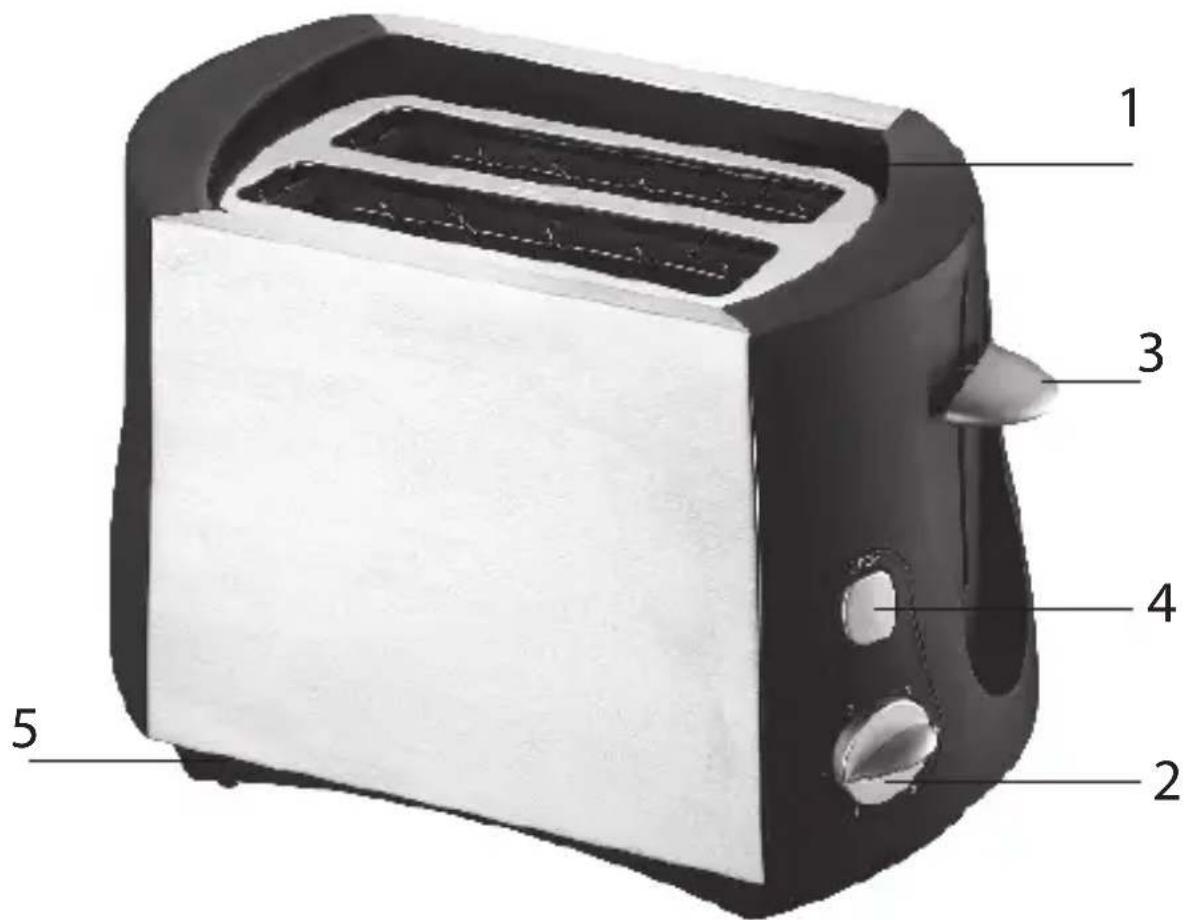
Picture1 (page 2)
-
2 toasting slots (Step 1 Put the bread into the open toasting slot)
-
Electronic variable browning control (Step 2 Select the desired
browning setting).
- Start control lever (Step 3 Press the start control down).
- Stop and automatically reject button «Cancel» Pressing this button stops the program.
- Crumb tray
Safety instructions
When using your appliance, basic safety precautions should always be followed, including the following:
SPECIAL INSTRUCTIONS
WARNING!
NEVER immerse the appliance, cable or plug in any liquid.
DO NOT allow water and moisture on the electrical parts of the device.
NEVER touch the appliance with wet or damp hands.
Only plug the appliance into an outlet with an earthed (ground) contact.
Otherwise, there is a risk to get an electric shock!
- DO NOT let children or untrained persons use the appliance without supervision.
- DO NOT leave the appliance unnecessarily plugged in. Disconnect the plug from the mains when the appliance is not being used.
- DO NOT use the power cord or the appliance in order to pull the plug out of the socket.
- DO NOT leave the appliance exposed to the weather (rain, sun, etc.).
- DO NOT leave the appliance without supervision when it is
connected to the power supply.
- Close supervision is necessary when the appliance is used near children.
- Always use the appliance on a dry, level surface.
- Always unplug from the plug socket when not in use and before cleaning.
- Do not operate the appliance if damaged, after an appliance malfunctions or it has been damaged in any manner, return to at authorized service engineer for repair.
- In the interest of safety, regular periodic close checks should be carried out on the supply cord to ensure no damage is evident. Should there be any signs that the cord is damaged in the slightest degree, the entire appliance should be returned be authorized service engineer.
- Do not let the cord hang over the edge of a table or counter or touch hot surfaces. Allow unit to cool before wrapping cord around base for storage.
- Do not touch any hot surfaces, do not store or cover the appliance until it has full cooled down.
- Do not place this appliance on or near a hot gas or electric burner, in or where it could touch a heated oven, or a microwave oven.
- Do not use harsh abrasives, caustic cleaners or oven cleaners when cleaning this appliance.
- Caution-bread may burn. When using this appliance, allow adequate air space above and on all sides for air circulation. Do not allow this appliance to touch curtains, wall coverings, clothing, dishtowels or other flammable materials during use.
CAUTION is required on surfaces where heat may cause a problem – an insulated heat pad is recommended.
- Do not use the toaster without the slide out crumb tray in place. The crumb tray should be cleaned regularly. Do not allow crumbs to build up in the tray.
- Do not use this appliance with any foodstuff product containing sugar content or with products containing jam or preserves.
- If the power cord is damaged, it must be replaced by the manufacturer or its service agent or a similarly qualified person in order to avoid a hazard.
- This appliance is not intended for use by persons (including children) with reduced physical, sensory or mental capabilities, or lack of experience and knowledge, unless they have been given supervision or instruction concerning use of the appliance by a person responsible for their safety.
- Children should be supervised to ensure that they do not play with the appliance.
WARNING! The temperature of accessible surfaces may be high when the appliance is operating.
Don't touch the metal parts during operation or just after.
Otherwise you can get burn!
- The bread may burn, therefore do not use the toaster near or below combustible material, such as curtains.
- THIS APPLIANCE IS FOR HOUSEHOLD USE ONLY. DO NOT USE THE APPLIANCE FOR ANYTHING OTHER THAN INTENDED USE.
- Do not use it for commercial purpose.
Operation
Before startup
- Remove all wrap materials and stickers
- Make sure that all the parts of appliance don't have damages.
- Put the toaster on a stable non-slip surface, away from curtains and flammable substances.
CAUTION! Is required on surfaces where heat may cause a problem – an insulated heat pad is recommended.
Provide adequate air space above and on all sides for air circulation.
Before first use it is suggested having the appliance without bread operated with the control knob set to grade 3 and the lever in down position to remove the heating element protection finish. At this time, the appliance will smoke. This is normal. It is recommended to have a good ventilation of air. After the first heating, let it cool down naturally before being used again.
Warning!
Never attempt to extract jammed toast, muffins, bagels or any other item with a knife or any other object, as contact with live elements may cause electrocution.
Allow the appliance to cool down, unplug and carefully remove the bread.
How to make toasts
- Plug the toaster in electric outlet.
- Put the bread into the toasting slot (1/Picture 1).
-
Select the desired browning setting, from No.7 on the browning control knob (2/Picture 1) (No.1-lightest, No. 6-darkest). When using the toast for the first time we suggest you toast on No.3. Different types of bread and personal preference may require a different browning setting.
-
Press the start control (3/Picture 1) down. It remains down until the bread is toasted.
Once toasted, the slices appear in the openings (1/Picture 1) and the start control (3/Picture 1) returns to its original position. The toaster switches “off” automatically.
- Press the «stop» and automatic eject button (4/Picture 1) if you wish to stop the toaster. If the bread sticks in the toaster, unplug it, wait for it to cool, and remove the bread.
Maintenance and care
WARNING!
Before cleaning the appliance in any way, make sure that the appliance plug is not connected to the socket.
Before cleaning unplug the appliance and let it cool completely.
Never place it in water or any other liquid.
How to remove breadcrumb
Your toaster comes with a slide out crumb tray. This is a quick and convenient way to remove crumbs. Always ensure that the toaster is unplugged and has cooled down before removing the crumb tray. Clean the crumb tray with a damp cloth and always dry the tray properly before replacing it into. In some models it needs unscrew the stopper screw.
Cleaning
- Do not use abrasive cleansers. Simply wipe the exterior with a clean damp cloth and dry thoroughly. Apply any cleaning agent to cloth, not directly onto the toaster.
- To remove crumbs, slide out the crumb tray and discard crumbs. Wipe clean and replace. Never operate the toaster without the
crumb tray in place.
- To remove any pieces of bread remaining in the toaster, turn the toaster upside down and shake gently. Never inset any hard or sharp instrument into the slots as this could damage the toaster and cause a safety hazard.
Storage
- Before cleaning unplug the appliance and let it cool completely.
- Clean and dry appliance before storage.
- Keep the appliance in cool dry place, away from children and persons with reduced mental or physical abilities.
Environmental protection
Old appliances contain valuable materials that can be recycled. Please arrange for the proper recycling of old appliances. Please dispose your old appliances using appropriate collection systems.
Subject to technical modifications!
Current electric alternativ;
Frecventa nominala: 50 Hz;
Certificated in Ukraine
Made in P.R.C. for Maestro
Apollo Corporation Limited ADD: Room801-2, 8/F., Easey Commercial
Building, 253-261 Hennessy Road, Wanchai, Hong Kong,
- feel MAESTRO® at home
- Technical specifications
- Electrical supply:
- Description of the appliance
- Safety instructions
- When using your appliance, basic safety precautions should always be followed, including the following:
- SPECIAL INSTRUCTIONS
- WARNING!
- Operation
- Before startup
- How to make toasts
- Maintenance and care
- How to remove breadcrumb
- Cleaning
- Storage
- Environmental protection
Brand : Maestro
Model : MR704
Category : Toaster