
Pixel A3 - Laminator FELLOWES - Free user manual and instructions
Find the device manual for free Pixel A3 FELLOWES in PDF.


| Product Type | Laminator |
| Brand | Fellowes |
| Model | Pixel A3 |
| Supported Formats | A3, A4 |
| Entry Width | A3: 318 mm, A4: 240 mm |
| Pouch Thickness | 80 – 125 microns |
| Warm-up Time | Approximately 3 minutes |
| Lamination Speed | Approximately 300 mm/min (fixed) |
| Number of Rollers | 2 |
| Ready Indication | Light (LED stops flashing) |
| Release Lever | Yes |
| Cold Lamination | Yes |
| Voltage / Frequency / Current | 220-240V AC, 50/60Hz, 3.4A |
| Wattage | 782 Watts |
| Dimensions (H x W x D) – A3 | 75 x 435 x 110 mm |
| Dimensions (H x W x D) – A4 | 75 x 342 x 110 mm |
| Net Weight – A3 | 1.7 kg |
| Net Weight – A4 | 1.4 kg |
| Max Document Thickness | 0.4 mm / 0.02" |
| Recommended Usage | Moderate use, up to 30 laminations per week |
| Auto Shut-Off | After 30 minutes of inactivity |
| Carrier-Free | Yes – no carrier required |
| Warranty | 2 years from date of purchase |
Frequently Asked Questions - Pixel A3 FELLOWES
User questions about Pixel A3 FELLOWES
0 question about this device. Answer the ones you know or ask your own.
Ask a new question about this device
Download the instructions for your Laminator in PDF format for free! Find your manual Pixel A3 - FELLOWES and take your electronic device back in hand. On this page are published all the documents necessary for the use of your device. Pixel A3 by FELLOWES.
USER MANUAL Pixel A3 FELLOWES
natural_image
Two white hexagonal billiard-style devices labeled 'Fellowes' with pixel control buttons, shown against a plain background (no text beyond branding)GB Please read these instructions before use.
FR Lire ces instructions avant utilisation.
ES Lea estas instrucciones antes de usar la máquina.
DE Diese Anleitungen vor Gebrauch genau durchlesen.
IT Primo dell'uso, si raccomanda di leggere questo manuale di istruzioni.
NL Lees deze instructies zorgvuldig door voordat u de machine in gebruik neemt.
SE Läs dessa anvisningar innan du använder apparaten.
DK Læs venligst denne vejledning for anvendelse.
FI Lue nämä ohjeet ennen käyttöä.
NO Vennligst les noye igjennom denne bruksanvisningen for bruk.
PL Przed użyciem proszę zapoznać się z niniejszą instrukcją.
RU Перед эксплуатацией устройства ознакомьтесь с содержанием данной инструкции.
GR Διαβάστε τις παρακάτω οδηγίες πριν από τη χρήση.
TR Kullanmadan önce lutfen bu talimatlari okuyen.
CZ Pred použitím si pročtěte tyto pokyny.
SK Pred použitím si prečítajte tieto pokyny.
HU Kérjük, hogy használat elött olvassa el az utasításokat.
PT Leia estas instruções antes da utilização.
BG Моля, прочетете инструкциите преди употреба.
RO Vă rugăm să citiți instrucțiunile înainte de utilizare.
HR Pažljivo pročitajte ove upute prije korištenja.
SI Pred uporabo izdelka preberite ta navodila za uporabo.
SR Pročitajte ova uputstva pre upotrebe.
AR
يرجى الapplاع على الإ Kirشادات قبل الاستعمال.
HB
INDEX
LAMINATOR CONTROLS / QUICK START GUIDE 3
ENGLISH 4-5
FRANCAIS 6-7
ESPAÑOL 8-9
DEUTSCH 10-11
ITALIANO 12-13
NEDERLANDS 14-15
SVENSKA 16-17
DANSK 18-19
SUOMI 20-21
NORSK 22-23
POLSKI 24-25
РУССКИЙ 26-27
ΕΛΛΗΝΙΚΑ 28-29
TÜRKÇE 30-31
ČESKY 32-33
SLOVENSKY 34-35
MAGYAR 36-37
PORTUGUÊS 38-39
БЪЛГАРСКИ 40-41
ROMÂNĂ 42-43
HRVATSKI 44-45
SLOVENČINA 46-47
SRPSKI 48-49
العربية 50-51
הכלה 52-53
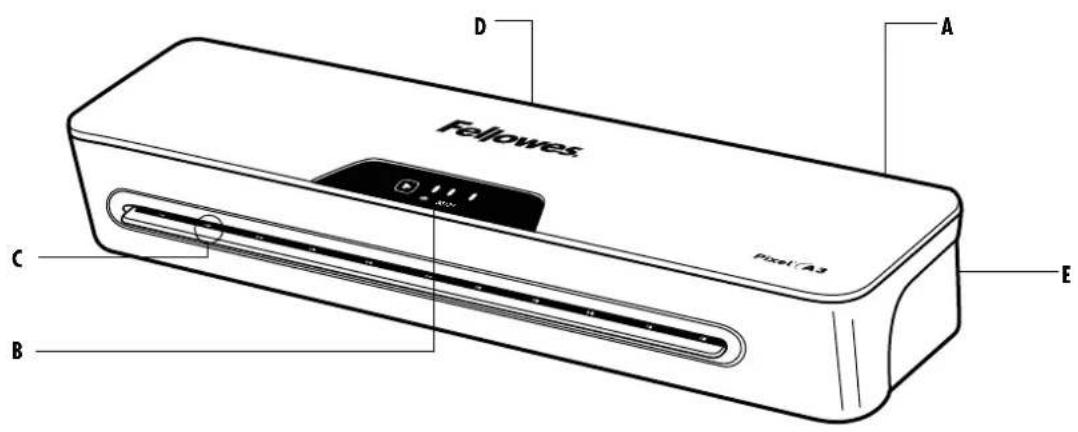
LAMINATOR CONTROLS
QUICK START GUIDE
natural_image
Illustration of a rectangular electronic device with a label '1' and a small icon below (no text or symbols on the device itself)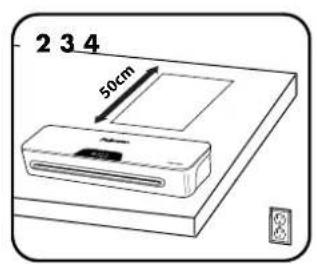
natural_image
Simple line drawing of an electrical outlet connected to a wall-mounted power plug (no text or symbols)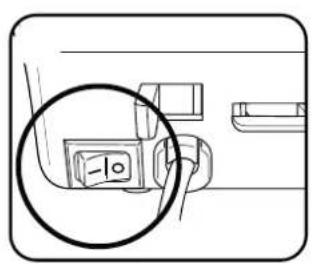
natural_image
Pure diagram of a folded paper or sheet with no text, numbers, or symbols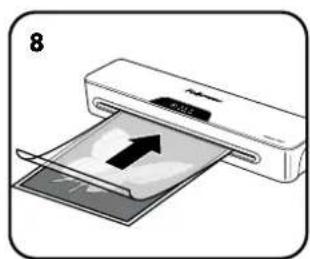
natural_image
Illustration of a printer being inserted into a paper with an arrow indicating the process (no text or symbols present)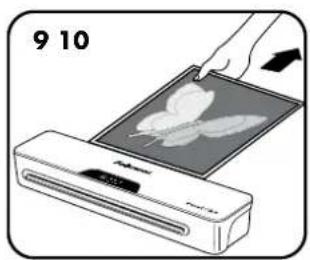
natural_image
Illustration of a hand pressing a leaf on a digital display unit (no text or symbols visible)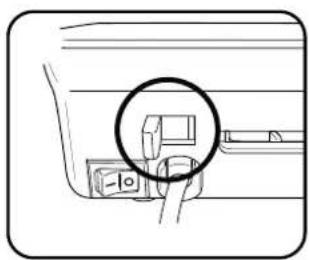
natural_image
Line drawing of a car interior with a magnified inset showing a component (no text or symbols)LAMINATOR CONTROLS
A On / off switch
B- Pouch selection buttons ( , 80, 125 millions)
C Pouch / document entry slot
D- Pouch / document exit
E Release lever ( )

CAPABILITIES
Performance
| Format | A3/A4 |
| Entry width A3 = 318mmA4 = 240mm | |
| Pouch thickness (min) 80 microns | |
| Pouch thickness (max) 125 microns | |
| Warm up time (estimate) 3 minutes | |
| Lamination speed (+/- 5%) approx. 300 mm/min (fixed speed) | |
| Number of rollers | 2 |
| Ready indication | Light |
| Release lever | Yes |
| Cold lamination | Yes |
Technical Data
| Voltage / Frequency / Current(Amps) A3 = 220-240V AC, 50/60Hz, 3.4A | |
| A4 = 220-240V AC, 50/60Hz, 3.4A | |
| WattageA4 = 782 Watts | A3 = 782 Watts |
| Dimensions (HxWxD)A4 = 75 x 342 x 110 mm | A3 = 75 x 435 x 110 mm |
| Net weightA4 = 1.4 kg | A3 = 1.7 kg |
| Max document thickness(laminating capacity) | 0.4mm/0.02" |
Maximum recommended usage: Moderate Use, 30 laminations per week. Heavier paper materials may have an effect on quoted usage.

IMPORTANT SAFETY INSTRUCTIONS - KEEP FOR FUTURE USE
- Plug the machine into an easily accessible socket.
- To prevent electrical shock - do not use the appliance close to water, do not spill water on to the appliance, power cord or wall socket.
DO ensure the machine is on a stable surface.
DO test laminate scrap sheets and set the machine before final laminations.
DO remove staples and other metal articles prior to laminating.
DO keep the machine away from heat and water sources.
DO turn off the machine after each use.
DO unplug the machine when not in use for an extended period.
DO use pouches designed for use at the appropriate settings.
DO keep away from pets, while in use.
DO ensure self-adhesive pouches are only used with the cold setting.
DO NOT leave the power cord in contact with hot surfaces.
DO NOT leave power cord hanging from cupboards or shelves.
DO NOT use appliance if the power cord is damaged.
DO NOT attempt to open or otherwise repair the machine.
DO NOT exceed the machines quoted performance.
DO NOT allow children to use this machine without adult supervision.
DO NOT laminate sharp or metal objects (eg: staples, paper clips).
DO NOT laminate heat-sensitive documents (eg: tickets, ultrasounds etc) on hot settings.
DO NOT laminate with self-adhesive pouches on hot settings.
DO NOT laminate an empty pouch.
FEATURES & TIPS
Auto Shut Off
'Auto Shut-Off' function
If the machine is not active for 30 minutes, the 'Sleep Mode' function will place the machine into standby mode. To operate the machine, press the 'Power On' button on the control panel.

'Release' function
To remove or re-align a pouch during lamination, activate the release lever located at the rear of the machine. The pouch can only be removed from the entry slot when the lever is activated.
- For best results, use Fellowes ^® brand pouches: 80 - 125 micron + cold pouches.
• For self-adhesive (cold pouches) only use the cold setting. - This machine does not need a carrier to laminate. It is a carrier-free mechanism.
• Always put the item to be laminated into the appropriate sized pouch.
• Always test laminate with a similar size and thickness before final process.
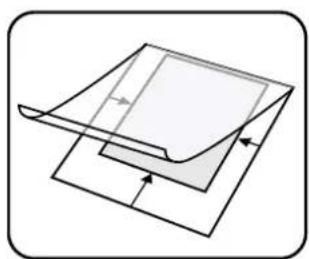
- Prepare pouch and item for lamination. Place item within pouch centred and touching the leading sealed edge. Ensure the pouch is not too large for the item.
- If required, trim excess material from around the item after lamination and cooling.
- When working with different pouch thickness' (temperature settings) it is recommended to first start with the thinnest pouches.
SETTING UP THE LAMINATOR
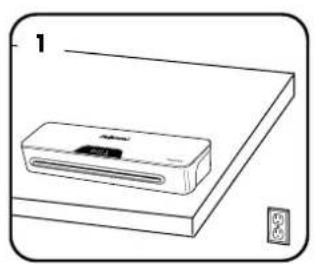
- Ensure the machine is on a stable surface.
-
Check there is enough clear space (min 50cm) behind the machine to allow items to pass through freely.
-
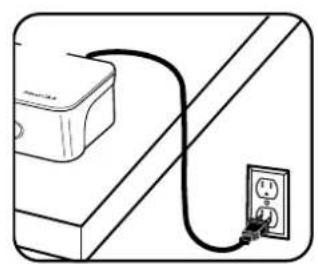
Plug the machine into an easily accessible main socket.
HOW TO LAMINATE
- Switch the power on (located at the rear of the machine).
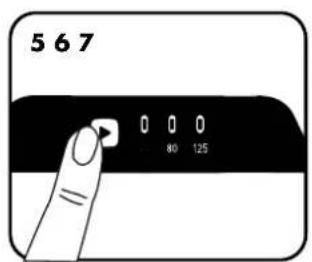
- The machine defaults to the cold setting. For 80 microns or 125 microns hot laminating, press the ▶ once for 80 microns or twice for 125 microns.
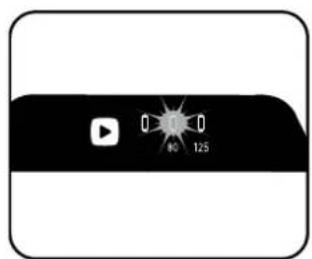
- When the machine is ready, temperature setting button will stop flashing and remain on.
-
Place the document into the open pouch. Ensure the document is centered against the sealed edge. Use the appropriate pouch size for the document.
-
Ensure the pouch enters the machine sealed edge first. Keep the pouch straight and central within the slot, not on an angle.
- Upon exit, the laminated pouch may be hot and soft. For the best quality and to prevent jamming remove the pouch immediately. Place the pouch on to a flat surface to cool. Take care when handling a hot pouch. Always remove laminate pouch before starting next laminate.
- To release a pouch during lamination, activate the release lever located at the rear of the machine. Gently pull pouch out of machine.
NEED HELP?
Let our experts help you with a solution.
Customer Service... www.fellowes.com
Always call Fellowes before contacting your place of purchase, see the rear cover for contact details.
TROUBLESHOOTING
| Problem Possible cause Solution | ||
| No control panel illumination | Machine not switched on Switch on machine | at rear next to plug inlet and at the wall socket |
| Laminator has gone in to Auto Shut Off mode | Press any button or cycle the power switch to re-start the machine | |
| Pouch does not completely seal the item | Item may be too thick to laminate Check pass through thickness is correctly selected and pass through again | |
| Temperature setting may be incorrect Check pouch thickness is correctly selected and pass through again | ||
| Pouch has waves or bubbles | Temperature setting may be incorrect | Check pouch thickness is correctly selected and pass through again |
| Pouch is lost in the machine Pouch is jammed | Operate the release lever and pull out the item by hand | |
| Jamming | Pouch was used ‘open end’ first | |
| Pouch was not centred on entry | ||
| Pouch was not straight upon entry | ||
| Empty pouch was used | ||
STORAGE & CLEANING
Switch off the machine at the wall. Allow the machine to cool. The outside of the machine can be cleaned with a damp cloth. Do not use solvents or flammable materials to polish the machine.
COMMANDES DE LA PLASTIFIEUSE
A3 = 75 × 435 × 110 mm
A4 = 75 × 342 × 110 mm
A3 = 1,7 kg
A4 = 1,4 kg
0,4 mm / 0,02"
DÔLEŽITÉ BEZPEČNOSTNÉ POKYNY – USCHOVAJTE NA POUŽITIE V BUDÚCNOSTI
POTREBNA VAM JE POMOĆ?
GB Thank you for purchasing a Fellowes product. Please visit www.fellowes.com/register to register your product and benefit from product news, feedback and offers. Product details can be found listed on the rating plate positioned on the rear side or underside of the machine.
Fellowes warrants all parts of the laminator to be free of defects in material and workmanship for 2 years from the date of purchase by the original consumer. If any part is found to be defective during warranty period, your sole and exclusive remedy will be repair or replacement, at Fellowes' option and expense, of the defective part. This warranty does not apply in cases of abuse, mishandling or unauthorised repair. Any implied warranty, including that of merchantability or fitness for particular purpose, is hereby limited in duration to the appropriate warranty period set forth above. In no event shall Felloves be liable for any consequential damages attributable to this product. This warranty gives you specific legal rights. You may have other legal rights that vary from this warranty. The duration, terms and conditions of this warranty are valid worldwide, except where different limitations, restrictions or conditions may be required by local law. For more details or to obtain services under this warranty, please contact Felloves or your dealer.
Australia Residents Only:
Our goods come with guarantees that cannot be excluded under the Australian Consumer Law. You are entitled to a replacement or refund for a major failure and for compensation for any other reasonably foreseeable loss or damage. You are also entitled to have the goods repaired or replaced if the goods fail to be of acceptable quality and the failure does not amount to a major failure. The benefits under Fellowes' Warranty are in addition to other rights and remedies under a law in relation to the machine.
natural_image
Simple line drawing of a trash bin with two crossed lines indicating no waste or restriction (no text or symbols)
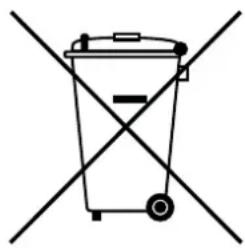
GB This product is classified as Electrical and Electronic Equipment. Should the time come for you to dispose of this product please ensure that it is not mixed with general household waste. For proper treatment, recovery and recycling, please take this product to a designated collection point. Please contact your local authority for further details of your nearest designated collection point.
FR Ce produit est classé comme équipement électrique et électronique. Si vous souhaitez mettre ce produit au rebut, veuillez vous assurer qu'il ne soit pas mélangé avec des déchets ménagers généraux. Pour un traitement, une récupération et un recyclage adéquats, veuillez apporter ce produit dans un point de collecte désigné. Veuillez prendre contact avec vos autorités locales pour davantage d'informations concernant votre point de collecte désigné le plus proche.
ES Este producto está clasificado como Equipo eléctrico y electrónico. Si llega el momento en el que necesita desechar este producto, asegúrese de que no se mezcle con los residuos domésticos comunes. Para el correcto tratamiento, valorización y reciclado, lleve este producto a un punto de recogida designado. Póngase en contacto con una autoridad local para obtener más información sobre el punto de recogida designado más cercano.
DE Dieses Produkt wurde als ein elektrisches und elektronisches Gerät klassifiziert. Sollte für Sie der Zeitpunkt der Entsorgung dieses Produkts gekommen sein, stellen Sie bitte sicher, dass es nicht mit dem gewöhnlichen Hausmüll entsorgt wird. Für angemessene Aufbereitung, Verwertung und Wiederaufbereitung bringen Sie dieses Produkt bitte zu einer entsprechenden Sammelstelle. Für weitere Details zu Ihrer am nächsten gelegenen Sammelstelle kontaktieren Sie bitte Ihre Behörden vor Ort.
IT Questo prodotto è classificato come Apparecchiatura Elettrica ed Elettronica. Nel caso in cui sia necessario smaltire questo prodotto, accertarsi che non venga inserito tra i rifiuti domestici. Per un trattamento, recupero e riciclaggio appropriati, conferire questo prodotto presso un punto di raccolta designato. Contattare gli enti locali per maggiori dettagli sul punto di raccolta designato più vicino.
NL Dit product is geclassificeerd als elektrische en elektronische apparatuur. Wanneer de tijd komt waarop dit product moet worden afgevoerd, dient u ervoor te zorgen dat het niet bij het algemene huishoudelijke afval wordt gedaan. Breng dit product naar een aangewezen inzamelpunt, zodat het op de juiste wijze kan worden behandeld, teruggewonnen en gerecycled. Neem contact op met de plaatselijke autoriteiten voor meer informatie over het dichtstbijzijnde aangewezen inzamelpunt.
SE Denna produkt är klassificerad som elektrisk och elektronisk utrustning. När det är dags för dig att kassera denna produkt bör du se till att inte blanda samman den med allmänt hushållsavfall. För att behandla, återhämta och återvinna denna produkt ordentligt bör du ta den till en designerad insamlingspunkt. Kontakta din lokala myndighet för mer information om din närmaste designerade insamlingspunkt.
DK Dette produkt er klassificeret som elektrisk og elektronisk udstyr. Hvis tiden er inde for at dette produkt skal kasseres, så sørg for at det ikke bliver blandet sammen med almindelig husholdningsaffald. Bring venligst produktet til et indsamlingssted til korrekt behandling, genindvinding og genbrug. Kontakt de lokale myndigheder for at få flere oplysninger om det nærmeste indsamlingssted.
FIN Tämä tuote luokitellaan sähkö- ja elektroniikkalaitteeksi. Jos sinun on hävitettävä tämä tuote, varmista, ettei sitä hävitetä lajittelemattomien kotitalousjätteiden mukana. Vie tämä tuote erityiseen jätteenkeruupisteeseen, joka hoitaa käytetyn laitteen asianmukaisen käsittelyn, talteenoton ja kierrätyksen. Voit pyytää lisätietoja lähimmästä virallisesta jätteenkeruupisteestä paikallisilta viranomaisilta
No Dette produktet klassifiseres som elektrisk og elektronisk utstyr. Dersom det skulle bli aktuelt for deg å avhende produktet ber vi deg forsikre deg om at det ikke kastes i husholdningsavfallet. For riktig avhending, gjenvinning og resirkulering, vennligst ta dette produktet med til et dertil egnet returpunkt. Vennligst kontakt dine lokale myndigheter for ytterligere detaljer om ditt nærmeste innsamlingssted.
PL Ten produkt jest sklasyfikowany jako sprzęt elektryczny i elektroniczny. Przy jego utylizacji należy dopilnować, by nie został wyrzucony razem z odpadami domowymi. Należy dostarczyć go do odpowiedniego punktu zbiórki odpadów, gdzie zostanie poddany właściwemu przetworzeniu, odzyskowi i recyklingowi. Szczegółowe informacje na temat najbliższego punktu zbiórki odpadów można uzyskać, kontaktując się z lokalnymi władzami.
RU
Данное изделие классифицировано как электрическое и электронное оборудование. По истечении срока эксплуатации изделия не утилизируйте его вместе с бытовыми отходами. Для обеспечения надлежащей обработки, вторичного использования и переработки изделие следует сдать в специализированный пункт приема. Для получения детальной информации касаемо ближайшего специализированного пункта приема утильсырья обратитесь в местные органы власти.
natural_image
Simple line drawing of a trash bin with two crossed lines indicating no text or symbols (no text or labels)
Declaration of Conformity
Fellowes, Inc.
Unit 2 Ontario Drive, New Rossington, Doncaster, DN11 OBF, England declares that the product model Pixel conforms with the requirements of the Restriction of Hazardous Substances Directive (2011/65/EU + 2015/863/EU), the Low Voltage Directive (2014/35/EU), the Electromagnetic Compatibility Directive (2014/30/EU), the WEEE directive (2012/19/EU), and below harmonized European EN Standards.
Safety: EN60950-1: 2006/A2:2013
EMC Standard: EN55014-1:2006+A1:2009+A2:2011
EN55014-2:2015
EN61000-3-2:2014
EN61000-3-3:2013
Year Affixed: 19
Itasca, Illinois, USA
January 1, 2019
John Fellowes
President & CEO



- INDEX
- LAMINATOR CONTROLS / QUICK START GUIDE 3
- LAMINATOR CONTROLS
- QUICK START GUIDE
- CAPABILITIES
- IMPORTANT SAFETY INSTRUCTIONS - KEEP FOR FUTURE USE
- FEATURES & TIPS
- 'Auto Shut-Off' function
- 'Release' function
- SETTING UP THE LAMINATOR
- HOW TO LAMINATE
- NEED HELP?
- STORAGE & CLEANING
- COMMANDES DE LA PLASTIFIEUSE
- DÔLEŽITÉ BEZPEČNOSTNÉ POKYNY – USCHOVAJTE NA POUŽITIE V BUDÚCNOSTI
- POTREBNA VAM JE POMOĆ?
- Australia Residents Only:
- Declaration of Conformity
- Fellowes, Inc.
Brand : FELLOWES
Model : Pixel A3
Category : Laminator