
MBP24 - Baby monitor MOTOROLA - Free user manual and instructions
Find the device manual for free MBP24 MOTOROLA in PDF.


| Product Type | Baby Monitor |
| Brand | Motorola |
| Model | MBP24 |
| Frequency | 2.4 GHz FHSS |
| Camera Dimensions (W x H x D) | 6.5 x 12.0 x 8.0 cm |
| Parent Unit Dimensions (W x H x D) | 8.0 x 14.0 x 6.0 cm |
| Camera Weight | 120 g |
| Parent Unit Weight | 180 g |
| Power Source | AC adapters (included) or rechargeable batteries (parent unit) |
| Battery Life (Parent Unit) | Up to 10 hours |
| Range | Up to 300 m outdoors, 50 m indoors |
| Key Functions | Two-way talk, night vision, temperature monitor, lullabies, low battery alert, out of range alert |
| Night Vision | Infrared LEDs, automatic activation in low light |
| Temperature Sensor | Yes, displayed on parent unit |
| Lullabies | 5 built-in melodies |
| Display | 2.0-inch color LCD |
| Maintenance and Cleaning | Wipe with a soft, dry cloth. Do not use liquids or cleaning agents. |
| Safety | Low battery and out-of-range alerts, interference-avoidance technology |
| Spare Parts and Repairability | Contact Motorola support for replacement parts |
| General Information | One camera system, expandable up to 4 cameras (additional cameras sold separately) |
Frequently Asked Questions - MBP24 MOTOROLA
User questions about MBP24 MOTOROLA
0 question about this device. Answer the ones you know or ask your own.
Ask a new question about this device
Download the instructions for your Baby monitor in PDF format for free! Find your manual MBP24 - MOTOROLA and take your electronic device back in hand. On this page are published all the documents necessary for the use of your device. MBP24 by MOTOROLA.
USER MANUAL MBP24 MOTOROLA
natural_image
White remote control device with power button and indicator lights (no text or symbols visible)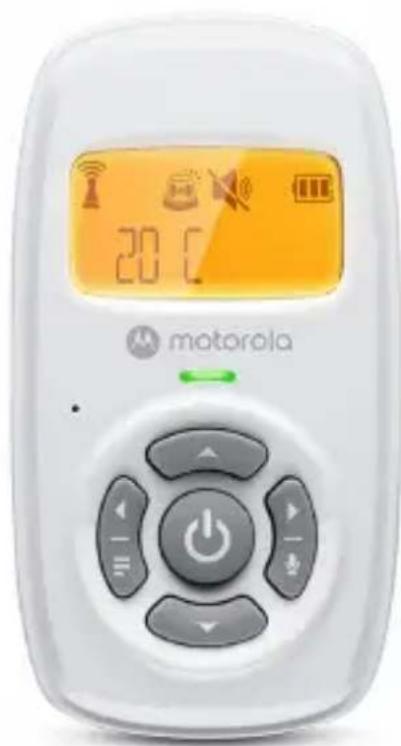
natural_image
White Motorola remote control device with digital display and control buttons (no readable text or symbols)For: AM24 and AM24-2
User Guide
Welcome...
to your new Motorola Baby monitor!
Thank you for purchasing the Digital Audio Baby Monitor. Now you hear your baby sleeping in another room.
Please retain your original dated sales receipt for your records. For warranty service of your Motorola product, you will need to provide a copy of your dated sales receipt as proof of warranty status. Registration is not required for warranty coverage.
For product related questions, please contact us by visit:
motorolanursery.com
This User Guide provides you with all the information you need to get the most from your product.
Before you use the digital audio baby monitor, we recommend that you insert and fully charge the battery in the parent unit, so that it continues to work if you disconnect it from the mains power to carry it to another location. Please read the Safety Instructions on page 6 before you install the units.
Got everything?
- 1 x Parent Unit
- 1 x Baby Unit
- 1 x Rechargeable Ni-MH battery pack for the Parent Unit
- 1 x Battery door for Parent Unit
- 1 x Power adapter for Parent unit
- 1 x Power adapter for Baby unit
In packs with dual parent units, you will find an additional parent unit with power adapter and rechargeable NiMH battery pack.
Overview of the Parent Unit
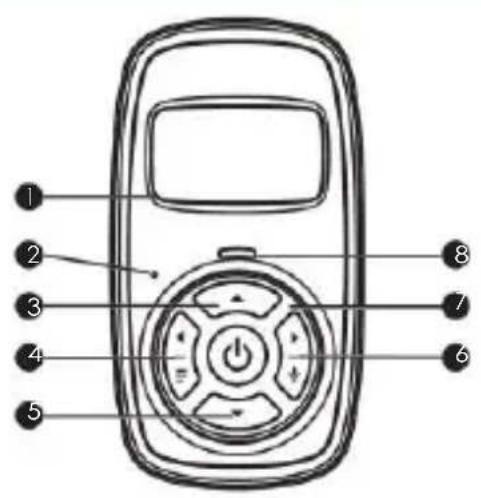
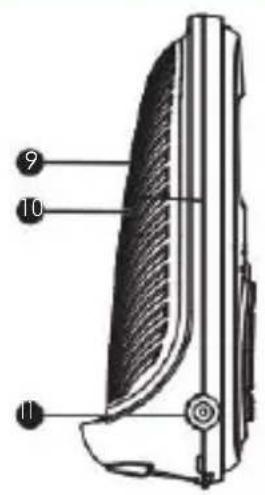
- LCD Display
- Microphone
-
UP button +
Press to increase speaker volume. While in a menu, press to scroll up. -
LEFT button < / M
Press to access the main menu.
While in a menu, press to access the sub-menu, or confirm the settings.
- DOWN button -
Press to decrease the speaker volume.
While in a menu, press to move down the menu list.
-
RIGHT button > /T
Press to cancel settings and go back to the previous level.
Press and hold to talk through to be baby unit. -
Power button 0
Press and hold to power on/off the parent unit.
- Power/Link indicator
On when the parent unit is powered on and linked to the baby unit.
Flashes when the parent unit is linking to the baby unit or when using Two way Talk function.
-
Speaker
-
Battery cover
-
Power jack
Overview of the Baby Unit
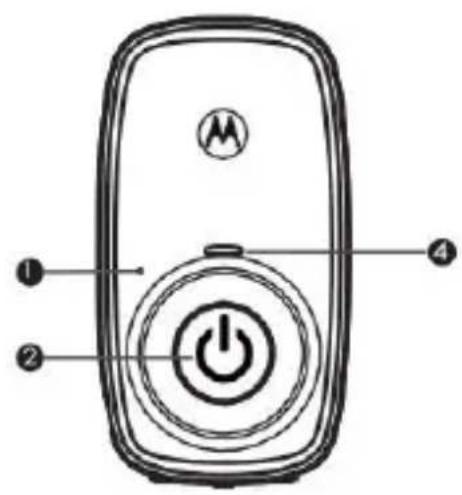
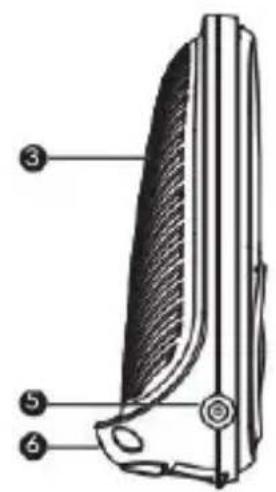
- Microphone
- Power button 0
Press and hold to power on/off the baby unit.
-
Speaker
-
Power indicator
On when the baby unit is powered on. - Power jack
- Temperature sensor
Important guidelines for installing your digital baby monitor
• To use your baby unit and parent unit together, you must be able to establish a radio link between them. Note - The range may be affected by environmental conditions.
- Any large metal object, like a refrigerator, a mirror, a filing cabinet, a metallic door or reinforced concrete, between the baby unit and parent unit may block the radio signal.
- The signal strength may also be reduced by other solid structures, like walls, or by radio or electrical equipment, such as TVs, computers, cordless or mobile phones, fluorescent lights or dimmer switches.
- If the signal is poor, try moving the parent unit and/or the baby unit to a different position in the room.
Table of contents
- Safety Instructions 6
- Getting Started....9
2.1 Baby unit power supply 9
22 Parent unit battery installation....10
23 Parent unit power supply 11
- Using Your Digital Audio Baby Monitor ....12
3.1 Power on or off the Baby Unit 12
3.2 Power on or off the Parent Unit 12
3.3 Speaker volume 12
3.4 Select display language for the parent unit....13
3.5 Turn sound alert on or off 13
3.6 Reset settings to default 13
3.7 Two-way talk....13
-
Disposal of the Device (environment)....14
-
Cleaning....15
- Troubleshooting....16
- General Information ....18
- Technical Specifications ....23
1. Safety Instructions

WARNING:
Strangulation Hazard. Children have STRANGLED in cords. Keep this cord out of the reach of children (more than 1 metre away). Never use extension cords with AC Adapters. Only use the AC Adapters provided.
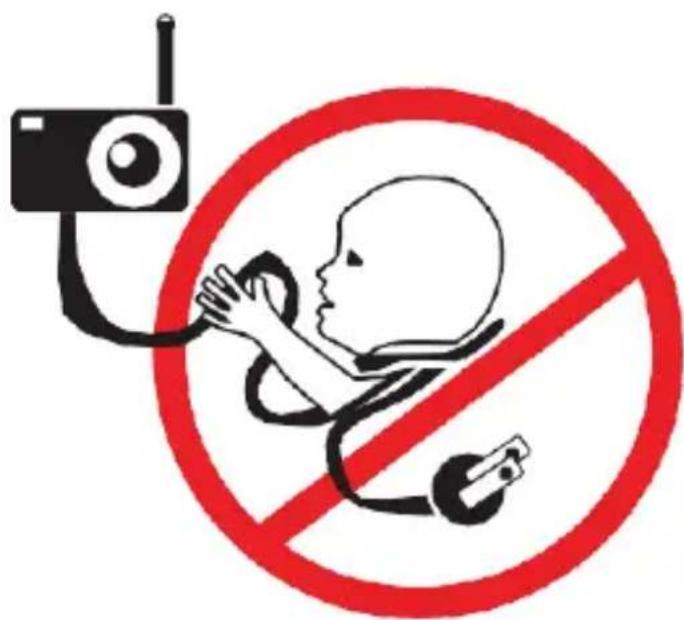
BABY MONITOR SET UP & USE:
- Determine a location for the BABY UNIT that will allow you to hear your baby in his/her cot.
- Place the BABY UNIT on a flat surface, such as a dresser, bureau, or shelf or mount the Unit to a wall securely using the keyhole slots under the stand.
• NEVER place the Baby Unit or cords within the cot.
WARNING
This Digital Audio Baby Monitor is compliant with all relevant standards regarding electromagnetic fields and is, when handled as described in the User Guide, safe to use. Therefore, always read the instructions in this User Guide carefully before using the device.
- Adult assembly is required. Keep small parts away from children when assembling.
• This product is not a toy. Do not allow children to play with it. - This Digital Audio Baby Monitor is not a substitute for responsible adult supervision.
- Keep this User Guide for future reference.
- Keep the cords out of reach of children.
- Do not cover the Digital Audio Baby Monitor with a towel or blanket.
- Test this monitor and all its functions so that you are familiar with it prior to actual use.
- Do not use the Digital Audio Baby Monitor in damp areas or close to water.
-
Do not install the Digital Audio Baby Monitor in extreme cold or heat, direct sunlight, or close to a heat source.
-
Only use the chargers and power adapters provided. Do not use other chargers or power adapters as this may damage the device and battery pack. The power adaptors are:
Shenzhen Huajin Electron Co., Ltd. (HJ-0600400A1-US)
or
Dongguan Everest Industrial Co., Ltd. (EP19-060040WXLA) -
Only insert a battery pack: GPI International Ltd. (GP75AAAH2BMJZ)
- Do not touch the plug contacts with sharp or metal objects.
- Connect the power adapters to easily accessible mains power.
CAUTION
There is a risk of explosion if the battery is replaced by an incorrect type. Dispose of used batteries according to the instructions.
Use only rechargeable battery pack with rating: 2.4V 750mAh.
2. Getting Started
2.1 Baby unit power supply
natural_image
Illustration of a remote control device connected to a cable, with an arrow indicating power connection (no text or symbols present)- Insert the DC plug of the power adapter into the DC jack on the side of the baby unit, as shown.
- Connect the other end of the power adapter to a suitable mains power socket.
• The Power indicator will illuminate.
NOTE
Only use the power adapter provided (DC6V/400mA). They are:
1.. Model Number: HJ-0600400P1-EU or HJ-0600400A1-supplied by Shenzhen Huajin Electronics Co., Ltd.
OR
2.. Model Number: EP19A-060040WXEZ and EP19B-060040WX supplied by DONGGUAN EVEREST INDUSTRIAL CO.,LTD.
2.2 Parent unit battery installation
The rechargeable battery pack supplied should be installed so that the Parent Unit can be moved without losing the link with the Baby Unit. Charge the parent unit before using it for the first time and when the parent unit indicates the battery is low.
- Open and lift the battery door up as shown in the figure. (fig.b1)
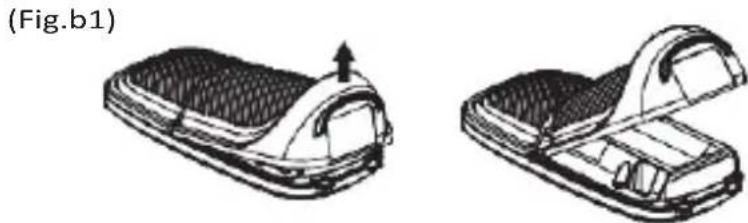
natural_image
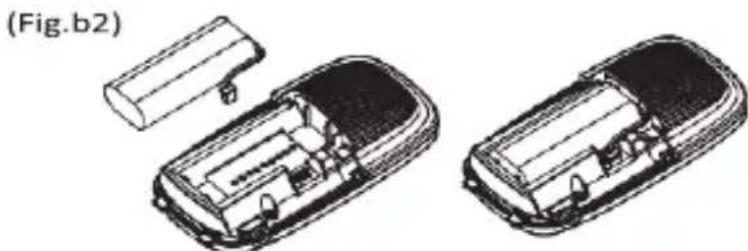
Two views of a flip-flop device showing internal structure and opening (no text or symbols)- Insert the plug of the rechargeable battery pack into the jack inside, fit the battery pack into the compartment. (fig.b2)
natural_image
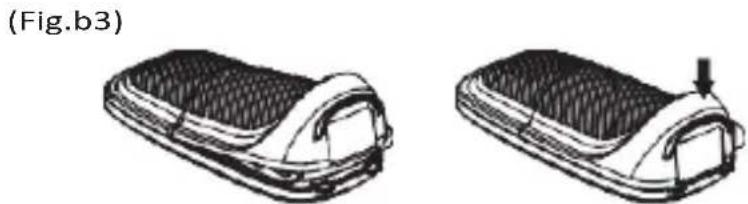
Technical line drawing of two 3D car housing components with internal compartments and mounting holes (no text or symbols)- Insert the catches at the top of the battery door then close the door as shown in the picture. (fig.b3)
natural_image
Two views of a car seat or cushion component, shown from different angles (no text or symbols)NOTE
Only use the power adapter provided (DC6/400mA).
We recommend that you install and fully charge the battery in the parent unit, so that it continues to work if you disconnect it from the mains power to carry it to another location.
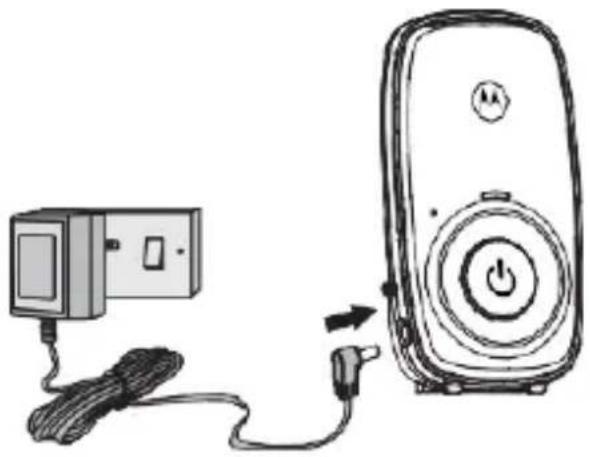
2.3 Parent unit power supply
natural_image
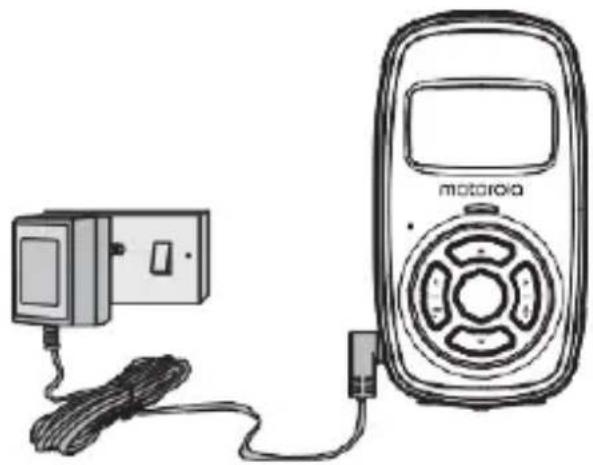
Line drawing of a motorola connected to a cable and power cord (no text or symbols)- Insert the DC plug of the power adapter into the DC jack on the side of the parent unit.
- Connect the other end of the power adapter to a suitable mains power socket,
• The parent unit will turn on.
NOTE
Only use the power adapter provided (DC6/400mA).
3. Using Your Digital Audio Baby Monitor
Please read these instructions carefully, and be aware that this digital audio baby monitor is only intended as an aid. It is not a substitute for responsible and proper adult supervision.
3.1 Power on or off the Baby Unit
- Press and hold0 to power on the baby unit. The Powerindicator will illuminate.
- Press and hold 0 again to power off the baby unit. The Power indicator will extinguish.
3.2 Power on or off the Parent Unit
- Press and hold0 to power on the parent unit. The Power/Link indicator will illuminate.
- Press and hold0 again to power off the parent unit. The Power/Link indicator will extinguish.
NOTE
If you place the parent and baby units too close together, you may hear a high pitched noise. This is not a fault. The units are designed to be operated at some distance apart, e.g. in separate rooms, so move the units further apart.
If the Power/Link indicator flashes on the parent unit, they are not linked to each other. Make sure that both units are powered on, and reduce the distance between the units, but not closer than 1 metre.
3.3 Speaker volume
You can adjust the speaker volume of the parent unit from Volume 1 to Volume 5, or turn it off.
- Press + or – on the parent unit when it is not in use.
3.4 Select display language for the parent unit
Choose from 6 languages.
- Press < / M twice on the parent unit when is not in use.
- Press + or – to select ENGLISH, FRANCAIS, ESPANOL, DEUTSCH, ITALIANO or PORTUGUES.
- Press < / M to confirm your selection. The display will show 'SAVED'.
3.5 Turn sound alert on or off
You can turn on the sound alert so that the parent unit beeps when a loud sound is detected by the baby unit. Is displayed when sound alert is enabled.
- Press < / M on the parent unit when it is not in use.
- Press + or – to scroll to SOUND ALERT and then pressLEFT button.
- Press < / M to change the current setting. (Default is off). The display will show 'SAVED' to confirm the setting has changed.
3.6 Reset settings to default
- Press < / M on the parent unit when it is not in use.
- Press + or - to scroll to RESET and then press < / M .
- Press < / Mto confirm. The display will show 'SAVED'.
All settings will be reset to default.
3.7 Two-way talk
You can use the Talk Back feature to comfort and reassure your baby.
Whilst using Talk Back you will not be able to hear your baby until you release the button.
- Press and hold > / T on the Parent unit to speak to your baby.
- Release the button to hear your baby again.
4. Disposal of the Device (environment)
At the end of the product life cycle, you should not dispose of this product with normal household waste. Take this product to a collection point for the recycling of electrical and electronic equipment. The symbol on the product, user guide and/or box indicates this.
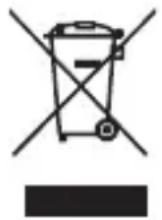
Some of the product materials can be re-used if you take them to a recycling point. By reusing some parts or raw materials from used products you make an important contribution to the protection of the environment.
Please contact your local authorities in case you need more information on the collection points in your area.
Dispose of the battery pack in an environmentally-friendly manner according to your local regulations.
5. Cleaning
Clean your Digital Audio Baby Monitor with a slightly damp cloth or with an anti-static cloth. Never use cleaning agents or abrasive solvents.
Cleaning and care
- Do not clean any part of the Digital Audio Baby Monitor with thinners or other solvents and chemicals - this may cause permanent damage to the product which is not covered by the warranty.
- Keep your Digital Audio Baby Monitor away from hot, humid areas or strong sunlight, and do not let it get wet.
- Every effort has been made to ensure high standards of reliability of your Digital Audio Baby Monitor. However, if something does go wrong, please do not try to repair it yourself - contact Customer Service for assistance.
IMPORTANT
Always switch off and disconnect the power adapter before cleaning your Digital Audio Baby Monitor.
6. Troubleshooting
Power/Link Indicator on the parent unit does not come on
- Check whether the parent unit is powered on.
- Check whether the supplied battery pack is correctly installed and that they are not drained.
- Recharge the parent unit by connecting it to the mains power.
Power/link indicator on the parent unit flashes and 'Not Linked' displayed on the screen.
- The parent unit and the baby unit may be out of range with each other. Reduce the distance between the units, but not closer than 1 metre.
- The baby unit may be powered off. Press and hold 0 to power on the baby unit.
☐ Indicator on the parent unit screen flashes
- Battery pack in the parent unit is running low. Connect the parent unit to the mains power with the supplied power adapter for recharging.
The parent unit beeps
- The parent unit may have lost connection with the baby unit.
Reduce the distance between the parent unit and the baby unit, but not closer than 1 metre. - The baby unit may be powered off. Press and hold 0 to power on the baby units.
- Battery pack in the parent unit is running low. Connect the parent unit to the mains power with the supplied power adapter for recharging.
Cannot hear sound or baby cry from the parent unit
- The volume level in the parent unit may be set too low. Increase the volume level of the parent unit. Refer to section 3.3 For volume level settings.
- The parent unit and the baby unit may be out of range with each other. Reduce the distance between the units, but not closer than 1 metre.
The Digital Audio Baby Monitor system produces a high-pitched noise
- The parent unit and the baby unit are too close to each other. Make sure that the parent unit and baby unit are at least 1 metre away from each other.
- The speaker volume of the parent unit may be set too high. Decrease the volume of the parent unit. Refer to section 3.3 for volume level settings.
Battery pack in the parent unit is running low quickly
- The volume level of the parent unit may be set too high, which consumes power. Decrease the volume level of the parent unit. Refer to section 3.2 for volume level settings.
7. General Information
If your product is not working properly, read this Quick Start Guide or the User's Guide of one of the models listed on page 1. Please visit us at: motorolanursery.com/support
Consumer Products and Accessories Limited Warranty (“Warranty”) Thank you for purchasing this Motorola branded product manufactured under license by Meizhou Guo Wei Electronics Co. LTD ("MZGW").
What Does this Warranty Cover?
Subject to the exclusions contained below, MZGW warrants that this Motorola branded product ("Product") or certified accessory ("Accessory") sold for use with this product that it manufactured to be free from defects in materials and workmanship under normal consumer usage for the period outlined below. This Warranty is your exclusive warranty and is not transferable.
THIS WARRANTY GIVES YOU SPECIFIC LEGAL RIGHTS, AND YOU MAY HAVE OTHER RIGHTS THAT VARY BY STATE, PROVINCE OR COUNTRY. FOR CONSUMERS WHO ARE COVERED BY CONSUMER PROTECTION LAWS OR REGULATIONS IN THEIR COUNTRY OF PURCHASE OR, IF DIFFERENT, THEIR COUNTRY OF RESIDENCE, THE BENEFITS CONFERRED BY THIS LIMITED WARRANTY ARE IN ADDITION TO ALL RIGHTS AND REMEDIES CONVEYED BY SUCH CONSUMER PROTECTION LAWS AND REGULATIONS. FOR A FULL UNDERSTANDING OF YOUR RIGHTS YOU SHOULD CONSULT THE LAWS OF YOUR COUNTRY, PROVINCE OR STATE.
Who is covered?
This Warranty extends only to the first consumer purchaser, and is not transferable.
What will MZGW do?
MZGW or its authorised distributor at its option and within a commercially reasonable time, will at no charge repair or replace any Products or Accessories that do not conform to this Warranty. We may use functionally equivalent reconditioned/refurbished/pre-owned or new Products, Accessories or parts.
What Other Limitations Are There?
ANY IMPLIED WARRANTIES, INCLUDING WITHOUT LIMITATION THE IMPLIED WARRANTIES OF MERCHANTABILITY AND FITNESS FOR A PARTICULAR PURPOSE, SHALL BE LIMITED TO THE DURATION OF THIS LIMITED WARRANTY, OTHERWISE THE REPAIR OR REPLACEMENT PROVIDED UNDER THIS EXPRESS LIMITED WARRANTY IS THE EXCLUSIVE REMEDY OF THE CONSUMER, AND IS PROVIDED IN LIEU OF ALL OTHER WARRANTIES, EXPRESS
OR IMPLIED. IN NO EVENT SHALL MOTOROLA OR MZGW BE LIABLE, WHETHER IN CONTRACT OR TORT (INCLUDING NEGLIGENCE) FOR DAMAGES IN EXCESS OF THE PURCHASE PRICE OF THE PRODUCT OR ACCESSORY, OR FOR ANY INDIRECT, INCIDENTAL, SPECIAL OR CONSEQUENTIAL DAMAGES OF ANY KIND, OR LOSS OF REVENUE OR PROFITS, LOSS OF BUSINESS, LOSS OF INFORMATION OR OTHER FINANCIAL LOSS ARISING OUT OF OR IN CONNECTION WITH THE ABILITY OR INABILITY TO USE THE PRODUCTS OR ACCESSORIES TO THE FULL EXTENT THESE DAMAGES MAY BE DISCLAIMED BY LAW.
Some jurisdictions do not allow the limitation or exclusion of incidental or consequential damages, or limitation on the length of an implied warranty, so the above limitations or exclusions may not apply to you. This Warranty gives you specific legal rights, and you may also have other rights that vary from one jurisdiction to another.
| Length of Coverage Products | |
| Consumer Products | One (2) years from the date of the products original purchase by the first consumer purchaser of the product. |
| Consumer Accessories | Ninety (90) days from the date of the accessories original purchase by the first consumer purchaser of the product. |
| Consumer Products and Accessories that are Repaired or Replaced | The balance of the original warranty or for Ninety (90) days from the date returned to the consumer, whichever is longer. |
Exclusions
Normal Wear and Tear. Periodic maintenance, repair and replacement of parts due to normal wear and tear are excluded from coverage.
Batteries. Only batteries whose fully charged capacity falls below 80% of their rated capacity and batteries that leak are covered by this Warranty.
Abuse & Misuse. Defects or damage that result from: (a) improper operation, storage, misuse or abuse, accident or neglect, such as physical damage (cracks, scratches, etc.) to the surface of the product resulting from misuse; (b) contact with liquid, water, rain, extreme humidity or heavy perspiration, sand, dirt or the like, extreme
heat, or food; (c) use of the Products or Accessories for commercial purposes or subjecting the Product or Accessory to abnormal usage or conditions; or (d) other acts which are not the fault of MOTOROLA or MZGW, are excluded from coverage. Use of Non-Motorola branded Products and Accessories. Defects or damage that result from the use of Non-Motorola branded or certified Products or Accessories or other peripheral equipment are excluded from coverage.
Unauthorised Service or Modification. Defects or damages resulting from service, testing, adjustment, installation, maintenance, alteration, or modification in any way by someone other than MOTOROLA, MZGW or its authorised service centres, are excluded from coverage.
Altered Products. Products or Accessories with (a) serial numbers or date tags that have been removed, altered or obliterated; (b) broken seals or that show evidence of tampering; (c) mismatched board serial numbers; or (d) nonconforming or non-Motorola branded housings, or parts, are excluded from coverage.
Communication Services. Defects, damages, or the failure of Products or Accessories due to any communication service or signal you may subscribe to or use with the Products or Accessories is excluded from coverage.
How to Obtain Warranty Service or Other Information?
Please contact us by visit: motorolanursery/com/support You will receive instructions on how to ship the Products or Accessories at your expense and risk, to a MZGW Authorised Repair Centre.
To obtain service, you must include: (a) the Product or Accessory; (b) the original proof of purchase (receipt) which includes the date, place and seller of the Product; (c) if a warranty card was included in your box, a completed warranty card showing the serial number of the Product; (d) a written description of the problem; and, most importantly; (e) your address and telephone number.
These terms and conditions constitute the complete warranty agreement between you and MZGW regarding the Products or Accessories purchased by you, and supersede any prior agreement or representations, including representations made in any literature publications or promotional materials issued by MZGW or representations made by any agent, employee or staff of MZGW, that may have been made in connection with the said purchase.
Disposal of the Device (environment)
At the end of the product life cycle, you should not dispose of this product with normal household waste. Take this product to a collection point for the recycling of electrical and electronic equipment. The symbol on the product, user's guide and/or box indicates this.
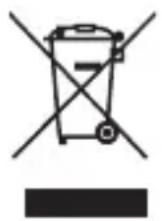
Some of the product materials can be re-used if you take them to a recycling point. By reusing some parts or raw materials from used products you make an important contribution to the protection of the environment.
Please contact your local authorities in case you need more information on the collection points in your area.
EU Declaration of Conformity (DoC)
Hereby, Meizhou Guo Wei Electronics Co. LTD declares that the product is in compliance with RE Directive 2014/53/EU. The full text of the EU declaration of conformity is available on the website: motorolanursery.com
FCC and IC regulations
FCC Caution:
Any Changes or modifications not expressly approved by the party responsible for compliance could void the user's authority to operate the equipment.
This device complies with part 15 of the FCC Rules. Operation is subject to the following two conditions: (1) This device may not cause harmful interference, and (2) this device must accept any interference received, including interference that may cause undesired operation.
IMPORTANT NOTE:
Note: This equipment has been tested and found to comply with the limits for a Class B digital device, pursuant to part 15 of the FCC Rules. These limits are designed to provide reasonable protection against harmful interference in a residential installation. This equipment generates, uses and can radiate radio frequency energy and, if not installed and used in accordance with the instructions, may cause harmful interference to radio communications. However, there is no guarantee that interference will not occur in a particular installation. If this equipment does cause harmful interference to radio or television reception, which can be determined by turning the equipment off and on, the user is encouraged to try to correct the interference by one or more of the following measures:
—Reorient or relocate the receiving antenna.
—Increase the separation between the equipment and receiver.
—Connect the equipment into an outlet on a circuit different from that to which the receiver is connected.
—Consult the dealer or an experienced radio/TV technician for help.
ISED Warning
This device complies with Innovation, Science, and Economic Development Canada licence-exempt RSS standard(s). Operation is subject to the following two conditions:
(1) this device may not cause interference, and
(2) this device must accept any interference, including interference that may cause undesired operation of the device.
Radiation Exposure Statement:
The baby unit complies with FCC/ISED radiation exposure limits set forth for an uncontrolled environment. The baby unit should be installed and operated with minimum distance 20cm between the radiator& your body.
The parent unit has been tested and comply with FCC and ISED SAR limits.
8. Technical Specifications
Baby unit
| Frequency | 1881.792 - 1897.344 MHz for EU1921.536 - 1928.448 MHz for USA & Canada |
| Channels | 10 for EU5 for USA & Canada |
| Operating temperature | 10°C - 40°C |
| Power supply adapter Rating | Input 100 - 240VAC, 50/60Hz, 200mAOutput 6VDC, 400mA |
Parent unit
| Frequency | 1881.792 - 1897.344 MHz for EU1921.536 - 1928.448 MHz for USA & Canada |
| Channels | 10 for EU5 for USA & Canada |
| Operating temperature | 10°C - 40°C |
| Power supply adapter Rating | Input 100 - 240VAC, 50/60Hz, 200mAOutput 6VDC, 400mA |
Specifications are subject to change without prior notice.
Manufactured, distributed or sold by Meizhou Guo Wei Electronics Co. LTD., official licensee for this product. MOTOROLA and the Stylized M Logo are trademarks or registered trademarks of Motorola Trademark Holdings, LLC. and are used under license. All other trademarks are the property of their respective owners. © 2021 Motorola Mobility LLC.
All rights reserved.
Version 4 (EN-EU&US)

- Welcome...
- to your new Motorola Baby monitor!
- motorolanursery.com
- Got everything?
- Overview of the Parent Unit
- Overview of the Baby Unit
- Important guidelines for installing your digital baby monitor
- Table of contents
- Safety Instructions
- WARNING:
- BABY MONITOR SET UP & USE:
- WARNING
- CAUTION
- Getting Started
- Baby unit power supply
- NOTE
- Parent unit battery installation
- Parent unit power supply
- Using Your Digital Audio Baby Monitor
- Power on or off the Baby Unit
- Power on or off the Parent Unit
- Speaker volume
- Select display language for the parent unit
- Turn sound alert on or off
- Reset settings to default
- Two-way talk
- Disposal of the Device (environment)
- Cleaning
- Cleaning and care
- IMPORTANT
- Troubleshooting
- The parent unit beeps
- Cannot hear sound or baby cry from the parent unit
- The Digital Audio Baby Monitor system produces a high-pitched noise
- Battery pack in the parent unit is running low quickly
- General Information
- What will MZGW do?
- What Other Limitations Are There?
- Exclusions
- How to Obtain Warranty Service or Other Information?
- Disposal of the Device (environment)
- EU Declaration of Conformity (DoC)
- FCC and IC regulations
- ISED Warning
- Radiation Exposure Statement:
- Technical Specifications
Brand : MOTOROLA
Model : MBP24
Category : Baby monitor